
Python library for developers of Duniter clients


Project description
Duniter Python API
Python implementation for Duniter BMA API
This is the most complete Python library to communicate with Duniter nodes endpoints.
This library is used by two clients:
Features
- Support Duniter's Basic Merkle API and protocol
- Asynchronous/synchronous without threads
- Support HTTP, HTTPS and Web Socket transport for the BMA API
- Support Elasticsearch Duniter4j API
- Duniter signing key
- Sign/verify and encrypt/decrypt messages with the Duniter credentials
Requirements
- Python >= 3.6.8
- aiohttp >= 3.6.1
- libnacl
- base58
- attr
Installation
You can install DuniterPy and its dependencies with the following command:
pip3 install duniterpy --user
Install the development environment
- Install Poetry:
curl -sSL https://raw.githubusercontent.com/sdispater/poetry/master/get-poetry.py | python - --preview
Documentation
Online official automaticaly generated documentation: https://clients.duniter.io/python/duniterpy/index.html
The examples folder contains scripts to help you!
Please take a look at the document HTTP API to learn more about the BMA API.
How to generate and read locally the autodoc:
- Install Sphinx
poetry install -E sphinx
- Generate documentation
poetry run make docs
- The HTML documentation is generated in
docs/_build/htmlfolder.
Development
- When writing docstrings, use the reStructuredText format recommended by https://www.python.org/dev/peps/pep-0287/#docstring-significant-features
- Use make commands to check the code and the format.
Black, the formatting tool, requires Python 3.6 or higher.
- Install runtime dependencies
poetry install --no-dev
- Have a look at the examples folder
- Run examples from parent folder
poetry run python examples/request_data.py
-
Before submitting a merge requests, please check the static typing and tests.
-
Install dev dependencies
poetry install
- Check static typing with mypy
make check
- Run all unit tests (builtin
unittestmodule) with:
make tests
- Run only some unit tests by passing a special ENV variable:
make tests TESTS_FILTER=tests.documents.test_block.TestBlock.test_fromraw
Packaging and deploy
PyPi
Change and commit and tag the new version number (semantic version number)
./release.sh 0.42.3
Build the PyPi package in the dist folder
make build
Deploy the package to PyPi test repository (prefix the command with a space in order for the shell not to save in its history system the command containing the password)
[SPACE]make deploy_test PYPI_TEST_LOGIN=xxxx PYPI_TEST_PASSWORD=xxxx
Install the package from PyPi test repository
pip install --index-url https://test.pypi.org/simple/ --extra-index-url https://pypi.python.org/simple/ duniterpy
Deploy the package on the PyPi repository (prefix the command with a space in order for the shell not to save in its history system the command containing the password)
[SPACE]make deploy PYPI_LOGIN=xxxx PYPI_PASSWORD=xxxx
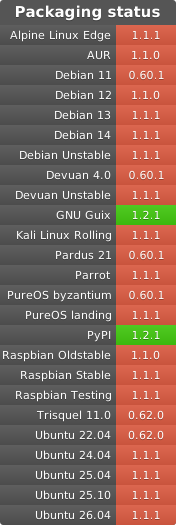
Packaging status
Release history Release notifications | RSS feed


Download files
Download the file for your platform. If you're not sure which to choose, learn more about installing packages.
Source Distribution
Built Distribution
Filter files by name, interpreter, ABI, and platform.
If you're not sure about the file name format, learn more about wheel file names.
Copy a direct link to the current filters
File details
Details for the file duniterpy-0.60.0.tar.gz.
File metadata
- Download URL: duniterpy-0.60.0.tar.gz
- Upload date:
- Size: 57.8 kB
- Tags: Source
- Uploaded using Trusted Publishing? No
- Uploaded via: poetry/1.0.10 CPython/3.6.12 Linux/4.9.58-xxxx-std-ipv6-64
File hashes
| Algorithm | Hash digest | |
|---|---|---|
| SHA256 |
624059b1a659b7130d7b205f719f7f32a63ff3c9e89bb7baa0e82e5ca7375636
|
|
| MD5 |
2af2994091ae08aef0c9ac1c14f0dbef
|
|
| BLAKE2b-256 |
7887ea2ed6f84df1a931e253a8aba316fbf49b9851c96c2ad2b2a8f6598f539f
|
File details
Details for the file duniterpy-0.60.0-py3-none-any.whl.
File metadata
- Download URL: duniterpy-0.60.0-py3-none-any.whl
- Upload date:
- Size: 89.6 kB
- Tags: Python 3
- Uploaded using Trusted Publishing? No
- Uploaded via: poetry/1.0.10 CPython/3.6.12 Linux/4.9.58-xxxx-std-ipv6-64
File hashes
| Algorithm | Hash digest | |
|---|---|---|
| SHA256 |
87f5030e5c0b63c1a336225fffcf2edb51460da36079c90edd4134194704ca13
|
|
| MD5 |
37f0d921f56d2b0c8254a783e82de491
|
|
| BLAKE2b-256 |
86de474c5e3d5de040dc37350bbac4e1265885d0cc9c08c227b61e7687c72054
|






