
`dworshak-secret` is a light-weight library for local credential access. By adding `dworshak-secret` as a dependency to your Python project, you enable your program or script to leverage secure credentials.
Verified details
These details have been verified by PyPIProject links
GitHub Statistics
Maintainers

Project description
dworshak-secret is a light-weight library for local credential access. By adding dworshak-secret as a dependency to your Python project, you enable your program or script to leverage secure credentials, typically added with the dworshak-prompt.Obtain().secret() function or managed directly with the dworshak CLI.
All secrets are stored Fernet-encrypted in a SQL database file. No opaque blobs — every entry is meaningful and decryptable via the library.
Example
Typical package inclusion. See below for guidance concerning Termux and iSH Alpine.
uv add "dworshak-secret[crypto]"
from dworshak_secret import DworshakSecret
from dworshak_prompt import Obtain

# Initialize the vault (create key and DB if missing)
client = DworshakSecret()
client.initialize_vault()

# Store and retrieve credentials by prompting the user on their local machine
obtain = Obtain()
username = obtain.secret("rjn_api", "username")
secret = obtain.secret("rjn_api", "password")

# ---

# Alternatively, store secrets with a script ....
## (NOT recommended to keep 'set' calls in your codebase or in system history)
client.set("rjn_api", "username", "davey.davidson")
client.set("rjn_api", "password", "s3cr3t")

## ...and then retrieve credentials in your codebase.
username = client.get("rjn_api", "username")
password = client.get("rjn_api", "password")

# ---

# List stored items
for service, item in client.list_contents():
    print(f"{service}/{item}")
Capture stdout environment variables for bash scripting by using the --emit flag
TESTSET=$(dworshak-secret set "myservice" "myitem" "myvalue" --emit)
echo $TESTSET

TESTGET=$(dworshak-secret get "myservice" "myitem" --emit)
echo $TESTGET
Running dworshak-secret set "myservice" "myitem", without including a value, will prompt the user for input, which will be hidden.
Alternatively, install the dworshak CLI and use:
TESTOBTAIN=$(dworshak prompt obtain secret "myservice" "myitem" --emit)
echo $TESTOBTAIN
This works because the multiplexer will skip the console input and route the user to the web interface or the GUI.
Include Cryptography Library
Here we cover using dworshak-secret as a dependency in your project.
The central question is how to properly include the cryptography package.
On a Termux system, cryptography can (B) be built from source or (A) the precompiled python-cryptography dedicated Termux package can be used.
Termux Installation
A. Use python-cryptography
This is faster but pollutes your local venv with other system site packages.
pkg install python-cryptography
uv venv --system-site-packages
uv add dworshak-secret
B. Allow cryptography to build from source (uv is better at this compared to using pip)
pkg install rust binutils
uv add "dworshak-secret[crypto]"
iSH Alpine installation
apk add py3-cryptography
uv venv --system-site-packages
uv add dworshak-secret
Why Dworshak Over keyring?
Keyring is the go-to for desktop Python apps thanks to native OS backends, but it breaks on Termux because there's no keyring daemon or secure fallback, leaving you with insecure plaintext or install headaches.
Dworshak avoids that entirely with a portable, self-contained Fernet-encrypted SQLite vault that works the same on Linux, macOS, Windows, and Termux on Android tablets.
You get reliable programmatic access via dworshak_secret.DworshakSecret().get() (or dworshak_prompt.Obtain().secret()).
The Dworshak ecosystem is field-ready for real scripting workflows like API pipelines and skip-the-playstore localhost webapps.
When keyring isn't viable, Dworshak just works.
CLI
dworshak is the intended CLI layer, but the dworshak-secret CLI can also be used directly.
pipx install "dworshak-secret[typer,crypto]"
dworshak-secret helptree
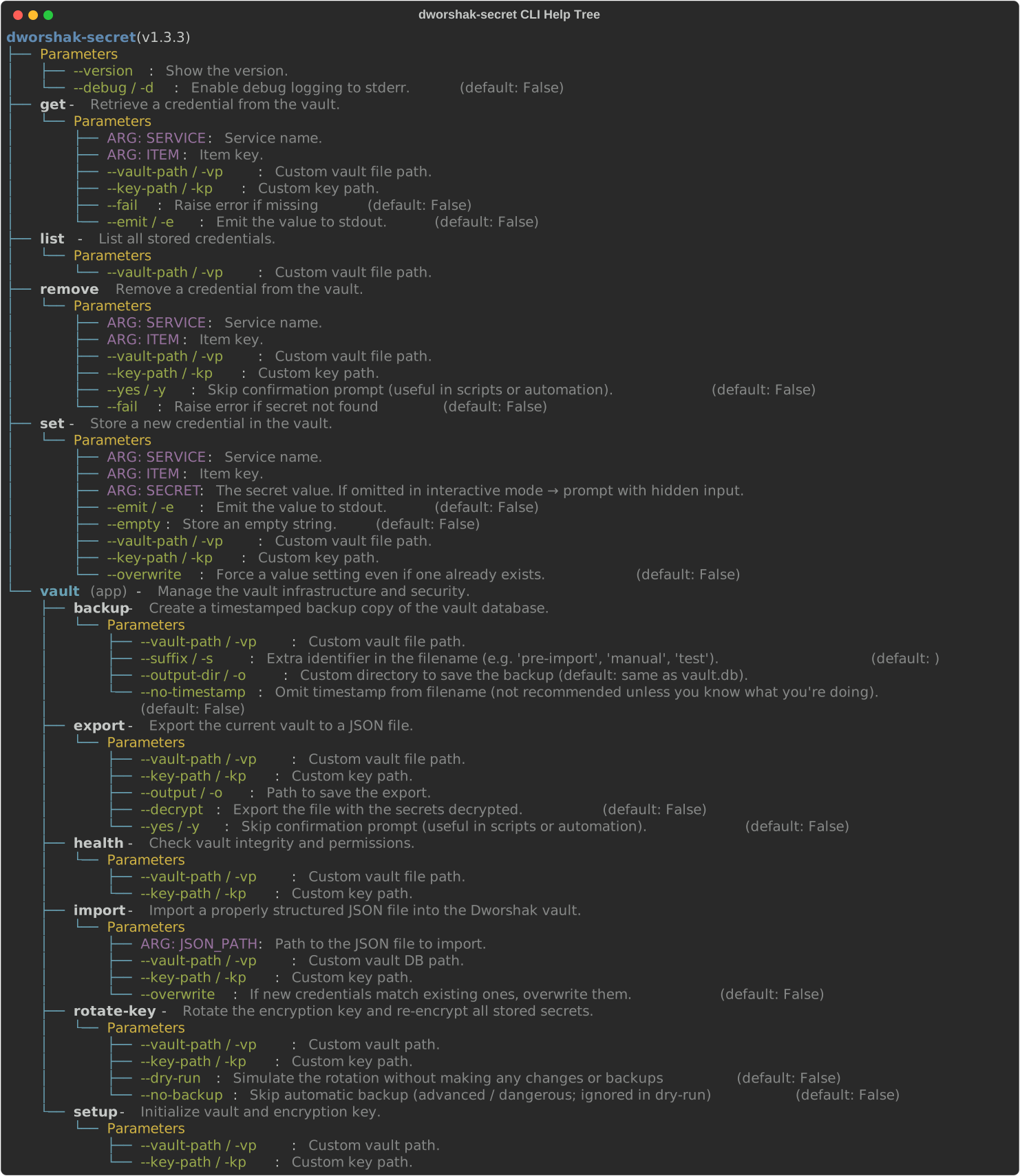
helptree is utility function for Typer CLIs, imported from the typer-helptree library.
- GitHub: https://github.com/City-of-Memphis-Wastewater/typer-helptree
- PyPI: https://pypi.org/project/typer-helptree/
Sister Projects in the Dworshak Ecosystem
- CLI/Orchestrator: dworshak
- Interactive UI: dworshak-prompt
- Secrets Storage: dworshak-secret
- Plaintext Pathed Configs: dworshak-config
- Classic .env Injection: dworshak-env
pipx install dworshak
pip install dworshak-secret
pip install dworshak-config
pip install dworshak-env
pip install dworshak-prompt
Project details
Verified details
These details have been verified by PyPIProject links
GitHub Statistics
Maintainers
Release history Release notifications | RSS feed


Download files
Download the file for your platform. If you're not sure which to choose, learn more about installing packages.
Source Distribution
Built Distribution
Filter files by name, interpreter, ABI, and platform.
If you're not sure about the file name format, learn more about wheel file names.
Copy a direct link to the current filters
File details
Details for the file dworshak_secret-1.3.3.tar.gz.
File metadata
- Download URL: dworshak_secret-1.3.3.tar.gz
- Upload date:
- Size: 24.4 kB
- Tags: Source
- Uploaded using Trusted Publishing? Yes
- Uploaded via: twine/6.1.0 CPython/3.13.12
File hashes
| Algorithm | Hash digest | |
|---|---|---|
| SHA256 |
1588d61a0eba28842991476cb86e409ef4ac79577fdc7d0e6ccf48b12bcc8231
|
|
| MD5 |
799129972c0518b1a8479c2b5eb3b988
|
|
| BLAKE2b-256 |
5e0ba6790ca0fc407a3436cd4534a2878245e5b8207973462062f0863c3fd95e
|
Provenance
The following attestation bundles were made for dworshak_secret-1.3.3.tar.gz:
Publisher:
publish.yml on City-of-Memphis-Wastewater/dworshak-secret
-
Statement:
-
Statement type:
https://in-toto.io/Statement/v1 -
Predicate type:
https://docs.pypi.org/attestations/publish/v1 -
Subject name:
dworshak_secret-1.3.3.tar.gz -
Subject digest:
1588d61a0eba28842991476cb86e409ef4ac79577fdc7d0e6ccf48b12bcc8231 - Sigstore transparency entry: 1700051748
- Sigstore integration time:
-
Permalink:
City-of-Memphis-Wastewater/dworshak-secret@bd181e314fb7373c01369c0f22a3a824ffb9ca75 -
Branch / Tag:
refs/tags/v1.3.3 - Owner: https://github.com/City-of-Memphis-Wastewater
-
Access:
public
-
Token Issuer:
https://token.actions.githubusercontent.com -
Runner Environment:
github-hosted -
Publication workflow:
publish.yml@bd181e314fb7373c01369c0f22a3a824ffb9ca75 -
Trigger Event:
release
-
Statement type:
File details
Details for the file dworshak_secret-1.3.3-py3-none-any.whl.
File metadata
- Download URL: dworshak_secret-1.3.3-py3-none-any.whl
- Upload date:
- Size: 26.3 kB
- Tags: Python 3
- Uploaded using Trusted Publishing? Yes
- Uploaded via: twine/6.1.0 CPython/3.13.12
File hashes
| Algorithm | Hash digest | |
|---|---|---|
| SHA256 |
9b8e0d36bd962a662c9c688285318b8a843405ed19740f5569c4905695e5af15
|
|
| MD5 |
74b7b58b830cd0c2483487e1932352d6
|
|
| BLAKE2b-256 |
3fa609312fede4885f16f02e8465ba76748c352d83fcbee8ac88536adf3e986c
|
Provenance
The following attestation bundles were made for dworshak_secret-1.3.3-py3-none-any.whl:
Publisher:
publish.yml on City-of-Memphis-Wastewater/dworshak-secret
-
Statement:
-
Statement type:
https://in-toto.io/Statement/v1 -
Predicate type:
https://docs.pypi.org/attestations/publish/v1 -
Subject name:
dworshak_secret-1.3.3-py3-none-any.whl -
Subject digest:
9b8e0d36bd962a662c9c688285318b8a843405ed19740f5569c4905695e5af15 - Sigstore transparency entry: 1700052267
- Sigstore integration time:
-
Permalink:
City-of-Memphis-Wastewater/dworshak-secret@bd181e314fb7373c01369c0f22a3a824ffb9ca75 -
Branch / Tag:
refs/tags/v1.3.3 - Owner: https://github.com/City-of-Memphis-Wastewater
-
Access:
public
-
Token Issuer:
https://token.actions.githubusercontent.com -
Runner Environment:
github-hosted -
Publication workflow:
publish.yml@bd181e314fb7373c01369c0f22a3a824ffb9ca75 -
Trigger Event:
release
-
Statement type:






