
Dynamic DES





Real-time SimPy control plane for event-driven digital twins.
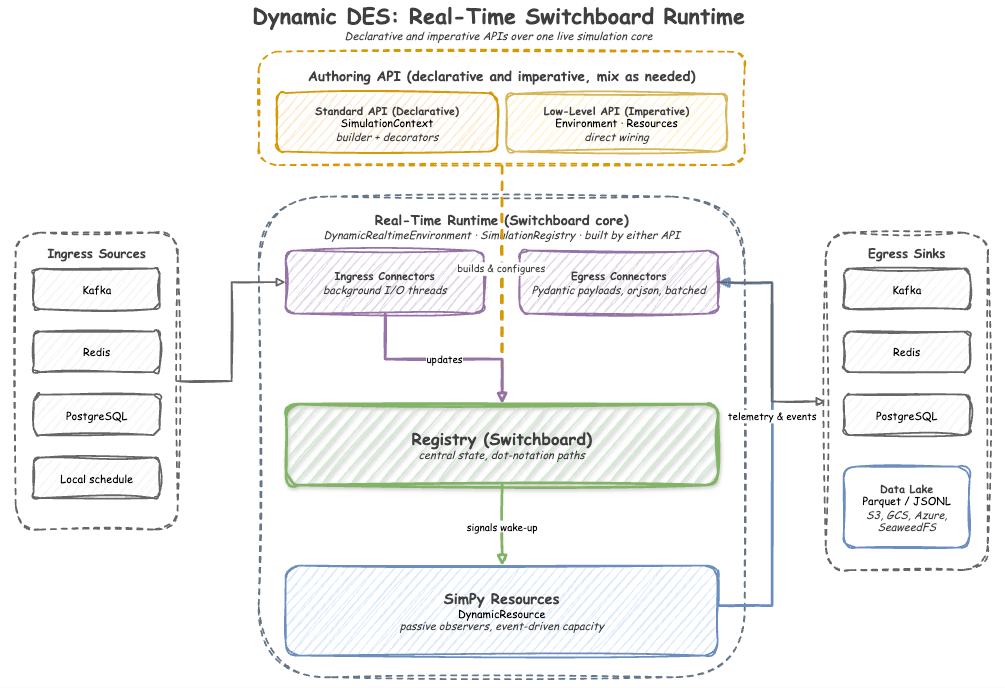
Dynamic DES bridges the gap between static discrete-event simulations and the live world. It allows you to update simulation parameters (arrivals, service times, capacities) and stream telemetry via Kafka, Redis, or PostgreSQL without stopping the simulation. Beyond live streaming, it transforms static models into synchronized forecasting engines, enabling rapid historical data generation and future state prediction. Export compressed, chunked datasets (Parquet, JSONL) directly to local storage, AWS S3, Google Cloud Storage, Azure Blob, or SeaweedFS using PyArrow VFS, complete with strict schema drift prevention.
Key Features
- ⚡ Real-Time Control: Synchronize SimPy with the system clock using
DynamicRealtimeEnvironment. - 🔗 Dynamic Registry: Dynamic, path-based updates (e.g.,
Line_A.arrival.rate) that trigger instant logic changes. - 🚀 High Throughput: Optimized to handle high throughput using
orjsonand local batching. - 🛡️ Enterprise Ready: Native
**kwargspassthrough for SASL, mTLS, OAuth, and AWS IAM Kafka clusters. - 📦 Pluggable Serialization: Stream lightweight JSON by default, or map specific ML topics to lazy-loaded Avro/Schema Registry serializers (Confluent & AWS Glue).
- 🗄️ Data Lake Ingestion: Native PyArrow VFS integration for fast chunked writing (Parquet/JSONL) directly to object storage, with built-in schema inference and drift enforcement.
- 🦆 Pydantic Duck-Typing: Seamlessly publish strictly-typed Pydantic V2 models straight from your simulation logic.
- 🌍 Domain Agnostic: Perfect for factory floors, crypto trading bots, or RPG game state management.
Installation
Install the core library:
pip install dynamic-des
To include specific backends and enterprise features:
# For Kafka support
pip install "dynamic-des[kafka]"

# For Confluent Schema Registry (Avro)
pip install "dynamic-des[kafka,confluent]"

# For AWS Glue Schema Registry (Avro)
pip install "dynamic-des[kafka,glue]"

# For Data Lake Storage (Parquet & PyArrow VFS)
pip install "dynamic-des[parquet]"

# For all backends (Kafka, Redis, Postgres, Avro, Parquet)
pip install "dynamic-des[all]"
Quick Start: Running an Example
Dynamic DES ships runnable examples in the examples/ folder of this repository. Download the ones you want, then run them.
curl -O https://raw.githubusercontent.com/jaehyeon-kim/dynamic-des/main/examples/declarative/local_example.py
curl -O https://raw.githubusercontent.com/jaehyeon-kim/dynamic-des/main/examples/declarative/kafka_example.py
curl -O https://raw.githubusercontent.com/jaehyeon-kim/dynamic-des/main/examples/kafka_dashboard.py
curl -O https://raw.githubusercontent.com/jaehyeon-kim/dynamic-des/main/examples/declarative/backfill_live_example.py
With uv
# 1. Install odctl, which runs the containers
uv tool install "odctl>=0.5.1"

# 2. Local, dependency-free simulation
uv run --no-project --with dynamic-des local_example.py

# 3. Start the Kafka broker and schema registry (requires Docker)
odctl up kafka-lite

# 4. Run the real-time digital twin (Ctrl + C to stop)
uv run --no-project --with "dynamic-des[kafka]" kafka_example.py

# 5. In a second terminal, watch and steer the run from the dashboard. It serves
#    http://localhost:8080 rather than opening a browser. Ctrl + C to stop.
uv run --no-project --with "dynamic-des[kafka]" --with nicegui kafka_dashboard.py

# 6. Backfill ten minutes of history to Parquet, generated instantly rather than
#    waited for, then tail live to Kafka for sixty seconds
uv run --no-project --with "dynamic-des[kafka,parquet]" backfill_live_example.py

# 7. Clean up the infrastructure when finished
odctl down kafka-lite --volumes
With pip
# 1. Install the package with both extras, odctl for the containers and
#    nicegui for the dashboard
pip install "dynamic-des[kafka,parquet]" "odctl>=0.5.1" nicegui

# 2. Local, dependency-free simulation
python local_example.py

# 3. Start the Kafka broker and schema registry (requires Docker)
odctl up kafka-lite

# 4. Run the real-time digital twin (Ctrl + C to stop)
python kafka_example.py

# 5. In a second terminal, watch and steer the run from the dashboard. It serves
#    http://localhost:8080 rather than opening a browser. Ctrl + C to stop.
python kafka_dashboard.py

# 6. Backfill ten minutes of history to Parquet, generated instantly rather than
#    waited for, then tail live to Kafka for sixty seconds
python backfill_live_example.py

# 7. Clean up the infrastructure when finished
odctl down kafka-lite --volumes
Examples that need a broker, a database or an object store get their container from odctl. Start the profile an example needs before you run it, and stop it with odctl down <profile> --volumes when you are finished. Kafka and Redis are the two whose odctl profile names differ, because odctl ships a one-broker Kafka as kafka-lite and uses Valkey rather than Redis.
| Profile | Start | Needed by |
|---|---|---|
| kafka-lite | odctl up kafka-lite |
declarative/kafka_example.py, imperative/kafka_example.py, declarative/backfill_live_example.py, kafka_dashboard.py |
| postgres | odctl up postgres |
declarative/postgres_example.py, imperative/postgres_example.py |
| valkey | odctl up valkey |
declarative/redis_example.py, imperative/redis_example.py |
| storage | odctl up storage |
declarative/history_example.py with USE_S3=true |
Paths in that table are relative to the examples/ folder. declarative/local_example.py needs no container, and declarative/history_example.py needs one only when USE_S3=true.
Guide: Backfill then live.
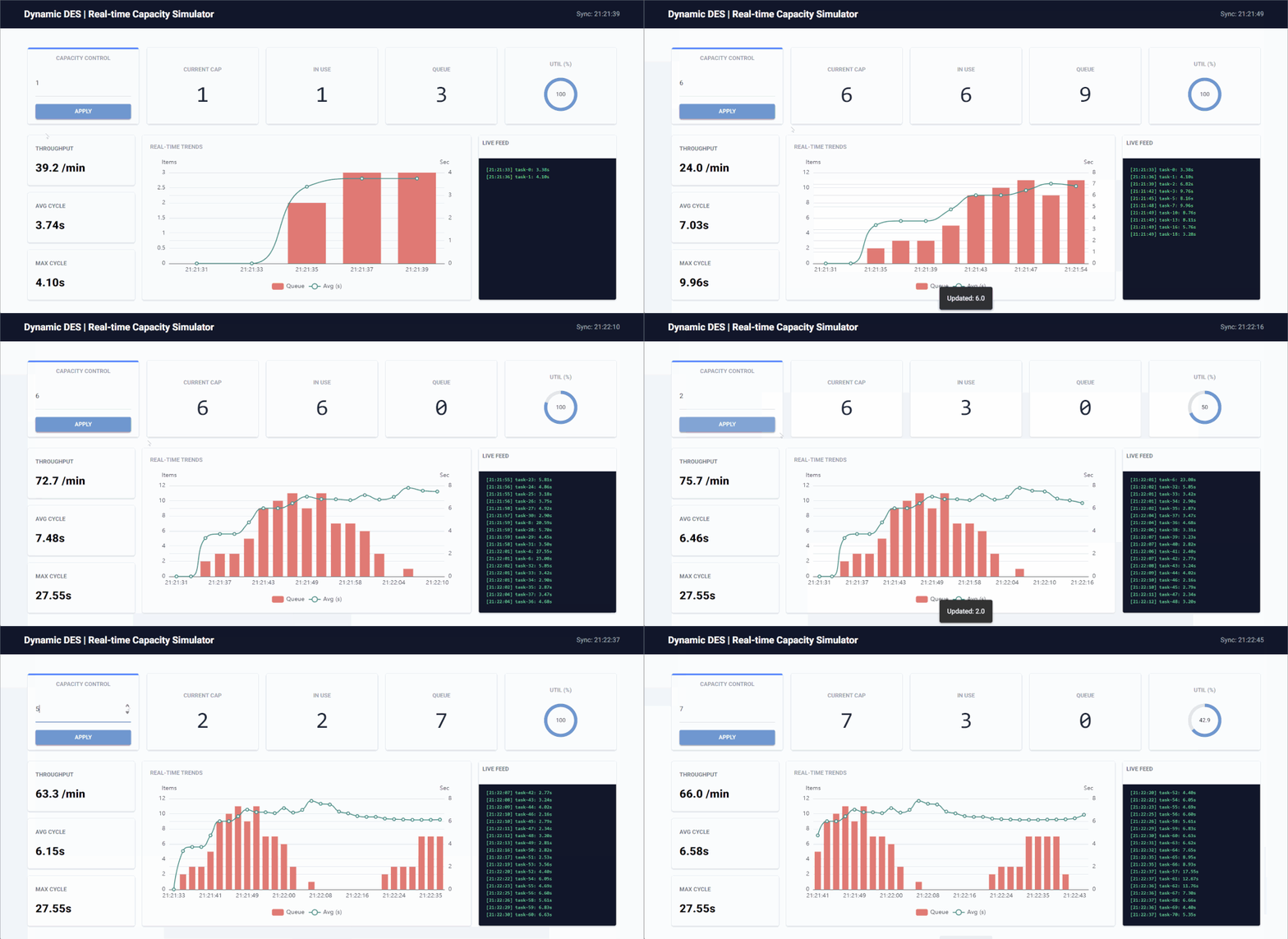
The control dashboard lets you update simulation parameters live and watch the telemetry react without restarting the run:
Building Your Own Simulation (Local Example)
The following snippet demonstrates a simple example using the declarative Standard API (SimulationContext). It initializes a production line, schedules dynamic capacity updates, and streams telemetry to the console.
import logging
from dynamic_des import SimulationContext, ConsoleEgress, LocalIngress

logging.basicConfig(
    level=logging.INFO, format="%(levelname)s [%(asctime)s] %(message)s"
)

# 1. Initialize SimulationContext (Builder Pattern)
# Schedule capacity to jump to 3 at t=10s, then drop to 2 at t=20s
app = (
    SimulationContext(sim_id="Line_A", factor=1.0, random_seed=42)
    .add_resource("lathe", current_cap=1, max_cap=5)
    .add_arrival("standard", dist="exponential", rate=1.0)
    .add_service("milling", dist="normal", mean=3.0, std=0.5)
    .add_ingress(LocalIngress(
        schedule=[
            (10.0, "Line_A.resources.lathe.current_cap", 3),
            (20.0, "Line_A.resources.lathe.current_cap", 2),
        ]
    ))
    .add_egress(ConsoleEgress())
)

# 2. Define Simulation Processes using Decorators
@app.arrival_loop("standard")
def arrival_process(context: SimulationContext):
    task_id = 0
    while True:
        yield context.wait_for_arrival("standard")
        context.spawn(work_task(task_id))
        task_id += 1

@app.task(service_id="milling", resource_id="lathe")
def work_task(task_id: int):
    # Returns custom metadata payload to be included in the finished event
    return {"part_id": task_id}

@app.telemetry_loop(interval=2.0)
def telemetry_monitor(context: SimulationContext):
    # Retrieve active resource handles to query state
    res = context.get_resource("lathe")
    context.env.publish_telemetry("Line_A.lathe.capacity", res.capacity)
    context.env.publish_telemetry("Line_A.lathe.in_use", res.in_use)
    context.env.publish_telemetry("Line_A.lathe.queue_length", len(res.queue.items))

# 3. Run the Simulation
print("Simulation started. Watch capacity change at t=10s and t=20s...")
app.run(until=25.0)
What this does
- Declarative Builder:
SimulationContextchains the setup, defining parameters, connectors, and configuration in one clean block. - Live Ingress: The
LocalIngressschedules registry mutations independently from the simulation logic. - Automatic Task Lifecycle: The
@app.taskdecorator automatically handles queued/started/finished telemetry emissions, resource locking, and random duration sampling. - Telemetry Egress: The
@app.telemetry_loopcaptures continuous stats and streams them to the designated egress (ConsoleEgress).
Data Egress JSON Schemas
To ensure strict data contracts with external consumers (like Kafka, Redis, or PostgreSQL), dynamic-des uses Pydantic to validate all outbound payloads. Users can expect two distinct JSON structures depending on the stream type:
Telemetry Stream
Used for scalar metrics like resource utilization, queue lengths, or simulation lag.
{
  "stream_type": "telemetry",
  "path_id": "Line_A.resources.lathe.utilization",
  "value": 85.5,
  "sim_ts": 120.5,
  "timestamp": "2023-10-25T14:30:00.000Z"
}
Event Stream
Used for discrete task lifecycle events (e.g., a part arriving, entering a queue, or finishing processing).
{
  "stream_type": "event",
  "key": "task-001",
  "value": {
    "status": "finished",
    "duration": 45.2,
    "path_id": "Line_A.service.lathe"
  },
  "sim_ts": 125.0,
  "timestamp": "2023-10-25T14:30:04.500Z"
}
More Examples
For more examples, including implementations using Kafka providers, please explore the examples folder, which has its own README naming what to install and which odctl profile each one needs.
Core Concepts
Dynamic DES is built on the Switchboard Pattern, decoupling data sourcing from simulation logic.
Switchboard Pattern
Instead of resources polling Kafka directly, the architecture is split into three layers:
- Connectors (Ingress/Egress): Background threads handle heavy I/O (Kafka, Redis).
- Registry (Switchboard): A centralized state manager that flattens data into dot-notation paths.
- Resources (SimPy Objects): Passive observers that "wake up" only when the Registry signals a change.
Event-Driven Capacity
Standard SimPy resources have static capacities. DynamicResource wraps a Container and a PriorityStore. When the Registry updates:
- Growing: Extra tokens are added to the pool immediately.
- Shrinking: The resource requests tokens back. If they are busy, it waits until they are released, ensuring no work-in-progress is lost.
High-Throughput Events
To handle high throughput, the EgressMixIn uses:
- Batching: Pushing lists of events to the I/O thread to reduce lock contention.
- orjson: Rust-powered serialization for maximum speed.
Documentation
For full documentation, architecture details, and API reference, visit: https://jaehyeon.me/dynamic-des/.
License
MIT
1 maintainer

Release files for dynamic-des 0.13.0
For a detailed explanation of source distributions (sdists) and built distributions (wheels), please see the package formats documentation.
Source distribution (sdist)
| File | Size | Uploaded | |
|---|---|---|---|
| dynamic_des-0.13.0.tar.gz | 46.7 kB | Details |
Built distribution (wheel)
| File | Interpreter | ABI | Platform | Reset |
|---|---|---|---|---|
| dynamic_des-0.13.0-py3-none-any.whl | Python 3 | none | any | Details |
Total release size: 108.7 kB
Release files / dynamic_des-0.13.0.tar.gz
| Download URL | dynamic_des-0.13.0.tar.gz |
|---|---|
| Size | 46.7 kB |
| Tags | Source |
|
SHA-256 checksum How to use checksums |
0a7529b103dcad48ca54edfc4f8dbd2119bdc9268ab6381beadccbff52a97132
|
|
BLAKE2b-256 checksum How to use checksums |
974e103bc63ad4573562733cf9ac26a9ec1931d40767d92b42980d14a6cc3b6c
|
| Upload date | |
|
Uploaded using Trusted Publishing? What is trusted publishing? |
Yes |
| Uploaded via |
twine/7.0.0 CPython/3.13.14
|
Provenance
Provenance describes where a file came from. On PyPI, provenance is shared via attestations, which provide a verifiable record of the build or publishing details. View details, limitations and caveats.


PyPI Publish Attestation
PyPI verified that this artifact, at this checksum, originated from the publisher listed below.
Signed by GitHub Actions, verified by PyPI on Sep 11, 2026.
Transparency logRelease files / dynamic_des-0.13.0-py3-none-any.whl
| Download URL | dynamic_des-0.13.0-py3-none-any.whl |
|---|---|
| Size | 62.0 kB |
| Tags | Python 3 |
|
SHA-256 checksum How to use checksums |
911edae76e8d9bcc957cb35108b862751ffd0bbe3d500459a9ac0c1be63f331d
|
|
BLAKE2b-256 checksum How to use checksums |
e2e19a68aae5bfe3add1cdd6316e0f1cde68789d555350fac51bd8703df68825
|
| Upload date | |
|
Uploaded using Trusted Publishing? What is trusted publishing? |
Yes |
| Uploaded via |
twine/7.0.0 CPython/3.13.14
|
Provenance
Provenance describes where a file came from. On PyPI, provenance is shared via attestations, which provide a verifiable record of the build or publishing details. View details, limitations and caveats.
PyPI Publish Attestation
PyPI verified that this artifact, at this checksum, originated from the publisher listed below.
Signed by GitHub Actions, verified by PyPI on Sep 11, 2026.
Transparency log













