
Dynamic Systems Testing Framework (DSTF)

Regression and unit testing for time-dependent system behavior. Discovers tests, runs simulations, compares against versioned baselines, and reports — across Modelica (Dymola, OpenModelica), FMU (FMPy), Julia/ModelingToolkit, and arbitrary Python.
Library-agnostic: tests can be discovered from in-model annotations (UnitTests components), declarative test_spec.json, or both. Reference results are partitioned per backend / OS so the same library can be regression-tested across backends without ref drift.
Criteria are written in dstf author, a local browser tool over the same figures the report draws: edit a criterion beside the plot it scores — drag a handle, or Ctrl+click to add a row that settles on the data — give a tolerance a lower and an upper side, put one criterion on many elements of an array, queue tests on simulator workers that stay alive, and watch a running test's trace as Dymola or OpenModelica writes it. A default and a dark theme cover the tool, the dashboard and the report pages.
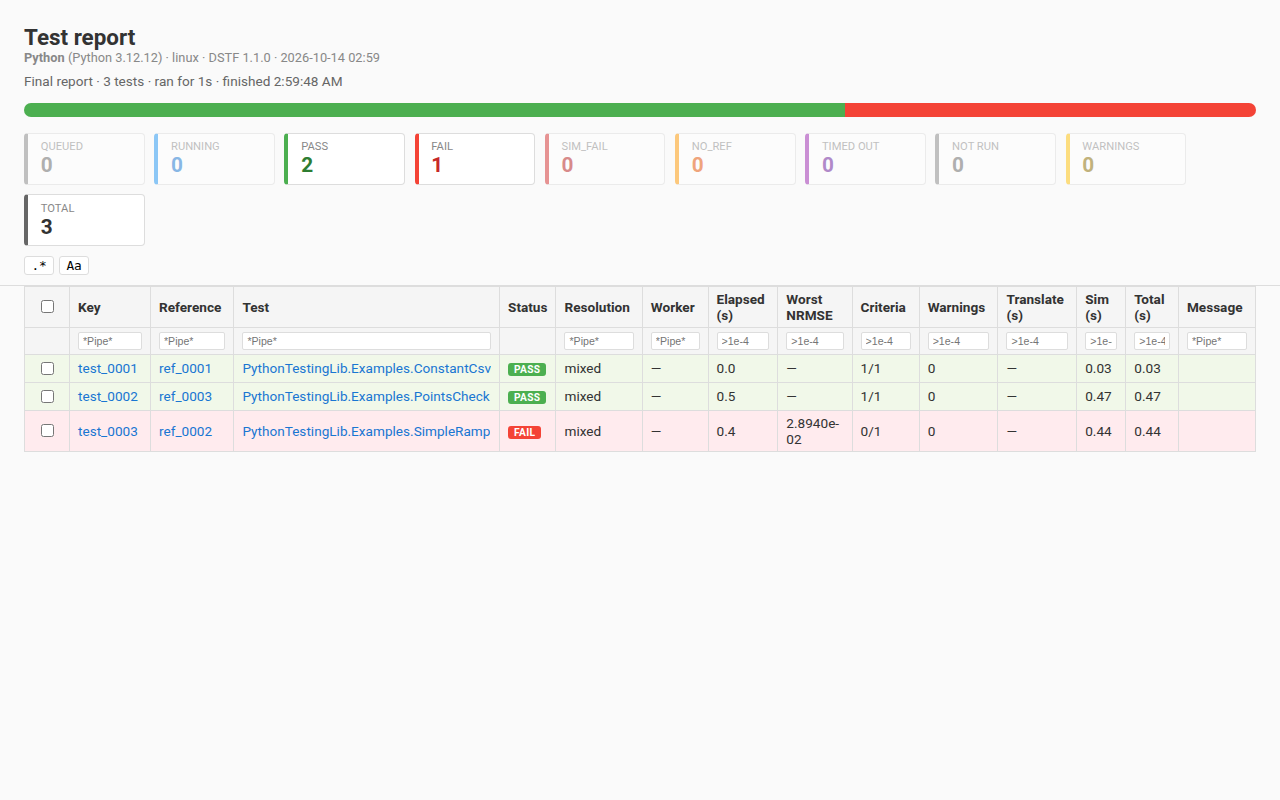
The unified dashboard — live progress during a run, a static report after. Each report is stamped with the backend, tool + MSL version, and OS that produced it; the table gives per-test verdicts, worst-NRMSE, and phase timing.
What's in the box
-
5 backends, each with persistent-worker support where it pays off:
Backend Source kind Persistent Notes Dymola Modelica .mo✓ default Python interface; --batchselects the.mospath. Records translation statistics, so a change in a model's state count is a structural warningOpenModelica Modelica .mo✓ default OMPython ZMQ; --batchselects theomc -spath. Records timing statistics and the model's state count (from the init file omc generates), so a change in it is the structural warning it is on Dymola — against a baseline that records the count, which one accepted before this does at its next accept; system sizes and Jacobian counts are Dymola's aloneFMPy Pre-built FMU per-test thread fmpy.simulate_fmuin-processJulia / MTK .jlModelingToolkit✓ default stdin-JSON pipe; Dyad untested Python Any simulate(stop_time, tol) -> dictsubprocess-per-test scipy, pandas, CSV loader, HTTP — anything -
7 comparison modes, composable via a
MetricTree:Mode What it scores nrmseRMSE over signal range — the default tubePass if signal stays inside a (constant or time-varying) envelope around ref pointsPer-point checks at declared times with time_tolerancex-box and abs/rel y-tolerancerangeScalar min_value/max_valuebounds — baseline-freeevent-timingMatch Modelica solver events against a declared list within per-event tolerance dominant-frequencyFFT peak matching against a declared peaks table — windowable scalarOne number — a reduction of the signal ( max/min/mean/sample_mean/final/integral) or a stored statistic by dotted path — vs a baseline scalar or declared boundsCombinators:
and,or,k-of-n,warn(relax to advisory),weighted. Leaves can scope to a time window and target named baselines (primary, soft-checks, companions). -
Read-only reports — per-test Plotly HTML drawn from figures Python built: the trajectory with its criterion geometry (tube band, range bounds, point boxes, event windows, FFT spectrum), overlay picker, error overlays, and the metric tree with the CLI's verdict and score text per leaf. Plus a live dashboard during runs and JUnit XML for CI. The report shows, the CLI decides.
-
An authoring tool —
dstf author(the[author]extra) serves a Suite page and a Test page on127.0.0.1. Criteria are edited inline under the plot they score, staged, and written totest_spec.jsonon Save:Feature What it does Two-sided tolerance A tolerance is one number or {"lower": a, "upper": b}; on the plot, an arrow outside each side sets itOn-plot editing Drag a ring, an arrow or a bound line; Ctrl+click adds a row that settles on the data; a field's ⌖ arms it for the next click; a placed value is snapped to a readable step Simulation queue Queue the selected tests: first in, first out, on workers that stay alive between runs; Remove a waiting test, Cancel a running one Live results A running test's trace is drawn as Dymola or OpenModelica writes its result file; a cancelled or timed-out run is shown, never scored or accepted Criteria over an array One criterion on the elements 1:5:20of an array; identical criteria fold into one row, edited as oneThemes "theme": "dark"intesting.jsonfor the dashboard, the report pages and the tool; the tool's ⋮ menu switches a browser tab live -
Three baseline roles per test, partitioned on disk: primary (regression anchor, hard-fail), soft_checks (warn-wrapped cross-regression imports), companions (plot-only overlays, including cross-library).
Install
End users:
# Not on PyPI yet — these work from the first published release.
uv tool install dynamic-systems-testing-framework   # then run plain: dstf ...
# or: pipx install dynamic-systems-testing-framework
Developers:
uv sync --extra dev --locked                             # core + pytest, from uv.lock
uv sync --extra dev --extra author --extra fmpy --extra om --locked   # plus the authoring tool, FMPy + OpenModelica extras
uv run dstf --help
uv sync installs the project editable and pins every dependency to uv.lock,
the same lock CI uses; --locked fails instead of silently re-locking when the
lock has drifted from pyproject.toml. It prunes anything you did not ask for
on that command line — being in the lock does not save it — so name every extra
at once.
For the Julia backend, install Julia 1.11+ and instantiate the demo project once:
curl -fsSL https://install.julialang.org | sh -s -- -y --default-channel 1.11
cd examples/julia/JuliaMtkTestingLib && julia --project=. -e 'using Pkg; Pkg.instantiate()'
The Python examples (SimpleRamp, PointsCheck) need scipy, which the dev
extra installs. Reach them through uv run dstf ...: the Python backend takes
the interpreter from testing.json's backends: {"Python": [...]} entry and
falls back to PATH — and the shipped example names python, so either route
ends at the first python on PATH, which uv run points at .venv. Run the
same examples from a tool-installed dstf and that is whatever comes first on
your PATH — a conda env, often — which needs its own scipy.
First 5 minutes
The repo ships demo libraries for every backend. Easiest first run is the Modelica demo:
# From the repo root:
uv run dstf --config examples/modelica/ModelicaTestingLib/Resources/ReferenceResults/testing.json run
What this does:
- Reads
testing.jsonto find the demo library, the backend (Dymola or OpenModelica — first one whose binary exists wins), the reference root, and any per-test recognizers. - Discovers the demo tests via the bundled
UnitTestsrecognizer plus declarative recognizers in the JSON. - Runs each in a persistent simulator worker, partitioning output under
testing_output/by backend + OS. - Compares against
Resources/ReferenceResults/<Backend>/<os>/ref_NNNN.jsonbaselines. - Prints a console report with pass/fail per test.
To see the interactive HTML reporter:
uv run dstf --config examples/modelica/ModelicaTestingLib/Resources/ReferenceResults/testing.json run --report
The dashboard URL is printed as a run starts (Live progress: file://…) and the page is opened in a browser tab; it reloads itself every 5s during the run. --report writes the per-test pages under <work_dir>/reports/ and opens the dashboard again when they are written. --no-browser (on run and compare) opens no tab and still prints the link.
The examples ship baselines for these <Backend>/<os> partitions: Modelica — Dymola/linux, Dymola/windows and OpenModelica/linux (its array model, HeatRodTest, on the two Linux ones); FMU — FMPy/linux and FMPy/windows; Julia — Julia/linux; Python — Python/linux. A first run on an OS a backend has no partition for (OpenModelica, Julia or Python on Windows, say) reports every test NO_REF until run --accept stores its baselines there. A companion in the examples is another source's curve of the SAME model, drawn over the test's plot when its box is ticked on the report page, and each ships in the partitions named here and no other: in OpenModelica/linux, the Modelica FrequencyTest, RangeCheckTest and MultiFrequencyTest carry the Julia example's baseline of that model; in Julia/linux, the Julia Frequency, RangeCheck and MultiFrequency carry the OpenModelica one; and MetricTreeTest carries its closed-form solution in Dymola/linux and OpenModelica/linux. A Dymola run of the example therefore shows no Julia companion, and Dymola/windows ships no companion at all.
To repeat with another backend's demo library, swap the config path:
# Julia/MTK, Python, and prebuilt FMUs through FMPy
uv run dstf --config examples/julia/JuliaMtkTestingLib/Resources/ReferenceResults/testing.json run
uv run dstf --config examples/python/PythonTestingLib/Resources/ReferenceResults/testing.json run
uv run dstf --config examples/fmu/testing.json run    # needs reference-fmus-binaries/
Configuration cheat-sheet
testing.json is the single entry point. The full field reference lives in docs/usage.md; the headline shape:
{
  "source_path": "../../MyLib",
  "backends": {
    "Dymola":       ["C:\\Program Files\\Dymola 2026x\\bin64\\Dymola.exe"],
    "OpenModelica": ["/usr/bin/omc"]
  },
  "test_spec": "test_spec.json",
  "dependencies": ["/path/to/SomeDep"],
  "tolerance": 1e-4,
  "diagnostic_variables": ["CPUtime", "EventCounter"]
}
The first backends entry whose binary exists wins (no need for per-OS config files). backend: "Dymola" (or any named entry) forces a specific one.
Common commands
# Discover tests without running
uv run dstf --config testing.json discover

# Run, compare, accept all current results as new baselines
uv run dstf --config testing.json run --accept

# Interactive review by category
uv run dstf --config testing.json run -i failed

# Filter (glob, comma list, or @file)
uv run dstf --config testing.json run --filter "Foo.A,Foo.B"
uv run dstf --config testing.json run --filter @rerun.txt

# Parallel + interactive HTML report (--batch-size N splits a Dymola --batch run into small batches)
uv run dstf --config testing.json run --parallel 4 --report

# Rerun only previously-failed tests, merge with last full run, regen report
uv run dstf --config testing.json run --rerun failed,sim-failed --merge --report

# Compare without re-simulating (uses last results)
uv run dstf --config testing.json compare

# Open the authoring tool in a browser (needs the [author] extra)
uv run dstf --config testing.json author

# Apply an RFC 6902 JSON-Patch envelope against test_spec.json — single- or
# multi-model form, from any source
uv run dstf --config testing.json spec-update spec_patch.json

# Manage the other baseline roles
uv run dstf --config testing.json companion add <model> <name> <path>
uv run dstf --config testing.json soft-check list <model>
uv run dstf --config testing.json import-baseline <model> <name> <source>   # soft_checks only

# Manifest / schema
uv run dstf --config testing.json manifest dump
uv run dstf --config testing.json manifest cleanup [--orphans] [--apply]   # dry-run by default
uv run dstf --config testing.json export-schema --output schema.json

# Diagnose Dymola Python interface discovery
uv run dstf check-dymola
uv run dstf <command> --help for each subcommand's full flag set.
Where things live
| Doc | What's in it |
|---|---|
docs/usage.md |
The deep user guide — every command, every config field, every comparison mode |
docs/architecture.md |
Six-layer plug-in pipeline + current-state map to code |
docs/extensibility.md |
Plug-in contracts for Source / Discovery / Backend / Dataset / Metric / Combinator |
docs/vision.md |
Where the framework is going (target user base, non-Modelica futures) |
docs/decisions.md |
Authoritative decision log |
docs/ideas.md |
Backlog (unimplemented features, with explicit deferred-by-design entries) |
examples/{modelica,fmu,julia,python}/ |
Working demo libraries — one per backend |
CI integration
- run: |
    uv run dstf --config ./testing.json run --report-format junit --output test-results.xml
- uses: actions/upload-artifact@v4
  with:
    name: test-results
    path: test-results.xml
For HTML reports as build artifacts, also pass --report and upload dashboard.html and the reports/ directory from the work dir (--work-dir sets it).
Status
v1.0. 5 backends in production, 4 demo libraries, and a comprehensive pytest suite (a Playwright subset drives the report pages and the authoring tool in a real browser). The report is read-only and mutates nothing: every number it draws comes from a figure Python built or a string the server rendered. Criteria are authored in dstf author, driven by the same figures and the same scorer as the CLI. Nothing is published to PyPI yet.
1 maintainer

Metadata
1 maintainer
Release files for dynamic-systems-testing-framework 1.0.1
For a detailed explanation of source distributions (sdists) and built distributions (wheels), please see the package formats documentation.
Source distribution (sdist)
| File | Size | Uploaded | |
|---|---|---|---|
| dynamic_systems_testing_framework-1.0.1.tar.gz | 1.3 MB | Details |
Built distribution (wheel)
| File | Interpreter | ABI | Platform | Reset |
|---|---|---|---|---|
| dynamic_systems_testing_framework-1.0.1-py3-none-any.whl | Python 3 | none | any | Details |
Total release size: 2.7 MB
Release files / dynamic_systems_testing_framework-1.0.1.tar.gz
| Download URL | dynamic_systems_testing_framework-1.0.1.tar.gz |
|---|---|
| Size | 1.3 MB |
| Tags | Source |
|
SHA-256 checksum How to use checksums |
a75cff02e3c8be9907613e452c2a9d49907fd4cfedd4d8406d4017253f631994
|
|
BLAKE2b-256 checksum How to use checksums |
47e7832139d03eee303ca92f55df2f9a8d53729de35b3c417a3c4b6182263446
|
| Upload date | |
|
Uploaded using Trusted Publishing? What is trusted publishing? |
Yes |
| Uploaded via |
twine/7.0.0 CPython/3.13.14
|
Provenance
Provenance describes where a file came from. On PyPI, provenance is shared via attestations, which provide a verifiable record of the build or publishing details. View details, limitations and caveats.


PyPI Publish Attestation
PyPI verified that this artifact, at this checksum, originated from the publisher listed below.
Signed by GitHub Actions, verified by PyPI on Oct 13, 2026.
Transparency logRelease files / dynamic_systems_testing_framework-1.0.1-py3-none-any.whl
| Download URL | dynamic_systems_testing_framework-1.0.1-py3-none-any.whl |
|---|---|
| Size | 1.4 MB |
| Tags | Python 3 |
|
SHA-256 checksum How to use checksums |
2d0b64bb0c5b0d1d5a75a0c4d125796ecbc7c76fa7851bb62c6747f3f209f002
|
|
BLAKE2b-256 checksum How to use checksums |
cf68ab975c905fab3f45ccd240019b590a1c8f26ca91de57a6af7fa2b1334e1d
|
| Upload date | |
|
Uploaded using Trusted Publishing? What is trusted publishing? |
Yes |
| Uploaded via |
twine/7.0.0 CPython/3.13.14
|
Provenance
Provenance describes where a file came from. On PyPI, provenance is shared via attestations, which provide a verifiable record of the build or publishing details. View details, limitations and caveats.
PyPI Publish Attestation
PyPI verified that this artifact, at this checksum, originated from the publisher listed below.
Signed by GitHub Actions, verified by PyPI on Oct 13, 2026.
Transparency log













