
Get sosreport dynflow files and generates user friendly html pages for
Verified details
These details have been verified by PyPIProject links
GitHub Statistics
Maintainers

Project description
DynflowParser
What's new
DynflowParser brings significant improvements over the original version including:
- 5-10x faster performance with optimized CSV parsing (pandas) and SQLite operations (WAL mode, compound indexes);
- Built-in HTTP server with network interface detection and SSH tunnel support for easy local and remote access;
- Enhanced UX with full-width responsive layout, improved text readability.
Description
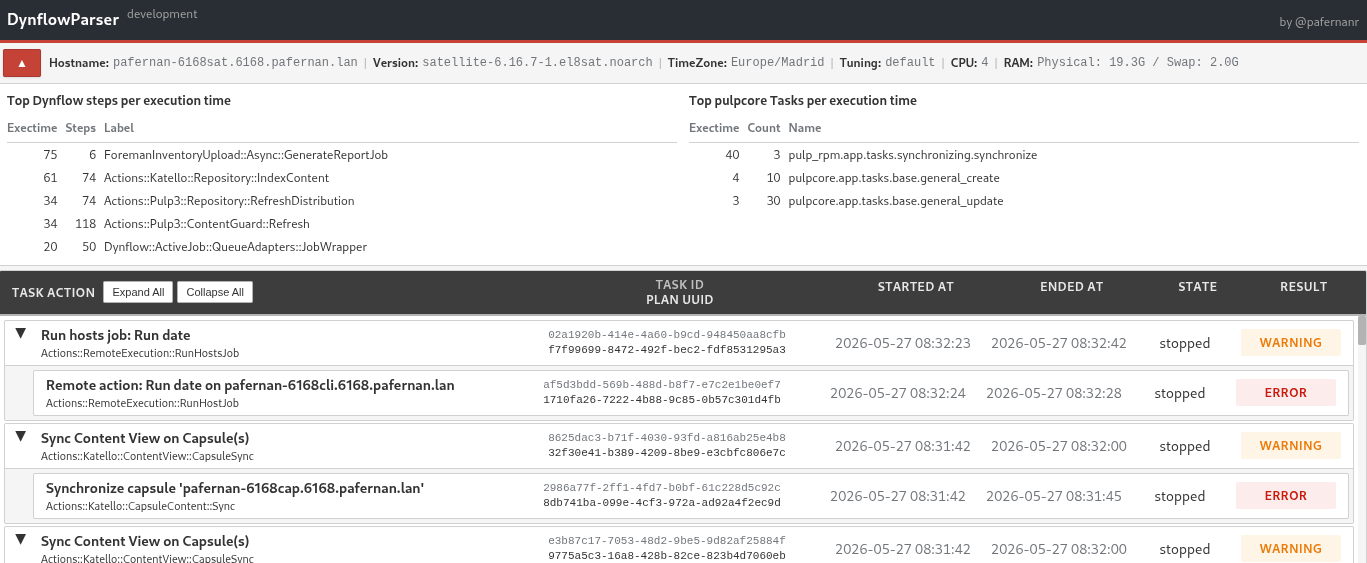
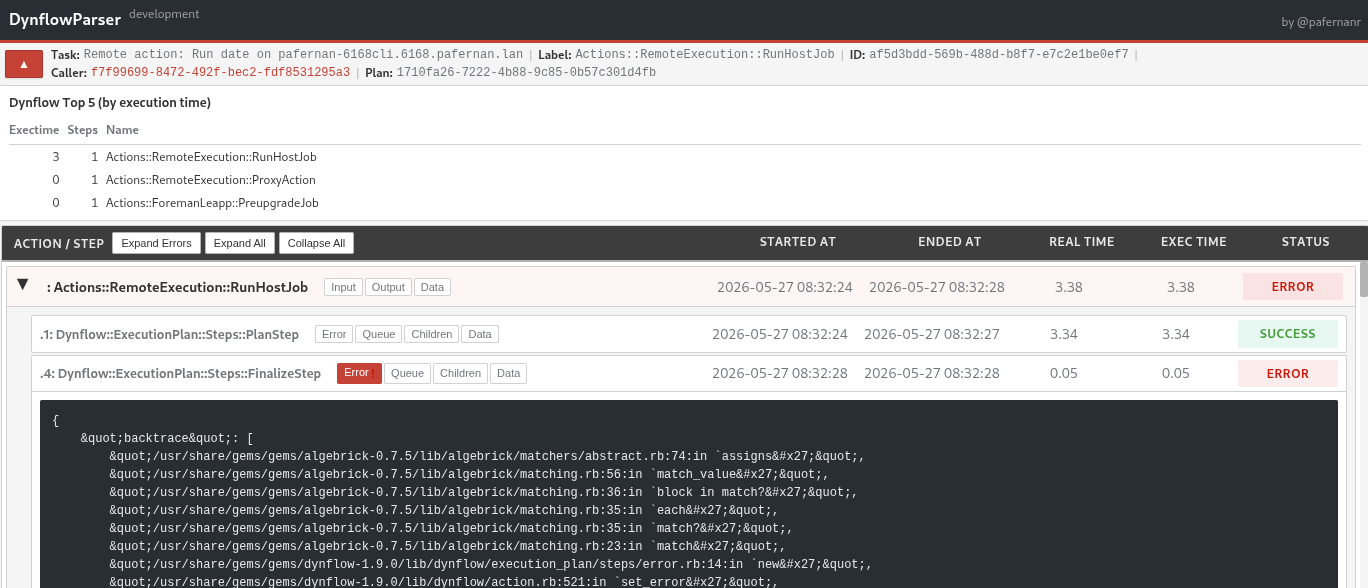
DynflowParser reads Dynflow task data from a sosreport and generates user-friendly HTML pages for analyzing Foreman/Satellite task execution. It provides an intuitive interface to browse Tasks, Plans, Actions, and Steps with automatic error highlighting and timezone conversion.
The companion command dynflowparser-export-tasks overcomes sosreport file size limitations by exporting tasks directly from the Foreman database.
| Tasks List | Task Details |
|---|---|
 |
 |
Main Features
- Smart Filtering: Only failed tasks parsed by default (use
-afor all tasks) - Error Navigation: Failed Actions & Steps automatically expanded for quick troubleshooting
- System Context: Header displays Hostname, Timezone, Satellite version, RAM, CPU, and Tuning profile
- Timezone Support: UTC dates automatically converted to sosreport timezone
- Formatting: Indented and readable fields for Actions & Steps
- HTTP Server: Built-in web server with
--httpd-serverand--ssh-tunneloptions for remote web access - Browser Integration: Automatically opens output in default browser
- CLI Friendly: (Work In Progress) Lynx-compatible for terminal-based browsing
Requirements
- Python 3.6+
- Required libraries:
- Jinja2
- pandas
- pytz
Installation
Using pip:
pip install dynflowparser
Using prebuilt packages:
Download from Latest Release
Usage
dynflowparser
dynflowparser [-h] [--version] [-a] [-d {D,I,W,E}] [-f DATE_FROM] [-t DATE_TO]
              [-l LAST_N_DAYS] [-n] [-q] [-o OUTPUT_PATH]
              [--httpd-server | --ssh-tunnel] [sosreport_path]
Positional arguments:
sosreport_path: Path to sosreport folder (default: current directory)
Optional arguments:
-h, --help: Show help message and exit-v, --version: Show program version and exit-a, --all: Parse all tasks (default: only unsuccessful)-d, --debug {D,I,W,E}: Debug level (default: W)-f, --from DATE_FROM: Parse tasks running from this datetime-t, --to DATE_TO: Parse tasks running up to this datetime-l, --last LAST_N_DAYS: Parse only last N days (overrides--fromand--to)-n, --nosql: Reuse existing SQLite file-q, --quiet: Quiet mode, no progress bar-o, --output_path OUTPUT_PATH: Write output to this path (default:./dynflowparserng/)--httpd-server: Start HTTP server to serve generated pages-s, --ssh-tunnel: Start HTTP server with SSH tunnel instructions (localhost binding)
Examples:
# Show version
dynflowparser --version

# Parse sosreport in current directory
dynflowparser

# Parse all tasks from specific sosreport
dynflowparser -a /path/to/sosreport

# Parse last 7 days with HTTP server
dynflowparser -l 7 --httpd-server /path/to/sosreport

# Parse with SSH tunnel for remote access
dynflowparser --ssh-tunnel /path/to/sosreport
dynflowparser-export-tasks
This command must be executed on the Foreman/Satellite server.
dynflowparser-export-tasks [-h] [-d DAYS] [-f FILTER]
                           [-r {cancelled,error,pending,success,warning}]
                           [-s {paused,planning,pending,running,scheduled,stopped}]
Optional arguments:
-d, --days DAYS: Number of days to export (default: 14)-f, --filter FILTER: Custom filter query (e.g.,label LIKE '%Manifest%')-r, --result: Filter by task result-s, --state: Filter by task state
Examples:
# Export last 14 days (default)
dynflowparser-export-tasks

# Export last 30 days of failed tasks
dynflowparser-export-tasks -d 30 -r error

# Export tasks matching specific label
dynflowparser-export-tasks -f "label LIKE '%Repository%'"
Limitations
- Sosreport requests last 14 days by default
- Sosreport truncates output files at 100MB, potentially missing records
- Supported Dynflow schema versions: 24 (Satellite 6.11), 25 (Satellite 6.19+)
- For larger datasets, use
dynflowparser-export-taskson the Foreman server
Project: https://github.com/pafernanr/dynflowparser
License: GPLv3
Project details
Verified details
These details have been verified by PyPIProject links
GitHub Statistics
Maintainers
Release history Release notifications | RSS feed


Download files
Download the file for your platform. If you're not sure which to choose, learn more about installing packages.
Source Distribution
Built Distribution
Filter files by name, interpreter, ABI, and platform.
If you're not sure about the file name format, learn more about wheel file names.
Copy a direct link to the current filters
File details
Details for the file dynflowparser-2.0.0rc2.tar.gz.
File metadata
- Download URL: dynflowparser-2.0.0rc2.tar.gz
- Upload date:
- Size: 43.9 kB
- Tags: Source
- Uploaded using Trusted Publishing? Yes
- Uploaded via: twine/6.1.0 CPython/3.13.12
File hashes
| Algorithm | Hash digest | |
|---|---|---|
| SHA256 |
788a8b856d6ef89738446ba2420d4b581763f720cfb6f99316f270b837c44964
|
|
| MD5 |
ac1865fa40c40030266da4f7ab6b3268
|
|
| BLAKE2b-256 |
5510ff2d741559a9dd2bb5a7b3f5ff0875ca7422b81655a96ad56fbead3f7920
|
Provenance
The following attestation bundles were made for dynflowparser-2.0.0rc2.tar.gz:
Publisher:
publish-pypi.yml on pafernanr/dynflowparser
-
Statement:
-
Statement type:
https://in-toto.io/Statement/v1 -
Predicate type:
https://docs.pypi.org/attestations/publish/v1 -
Subject name:
dynflowparser-2.0.0rc2.tar.gz -
Subject digest:
788a8b856d6ef89738446ba2420d4b581763f720cfb6f99316f270b837c44964 - Sigstore transparency entry: 1641757087
- Sigstore integration time:
-
Permalink:
pafernanr/dynflowparser@43ed48b202ce28d7fa30114dd4bad2c61c578221 -
Branch / Tag:
refs/tags/v2.0.0rc2 - Owner: https://github.com/pafernanr
-
Access:
public
-
Token Issuer:
https://token.actions.githubusercontent.com -
Runner Environment:
github-hosted -
Publication workflow:
publish-pypi.yml@43ed48b202ce28d7fa30114dd4bad2c61c578221 -
Trigger Event:
release
-
Statement type:
File details
Details for the file dynflowparser-2.0.0rc2-py3-none-any.whl.
File metadata
- Download URL: dynflowparser-2.0.0rc2-py3-none-any.whl
- Upload date:
- Size: 48.5 kB
- Tags: Python 3
- Uploaded using Trusted Publishing? Yes
- Uploaded via: twine/6.1.0 CPython/3.13.12
File hashes
| Algorithm | Hash digest | |
|---|---|---|
| SHA256 |
d68c53400d6638dce4f2f3f73d5e924db35509c0111c327bd2fa7329efe04276
|
|
| MD5 |
df5735b18c10ebe00f5303c3c93e33ef
|
|
| BLAKE2b-256 |
fdaae52edc3be2ba934f4e66aafcac876fa6ba507f01a350a994d2e5f2c64754
|
Provenance
The following attestation bundles were made for dynflowparser-2.0.0rc2-py3-none-any.whl:
Publisher:
publish-pypi.yml on pafernanr/dynflowparser
-
Statement:
-
Statement type:
https://in-toto.io/Statement/v1 -
Predicate type:
https://docs.pypi.org/attestations/publish/v1 -
Subject name:
dynflowparser-2.0.0rc2-py3-none-any.whl -
Subject digest:
d68c53400d6638dce4f2f3f73d5e924db35509c0111c327bd2fa7329efe04276 - Sigstore transparency entry: 1641757276
- Sigstore integration time:
-
Permalink:
pafernanr/dynflowparser@43ed48b202ce28d7fa30114dd4bad2c61c578221 -
Branch / Tag:
refs/tags/v2.0.0rc2 - Owner: https://github.com/pafernanr
-
Access:
public
-
Token Issuer:
https://token.actions.githubusercontent.com -
Runner Environment:
github-hosted -
Publication workflow:
publish-pypi.yml@43ed48b202ce28d7fa30114dd4bad2c61c578221 -
Trigger Event:
release
-
Statement type:






