
Dynimg
A fast library and CLI for rendering HTML/CSS to images. Use from Python, Rust, or the command line. Built on Blitz, a modular Rust rendering engine.
Perfect for generating dynamic images like Open Graph (OG) images, social media cards, email headers, and more.
 |
 |
- PNG, WebP (lossless), and JPEG output, with transparent backgrounds for PNG and WebP
- Fast: native Rust, no browser
- Secure by default: network and filesystem access are off unless enabled
Limitations
dynimg turns small custom templates into images quickly. It is not a way to screenshot arbitrary web pages.
- No JavaScript.
- Not every HTML/CSS feature works. Blitz's CSS status page lists what's supported, though dynimg may lag behind the latest Blitz. Check that the output looks the way you want; some designs need workarounds to render like a real browser.
- Not for untrusted documents. Network and filesystem access are off by default, but dynimg isn't designed to render arbitrary user-submitted HTML. See Untrusted templates for the known risks.
- Encoding favors quality over size. Output images are reasonably sized, but for production you may want to optimize them with a dedicated library and cache the result.
Installation
pip install dynimg
This installs both the Python library and the dynimg command.
To use it from Rust, depend on the git repository (dynimg isn't on crates.io because Blitz is pinned to a git revision):
[dependencies]
dynimg = { git = "https://github.com/blopker/dynimg", tag = "v0.3.0" }
tokio = { version = "1", features = ["rt-multi-thread", "macros"] }
Or install the CLI with cargo install --git https://github.com/blopker/dynimg.
Usage
CLI
dynimg input.html -o output.png                    # format from the extension: .png, .webp, .jpg
dynimg input.html -o output.png -w 1200 -H 630     # 1200×630 viewport → 2400×1260 image
dynimg input.html | some-command                   # piped: writes PNG to stdout (-f to pick the format)
echo '<h1>Hello</h1>' | dynimg - -o output.png     # read HTML from stdin
Without -o, output goes to stdout when it's piped, and to <input name>.jpg otherwise. Run dynimg --help for all options.
Python
import dynimg

html = """
<body style="margin: 0; height: 630px; display: flex; align-items: center;
             justify-content: center; background: linear-gradient(135deg, #667eea, #764ba2);">
  <h1 style="color: white; font-family: system-ui; font-size: 64px;">Hello World</h1>
</body>
"""

image = dynimg.render(html, dynimg.RenderOptions(width=1200, height=630))
image.save_png("output.png")       # also save_webp(path), save_jpeg(path, quality=None)
png_bytes = image.to_png()         # also to_webp(), to_jpeg(quality=None)
print(image.width, image.height)   # pixel size of the output

# Or render straight to a file (format from the extension)
dynimg.render_to_file(html, "output.jpg", quality=85)
Rust
use dynimg::{render, render_to_file, RenderOptions};

#[tokio::main]
async fn main() -> Result<(), dynimg::Error> {
    let html = "<body style='background: #4f46e5'><h1>Hello World</h1></body>";

    let options = RenderOptions::default().width(1200).height(630);
    let image = render(html, options.clone()).await?;
    image.save("output.png")?;          // format from the extension
    let webp = image.to_webp();         // also to_png(), to_jpeg(quality)

    // Or render straight to a file
    render_to_file(html, "output.jpg", options).await?;
    Ok(())
}
RenderOptions also has public fields, so RenderOptions { width: Some(1200), ..Default::default() } works too.
Options
Each option can be set from the CLI, from code, or with a <meta> tag in the HTML. Values passed explicitly win over meta tags, which win over the defaults.
| Option | CLI | Python RenderOptions |
Rust builder | Meta tag | Default |
|---|---|---|---|---|---|
| Viewport width (CSS px) | -w, --width |
width |
.width() |
dynimg:width |
1200 |
| Viewport height (CSS px) | -H, --height |
height |
.height() |
dynimg:height |
document height |
| Scale factor | -s, --scale |
scale |
.scale() |
dynimg:scale |
2 |
| JPEG quality (1–100) | -q, --quality |
quality |
.quality() |
dynimg:quality |
90 |
| Allow network | --allow-net |
allow_net |
.allow_net() |
off | |
| Local assets directory | --assets |
assets_dir |
.assets_dir() |
none | |
| Base URL for relative URLs | (input file's directory) | base_url |
.base_url() |
none | |
| Background color (any CSS color) | background |
.background() |
transparent | ||
| Custom fonts | --font |
fonts |
.font_file(), .named_font_file() |
none | |
| Verbose logging | -v, --verbose |
verbose |
.verbose() |
off |
<meta name="dynimg:width" content="1200">
<meta name="dynimg:height" content="630">
Image size
Width and height set the viewport, the size your CSS lays out against. The output image is viewport × scale: the default 1200px viewport at 2x produces a 2400px-wide image. Write your CSS at viewport size (width: 1200px) and use --scale 1 when you need exact pixel dimensions.
Output images are limited to 8192 pixels on each side; larger renders fail with an error rather than being cropped.
Transparency and JPEG
PNG and WebP keep transparent areas, so leave the page background unset to get a transparent image:
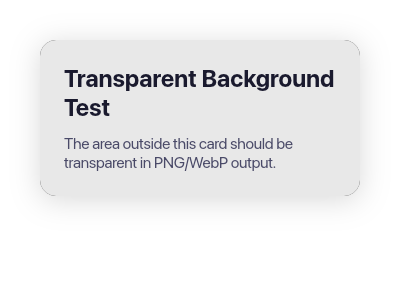
JPEG has no transparency. The CLI and render_to_file use a white background for .jpg output when none is set. When encoding a rendered image yourself with to_jpeg(), set background (e.g. "#ffffff"), otherwise transparent areas come out black.
External Resources
Network and filesystem access are off by default. Enable them to load images, stylesheets, and fonts:
dynimg input.html -o output.png --allow-net         # remote URLs
dynimg input.html -o output.png --assets ./assets   # local files
With an assets directory, local paths resolve inside it, and paths that escape it fail:
<img src="img/hero.png">     <!-- loads ./assets/img/hero.png -->
<img src="../secret.png">    <!-- ERROR: outside assets directory -->
data: URIs always work, which makes them handy for self-contained templates.
Untrusted Templates
dynimg isn't hardened for rendering HTML written by people you don't trust. Local files outside --assets and the network (unless allowed) are out of reach, but a hostile template can still:
- Crash the process. A few thousand nested elements overflow the stack. In Python this kills the interpreter (a segfault), not a catchable exception.
- Use a lot of CPU. There is no render time limit, so expensive layouts or effects can tie up a worker.
- Use a lot of memory. Templates pick their own size through meta tags and content height, up to the 8192×8192 limit. At that size the pixel buffer is 256 MiB, and encoding can push peak memory to about 500 MiB for JPEG and 1 GiB for WebP. Setting width, height, and scale explicitly takes that choice away from the template.
- Make requests from your server, if network access is on. Private and internal addresses (like cloud metadata endpoints) aren't blocked, and redirects are followed.
- Feed arbitrary bytes to image and font decoders.
data:URIs are always decoded, even with network and file access off.
If you render untrusted templates anyway, do it in a separate process with memory and time limits, set the size explicitly, and leave network access off. If you find a security flaw, please report it privately rather than opening a public issue.
Fonts
Register font files (TTF/OTF/WOFF/WOFF2) directly, without @font-face or an assets directory. A font is registered under the family name inside the file, and takes priority over system fonts with the same name:
dynimg input.html -o output.png --font Inter-Regular.ttf --font Inter-Bold.ttf
<h1 style="font-family: 'Inter'">Uses the registered font</h1>
NAME=FILE registers a font under a CSS name instead. A CSS generic (serif, sans-serif, monospace, cursive, fantasy, system-ui, ui-serif, ui-sans-serif, ui-monospace, ui-rounded, emoji, math, fangsong) is mapped to that font ahead of the platform's choice. Any other name becomes the font's family name:
dynimg input.html -o output.png \
  --font sans-serif=Inter-Regular.ttf \
  --font emoji=Twemoji.ttf \
  --font brand=FancyDisplay.ttf   # matches font-family: 'brand'
In Python, fonts takes a path, a {name: path} dict, or a list mixing both:
options = dynimg.RenderOptions(fonts=[
    "/app/fonts/Inter-Bold.ttf",
    {"sans-serif": "/app/fonts/Inter-Regular.ttf", "emoji": "/app/fonts/Twemoji.ttf"},
])
Mapping the generics your pages use (and emoji) makes rendering identical on every host. Platform fonts are then only a fallback for glyphs your fonts don't cover.
Minimal containers
On Linux, system fonts are found through fontconfig when it's installed, but it's optional: dynimg loads it at runtime and works without it. In a minimal container you don't need fontconfig, libexpat, or fc-cache; register your fonts directly. When no system fonts are found, registered fonts also back the generic families, so unstyled text still renders.
Example Templates
The examples/ directory has the templates used by the snapshot tests, including the OG image and social card above. Their rendered output is in tests/snapshots/.
Performance
In a long-running process (a server or Python worker), the example templates render in 1–4ms each, plus 1–5ms of PNG encoding for a 2400px-wide image (measured on an Apple M5 Max). Pages that fetch remote resources also wait for the network.
The first render in a process discovers the system's fonts, which takes roughly 10–80ms; later renders reuse that list, so fonts installed after the first render are picked up after a restart. Registered fonts are read on every render. The CLI renders once per process, so each invocation pays the startup cost.
Development
See the Makefile for common commands:
make install   # build (release) and install into the local .venv, including the CLI
make dev       # same, debug build
make test      # lints, Rust tests, Python tests, and snapshot tests
make fmt       # format Rust code
Releasing
make release             # bump patch version, commit, tag, and push
make release BUMP=minor  # or minor/major
The script requires a clean, up-to-date main. Pushing the tag triggers GitHub Actions, which builds wheels for Linux (x86_64, aarch64) and macOS (aarch64), creates a GitHub Release, and publishes to PyPI.
License
MIT
1 maintainer

Metadata
1 maintainer
Release files for dynimg 0.3.0
For a detailed explanation of source distributions (sdists) and built distributions (wheels), please see the package formats documentation.
Source distribution (sdist)
| File | Size | Uploaded | Provenance | |
|---|---|---|---|---|
| dynimg-0.3.0.tar.gz | 5.1 MB | With provenance | Details |
Built distributions (wheels)
| File | Interpreter | ABI | Platform | Reset |
|---|---|---|---|---|
| dynimg-0.3.0-cp311-abi3-manylinux_2_17_x86_64.manylinux2014_x86_64.whl | CPython 3.11 | abi3 | Linux glibc 2.17+ x86-64 | Details |
| dynimg-0.3.0-cp311-abi3-manylinux_2_17_aarch64.manylinux2014_aarch64.whl | CPython 3.11 | abi3 | Linux glibc 2.17+ ARM64 | Details |
| dynimg-0.3.0-cp311-abi3-macosx_11_0_arm64.whl | CPython 3.11 | abi3 | macOS 11.0+ ARM64 | Details |
Total release size: 36.6 MB
Release files / dynimg-0.3.0.tar.gz
| Download URL | dynimg-0.3.0.tar.gz |
|---|---|
| Size | 5.1 MB |
| Tags | Source |
|
SHA-256 checksum How to use checksums |
f90058dd6f0216c0f084fcde34de51cae8043306b44762a264e6378a8a9f40e2
|
|
BLAKE2b-256 checksum How to use checksums |
18fd864c5299c001e4d727ded33801e398fbf5df9920ae81b7c1e6199d953c89
|
| Upload date | |
|
Uploaded using Trusted Publishing? What is trusted publishing? |
Yes |
| Uploaded via |
twine/7.0.0 CPython/3.13.16
|
Provenance
Provenance describes where a file came from. On PyPI, provenance is shared via attestations, which provide a verifiable record of the build or publishing details. View details, limitations and caveats.


PyPI Publish Attestation
PyPI verified that this artifact, at this checksum, originated from the publisher listed below.
Signed by GitHub Actions, verified by PyPI on Oct 20, 2026.
Transparency logRelease files / dynimg-0.3.0-cp311-abi3-manylinux_2_17_x86_64.manylinux2014_x86_64.whl
| Download URL | dynimg-0.3.0-cp311-abi3-manylinux_2_17_x86_64.manylinux2014_x86_64.whl |
|---|---|
| Size | 11.1 MB |
| Tags | CPython 3.11 Linux glibc 2.17+ x86-64 abi3 |
|
SHA-256 checksum How to use checksums |
45eb0f5df7f3652b3e8c111408485bc5b365096c93f6e9a04c021385bade7df8
|
|
BLAKE2b-256 checksum How to use checksums |
8e217fd66d872585e57c4a42f7e92343930a64ebe0c14e04c50c172d8c6c24bd
|
| Upload date | |
|
Uploaded using Trusted Publishing? What is trusted publishing? |
Yes |
| Uploaded via |
twine/7.0.0 CPython/3.13.16
|
Provenance
Provenance describes where a file came from. On PyPI, provenance is shared via attestations, which provide a verifiable record of the build or publishing details. View details, limitations and caveats.
PyPI Publish Attestation
PyPI verified that this artifact, at this checksum, originated from the publisher listed below.
Signed by GitHub Actions, verified by PyPI on Oct 20, 2026.
Transparency logRelease files / dynimg-0.3.0-cp311-abi3-manylinux_2_17_aarch64.manylinux2014_aarch64.whl
| Download URL | dynimg-0.3.0-cp311-abi3-manylinux_2_17_aarch64.manylinux2014_aarch64.whl |
|---|---|
| Size | 10.4 MB |
| Tags | CPython 3.11 Linux glibc 2.17+ ARM64 abi3 |
|
SHA-256 checksum How to use checksums |
ea8f66a15763f82bcf910756c8b11935a55e3bac187d5689e40e6c1ad960b5c5
|
|
BLAKE2b-256 checksum How to use checksums |
c5a3f821abdb4d6240d8793b1815598f51264465a85d6a16e44360cf2f7c1266
|
| Upload date | |
|
Uploaded using Trusted Publishing? What is trusted publishing? |
Yes |
| Uploaded via |
twine/7.0.0 CPython/3.13.16
|
Provenance
Provenance describes where a file came from. On PyPI, provenance is shared via attestations, which provide a verifiable record of the build or publishing details. View details, limitations and caveats.
PyPI Publish Attestation
PyPI verified that this artifact, at this checksum, originated from the publisher listed below.
Signed by GitHub Actions, verified by PyPI on Oct 20, 2026.
Transparency logRelease files / dynimg-0.3.0-cp311-abi3-macosx_11_0_arm64.whl
| Download URL | dynimg-0.3.0-cp311-abi3-macosx_11_0_arm64.whl |
|---|---|
| Size | 10.0 MB |
| Tags | CPython 3.11 abi3 macOS 11.0+ ARM64 |
|
SHA-256 checksum How to use checksums |
c0eb714e3bf2de1d441834a2a045815823928557f103393a80cddda3cff507cf
|
|
BLAKE2b-256 checksum How to use checksums |
b70d62e8b2e454e5e65dc978387cd5287d87d86abc68c161f2839ac60c9555d3
|
| Upload date | |
|
Uploaded using Trusted Publishing? What is trusted publishing? |
Yes |
| Uploaded via |
twine/7.0.0 CPython/3.13.16
|
Provenance
Provenance describes where a file came from. On PyPI, provenance is shared via attestations, which provide a verifiable record of the build or publishing details. View details, limitations and caveats.
PyPI Publish Attestation
PyPI verified that this artifact, at this checksum, originated from the publisher listed below.
Signed by GitHub Actions, verified by PyPI on Oct 20, 2026.
Transparency logSecurity for dynimg 0.3.0
Provenance
Provenance describes where a file came from. On PyPI, provenance is shared via attestations, which provide a verifiable record of the build or publishing details. View details, limitations and caveats.
Full provenance
All 4 files in this release have been uploaded with provenance metadata.
Attestation for dynimg-0.3.0.tar.gz
PyPI Publish Attestation
PyPI verified that this artifact, at this checksum, originated from the publisher listed below.
Signed by GitHub Actions, verified by PyPI on Oct 20, 2026.
Transparency logA note on package security
PyPI is a repository for distributing packages, not a service for auditing them. While third-party security researchers and our staff do their best to detect and remove malicious packages, PyPI cannot guarantee the quality, security or suitability of any given package.
To learn more about protecting yourself from malicious actors, visit our package security documentation.














