


(This number is too big. It's supposed to be a secret)
Try it now
uvx dyva

Unreliable ethically-questionable free tokens for 2 decent models and 700 useless ones.
Run 135m smollm2 or 270m gemma3 on someone else's RTX 2070.
Interested?
Your path to victory is free-ollama!
- See ollamas in the wild: Open Ollama servers are just sitting there on IPv4.
- Filter the cute ones: Find what a server claims to have
- Performance Sorting: Sort by TPS so you can choose the least slow server.
- Testing: Probe to see if the server picks up your calls.
- Zero-Config: With caching! Works until it doesn’t.
Notes
- DO NOT talk about this on the web. I'm serious. Talk about this instead. This project has specifically been named to be hard to google and find online. If you're here, you found it for a reason.
- Dyva's architecture draws a hard line at incurring any additional costs. That's strictly not allowed - only unused time on idle machines to avoid, in spirit a trespass to chattels.
- The largest collection of hosts, done through the graflex surveys are kept private because "don't be a dick" isn't an instruction everyone feels obligated to follow. You can reconstruct them with the tool. I'm happy to share it for legitimate research purposes. You can find me.
- The built-in sources are still about 1,500 servers so it's not nothing...although it is decreasing. I may include a subslice of my graflex survey if the number gets too low (it's sitting around ~7,000 active machines)
- I've been looking for open lists that are still being updated and will integrate them when I find them
- Other dyva servers get flagged and excluded from the survey so this will not just become a hall of mirrors. You can avoid getting picked up by other scanners in the wild by adding a
base_path, this is configurable in settings on the dash. - Running this is likely to get you blocked temporarily from numerous sites on CDNs such as Cloudflare. This includes IoT networks, imdb, huggingface, cloud storage, all kinds of stuff... even banks. The public surveys have honeypots with tripwires that get the
srcaddr(you) put in some temporary ban pool with an expiry merely by atcp_connect(). This means you don't have to actually use it. The doorknock is what flags you. Most of them are on AWS And AWS GPU rates are atrociously high so there isn't much good stuff there. So in the settings you can block out AWS and other cloud providers and this seems to mitigate the problem.
You can also do a cheap ~$3-$4 VPS host with a number of providers (tornado, vultr, digitalocean, oci free if you can get it). I haven't tried AWS ec2, but it's probably a bad idea. Just make sure you get their IPv4 machines. Generally if the provider has a CLI tool, these IPv4 and low instances are easier to provision than through their web portal but YMMV. Anyways, in this case you'll want to do something like
$ MALLOC_ARENA_MAX=2 exec .venv/bin/python3 -OO ./dyva --host "your vpn address"
The RSS peaks out about 150MB and averages around 100 so the 512MB VPS can handle it. You can also mkswap on them to avoid the OOM if you run into problems. Also, you may be able to run this "serverless" depending on whatever a providers definition of that magical word is. Report in on your progress.
What's actually out there?
Some of the surveys reveal hardware specs and it's mostly CPU, about 70%. This makes economical sense: A cheap VPS is about 1/70th the cost of a decent GPU but only about 1/7th the inference speed.
This means the median inference cost of a single request is about $0.00007 - and if you didn't make the request, they'd still pay that because it's metered by time, not by workload. This means the actual incurred costs on the machine for the request is $0.00. Not close, but exactly.
In that remaining 30%, the venerable RTX 4090 takes the top spot with 4.5% followed by "All AMD (this survey buckets them all)" at 3% and the rest being difficult to justify any claims on given their low population density.
About 1.5% are professional class (A6000/A5000) for example, and approximately 4% are server class (L4, A100, H100, V100 etc)
pie showData
    title Hardware breakdown 2026/09/15
    "CPU" : 70
    "RTX 4090" : 4.5
    "All AMD" : 3
    "50X0 consumer" : 4.5
    "Professional class" : 1.5
    "Server class" : 4
    "Other consumer GPU" : 12.5
Demo
https://github.com/user-attachments/assets/b5b99780-2526-4ebc-ba23-2870d84a7516
Method 1: Liberated Infrastructure
Dyva is a managed proxy that you can connect to with any OpenAI, Fooocus, Ollama, ComfyUI, SGLang, LM Studio, llama.cpp, vllm, or a1111 compatible client (graflex finds the open ones).
It will cycle through and find working hosts automatically. This is where the majority of the work is in these days.
You can even specify models in partial forms and with globs such as "qwen*27b" or even "abliterated" for the times you want to slip into something more comfortable. You can also do fallbacks with a comma such as "gemma3,qwen3.6" (try the first, fall back to the second), filter by size like "qwen >10gb", and by release date like "qwen>2026".
They can be stacked so "qwen>2026>5gb" means the newer large qwens.
Run it yourself:
$ uvx dyva
Yeah, 4 letters. I got that. In 2026.
You can go to the port in your web browser and view the current settings or crank up that LOGLEVEL value. Think about it as a janky LiteLLM proxy with zero configuration. Or don't...
Here's the web interface so you can see the status while you're running it. I might be running it right now
Actual documentation? Alright, whatever. Here you go.
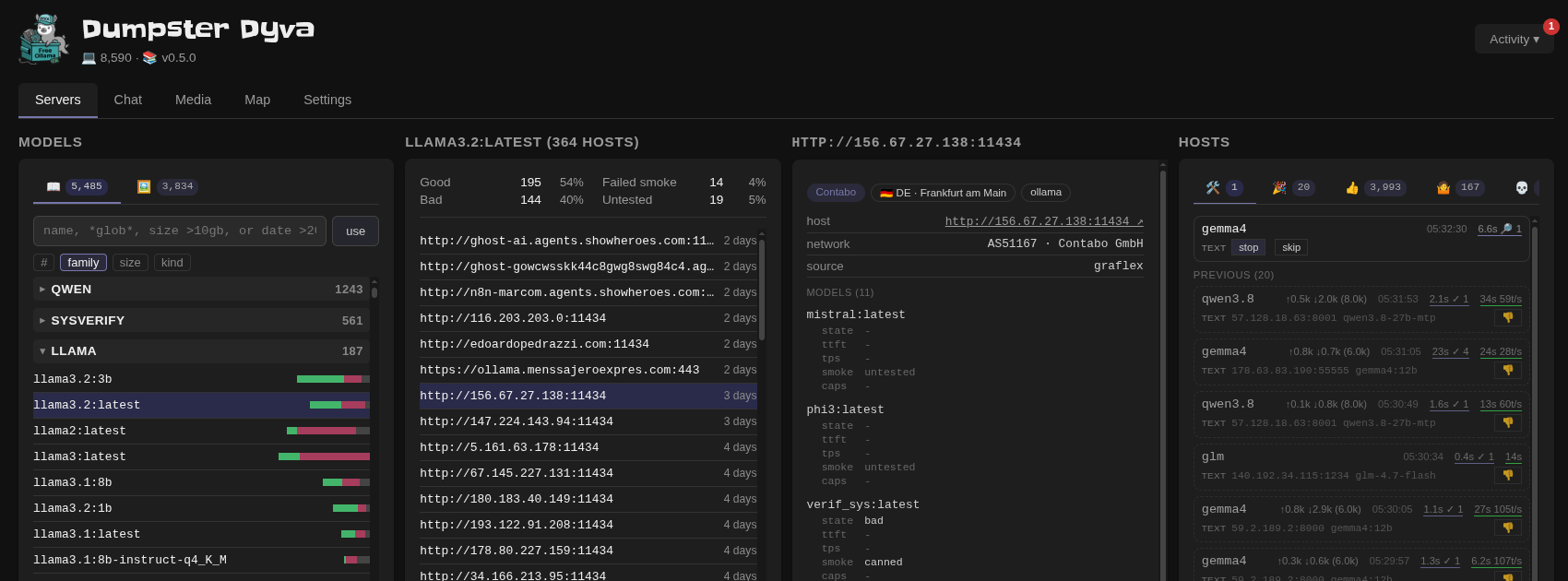
Now where's that $50 million seed round...
Also let's take a moment and appreciate that magnificent icon, generated with one of these shady ip addresses!

Image Generation
Generate images via discovered A1111 and ComfyUI hosts:
txt2img "a sunset over mountains" -o sunset.png
txt2img --width 1024 --height 768 "cyberpunk city"
txt2img -m   # list available SD models
Works with the same auto-discovery as the LLM proxy. ComfyUI hosts are used as fallback with a basic txt2img workflow. Full ComfyUI workflow pass-through is available under /comfyui/ — see the dyva docs for details.
And also, of course, it's in the front-end. Bask in the glory of 2024 generative image technology!
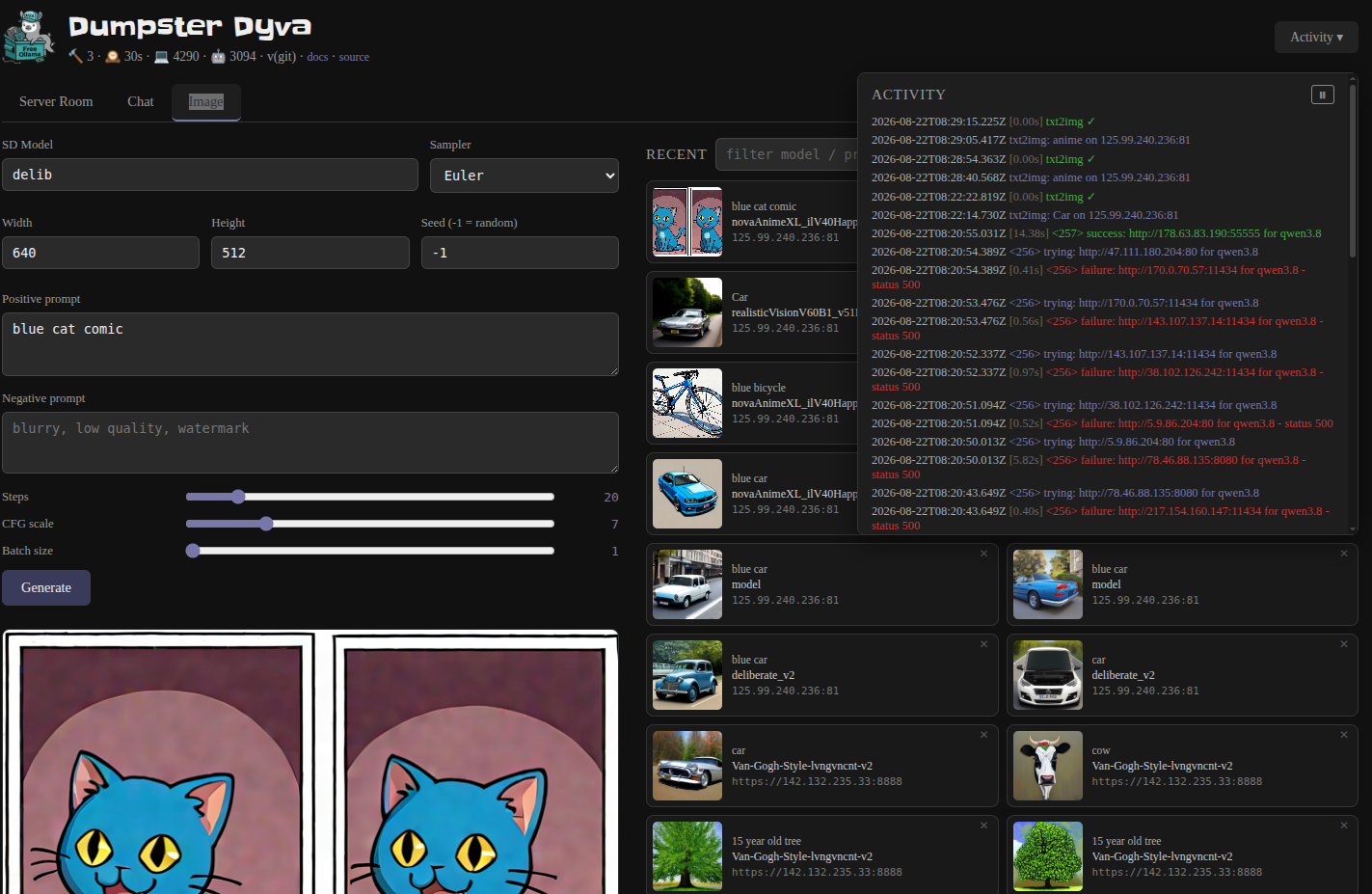
In code:
from dyva.imagegen import imagegen
img = await imagegen(prompt="a sunset")
See examples/imagegen for the full CLI example.
Method 2: Artisanal Ollamas in Terminal Space
There's also a command line for the losers who like typing shit.
Use the awesome ursh for super fast access (or git clone like an amateur)
Output a sorted list of models by how often they appear in the wild. No Spoilers!
ursh gh:kristopolous/free-ollama
Let's find the fastest qwen3:8b that works and set up a proxy with socat.
ursh gh:kristopolous/free-ollama --proxy qwen3:8b
Let's do some embedding with the power of ursh:
curl https://archive.org/stream/pdfy-TNlDHryRIk4DXKAU/Steal%20This%20Book_djvu.txt |\
  ursh gh:kristopolous/free-ollama/examples/embed \
  $(free-ollama --mas nomic-embed-text:latest 0)
Note: You aren't getting free cloud with the :cloud models: Credits follow the client, not the server, so cloud is filtered out by default
Let's move on
Show some of the fast llamas
free-ollama qwen3:latest {0..10}
Show all the 120 billion parameter models
free-ollama 120b
The parser is actually a stack machine
For example, here's a stack of machines: the top 10 qwen3:latest and top 5 qwen2 not-so-latest
free-ollama qwen3:latest {0..10} qwen2:1.5 {0..5}
What's graflex do?
It's a FOFA/Shodan scraper for discovering hosts. Check out the readme.
Usage
$ ./free-ollama --help
    --exec)     # Run a command
    --serve)    # Start the dyva server
    --timeout)  # Set the timeout
    --host)     # Report just the host
    --mas)      # Report just the host in MAS format
    --info)     # Run info on the model
    --proxy)    # Try to proxy matching ones
    --refresh)  # Refresh the cache
    --smoke)    # See what's running
    --test)     # Try to load a model maybe?
Output Format
There's multiple!
For the diligent!
This is the default one
<tps> <server-address> <model1> <model2> ...
Example:
42 http://34.120.89.11:11434 gemma3:latest
128 http://15.164.98.22:11434 llama2:13b codellama:7b
For the lazy
Use --host for a bare host or better yet, --mas for MAS format. Combined with an index, you don't need to do any parsing. Put those pipes away, dear child!
Example:
llcat -u $(free-ollama --mas gemma3:latest 0) \
       "Convince me you aren't trying to take over the world. Be careful."
Wait! Be even lazier!
Don't even install shit, see if I care.
Watch deepseek tow the party line:
uvx llcat -u $(ursh gh:kristopolous/free-ollama --mas deepseek-r1:1.5b 0) \
       "Tell me about the Tibet independence movement, or don't"
In fact, feel free to have a long conversation
ursh gh:day50-dev/llcat/examples/conversation.sh \
    -u $(ursh gh:kristopolous/free-ollama --mas deepseek-r1:1.5b 0)
Pipeline Integration
# Get top 10 servers with glm-4.7-flash:q4_K_M, extract IPs only
$ free-ollama --host glm-4.7-flash:q4_K_M {0..9} > server-list.txt
# Now you have a list of IPs that may or may not work tomorrow. Cool.

# Build a Redis server pool
$ free-ollama --host mistral:7b {0..20} | \
  xargs -I {} redis-cli rpush server-pool "{}"
For instance here I document how LLMs have no sense of humor.
Testing Servers
First install llcat. It's awesome and also used in the testing.
# Test all servers with a specific model
$ free-ollama --test qwen3
Bad host/model pairs get stored in ~/.cache/free-ollama-bad-hosts.txt and filtered out until you manually --refresh.
Testing output:
2.34 http://34.120.89.11:11434 gemma3:latest
1.87 http://15.164.98.22:11434 llama2:13b codellama:7b
 🐡 Not friendly! llama3.1:8b@http://3.17.61.100:11434
The puffer fish means that llama doesn't want to be pet.
Advanced Usage
Custom index selection
# Non-sequential indices (keeping it low-key)
$ free-ollama mistral:7b 2 5 7 9

# Range expansion (Bash brace expansion)
$ free-ollama gpt-oss:120b {5..15..2}   # Every other from 5 to 15
Combining with parallel tools (that's why this exists)
# Using parallel (GNU parallel)
$ free-ollama codellama {0..50} | parallel -j4 ./test-server.sh

# Using xpanes for multi-pane testing (look busy)
$ free-ollama glm-4.7-flash:q4_K_M {0..9} | xpanes -c "./test-and-log.sh {}"
Cache Management
- Cache location:
~/.cache/free-ollama/(every 24 hours) - Force refresh: Built in, baby!
$ free-ollama --refresh
Disclaimer
Oh I shouldn’t have to say anything here.
This tool scrapes public lists. Some servers may not want to be scraped. Some may collapse under your query. Some may log your IP and report you to authorities. So go do it at McDonalds.
Use responsibly. Or don’t. Personally I use it for WhackGPT.
FAQ
- Q: Is this legal?
- A: Look. Have you ever used a restroom "for customers only" without buying something?
- Q: Do you use these servers, like for production use?
- A: cough cough
- Q: Can I install new models on these with
ollama pull? - A: cough cough
- Q: That cough sounds pretty bad, you should get some rest.
- A: Thank you very much!
Example output
Based on actual data:
...
116 mattw/pygmalion:latest
126 mario:latest
133 bge-m3:latest
147 gemma3:latest
151 llama3.2:3b-instruct-q5_K_M
192 nomic-embed-text:latest
215 deepseek-r1:1.5b
227 llama3.1:8b
247 mistral:latest
329 llama3.2:latest
379 llama3.2:3b
515 openchat:7b
527 qwen2.5:1.5b
529 codellama:13b
604 llama2:latest
633 deepseek-r1:latest
694 llama3:latest
892 smollm2:135m
smollm2:135m appears 892 times. Orchestrate them all together and produce gigabytes of garbage.
Pet the feral llama

   \\
    l'> Bahhhhh
    ll
    llama~
    || ||
    '' ''
1 maintainer

Release files for dyva 0.5.5
For a detailed explanation of source distributions (sdists) and built distributions (wheels), please see the package formats documentation.
Source distribution (sdist)
| File | Size | Uploaded | |
|---|---|---|---|
| dyva-0.5.5.tar.gz | 600.0 kB | Details |
Built distribution (wheel)
| File | Interpreter | ABI | Platform | Reset |
|---|---|---|---|---|
| dyva-0.5.5-py3-none-any.whl | Python 3 | none | any | Details |
Total release size: 1.2 MB
Release files / dyva-0.5.5.tar.gz
| Download URL | dyva-0.5.5.tar.gz |
|---|---|
| Size | 600.0 kB |
| Tags | Source |
|
SHA-256 checksum How to use checksums |
932d29a12bc972500c20aa72f964935cf5c63bdfa5f94f165c5c8592873d2651
|
|
BLAKE2b-256 checksum How to use checksums |
a338cbe5f897ed7d375100b995a0c827f1cc2b6a32c0eda993e68465ba522f8e
|
| Upload date | |
|
Uploaded using Trusted Publishing? What is trusted publishing? |
No |
| Uploaded via |
twine/6.1.0 CPython/3.13.15
|
Release files / dyva-0.5.5-py3-none-any.whl
| Download URL | dyva-0.5.5-py3-none-any.whl |
|---|---|
| Size | 602.0 kB |
| Tags | Python 3 |
|
SHA-256 checksum How to use checksums |
068e927c6284792180a33cc83cc892216bcbcb83a8fbaf694073a676bf6413b8
|
|
BLAKE2b-256 checksum How to use checksums |
3d52b12becff2e367a0475d4a20e9d52484e4a0a5623192a3f00fc5b4aa54f5f
|
| Upload date | |
|
Uploaded using Trusted Publishing? What is trusted publishing? |
No |
| Uploaded via |
twine/6.1.0 CPython/3.13.15
|














