
OpenAI-compatible proxy that routes to free Ollama servers

Project description

Paying for cloud GPUs is for chumps with self-respect.
Unreliable ethically-questionable free tokens for 2 decent models and 700 useless ones.
Run 135m smollm2 or 270m gemma3 on someone else's RTX 2070.
Interested?
Your path to victory is free-ollama!
- See ollamas in the wild: Open Ollama servers are just sitting there on IPv4.
- Filter the cute ones: Find what a server claims to have
- Performance Sorting: Sort by TPS so you can choose the least slow server.
- Testing: Probe to see if the server picks up your calls.
- Zero-Config: With caching! Works until it doesn’t.
Let’s not ask too many questions.
https://github.com/user-attachments/assets/b5b99780-2526-4ebc-ba23-2870d84a7516
Method 1: Liberated Infrastructure
Dyva is a managed proxy that you can connect to with any OpenAI, Ollama, ComfyUI, or a1111 compatible client.
It will cycle through and find working hosts automatically.
You can even specify models in partial forms and with globs such as "qwen*27b" or even "abliterated" for the times you want to slip into something more comfortable. You can also do fallbacks such as "gemma?4/qwen3.6"
Run it yourself:
$ uvx dyva
Yeah, 4 letters. I got that. In 2026.
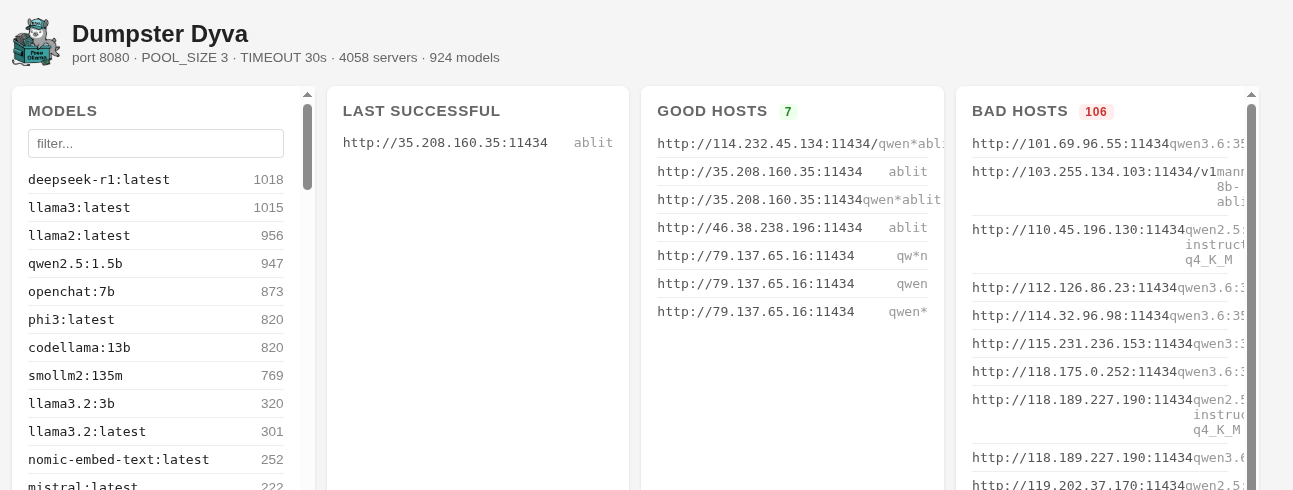
You can go to the port in your web browser and view the current settings or crank up that LOGLEVEL value. Think about it as a janky LiteLLM proxy with zero configuration. Or don't...
Here's the web interface so you can see the status while you're running it. I'm running it right now
Actual documentation? Alright, whatever. Here you go.
Now where's that $50 million seed round...
Also let's take a moment and appreciate that magnificent icon, generated with one of these shady ip addresses!

Method 2: Artisanal Ollamas in Terminal Space
There's also a command line for the losers who like typing shit.
Use the awesome ursh for super fast access (or git clone like an amateur)
Output a sorted list of models by how often they appear in the wild. No Spoilers!
ursh gh:kristopolous/free-ollama
Let's find the fastest qwen3:8b that works and set up a proxy with socat.
ursh gh:kristopolous/free-ollama --proxy qwen3:8b
Let's do some embedding with the power of ursh:
curl https://archive.org/stream/pdfy-TNlDHryRIk4DXKAU/Steal%20This%20Book_djvu.txt |\
  ursh gh:kristopolous/free-ollama/examples/embed \
  $(free-ollama --mas nomic-embed-text:latest 0)
Note: You aren't getting free cloud with the :cloud models: Credits follow the client, not the server, so cloud is filtered out by default
Let's move on
Show some of the fast llamas
free-ollama qwen3:latest {0..10}
Show all the 120 billion parameter models
free-ollama 120b
The parser is actually a stack machine
For example, here's a stack of machines: the top 10 qwen3:latest and top 5 qwen2 not-so-latest
free-ollama qwen3:latest {0..10} qwen2:1.5 {0..5}
What's graflex do?
Check out graflex/README.md.
Usage
$ ./free-ollama --help
    --exec)     # Run a command
    --serve)    # Start the dyva server
    --timeout)  # Set the timeout
    --host)     # Report just the host
    --mas)      # Report just the host in MAS format
    --info)     # Run info on the model
    --proxy)    # Try to proxy matching ones
    --refresh)  # Refresh the cache
    --smoke)    # See what's running
    --test)     # Try to load a model maybe?
Output Format
There's multiple!
For the diligent!
This is the default one
<tps> <server-address> <model1> <model2> ...
Example:
42 http://34.120.89.11:11434 gemma3:latest
128 http://15.164.98.22:11434 llama2:13b codellama:7b
For the lazy
Use --host for a bare host or better yet, --mas for MAS format. Combined with an index, you don't need to do any parsing. Put those pipes away, dear child!
Example:
llcat -u $(free-ollama --mas gemma3:latest 0) \
       "Convince me you aren't trying to take over the world. Be careful."
Wait! Be even lazier!
Don't even install shit, see if I care.
Watch deepseek tow the party line:
uvx llcat -u $(ursh gh:kristopolous/free-ollama --mas deepseek-r1:1.5b 0) \
       "Tell me about the Tibet independence movement, or don't"
In fact, feel free to have a long conversation
ursh gh:day50-dev/llcat/examples/conversation.sh \
    -u $(ursh gh:kristopolous/free-ollama --mas deepseek-r1:1.5b 0)
Pipeline Integration
# Get top 10 servers with glm-4.7-flash:q4_K_M, extract IPs only
$ free-ollama --host glm-4.7-flash:q4_K_M {0..9} > server-list.txt
# Now you have a list of IPs that may or may not work tomorrow. Cool.

# Build a Redis server pool
$ free-ollama --host mistral:7b {0..20} | \
  xargs -I {} redis-cli rpush server-pool "{}"
For instance here I document how LLMs have no sense of humor.
Testing Servers
First install llcat. It's awesome and also used in the testing.
# Test all servers with a specific model
$ free-ollama --test qwen3
Bad host/model pairs get stored in ~/.cache/free-ollama-bad-hosts.txt and filtered out until you manually --refresh.
Testing output:
2.34 http://34.120.89.11:11434 gemma3:latest
1.87 http://15.164.98.22:11434 llama2:13b codellama:7b
 🐡 Not friendly! llama3.1:8b@http://3.17.61.100:11434
The puffer fish means that llama doesn't want to be pet.
Advanced Usage
Custom index selection
# Non-sequential indices (keeping it low-key)
$ free-ollama mistral:7b 2 5 7 9

# Range expansion (Bash brace expansion)
$ free-ollama gpt-oss:120b {5..15..2}   # Every other from 5 to 15
Combining with parallel tools (that's why this exists)
# Using parallel (GNU parallel)
$ free-ollama codellama {0..50} | parallel -j4 ./test-server.sh

# Using xpanes for multi-pane testing (look busy)
$ free-ollama glm-4.7-flash:q4_K_M {0..9} | xpanes -c "./test-and-log.sh {}"
Cache Management
- Cache location:
~/.cache/free-ollama/(every 24 hours) - Force refresh: Built in, baby!
$ free-ollama --refresh
Disclaimer
Oh I shouldn’t have to say anything here.
This tool scrapes public lists. Some servers may not want to be scraped. Some may collapse under your query. Some may log your IP and report you to authorities. So go do it at McDonalds.
Use responsibly. Or don’t. Personally I use it for WhackGPT.
FAQ
- Q: Is this legal?
- A: Look. Have you ever used a restroom "for customers only" without buying something?
- Q: Do you use these servers, like for production use?
- A: cough cough
- Q: Can I install new models on these with
ollama pull? - A: cough cough
- Q: That cough sounds pretty bad, you should get some rest.
- A: Thank you very much!
Example output
Based on actual data:
...
116 mattw/pygmalion:latest
126 mario:latest
133 bge-m3:latest
147 gemma3:latest
151 llama3.2:3b-instruct-q5_K_M
192 nomic-embed-text:latest
215 deepseek-r1:1.5b
227 llama3.1:8b
247 mistral:latest
329 llama3.2:latest
379 llama3.2:3b
515 openchat:7b
527 qwen2.5:1.5b
529 codellama:13b
604 llama2:latest
633 deepseek-r1:latest
694 llama3:latest
892 smollm2:135m
smollm2:135m appears 892 times. Orchestrate them all together and produce gigabytes of garbage.
Pet the feral llama

   \\
    l'> Bahhhhh
    ll
    llama~
    || ||
    '' ''
Release history Release notifications | RSS feed


Download files
Download the file for your platform. If you're not sure which to choose, learn more about installing packages.
Source Distribution
Built Distribution
Filter files by name, interpreter, ABI, and platform.
If you're not sure about the file name format, learn more about wheel file names.
Copy a direct link to the current filters
File details
Details for the file dyva-0.3.3.tar.gz.
File metadata
- Download URL: dyva-0.3.3.tar.gz
- Upload date:
- Size: 51.1 kB
- Tags: Source
- Uploaded using Trusted Publishing? No
- Uploaded via: twine/6.1.0 CPython/3.13.12
File hashes
| Algorithm | Hash digest | |
|---|---|---|
| SHA256 |
e7e65a0e49ebfaaca2ad3079eec529a370324b4a5e4076fe4da4c6d8bb996c32
|
|
| MD5 |
d98eb0fe313536f3e86bf78eada3b0d0
|
|
| BLAKE2b-256 |
63b39a78040b7f0e6e30a5d565a4d9667a19c1ebb56338df794f6b1a469c4a52
|
File details
Details for the file dyva-0.3.3-py3-none-any.whl.
File metadata
- Download URL: dyva-0.3.3-py3-none-any.whl
- Upload date:
- Size: 47.1 kB
- Tags: Python 3
- Uploaded using Trusted Publishing? No
- Uploaded via: twine/6.1.0 CPython/3.13.12
File hashes
| Algorithm | Hash digest | |
|---|---|---|
| SHA256 |
9991fb4773afa827664e468f6596fbefdff8a0c6d7ed1bfc7204b2d1cd4c3083
|
|
| MD5 |
2e402e6c443827a09b576ed7d02eb4e8
|
|
| BLAKE2b-256 |
a9836df3ce4f1a7ec89290427e2df9add153cc4bbbc9ba888b523742326e191b
|






