
E4S Container Launcher
E4S container launcher is a tool to simplify running MPI applications in E4S containers with host libraries. This project is built upon the MPICH ABI Compatibility Initiative and CEA's Wi4MPI.
Check out the documentation here !
Usage
Running an application with E4S Container Launcher can be as simple as prefixing the launcher command by e4s-cl launch.
e4s-cl init
e4s-cl launch mpirun -np 4 ./foo
The full details on execution and configuration can be found here.
How it works
Creating containers
e4s-cl wraps around standard MPI-capable launchers to execute a small amount of pre-processing before creating containers in which to run commands.
This processing includes analyzing the library environment from the host, to bind select libraries to the container in order to make them accessible to the running process.
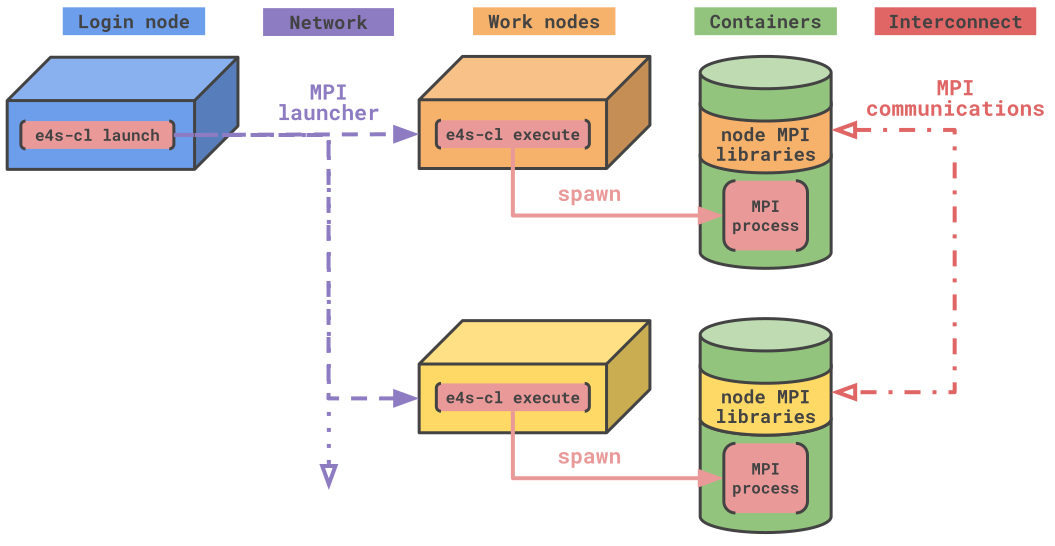
The concept of profile
One of the core components of the tool are profiles. They contain specific information about an execution environment that can be reproduced, such as container image and technology, or files and libraries to import in the containers.
They can be accessed and modified using the e4s-cl profile commands.
$ e4s-cl profile list
============= Profile Configurations (/home/user/.local/e4s_cl/user.json) ==
+----------+------------+-------------+------------+-----------+-------+--------+
| Selected |    Name    |   Backend   |   Image    | Libraries | Files | WI4MPI |
+==========+============+=============+============+===========+=======+========+
|          |  MPICH_3.4 | singularity |       None |    16     |   1   |   No   |
+----------+------------+-------------+------------+-----------+-------+--------+
Profiles are also used as intermediate outputs of the program. e4s-cl profile detect will analyze a given binary to list all its library and file dependencies. Those results are stored into a given profile to be reused.
Installation
e4s-cl requires python3.7+ to run. If you do not have access to a compatible version, the guided installation process will download a conda interpreter to run the project.
Guided standalone installation
You can install e4s-cl and a dedicated python interpreter using the provided Makefile. The installation location can be set using the INSTALLDIR variable:
git clone https://github.com/E4S-Project/e4s-cl
cd e4s-cl
make INSTALLDIR=<prefix> install
Once the installation succeeds, add <prefix>/bin to your PATH.
python package installation
If you would rather install e4s-cl using standard python packaging facilities, you may install using pip:
git clone https://github.com/E4S-Project/e4s-cl
cd e4s-cl
pip install .
The full details on installation targets can be found here.
1 maintainer

Metadata
1 maintainer
Release files for e4s-cl 1.0.9
For a detailed explanation of source distributions (sdists) and built distributions (wheels), please see the package formats documentation.
Source distribution (sdist)
| File | Size | Uploaded | |
|---|---|---|---|
| e4s_cl-1.0.9.tar.gz | 363.5 kB | Details |
Built distribution (wheel)
| File | Interpreter | ABI | Platform | Reset |
|---|---|---|---|---|
| e4s_cl-1.0.9-py3-none-any.whl | Python 3 | none | any | Details |
Total release size: 804.1 kB
Release files / e4s_cl-1.0.9.tar.gz
| Download URL | e4s_cl-1.0.9.tar.gz |
|---|---|
| Size | 363.5 kB |
| Tags | Source |
|
SHA-256 checksum How to use checksums |
be8c68d3e843ea0d8fdf6eaa053358ba162833ab681144afe62666d09321155a
|
|
BLAKE2b-256 checksum How to use checksums |
24adbd7c13311098a8fb4816b1bcce0df7c6ab8b18e6c498e613868b0e7fbb7c
|
| Upload date | |
|
Uploaded using Trusted Publishing? What is trusted publishing? |
No |
| Uploaded via |
twine/6.2.0 CPython/3.12.3
|
Release files / e4s_cl-1.0.9-py3-none-any.whl
| Download URL | e4s_cl-1.0.9-py3-none-any.whl |
|---|---|
| Size | 440.6 kB |
| Tags | Python 3 |
|
SHA-256 checksum How to use checksums |
f50da0d6a3c09fd97e40cf488afb59b0505aa10b63fabe0bcab42d65f905be26
|
|
BLAKE2b-256 checksum How to use checksums |
a163cf6bc9abbae3e98e6017e0597332afc243435234ca6847c98dc16e251a2a
|
| Upload date | |
|
Uploaded using Trusted Publishing? What is trusted publishing? |
No |
| Uploaded via |
twine/6.2.0 CPython/3.12.3
|














