
A command-line utility to run MPI projects in E4S containers

Project description
E4S Container Launcher
E4S container launcher is a tool to simplify running MPI applications in E4S containers with host libraries. This project is built upon the MPICH ABI Compatibility Initiative and CEA's Wi4MPI.
Check out the documentation here !
Usage
Running an application with E4S Container Launcher can be as simple as prefixing the launcher command by e4s-cl launch.
e4s-cl init
e4s-cl launch mpirun -np 4 ./foo
The full details on execution and configuration can be found here.
How it works
Creating containers
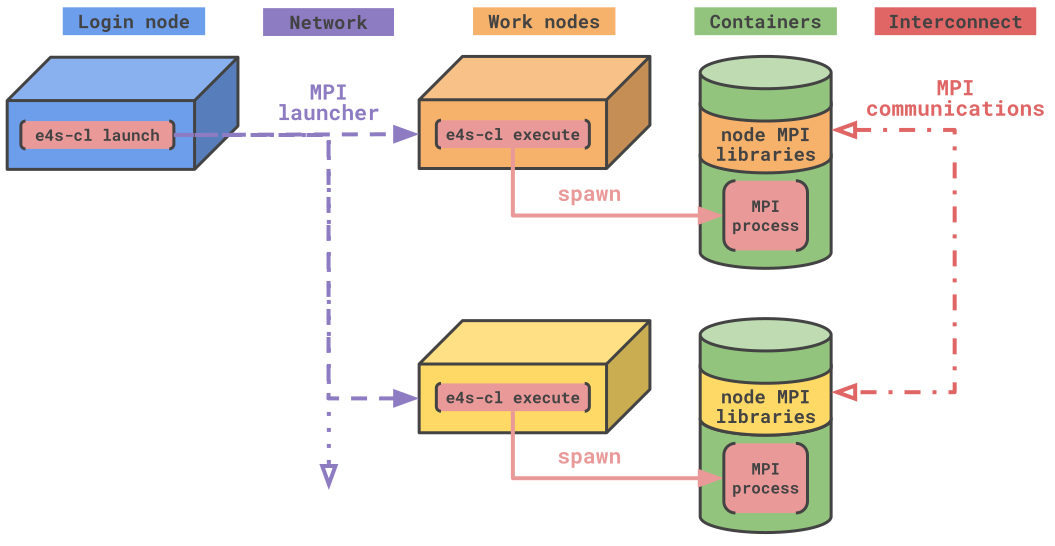
e4s-cl wraps around standard MPI-capable launchers to execute a small amount of pre-processing before creating containers in which to run commands.
This processing includes analyzing the library environment from the host, to bind select libraries to the container in order to make them accessible to the running process.
The concept of profile
One of the core components of the tool are profiles. They contain specific information about an execution environment that can be reproduced, such as container image and technology, or files and libraries to import in the containers.
They can be accessed and modified using the e4s-cl profile commands.
$ e4s-cl profile list
============= Profile Configurations (/home/user/.local/e4s_cl/user.json) ==
+----------+------------+-------------+------------+-----------+-------+--------+
| Selected |    Name    |   Backend   |   Image    | Libraries | Files | WI4MPI |
+==========+============+=============+============+===========+=======+========+
|          |  MPICH_3.4 | singularity |       None |    16     |   1   |   No   |
+----------+------------+-------------+------------+-----------+-------+--------+
Profiles are also used as intermediate outputs of the program. e4s-cl profile detect will analyze a given binary to list all its library and file dependencies. Those results are stored into a given profile to be reused.
Installation
e4s-cl requires python3.7+ to run. If you do not have access to a compatible version, the guided installation process will download a conda interpreter to run the project.
Guided standalone installation
You can install e4s-cl and a dedicated python interpreter using the provided Makefile. The installation location can be set using the INSTALLDIR variable:
git clone https://github.com/E4S-Project/e4s-cl
cd e4s-cl
make INSTALLDIR=<prefix> install
Once the installation succeeds, add <prefix>/bin to your PATH.
python package installation
If you would rather install e4s-cl using standard python packaging facilities, you may install using pip:
git clone https://github.com/E4S-Project/e4s-cl
cd e4s-cl
pip install .
The full details on installation targets can be found here.
Release history Release notifications | RSS feed


Download files
Download the file for your platform. If you're not sure which to choose, learn more about installing packages.
Source Distribution
Built Distribution
Filter files by name, interpreter, ABI, and platform.
If you're not sure about the file name format, learn more about wheel file names.
Copy a direct link to the current filters
File details
Details for the file e4s_cl-1.0.7.tar.gz.
File metadata
- Download URL: e4s_cl-1.0.7.tar.gz
- Upload date:
- Size: 337.4 kB
- Tags: Source
- Uploaded using Trusted Publishing? No
- Uploaded via: twine/6.2.0 CPython/3.12.9
File hashes
| Algorithm | Hash digest | |
|---|---|---|
| SHA256 |
b3f1073f73aa79b3656e220e8d6cf85fcb7e6fae34f351a0543980172fc856a6
|
|
| MD5 |
54522280733612b8be4434cbb23bd32f
|
|
| BLAKE2b-256 |
047c841a102ec2efd147f9803444108ca36a205944f1ccbc6f7162902310d53d
|
File details
Details for the file e4s_cl-1.0.7-py3-none-any.whl.
File metadata
- Download URL: e4s_cl-1.0.7-py3-none-any.whl
- Upload date:
- Size: 385.8 kB
- Tags: Python 3
- Uploaded using Trusted Publishing? No
- Uploaded via: twine/6.2.0 CPython/3.12.9
File hashes
| Algorithm | Hash digest | |
|---|---|---|
| SHA256 |
fc26cc7d0f7955bd9f15aac69e583f99bbf3e12a593ea7a608870a2f1d00411e
|
|
| MD5 |
069a5ede0ad54275fb5555eadd3ee45b
|
|
| BLAKE2b-256 |
28066c0fdc170d6430a378dcf52be7d3ac7e1153d6ef8b295ee8ce11edee9d75
|






