
eXplore CT 120 Reconstruction


Cone-beam CT reconstruction for the GE eXplore CT 120 micro-CT scanner. Point it at a scan folder and get a calibrated HU volume back.
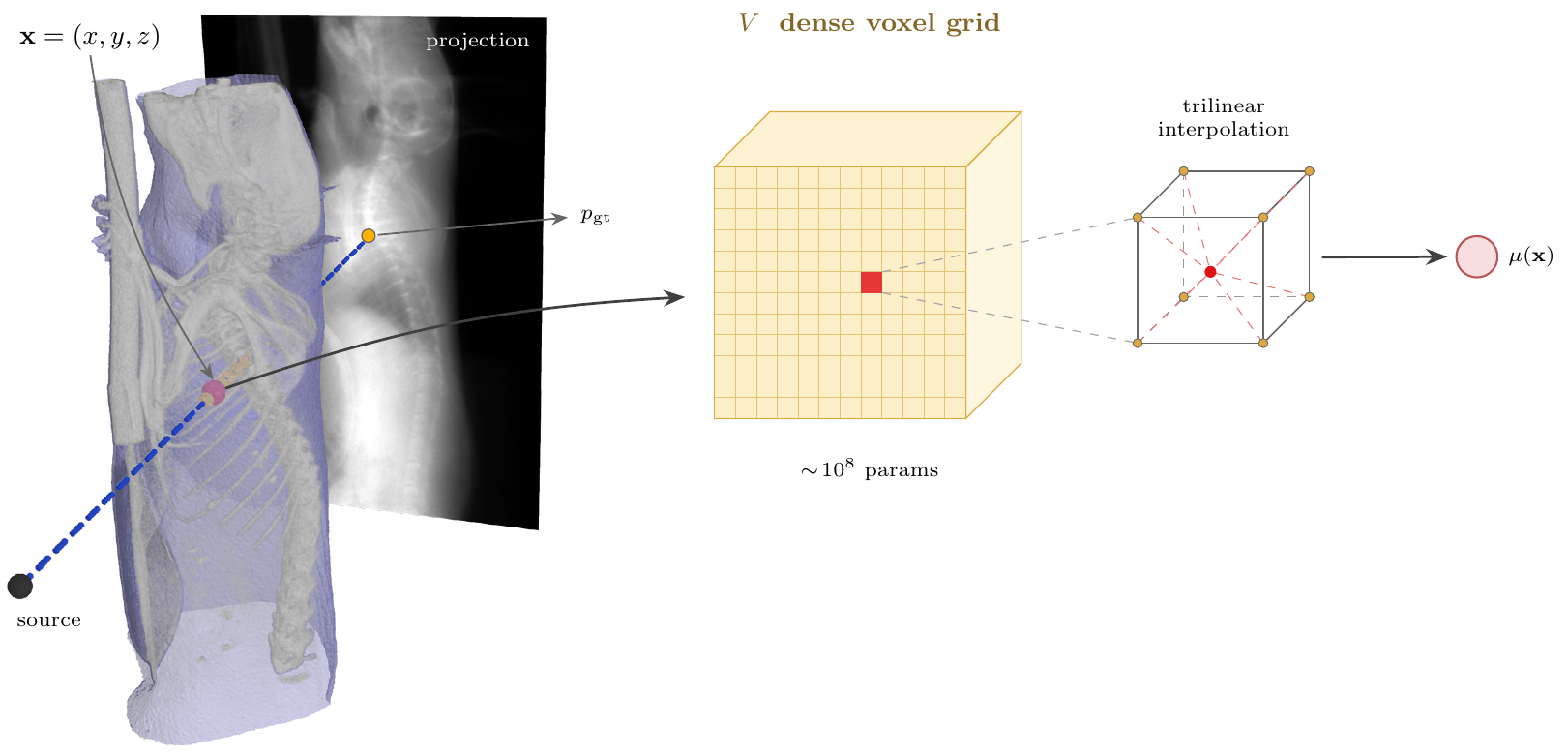
Each detector pixel measures a line integral of the attenuation μ along a ray from the source. Reconstruction recovers the volume, here a dense voxel grid, from those measurements.
| Family | Algorithms | Needs |
|---|---|---|
Analytic (fdk/) |
FDK with ramp / Shepp-Logan / cosine / Hamming windows, Parker weighting | PyTorch |
Classical iterative (iterative/) |
ASTRA: SIRT, CGLS, SART. TIGRE: OS-SART, SART, SIRT, MLEM, +TV | CUDA + ASTRA or TIGRE |
Learning-based (learning_based_iterative/) |
Differentiable projector + gradient descent; voxel grid by default, other representations pluggable | CUDA |
All three share the same loading, preprocessing, geometry calibration, HU calibration and output format, so their volumes are directly comparable.
Install
pip install eXplore_CT_120_reconstruction_algorithms
# or the development version
pip install git+https://github.com/UBC-Ford-lab/eXplore_CT_120_reconstruction_algorithms.git
Optional backends and logging:
pip install astra-toolbox                                            # ASTRA
pip install "git+https://github.com/CERN/TIGRE.git#subdirectory=Python"   # TIGRE (not on PyPI)
pip install wandb                                                    # experiment logging
Python 3.10+ and PyTorch 2.0+. The import name is explore_ct120_recon.
Usage
Six commands are installed:
ct120-fdk data/scans/Scan_1988
ct120-iterative data/scans/Scan_1988 --backend astra --algorithm SIRT3D_CUDA --iterations 100
ct120-iterative data/scans/Scan_1988 --backend tigre --algorithm ossart --tv-lambda 10
ct120-learned data/scans/Scan_1988 --downsample 3
ct120-volume-report VOLUME.vff
ct120-projection-report data/scans/Scan_1988 --volume a.vff --volume b.vff
ct120-geometry-calibration data/scans/Scan_1988
(python -m explore_ct120_recon.run_fdk_recon ... is the same thing.)
A scan folder holds the projection .vff files, scan.xml, and the
bright.vff / dark.vff flat-field frames. Each run writes a .vff
volume next to the scan folder, a .json sidecar with the grid and the
fitted HU map, and a _plots/ folder with slices, histogram and projection
diagnostics. --help lists every flag.
Pipeline
raw projections → flat-field + log → air normalization + ring correction
  → detector rotation calibration (measured once per scan, cached)
  → FDK | ASTRA / TIGRE | learned
  → μ (mm⁻¹) → HU calibration → .vff + .json + plots
Defaults that matter, each with a --no-... or explicit override:
- Field of view and ROI are
auto: the grid is what the detector subtends, tightened to the object; the export region is the scanner's ownSubVolumeCoordinates.xmlbox, so results line up with the vendor volume. - Model domain
auto(iterative and learned): backends that fit the projections cover everything a ray crosses, bed included, otherwise the missing attenuation becomes a smooth HU bias.--roithen only crops the output. - HU calibration fits two anchors from the volume's own histogram: air
at −1000 HU and bulk soft tissue at
--tissue-hu(default +120, use 0 for a water phantom). No phantom or scanner constant needed. - Preflight estimates VRAM and RAM before allocating anything.
--preflight-onlyjust prints the report. - Weights & Biases logging is on when
--wandb-projector$WANDB_PROJECTnames a project; nothing is hardcoded and nothing is uploaded otherwise.
Learning-based reconstruction
Fits a volume model to the line integrals through a differentiable ray
tracer, with Adam, non-negativity, LR warmup and plateau reduction, and a
held-out projection for early stopping. Main flags: --loss (mse,
huber, ssim, msssim, sart, ...), --iterations, --rays-per-batch
(sized from free VRAM by default), --emulate-sart, --compile.
A new representation only has to answer three hooks in a
LearnedReconstructor subclass: build_model, build_domain,
export_volume. Register it with a LearnedAlgorithm descriptor and it
becomes an --algorithm choice; voxel/ is the 100-line example. A
representation in another package works the same way via
--algorithm-module my_package.algorithms.
Report tools
ct120-volume-report draws slices, the HU histogram and the fitted anchors
for any finished volume, including the vendor's. ct120-projection-report
forward-projects one or more volumes and scores them against the measured
projections on the same angles and detector window.
ct120-geometry-calibration pre-measures the detector rotation, for
example on a GPU node before submitting long jobs. Use --vendor with the
report tools for a GE volume; it applies the vendor's axis conventions and
locates the ROI from the scan.
Everything is importable too:
from explore_ct120_recon.ct_core.vff_io import read_vff, write_vff
from explore_ct120_recon.learning_based_iterative import LearnedReconstructor
Layout
src/explore_ct120_recon/
  run_*.py                    drivers, one per family plus the report tools
  ct_core/                    shared: scan loading, preprocessing, geometry
                              calibration, HU calibration, preflight, VFF I/O
  fdk/                        filtered backprojection
  iterative/{astra,tigre}/    toolbox wrappers
  learning_based_iterative/   trainer, ray sampler, renderer, losses, voxel/
Detector calibrations measured from a scan are cached in data/calibration/
of the checkout when running from source, in the per-user data directory
(~/.local/share/explore_ct120_recon/calibration on Linux) for an installed
copy, or wherever $CT_CALIBRATION_DIR points.
Development
git clone https://github.com/UBC-Ford-lab/eXplore_CT_120_reconstruction_algorithms.git
cd eXplore_CT_120_reconstruction_algorithms
pip install -e ".[dev]"
License
MIT, see LICENSE.
1 maintainer

Metadata
1 maintainer
Release files for eXplore-CT-120-reconstruction-algorithms 0.1.0
For a detailed explanation of source distributions (sdists) and built distributions (wheels), please see the package formats documentation.
Source distribution (sdist)
| File | Size | Uploaded | |
|---|---|---|---|
| explore_ct_120_reconstruction_algorithms-0.1.0.tar.gz | 342.2 kB | Details |
Built distribution (wheel)
| File | Interpreter | ABI | Platform | Reset |
|---|---|---|---|---|
| explore_ct_120_reconstruction_algorithms-0.1.0-py3-none-any.whl | Python 3 | none | any | Details |
Total release size: 720.9 kB
Release files / explore_ct_120_reconstruction_algorithms-0.1.0.tar.gz
| Download URL | explore_ct_120_reconstruction_algorithms-0.1.0.tar.gz |
|---|---|
| Size | 342.2 kB |
| Tags | Source |
|
SHA-256 checksum How to use checksums |
af58903835918040b24ea5ccf12090e504ee3f31a8be12d855f2519e98f6bfb3
|
|
BLAKE2b-256 checksum How to use checksums |
fef253ff4edcb039a95e9477b896aad3931e4077fcaf664ff28349d4511b6a89
|
| Upload date | |
|
Uploaded using Trusted Publishing? What is trusted publishing? |
No |
| Uploaded via |
twine/7.0.0 CPython/3.10.12
|
Release files / explore_ct_120_reconstruction_algorithms-0.1.0-py3-none-any.whl
| Download URL | explore_ct_120_reconstruction_algorithms-0.1.0-py3-none-any.whl |
|---|---|
| Size | 378.7 kB |
| Tags | Python 3 |
|
SHA-256 checksum How to use checksums |
f1e4dc932208867df9667588372babb31e46957f33ed6ff9fe418eaf2d3c772f
|
|
BLAKE2b-256 checksum How to use checksums |
72a98e77a8f35a337ec1b0ad80074b578291effc7d04c68ff125afa671644199
|
| Upload date | |
|
Uploaded using Trusted Publishing? What is trusted publishing? |
No |
| Uploaded via |
twine/7.0.0 CPython/3.10.12
|














