
eXplore CT 120 Reconstruction


Cone-beam CT reconstruction for the GE eXplore CT 120 micro-CT scanner.
Input is a scan folder as the scanner writes it, output is an HU-calibrated
.vff volume.
| Family | Algorithms | Needs |
|---|---|---|
Analytic (fdk/) |
FDK with ramp, Shepp-Logan, cosine or Hamming window, Parker weighting | PyTorch |
Classical iterative (iterative/) |
ASTRA: SIRT, CGLS, SART. TIGRE: OS-SART, SART, SIRT, MLEM, optionally with TV | CUDA, ASTRA or TIGRE |
Learning-based (learning_based_iterative/) |
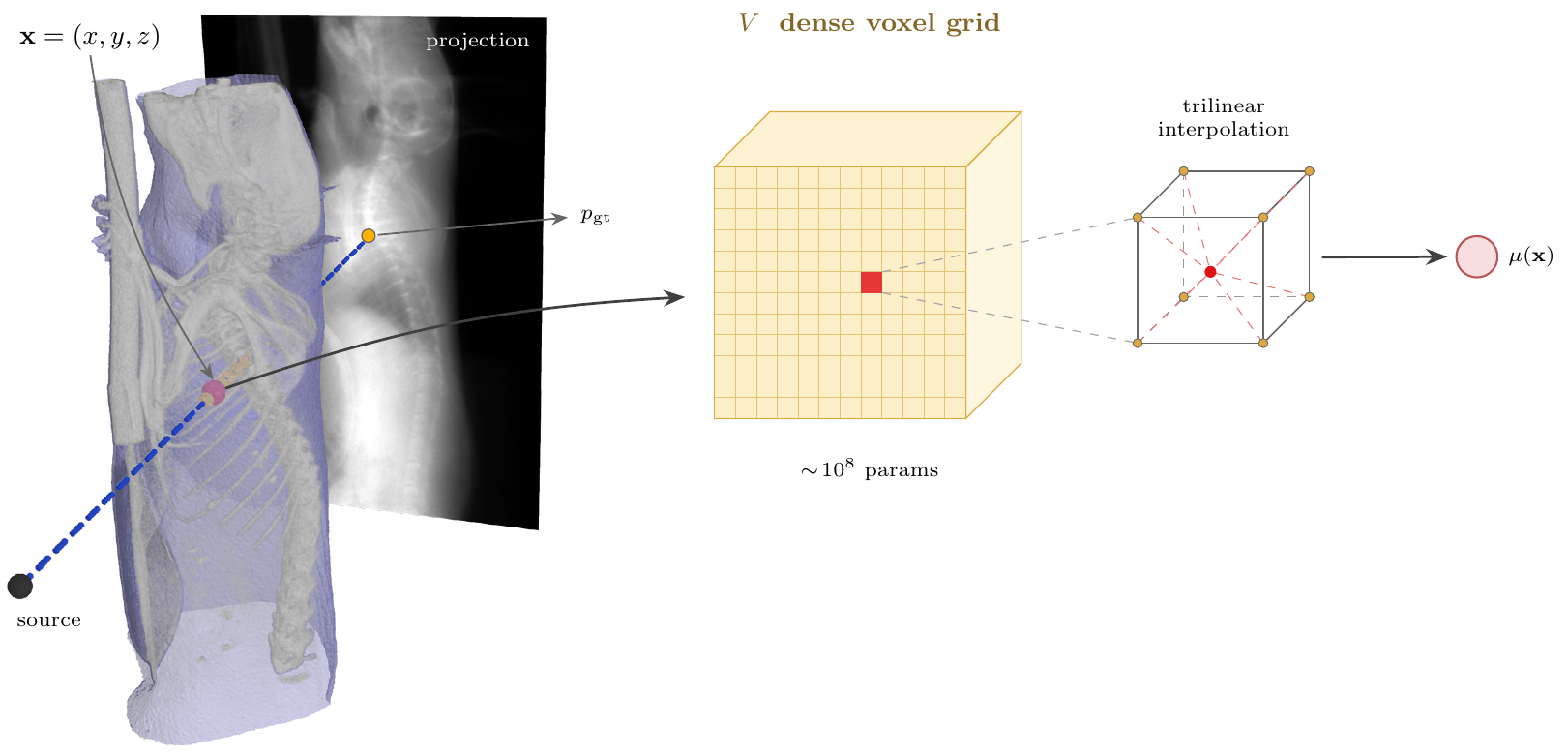
Differentiable projector and gradient descent: --algorithm voxel (dense grid, default), gaussian (3-D Gaussian splatting), gaussian_dynamic (Gaussian splatting with a deformation field, for gated scans of breathing animals) |
CUDA, plus the rasteriser for the Gaussian algorithms |
The families share scan loading, preprocessing, geometry and HU calibration and output format, so their volumes compare directly.
Install
pip install eXplore_CT_120_reconstruction_algorithms          # import name: explore_ct120_recon
pip install "eXplore_CT_120_reconstruction_algorithms[gui]"   # with the web page
Optional: astra-toolbox, TIGRE (pip install "git+https://github.com/CERN/TIGRE.git#subdirectory=Python"), wandb for
run logging, and ./install_rasteriser.sh for the Gaussian algorithms. The
rasteriser is r2_gaussian's
(research licence, not on PyPI), built at a pinned commit that the Gaussian
backend was calibrated against; the build is stamped so each run's log says
which it used. Python 3.10+, PyTorch 2.0+.
Usage
ct120-fdk data/scans/Scan_1988
ct120-iterative data/scans/Scan_1988 --backend astra --algorithm SIRT3D_CUDA --iterations 100
ct120-iterative data/scans/Scan_1988 --backend tigre --algorithm ossart --tv-lambda 10
ct120-learned data/scans/Scan_1988 --downsample 3
ct120-learned data/scans/Scan_1988 --algorithm gaussian
ct120-learned data/scans/Scan_1510 --algorithm gaussian_dynamic
ct120-volume-report VOLUME.vff
ct120-bilateral-filter VOLUME.vff [SD]
ct120-projection-report data/scans/Scan_1988 --volume a.vff --volume b.vff
ct120-geometry-calibration data/scans/Scan_1988
ct120-noise-calibration data/scans/Scan_1988
ct120-simulate-scan VOLUME.vff --template data/scans/Scan_1988 --output data/scans/Sim_1988
ct120-motion-show RESULT_DIR
ct120-export-4d RESULT_DIR/recon_4d.nrrd --format nrrd-slicer
ct120-ventilation RESULT_DIR
ct120-breathing-phantom build REST.vff --template data/scans/Scan_1510 --output data/scans/Phantom_1510
ct120-gui
--help on any command lists its flags; python -m explore_ct120_recon.run_fdk_recon … is the same as the console script. A
scan folder holds the projection .vff files, scan.xml and the
bright.vff / dark.vff frames. A run writes a .vff volume next to the
scan, a .json sidecar with the grid and the HU map, and a _plots/ folder.
Pipeline
raw projections → flat-field + log → air normalization + ring correction
  → detector rotation calibration (measured once per scan, cached)
  → FDK | ASTRA / TIGRE | learned
  → μ (mm⁻¹) → HU calibration → .vff + .json + plots
Defaults, each with an override flag:
- Field of view and ROI are
auto: the grid is what the detector subtends, tightened to the object; the export region is the scanner's ownSubVolumeCoordinates.xmlbox, so results line up with the vendor volume. - The iterative and learned families reconstruct everything a ray crosses,
bed included; otherwise the missing attenuation becomes a smooth HU bias.
--roionly crops the output. - HU calibration fits air at −1000 HU and bulk soft tissue at
--tissue-hu(default +120; 0 for a water phantom) from the volume's own histogram. - Preflight estimates VRAM and RAM first;
--preflight-onlyprints it. - Weights & Biases logging is on when
--wandb-projector$WANDB_PROJECTnames a project.
Learning-based reconstruction
Fits a volume model to the line integrals through a differentiable ray
tracer: Adam with non-negativity, LR warmup, plateau reduction and a held-out
projection for early stopping (--loss, --iterations, --rays-per-batch,
--emulate-sart, --compile). All representations share one loss registry.
The default wls weights each ray by the inverse variance of its counts,
Var(p) = A/count + (sigma_r/ds)^2/count^2: the Poisson slope A is measured
from consecutive views on every run, the read noise sigma_r from the scan
when possible, else from the detector calibration (--wls-slope,
--wls-read-noise pin either). --loss mse is SIRT's objective, for
comparisons with the classical solvers.
To add a representation, subclass LearnedReconstructor (build_model,
build_domain, export_volume) and register a LearnedAlgorithm; voxel/
is the short example, gaussian/ the full one. A descriptor can change the
shared defaults through driver_defaults, and a representation in another
package is loaded with --algorithm-module my_package.algorithms.
Dynamic Gaussian splatting (--algorithm gaussian_dynamic)
In a gated step-and-shoot scan of a breathing animal every projection sees a
slightly different state. gaussian_dynamic keeps the static cloud as the
mean anatomy and gives every projection its own state: a column for the gate
plus a small learned code, decoded through a low-rank displacement basis on a
1 mm control grid. The displacement transports each primitive's shape by the
deformation gradient and divides its amplitude by |det F|, so mass is
conserved; divergence is allowed only in cells containing air; three motion
parts with learned membership let the lung slide along the chest wall. All of
it is estimated from the projections, with no image registration.
The run loads all gated phases and writes, besides the gate-0 state in
recon.vff: recon_4d.nrrd (nine states from gate 0 to gate 1;
--dyn-export-4d-format nrrd|nrrd-slicer|nifti, ct120-export-4d converts),
recon_ventilation.nrrd with its sidecar (regional specific ventilation at
0.5 mm; ct120-ventilation re-exports), and motion/* panels
(ct120-motion-show redraws them from the checkpoint). The --dyn-* flags
are in --help. ct120-breathing-phantom builds a gated scan of a breathing
digital phantom with a known displacement field and scores a reconstruction
against it.
Web page
ct120-gui              # starts the server in the background if needed and opens the page
ct120-gui shortcut     # an icon in the application menu (Start menu, ~/Applications); --desktop, --remove; the server options are baked into the icon
ct120-gui serve --host 0.0.0.0 --scans-root data/scans --wandb-project my-project   # a lab server, foreground
Closing the browser leaves the server running; the "stop server" button on
the page or ct120-gui stop ends it. Jobs never stop with the server: local
ones run in their own sessions, remote ones on their machines, and the next
server picks them up. The page has no login, so serve it on the lab network
only.
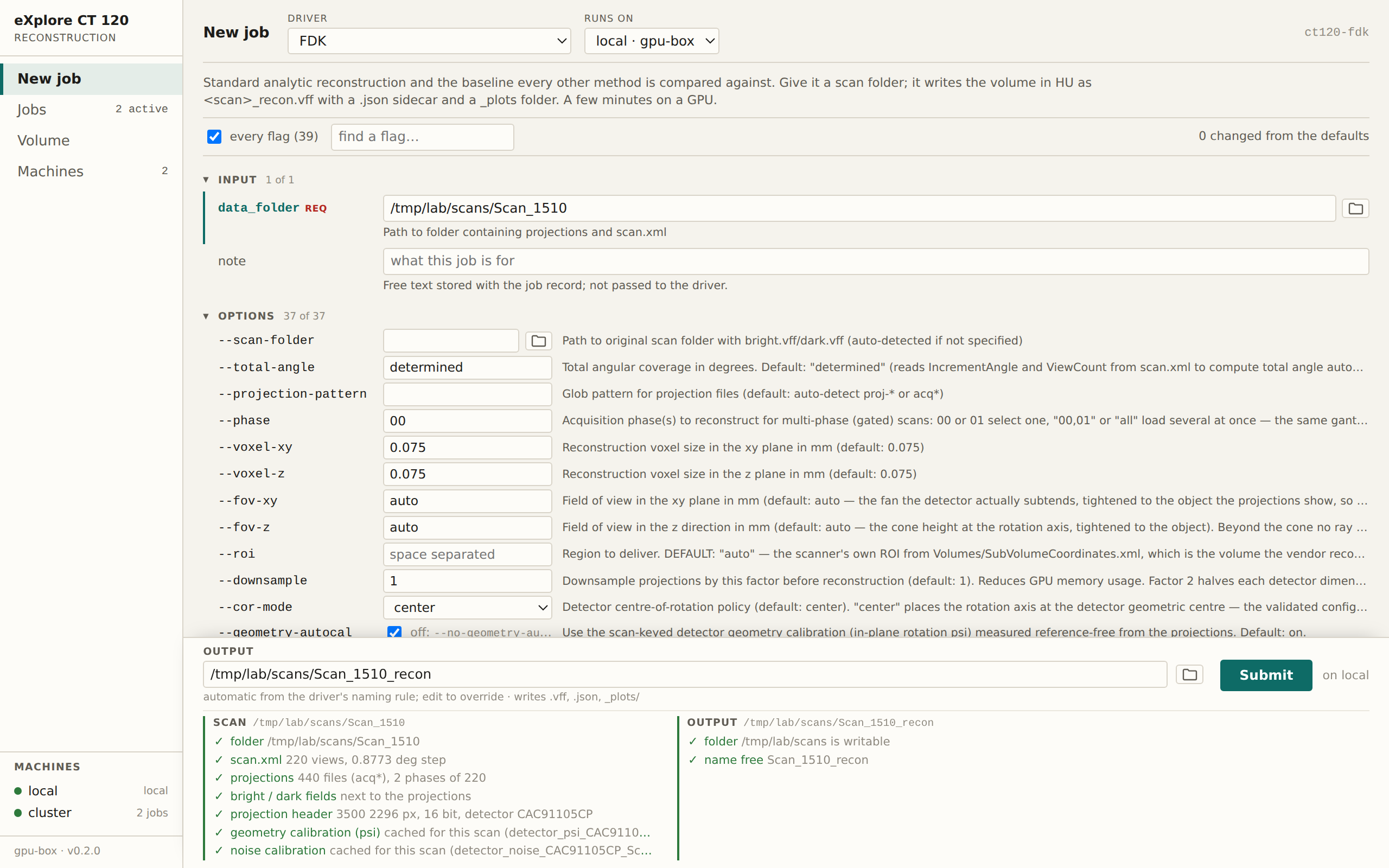
New job. One row per flag, generated from the driver's own argparse parser,
with the ones changed from the defaults marked; only those are passed, so the
recorded command is what a person would have typed. As soon as an input is
named, the page checks it on the machine the job will run on: scan.xml,
projection count, bright and dark fields, detector serial, cached
calibrations; for a volume its header, size and sidecar; for the output
whether the folder is writable and the name free. Every path field has a
folder button that browses that machine's file system. The form can be
pre-filled from the address bar
(/new?driver=learned&algorithm=gaussian&input=…&all=1; the viewer takes
/view?machine=&path=&window=).
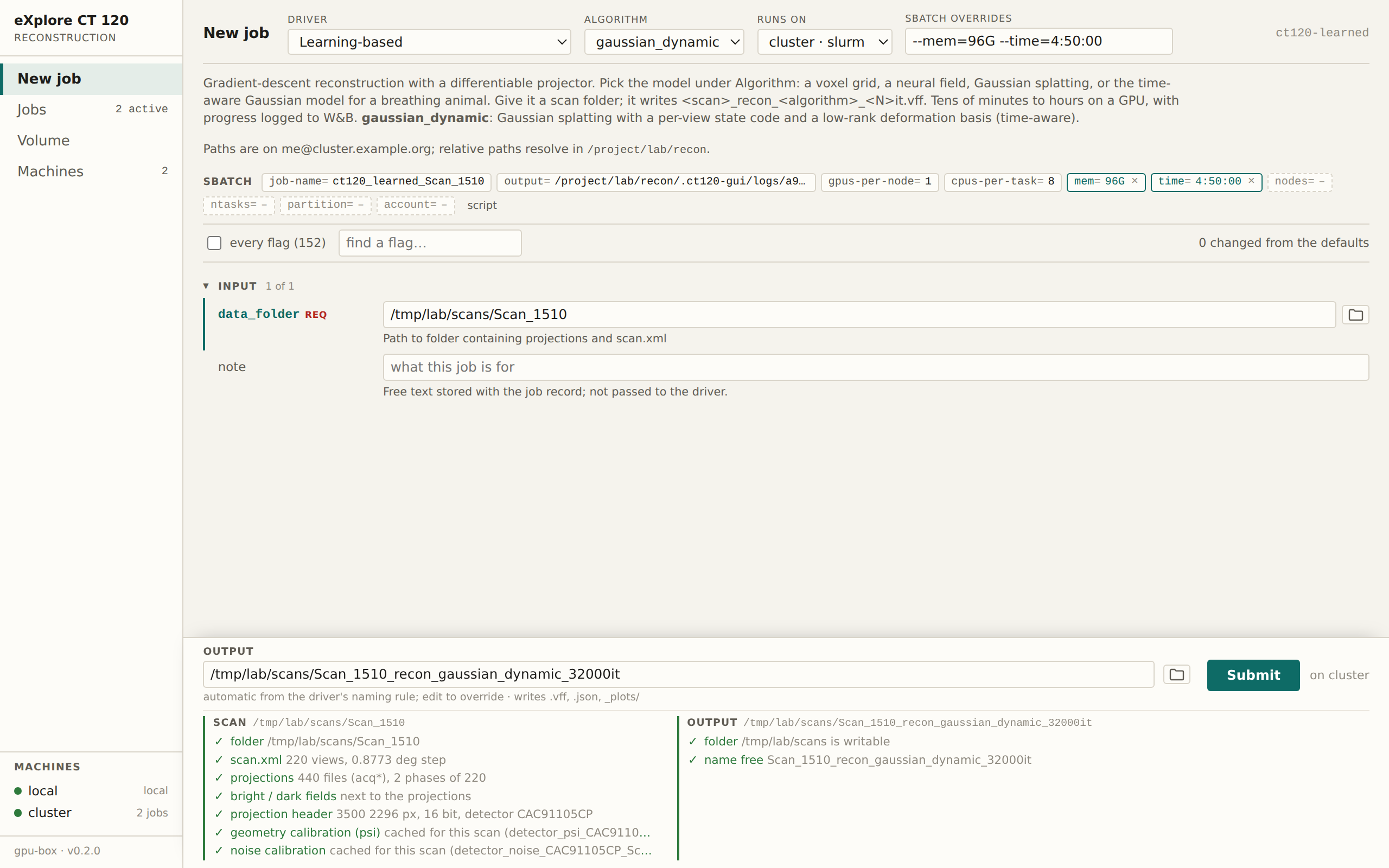
The same form aimed at a Slurm cluster. The #SBATCH directives appear as
chips: the teal ones are per-job overrides and can be edited in place, the
dashed ones are left to the scheduler; "script" shows the rendered sbatch
file. A Slurm job is the machine's template with {job_name}, {log},
{workdir}, {env} and {command} filled in; module loads and the account
belong in the machine's own copy.
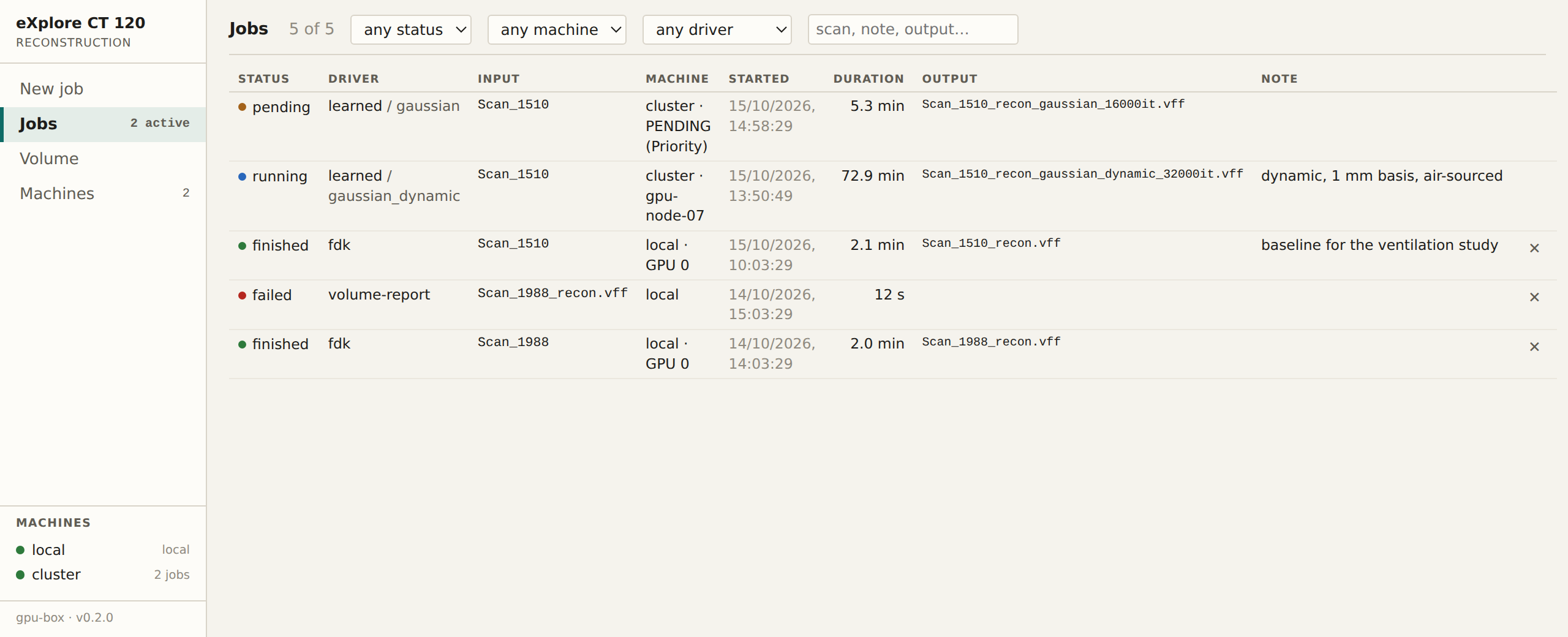
Jobs. Every run, filterable by status, machine, driver and text.
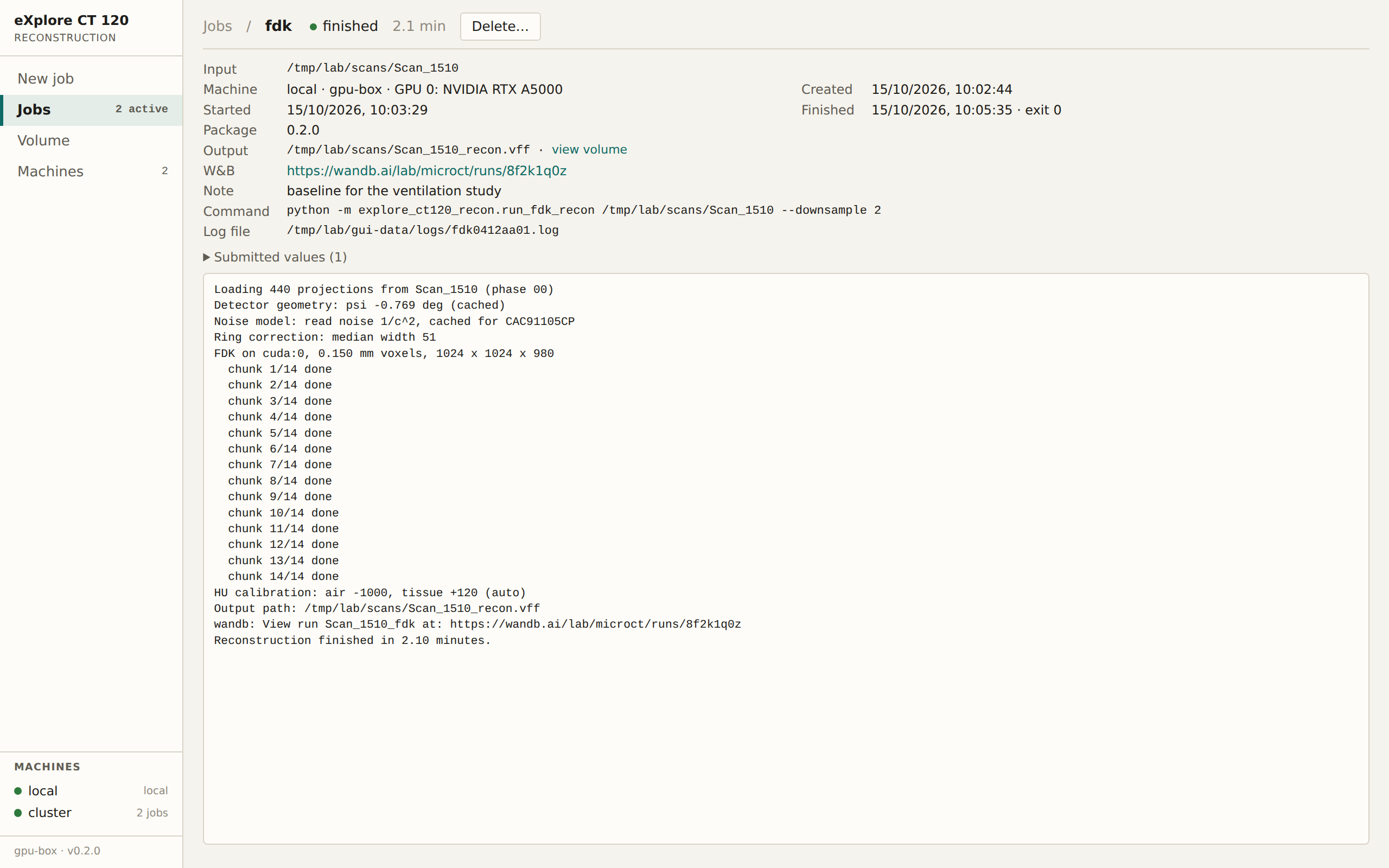
One job. Command line, machine, GPU or node, output, W&B link, and the log tailed from wherever it runs. A running job can be cancelled; a finished one deleted with or without the files it wrote, which are listed by the run's own naming rule and shown with their sizes first.
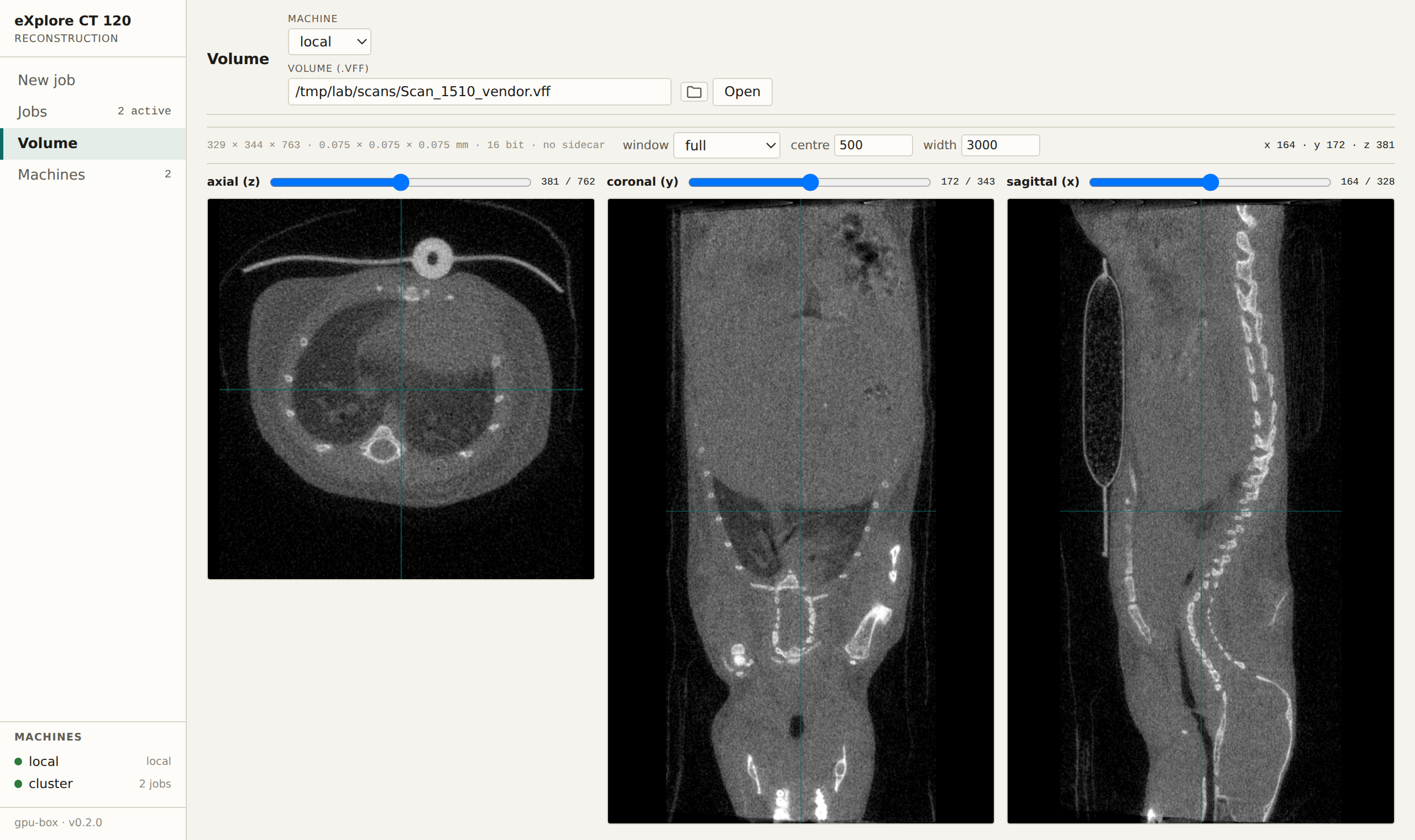
Volume. Any .vff on any connected machine, reached from a job's output or
by path; here the scanner's own reconstruction of a mouse, shown in the
vendor's axis convention. Only the slices on view are read, where the volume
lives, so a 2 GB reconstruction on the cluster opens at once; the window is
applied in the browser (lung, soft tissue, bone presets or free), with the
value under the cursor and a crosshair linking the three planes.
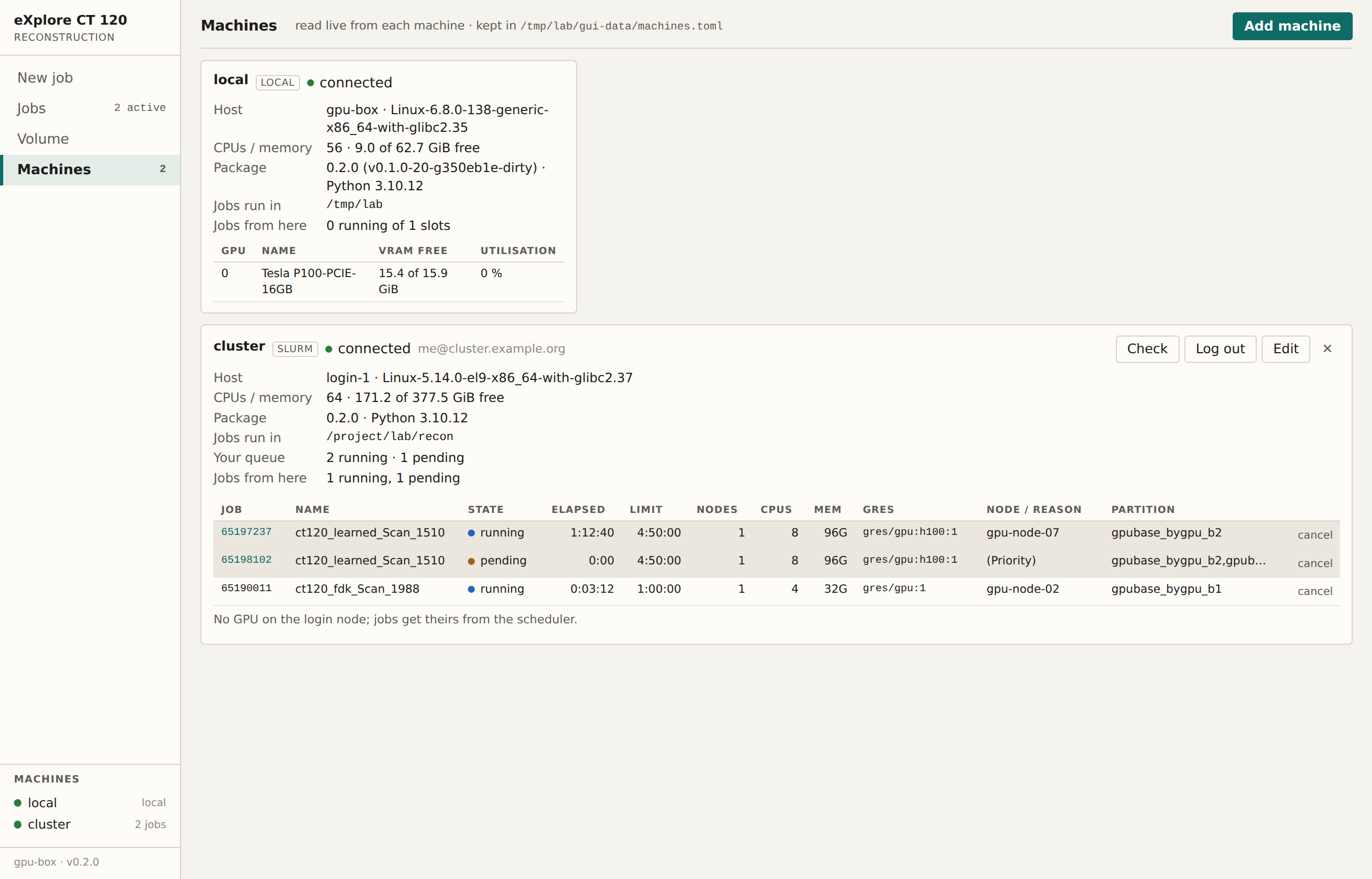
Machines. The machine serving the page, plus any GPU workstation over SSH or Slurm cluster added on the page (SSH destination, Python interpreter with this package, working directory, scans folder, Slurm template), each with a health check. For a cluster the user's whole queue is shown; rows submitted from the page link to their job, and any row can be cancelled. SSH uses the user's own setup, one multiplexed connection per machine, never storing passwords or keys; when a host asks for a second factor, Connect opens the login in a terminal panel on the page. Log out drops the connection.
Job records, logs and machines.toml live in the per-user data directory
(~/.local/share/explore_ct120_recon/gui on Linux) or --data-dir; relative
paths resolve against --cwd. The page is a React application in
gui-frontend/, built into src/explore_ct120_recon/gui/static/ (committed,
so pip install ships it); rebuild with npm install && npm run build.
Report tools
ct120-volume-report draws slices, the HU histogram and the fitted anchors
of a finished volume, vendor volumes included (--vendor applies GE's axis
conventions). ct120-bilateral-filter ports the lab's MATLAB filter_vff.m
(imbilatfilt per axial slice, degreeOfSmoothing = 2*SD^2, SD measured
from the patch im(20:40,160:180,100) when not given) and writes
<volume>_imbilatfilt.vff. ct120-projection-report forward-projects one or
more volumes and scores them against the measured projections.
ct120-geometry-calibration measures the detector rotation ahead of time.
ct120-noise-calibration measures the Poisson slope and read noise; run it
once per detector on a dense phantom, since a mouse scan cannot separate the
two terms, and the wls loss picks the value up from there.
Everything is importable:
from explore_ct120_recon.ct_core.vff_io import read_vff, write_vff
from explore_ct120_recon.learning_based_iterative import LearnedReconstructor
Layout
src/explore_ct120_recon/
  run_*.py                      drivers, one per family plus the report tools
  ct_core/                      scan loading, preprocessing, geometry and HU
                                calibration, noise model, preflight, VFF I/O
  fdk/                          filtered backprojection
  iterative/{astra,tigre}/      toolbox wrappers
  simulate/                     forward projection of a volume into a scan folder
  learning_based_iterative/     trainer, ray sampler, renderer, losses
    voxel/                      dense grid
    gaussian/                   Gaussian splatting
    dynamic_gaussian/           Gaussian splatting with a deformation field
  gui/                          the web page: API, job store, executors; static/ is the built page
gui-frontend/                   React sources of the page
Calibrations measured from a scan are cached in data/calibration/ when
running from a checkout, otherwise in the per-user data directory or
$CT_CALIBRATION_DIR.
License
MIT, see LICENSE.
1 maintainer

Metadata
1 maintainer
Release files for eXplore-CT-120-reconstruction-algorithms 0.2.1
For a detailed explanation of source distributions (sdists) and built distributions (wheels), please see the package formats documentation.
Source distribution (sdist)
| File | Size | Uploaded | |
|---|---|---|---|
| explore_ct_120_reconstruction_algorithms-0.2.1.tar.gz | 878.8 kB | Details |
Built distribution (wheel)
| File | Interpreter | ABI | Platform | Reset |
|---|---|---|---|---|
| explore_ct_120_reconstruction_algorithms-0.2.1-py3-none-any.whl | Python 3 | none | any | Details |
Total release size: 1.8 MB
Release files / explore_ct_120_reconstruction_algorithms-0.2.1.tar.gz
| Download URL | explore_ct_120_reconstruction_algorithms-0.2.1.tar.gz |
|---|---|
| Size | 878.8 kB |
| Tags | Source |
|
SHA-256 checksum How to use checksums |
2b587ddc27564ff4040023a80fc6a9ba324b03215cd87baa75ec873a14d2e3b3
|
|
BLAKE2b-256 checksum How to use checksums |
d413dc7807bbdcb0ccbb63402417b5ef08b89ca08b126f0ab3c780cc46ac9526
|
| Upload date | |
|
Uploaded using Trusted Publishing? What is trusted publishing? |
Yes |
| Uploaded via |
twine/7.0.0 CPython/3.13.14
|
Provenance
Provenance describes where a file came from. On PyPI, provenance is shared via attestations, which provide a verifiable record of the build or publishing details. View details, limitations and caveats.


PyPI Publish Attestation
PyPI verified that this artifact, at this checksum, originated from the publisher listed below.
Signed by GitHub Actions, verified by PyPI on Oct 16, 2026.
Transparency logRelease files / explore_ct_120_reconstruction_algorithms-0.2.1-py3-none-any.whl
| Download URL | explore_ct_120_reconstruction_algorithms-0.2.1-py3-none-any.whl |
|---|---|
| Size | 965.8 kB |
| Tags | Python 3 |
|
SHA-256 checksum How to use checksums |
17630d67a61c99104b9b9aba913f1cbbed01e2f57f678bc75809dba5278f88e2
|
|
BLAKE2b-256 checksum How to use checksums |
00b75774d092de43c31b417e39481863085940999c7c56b96e462177903cc522
|
| Upload date | |
|
Uploaded using Trusted Publishing? What is trusted publishing? |
Yes |
| Uploaded via |
twine/7.0.0 CPython/3.13.14
|
Provenance
Provenance describes where a file came from. On PyPI, provenance is shared via attestations, which provide a verifiable record of the build or publishing details. View details, limitations and caveats.
PyPI Publish Attestation
PyPI verified that this artifact, at this checksum, originated from the publisher listed below.
Signed by GitHub Actions, verified by PyPI on Oct 16, 2026.
Transparency log













