
Python图形验证码生成库,支持GIF、中文、算术等类型

Project description
EasyCaptcha-Python


Python 图形验证码生成库,支持 GIF、中文、算术等类型,可用于 Python Web、桌面应用等项目。
这是 EasyCaptcha Java 版本的 Python 实现。
1.简介
Python 图形验证码,支持 gif、中文、算术等类型,可用于 Flask、Django、FastAPI 等 Web 框架。
2.效果展示
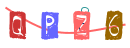
PNG 类型:



GIF 类型:



算术类型:



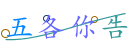
中文类型:


内置字体:


3.安装
3.1.使用 pip 安装
pip install easy-captcha-python
3.2.从源码安装
git clone https://github.com/yourusername/easy-captcha-python.git
cd easy-captcha-python
pip install -e .
4.使用方法
4.1.快速开始
from easy_captcha import SpecCaptcha
from io import BytesIO

# 三个参数分别为宽、高、位数
captcha = SpecCaptcha(130, 48, 5)

# 获取验证码文本
code = captcha.text()
print(f"验证码: {code}")

# 输出到文件
with open('captcha.png', 'wb') as f:
    stream = BytesIO()
    captcha.out(stream)
    f.write(stream.getvalue())
4.2.在 Flask 中使用
from flask import Flask, session, make_response
from easy_captcha import SpecCaptcha
from io import BytesIO

app = Flask(__name__)
app.secret_key = 'your-secret-key'

@app.route('/captcha')
def captcha():
    # 创建验证码
    cap = SpecCaptcha(130, 48, 5)
    # 验证码文本存入session
    session['captcha'] = cap.text().lower()

    # 输出图片
    stream = BytesIO()
    cap.out(stream)

    response = make_response(stream.getvalue())
    response.headers['Content-Type'] = 'image/png'
    return response

@app.route('/verify/<code>')
def verify(code):
    # 获取session中的验证码
    if code.lower() == session.get('captcha'):
        return '验证成功'
    return '验证失败'
前端 HTML 代码:
<img src="/captcha" width="130px" height="48px" />
4.3.在 Django 中使用
from django.http import HttpResponse
from easy_captcha import SpecCaptcha
from io import BytesIO

def captcha(request):
    cap = SpecCaptcha(130, 48, 5)
    # 验证码文本存入session
    request.session['captcha'] = cap.text().lower()

    # 输出图片
    stream = BytesIO()
    cap.out(stream)

    return HttpResponse(stream.getvalue(), content_type='image/png')
4.4.在 FastAPI 中使用
from fastapi import FastAPI, Response
from easy_captcha import SpecCaptcha
from io import BytesIO

app = FastAPI()

@app.get("/captcha")
async def captcha():
    cap = SpecCaptcha(130, 48, 5)
    code = cap.text()

    stream = BytesIO()
    cap.out(stream)

    return Response(content=stream.getvalue(), media_type="image/png")
4.5.前后端分离项目
前后端分离项目建议使用 base64 编码返回:
from flask import Flask, jsonify, request
import uuid

app = Flask(__name__)
# 这里使用字典模拟,生产环境建议使用Redis
captcha_store = {}

@app.route('/captcha')
def get_captcha():
    from easy_captcha import SpecCaptcha

    cap = SpecCaptcha(130, 48, 5)
    code = cap.text().lower()
    key = str(uuid.uuid4())

    # 存储验证码(生产环境建议存到Redis并设置过期时间)
    captcha_store[key] = code

    # 返回key和base64图片
    return jsonify({
        'key': key,
        'image': cap.to_base64()
    })

@app.route('/login', methods=['POST'])
def login():
    data = request.json
    ver_key = data.get('verKey')
    ver_code = data.get('verCode', '').lower()

    # 验证验证码
    if ver_code == captcha_store.get(ver_key):
        # 验证成功后删除
        captcha_store.pop(ver_key, None)
        return jsonify({'success': True})
    return jsonify({'success': False, 'message': '验证码错误'})
前端使用示例:
<img id="verImg" width="130px" height="48px" />

<script>
    var verKey;
    // 获取验证码
    fetch("/captcha")
        .then((res) => res.json())
        .then((data) => {
            verKey = data.key;
            document.getElementById("verImg").src = data.image;
        });

    // 登录
    fetch("/login", {
        method: "POST",
        headers: { "Content-Type": "application/json" },
        body: JSON.stringify({
            verKey: verKey,
            verCode: "8u6h",
            username: "admin",
            password: "admin",
        }),
    })
        .then((res) => res.json())
        .then((data) => console.log(data));
</script>
5.更多设置
5.1.验证码类型
from easy_captcha import (
    SpecCaptcha, GifCaptcha, ChineseCaptcha,
    ChineseGifCaptcha, ArithmeticCaptcha
)

# PNG类型
captcha = SpecCaptcha(130, 48, 5)
code = captcha.text()  # 获取验证码文本
chars = captcha.text_char()  # 获取验证码字符数组

# GIF类型
captcha = GifCaptcha(130, 48, 5)

# 中文类型
captcha = ChineseCaptcha(130, 48, 4)

# 中文GIF类型
captcha = ChineseGifCaptcha(130, 48, 4)

# 算术类型
captcha = ArithmeticCaptcha(130, 48, 2)
captcha.len = 3  # 几位数运算,默认是两位
formula = captcha.get_arithmetic_string()  # 获取运算公式:3+2=?
result = captcha.text()  # 获取运算结果:5

# 输出验证码
from io import BytesIO
stream = BytesIO()
captcha.out(stream)
注意:
> 算术验证码的 len 表示是几位数运算,而其他验证码的 len 表示验证码的位数,算术验证码的 text()表示的是公式的结果, 对于算术验证码,你应该把公式的结果存储到 session,而不是公式。
5.2.验证码字符类型
| 类型 | 描述 |
|---|---|
| TYPE_DEFAULT | 数字和字母混合 |
| TYPE_ONLY_NUMBER | 纯数字 |
| TYPE_ONLY_CHAR | 纯字母 |
| TYPE_ONLY_UPPER | 纯大写字母 |
| TYPE_ONLY_LOWER | 纯小写字母 |
| TYPE_NUM_AND_UPPER | 数字和大写字母 |
使用方法:
from easy_captcha import SpecCaptcha, TYPE_ONLY_NUMBER

captcha = SpecCaptcha(130, 48, 5)
captcha.char_type = TYPE_ONLY_NUMBER
只有
SpecCaptcha和GifCaptcha设置才有效果。
5.3.字体设置
内置字体:
| 字体 | 效果 |
|---|---|
| FONT_1 |  |
| FONT_2 |  |
| FONT_3 |  |
| FONT_4 | 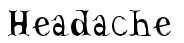 |
| FONT_5 |  |
| FONT_6 | 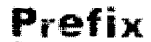 |
| FONT_7 |  |
| FONT_8 |  |
| FONT_9 |  |
| FONT_10 |  |
使用方法:
from easy_captcha import SpecCaptcha, FONT_1, FONT_2

captcha = SpecCaptcha(130, 48, 5)

# 设置内置字体
captcha.set_font(FONT_1, size=32)

# 也可以使用系统字体(需要PIL.ImageFont支持)
from PIL import ImageFont
captcha._font = ImageFont.truetype("arial.ttf", 32)
5.4.输出 base64 编码
from easy_captcha import SpecCaptcha

captcha = SpecCaptcha(130, 48, 5)
base64_str = captcha.to_base64()

# 如果不想要base64的头部data:image/png;base64,
base64_str = captcha.to_base64("")  # 加一个空的参数即可
5.5.输出到文件
from easy_captcha import SpecCaptcha
from io import BytesIO

captcha = SpecCaptcha(130, 48, 5)

# 输出到文件
with open('captcha.png', 'wb') as f:
    stream = BytesIO()
    captcha.out(stream)
    f.write(stream.getvalue())
6.完整示例
查看 examples/ 目录获取更多示例:
basic_usage.py- 基本使用示例all_types_demo.py- 所有验证码类型演示
运行示例:
# 运行基本示例
python examples/basic_usage.py

# 运行完整演示
python examples/all_types_demo.py
所有生成的验证码图片将保存到 ./out/ 目录。
7.许可证
Apache License 2.0
8.致谢
本项目是 EasyCaptcha 的 Python 实现版本。
9.贡献
欢迎提交 Issue 和 Pull Request!
Release history Release notifications | RSS feed


Download files
Download the file for your platform. If you're not sure which to choose, learn more about installing packages.
Source Distribution
Built Distribution
Filter files by name, interpreter, ABI, and platform.
If you're not sure about the file name format, learn more about wheel file names.
Copy a direct link to the current filters
File details
Details for the file easy_captcha_python-0.1.0.tar.gz.
File metadata
- Download URL: easy_captcha_python-0.1.0.tar.gz
- Upload date:
- Size: 341.7 kB
- Tags: Source
- Uploaded using Trusted Publishing? No
- Uploaded via: twine/6.2.0 CPython/3.12.12
File hashes
| Algorithm | Hash digest | |
|---|---|---|
| SHA256 |
60ae42f7b7c51cb0ed19b9df560d4c0511cb6b6346a49d72415a77d44f637d2e
|
|
| MD5 |
bb4fa19630e1d2439c48603974cfbe71
|
|
| BLAKE2b-256 |
198f27a17fb25d6463bb1ae36b1c4c4e35e6e3d5eeb76370f24fadfae5076346
|
File details
Details for the file easy_captcha_python-0.1.0-py3-none-any.whl.
File metadata
- Download URL: easy_captcha_python-0.1.0-py3-none-any.whl
- Upload date:
- Size: 345.5 kB
- Tags: Python 3
- Uploaded using Trusted Publishing? No
- Uploaded via: twine/6.2.0 CPython/3.12.12
File hashes
| Algorithm | Hash digest | |
|---|---|---|
| SHA256 |
05685e2bdffc5bca49f26de0d9415c2c10454cc0408f25d05a0bcaf2e6aa5c31
|
|
| MD5 |
c0cee2cdfb54250f09c11277f72b8954
|
|
| BLAKE2b-256 |
cd2a53def54a76a5b8ebde2a39d28567ca5b98030df1e335cbb5cf994ae216f1
|






