
Python graphic captcha generation library supporting GIF, Chinese characters, arithmetic and more

Project description
EasyCaptcha-Python


Python graphic captcha generation library supporting GIF, Chinese characters, arithmetic, and other types. Suitable for Python Web, desktop applications, and more.
This is a Python implementation of the EasyCaptcha Java version.
1. Introduction
Python graphic captcha supporting GIF, Chinese characters, arithmetic, and other types. Compatible with Flask, Django, FastAPI, and other web frameworks.
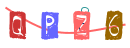
2. Demo
PNG Type:


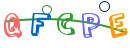
GIF Type:



Arithmetic Type:



Chinese Type:
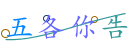
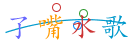
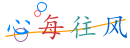
Built-in Fonts:


3. Installation
3.1. Install via pip
pip install easy-captcha-python
3.2. Install from source
git clone https://github.com/Savlgoodman/EasyCaptcha-Python
cd easy-captcha-python
pip install -e .
4. Usage
4.1. Quick Start
from easy_captcha import SpecCaptcha
from io import BytesIO

# Three parameters: width, height, character count
captcha = SpecCaptcha(130, 48, 5)

# Get captcha text
code = captcha.text()
print(f"Captcha: {code}")

# Write to file
with open('captcha.png', 'wb') as f:
    stream = BytesIO()
    captcha.out(stream)
    f.write(stream.getvalue())
4.2. Use with Flask
from flask import Flask, session, make_response
from easy_captcha import SpecCaptcha
from io import BytesIO

app = Flask(__name__)
app.secret_key = 'your-secret-key'

@app.route('/captcha')
def captcha():
    # Create captcha
    cap = SpecCaptcha(130, 48, 5)
    # Store captcha text in session
    session['captcha'] = cap.text().lower()

    # Output image
    stream = BytesIO()
    cap.out(stream)

    response = make_response(stream.getvalue())
    response.headers['Content-Type'] = 'image/png'
    return response

@app.route('/verify/<code>')
def verify(code):
    # Get captcha from session
    if code.lower() == session.get('captcha'):
        return 'Verification successful'
    return 'Verification failed'
Frontend HTML:
<img src="/captcha" width="130px" height="48px" />
4.3. Use with Django
from django.http import HttpResponse
from easy_captcha import SpecCaptcha
from io import BytesIO

def captcha(request):
    cap = SpecCaptcha(130, 48, 5)
    # Store captcha text in session
    request.session['captcha'] = cap.text().lower()

    # Output image
    stream = BytesIO()
    cap.out(stream)

    return HttpResponse(stream.getvalue(), content_type='image/png')
4.4. Use with FastAPI
from fastapi import FastAPI, Response
from easy_captcha import SpecCaptcha
from io import BytesIO

app = FastAPI()

@app.get("/captcha")
async def captcha():
    cap = SpecCaptcha(130, 48, 5)
    code = cap.text()

    stream = BytesIO()
    cap.out(stream)

    return Response(content=stream.getvalue(), media_type="image/png")
4.5. Frontend-Backend Separated Projects
For frontend-backend separated projects, it is recommended to return base64 encoded images:
from flask import Flask, jsonify, request
import uuid

app = Flask(__name__)
# Using dictionary as simulation, Redis is recommended for production
captcha_store = {}

@app.route('/captcha')
def get_captcha():
    from easy_captcha import SpecCaptcha

    cap = SpecCaptcha(130, 48, 5)
    code = cap.text().lower()
    key = str(uuid.uuid4())

    # Store captcha (recommend storing in Redis with expiration in production)
    captcha_store[key] = code

    # Return key and base64 image
    return jsonify({
        'key': key,
        'image': cap.to_base64()
    })

@app.route('/login', methods=['POST'])
def login():
    data = request.json
    ver_key = data.get('verKey')
    ver_code = data.get('verCode', '').lower()

    # Verify captcha
    if ver_code == captcha_store.get(ver_key):
        # Remove after successful verification
        captcha_store.pop(ver_key, None)
        return jsonify({'success': True})
    return jsonify({'success': False, 'message': 'Captcha error'})
Frontend example:
<img id="verImg" width="130px" height="48px" />

<script>
    var verKey;
    // Fetch captcha
    fetch("/captcha")
        .then((res) => res.json())
        .then((data) => {
            verKey = data.key;
            document.getElementById("verImg").src = data.image;
        });

    // Login
    fetch("/login", {
        method: "POST",
        headers: { "Content-Type": "application/json" },
        body: JSON.stringify({
            verKey: verKey,
            verCode: "8u6h",
            username: "admin",
            password: "admin",
        }),
    })
        .then((res) => res.json())
        .then((data) => console.log(data));
</script>
5. More Settings
5.1. Captcha Types
from easy_captcha import (
    SpecCaptcha, GifCaptcha, ChineseCaptcha,
    ChineseGifCaptcha, ArithmeticCaptcha
)

# PNG type
captcha = SpecCaptcha(130, 48, 5)
code = captcha.text()  # Get captcha text
chars = captcha.text_char()  # Get captcha character array

# GIF type
captcha = GifCaptcha(130, 48, 5)

# Chinese type
captcha = ChineseCaptcha(130, 48, 4)

# Chinese GIF type
captcha = ChineseGifCaptcha(130, 48, 4)

# Arithmetic type
captcha = ArithmeticCaptcha(130, 48, 2)
captcha.len = 3  # Number of digits for arithmetic, default is two
formula = captcha.get_arithmetic_string()  # Get arithmetic formula: 3+2=?
result = captcha.text()  # Get result: 5

# Output captcha
from io import BytesIO
stream = BytesIO()
captcha.out(stream)
Note:
For arithmetic captcha,lenrepresents the number of digits in the operation, while for other captchaslenrepresents the number of characters. Thetext()method for arithmetic captcha returns the result of the formula. For arithmetic captcha, you should store the result in session, not the formula itself.
5.2. Character Types
| Type | Description |
|---|---|
| TYPE_DEFAULT | Numbers and letters |
| TYPE_ONLY_NUMBER | Numbers only |
| TYPE_ONLY_CHAR | Letters only |
| TYPE_ONLY_UPPER | Uppercase only |
| TYPE_ONLY_LOWER | Lowercase only |
| TYPE_NUM_AND_UPPER | Numbers and uppercase |
Usage:
from easy_captcha import SpecCaptcha, TYPE_ONLY_NUMBER

captcha = SpecCaptcha(130, 48, 5)
captcha.char_type = TYPE_ONLY_NUMBER
Only effective for
SpecCaptchaandGifCaptcha.
5.3. Font Settings
Built-in fonts:
| Font | Preview |
|---|---|
| FONT_1 | 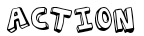 |
| FONT_2 |  |
| FONT_3 | 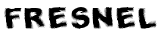 |
| FONT_4 | 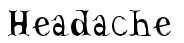 |
| FONT_5 |  |
| FONT_6 | 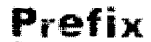 |
| FONT_7 |  |
| FONT_8 | 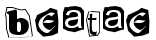 |
| FONT_9 |  |
| FONT_10 |  |
Usage:
from easy_captcha import SpecCaptcha, FONT_1, FONT_2

captcha = SpecCaptcha(130, 48, 5)

# Set built-in font
captcha.set_font(FONT_1, size=32)

# You can also use system fonts (requires PIL.ImageFont support)
from PIL import ImageFont
captcha._font = ImageFont.truetype("arial.ttf", 32)
5.4. Output base64
from easy_captcha import SpecCaptcha

captcha = SpecCaptcha(130, 48, 5)
base64_str = captcha.to_base64()

# If you don't want the base64 header "data:image/png;base64,"
base64_str = captcha.to_base64("")  # Just pass an empty parameter
5.5. Output to File
from easy_captcha import SpecCaptcha
from io import BytesIO

captcha = SpecCaptcha(130, 48, 5)

# Write to file
with open('captcha.png', 'wb') as f:
    stream = BytesIO()
    captcha.out(stream)
    f.write(stream.getvalue())
6. Complete Examples
Check the examples/ directory for more examples:
basic_usage.py- Basic usage exampleall_types_demo.py- All captcha types demo
Run examples:
# Run basic example
python examples/basic_usage.py

# Run full demo
python examples/all_types_demo.py
All generated captcha images will be saved to the ./out/ directory.
7. License
Apache License 2.0
8. Acknowledgments
This project is a Python implementation of EasyCaptcha.
9. Contributing
Issues and Pull Requests are welcome!
10. References
For more detailed documentation, please refer to the Usage Guide.
Release history Release notifications | RSS feed


Download files
Download the file for your platform. If you're not sure which to choose, learn more about installing packages.
Source Distribution
Built Distribution
Filter files by name, interpreter, ABI, and platform.
If you're not sure about the file name format, learn more about wheel file names.
Copy a direct link to the current filters
File details
Details for the file easy_captcha_python-1.0.0.tar.gz.
File metadata
- Download URL: easy_captcha_python-1.0.0.tar.gz
- Upload date:
- Size: 342.6 kB
- Tags: Source
- Uploaded using Trusted Publishing? No
- Uploaded via: twine/6.2.0 CPython/3.13.11
File hashes
| Algorithm | Hash digest | |
|---|---|---|
| SHA256 |
4432f1676a0d30a3077d345252eeb8638bbddc322d11db42c516d0b08e7f715e
|
|
| MD5 |
8282337b8751d8440746cba237cdff92
|
|
| BLAKE2b-256 |
1b54e217584d6c5b91eb29647542d85e89d6b7929a247cf6d4e1ba83b581b4a2
|
File details
Details for the file easy_captcha_python-1.0.0-py3-none-any.whl.
File metadata
- Download URL: easy_captcha_python-1.0.0-py3-none-any.whl
- Upload date:
- Size: 345.5 kB
- Tags: Python 3
- Uploaded using Trusted Publishing? No
- Uploaded via: twine/6.2.0 CPython/3.13.11
File hashes
| Algorithm | Hash digest | |
|---|---|---|
| SHA256 |
4c47045fcf360288a1456dcf5e65302b815779fd87841b8cfd9c73f067794e2f
|
|
| MD5 |
4cf10a9d0555847c928407be57fcbbbd
|
|
| BLAKE2b-256 |
284c74fee6e4f47bd937b0908f5e6966537921fd9747de29d9ab0fa380400677
|






