
EasySpeak 

Voice control for Linux desktops. Fully local, no cloud, Wayland-native.
Say "Hey Jarvis" and control your desktop with your voice.








⚠️ Early development. This project works but is not polished. Expect bugs, incomplete docs, and changes without notice.
Why EasySpeak?
Linux desktop voice control is a gap. Talon exists but has a steep learning curve and costs money for the full version. Most other tools are X11-only, abandoned, or cloud-dependent.
EasySpeak is free and open source (GPL-3.0), fully local (no cloud, no accounts), Wayland-native, simple ("Hey Jarvis, open downloads"), and extensible (drop a Python file in plugins/). Built for people with RSI, accessibility needs, hands-busy workflows, or anyone who wants to talk to their computer.
- Wake word activation ("Hey Jarvis")
- Mouse grid and experimental head tracking
- Browser control, dictation, app launcher, media and system controls
- pyopen-wakeword + Parakeet (or Whisper) + Piper, all on-device
Demo
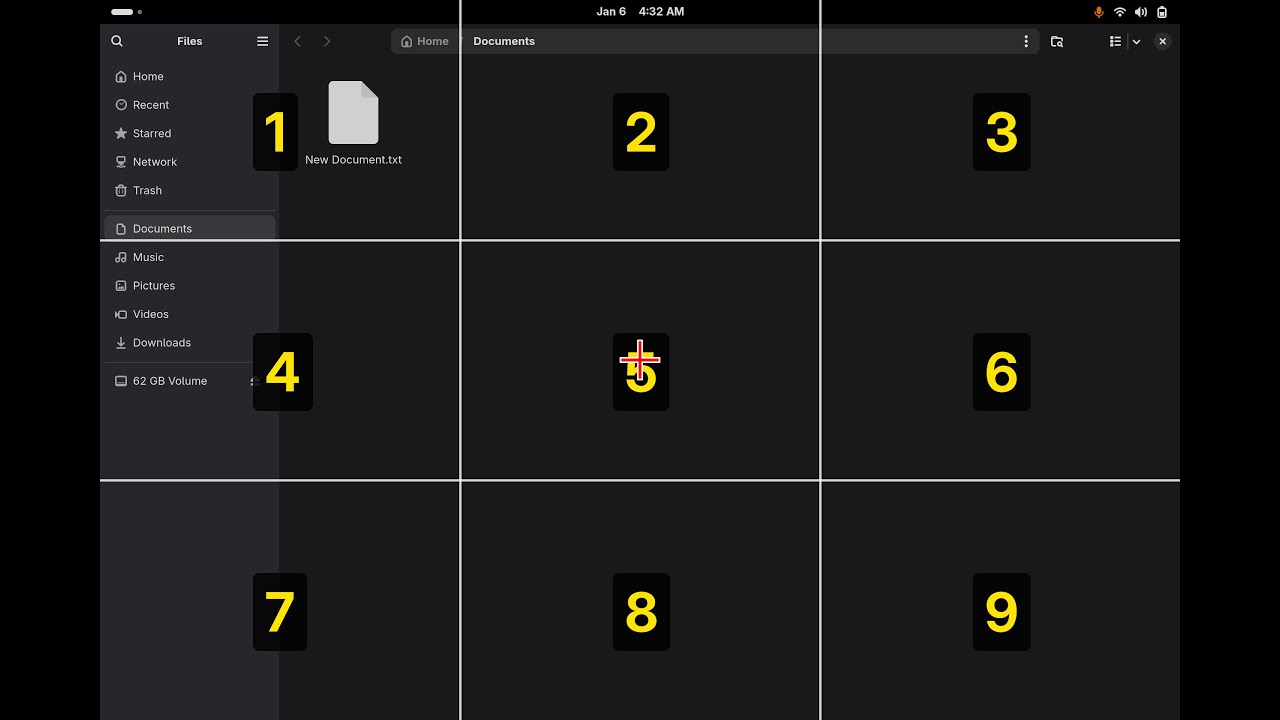
Matt Hartley walks through the current state of EasySpeak. See also the first demo from the start of the project.
Quickstart
Requirements: Linux on Wayland with GNOME Shell 47+ or KDE Plasma 6 (what works where), Python 3.10–3.14 (tested against 3.10, 3.11, 3.12, 3.13, and 3.14), a microphone, and ~2 GB disk for models. Tested on Fedora 43.
# 1. System packages (Fedora; see the docs for the full list)
sudo dnf install python3 python3-devel gcc portaudio-devel \
  pipewire-utils wireplumber at-spi2-core python3-gobject qutebrowser \
  glib2 ffmpeg-free pulseaudio-utils sound-theme-freedesktop

# 2. Get EasySpeak and run it (uv manages the virtualenv for you)
git clone https://github.com/ctsdownloads/easyspeak.git ~/easyspeak
cd ~/easyspeak
uv run easyspeak
You also need Piper TTS installed for voice feedback. See the Installation guide for the venv-based path, head tracking, and full details.
Prefer prebuilt packages? Grab the easyspeak app .deb/.rpm plus a language
pack (easyspeak-lang-en; German, Italian, French and Spanish packs exist too) from the
Releases page and install them
together — a self-contained, offline install (Python runtime, piper, GNOME
extension, and speech models). See the
Packaging guide.
Then say "Hey Jarvis" followed by a command. Say "help" to list all commands.
Documentation
- Installation — system packages, Python, Piper TTS
- Usage — running the daemon, CLI flags, configuration
- Commands — the full command reference
- Writing plugins — extend EasySpeak with a Python file
- Troubleshooting — common problems and fixes
- How it works — the architecture
- API reference — generated from the source docstrings
- Contributing — how to set up a dev environment and submit changes
- License — GPL-3.0
Acknowledgments
- pyopen-wakeword — Wake word detection
- faster-whisper — Speech recognition
- Piper — Text-to-speech (we use the last standalone binary from the original rhasspy/piper repo)
- Talon — Inspiration for voice control concepts
1 maintainer

Metadata
1 maintainer
Release files for easyspeak-linux 0.13.0
For a detailed explanation of source distributions (sdists) and built distributions (wheels), please see the package formats documentation.
Source distribution (sdist)
| File | Size | Uploaded | |
|---|---|---|---|
| easyspeak_linux-0.13.0.tar.gz | 185.2 kB | Details |
Built distribution (wheel)
| File | Interpreter | ABI | Platform | Reset |
|---|---|---|---|---|
| easyspeak_linux-0.13.0-py3-none-any.whl | Python 3 | none | any | Details |
Total release size: 392.4 kB
Release files / easyspeak_linux-0.13.0.tar.gz
| Download URL | easyspeak_linux-0.13.0.tar.gz |
|---|---|
| Size | 185.2 kB |
| Tags | Source |
|
SHA-256 checksum How to use checksums |
55e2db2dd575cd391be72d926b41e7f3d54567c97154e022d7922c53ba9c7daa
|
|
BLAKE2b-256 checksum How to use checksums |
52a6393ae56fef63b9d93a0527bdaac13bfcfbee4225c3c2d1a4b5f695d60c5d
|
| Upload date | |
|
Uploaded using Trusted Publishing? What is trusted publishing? |
Yes |
| Uploaded via |
twine/7.0.0 CPython/3.13.14
|
Provenance
Provenance describes where a file came from. On PyPI, provenance is shared via attestations, which provide a verifiable record of the build or publishing details. View details, limitations and caveats.


PyPI Publish Attestation
PyPI verified that this artifact, at this checksum, originated from the publisher listed below.
Signed by GitHub Actions, verified by PyPI on Oct 11, 2026.
Transparency logRelease files / easyspeak_linux-0.13.0-py3-none-any.whl
| Download URL | easyspeak_linux-0.13.0-py3-none-any.whl |
|---|---|
| Size | 207.3 kB |
| Tags | Python 3 |
|
SHA-256 checksum How to use checksums |
a866303942a8c5f5dbe3c9e2c0f1604da356591542b0e33a768cea26afa055ba
|
|
BLAKE2b-256 checksum How to use checksums |
8fc78e2e7d11d7039a3d4a9989f311e53867e2d569284033479d2421e577dba0
|
| Upload date | |
|
Uploaded using Trusted Publishing? What is trusted publishing? |
Yes |
| Uploaded via |
twine/7.0.0 CPython/3.13.14
|
Provenance
Provenance describes where a file came from. On PyPI, provenance is shared via attestations, which provide a verifiable record of the build or publishing details. View details, limitations and caveats.
PyPI Publish Attestation
PyPI verified that this artifact, at this checksum, originated from the publisher listed below.
Signed by GitHub Actions, verified by PyPI on Oct 11, 2026.
Transparency log













