
Voice control for Linux desktops. Fully local, no cloud, Wayland-native.
Verified details
These details have been verified by PyPIProject links
GitHub Statistics
Maintainers

Project description
EasySpeak
Voice control for Linux desktops. Fully local, no cloud, Wayland-native.
Say "Hey Jarvis" and control your desktop with your voice.






⚠️ Early development. This project works but is not polished. Expect bugs, incomplete docs, and changes without notice.
Why EasySpeak?
Linux desktop voice control is a gap. Talon exists but has a steep learning curve and costs money for the full version. Most other tools are X11-only, abandoned, or cloud-dependent.
EasySpeak is:
- Free and open source - GPL-3.0 licensed, no paywalls
- Fully local - No cloud, no accounts, no data leaving your machine
- Wayland-native - Works on modern GNOME desktops where X11 tools fail
- Simple - Say "Hey Jarvis, open downloads" and it works
- Extensible - Drop a Python file in plugins/ to add commands
Built for people with RSI, accessibility needs, hands-busy workflows, or anyone who wants to talk to their computer.
Features
Current and in active development:
- Wake word activation - Hands-free with "Hey Jarvis"
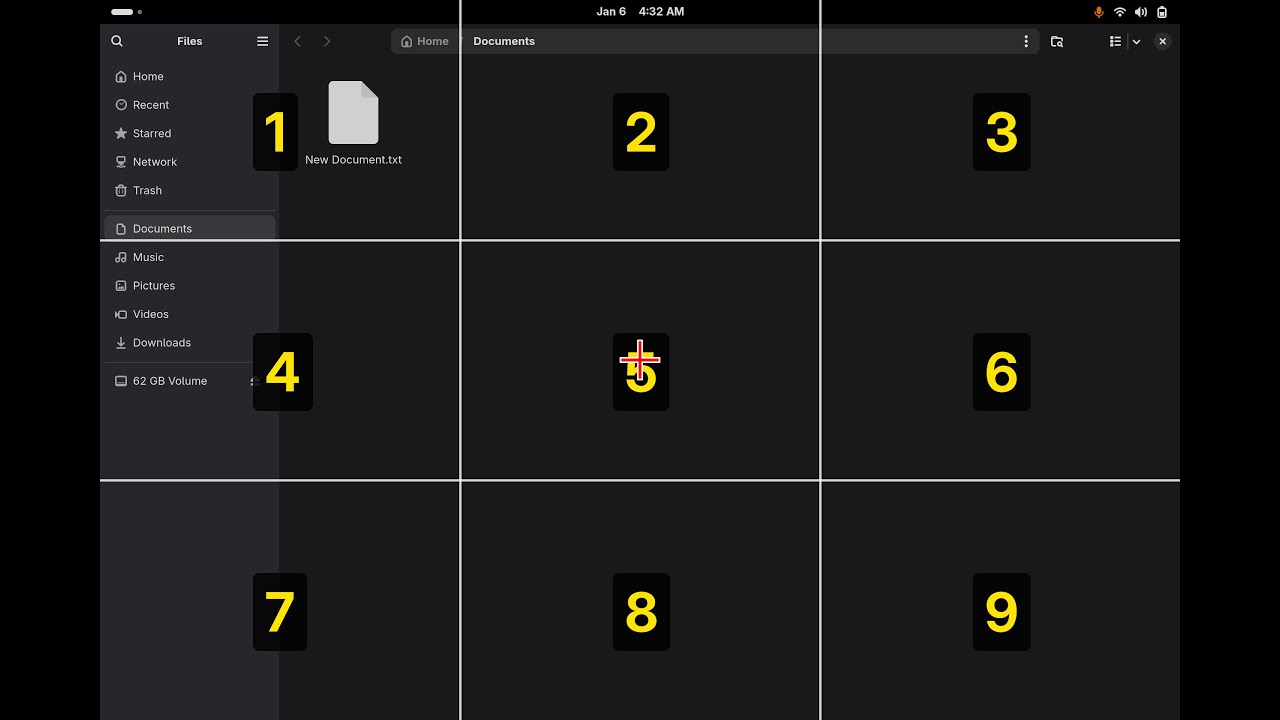
- Mouse grid - Navigate anywhere on screen with voice ("grid", "3 7 5", "click")
- Head tracking - Control cursor with head movement (experimental)
- Browser control - Qutebrowser integration with link hints, tabs, scrolling
- Dictation - Voice-to-text in any text field with punctuation commands
- App launcher - Open and close applications by name
- Media control - Play, pause, skip via MPRIS
- System controls - Volume, brightness, do not disturb
- Fully local - OpenWakeWord + Whisper + Piper, no cloud services
- Wayland-native - Works properly on modern Linux desktops
- Plugin architecture - Easy to extend
Demo
Click the thumbnail to watch the demo video:
Terminal output:

Mouse grid (Files):

Mouse grid (Browser):

Browser (Numbers click navigation):

Requirements
- Linux with GNOME Shell 47+ on Wayland
- Python 3.12 (not 3.13 and 3.14 - see installation notes)
- Working microphone
- ~2GB disk space for models
Tested on Fedora 43.
Installation
Fedora 43's default python3 is 3.14. Unfortunately, we depend on a few Google packages that are not available for Python 3.13+ yet.
sudo dnf install python3.12
python3.12 --version  # Verify it's installed
1. System Packages
sudo dnf install \
  pipewire-utils \
  wireplumber \
  at-spi2-core \
  python3-gobject \
  qutebrowser \
  glib2 \
  ffmpeg-free \
  pulseaudio-utils \
  sound-theme-freedesktop \
  portaudio-devel \
  python3.12-devel \
  gcc
2. Python Packages
python3.12 -m venv ~/easyspeak-venv
source ~/easyspeak-venv/bin/activate
pip install faster-whisper openwakeword numpy pyaudio
cd ~/easyspeak
pip install -e .
If you use uv you can ignore the steps that create a virtual environment and simply run:
uv run easyspeak
uv will transparently create and update a virtual environment, and run easyspeak from in there.
3. Piper TTS
mkdir -p ~/.local/bin
cd ~/.local/bin
wget https://github.com/rhasspy/piper/releases/download/2023.11.14-2/piper_linux_x86_64.tar.gz
tar xzf piper_linux_x86_64.tar.gz
rm piper_linux_x86_64.tar.gz

echo 'export PATH="$HOME/.local/bin/piper:$PATH"' >> ~/.bashrc
source ~/.bashrc

mkdir -p ~/.local/share/piper
cd ~/.local/share/piper
wget -O en_US-amy-medium.onnx \
  "https://huggingface.co/rhasspy/piper-voices/resolve/v1.0.0/en/en_US/amy/medium/en_US-amy-medium.onnx"
wget -O en_US-amy-medium.onnx.json \
  "https://huggingface.co/rhasspy/piper-voices/resolve/v1.0.0/en/en_US/amy/medium/en_US-amy-medium.onnx.json"
4. Clone Repository
git clone https://github.com/ctsdownloads/easyspeak.git ~/easyspeak
cd ~/easyspeak
5. GNOME Shell Extension
mkdir -p ~/.local/share/gnome-shell/extensions/easyspeak-grid@local
cp extension.js metadata.json ~/.local/share/gnome-shell/extensions/easyspeak-grid@local/
Log out and back in (GNOME Shell must restart to detect new extensions).
Then enable:
gnome-extensions enable easyspeak-grid@local
6. Enable Accessibility
gsettings set org.gnome.desktop.interface toolkit-accessibility true
7. Configure Qutebrowser
EasySpeak uses number hints (not letters). Configure qutebrowser:
mkdir -p ~/.config/qutebrowser
cat > ~/.config/qutebrowser/config.py << 'EOF'
config.load_autoconfig(False)
c.hints.chars = '0123456789'
EOF
Usage
source ~/easyspeak-venv/bin/activate   # Now python = venv's python3.12
easyspeak                              # the project execution script
Activate the venv each time you open a new terminal.
Say "Hey Jarvis" followed by a command.
Commands
Mouse Grid
Screen splits into a 3x3 layout (like a phone keypad):
1 2 3
4 5 6
7 8 9
Say "grid" to show it. Say a number to zoom into that zone. Keep zooming until you're over your target, then "click".
Chain numbers to go faster: "3 6 3" zooms three times at once.
Drag and drop:
- Navigate to the thing you want to drag
- Say "mark" - grabs it (mousedown)
- Grid resets to full screen
- Navigate to where you want to drop it
- Say "drag" - releases it (mouseup)
| Command | Action |
|---|---|
| grid | Show grid |
| 1-9 | Zoom to zone |
| 3 7 5 | Chain zones |
| click | Left click |
| double click | Double click |
| right click | Right click |
| middle click | Middle click |
| up/down/left/right | Nudge position |
| left 5, down 3, etc. | Nudge with repeat |
| scroll up/down/left/right | Scroll at cursor |
| scroll down 3, etc. | Scroll with repeat |
| mark | Grab (start drag) |
| drag | Drop (end drag) |
| again | Reopen at last spot |
| close | Hide grid |
Head Tracking (Experimental)
Requires webcam and additional dependencies (pip install sixdrepnet opencv-python or pip install .[head-tracking], or run via uv run --extra head-tracking easyspeak).
| Command | Action |
|---|---|
| start tracking | Begin head tracking |
| stop tracking | End tracking |
| freeze | Lock cursor position |
| go | Resume tracking |
| recalibrate | Reset center position |
| nudge up/down/left/right | Fine tune when frozen |
| click | Left click |
| double click | Double click |
| right click | Right click |
Browser (Qutebrowser)
| Command | Action |
|---|---|
| browser | Enter browser mode |
| numbers / hints | Show link hints |
| zero two | Click hint 02 |
| new tab | Open new tab |
| close tab | Close current tab |
| tab left/right | Switch tabs |
| tab [number] | Jump to specific tab |
| undo tab | Restore closed tab |
| back / forward | Navigate history |
| reload | Refresh page |
| scroll up/down | Scroll page |
| page up/down | Scroll by page |
| top / bottom | Go to top/bottom |
| find [text] | Search in page |
| find next/previous | Navigate matches |
| search [query] | Web search (DuckDuckGo) |
| go to [url] | Navigate to URL |
| open youtube | Open bookmark |
| exit browser | Leave browser mode |
Built-in bookmarks: youtube, google, gmail, github, reddit, twitter, facebook, amazon, netflix, duckduckgo
Dictation
| Command | Action |
|---|---|
| notes | Start dictation mode |
| stop notes | End dictation mode |
| comma | Insert , |
| period | Insert . |
| question mark | Insert ? |
| exclamation mark | Insert ! |
| colon | Insert : |
| semicolon | Insert ; |
| apostrophe | Insert ' |
| quote | Insert " |
| dash | Insert - |
| new line | Insert newline |
| new paragraph | Insert double newline |
| new sentence | Insert . and capitalize next |
| backspace | Delete character |
| space | Insert space |
| tab | Insert tab |
| at sign | Insert @ |
| hashtag | Insert # |
| percent | Insert % |
| asterisk | Insert * |
Apps
| Command | Action |
|---|---|
| open [app] | Launch application |
| close [app] | Close application |
Default apps in plugins/apps.py (edit to match your system):
- firefox, steam, spotify, calculator, settings, files, terminal, browser
These are just examples. Edit apps.py to add your own apps.
Files
| Command | Action |
|---|---|
| open documents | Open Documents folder |
| open downloads | Open Downloads folder |
| open pictures | Open Pictures folder |
| open music | Open Music folder |
| open videos | Open Videos folder |
| open home | Open home folder |
| open desktop | Open Desktop folder |
Media
| Command | Action |
|---|---|
| play | Resume playback |
| pause | Pause playback |
| next / skip | Next track |
| previous / back | Previous track |
System
| Command | Action |
|---|---|
| volume up/down | Adjust volume |
| mute | Toggle mute |
| brightness up/down | Adjust brightness |
| do not disturb on/off | Toggle notifications |
General
| Command | Action |
|---|---|
| help | List all commands |
| stop / exit / quit | Exit EasySpeak |
File Structure
easyspeak/
├── extension.js # GNOME Shell extension
├── metadata.json # Extension metadata
├── pyproject.toml
├── [1;38;2;36;114;200msrc[0m
│ ├── [1;38;2;36;114;200mcore[0m
│ │ ├── __init__.py
│ │ └── main.py # Main application
│ └── [1;38;2;36;114;200mplugins[0m
│ ├── __init__.py
│ ├── 00_eyetrack.py # Head tracking (experimental)
│ ├── 00_mousegrid.py # Grid overlay mouse control
│ ├── apps.py # Application launcher
│ ├── browser.py # Qutebrowser control
│ ├── dictation.py # Voice-to-text
│ ├── files.py # Folder navigation
│ ├── media.py # Playback controls
│ ├── system.py # Volume, brightness, DND
│ └── zz_base.py # Help and exit
└── [1;38;2;36;114;200mtests[0m
├── [1;38;2;36;114;200mcore[0m
│ └── test_main.py
└── [1;38;2;36;114;200mplugins[0m
└── test_apps.py
After installation, the extension is copied to:
~/.local/share/gnome-shell/extensions/easyspeak-grid@local/
├── extension.js
└── metadata.json
How It Works
- Wake word: OpenWakeWord detects "Hey Jarvis" instantly
- Speech-to-text: faster-whisper transcribes commands locally
- Text-to-speech: Piper provides voice feedback
- Mouse control: GNOME Shell extension with Clutter virtual input
- Browser scroll: JavaScript injection via qutebrowser IPC
- Dictation: AT-SPI accessibility framework
All processing happens locally. No data leaves your machine.
Writing Plugins
Drop a Python file in plugins/ and it gets loaded automatically.
NAME = "myplugin"
DESCRIPTION = "What it does"

COMMANDS = [
    "say hello - speaks a greeting",
]

def setup(core):
    """Called once at startup. Store core reference if needed."""
    pass

def handle(cmd, core):
    """Called for every voice command. Return True if handled, None to pass to next plugin."""
    if "say hello" in cmd:
        core.speak("Hello there!")
        return True
    return None
Core methods you can use:
core.speak("text")- text-to-speech responsecore.host_run(["cmd", "arg"])- run shell commandcore.transcribe(audio)- transcribe audio to textcore.wait_for_speech()- wait for user to start speakingcore.record_until_silence()- record until user stops
Loading order: Plugins load alphabetically. Use number prefixes to control order (00_mousegrid.py loads before apps.py).
Troubleshooting
"Failed to show grid - is extension enabled?"
gnome-extensions enable easyspeak-grid@local
# Then log out and back in
Dictation not working
gsettings set org.gnome.desktop.interface toolkit-accessibility true
# Log out and back in
Wake word not detecting
- Check microphone:
arecord -d 3 test.wav && aplay test.wav - Adjust
WAKE_THRESHOLDin core.py (lower = more sensitive)
Wake word triggers multiple times
Mic gain too high. Lower capture level:
alsamixer
# Press F6 to select your mic device
# Press Tab to switch to Capture
# Lower to ~70
Commands misheard
- Adjust
SILENCE_THRESHOLDin core.py - Speak clearly after the beep
Piper permission denied
chmod +x ~/.local/bin/piper/piper
chmod +x ~/.local/bin/piper/espeak-ng
pip install fails with PyAV/Cython errors
You're on Python 3.14 or 3.13. Use python3.12 with a venv instead:
sudo dnf install python3.12 python3.12-devel
python3.12 -m venv ~/easyspeak-venv
source ~/easyspeak-venv/bin/activate
pip install faster-whisper openwakeword numpy pyaudio
cd ~/easyspeak
pip install -e .
Contributing
See CONTRIBUTING.
License
GPL-3.0 License. See LICENSE for details.
Acknowledgments
- OpenWakeWord - Wake word detection
- faster-whisper - Speech recognition
- Piper - Text-to-speech (we use the last standalone binary from the original rhasspy/piper repo)
- Talon - Inspiration for voice control concepts
Project details
Verified details
These details have been verified by PyPIProject links
GitHub Statistics
Maintainers
Release history Release notifications | RSS feed

Download files
Download the file for your platform. If you're not sure which to choose, learn more about installing packages.
Source Distribution
Built Distribution
Filter files by name, interpreter, ABI, and platform.
If you're not sure about the file name format, learn more about wheel file names.
Copy a direct link to the current filters
File details
Details for the file easyspeak_linux-0.1.0.tar.gz.
File metadata
- Download URL: easyspeak_linux-0.1.0.tar.gz
- Upload date:
- Size: 128.9 kB
- Tags: Source
- Uploaded using Trusted Publishing? Yes
- Uploaded via: twine/6.1.0 CPython/3.13.7
File hashes
| Algorithm | Hash digest | |
|---|---|---|
| SHA256 |
5772d70076cab05eb18f928908bacf43ef30b240672a7e94a0bb8523cb3301f3
|
|
| MD5 |
11a7282d034eff7df6c01ed3eeb5b5e6
|
|
| BLAKE2b-256 |
6b914e32ede39f4af2b185a4c8544a50d55b927aeae6e955fdf8da6870c72869
|
Provenance
The following attestation bundles were made for easyspeak_linux-0.1.0.tar.gz:
Publisher:
publish.yml on ctsdownloads/easyspeak
-
Statement:
-
Statement type:
https://in-toto.io/Statement/v1 -
Predicate type:
https://docs.pypi.org/attestations/publish/v1 -
Subject name:
easyspeak_linux-0.1.0.tar.gz -
Subject digest:
5772d70076cab05eb18f928908bacf43ef30b240672a7e94a0bb8523cb3301f3 - Sigstore transparency entry: 928236352
- Sigstore integration time:
-
Permalink:
ctsdownloads/easyspeak@556365ac88bc72c0e5bd83a7328296f5b856424a -
Branch / Tag:
refs/tags/0.1.0 - Owner: https://github.com/ctsdownloads
-
Access:
public
-
Token Issuer:
https://token.actions.githubusercontent.com -
Runner Environment:
github-hosted -
Publication workflow:
publish.yml@556365ac88bc72c0e5bd83a7328296f5b856424a -
Trigger Event:
push
-
Statement type:
File details
Details for the file easyspeak_linux-0.1.0-py3-none-any.whl.
File metadata
- Download URL: easyspeak_linux-0.1.0-py3-none-any.whl
- Upload date:
- Size: 43.6 kB
- Tags: Python 3
- Uploaded using Trusted Publishing? Yes
- Uploaded via: twine/6.1.0 CPython/3.13.7
File hashes
| Algorithm | Hash digest | |
|---|---|---|
| SHA256 |
6acd6780ce3e60053af8912cd2ed49089d38dd0057699e03cc0eecaed985267f
|
|
| MD5 |
b3a2f38ad86347b60d7450f01adee3d8
|
|
| BLAKE2b-256 |
ead18e6e916c84a012388c3256bb4eeae4bff60f4053c33204f1005600c41e73
|
Provenance
The following attestation bundles were made for easyspeak_linux-0.1.0-py3-none-any.whl:
Publisher:
publish.yml on ctsdownloads/easyspeak
-
Statement:
-
Statement type:
https://in-toto.io/Statement/v1 -
Predicate type:
https://docs.pypi.org/attestations/publish/v1 -
Subject name:
easyspeak_linux-0.1.0-py3-none-any.whl -
Subject digest:
6acd6780ce3e60053af8912cd2ed49089d38dd0057699e03cc0eecaed985267f - Sigstore transparency entry: 928236356
- Sigstore integration time:
-
Permalink:
ctsdownloads/easyspeak@556365ac88bc72c0e5bd83a7328296f5b856424a -
Branch / Tag:
refs/tags/0.1.0 - Owner: https://github.com/ctsdownloads
-
Access:
public
-
Token Issuer:
https://token.actions.githubusercontent.com -
Runner Environment:
github-hosted -
Publication workflow:
publish.yml@556365ac88bc72c0e5bd83a7328296f5b856424a -
Trigger Event:
push
-
Statement type:






