
🎙️ EchoAI Helper


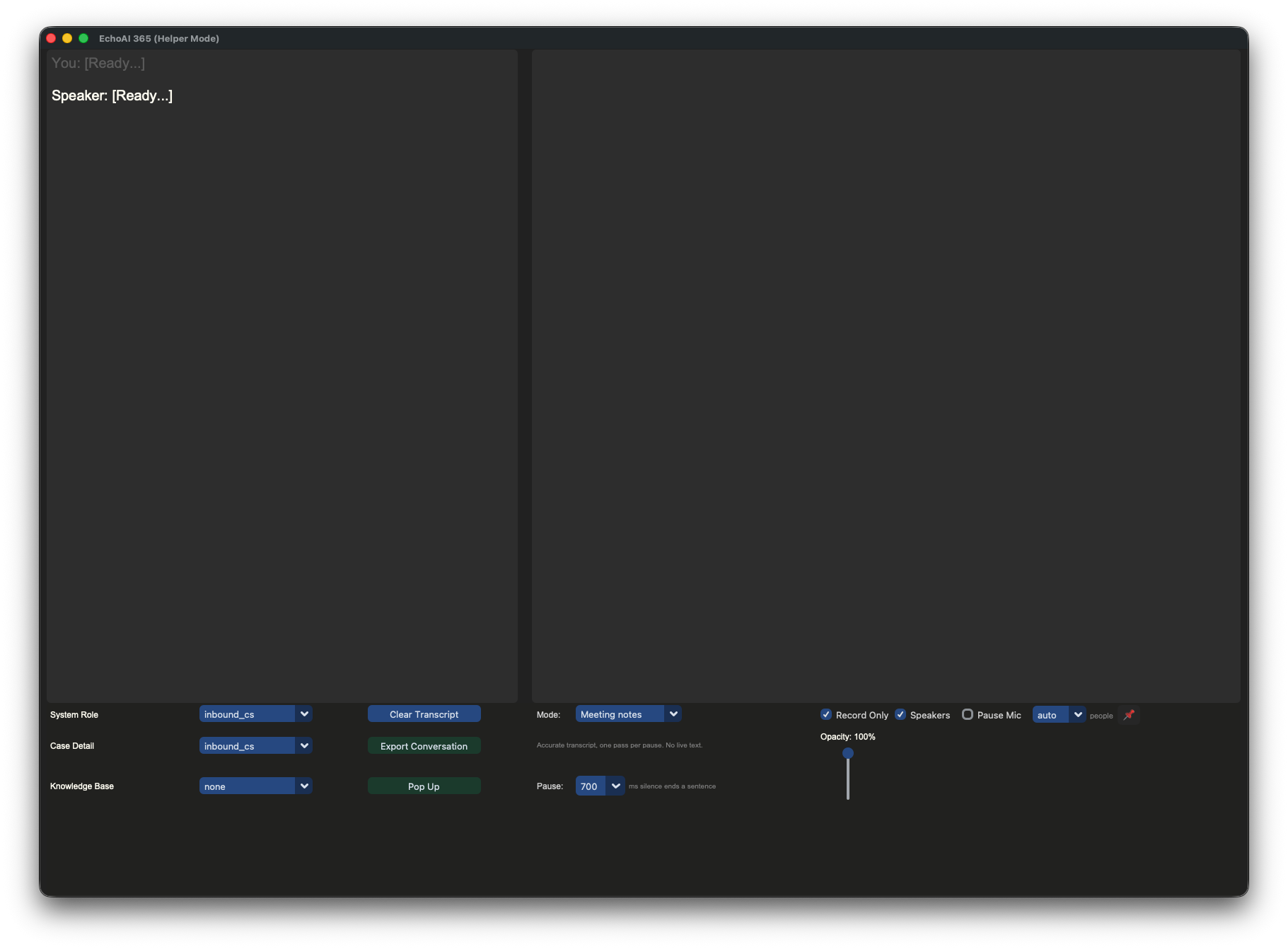
Real-time meeting transcription and interview assistance, running on your own machine. It records both sides of a conversation — your microphone and whatever the meeting app is playing — transcribes them as they happen, labels who is speaking, and exports readable notes.
Speech recognition is local. Audio never leaves the machine unless you ask a language model to clean up the finished transcript.

✨ What it does
- Local speech recognition — FunASR / SenseVoice, on-device, GPU-accelerated where one is available (Metal on Apple Silicon, CUDA on Windows)
- Automatic language detection — Mandarin, Cantonese, English, Japanese and Korean, switching per utterance, including mid-sentence code-switching
- Both sides of the call — your microphone and the far end, on separate tracks
- Speaker labelling — voices on the far-end track are told apart as the meeting runs, and re-grouped properly at export once you give it the real headcount
- Pause-based segmentation — sentences are cut where people actually pause, not on a fixed timer, so the model sees whole utterances
- Crash-safe recording — every settled sentence is written to disk as it is produced; a crash costs the last line, not the meeting
- LLM cleanup on export — an optional pass that fixes mis-heard words using the surrounding conversation, through an API key or through a coding-agent CLI on a subscription you already pay for
- Markdown and JSON export — Markdown to read, JSON as a complete record
- Noise kept out of the transcript — room noise that reaches the model comes back as a bare "."; 169 of 1312 lines in one real meeting, now dropped
- Pause your own track — muting yourself in the meeting app does not reach this one, and pausing roughly halves the model's work
- Recovers a lost microphone — a Bluetooth headset that drops out is detected and capture is rebuilt, rather than silently recording nothing
- Live reply suggestions — for interviews, where a prompt is wanted while the other person is still talking
💡 Two modes
| Meeting notes | Live interview | |
|---|---|---|
| Text appears | at each pause | as you speak (~0.6s) |
| Model calls | one per sentence | roughly three times as many |
| Best for | an accurate record | a prompt you can act on |
Switch in the app; the several settings that differ move together.
🎬 Demo
https://github.com/user-attachments/assets/0d627e4a-960b-4628-8bbc-8d892f02cfd1
⚡ Install
Before you start (macOS)
Two things a fresh Mac tends to be missing. Both are one command, and the first is easy to mistake for something having gone wrong.
Command Line Developer Tools. macOS ships stubs for git and the
compilers; touching one pops a dialog saying the tools must be installed. It
can appear part-way through an install, which reads like a failure and is not.
Get it over with first:
xcode-select --install
If they are already there it says so and exits non-zero, which looks like a failure and is not.
uv, which is how this is installed:
curl -LsSf https://astral.sh/uv/install.sh | sh
It fetches its own Python, which matters: this needs 3.12 or 3.13, and the Python on your Mac is probably 3.9 (Apple's) or 3.14 (Homebrew's).
Homebrew — optional, and what it changes
Not required. echoai-helper setup installs the virtual audio device either
way: with Homebrew if you have it, and otherwise by fetching the vendor's
package directly and verifying its checksum before anything runs.
Having it means the audio driver is tracked like anything else you installed,
so brew uninstall --cask blackhole-2ch removes it cleanly. Without it the
driver is still perfectly removable, just by hand.
/bin/bash -c "$(curl -fsSL https://raw.githubusercontent.com/Homebrew/install/HEAD/install.sh)"
macOS
Then:
uv tool install echoai-helper     # uv fetches a suitable Python itself
echoai-helper setup               # audio routing — one password prompt
echoai-helper install-launcher    # adds an icon to Launchpad, and opens it
After that, launch from Launchpad or run echoai-helper.
If the icon does nothing, the app is reporting something it cannot show
you. It writes everything to ~/Library/Logs/EchoAI Helper.log; the last few
lines say what stopped it:
tail -20 "$HOME/Library/Logs/EchoAI Helper.log"
Apple Silicon. Transcription runs on Metal and keeps up comfortably. Intel Macs install and run, but see known limitations — there is no Metal path, so they fall back to the CPU.
setup installs a virtual audio device and builds the Multi-Output that lets
you hear a meeting while it is being recorded. macOS asks for a password once,
because that installs an audio driver — nothing else needs a privilege, and
Audio MIDI Setup is not involved.
The app takes the audio output while it runs and gives it back silently when it
quits, including after a crash. echoai-helper setup --restore does it by hand;
--status shows what routing is in place.
Prefer Homebrew?
A formula is in packaging/ for a tap. Homebrew
can declare the virtual audio device as a dependency, which removes the one step
that needs a password.
Windows
powershell -c "irm https://astral.sh/uv/install.ps1 | iex"    # if you need uv
uv tool install echoai-helper
echoai-helper
No audio setup step: Windows exposes WASAPI loopback directly, so the far end of
a call is capturable without a virtual device. The macOS-only commands (setup,
install-launcher) report that there is nothing to do. See
known limitations — this path has not been re-tested since
the segmentation rework.
What has actually been tested
Stated precisely, because "should work" and "has been run" are different claims and the difference matters when you are deciding whether to install it.
| Install | Live meeting | Notes | |
|---|---|---|---|
| M4 Mac mini, 16GB, macOS 26.3, Python 3.12 | ✅ | ✅ | The development machine. Every measurement in this README comes from it. |
| Other Apple Silicon (M1–M3) | — | — | Same wheels, same Metal path. Expected to work; not run. |
| Intel Mac | ✅ resolves | ❌ | Installs — uv falls back to torch 2.2.2 — but no Metal, so CPU only. See known limitations. |
| Windows 10/11 | ✅ resolves | ❌ | Dependencies resolve. The capture path has not been run since the segmentation rework. |
"Live meeting" means real calls, in Mandarin, Cantonese and English, with the transcript exported afterwards — not a smoke test. The longest was 84 minutes and 1311 lines.
The Mac mini has no built-in microphone, so the microphone track has only been exercised through a Bluetooth headset and a wired input. Disconnecting and reconnecting that headset mid-recording is tested, because that is how the microphone was found to die silently in the first place.
If you run it somewhere not on this list, an issue saying so — working or not — is genuinely useful.
Upgrading
uv tool upgrade echoai-helper
Not uv tool install again — that is a no-op on something already installed
and says so, which is easy to read as "you are up to date" when you are not:
`echoai-helper` is already installed
If it lands on an older version than you expected, two separate caches can be responsible and they need different things.
uv keeps its own copy of the package index, and --refresh clears it:
uv tool install --force --refresh echoai-helper
--refresh is necessary and not sufficient. Without it, the previous version
came back minutes after the new one was live and listed. With it, one release
resolved immediately and the next still needed a minute or two of retrying, so
treat it as removing one obstacle rather than as a guarantee.
The other cache is PyPI's own propagation, and no flag beats that one — a
release published seconds ago may not be on the index yet, and the upgrade
reports Updated ... -> vX.Y.Z and looks entirely successful either way. Wait
a minute and run it again.
echoai-helper version is the check in both cases. Trust it over what the
installer printed.
Re-run echoai-helper install-launcher after upgrading if you use the
Launchpad icon. The bundle holds a generated script rather than a copy of the
program, so it keeps working across upgrades — but the icon and the launch
script itself are only rewritten when you run that again.
First run
Speech models (~1.5GB) download on first launch. Nothing else is needed.
Why uv rather than pip
Because this needs Python 3.12 or 3.13, and the Python you have is probably
neither. macOS ships 3.9; Homebrew currently installs 3.14. uv fetches a
suitable interpreter itself, and its builds include tkinter, so there is no
separate Tk step either.
If you try pip install echoai-helper on the wrong version you get:
ERROR: Could not find a version that satisfies the requirement echoai-helper
       (from versions: none)
ERROR: No matching distribution found for echoai-helper
which reads as "no such package". It means "not for this Python". Nothing is wrong with the name.
The upper bound is onnxruntime, which publishes no macOS arm64 wheel for 3.14.
The lower one is the vendored src/custom_speech_recognition, which imports
aifc and audioop — removed from the standard library in 3.13, and supplied
by backports that install only when they are missing.
🎯 Using it
- Open the app. If audio routing is not in place, it offers to finish it.
- Pick a mode, and set the number of people if you know it.
- Hold your meeting. Nothing needs touching — though Pause Mic is there for the stretches you are muted anyway, and it roughly halves the model's work. Wear headphones. On speakers your microphone hears the far end and files it under your own name; see Known limitations.
- Export — one dialog covers format, cleanup, which model to clean with, and merging over-split speakers.
Cleanup runs in the background with a progress bar and an estimate, and can be stopped: whatever finished is kept.
Choosing a cleanup backend
| Cost | Speed (measured) | |
|---|---|---|
API (conf.yaml) |
per token | 5–8s per batch of lines |
| Claude CLI | included in a subscription | 20–50s per batch |
Both are offered at export, and the dialog turns the per-batch figure into an estimate for the transcript in hand. The live reply suggestions always use the configured API — a CLI takes seconds per answer, which is too late to be useful while someone is still talking.
Past recordings
echoai-helper sessions              # list them
echoai-helper sessions --export 0   # export one again
echoai-helper sessions --delete 0
Re-exporting is the point: a different format, another pass of cleanup, a different number of speakers, without re-recording anything. An unfinished session from the last 12 hours is offered on the next launch.
⚙️ Configuration
Model settings live in conf.yaml; everything else is in the app. Installed
from a wheel the shipped copy sits inside the package, so make yourself an
editable one:
echoai-helper config # writes conf.yaml where you can reach it, and prints the path
That copy overrides the defaults. You will not usually need it — both values
below already ship as auto.
FunASR:
  model_name: "iic/SenseVoiceSmall"
  device: "auto"        # cuda, then mps, then cpu
  language: "auto"      # zh, en, yue, ja, ko

LLM:
  provider: "openai"    # openai | litellm | cli
Both auto values are load-bearing rather than lazy defaults:
device: "auto"— measured on an M4, dual-track real-time factor is 2.04 on cpu (falling behind twice over) against 0.35 on Metal. Landing on cpu by accident means transcription that cannot keep up. Naming a device explicitly is also wrong on every machine that does not have it, and this file travels.language: "auto"— pinning a language does not bias the model, it forces the syllables onto words of that language. A Cantonese call transcribed withlanguage: "en"comes back as fluent nonsense.
An OpenAI key is optional. Transcription runs on your machine and needs no account. The key is for the reply suggestions and the cleanup pass at export; the app asks for one the first time you use either, and remembers it.
To set it up front:
echoai-helper key
It is stored in the user config directory, readable only by you. A checkout's
own .llm or .env still works for development.
🔍 Troubleshooting
echoai-helper check-audio           # what is being captured, and from where
echoai-helper setup --status        # what routing is in place
Nothing from the far end (macOS). The meeting app has its own audio settings
and remembers them. Set its speaker to EchoAI Meeting.
Nothing from the microphone over Bluetooth. A Bluetooth headset can only send its microphone to one device; if it is on a phone call, the Mac gets silence. This now recovers on its own: the app notices within about five seconds that the device has stopped delivering, waits without touching anything while no microphone is available, and rebuilds capture as soon as one is. You will see it in the log:
[WARN] You: no audio for 31s — the device is gone. Rebuilding capture.
[INFO] You: capture restored on 'Your Headset'
You are muted in the meeting but still being transcribed. Expected — muting in Zoom or WeChat silences your outgoing audio, not this app's own input stream. Use Pause Mic. It resets to off every launch, deliberately: a pause that survived a restart would look like recording and not be.
More speakers than people. Expected during the meeting, and fixable afterwards. A voice print reflects what is being said as much as who is saying it, so the same person reading out a number and the same person talking come back as different speakers. Set the number of people before the meeting, or merge at export, where all the prints are clustered together instead of one utterance at a time.
The prints are recorded whether or not speaker labels are switched on, so turning labels off does not cost you the ability to sort the speakers out later.
🛠️ Development
git clone https://github.com/colakang/echoai_helper.git
cd echoai_helper
uv venv --python 3.12 .venv
uv pip install --python .venv/bin/python -e .
.venv/bin/python -m pytest tests/ -q
.venv/bin/python main.py            # run from the checkout
docs/macos-audio-setup.md covers the audio
routing, what has been measured, and where the sharp edges are.
📝 Known limitations
-
Use headphones if you record the microphone. Played through speakers, the far end lands in your own track. Nothing prevents a microphone hearing a loudspeaker. A meeting app appears to solve this, and does not: Teams and Zoom run echo cancellation on the stream they send, subtracting the signal they just played from the microphone before it goes out. That happens inside the app and applies to the audio it transmits. This app opens the input device separately through CoreAudio and receives the raw microphone — echo cancellation was never applied to it and could not be, because the meeting app has no idea this one exists.
Measured on a session recorded over speakers: the microphone was switched on 234 seconds in, and from then on 5 of 21 turns in the "You" track were the far end repeated back, one of them 0.89 similar to a "Speaker" turn within 0.1 seconds. Before the microphone was on, none of it happened.
Headphones remove the path entirely, which is why that is the advice rather than a setting. Pause Mic does the same thing for the stretches where you are only listening.
-
Recovering the microphone interrupts the meeting audio for ~0.4s. When a device dies, PortAudio can only be recovered by restarting it, which invalidates every open stream — so the far-end track is rebuilt too, whether or not anything was wrong with it. Measured at 378ms. It buys back a microphone track that would otherwise be dead for the rest of the call.
-
Live speaker labels are a rough guide; the export is where they are settled. Measured on one speaker replayed through the app, the voice print depends on what is being said, not only on who is saying it: two turns of ordinary speech score 0.741 against each other, two turns of read-out digits score 0.746 — and the same person's speech against their own digits scores 0.473, below the threshold that decides "same speaker". 82% of same-person pairs across different content are judged to be different people.
No threshold fixes that. On the same recording the same-person range (0.276–0.988) sits entirely inside the different-person range (0.276–0.820), so every setting either splits one person or merges two.
What does work is re-clustering at export, which sees all the voice prints at once and is given the real number of people, rather than deciding one utterance at a time. Set the headcount before the meeting, or merge at export — the voice prints are recorded either way, including when speaker labels are switched off.
Utterances shorter than 2 seconds carry no voice print at all and cannot be re-grouped afterwards. There is nothing measurable in audio that short; the gate is set where a speaker starts matching themselves more than they match a stranger.
-
The Windows capture path is untested since the segmentation rework. Its detector threshold was lowered to pass silence through, because segmentation now happens on pauses and a recogniser that only reports speech never delivers them — reasoned, not verified. Reports welcome.
-
Intel Macs fall back to the CPU. PyTorch has shipped no Intel-Mac build since 2.2.2, and there is no Metal path on Intel regardless;
uvresolves to that older torch and installs cleanly. But an M4 already measures a dual-track real-time factor of 2.04 on CPU — falling behind twice over — and an Intel CPU is slower again. Expect transcription not to keep up with a live meeting. Untested: reasoned from the wheel availability and the CPU measurement. -
macOS audio routing is a shared setting. Selecting the Multi-Output changes the output for every app, and macOS sometimes moves it back after sleep. Checked at every launch.
🤝 Contributing
Pull requests welcome; for anything substantial, open an issue first. See CONTRIBUTING.md.
🙌 Credits
- FunASR — speech recognition and speaker embeddings
- silero-vad — voice activity detection
- WhisperLiveKit — the LocalAgreement idea behind stable partial transcripts
- BlackHole — virtual audio device on macOS
- CustomTkinter — interface
- Ecoute — the original inspiration
- @zixing0131 — core audio processing
📞 Contact
📄 License
MIT — see LICENSE.
1 maintainer

Download files
Download the file for your platform. If you're not sure which to choose, learn more about installing packages.
Source Distribution
Built Distribution
Filter files by name, interpreter, ABI, and platform.
If you're not sure about the file name format, learn more about wheel file names.
Copy a direct link to the current filters
File details
Details for the file echoai_helper-1.5.3.tar.gz.
File metadata
- Download URL: echoai_helper-1.5.3.tar.gz
- Upload date:
- Size: 2.5 MB
- Tags: Source
- Uploaded using Trusted Publishing? No
- Uploaded via:
uv/0.10.8 {"installer":{"name":"uv","version":"0.10.8","subcommand":["publish"]},"python":null,"implementation":{"name":null,"version":null},"distro":{"name":"macOS","version":null,"id":null,"libc":null},"system":{"name":null,"release":null},"cpu":null,"openssl_version":null,"setuptools_version":null,"rustc_version":null,"ci":null}
File hashes
| Algorithm | Hash digest | |
|---|---|---|
| SHA256 |
b8e9d48743230bc2b17dca96004c02cdeea022f2164733c6a581cd00bafe0004
|
|
| MD5 |
2565f3b97a2cbcd2b1a02d4c561a3277
|
|
| BLAKE2b-256 |
8bc3db77c6714b00ce2ae78937c9396f1a734a6522ebc67543d171f32fe30564
|
File details
Details for the file echoai_helper-1.5.3-py3-none-any.whl.
File metadata
- Download URL: echoai_helper-1.5.3-py3-none-any.whl
- Upload date:
- Size: 2.4 MB
- Tags: Python 3
- Uploaded using Trusted Publishing? No
- Uploaded via:
uv/0.10.8 {"installer":{"name":"uv","version":"0.10.8","subcommand":["publish"]},"python":null,"implementation":{"name":null,"version":null},"distro":{"name":"macOS","version":null,"id":null,"libc":null},"system":{"name":null,"release":null},"cpu":null,"openssl_version":null,"setuptools_version":null,"rustc_version":null,"ci":null}
File hashes
| Algorithm | Hash digest | |
|---|---|---|
| SHA256 |
a6583617916b5b824ae59cae6acfd5da7d526782b8324ccad3548778e3257fc1
|
|
| MD5 |
57daf2b3c52d3a513bb4ea6d75a99059
|
|
| BLAKE2b-256 |
95eb6fb9b5fb9e01c18ceb79f7dacac653374237d6b323b25dc28cb46e37dbd5
|














