






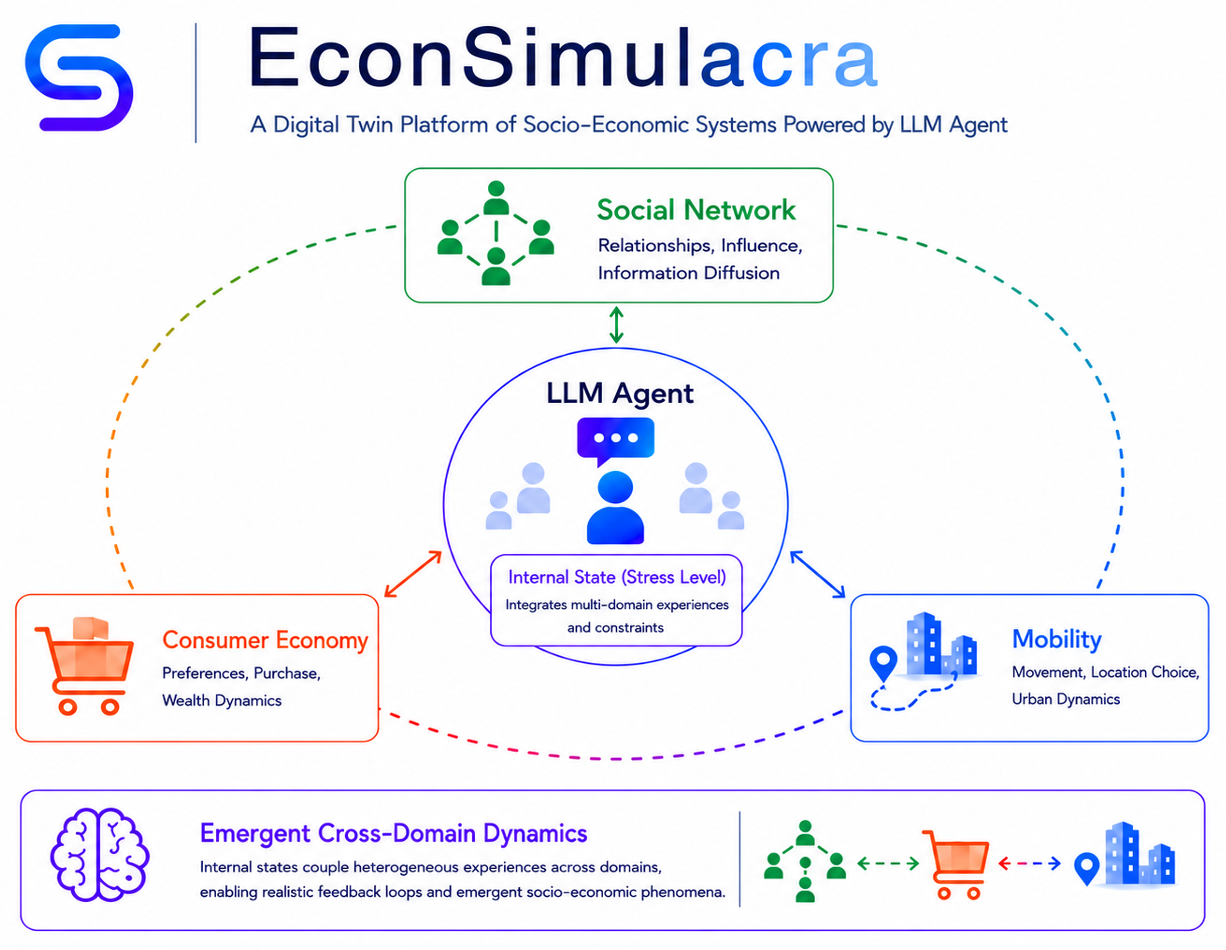
EconSimulacra is a simulation platform for studying complex socio-economic systems with large language model (LLM) agents. The framework enables researchers and practitioners to simulate:
- household consumption
- firm pricing strategies
- narrative diffusion through social networks
- spatial mobility of agents
By combining agent-based modeling with LLM reasoning, EconSimulacra allows researchers to study emergent macroeconomic phenomena from micro-level behavioral rules.
Key Features
- 🧠 LLM-driven agents with internal states and reasoning
- 🏙 Spatial grid environments with agent mobility
- 🛒 Market interactions (consumption, pricing)
- 🌐 Social network dynamics (follow, unfollow, narrative diffusion)
- 📊 Structured simulation logs for analysis
- ⚡ Parallel simulation execution
- 🧩 Modular architecture for extensibility
Live Demo
An interactive demo is available at https://econsimulacra.onrender.com — no installation or API key required.
The demo replays a pre-recorded simulation log in your browser. You can also upload your own .txt log file to visualize any simulation you have run locally.
| Panel | Description |
|---|---|
| 🗺 Grid Map | Agents move on a 10 × 10 grid. Emoji icons reflect stress level (😊😐😟😫) or sleep state (😴). Transaction popups appear above stores when orders are completed. |
| 🕸 Social Network | Force-directed graph of follow relationships between agents. |
| 📊 Macro Dashboard | Time-series charts of average wealth, item prices, and activity per step. |
| Agent Inspector | Detailed state of the selected agent (wealth, inventory, stress, last thought/tweet). |
| Event Feed | Scrolling stream of simulation events. |
Documentations & User Guides
Documentations are available on GitHub Pages.
Install
This package is available on pypi as econsimulacra
$ pip install econsimulacra
$ python
>> import econsimulacra
Conceptual Architecture
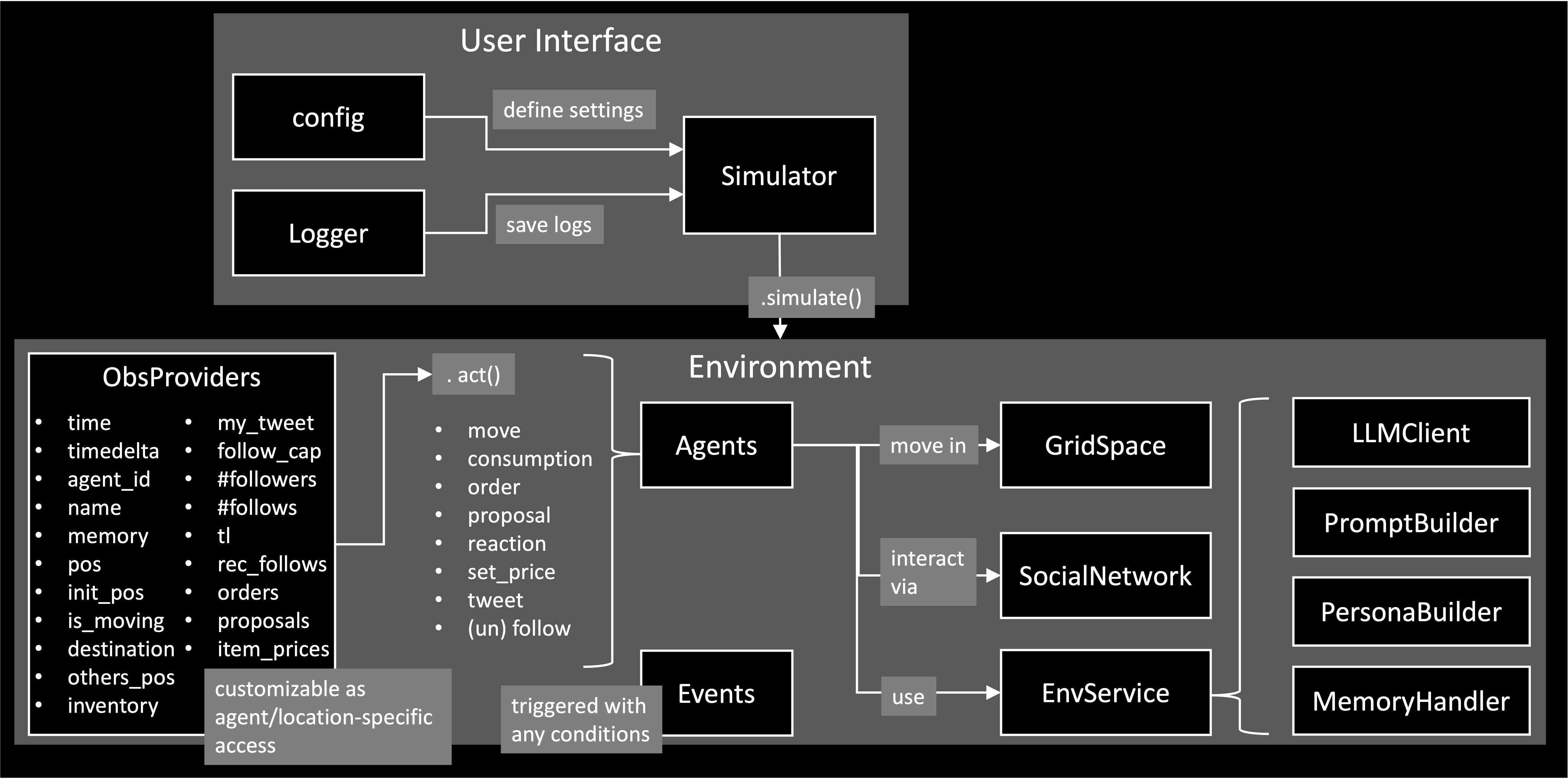
EconSimulacra consists of the following main components:
Simulator
The Simulator executes the simulation, manages temporal progression, and supports parallel execution. At each simulation step, the simulator collects actions from all agents based on their observations and applies them to the environment. The core logic of the simulator is conceptually as follows.
num_steps: int
for _ in range(num_steps):
    all_actions_dic = {}
    for agent_id in env.agent_ids:
        agent = self.env.agent_id2agent[agent_id]
        obs = self.env.get_observations(agent_id=agent_id)
        action_dic = agent.act(obs)
        all_actions_dic[agent_id] = action_dic
    self.env.step(all_actions_dic)
In each step:
- The environment provides observations to each agent
env.get_observations(agent_id=agent_id) - Agents decide their actions based on these observations
action_dic = agent.act(obs) - The environment updates the global state according to the agents' actions.
env.step(all_actions_dic)
The Simulator requires config to apply your simulation settings. See examples/openai/config.json for an example.
simulator = Simulator(
    config=config_dic_path,
    env_class=Environment,
    logger=logger,
    summarizer_class=SimulationSummarizer,
)
You can introduce your custom classes in your simulation by specifying "type": "MyClass" in the config and register them to the Simulator. examples/openai/main.py provides an example to introduce the custom event SubsidyEvent and custom agent DiscountRestaurant.
simulator.register_classes([MyClass1, MyClass2])
Environment
The Environment manages the global state of the simulated world, including the internal states of all agents. It is responsible for:
- providing observations to agents (
.get_observations) - applying agents’ actions and updating the world state (
.step)
The environment includes multiple submodules, such as:
- GridSpace: A spatial environment in which agents reside and move. This allows the simulation of spatial interactions, mobility, and location-dependent behaviors.
- SocialNetwork: A communication layer where agents can exchange messages and interact socially, enabling the study of information diffusion and social influence. The social network also includes a customizable RecommenderSystem that can suggest other agents to follow.
Agent
An Agent represents an autonomous decision-maker in the simulation Agents receive structured observations from the environment and determine their actions (.act).
The information available to each agent, both as observations received from the environment and as information disclosed to other agents, is fully configurable via the agent configuration. For example, requestObs field defines what an agent can perceive from the environment, while provideInfo* fields define what an agent reveals to others.
EconSimulacra provides a built-in LLMAgent implementation that leverages LLMs to generate agent behaviors. To ensure reliable and stable simulations, agent actions are generated as structured outputs using Outlines, which enforces predefined schemas for the generated actions.
The LLM-based agent system is modular and consists of several customizable submodules:
- LLMClient – manages the underlying language model and inference settings
- PersonaBuilder – assigns role-playing personas to agents
- PromptBuilder – constructs prompts used for agent reasoning
- MemoryHandler - stores and provides each agent the sequence of their experience in the past time steps as memory
By customizing these components, users can easily modify LLM configurations and experiment with different prompting strategies, personas, and model backends without changing the core simulation logic.
Event
An EventManager is responsible for managing events and triggering them at appropriate times during the simulation. Events can be scheduled based on:
- specific timestamps, (
at) - time intervals or durations, (
between) - periodic execution (e.g., every k steps), (
every) - or the occurrence of specific logs (e.g., when a transaction is generated). (
with)
You can also adapt probabilistic triggering via probability. By registering custom events, users can introduce exogenous dynamics into the simulation, such as policy interventions or regime shifts, in a flexible and extensible manner.
Basic Usage
OpenAI API
This section explains how to run EconSimulacra using the OpenAI API, based on the example in examples/openai.
1. Set OpenAI API Key
You need to provide your OpenAI API key in one of the following ways:
Option A: Environment Variable (recommended)
$ export OPENAI_API_KEY="your_api_key"
Option B: config.json
{
    "llmClient": {
        "type": "OpenAIClient",
        "modelName": "gpt-4o-mini",
        "apiKey": "your_api_key",
        ...
    },
}
2. Configure Simulation
An example configuration is provided at: config.json. This file defines simulation parameters (e.g., number of steps), environment settings (e.g., agents, items, space) and LLM-related services (e.g., llm client, prompt settings). You can modify this file to design your own simulation scenario.
3. Set Log Output Path
To save simulation logs, set the following environment variable:
$ export LOG_TXT_PATH="path/to/output_log.txt"
4. Run Simulation
Move to the example directory and execute:
$ cd examples/openai
$ python main.py
In this script, custom Event class: SubsidyEvent and rule-based restaurant DiscountRestaurant are implemented. The script will 1) load config.json, 2) generate simulator and register the SubsidyEvent and DiscountRestaurant to the simulator, 3) reset the environment and run the simulation loop, and 4) output logs to the specified path.
VLLM
This section explains how to run EconSimulacra by using a vLLM-backed OpenAI-compatible server.
1. Create a Separate Virtual Environment
We recommend preparing a dedicated virtual environment for vLLM, and running the vLLM server there as a separate process, since some dependency requirements conflict with EconSimulacra environment.
$ python -m venv .venv-vllm
$ source .venv-vllm/bin/activate
$ pip install vllm
Please also ensure that the installed versions of vLLM, PyTorch, and CUDA are compatible with your local NVIDIA driver and GPU environment.
2. Set VLLM configs
{
    "llmClient": {
        "type": "VLLMClient",
        "modelName": "meta-llama/Meta-Llama-3-8B-Instruct",
        "vllmPython": "path_to_venv_vllm/.venv-vllm/bin/python",
        "useGpu": true,
        "gpuIds": [0, 1],
        "isDataParallel": true,
        "host": "127.0.0.1",
        "port": 8000,
        "timeOut": 60,
        "maxRetries": 3,
        "serverStartTimeout": 300,
        "maxConcurrentGenerations": 32,
        "trustRemoteCode": false,
        "gpuMemoryUtilization": 0.9,
    },
}
Citation
If you consider cite our work, please use the following arxiv entry:
@misc{hashimoto2026econsimulacra,
    title={{EconSimulacra: A digital twin platform of socio-economic systems powered by LLM agents}},
    author={Ryuji Hashimoto and Masahiro Kaneko and Kentaro Ueda and Takehiro Takayanagi and Kiyoshi Izumi},
    year={2026},
    doi={10.48550/arXiv.2606.26883},
}
1 maintainer

Release files for econsimulacra 0.14.1
For a detailed explanation of source distributions (sdists) and built distributions (wheels), please see the package formats documentation.
Source distribution (sdist)
| File | Size | Uploaded | |
|---|---|---|---|
| econsimulacra-0.14.1.tar.gz | 190.2 kB | Details |
Built distribution (wheel)
| File | Interpreter | ABI | Platform | Reset |
|---|---|---|---|---|
| econsimulacra-0.14.1-py3-none-any.whl | Python 3 | none | any | Details |
Total release size: 425.0 kB
Release files / econsimulacra-0.14.1.tar.gz
| Download URL | econsimulacra-0.14.1.tar.gz |
|---|---|
| Size | 190.2 kB |
| Tags | Source |
|
SHA-256 checksum How to use checksums |
199eee662bfe14e801fd14463148fbdbbf9e3abbdae7695dce66080655ba679b
|
|
BLAKE2b-256 checksum How to use checksums |
5e7328811a094e28cebf9cb581df1b16c90d02f95bc6b7304126acbdbb81dea1
|
| Upload date | |
|
Uploaded using Trusted Publishing? What is trusted publishing? |
Yes |
| Uploaded via |
twine/7.0.0 CPython/3.13.14
|
Provenance
Provenance describes where a file came from. On PyPI, provenance is shared via attestations, which provide a verifiable record of the build or publishing details. View details, limitations and caveats.


PyPI Publish Attestation
PyPI verified that this artifact, at this checksum, originated from the publisher listed below.
Signed by GitHub Actions, verified by PyPI on Aug 29, 2026.
Transparency logRelease files / econsimulacra-0.14.1-py3-none-any.whl
| Download URL | econsimulacra-0.14.1-py3-none-any.whl |
|---|---|
| Size | 234.8 kB |
| Tags | Python 3 |
|
SHA-256 checksum How to use checksums |
2b8eecd2463d1286a29e405a34d1d1f7ab0e23522cdfb9b5490b86613dbff687
|
|
BLAKE2b-256 checksum How to use checksums |
307756c903934ce8b26cc04512578010ed2dfbea05adbc4deb939ae09d5d2c4e
|
| Upload date | |
|
Uploaded using Trusted Publishing? What is trusted publishing? |
Yes |
| Uploaded via |
twine/7.0.0 CPython/3.13.14
|
Provenance
Provenance describes where a file came from. On PyPI, provenance is shared via attestations, which provide a verifiable record of the build or publishing details. View details, limitations and caveats.
PyPI Publish Attestation
PyPI verified that this artifact, at this checksum, originated from the publisher listed below.
Signed by GitHub Actions, verified by PyPI on Aug 29, 2026.
Transparency log













