
EdgeVoiceAI
A modular, full-duplex conversational voice AI framework for Python 3.10+
Built for edge devices (Raspberry Pi, Linux) and laptops (macOS, Windows) powered by Google Gemini Live.




🌟 Overview
EdgeVoiceAI is a developer-first Python library designed to build low-latency, full-duplex conversational voice assistants from scratch. It connects physical hardware microphones and speakers directly with Google Gemini's real-time bidirectional streaming API (bidiGenerateContent), enabling natural spoken interactions with instant turn-taking and conversational barge-in interruptions.
Unlike traditional voice wrappers that chain disjointed Speech-To-Text (STT) $\rightarrow$ LLM $\rightarrow$ Text-To-Speech (TTS) pipelines with noticeable latency, EdgeVoiceAI operates over a single, continuous, bidirectional audio WebSocket connection.
🏗️ Architecture
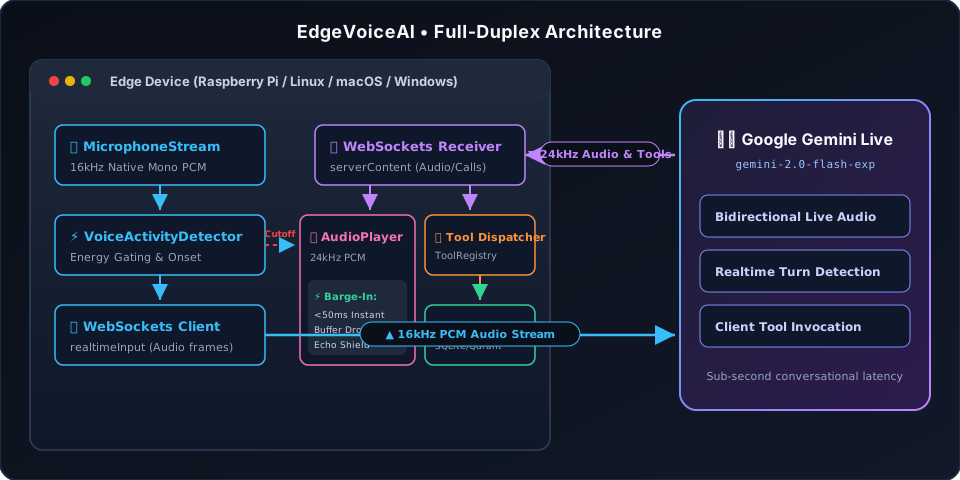
+-----------------------------------------------------------------------+
|        Client Device (macOS / Linux / Windows / Raspberry Pi)         |
|                                                                       |
|   [🎙️ MicrophoneStream (16kHz Native Mono PCM)]                       |
|                │                                                      |
|                ▼                                                      |
|   [⚡ VoiceActivityDetector (Energy Gating & Syllable Onset)]          |
|                │                                                      |
|                ▼                                                      |
|   [📤 WebSockets Client (realtimeInput audio frames)]                 |
|                │                                      ▲               |
+────────────────┼──────────────────────────────────────┼───────────────+
                 │                                      │
                 │ 16kHz PCM Stream                     │
                 ▼                                      │
+───────────────────────────────────────────────────────┼───────────────+
|                  Google Gemini Live Service           │               |
|                 (gemini-2.0-flash-exp / live)         │               |
+───────────────────────────────────────────────────────┼───────────────+
                 │                                      │
                 │ 24kHz Streaming Audio & Tool Calls   │
                 ▼                                      │
+────────────────┼──────────────────────────────────────┼───────────────+
|                ▼                                                      |
|   [📥 WebSockets Receiver (serverContent)]                            |
|          │                                                            |
|          ├─────────────────────────────┐                              |
|          ▼                             ▼                              |
|   [🔊 AudioPlayer (24kHz PCM)]   [🔧 Tool Dispatcher (ToolRegistry)]  |
|    • <50ms Instant Barge-In Cancel             │                      |
|    • Acoustic Echo Suppression                 ▼                      |
|                                  [🧠 Memory & Vector Stores]          |
|                                     (SQLite / Qdrant / Pinecone)      |
+-----------------------------------------------------------------------+
✨ Key Features
- ⚡ Ultra-Low Latency & Instant Barge-In: Real-time 16kHz continuous streaming. When you speak while the assistant responds, playback clears instantly (<50ms) to yield the floor naturally.
- 🧩 Self-Describing Tools with Prompt Composition: Each tool declares its own JSON schema, execution callback, and prompt etiquette instructions (
prompt_instruction). The framework automatically synthesizes these instructions into the agent's system prompt. - 🎙️ Cross-Platform Audio Engine: Powered by PortAudio with automatic hardware enumeration across macOS (CoreAudio), Linux / Raspberry Pi (ALSA/PulseAudio), and Windows (WASAPI/MME).
- 🔍 Plug-and-Play RAG Integration: Built-in
RAGRetrieverwith chunking and native vector store backends forInMemoryVectorStore,QdrantVectorStore, andPineconeVectorStore. - 🛡️ Conversational Guardrails: Turn-aware farewell detectors, topic safety guards, and entity memory management.
- 📲 Built-in Notification Tools: Two-turn confirmation WhatsApp dispatch tool with phone number normalization.
📦 Installation
1. Install System Audio Dependencies (PortAudio)
EdgeVoiceAI uses PortAudio for native, cross-platform audio streaming.
- macOS:
brew install portaudio
- Linux / Raspberry Pi:
sudo apt-get update
sudo apt-get install -y portaudio19-dev libasound2-dev python3-pyaudio
- Windows:
Pre-compiled wheels are included automatically via
pyaudio.
2. Install EdgeVoiceAI via pip
# Core package
pip install edgevoiceai

# With specific optional extras
pip install "edgevoiceai[qdrant]"    # Qdrant vector store support
pip install "edgevoiceai[pinecone]"  # Pinecone vector store support
pip install "edgevoiceai[media]"     # Pygame audio sound effects

# Or install all extras
pip install "edgevoiceai[all]"
🚀 5-Minute Quickstart
1. Set Your Gemini API Key
export GEMINI_API_KEY="your-google-ai-studio-api-key"
2. Run a Full-Duplex Voice Assistant
import asyncio
import os
from dotenv import load_dotenv
from edgevoiceai import (
    BaseTool,
    InMemoryMemoryStore,
    ToolExecutionContext,
    ToolRegistry,
    ToolResult,
    VoiceAgent,
    VoiceConfig,
)

# Load GEMINI_API_KEY from .env
load_dotenv()


# Define a custom tool with prompt instructions
class BookAppointmentTool(BaseTool):
    @property
    def name(self) -> str:
        return "book_appointment"

    @property
    def description(self) -> str:
        return "Schedules a consultation appointment for the user."

    @property
    def parameters_schema(self) -> dict:
        return {
            "type": "object",
            "properties": {
                "name": {"type": "string", "description": "Customer name"},
                "date": {"type": "string", "description": "Date of appointment (YYYY-MM-DD)"},
                "time": {"type": "string", "description": "Time (e.g. 10:00 AM)"},
            },
            "required": ["name", "date", "time"],
        }

    @property
    def prompt_instruction(self) -> str:
        return (
            "When scheduling, ask for the customer's name, desired date, and preferred time. "
            "Always verbally confirm all details before executing book_appointment."
        )

    async def execute(self, params: dict, context: ToolExecutionContext) -> ToolResult:
        name = params.get("name")
        date = params.get("date")
        time = params.get("time")
        # In a real app, write to database or calendar API
        return ToolResult(
            status="success",
            message=f"Appointment booked for {name} on {date} at {time}.",
            data={"status": "confirmed", "booking_id": "APT-1001"},
        )


async def main():
    api_key = os.environ.get("GEMINI_API_KEY")
    if not api_key:
        raise ValueError("Please set the GEMINI_API_KEY environment variable.")

    # Configure the voice session
    config = VoiceConfig(
        api_key=api_key,
        voice="Puck",  # Puck, Charon, Aoede, Fenrir, Kore
        system_instruction=(
            "You are a friendly, concise voice assistant. "
            "Keep responses natural, conversational, and direct."
        ),
    )

    # Register tools and memory
    registry = ToolRegistry()
    registry.register(BookAppointmentTool())
    memory = InMemoryMemoryStore()

    agent = VoiceAgent(config=config, tools=registry, memory=memory)

    print("🎙️ Starting Voice Assistant... Speak into your microphone!")
    try:
        await agent.run_edge()
    except KeyboardInterrupt:
        print("\nStopping...")
    finally:
        agent.stop()


if __name__ == "__main__":
    asyncio.run(main())
📖 Documentation
Comprehensive documentation, tutorials, architecture deep-dives, and API references are available at: https://merhasmukh.github.io/edgevoiceai/
📄 License
This project is licensed under the MIT License.
1 maintainer

Metadata
1 maintainer
Release files for edgevoiceai 0.1.2
For a detailed explanation of source distributions (sdists) and built distributions (wheels), please see the package formats documentation.
Source distribution (sdist)
| File | Size | Uploaded | Provenance | Actions |
|---|---|---|---|---|
| edgevoiceai-0.1.2.tar.gz | 65.6 kB | Without provenance | Details for edgevoiceai-0.1.2.tar.gz |
Built distribution (wheel)
| File | Interpreter | ABI | Platform | Actions Reset |
|---|---|---|---|---|
| edgevoiceai-0.1.2-py3-none-any.whl | Python 3 | none | any | Details for edgevoiceai-0.1.2-py3-none-any.whl |
Total release size: 148.3 kB
Release files / edgevoiceai-0.1.2.tar.gz
| Download URL | edgevoiceai-0.1.2.tar.gz |
|---|---|
| Size | 65.6 kB |
| Tags | Source |
|
SHA-256 checksum How to use checksums |
28ced2ef75d474a015371bd1e013a4f15f58b96843f1e7d287a344e028ba1df1
|
|
BLAKE2b-256 checksum How to use checksums |
c071d38c7956d669f211229babc193ffd75149bc1c0cfaf965a2db068788e61d
|
| Upload date | |
|
Uploaded using Trusted Publishing? What is trusted publishing? |
No |
| Uploaded via |
twine/7.0.0 CPython/3.13.7
|
Release files / edgevoiceai-0.1.2-py3-none-any.whl
| Download URL | edgevoiceai-0.1.2-py3-none-any.whl |
|---|---|
| Size | 82.6 kB |
| Tags | Python 3 |
|
SHA-256 checksum How to use checksums |
a29e11b5e90cb31ec0f7062c780642d7122fbf5ad31877a5a934b51fb295428e
|
|
BLAKE2b-256 checksum How to use checksums |
58daa487e71cb762b9692ee793e1aadc42f75d1b03b48725325cc41c65b8f7ad
|
| Upload date | |
|
Uploaded using Trusted Publishing? What is trusted publishing? |
No |
| Uploaded via |
twine/7.0.0 CPython/3.13.7
|
Security for edgevoiceai 0.1.2
Provenance
Provenance describes where a file came from. On PyPI, provenance is shared via attestations, which provide a verifiable record of the build or publishing details. View details, limitations and caveats.
No provenance found
None of the files in this release were uploaded with provenance metadata.
A note on package security
PyPI is a repository for distributing packages, not a service for auditing them. While third-party security researchers and our staff do their best to detect and remove malicious packages, PyPI cannot guarantee the quality, security or suitability of any given package.
To learn more about protecting yourself from malicious actors, visit our package security documentation.














