
Extract data in JSON from any spreadsheet

Project description
EDJAS: Extract Data in JSON from Any Spreadsheet
- Sources at https://github.com/holdenweb/edjas
- Demonstration code at https://github.com/holdenweb/edjas-demo
This project is an attempt to help organisations that insist on managing their businesses, or major aspects thereof, using spreadsheets. Many articles have been written on the limitations of spreadsheet technology. If you have any doubts then look at the "The Problem with Spreadsheets" section of this LinkedIn article. Some large organisations are now providing advice — although in many cases better advice might be: stop using spreadsheets for that!
Rather than try to change the way people do business (imagine "If I Ruled the World" playing softly in the background), EDJAS is intended to help people extract that locked-up data more effectively, in simple and easy-to-understand ways that don't affect existing workflows.
It lets you add data specifications to any existing spreadsheet by creating
named ranges in the spreadsheet. By default EDJAS will look for a range
name Parameters as its starting point, although this can be overridden on the command line.
This range should be precisely two columns wide, and EDJAS
treats the left-hand column as names and the right-hand column as values.
Normally, the values are used literally after extraction from the spreadsheet.
Two formats for the value are given special treatment.
[range-name]: the named range is exported as a JSON list or, if it's two-dimensional a list of row lists.{range_name}: The named range, which must be two columns wide, becomes a JSON object where the left-hand column specifies the names and the right-hand column specifies the values.
Applying functions
Either markup form may name a function to transform the extracted value:
[f name] yields the result of applying f to the value [name] would produce,
and {f name} yields f applied to the value {name} would produce. The
function name and the range name are separated by a space (Excel range names
never contain spaces, so this is unambiguous).
For example, if Sales is a table whose first row holds column headings,
[records Sales] turns it into a list of JSON objects — one per data row.
Functions are resolved from a fixed, built-in registry — spreadsheets cannot run arbitrary code. The functions shipped by default are:
| Function | Applied to | Result |
|---|---|---|
records |
[table] |
first row is headings; remaining rows become a list of objects |
columns |
[table] |
first row is headings; columns become a {heading: [values]} object |
transpose |
[table] |
swaps rows and columns |
flatten |
[table] |
flattens nested rows into a single list |
keys / values / items |
{object} |
the object's keys, values, or [key, value] pairs |
invert |
{object} |
swaps keys and values |
int / float / str |
either | coerces every value to that type |
round2 |
either | rounds every floating-point value to two decimal places |
isodate |
either | formats date/time values as ISO-8601 strings |
When using EDJAS as a library, read_file(path, functions={...}) adds your own
functions to (and can override) the built-ins:
from edjas import read_file
read_file("data.xlsx", functions={"upper": lambda v: [s.upper() for s in v]})
Date and time cells are serialised as ISO-8601 strings automatically.
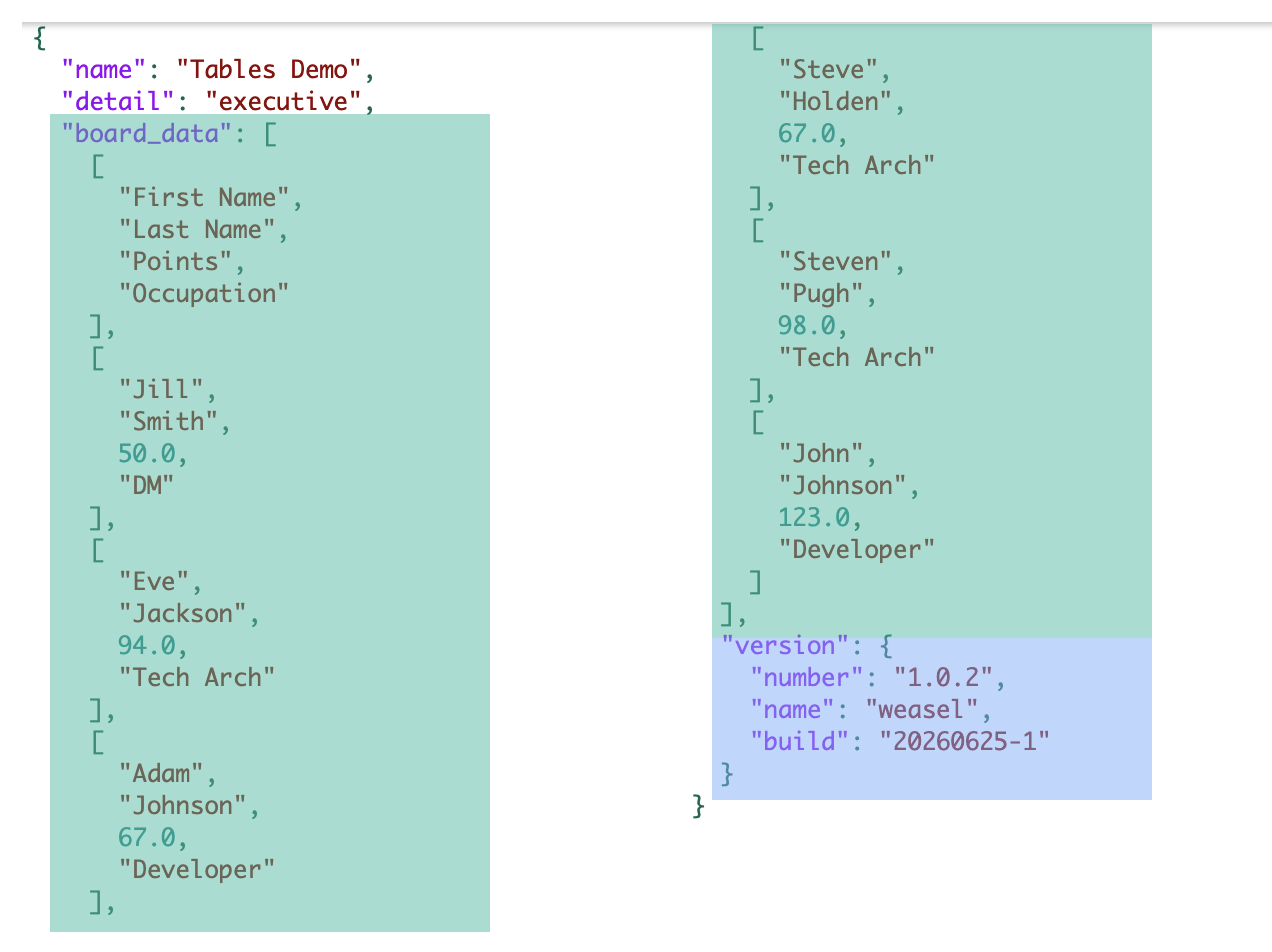
The parameter details are used to extract data from the spreadsheet, which is then sent to standard output as JSON.
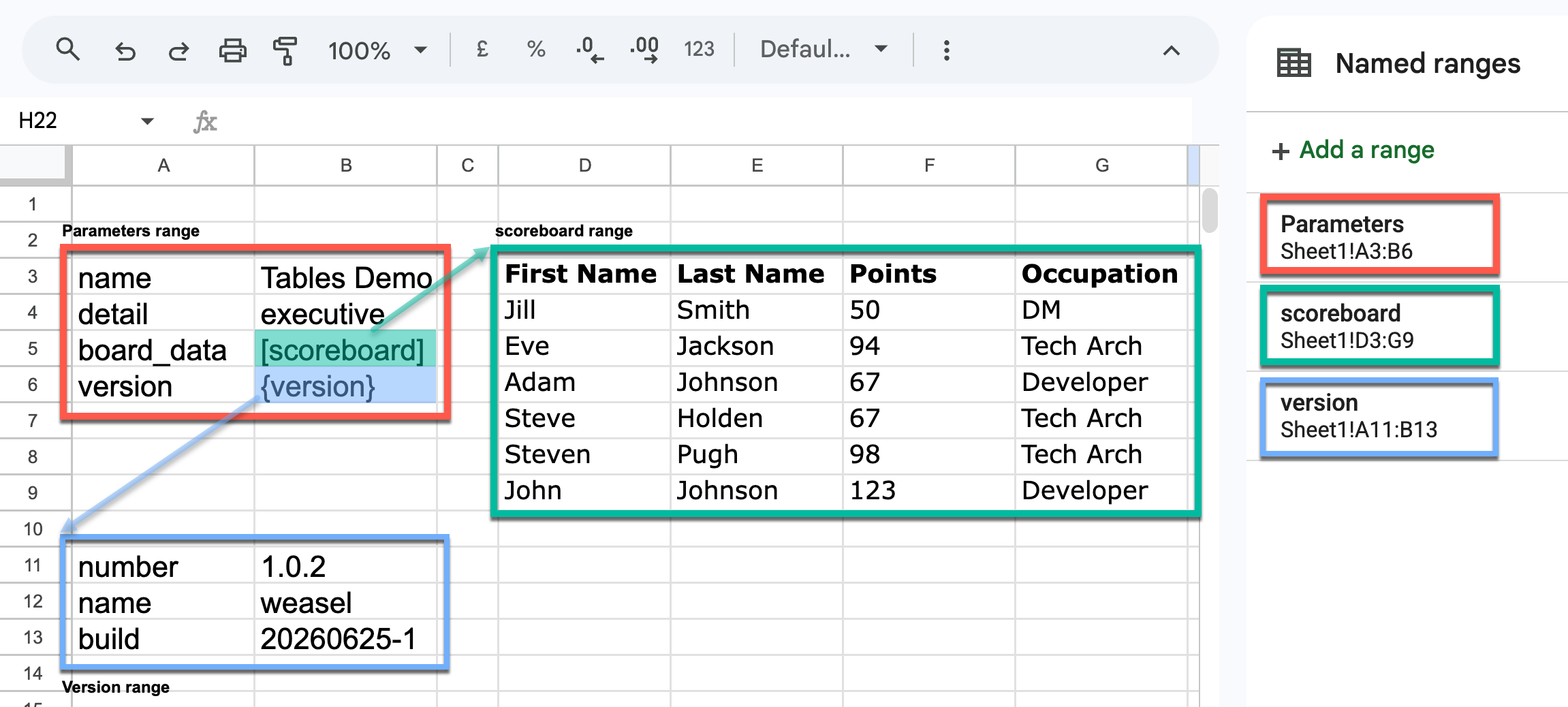
In the example shown, the version key has a dict value, and in that dict the number key has a value of "1.0.2".
The version number can therefore be referenced in the JSON output as version.number. The output from this example is shown below.
A demonstration of the system can be found at https://github.com/holdenweb/edjas-demo.
This is particularly useful for audiences that have an interest in only a limited number of features from a possibly quite large spreadsheet. More generally, JSON is such a widely used format that spreadsheet data can be re-used in a wide range of systems as appropriate.
Release history Release notifications | RSS feed


Download files
Download the file for your platform. If you're not sure which to choose, learn more about installing packages.
Source Distribution
Built Distribution
Filter files by name, interpreter, ABI, and platform.
If you're not sure about the file name format, learn more about wheel file names.
Copy a direct link to the current filters
File details
Details for the file edjas-0.6.1.tar.gz.
File metadata
- Download URL: edjas-0.6.1.tar.gz
- Upload date:
- Size: 369.1 kB
- Tags: Source
- Uploaded using Trusted Publishing? No
- Uploaded via: uv/0.10.7 {"installer":{"name":"uv","version":"0.10.7","subcommand":["publish"]},"python":null,"implementation":{"name":null,"version":null},"distro":{"name":"macOS","version":null,"id":null,"libc":null},"system":{"name":null,"release":null},"cpu":null,"openssl_version":null,"setuptools_version":null,"rustc_version":null,"ci":null}
File hashes
| Algorithm | Hash digest | |
|---|---|---|
| SHA256 |
1b0894a1a46edf67adc123d6a2b8cf6111352165c81a9119763595734e1375b4
|
|
| MD5 |
36dd927c6e4cf5e935d5b5ebdac93122
|
|
| BLAKE2b-256 |
df91717886c13fd093033fb0b1c6c97ae24883e730d214bc8e096fa7c6fa02cc
|
File details
Details for the file edjas-0.6.1-py3-none-any.whl.
File metadata
- Download URL: edjas-0.6.1-py3-none-any.whl
- Upload date:
- Size: 8.9 kB
- Tags: Python 3
- Uploaded using Trusted Publishing? No
- Uploaded via: uv/0.10.7 {"installer":{"name":"uv","version":"0.10.7","subcommand":["publish"]},"python":null,"implementation":{"name":null,"version":null},"distro":{"name":"macOS","version":null,"id":null,"libc":null},"system":{"name":null,"release":null},"cpu":null,"openssl_version":null,"setuptools_version":null,"rustc_version":null,"ci":null}
File hashes
| Algorithm | Hash digest | |
|---|---|---|
| SHA256 |
1dc566de0c11177c5d8fb321b7a21d433e46131f7a13c078e179b4377325ffe3
|
|
| MD5 |
c6ed0671f1ca6f662cdd826266b791e4
|
|
| BLAKE2b-256 |
9371f11b830e47d9886992e800b44f1808c9bf27d05f76c108cb1ba522274681
|






