
EDJAS: Extract Data in JSON from Any Spreadsheet
- Sources at https://github.com/holdenweb/edjas
This project is an attempt to help organisations that insist on managing their businesses, or major aspects thereof, using spreadsheets. Many articles have been written on the limitations of spreadsheet technology. If you have any doubts then look at the "The Problem with Spreadsheets" section of this LinkedIn article. Some large organisations are now providing advice — although in many cases better advice might be: stop using spreadsheets for that!
Rather than try to change the way people do business (imagine "If I Ruled the World" playing softly in the background), EDJAS is intended to help people extract that locked-up data more effectively, in simple and easy-to-understand ways that don't affect existing workflows.
EDJAS leaves your spreadsheet completely untouched. Instead of adding anything to the workbook, you write a small specification file — a TOML document — describing what to extract. One spec can serve many workbooks, and one workbook can have many specs, each tailored to a different audience.
The specification file
A spec is a TOML file with an [extract] table mapping the output keys you want to
the values to pull from the spreadsheet:
[extract]
title  = "Summary!B2"                    # a single cell   -> scalar
hours  = "{Hours}"                        # a 2-column range -> object
prices = "{Prices | int}"                 # object, values coerced to int
sales  = "[Sales | records]"              # a table -> list of objects
people = "[Grid | transpose | records]"   # a pipeline of transforms
Each value is an extraction expression. There are three forms:
ref(a plain reference) — the value of a single cell.[ref]— the range as a JSON list, or a list of row-lists if it is two-dimensional.{ref}— a two-column range as a JSON object (left column names, right column values).
A ref may be:
- a named range (
Prices); - the name of an Excel Table (
RevisionTriangles_Table1) — its whole range, header row included, wherever the table lives in the workbook; or - an A1-style cell range (
D3:E9), optionally qualified with a sheet name (Summary!D3:E9).
Named ranges and tables are recommended: they survive layout changes, whereas bare
cell references do not. This also fits the way well-produced government and statistical
spreadsheets are built, where the published data is laid out as named Excel Tables. A
sheet name that contains spaces or punctuation must be wrapped in single quotes, exactly
as Excel writes it — 'Cover Sheet'!A1, or 'Bob''s Data'!C3 with an embedded
apostrophe doubled.
A cell containing a formula yields its computed value, not the formula text, so
extracting a total or an average works as you would expect. EDJAS reads the value
Excel cached the last time it saved the workbook; a workbook that has never been
recalculated in Excel — one produced entirely by another tool, say — has no cached
value, and such a cell reads as null.
A worked example
The repository ships a sample workbook and a spec exercising every construct described here. Run them together:
edjas examples/example.xlsx examples/example.toml
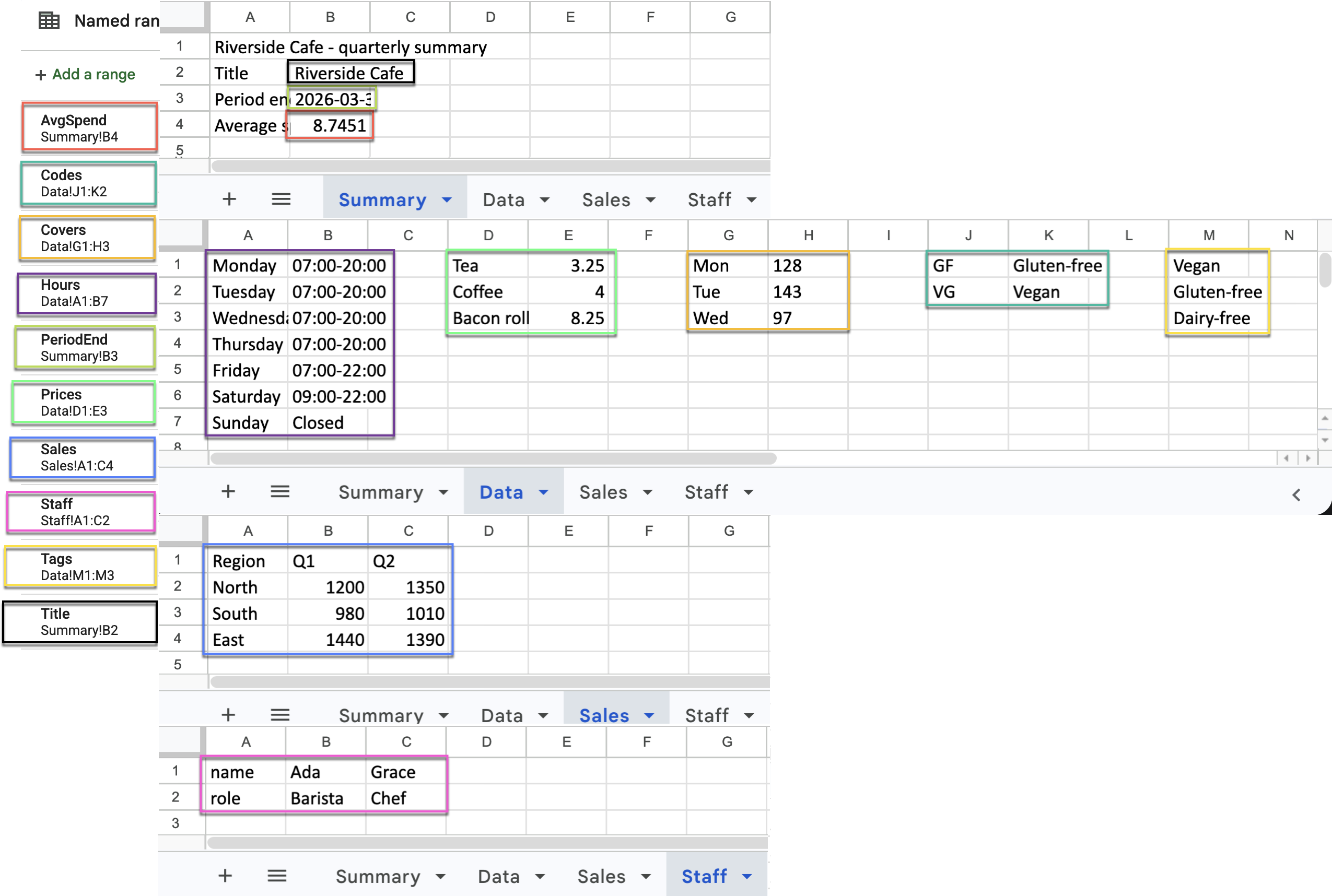
examples/example.xlsx is a small café report spread over four sheets:
| Named range | Where | Shape |
|---|---|---|
Title, PeriodEnd, AvgSpend |
Summary!B2:B4 |
single cells |
Hours, Prices, Covers, Codes |
Data |
two-column name/value ranges |
Tags |
Data!M1:M3 |
a single column |
Sales |
Sales!A1:C4 |
a table with a heading row |
Staff |
Staff!A1:C2 |
one field per row, so it needs transposing |
The three forms, against that workbook (comments show the JSON produced):
title = "Title"      # "Riverside Cafe"
tags  = "[Tags]"     # ["Vegan", "Gluten-free", "Dairy-free"]
hours = "{Hours}"    # {"Monday": "07:00-20:00", ... "Sunday": "Closed"}
and the same three ways of writing a reference:
title_again = "B2"             # an A1 cell on the active sheet
prices      = "{Data!D1:E3}"   # a sheet-qualified A1 range
tags        = "[Tags]"         # a named range
Here's a dump of the spreadsheet with the named ranges marked in the same colors as the referenced cells.
Transforming values with functions
Any expression may append a pipeline of functions, separated by |, applied left
to right after extraction — so [Grid | transpose | records] transposes the range,
then builds objects from it. Functions come from a fixed, built-in registry (no
arbitrary code runs). The built-ins:
| Function | Typical input | Result |
|---|---|---|
records |
[table] |
first row is headings; remaining rows become a list of objects |
columns |
[table] |
first row is headings; columns become a {heading: [values]} object |
transpose |
[table] |
swaps rows and columns |
flatten |
[table] |
flattens nested rows into a single list |
keys / values / items |
{object} |
the object's keys, values, or [key, value] pairs |
invert |
{object} |
swaps keys and values |
int / float / str |
any | coerces every value to that type |
round |
any | rounds every floating-point value; takes the number of decimal places (default 2) |
isodate |
any | formats date/time values as ISO-8601 strings |
Each of them against the sample workbook, with the JSON they produce:
sales_rows       = "[Sales]"                       # [["Region","Q1","Q2"], ["North",1200,1350], ...]
sales_records    = "[Sales | records]"             # [{"Region":"North","Q1":1200,"Q2":1350}, ...]
sales_columns    = "[Sales | columns]"             # {"Region":["North","South","East"], "Q1":[1200,980,1440], ...}
sales_transposed = "[Sales | transpose]"           # [["Region","North","South","East"], ["Q1",1200,980,1440], ...]
staff_flat       = "[Staff | flatten]"             # ["name","Ada","Grace","role","Barista","Chef"]
staff            = "[Staff | transpose | records]" # [{"name":"Ada","role":"Barista"}, {"name":"Grace","role":"Chef"}]
price_list       = "{Prices | keys}"               # ["Tea","Coffee","Bacon roll"]
price_values     = "{Prices | values}"             # [3.25, 4, 8.25]
price_items      = "{Prices | items}"              # [["Tea",3.25], ["Coffee",4], ["Bacon roll",8.25]]
code_names       = "{Codes | invert}"              # {"Gluten-free":"GF", "Vegan":"VG"}
covers           = "{Covers | int}"                # {"Mon":128, "Tue":143, "Wed":97}
prices_as_text   = "{Prices | str}"                # {"Tea":"3.25", "Coffee":"4", "Bacon roll":"8.25"}
average_spend    = "AvgSpend | round 2"            # 8.75   (the cell holds 8.7451)
spend_whole      = "AvgSpend | round 0"            # 9.0
period_ending    = "PeriodEnd | isodate"           # "2026-03-31"
Covers holds its numbers as text, which is why int is worth applying. A date-only
cell is stored as midnight, and both isodate and the automatic serialisation render
it as a plain date rather than 2026-03-31T00:00:00; a genuine time of day is kept.
Function arguments
A function may take arguments after its name, separated by spaces. An argument is a
number (2), a double-quoted string (", "), or a bare word, which is
read as another range reference. The extracted value is always passed as the first
argument, so [Price | round 2] means round(Price, 2). (Grouping parentheses are
reserved for a possible future extension and are not yet supported.)
round is the built-in that takes an argument; the same mechanism serves functions
you supply yourself:
from edjas import read_spec
read_spec("examples/example.xlsx", "examples/example.toml",
          functions={"join": lambda v, sep: sep.join(v)})
With that in place a spec entry of tag_line = '[Tags | join ", "]' yields
"Vegan, Gluten-free, Dairy-free".
Usage
From the command line — pass the spreadsheet and the spec; JSON goes to standard output:
edjas data.xlsx report.toml
As a library, read_spec returns the extracted data as a Python dict. Pass
functions={...} to add your own functions to (or override) the built-ins; each
receives the extracted value first, then any arguments:
from edjas import read_spec
data = read_spec("data.xlsx", "report.toml",
                 functions={"join": lambda v, sep: sep.join(v)})
# ... lets the spec use:  tags = "[Tags | join \", \"]"
Date and time cells are serialised as ISO-8601 strings automatically.
Rendering an HTML report
Extraction gives you a plain data structure; turning that into a readable document is a
separate, optional step. EDJAS ships a small helper, render_report, that feeds the
extracted data straight into a Jinja2 template.
Jinja2 is an optional dependency — the core install never pulls it in — so enable it
with the demo extra:
pip install edjas[demo]
from edjas import render_report

html = render_report(
    "data.xlsx", "report.toml",
    template="report.html", templates_dir="templates",
)
The extracted dict is passed to the template as data; any extra keyword arguments
become further template variables. Because rendering only reads the workbook, the
source file is left untouched, exactly as with plain extraction.
Spreadsheets sometimes carry very long column headings. render_report takes an
optional headings={old: new} mapping that renames headings in the extracted data
before rendering; it defaults to None, so headings are shown verbatim unless you ask
otherwise:
html = render_report(
    "data.xlsx", "report.toml",
    template="report.html", templates_dir="templates",
    headings={"A very long column title (percentage points)": "Change (pp)"},
)
A complete, self-contained example lives in examples/report/: a real,
unmodified UK government workbook — the ONS Retail Sales Index summary tables, published
under the Open Government Licence — a spec that pulls its cover-sheet metadata, its
contents list, and a named Excel Table, and three templates (a base layout, the report,
and a shared table macro) that compose into
report.html. Build it with:
python examples/report/build.py                     # faithful to the workbook
python examples/report/build.py --shorten-headings  # tidy the long ONS column titles
Architecture
Four diagrams describe how EDJAS is put together, zooming in a level at a time.
Each is a self-contained SVG that can be viewed in the browser or downloaded from
the images/ directory.
- C4 system context — the setting: the spreadsheet maintainer who carries on as before, the analyst who authors specs, and the systems the extracted JSON feeds.
- C4 container diagram — one level in: the command-line and library containers, the files they read, and where the JSON ends up.
- C4 component diagram — inside the library: the spec loader, expression evaluator, pipeline parser, workbook reader, pipeline executor and function registry, and the calls between them.
- Internal structure — down at the code: the modules that make up the package, and how a single extraction run flows through them from the spec and workbook to standard output.
This is particularly useful for audiences that have an interest in only a limited number of features from a possibly quite large spreadsheet. More generally, JSON is such a widely used format that spreadsheet data can be re-used in a wide range of systems as appropriate.
1 maintainer

Metadata
1 maintainer
Release files for edjas 0.7.3
For a detailed explanation of source distributions (sdists) and built distributions (wheels), please see the package formats documentation.
Source distribution (sdist)
| File | Size | Uploaded | Provenance | Actions |
|---|---|---|---|---|
| edjas-0.7.3.tar.gz | 552.7 kB | Without provenance | Details for edjas-0.7.3.tar.gz |
Built distribution (wheel)
| File | Interpreter | ABI | Platform | Actions Reset |
|---|---|---|---|---|
| edjas-0.7.3-py3-none-any.whl | Python 3 | none | any | Details for edjas-0.7.3-py3-none-any.whl |
Total release size: 570.2 kB
Release files / edjas-0.7.3.tar.gz
| Download URL | edjas-0.7.3.tar.gz |
|---|---|
| Size | 552.7 kB |
| Tags | Source |
|
SHA-256 checksum How to use checksums |
57cb89be2e003a31a1247c4b4c12addbdcf33b6a64489a9caa118c1adab71070
|
|
BLAKE2b-256 checksum How to use checksums |
fb5ef762f94ad670fa0db84d72494021f985b07ca1a1eb663857101c885a7b9d
|
| Upload date | |
|
Uploaded using Trusted Publishing? What is trusted publishing? |
No |
| Uploaded via |
uv/0.10.7 {"installer":{"name":"uv","version":"0.10.7","subcommand":["publish"]},"python":null,"implementation":{"name":null,"version":null},"distro":{"name":"macOS","version":null,"id":null,"libc":null},"system":{"name":null,"release":null},"cpu":null,"openssl_version":null,"setuptools_version":null,"rustc_version":null,"ci":null}
|
Release files / edjas-0.7.3-py3-none-any.whl
| Download URL | edjas-0.7.3-py3-none-any.whl |
|---|---|
| Size | 17.5 kB |
| Tags | Python 3 |
|
SHA-256 checksum How to use checksums |
c214ecaed8d09f88dcf7befb297424bf731b1ca932ed51ea2e5a2b22138b1b62
|
|
BLAKE2b-256 checksum How to use checksums |
f908873ac58da97673021ee6b3aff88c6f7db21d942d7785def5490ca6e22c59
|
| Upload date | |
|
Uploaded using Trusted Publishing? What is trusted publishing? |
No |
| Uploaded via |
uv/0.10.7 {"installer":{"name":"uv","version":"0.10.7","subcommand":["publish"]},"python":null,"implementation":{"name":null,"version":null},"distro":{"name":"macOS","version":null,"id":null,"libc":null},"system":{"name":null,"release":null},"cpu":null,"openssl_version":null,"setuptools_version":null,"rustc_version":null,"ci":null}
|
Security for edjas 0.7.3
Provenance
Provenance describes where a file came from. On PyPI, provenance is shared via attestations, which provide a verifiable record of the build or publishing details. View details, limitations and caveats.
No provenance found
None of the files in this release were uploaded with provenance metadata.
A note on package security
PyPI is a repository for distributing packages, not a service for auditing them. While third-party security researchers and our staff do their best to detect and remove malicious packages, PyPI cannot guarantee the quality, security or suitability of any given package.
To learn more about protecting yourself from malicious actors, visit our package security documentation.

















