
edt-bridge-mcp
English · Русский
stdio MCP front-end for the edt-bridge 1C:EDT plugin.
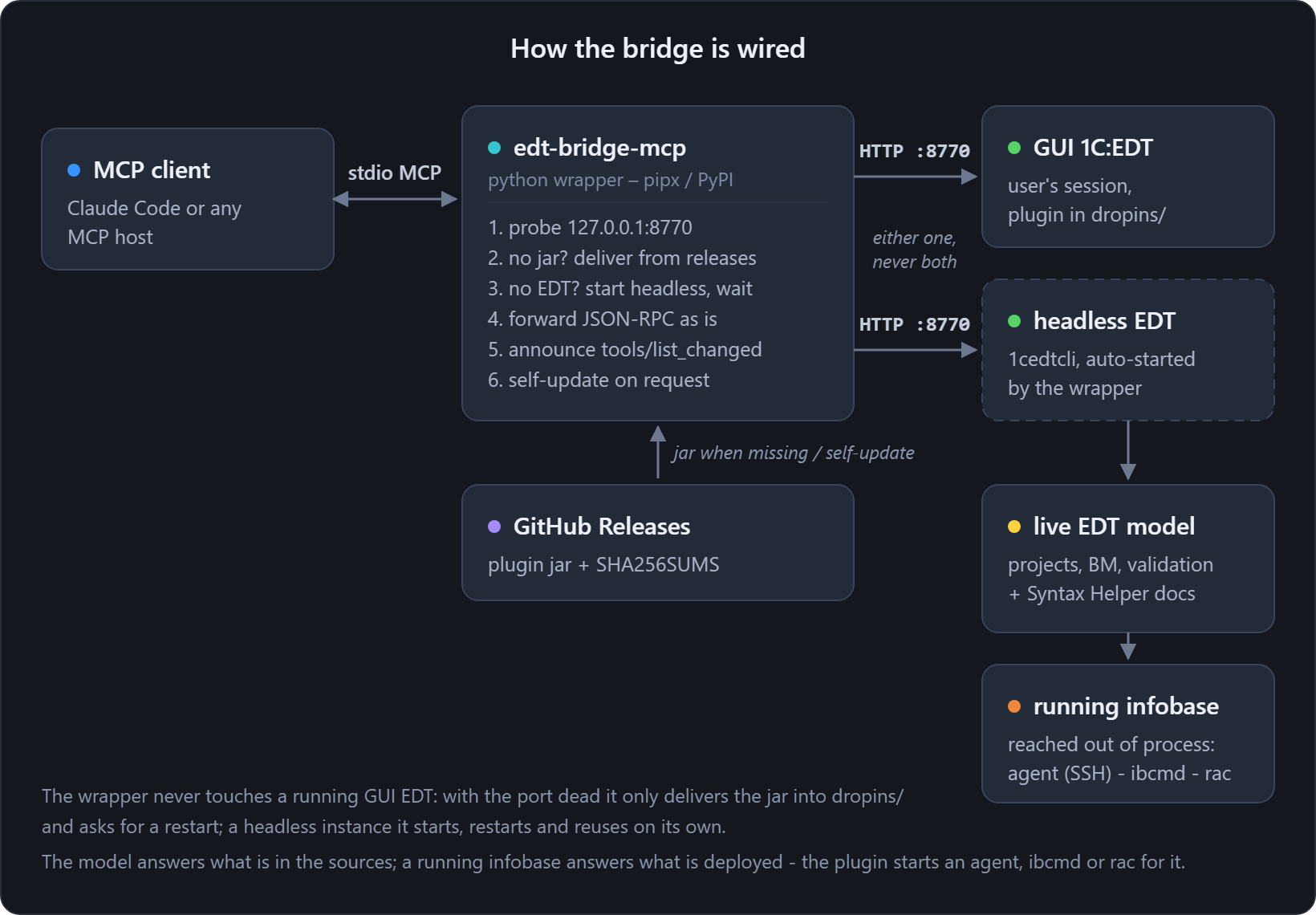
The Java plugin serves MCP as plain JSON-RPC over HTTP on 127.0.0.1:8770, which means an MCP client
configured with that URL loses the server whenever EDT is not running. This wrapper is what the
client talks to instead:
- EDT open, GUI or headless, and every request is forwarded to the live bridge;
- EDT closed, and it starts a headless EDT –
1cedtcliwith a keepalive pipe, the same recipe asscripts/run-headless.ps1– then forwards once the model is ready; - plugin jar missing, and it delivers the jar itself from the latest GitHub release, checksum
verified, into EDT's
dropins/before starting. A barepipx install edt-bridge-mcpis enough to get a working bridge; - a client session never hangs on startup. While the bridge is starting,
tools/listreturns an empty list, and anotifications/tools/list_changedfollows when it is ready.
Install
pipx install edt-bridge-mcp # or: pipx install ./python from a checkout
Register in an MCP client
claude mcp add edt-bridge -- edt-bridge-mcp --workspace "D:\\path\\to\\edt-workspace"
From a shell
The default mode speaks JSON-RPC over stdin and stdout, for an MCP client to drive. To reach the same bridge by hand or from a script, use the sub-commands. Same port scan, same token, same headless start:
edt-bridge-mcp tools                    # what the running bridge serves
edt-bridge-mcp call edt_projects        # call a tool, print what it returned
edt-bridge-mcp call edt_metadata_details --json '{"projectName": "SM", "fqn": "CommonModule.Foo"}'
edt-bridge-mcp call edt_create_extension --json-file args.json   # arguments from a UTF-8 file
edt-bridge-mcp status                   # is a bridge up? (never starts one)
--raw prints the JSON result instead of the text a tool returned. Arguments come from --json,
--json-file or --stdin, and a file is the dependable route for non-ASCII arguments on Windows.
Exit codes: 0 is fine, 1 means the call could not be made at all (no bridge, bad usage, transport
error), and 2 means the bridge ran the tool and the tool reported an error. That lets a script tell
"it failed" from "it never ran".
Self-update
edt-bridge-mcp self-update             # refresh the plugin jar (GitHub Releases) + the wrapper (PyPI)
edt-bridge-mcp self-update --jar-only  # only the jar
edt-bridge-mcp self-update --pip-only  # only the wrapper
edt-bridge-mcp self-update --pip-only --from <repo>/python   # from a checkout
A running EDT, GUI or headless, keeps the old jar loaded until it restarts. The wrapper restarts its own headless instance the next time it starts one.
--from installs the wrapper from a local checkout instead of PyPI. Use it to try a build that is
not released yet, without a full pipx install --force, which rebuilds the venv and replaces the exe
the running client holds.
The exit code separates the bridge from its add-ons. 0 means every step asked for succeeded. 1
means the bridge itself did not update, neither the jar nor the wrapper, or that nothing did. 2
means the bridge is current and only a wrapper plugin is not: a plugin installs from its own source,
and that source being unreachable is not the bridge failing to update.
The wrapper updates itself by unpacking, not through an installer. It downloads the wheel from PyPI,
or copies the package out of the checkout given to --from, and replaces the package inside
site-packages using the standard library alone. No pip, no pipx, no build backend, and that matters:
pipx 1.15 builds its venvs through uv, and a uv-built venv contains no pip at all.
Plugins
External packages installed into the wrapper's environment can add MCP tools of their own. This is
the home for what a public repository cannot carry: reference material under somebody's license,
tools wired to an internal service. The wrapper finds them through the edt_bridge.tools
entry-point group, lists their tools next to the bridge's and dispatches them itself, so they answer
even while no EDT is running.
pipx inject edt-bridge-mcp <package>   # install a plugin
edt-bridge-mcp plugins                 # what is plugged in, or why a plugin refused to load
EDT_BRIDGE_NO_PLUGINS=1 turns the discovery off. The declaration contract for plugin authors is on
the installation page.
The exes in Scripts are never touched. They are what a running client holds open, Windows will not
let them be replaced, and they do not need to be: the stub launches whatever code is in site-packages
the next time it starts. pipx_metadata.json is corrected, so pipx list does not go on reporting
the old version. An editable install is refused rather than overwritten.
Configuration
CLI flags override the environment.
| Env | Flag | Meaning |
|---|---|---|
EDT_BRIDGE_PORT |
--port |
bridge port (default 8770) |
EDT_BRIDGE_TOKEN |
– | write-tools token, forwarded as Authorization: Bearer and injected into the headless JVM |
EDT_BRIDGE_WORKSPACE |
--workspace |
EDT workspace path, required for the headless start |
EDT_BRIDGE_EDT_DIR |
--edt-dir |
EDT install dir (.../1cedt); the newest install is found automatically when omitted |
EDT_BRIDGE_START_TIMEOUT |
--start-timeout |
seconds to wait for a starting bridge (default 360) |
EDT_BRIDGE_AUTOSTART |
--no-autostart |
set 0 or pass the flag to forward requests and start nothing |
The rarely touched ones (EDT_BRIDGE_PORT_SCAN, EDT_BRIDGE_WINDOW_WAIT, EDT_BRIDGE_LANG) and the
plugin's own variables are in
Environment variables.
Safety
- If a GUI EDT is running but the bridge port is dead, which means the plugin is missing there,
the wrapper refuses to start a headless instance, because the GUI holds the workspace lock. It
still delivers the jar into
dropins/when missing, so restarting that EDT activates the bridge. - If a headless
1cedtcliis already starting, the wrapper waits for it instead of spawning a second one.
1 maintainer

Metadata
1 maintainer
Release files for edt-bridge-mcp 0.27.3
For a detailed explanation of source distributions (sdists) and built distributions (wheels), please see the package formats documentation.
Source distribution (sdist)
| File | Size | Uploaded | |
|---|---|---|---|
| edt_bridge_mcp-0.27.3.tar.gz | 78.0 kB | Details |
Built distribution (wheel)
| File | Interpreter | ABI | Platform | Reset |
|---|---|---|---|---|
| edt_bridge_mcp-0.27.3-py3-none-any.whl | Python 3 | none | any | Details |
Total release size: 123.7 kB
Release files / edt_bridge_mcp-0.27.3.tar.gz
| Download URL | edt_bridge_mcp-0.27.3.tar.gz |
|---|---|
| Size | 78.0 kB |
| Tags | Source |
|
SHA-256 checksum How to use checksums |
63af54d4872d6b52dfb3c6e130cbe3396745b879c261eaef6cd3a973502d6be1
|
|
BLAKE2b-256 checksum How to use checksums |
b886f1ff6ce8a61ec6a7299fc418ecd34263c9b49a58fd8511330426dddc6bcf
|
| Upload date | |
|
Uploaded using Trusted Publishing? What is trusted publishing? |
Yes |
| Uploaded via |
twine/7.0.0 CPython/3.13.14
|
Provenance
Provenance describes where a file came from. On PyPI, provenance is shared via attestations, which provide a verifiable record of the build or publishing details. View details, limitations and caveats.


PyPI Publish Attestation
PyPI verified that this artifact, at this checksum, originated from the publisher listed below.
Signed by GitHub Actions, verified by PyPI on Oct 5, 2026.
Transparency logRelease files / edt_bridge_mcp-0.27.3-py3-none-any.whl
| Download URL | edt_bridge_mcp-0.27.3-py3-none-any.whl |
|---|---|
| Size | 45.7 kB |
| Tags | Python 3 |
|
SHA-256 checksum How to use checksums |
080c8a0098ed2f342deeb70d70bd633f3d543a615a79e739d4f2f39650a10f63
|
|
BLAKE2b-256 checksum How to use checksums |
a4396523f08232580b356dceff3d8e4aedb643a31170da8b2d460544ea760326
|
| Upload date | |
|
Uploaded using Trusted Publishing? What is trusted publishing? |
Yes |
| Uploaded via |
twine/7.0.0 CPython/3.13.14
|
Provenance
Provenance describes where a file came from. On PyPI, provenance is shared via attestations, which provide a verifiable record of the build or publishing details. View details, limitations and caveats.
PyPI Publish Attestation
PyPI verified that this artifact, at this checksum, originated from the publisher listed below.
Signed by GitHub Actions, verified by PyPI on Oct 5, 2026.
Transparency log













