
stdio MCP front-end for the edt-bridge 1C:EDT plugin: proxies to a running EDT, or auto-starts a headless one

Project description
edt-bridge-mcp
English · Русский
stdio MCP front-end for the edt-bridge 1C:EDT plugin.
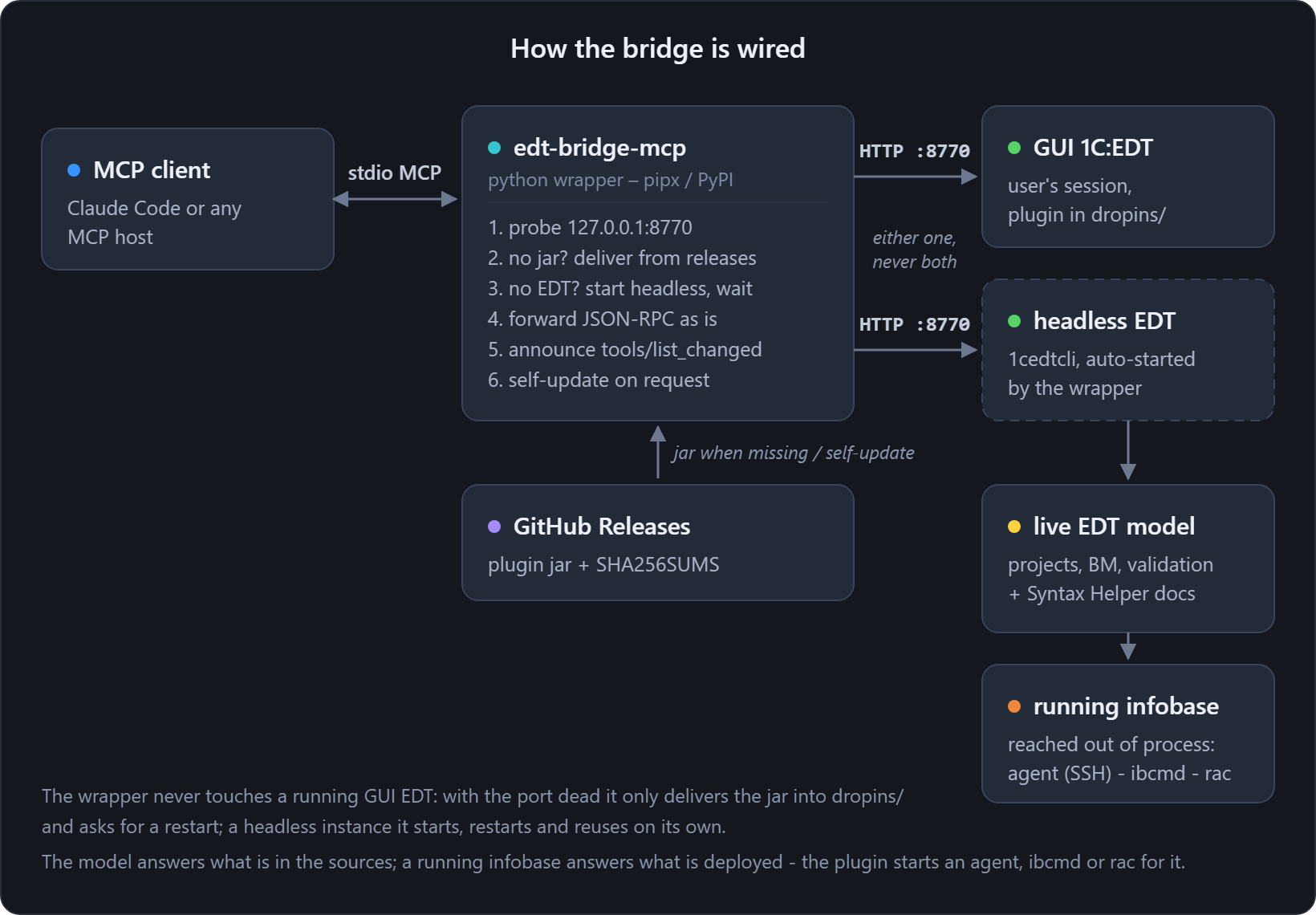
The Java plugin serves MCP as plain JSON-RPC over HTTP on 127.0.0.1:8770 — which means an
MCP client configured with that URL loses the server whenever EDT is not running. This wrapper
is what the client talks to instead:
- EDT open (GUI or headless) → every request is forwarded to the live bridge;
- EDT closed → it auto-starts a headless EDT (
1cedtcliwith a keepalive pipe, the same recipe asrun-headless.ps1) and forwards once the model is ready; - plugin jar missing → it delivers the jar itself from the latest GitHub release
(checksum-verified) into EDT's
dropins/before starting — a barepipx install edt-bridge-mcpis enough to get a working bridge; - a client session never hangs on startup: while the backend is starting,
tools/listreturns an empty list and anotifications/tools/list_changedfollows when ready.
Install
pipx install edt-bridge-mcp # or: pipx install ./python from a checkout
Register in an MCP client
claude mcp add edt-bridge -- edt-bridge-mcp --workspace "D:\\path\\to\\edt-workspace"
Self-update
edt-bridge-mcp self-update             # refresh the plugin jar (GitHub Releases) + the wrapper (PyPI)
edt-bridge-mcp self-update --jar-only  # only the jar
edt-bridge-mcp self-update --pip-only  # only the wrapper
A running EDT (GUI or headless) keeps the old jar loaded until it restarts; the wrapper restarts its own headless instance on the next auto-start.
Configuration
CLI flags override the environment.
| Env | Flag | Meaning |
|---|---|---|
EDT_BRIDGE_PORT |
--port |
bridge port (default 8770) |
EDT_BRIDGE_TOKEN |
— | write-tools token, forwarded as Authorization: Bearer and injected into the headless JVM |
EDT_BRIDGE_WORKSPACE |
--workspace |
EDT workspace path — required for the headless auto-start |
EDT_BRIDGE_EDT_DIR |
--edt-dir |
EDT install dir (…/1cedt); newest install auto-detected when omitted |
EDT_BRIDGE_START_TIMEOUT |
--start-timeout |
seconds to wait for a starting backend (default 360) |
EDT_BRIDGE_AUTOSTART |
--no-autostart |
set 0/pass the flag for proxy-only mode |
Safety
- If a GUI EDT is running but the bridge port is dead (plugin missing there), the wrapper
refuses to start a headless instance — the GUI holds the workspace lock. It still delivers
the jar into
dropins/when missing, so restarting that EDT activates the bridge. - If a headless
1cedtcliis already starting, the wrapper waits for it instead of spawning a second one.
Release history Release notifications | RSS feed


Download files
Download the file for your platform. If you're not sure which to choose, learn more about installing packages.
Source Distribution
Built Distribution
Filter files by name, interpreter, ABI, and platform.
If you're not sure about the file name format, learn more about wheel file names.
Copy a direct link to the current filters
File details
Details for the file edt_bridge_mcp-0.1.0.tar.gz.
File metadata
- Download URL: edt_bridge_mcp-0.1.0.tar.gz
- Upload date:
- Size: 11.5 kB
- Tags: Source
- Uploaded using Trusted Publishing? No
- Uploaded via: twine/6.2.0 CPython/3.14.2
File hashes
| Algorithm | Hash digest | |
|---|---|---|
| SHA256 |
e7c96ac37817e525047c0aece4f2914604e0f61e4e5d12e2e42574b827c291d4
|
|
| MD5 |
a7fcea6865fe3701f85e998ab315b7a8
|
|
| BLAKE2b-256 |
d26bd506817b4db4fca44962410a1df3317bcc0dbd1b23c995728e2d3677ea77
|
File details
Details for the file edt_bridge_mcp-0.1.0-py3-none-any.whl.
File metadata
- Download URL: edt_bridge_mcp-0.1.0-py3-none-any.whl
- Upload date:
- Size: 11.9 kB
- Tags: Python 3
- Uploaded using Trusted Publishing? No
- Uploaded via: twine/6.2.0 CPython/3.14.2
File hashes
| Algorithm | Hash digest | |
|---|---|---|
| SHA256 |
676ed40a1176004e5458652b1f5e4c67c31fccae34f474bcaf09b41c4707b897
|
|
| MD5 |
a97bcdd2fe3502d814902794865000d3
|
|
| BLAKE2b-256 |
ff4f1477776bb47e2b00dfd8b2e0666b67764368e53388b3b92cc57fe4718dee
|






