
A Python package for generating educational content using Generative AI

Project description





Educhain 🎓🔗
Educhain is a powerful Python package that leverages Generative AI to create engaging and personalized educational content. From generating multiple-choice questions to crafting comprehensive lesson plans, Educhain makes it easy to apply AI in various educational scenarios.
🚀 Features
📝 Generate Multiple Choice Questions (MCQs)
from educhain import Educhain

client = Educhain()

# Basic MCQ generation
mcq = client.qna_engine.generate_questions(
    topic="Solar System",
    num=3,
    question_type="Multiple Choice"
)

# Advanced MCQ with custom parameters
advanced_mcq = client.qna_engine.generate_questions(
    topic="Solar System",
    num=3,
    question_type="Multiple Choice",
    difficulty_level="Hard",
    custom_instructions="Include recent discoveries"
)

print(mcq.model_dump_json())  # View in JSON format , For Dictionary format use mcq.model_dump()
📊 Create Lesson Plans
from educhain import Educhain

client = Educhain()

# Basic lesson plan
lesson = client.content_engine.generate_lesson_plan(
    topic="Photosynthesis"
)

# Advanced lesson plan with specific parameters
detailed_lesson = client.content_engine.generate_lesson_plan(
    topic="Photosynthesis",
    duration="60 minutes",
    grade_level="High School",
    learning_objectives=["Understanding the process", "Identifying key components"]
)

print(lesson.model_dump_json())  # View in JSON format , For Dictionary format use lesson.model_dump()
🔄 Support for Various LLM Models
from educhain import Educhain, LLMConfig
from langchain_google_genai import ChatGoogleGenerativeAI
from langchain_openai import ChatOpenAI

# Using Gemini
gemini_model = ChatGoogleGenerativeAI(
    model="gemini-2.0-flash",
    google_api_key="YOUR_GOOGLE_API_KEY"
)
gemini_config = LLMConfig(custom_model=gemini_model)
gemini_client = Educhain(gemini_config)

# Using GPT-4
gpt4_model = ChatOpenAI(
    model_name="gpt-4.1",
    openai_api_key="YOUR_OPENAI_API_KEY"
)
gpt4_config = LLMConfig(custom_model=gpt4_model)
gpt4_client = Educhain(gpt4_config)
📁 Export Questions to Different Formats
from educhain import Educhain

client = Educhain()
questions = client.qna_engine.generate_questions(topic="Climate Change", num=5)

# Export to JSON
questions.json("climate_questions.json")

# Export to PDF
questions.to_pdf("climate_questions.pdf")

# Export to CSV
questions.to_csv("climate_questions.csv")
🎨 Customizable Prompt Templates
from educhain import Educhain

client = Educhain()

# Custom template for questions
custom_template = """
Generate {num} {question_type} questions about {topic}.
Ensure the questions are:
- At {difficulty_level} level
- Focus on {learning_objective}
- Include practical examples
- {custom_instructions}
"""

questions = client.qna_engine.generate_questions(
    topic="Machine Learning",
    num=3,
    question_type="Multiple Choice",
    difficulty_level="Intermediate",
    learning_objective="Understanding Neural Networks",
    custom_instructions="Include recent developments",
    prompt_template=custom_template
)
📚 Generate Questions from Files
from educhain import Educhain

client = Educhain()

# From URL
url_questions = client.qna_engine.generate_questions_from_data(
    source="https://example.com/article",
    source_type="url",
    num=3
)

# From PDF
pdf_questions = client.qna_engine.generate_questions_from_data(
    source="path/to/document.pdf",
    source_type="pdf",
    num=3
)

# From Text File
text_questions = client.qna_engine.generate_questions_from_data(
    source="path/to/content.txt",
    source_type="text",
    num=3
)
📹 Generate Questions from YouTube Videos 
from educhain import Educhain

client = Educhain()

# Basic usage - Generate 3 MCQs from a YouTube video
questions = client.qna_engine.generate_questions_from_youtube(
    url="https://www.youtube.com/watch?v=dQw4w9WgXcQ",
    num=3
)
print(questions.model_dump_json())

# Generate questions preserving original language
preserved_questions = client.qna_engine.generate_questions_from_youtube(
    url="https://www.youtube.com/watch?v=dQw4w9WgXcQ",
    num=2,
    target_language='hi',
    preserve_original_language=True  # Keeps original language
)
🥽 Generate Questions from Images
from educhain import Educhain

client = Educhain() #Default is 4o-mini (make sure to use a multimodal LLM!)

question = client.qna_engine.solve_doubt(
    image_source="path-to-your-image",
    prompt="Explain the diagram in detail",
    detail_level = "High"
    )

print(question)
🥽 Generate Visual Questions
from langchain_google_genai import ChatGoogleGenerativeAI
from educhain import Educhain, LLMConfig

gemini_flash = ChatGoogleGenerativeAI(model="gemini-2.0-flash", google_api_key=GOOGLE_API_KEY)

flash_config = LLMConfig(custom_model=gemini_flash)

client = Educhain(flash_config)

ques = client.qna_engine.generate_visual_questions(
        topic="GMAT Statistics", num=10 )

print(ques.model_dump_json())
📈 Workflow
Reimagining Education with AI 🤖
- 📜 QnA Engine: Generates an infinte variety of Questions
- 📰 Content Engine: One-stop content generation - lesson plans, flashcards, notes etc
- 📌 Personalization Engine: Adapts to your individual level of understanding for a tailored experience.

🛠 Installation
pip install educhain
🎮 Usage
📚 Starter Guide

Quick Start
Get started with content generation in < 3 lines!
from educhain import Educhain

client = Educhain()

ques = client.qna_engine.generate_questions(topic="Newton's Law of Motion",
                                            num=5)
print(ques.model_dump_json())
ques.model_dump_json() # ques.model_dump()
Supports Different Question Types
Generates different types of questions. See the advanced guide to create a custom question type.
# Supports "Multiple Choice" (default); "True/False"; "Fill in the Blank"; "Short Answer"

from educhain import Educhain

client = Educhain()

ques = client.qna_engine.generate_questions(topic = "Psychology",
                                            num = 10,
                                            question_type="Fill in the Blank"
                                            custom_instructions = "Only basic questions")

print(ques.model_dump_json())
ques.model_dump_json() #ques.model_dump()
Use Different LLM Models
To use a custom model, you can pass a model configuration through the LLMConfig class
Here's an example using the Gemini Model
from langchain_google_genai import ChatGoogleGenerativeAI
from educhain import Educhain, LLMConfig

gemini_flash = ChatGoogleGenerativeAI(
    model="gemini-2.0-flash",
    google_api_key="GOOGLE_API_KEY")

flash_config = LLMConfig(custom_model=gemini_flash)

client = Educhain(flash_config) #using gemini model with educhain

ques = client.qna_engine.generate_questions(topic="Psychology",
                                            num=10)

print(ques.model_dump_json())
ques.model_dump_json() #ques.model_dump()
Customizable Prompt Templates
Configure your prompt templates for more control over input parameters and output quality.
from educhain import Educhain

client = Educhain()

custom_template = """
Generate {num} multiple-choice question (MCQ) based on the given topic and level.
Provide the question, four answer options, and the correct answer.
Topic: {topic}
Learning Objective: {learning_objective}
Difficulty Level: {difficulty_level}
"""

ques = client.qna_engine.generate_questions(
    topic="Python Programming",
    num=2,
    learning_objective="Usage of Python classes",
    difficulty_level="Hard",
    prompt_template=custom_template,
)

print(ques.model_dump_json())
Generate Questions from Data Sources
Ingest your own data to create content. Currently supports URL/PDF/TXT.
from educhain import Educhain
client = Educhain()

ques = client.qna_engine.generate_questions_from_data(
    source="https://en.wikipedia.org/wiki/Big_Mac_Index",
    source_type="url",
    num=5)

print(ques.model_dump_json())
ques.model_dump_json() # ques.model_dump()
Generate Lesson Plans
Create interactive and detailed lesson plans.
from educhain import Educhain

client = Educhain()

plan = client.content_engine.generate_lesson_plan(
                              topic = "Newton's Law of Motion")

print(plan.model_dump_json())
plan.model_dump_json()  # plan.model_dump()
📊 Supported Question Types
- Multiple Choice Questions (MCQ)
- Short Answer Questions
- True/False Questions
- Fill in the Blank Questions
🔧 Troubleshooting
Common Issues and Solutions
API Key Authentication Errors
Error: Authentication failed. Please check your API key.
Solution: Verify that your API key is correct and properly set. For OpenAI or Google API keys, ensure they are active and have sufficient quota remaining.
# Correct way to set API keys
import os
os.environ["OPENAI_API_KEY"] = "your-api-key-here"
# or
os.environ["GOOGLE_API_KEY"] = "your-api-key-here"
Model Not Generating Expected Output
Issue: The model generates content that doesn't match your expectations or requirements.
Solution: Try adjusting the parameters or providing more specific instructions:
# Be more specific with your requirements
questions = client.qna_engine.generate_questions(
    topic="Python Programming",
    num=3,
    difficulty_level="Intermediate",
    custom_instructions="Focus on object-oriented programming concepts. Include code examples in each question."
)
Package Import Errors
ModuleNotFoundError: No module named 'educhain'
Solution: Ensure you've installed the package correctly:
pip install educhain --upgrade
If you're using a virtual environment, make sure it's activated before installing.
Memory Issues with Large Outputs
Issue: Generating a large number of questions causes memory errors.
Solution: Generate questions in smaller batches:
# Instead of generating 50 questions at once
all_questions = []
for i in range(5):
    batch = client.qna_engine.generate_questions(
        topic="History",
        num=10
    )
    all_questions.extend(batch.questions)
🗺 Roadmap
- Bulk Generation
- Outputs in JSON format
- Custom Prompt Templates
- Custom Response Models using Pydantic
- Exports questions to JSON/PDF/CSV
- Support for other LLM models
- Generate questions from text/PDF file
- Integration with popular Learning Management Systems
- Mobile app for on-the-go content generation
🤝 Open Source Contributions Welcome!
We invite you to help enhance our library. If you have any ideas, improvements, or suggestions for enhancements to contribute, please open a GitHub issue or submit a pull request. Be sure to adhere to our existing project structure and include a detailed README.md for any new Contribution.
Thank you for your continued support, community!
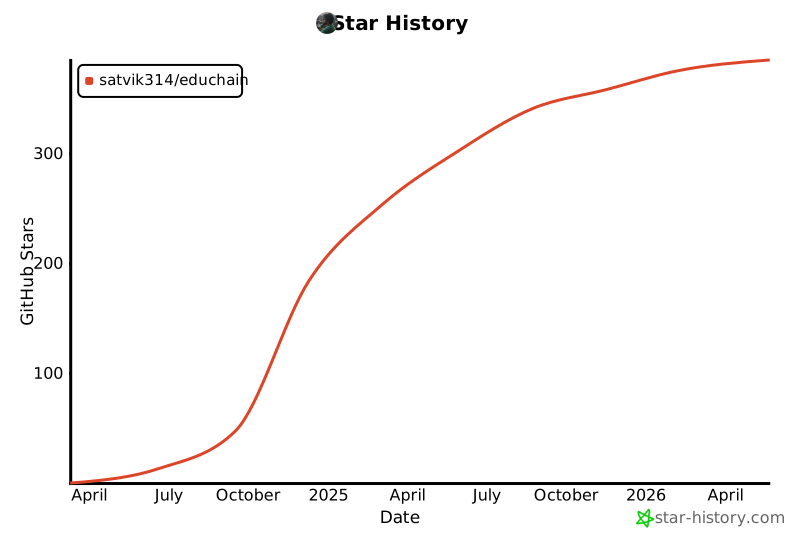
📈 Version History
v1.2.0 (May 2025)
- ✨ Added support for generating visual questions with multimodal LLMs
- ✨ Added support for generating questions from YouTube videos
- ✨ Added support for generating questions from images
- 🐛 Fixed issue with PDF parsing for certain file formats
- ⚡️ Improved performance for large document processing
v1.1.0 (February 2025)
- ✨ Added support for custom prompt templates
- ✨ Added export functionality to PDF, CSV, and JSON
- 🔄 Enhanced compatibility with Gemini models
- 📚 Expanded documentation with more examples
v1.0.0 (December 2024)
- 🚀 Initial release
- ✅ Core question generation functionality
- ✅ Support for multiple question types
- ✅ Basic lesson plan generation
- ✅ Integration with OpenAI models
📝 License

This project is licensed under the MIT License - see the LICENSE file for details.
📬 Connect With Us




Made with ❤️ by Buildfastwithai
Release history Release notifications | RSS feed


Download files
Download the file for your platform. If you're not sure which to choose, learn more about installing packages.
Source Distribution
Built Distribution
Filter files by name, interpreter, ABI, and platform.
If you're not sure about the file name format, learn more about wheel file names.
Copy a direct link to the current filters
File details
Details for the file educhain-0.3.13.tar.gz.
File metadata
- Download URL: educhain-0.3.13.tar.gz
- Upload date:
- Size: 51.5 kB
- Tags: Source
- Uploaded using Trusted Publishing? No
- Uploaded via: twine/6.2.0 CPython/3.10.16
File hashes
| Algorithm | Hash digest | |
|---|---|---|
| SHA256 |
5422a03e39b397cf75221ddae2e9b404f9657cc0cb842d407f4a5a6957a21fa6
|
|
| MD5 |
8b4347db53c6b642ccff3297165f9588
|
|
| BLAKE2b-256 |
4cb16882d8ab68e2f8d8420ebbcee8e2687f8f09104c65ed74bae90853f02873
|
File details
Details for the file educhain-0.3.13-py3-none-any.whl.
File metadata
- Download URL: educhain-0.3.13-py3-none-any.whl
- Upload date:
- Size: 49.8 kB
- Tags: Python 3
- Uploaded using Trusted Publishing? No
- Uploaded via: twine/6.2.0 CPython/3.10.16
File hashes
| Algorithm | Hash digest | |
|---|---|---|
| SHA256 |
1bce5a378175d2c124e32738fd2ec7ab789872aa6a7ef868ac3990d2e6fb48f1
|
|
| MD5 |
ef5e159ad980b97e3961a5d9e5e98bfe
|
|
| BLAKE2b-256 |
4db002d05e93bb720411f8c0445194e2264b3c5f1eb5e044b8d0ff4ea689c128
|






