
Detect and visualize intracranial electrode locations from CT and MR scans.

Project description
🧠 ElecMap: Intracranial Electrode Localization Toolkit



Automated detection and visualization of intracranial electrodes from CT/MR scans for neurosurgical planning and research.
📁 Table of Contents
- Introduction
- Key Features
- Installation
- Usage
- Sample Output
- Project Structure
- JSON Output Format
- Use Cases
- Dependencies
- License
- Contact
- Citation
📘 Introduction
ElecMap is a Python package designed for the automated detection of intracranial electrodes from CT and MR brain scans. It accurately identifies and localizes electrode centroids within medical imaging data. The package includes a visualization tool to help users review and display the detected electrode locations.
It leverages powerful libraries such as:
- SimpleITK for image processing
- nipype for interfacing with FSL's BET
- matplotlib for report generation
🌟 Key Features
- ✅ Precise Electrode Mapping: Localizes electrode centroids in 3D space
- 🔄 Multi-Modal Integration: Combines CT and MR data for improved anatomical accuracy
- 📄 Clinical-Grade Reports: Generates standardized HTML reports for documentation
- 🚫 Smart Filtering: Automatic outlier rejection and duplicate detection
- ⚙️ Fallback Mode: Works with CT-only if FSL or MR scan is unavailable
📦 Installation
1. Install directly from PyPI (recommended):
pip install elecmap
2. Clone the repository from GitHub:
git clone https://github.com/saberm2837/ElecMap.git
cd ElecMap
🔔 Note: FSL must be installed and accessible in your system PATH to use MR-based skull stripping features. If unavailable, ElecMap will still perform CT-only detection with a warning.
🛠️ Usage
1. Electrode Detection
from elecmap import detect_electrodes
import os

# Input files
ct_file = '/path/to/sample_ct.nii'
mr_file = '/path/to/sample_mr.nii'  # Optional if FSL is unavailable

# Set FSL environment variables if needed
if 'FSLDIR' not in os.environ:
    os.environ['FSLDIR'] = '/opt/fsl'
    os.environ['FSLOUTPUTTYPE'] = 'NIFTI_GZ'

# Run detection
detect_electrodes(ct_file, mr_file)
This function performs:
- STEP 1: Load CT and MR images
- STEP 2: Skull-strip MR using FSL BET (optional)
- STEP 3: Apply MR brain mask to CT (optional)
- STEP 4: Detect candidate electrodes from CT intensities
- STEP 5: Eliminate outliers
- STEP 6: Save coordinates to
processed_scans/electrodes_sample_ct.json
✅ Tip: If no MR image or FSL is available, simply pass
Noneas the second argument or omit it.
2. Electrode Visualization
from elecmap import display_electrode_locations

# Input files
ct_file = '/path/to/sample_ct.nii'
json_file = 'processed_scans/electrodes_sample_ct.json'

# Generate HTML report
display_electrode_locations(ct_file, json_file)
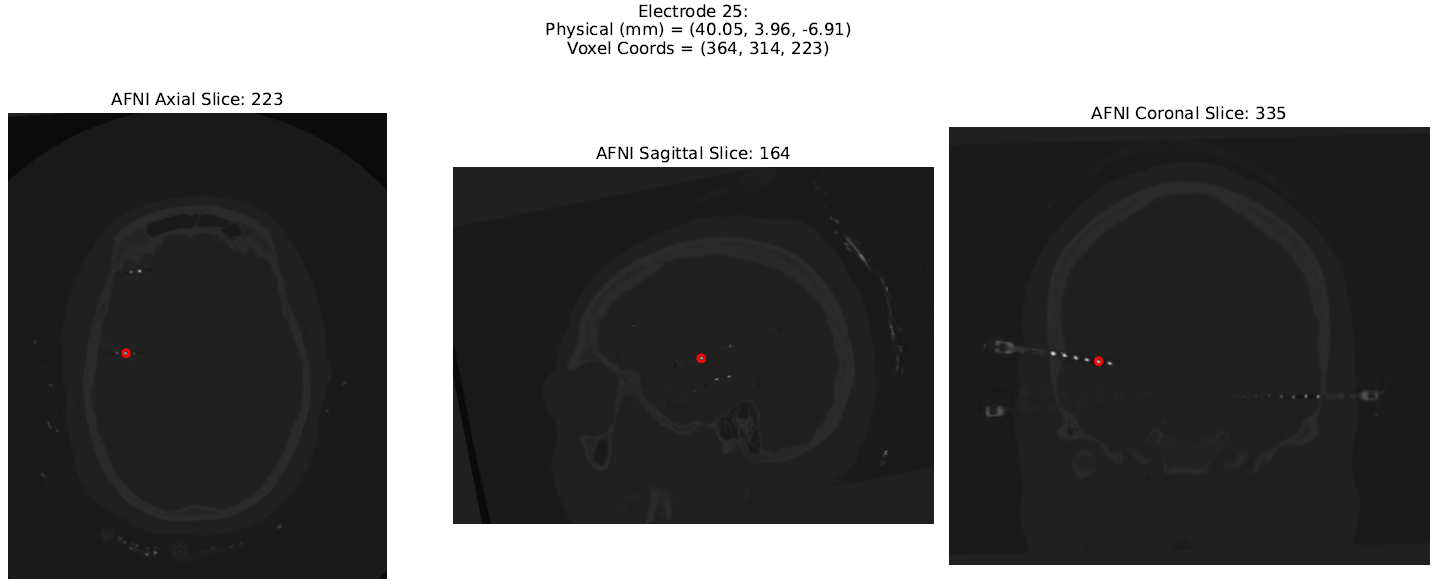
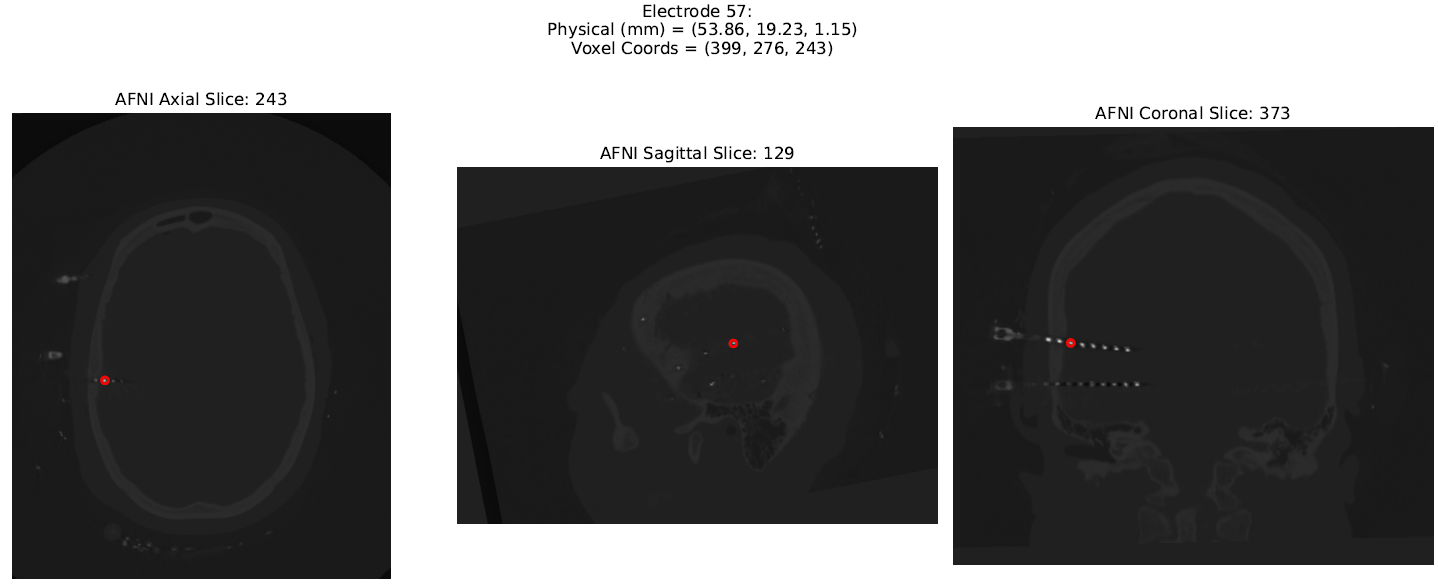
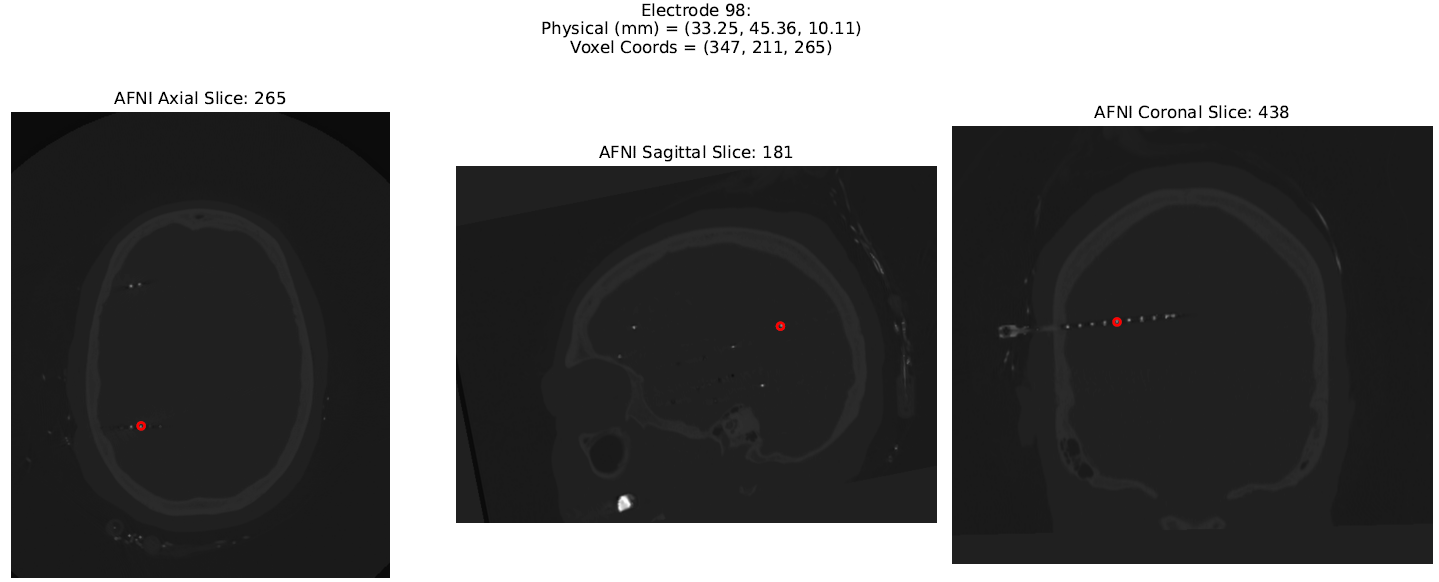
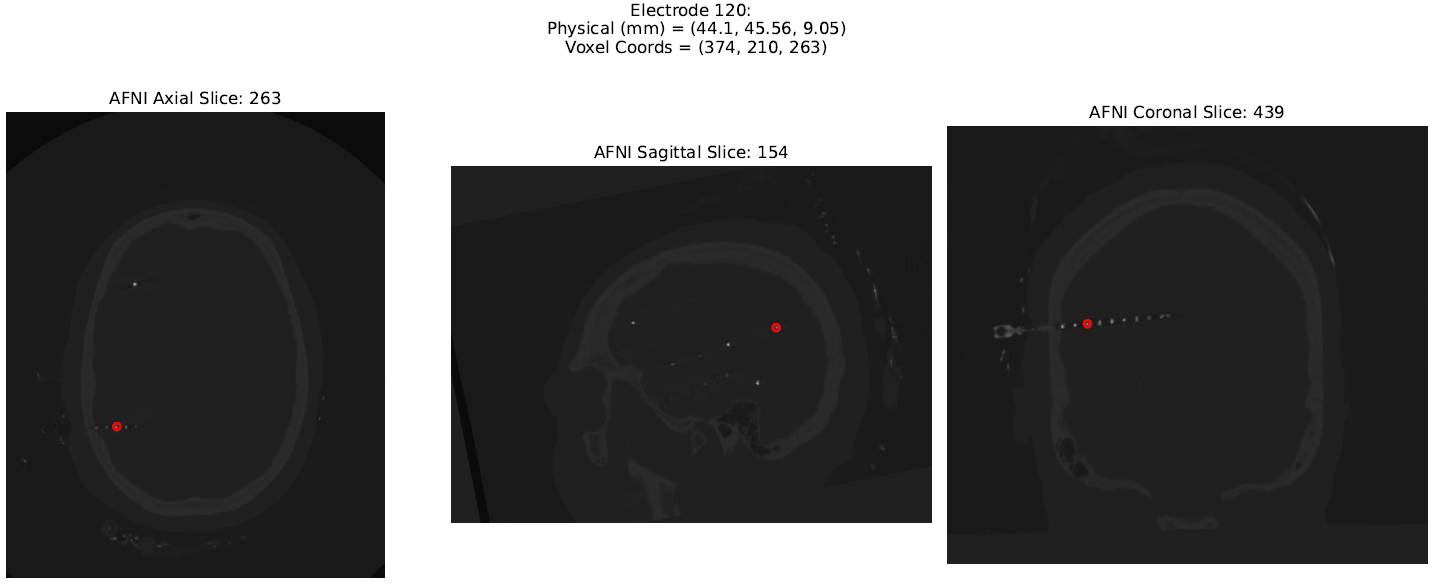
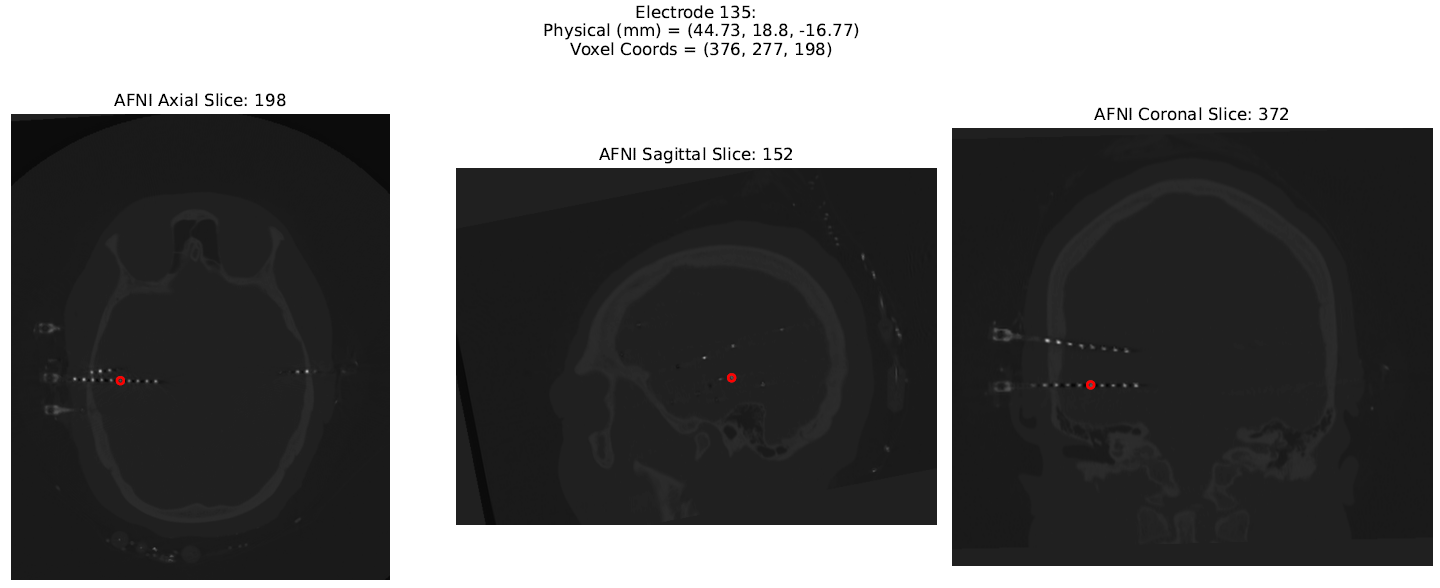
This function:
- Overlays detected electrodes on axial, sagittal, and coronal slices
- Saves an interactive HTML report to:
reports/report_sample_ct.html
✅ Sample Output
Console output (detection):
[12:52:13] STEP 1: Loading images ...
CT array shape: (481, 650, 529)
voxel intensity range: -4734.0 to 31743.0
Z-axis bounds: 38 to 443
Y-axis bounds: 52 to 598
X-axis bounds: 42 to 487

[12:52:15] STEP 2: Performing skull stripping on MR using FSL BET ...
Skull-stripped MR image saved at: /data/processed_scans/sample_mr_bet.nii.gz
Brain mask saved at: /data/processed_scans/sample_mr_bet_mask.nii.gz

[12:52:31] STEP 3: Loading the generated MR brain mask and applying it to the CT scan ...
MR brain mask loaded successfully.

[12:52:31] Dilating the brain mask by 30 voxels ...
Successfully Skull stripped the CT scan.

[12:52:52] STEP 4: Compute the centroid of electrodes ...
Detected total number of potential electrodes: 142

[12:52:53] STEP 5: Eliminate outliers from the list of potential electrodes ...
Processing electrodes:  52%|█████▏    | 74/142 [00:00<00:00, 733.90it/s]
Electrode outside margin 1: physical = (29.92, -35.9, -83.28), voxel = (339, 414, 31)
Electrode outside margin 2: physical = (-27.22, -37.28, -88.78), voxel = (196, 417, 18)
Processing electrodes: 100%|██████████| 142/142 [00:00<00:00, 375.20it/s]
Electrode outside margin 3: physical = (-27.55, -38.4, -87.82), voxel = (195, 420, 20)
Electrode outside margin 4: physical = (-27.75, -38.8, -87.42), voxel = (195, 421, 21)
Electrode outside margin 5: physical = (-25.96, -38.0, -88.62), voxel = (199, 419, 18)
Electrode outside margin 6: physical = (-26.36, -38.4, -88.22), voxel = (198, 420, 19)
Electrode outside margin 7: physical = (26.76, -35.6, -83.43), voxel = (331, 413, 31)
Final electrode count after eliminating 7 potential outliers: 135

[12:52:53] STEP 6: Saving electrode coordinates to the disk ...
Electrode coordinates successfully saved to: processed_scans/electrodes_sample_ct.json
Console output (visualization):
Generating report: 100%|██████████| 135/135 [00:26<00:00,  5.01it/s]
HTML report saved to: reports/report_sample_ct.html
Report preview (example images):
📂 Project Structure
ElecMap/
├── src/
|   └── elecmap/
│       ├── __init__.py
│       ├── electrode_detection.py
│       └── electrode_visualization.py
├── examples/
│   └── run_elecmap_demo.py
├── processed_scans/
│   └── (auto-generated outputs)
├── reports/
│   └── (auto-generated reports)
├── pyproject.toml
├── requirements.txt
├── LICENSE
└── README.md
📋 JSON Output Format
The output JSON contains a list of detected electrode centroids:
[
  {
    "physical_mm": [51.74, -40.14, -2.88],
    "voxel_coords": [394, 324, 250]
  },
  ...
]
physical_mm: electrode location in real-world space (millimeters)voxel_coords: electrode position in image voxel space (indices)
🔬 Use Cases
- Epilepsy and tumor surgery planning
- Post-operative SEEG or ECoG contact localization
- Research in brain-computer interfaces (BCIs)
- Electrode tracking across imaging sessions
- Quality control of electrode placement
🧪 Dependencies
-
Python 3.8+
-
Python libraries:
SimpleITKmatplotlibnumpytermcolortqdmnipype(for FSL integration)
-
System dependency:
Install all Python dependencies with:
pip install -r requirements.txt
⚠️ Without FSL, only CT-based detection is performed. A warning will be printed.
🧾 License
This project is licensed under the MIT License.
🤝 Contributing
Feedback and contributions are welcome!
Please open an issue to report bugs, request features, or contribute code.
📫 Contact
Created by: Mohammad Saber
📧 Email: mohammadsaber@gmail.com
🌐 GitHub: https://github.com/saberm2837/ElecMap
📚 Citation
If you use ElecMap in your research, please cite:
@software{ElecMap2025,
  author = {Mohammad Saber},
  title = {ElecMap: Intracranial Electrode Localization Toolkit},
  year = {2025},
  url = {https://github.com/saberm2837/ElecMap}
}
Release history Release notifications | RSS feed


Download files
Download the file for your platform. If you're not sure which to choose, learn more about installing packages.
Source Distribution
Built Distribution
Filter files by name, interpreter, ABI, and platform.
If you're not sure about the file name format, learn more about wheel file names.
Copy a direct link to the current filters
File details
Details for the file elecmap-0.1.1.tar.gz.
File metadata
- Download URL: elecmap-0.1.1.tar.gz
- Upload date:
- Size: 15.1 kB
- Tags: Source
- Uploaded using Trusted Publishing? No
- Uploaded via: twine/6.0.1 CPython/3.10.13
File hashes
| Algorithm | Hash digest | |
|---|---|---|
| SHA256 |
31b4ca7119f017a2563eddb4160fd0aae75c3739035c0d04767bd654bcb77edf
|
|
| MD5 |
8a1503a68c9cad4260536b3df7a658e7
|
|
| BLAKE2b-256 |
c19e4d9f78c4086410b9c7cdde7d190ba4923ee5bab4566a9edfc61cdc7ce81f
|
File details
Details for the file elecmap-0.1.1-py3-none-any.whl.
File metadata
- Download URL: elecmap-0.1.1-py3-none-any.whl
- Upload date:
- Size: 12.7 kB
- Tags: Python 3
- Uploaded using Trusted Publishing? No
- Uploaded via: twine/6.0.1 CPython/3.10.13
File hashes
| Algorithm | Hash digest | |
|---|---|---|
| SHA256 |
c041e432bb9b323e9d8dd8f202c562e09e62a8bad052eb834671599cf528e55f
|
|
| MD5 |
bd876d615e62dec335b4ebb4435f7705
|
|
| BLAKE2b-256 |
f427e19a2e09b0e475560bb325f99eb7dca2aee69faa97e78146a9d748e09fc3
|






