
Elemctl
English · Русский
Documentation: docs.keyfire.ru/elemctl
A command-line tool, MCP server and Python library for managing applications on the 1C:Enterprise.Element cloud platform (1cmycloud.com) through Console API v2.
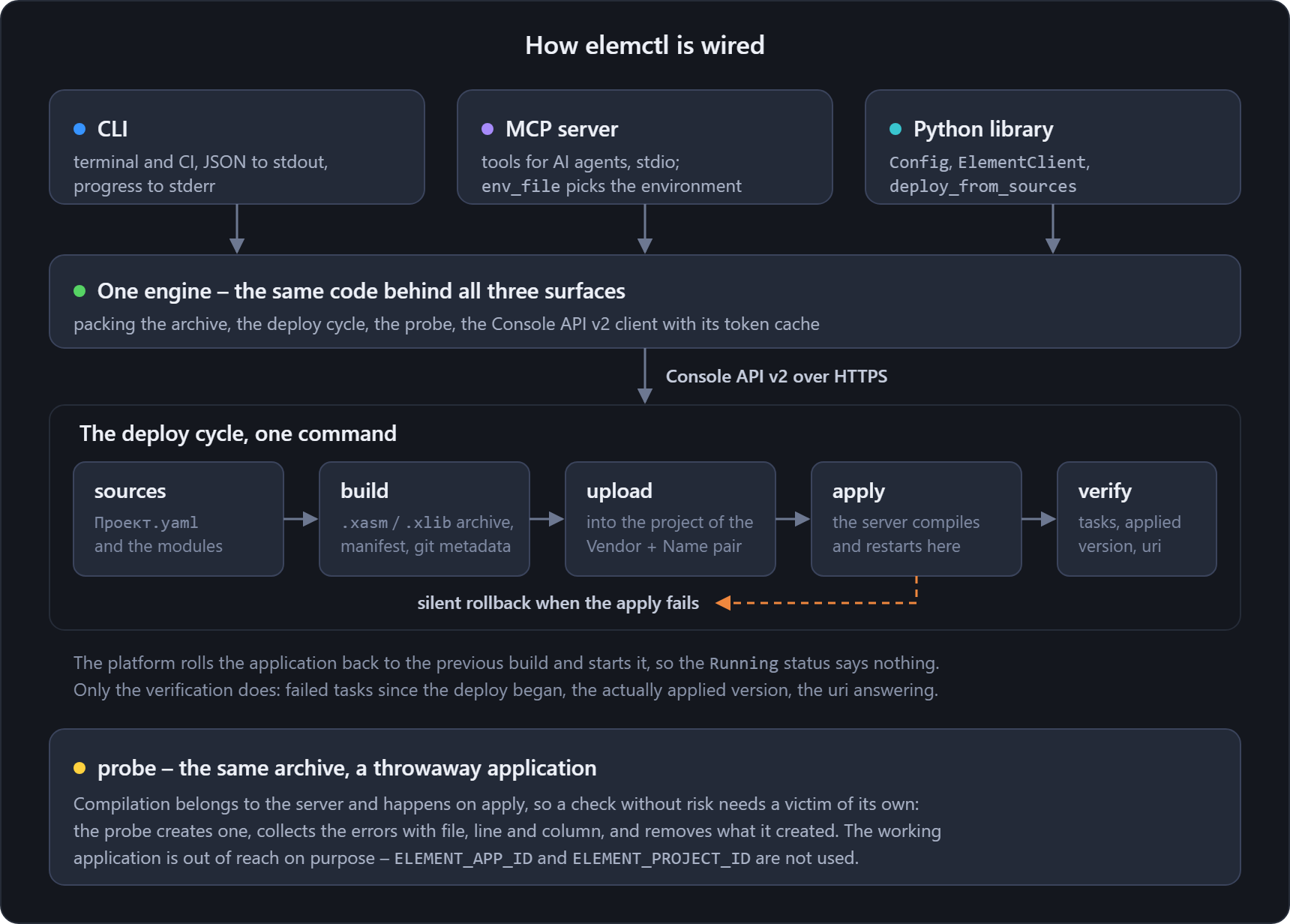
elemctl runs an application's whole life on the platform, and you never have to open the web console. It creates the application, builds a .xasm/.xlib archive from project sources, uploads that build and applies it. Then it checks that the apply really happened, because the platform can roll back without saying so. A probe checks compilation and leaves the working application alone. Other commands handle development-environment branches, dumps and the technology version.
One engine, three ways to reach it. The elemctl command works in a terminal and in CI. The MCP server serves AI agents: Claude Code and other MCP clients. The elemctl Python module goes into scripts of your own.
elemctl is a CLI tool, MCP server and Python library for the 1C:Enterprise.Element (1cmycloud) Console API: manage applications, upload builds, deploy with a verified apply and check compilation with a probe. The CLI output is plain JSON.
Development notes and updates (in Russian): the 1C × AI: engineering workshop Telegram channel.
Features
- Applications: list, details, create, start, stop, delete, technology version, debug-session data (
apps debug). The list filters by name on the client side and prints short cards with--brief. Commands that address one application take its id or its exact name. - Projects and builds: upload
.xasm/.xlib, list builds, delete. - Build from sources: elemctl packs a project directory into a build archive with a manifest and git metadata. That directory holds
Проект.yamland the modules. The version comes from the flag, from the last build's counter or from the CI run number in the environment:CI_PIPELINE_IID,GITHUB_RUN_NUMBER,BUILD_NUMBER. The output carries it as a field. Descriptors written with English key spellingsName/Vendor/Versionare read as well as Russian ones. - One-command deploy: build -> upload -> apply -> restart -> verification that the apply actually took effect. Uncommitted changes in the project directory show up in the report as
dirty. Pass--require-cleanto stop on a dirty tree. - Compilation check without risking the application (
elemctl probe): the server compiles the sources, and it does so inside a throwaway application. Errors come back with file, line and column, and the probe deletes what it created. The working application stays out of reach on purpose: the probe never readsELEMENT_APP_IDorELEMENT_PROJECT_ID. - User lists (
elemctl user-lists): the sign-in settings you would normally open the control panel for, namely self-registration and signing in with a login and a password. Address a list by id, by presentation or by the application that owns it. - Development-environment branches: list, create, bind to an application, merge.
- Dumps: create and check readiness.
- MCP server: the same operations, exposed as tools for AI agents – Claude Code and other MCP clients.
- Plugins:
importlib.metadataentry points. An external package supplies the platform debug adapter (elemctl debug-adapter) and commands of its own, and the core stays small. OneCommanddeclaration becomes both a CLI subcommand and an MCP tool, so a command that knows your own environment lives in your package instead of a public core. - Self-update:
elemctl self-updateupdates the package by unpacking the wheel. It works even while a running MCP server holdselemctl.exe, which is exactly where plain pipx or pip breaks the install. - In VS Code: deploy and debugging live in the XBSL extension, which calls elemctl. The deploy button runs
elemctl deploy, and the debug-session coordinates come fromelemctl apps debug.
Checking that the build was applied
A platform quirk: when a project apply fails, the platform silently rolls back the application to the previous build. The Running status then says nothing about whether the deploy worked. So elemctl deploy does not trust the status, and once the work is done it checks three things:
- Application tasks with an
ErrororFailedstatus that started after the deploy began. Older errors from the history are ignored. - The application's actual project version, the
source.project-versionfield. It has to match the build that was just uploaded. - Whether the application uri answers a health-check HTTP request. The result lands in the report's
uri-statusfield and changes nothing: 401 and 403 are normal for closed applications.
The deploy exit code is zero only when the build really was applied.
Installation
pipx install elemctl            # or: pip install elemctl
pip install "elemctl[mcp]"      # with the MCP server
You need Python 3.10 or newer. The core and the CLI have no external dependencies: the standard library is enough.
Configuration
elemctl takes the connection credentials from environment variables or from a .env file in the current directory. An environment variable wins over the file.
| Variable | Purpose |
|---|---|
ELEMENT_BASE_URL |
the platform base URL, e.g. https://1cmycloud.com |
ELEMENT_CLIENT_ID |
Client-Id used to obtain a token |
ELEMENT_CLIENT_SECRET |
Client-Secret |
ELEMENT_APP_ID |
default application (optional) |
ELEMENT_PROJECT_ID |
default project (optional) |
ELEMENT_SPACE_ID |
default space (optional) |
ELEMENT_CA_FILE |
additional PEM CA bundle for a private cloud (optional) |
ELEMENT_TLS_STRICT |
strict RFC 5280 certificate checks; true by default |
ELEMENT_TLS_VERIFY |
certificate and hostname verification; true by default |
Client-Id and Client-Secret are issued in the 1cmycloud control panel, in the Console API integrations section. A file template is .env.example.
Configuring with .env
Copy the template into the directory from which you will run elemctl:
cp .env.example .env
Then fill in at least the platform address, Client-Id and Client-Secret:
ELEMENT_BASE_URL=https://1cmycloud.com
ELEMENT_CLIENT_ID=client-id
ELEMENT_CLIENT_SECRET=client-secret
Without --env-file, the tool looks for a file named exactly .env in the
current working directory. That is not necessarily the project directory,
and not the directory elemctl is installed into. The elemctl repository
excludes .env from Git. If you create one in another repository, add .env
to its .gitignore: the file holds a secret and has no business in commits or
logs.
When the configuration lives elsewhere, pass it explicitly. An absolute path is more reliable for the MCP server, background jobs and CI:
elemctl --env-file /opt/elemctl/cloud.env apps list
The option is also accepted after the command:
elemctl apps list --env-file /opt/elemctl/cloud.env
A relative path is resolved from the current working directory. Separate files let one installation address several stands, and no process variable has to change:
elemctl --env-file ./env/public-cloud.env apps list
elemctl --env-file ./env/local-cloud.env apps list
Example for a local cloud with a trusted but legacy internal CA that Python 3.13 rejects under strict RFC 5280 checks:
ELEMENT_BASE_URL=https://cloud.internal.example
ELEMENT_CLIENT_ID=client-id
ELEMENT_CLIENT_SECRET=client-secret
ELEMENT_TLS_STRICT=false
For an internal CA that is trusted but rejected by Python 3.13 with
Basic Constraints of CA cert not marked critical, set
ELEMENT_TLS_STRICT=false. Certificate-chain, validity, signature and hostname
verification all stay on. Only OpenSSL's strict RFC 5280 profile is relaxed.
Where you can, fix or reissue the CA certificate instead.
Use ELEMENT_CA_FILE=/path/to/internal-ca.pem when the private CA is not in the
system trust store. ELEMENT_TLS_VERIFY=false turns off both certificate and
hostname verification. It is a last resort, and only for an isolated test
network. With verification off, every command prints a warning to stderr while
stdout still carries the answer alone, so piped JSON survives intact. Boolean
values accept true/false, yes/no, on/off, or 1/0.
ELEMCTL_NO_PROXY solves a different problem: it routes requests past the
environment's proxy. It helps when the proxy cannot reach an internal address or
replaces its certificate. Server-certificate verification stays on either way.
If the direct connection reaches the server and ends with
CERTIFICATE_VERIFY_FAILED, configure the trusted CA or the ELEMENT_TLS_*
options.
Behaviour of the tool
These are set through the environment only – a connection .env is not their place:
| Variable | Purpose |
|---|---|
ELEMCTL_LANG |
language of the messages and the help (ru, en); the --lang flag wins over it |
ELEMCTL_NO_PROXY |
set it to bypass the environment's proxy for every call (loopback and private addresses are bypassed anyway) |
ELEMCTL_NO_PLUGINS |
do not look for plugins: work with the core capabilities only |
The CI environment
The build declares no variables of its own, but it reads the ones CI sets itself. That is why a pipeline needs neither a version flag nor an edit of the sources:
| Variable | Purpose |
|---|---|
CI_PIPELINE_IID |
run number; the build version suffix comes from it when there is neither --build-version nor a previous build |
GITHUB_RUN_NUMBER |
the same, second in order |
BUILD_NUMBER |
the same, third in order; the first numeric value wins |
CI_COMMIT_BRANCH |
the branch name for the manifest when git is in a detached HEAD |
CI_COMMIT_REF_NAME |
the same, second in order |
GITHUB_REF_NAME |
the same, third in order; the value HEAD is discarded and the field stays empty |
Quick start
# list applications
elemctl apps list

# application details (status, uri, actual project version)
elemctl apps get <app-id>

# create the application only if it does not exist yet:
# {"id": ..., "created": true|false, "sign-in": ...} - the last field is the way in
# --wait waits for the application AND verifies the build it really runs
elemctl apps ensure acme-crm-dev --project-id <project-id> --latest-build --wait

# full deploy cycle from sources with apply verification
elemctl deploy --app-id <app-id> --project-id <project-id> --project-dir acme/crm

# compile the sources on the server without touching the working application:
# ok, plus errors with file, line and column; cleans up after itself
elemctl probe --project-dir acme/crm

# debug-session data: {"debug-token": ..., "debug-address": ...}
# (debugging must be enabled on the server: config/debug.yml enabled: true)
elemctl apps debug <app-id>

# only build the .xasm archive, without uploading it anywhere
elemctl build --project-dir acme/crm --output ./dist

# parse a built archive: manifest, subsystems, global types with qualified names
elemctl inspect ./dist/e1c-CurrencyConverter-2.0.xlib

# forbid signing in by password and self-registration in the application's user list
elemctl user-lists password-login --app crm-dev --disable
elemctl user-lists self-registration --app crm-dev --disable

# merge changes from a development-environment branch
elemctl branches merge <branch-id>
Every command writes JSON to stdout, and progress of long-running operations goes to stderr. An error comes back as a JSON object with an error field and exit code 1.
The --json flag turns that convention into a guarantee a script can lean on, and it is accepted in any position. While the command runs, stdout is swapped for stderr, so the real stdout receives nothing but the JSON answer. No stray line from a plugin or a library can slip in. Parse the stream whole with json.load instead of hunting for the first brace. With --json a failure also goes to stderr and stdout stays empty, because a pipeline would read anything in the machine channel as the answer.
For the full list of commands run elemctl --help, and for one group elemctl apps --help, elemctl deploy --help and so on.
Language
Error and progress messages, and the --help text, come in Russian and English. The JSON result is language-neutral. The language is picked in this order: --lang ru|en, then the ELEMCTL_LANG env var, then the system locale (LC_ALL, then LANG), then Russian. --lang is read before the parser is built, so elemctl --lang en --help prints English help.
MCP server
The server exposes platform operations as MCP tools (stdio transport):
pip install "elemctl[mcp]"
claude mcp add elemctl -- elemctl mcp
The server reads connection credentials from the same ELEMENT_* variables / .env.
Tools
| Tool | What it does |
|---|---|
list_apps |
list of applications; the deleted ones are hidden unless include_deleted asks for them, name filters by a substring of the name on the client and status by the status word; the answer carries the counters and a summary line next to applications, brief (the default) keeps id, name, status, uri and the applied version |
find_app |
find an application by its exact name: the id and a found flag; deleted ones are skipped unless include_deleted is set |
get_app |
application card: status, uri, the actual project version |
create_app |
create an application; with only a project_id the source is the project's latest build. The answer carries sign-in – the way in; verify waits for the application and checks the build it really runs |
ensure_app |
create an application by name only if it does not exist yet; an existing one is not recreated (created: false); verify checks the build the application really runs |
start_app |
start the application |
stop_app |
stop the application |
delete_app |
delete the application. This cannot be undone: the data is lost, and a recreated application gets a different URL |
list_app_tasks |
tasks of the applications; app_id is an optional filter |
debug_info |
debug-session data: debug-token and debug-address (debugging must be enabled on the server) |
list_spaces |
list of spaces |
list_projects |
list of projects; name filters by a substring of the name on the client, the deleted ones are hidden unless include_deleted is set; brief (the default) – id, name, project kind, space, application count, deletion flag |
list_builds |
a project's builds, newest first; the answer is an object {total, shown, summary, builds}; limit (default 10, 0 – all), brief (the default) keeps id, versions, date, branch and commit |
get_build |
the whole card of one build; version is the build's version (1.0-42), an id is accepted too and resolved through the listing |
build_assembly |
build a .xasm/.xlib archive from the sources locally (does not talk to the platform) |
inspect_assembly |
parse a built archive: manifest, project properties, subsystems and global types with qualified names (local) |
deploy |
the whole cycle from sources, with a check that the build was applied; the verdict is ok, the details are problems and log |
probe |
check the compilation with the server compiler without touching the working application; errors with file, line and column, cleans up after itself |
apply_build |
apply an uploaded build to the application by its id |
verify_deploy |
verify the apply actually took effect: failed tasks, the applied build, the availability of the uri |
list_user_lists |
user lists; name filters by a substring of the presentation |
configure_user_list |
self-registration and password sign-in; without the flags it only reports the current state |
list_branches |
list of development-environment branches; the project_id and name filters are optional |
merge_branch |
accept the changes of a development-environment branch |
debug_adapter |
the path to the platform debug adapter from a plugin; a missing plugin is an answer (found: false), not an error (local) |
The tools a plugin brings stand next to these, described below.
A single environment is not a limit. Every tool that talks to the platform takes an optional env_file, a path to another installation's .env. One server then serves both the cloud and a local installation, with no restart under different credentials.
list_apps returns brief cards by default: id, name, status, uri, applied version. Full cards of a whole space run to tens of thousands of characters in an agent's response, so ask for them with brief=false. The name parameter filters by a case-insensitive substring, and it does so on the client because the platform ignores the query parameter. The status parameter filters by the whole status word. Deleted applications stay hidden until include_deleted asks for them: a stand a few months old answers with hundreds of cards of which a handful are alive. Nothing is cut silently. The answer carries total (how many cards the platform gave), live (how many of those are not deleted), shown and a ready summary line such as "7 live of 324", with the cards themselves under applications.
list_projects behaves the same way and returns id, name, project kind, space, application count and the deletion flag. Its name filters by a substring too, and projects marked deleted stay hidden until include_deleted is set: a stand a few months old keeps hundreds of them against a handful of live ones.
list_builds answers with brief cards as well, holding id, versions, date, branch and commit, and with the ten newest builds unless limit says otherwise; 0 lifts the cut. The cards sit under builds, next to the counters total (how many builds the platform returned) and shown, plus a summary line. The platform's listing is not the project's whole history: it deletes the builds nobody uses, whatever their age. The build an application runs, the project's first build and a release build stay. The listing has no pages, and summary says plainly that what you see is the remainder of the history. It reads that off the answer itself: the platform hands out the numbers of one base version consecutively, so a number missing from the listing is a build already taken away.
get_build hands back one card whole and is addressed by the build version. An id is accepted as well and looked up in the listing, because the address the method understands is the version, not the id of a card.
get_app, delete_app, start_app, stop_app and debug_info accept the application id (UUID) or its exact name. A value that is not a UUID is resolved through the list, and several matches are an error rather than a guess.
create_app and ensure_app add a sign-in field to the answer: the address and the account that gets into a freshly created application. That account comes from the control panel, the accounts used in other applications do not work there, and an agent sees only the JSON. The verify parameter of both waits for the application and checks that it really runs the build that was asked for: the platform rolls a failed apply back without a word, and a created application used to be reported ready on trust. The report lands in the verify field of the answer. The waiting costs minutes, so such a call belongs in a background elemctl run.
Plugins
elemctl discovers external packages through importlib.metadata entry points. Its own pyproject.toml declares nothing about plugins, and it reads them on demand. Non-publishable vendor artifacts then live in a separate package, and the elemctl core stays clean and public.
elemctl.debug_adapter: a plugin package declares the directory of the platform debug adapter. Those are proprietary 1C jars and elemctl does not ship them. The entry-point value is a path, or a zero-argument callable that returns one. The path points to a directory holding a repo/ subdirectory with the adapter jars.
elemctl.commands: a plugin package brings commands of its own. The entry-point value is a Command, a list of them, or a zero-argument callable returning either. One declaration covers both surfaces: elemctl builds a CLI subcommand and an MCP tool with a proper schema out of it, and knows nothing about what the command does. That is where a command belongs when it is about your own environment: internal circuits, other systems, your stands. A public core is no place for it.
# a plugin package's pyproject.toml
[project.entry-points."elemctl.debug_adapter"]
name = "my_package:adapter_root"     # () -> Path to the directory containing repo/

[project.entry-points."elemctl.commands"]
name = "my_package.commands:commands"   # () -> list[Command]
# my_package/commands.py
from elemctl.plugins import Argument, Command

def warm_up(context, stand="", force=False):
    context.log(f"warming up {stand}")          # progress: stderr in the CLI, the log field in MCP
    card = context.client.get_app(stand)        # the client is built on first use
    return {"ok": True, "status": card.get("status")}

def commands():
    return [Command(
        name="warm-up",
        help="open the admin page of a fresh stand",
        handler=warm_up,
        arguments=[Argument("--stand", help="the application"), Argument("--force", type=bool)],
    )]
The result of a handler has to be JSON-serializable: the CLI prints it, the MCP tool returns it. The exit code of the CLI comes from the result too. An integer from 0 to 255 in the exit-code field becomes the exit code as it is, so a command with three outcomes can hand a script "no differences", "differences" and "a step failed" as 0, 1 and 2. Without that field, a dict result with "ok": false ends with exit code 1, the same convention the deploy and probe reports follow. When the field disagrees with ok, the field decides. A string, true or 300 is not a code, and the CLI goes by ok instead. The MCP tool returns the field with the rest of the result. Do not call sys.exit in a handler to get a code: the same function runs inside the MCP server, where the call would never be answered and the server would stop. Argument types are str, int, float and bool for a flag. elemctl adds env_file to the MCP tool itself, so a plugin command reaches other environments exactly like the core tools do. A command may not take over a name the core already occupies: that is an error, not a silent override.
# the adapter path from the installed plugin (for the VS Code extension):
# {"path": "...", "found": true} or {"path": null, "found": false}
elemctl debug-adapter

# what the plugins bring – adapter directories and commands
elemctl plugins
The adapter itself, those proprietary 1C jars, is extracted from the platform distribution by tools/extract_adapter.py. Point xbsl.debug.adapterPath at the resulting directory by hand, or build the plugin package from it. The script is not shipped in the package distribution.
ELEMCTL_NO_PLUGINS=1 turns plugin discovery off: only the core capabilities are left.
VS Code
A companion extension integrates elemctl into the editor:
- XBSL (the
xbsl project) – highlighting, linting, the form designer
and the metadata tree. The XBSL: deploy the project button runs
elemctl deployas a terminal task and verifies the apply. The same extension debugs 1C:Element applications with the platform's DAP adapter, whose session data comes fromelemctl apps debug. Debugging used to be a separate XBSL Debug extension living in the elemctl repository. Since XBSL 0.57 it is part of the one extension, and the repository keeps only the elemctl side of it.
It is also published to Open VSX.
Use as a library
from elemctl import Config, ElementClient
from elemctl.deploy import deploy_from_sources

client = ElementClient(Config.from_env())
apps = client.list_apps()

report = deploy_from_sources(
    client,
    app_id="...",
    project_id="...",
    project_dir="acme/crm",
    log=print,
)
assert report.ok, report.problems
list_apps() answers with the live applications. Deleted ones stay in the
platform list under the Deleted status, and a stand a few months old carries
hundreds of them; pass include_deleted=True for the full list.
list_apps_counted() returns the same list under items and adds the counters
the CLI and the MCP tool report: total, live and shown.
To check compilation without touching the working application, run the same
cycle the probe command does:
from elemctl.probe import probe_project

report = probe_project(client, project_dir="acme/crm", log=print)
for error in report.errors:
    print(f"{error['file']}:{error['line']}:{error['column']} {error['message']}")
assert report.ok, report.messages
Build format
.xasm for an application and .xlib for a library are both ZIP archives:
Assembly.yaml            # manifest: ProjectKind, Vendor, Name, Version, ...
{vendor}/{name}/...      # project files: .yaml, .xbsl, resources
The project directory must follow the {repo}/{vendor}/{name}/Проект.yaml layout, because paths inside the archive are built relative to the repository root. The ВидПроекта field in Проект.yaml says whether the project is an application or a library. When an application references libraries whose source projects sit under the same repository root, their files go into the application archive on their own, transitive local dependencies included. A referenced library that is not present locally remains an external platform dependency.
Limitations and status
- The tool is unofficial and not affiliated with 1C Company. The Console API may change without notice.
- elemctl uses only the documented Console API v2. It neither calls nor describes the platform console's internal APIs.
- On some platform configurations an application created from
--project-idalone comes out as an empty skeleton with no project data. Create it from a build instead:elemctl apps create <name> --project-id <id> --latest-build. Thecreate_appMCP tool substitutes the latest build for you. Runelemctl deployonce the application exists. - The platform describes an application created with an
Errorstatus only as "Неизвестная ошибка. Обратитесь к администратору". The details live in the application's task: the files, lines and columns of the compilation errors.apps create --waitandapps ensureprint them after the generic text, the waydeployandverifyhave long done, so you do not have to dig through the server log. Not every failure ends inError, though. A failed apply is rolled back to the previous build and the application comes upRunning, so--waitalso verifies which build the application really runs and answers with exit code 1 when it is not the one you asked for. Use--no-verifyfor the plain wait. - You cannot compile the sources without creating something on the platform: compilation belongs to the server and happens when a build is applied. That is what
probeis for, and it takes the hit on a throwaway application instead of the working one. One probe costs as much time as creating an application does, so minutes. Its place is before a deploy or in CI, not in a per-keystroke loop. - A platform project is identified by the
Vendor+Namepair in the manifest, not by theИдinПроект.yaml. A build uploaded without a project id lands in the project that already owns the pair, and a second project for the same pair is refused with a 409. - You sign in to a freshly created application with a control-panel account. The application gets its own empty user list, password sign-in is off and no account service is attached, so the accounts that work in other applications do not work here. Connecting another application's user list does not change that, and neither does enabling the local sign-in.
apps createandapps ensuresay so themselves: thesign-infield of the answer, and the same text on stderr. - Deleted applications stay in the platform's list with a
Deletedstatus and their formerid. On that idapps getanddeployreturn 404.apps findandapps ensureskip them;apps find --include-deletedbrings the previous search behaviour back. - The platform refuses to delete an application that has unpublished changes in the development environment and answers HTTP 400
FAILED_PRECONDITION. The Console API has no forced deletion, so the control panel is the only way out. elemctl points this out in the error message. - Recreating an application, meaning delete and then create, changes its URL. External settings tied to that address, an OIDC redirect for instance, will need updating. The Console API has no "soft" wipe of application data; that is done in the management console.
Origin and legal notes
The code is written from scratch against the platform's external interface specification. ORIGIN.md describes the process and the guarantees. Trademarks and the absence of affiliation with 1C Company are covered in the NOTICE file.
License
1 maintainer

Release files for elemctl 0.41.0
For a detailed explanation of source distributions (sdists) and built distributions (wheels), please see the package formats documentation.
Source distribution (sdist)
| File | Size | Uploaded | |
|---|---|---|---|
| elemctl-0.41.0.tar.gz | 343.2 kB | Details |
Built distribution (wheel)
| File | Interpreter | ABI | Platform | Reset |
|---|---|---|---|---|
| elemctl-0.41.0-py3-none-any.whl | Python 3 | none | any | Details |
Total release size: 471.0 kB
Release files / elemctl-0.41.0.tar.gz
| Download URL | elemctl-0.41.0.tar.gz |
|---|---|
| Size | 343.2 kB |
| Tags | Source |
|
SHA-256 checksum How to use checksums |
dc75f77ffa096d3cf8446a8f93d6acc7c5c299fa54fd51093cda6aae0c5e3ea3
|
|
BLAKE2b-256 checksum How to use checksums |
c3bf154ff14930c31d4448662e0cefa568d8b24561349c242157e40806dfd0db
|
| Upload date | |
|
Uploaded using Trusted Publishing? What is trusted publishing? |
Yes |
| Uploaded via |
twine/7.0.0 CPython/3.13.14
|
Provenance
Provenance describes where a file came from. On PyPI, provenance is shared via attestations, which provide a verifiable record of the build or publishing details. View details, limitations and caveats.


PyPI Publish Attestation
PyPI verified that this artifact, at this checksum, originated from the publisher listed below.
Signed by GitHub Actions, verified by PyPI on Sep 13, 2026.
Transparency logRelease files / elemctl-0.41.0-py3-none-any.whl
| Download URL | elemctl-0.41.0-py3-none-any.whl |
|---|---|
| Size | 127.7 kB |
| Tags | Python 3 |
|
SHA-256 checksum How to use checksums |
6883d107abaa8571bc3b56de7333970b0d5336fed9046b062b3dc38b47f8e6c1
|
|
BLAKE2b-256 checksum How to use checksums |
babbd88d3650877128a15c50af24efe669cb8352ad9f570dbc5db256d7c39ad2
|
| Upload date | |
|
Uploaded using Trusted Publishing? What is trusted publishing? |
Yes |
| Uploaded via |
twine/7.0.0 CPython/3.13.14
|
Provenance
Provenance describes where a file came from. On PyPI, provenance is shared via attestations, which provide a verifiable record of the build or publishing details. View details, limitations and caveats.
PyPI Publish Attestation
PyPI verified that this artifact, at this checksum, originated from the publisher listed below.
Signed by GitHub Actions, verified by PyPI on Sep 13, 2026.
Transparency log













