
email-profile





The simplest way to work with email in Python. No boilerplate, no low-level IMAP commands, no headaches.
Just connect, read, search, send, backup, and restore — with one class. Or hand the same account to Claude, Cursor or any MCP client and let the model do it.
from email_profile import Email

with Email("user@gmail.com", "app_password") as app:
    for msg in app.inbox.where().messages():
        print(f"{msg.date} | {msg.from_} | {msg.subject}")
That's it. No server configuration needed — email-profile auto-discovers your IMAP server from your email address.
- Documentation: linux-profile.github.io/email-profile
- Source Code: github.com/linux-profile/email-profile
- PyPI: pypi.org/project/email-profile
Contents — Install · Why · Quick Start · MCP Server · Features · Providers · Environment
Install
pip install email-profile          # library
pip install email-profile[mcp]     # + MCP server for AI clients
Why email-profile?
Most Python email libraries make you deal with imaplib directly, parse raw bytes, manage connections manually, and write dozens of lines just to read your inbox.
email-profile gives you a clean, human API:
- Write
Email("user@gmail.com", "pw")instead of configuring IMAP servers manually - Write
app.inbox.where(Q.unseen()).first()instead of raw IMAP search commands - Write
app.sync()instead of building your own backup system - Write
app.send(to="...", subject="...", body="...")instead of constructing MIME messages - Run
email-profile-mcpand ask Claude "what needs an answer today?" instead of writing an agent
It combines IMAP + SMTP + storage + sync + MCP in a single library. No other Python package does this.
Quick Start
Connect
Three ways to connect — pick the one that fits:
from email_profile import Email

# Just email + password (auto-discovers the server)
with Email("user@gmail.com", "app_password") as app:
    print(app.mailboxes())

# From .env file (great for production)
with Email.from_env() as app:
    print(app.mailboxes())

# Explicit server (when you need full control)
with Email("imap.gmail.com", "user@gmail.com", "app_password") as app:
    print(app.mailboxes())
Read Emails
with Email.from_env() as app:
    # How many emails?
    print(app.inbox.where().count())

    # Read them
    for msg in app.inbox.where().messages():
        print(f"{msg.date} | {msg.from_} | {msg.subject}")

    # Just the first one
    msg = app.inbox.where().first()

    # Only headers (much faster for large mailboxes)
    for msg in app.inbox.where().messages(mode="headers"):
        print(msg.subject)
Search
Find exactly what you need with composable queries:
from email_profile import Email, Q
from datetime import date

with Email.from_env() as app:
    # Combine conditions with & (AND), | (OR), ~ (NOT)
    q = Q.subject("meeting") & Q.unseen()
    print(app.inbox.where(q).count())

    # From Alice or Bob
    q = Q.from_("alice@x.com") | Q.from_("bob@x.com")

    # Everything except seen emails
    q = ~Q.seen()

    # Emails from 2025, larger than 1MB
    q = Q.since(date(2025, 1, 1)) & Q.before(date(2025, 12, 31)) & Q.larger(1_000_000)
Or use validated kwargs if you prefer:
from email_profile import Query

query = Query(subject="report", unseen=True, since=date(2025, 1, 1))
query = Query(subject="report").exclude(subject="spam").or_(subject="urgent")
Built-in shortcuts for common searches:
app.unread().count()
app.recent(days=7).count()
app.search("invoice").count()
Send Emails
Send, reply, and forward — with automatic SMTP discovery:
with Email.from_env() as app:
    # Simple
    app.send(to="recipient@x.com", subject="Hello", body="Hi there!")

    # HTML + attachments + CC
    app.send(
        to=["alice@x.com", "bob@x.com"],
        subject="Report",
        body="See attached.",
        html="<h1>Report</h1>",
        attachments=["report.pdf"],
        cc="manager@x.com",
    )

    # Reply to an email (preserves threading)
    msg = app.inbox.where().first()
    app.reply(msg, body="Thanks!")

    # Forward
    app.forward(msg, to="colleague@x.com", body="FYI")
Backup & Restore
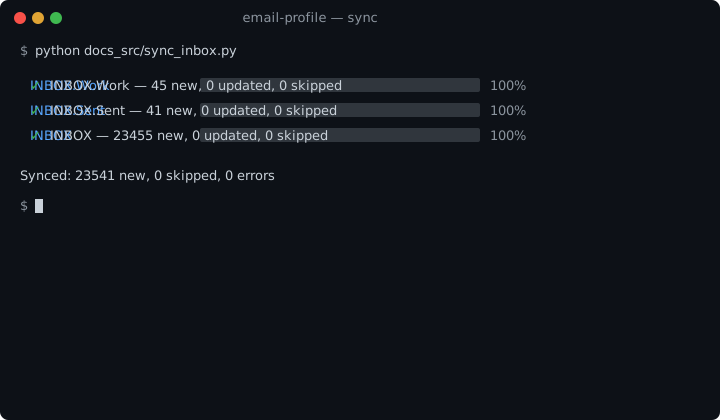
Sync your entire mailbox to a local SQLite database. Incremental — only downloads new emails. Parallel — multiple mailboxes at once. With progress bars.
with Email.from_env() as app:
    # Backup everything (compares by Message-ID, skips duplicates)
    result = app.sync()
    print(f"{result.inserted} new, {result.skipped} skipped")

    # Backup one mailbox
    result = app.sync(mailbox="INBOX")

    # Force re-download (skip duplicate check)
    result = app.sync(skip_duplicates=False)

    # Restore to server (e.g. after migrating)
    count = app.restore()
Mailbox Operations
with Email.from_env() as app:
    # Built-in folder shortcuts (auto-detected across languages)
    app.inbox      # INBOX
    app.sent       # Sent / Enviados / Enviadas
    app.trash      # Trash / Lixeira / Papelera
    app.drafts     # Drafts / Rascunhos
    app.spam       # Spam / Junk / Lixo Eletrônico

    # Any folder by name
    work = app.mailbox("INBOX.Work")

    # Message operations
    work.mark_seen(uid)
    work.move(uid, "INBOX.Archive")
    work.delete(uid)
Custom Storage
Storage is lazily initialized — email.db is only created when sync() or restore() is first called.
from email_profile import Email, StorageSQLite

# Default: saves to ./email.db on first sync
with Email.from_env() as app:
    app.sync()

# Custom path
with Email.from_env() as app:
    app.storage = StorageSQLite("./backup.db")
    app.sync()
MCP Server
The same account, as tools for an AI client. Install the extra, point Claude Code, Claude Desktop or Cursor at it, and ask:
"What came in today that needs an answer?" "Find the invoice Alice sent last month and save the PDF." "Draft a reply saying Thursday works — show me before you send."
pip install "email-profile[mcp]"
email-profile-mcp                 # read-only
email-profile-mcp --allow-send    # + send, reply, forward
Safety model
- Read-only by default.
send_email,reply_messageandforward_messageexist only with--allow-send;delete_messageonly with--allow-delete. - Irreversible tools are annotated destructive, so clients that support it ask you before calling them.
- Credentials never pass through the model. They come from the
environment or
.env; no tool accepts a password. - Bodies are truncated (4000 chars by default) and attachment bytes never
cross the wire —
save_attachmentwrites only underEMAIL_MCP_ATTACHMENTS_DIRand returns the path. - One message per call.
uidaccepts a single id; IMAP ranges like1:*are refused, and search strings are escaped before reaching the server.
Connect a client
Claude Code
claude mcp add email \
  --env EMAIL_USERNAME=you@gmail.com --env EMAIL_PASSWORD=app-password \
  -- uvx --from "email-profile[mcp]" email-profile-mcp --allow-send
Or install the repository as a plugin — the server plus six skills that keep the model from sending before you approve:
claude plugin marketplace add linux-profile/email-profile
claude plugin install email-profile@email-profile
Claude Desktop
~/Library/Application Support/Claude/claude_desktop_config.json:
{
  "mcpServers": {
    "email": {
      "command": "uvx",
      "args": ["--from", "email-profile[mcp]", "email-profile-mcp", "--allow-send"],
      "env": { "EMAIL_USERNAME": "you@gmail.com", "EMAIL_PASSWORD": "app-password" }
    }
  }
}
Cursor
Same shape in .cursor/mcp.json — copy examples/cursor.json.
From Python
from email_profile import Email
from email_profile.mcp import Settings, build

server = build(
    Settings(allow_send=True),
    email_factory=lambda: Email("imap.example.com", "user", "pw"),
)
server.run()                              # stdio
server.run(transport="streamable-http")   # or HTTP
Tools
| Tool | Hint | What it does |
|---|---|---|
list_mailboxes |
read-only | Server-side folder names |
search_messages |
read-only | Filter one mailbox by sender, subject, text, dates, flags — headers only, newest first, paginated |
read_message |
read-only | Headers, body and attachment metadata for one (mailbox, uid) |
list_attachments |
read-only | Name, type and size of each attachment |
save_attachment |
reversible | Write one attachment to disk |
mark_seen / mark_unseen |
reversible | Read state |
flag_message / unflag_message |
reversible | Star |
move_message |
reversible | Move to another mailbox |
send_email |
destructive | New message over SMTP — --allow-send |
reply_message |
destructive | Reply keeping thread headers — --allow-send |
forward_message |
destructive | Forward with attachments — --allow-send |
delete_message |
destructive | Flag, or expunge with expunge=true — --allow-delete |
Four prompts put the tools in the order a task needs: triage_inbox,
find_message, draft_reply, summarize_thread. The plugin ships the same
guidance as skills under skills/.
Options
| Flag | Env | Default |
|---|---|---|
--allow-send |
EMAIL_MCP_ALLOW_SEND |
off |
--allow-delete |
EMAIL_MCP_ALLOW_DELETE |
off |
--max-chars |
EMAIL_MCP_MAX_CHARS |
4000 |
| — | EMAIL_MCP_LIMIT |
20 |
| — | EMAIL_MCP_DEFAULT_MAILBOX |
INBOX |
| — | EMAIL_MCP_ATTACHMENTS_DIR |
. — the only place save_attachment writes |
--http --host --port |
— | stdio |
Full reference: MCP Server docs.
Features
| Feature | Description |
|---|---|
| Auto-discovery | Detects IMAP/SMTP servers from email domain (50+ providers) |
| Unified API | IMAP + SMTP in a single Email class |
| Query Builder | Composable search with Q (AND, OR, NOT) and validated Query kwargs |
| Sync & Restore | Incremental backup to SQLite, restore to any server |
| Parallel | Multi-threaded sync and restore with configurable workers |
| Progress | Rich progress bars with per-mailbox status |
| Retry | Exponential backoff on transient failures |
| Send | Send, reply, forward with HTML, attachments, CC/BCC |
| Storage | Pluggable storage backend (SQLite default) |
| Flags | Read/unread, flag, delete, move, copy operations |
| Context Manager | with Email(...) as app: for automatic cleanup |
| MCP Server | 14 tools + 4 prompts for Claude Code, Claude Desktop, Cursor — read-only until you opt in |
| Plugin | Claude Code plugin with skills that gate sending behind your approval |
Supported Providers
Auto-discovery works out of the box. Just use your email and password — no server configuration needed.
| Provider | IMAP Server | |
|---|---|---|
 |
Gmail | imap.gmail.com |
 |
Outlook / Hotmail / Live | outlook.office365.com |
 |
Yahoo | imap.mail.yahoo.com |
 |
iCloud | imap.mail.me.com |
 |
Zoho | imap.zoho.com |
 |
ProtonMail (Bridge) | 127.0.0.1:1143 |
 |
AOL | imap.aol.com |
 |
Yandex | imap.yandex.com |
 |
Mail.ru | imap.mail.ru |
 |
GMX | imap.gmx.com |
 |
Hostinger | imap.hostinger.com |
 |
GoDaddy | imap.secureserver.net |
 |
Namecheap | mail.privateemail.com |
 |
Gandi | mail.gandi.net |
 |
OVH | ssl0.ovh.net |
 |
Ionos (1&1) | imap.ionos.com |
 |
Fastmail | imap.fastmail.com |
|
Rackspace | secure.emailsrvr.com |
|
Titan | imap.titan.email |
|
Locaweb | imap.locaweb.com.br |
|
KingHost | imap.kinghost.net |
|
UOL | imap.uol.com.br |
|
Terra | imap.terra.com.br |
Any server with DNS SRV or MX records is also detected automatically.
Environment Variables
EMAIL_USERNAME=user@example.com
EMAIL_PASSWORD=app_password
EMAIL_SERVER=imap.example.com   # optional, auto-discovered

EMAIL_MCP_ALLOW_SEND=false      # MCP server only
EMAIL_MCP_ALLOW_DELETE=false
Gmail, Outlook and iCloud require an app password, not the account password.
Contributing
Issues and pull requests welcome — see CONTRIBUTING.md. Security reports: SECURITY.md.
License
MIT
1 maintainer

Download files
Download the file for your platform. If you're not sure which to choose, learn more about installing packages.
Source Distribution
Built Distribution
Filter files by name, interpreter, ABI, and platform.
If you're not sure about the file name format, learn more about wheel file names.
Copy a direct link to the current filters
File details
Details for the file email_profile-1.1.0.tar.gz.
File metadata
- Download URL: email_profile-1.1.0.tar.gz
- Upload date:
- Size: 48.1 kB
- Tags: Source
- Uploaded using Trusted Publishing? Yes
- Uploaded via:
twine/7.0.0 CPython/3.13.14
File hashes
| Algorithm | Hash digest | |
|---|---|---|
| SHA256 |
fde194000abd4e3e67afcd2304ed193736faa7492bf3d3353166b526bbd21cab
|
|
| MD5 |
5344ae06219b5396dc0566ec5984187e
|
|
| BLAKE2b-256 |
b7bf841aa7e924f196fc83b9c06797577ee32639966208c4957c8938c5d491d9
|
Provenance
The following attestation bundles were made for email_profile-1.1.0.tar.gz:
Publisher:
python-publish-pypi.yml on linux-profile/email-profile
-
Statement:
-
Statement type:
https://in-toto.io/Statement/v1 -
Predicate type:
https://docs.pypi.org/attestations/publish/v1 -
Subject name:
email_profile-1.1.0.tar.gz -
Subject digest:
fde194000abd4e3e67afcd2304ed193736faa7492bf3d3353166b526bbd21cab - Sigstore transparency entry: 2798722620
- Sigstore integration time:
-
Permalink:
linux-profile/email-profile@9faffe15f57f2db7c10dcb97d32b6a8d5179286d -
Branch / Tag:
refs/tags/v1.1.0 - Owner: https://github.com/linux-profile
-
Access:
public
-
Token Issuer:
https://token.actions.githubusercontent.com -
Runner Environment:
github-hosted -
Publication workflow:
python-publish-pypi.yml@9faffe15f57f2db7c10dcb97d32b6a8d5179286d -
Trigger Event:
release
-
Statement type:
File details
Details for the file email_profile-1.1.0-py3-none-any.whl.
File metadata
- Download URL: email_profile-1.1.0-py3-none-any.whl
- Upload date:
- Size: 62.0 kB
- Tags: Python 3
- Uploaded using Trusted Publishing? Yes
- Uploaded via:
twine/7.0.0 CPython/3.13.14
File hashes
| Algorithm | Hash digest | |
|---|---|---|
| SHA256 |
702cf308f2303b9bd6f80095eabdd7feede9f73f99e40fc73998c2ab72065f17
|
|
| MD5 |
3dbdef45105d94233fec1bcdc47b2f1f
|
|
| BLAKE2b-256 |
d54a10a67bc3c0e62d3fb731acc86d02bcd412840ec7532fa7e18146bbdbfe8f
|
Provenance
The following attestation bundles were made for email_profile-1.1.0-py3-none-any.whl:
Publisher:
python-publish-pypi.yml on linux-profile/email-profile
-
Statement:
-
Statement type:
https://in-toto.io/Statement/v1 -
Predicate type:
https://docs.pypi.org/attestations/publish/v1 -
Subject name:
email_profile-1.1.0-py3-none-any.whl -
Subject digest:
702cf308f2303b9bd6f80095eabdd7feede9f73f99e40fc73998c2ab72065f17 - Sigstore transparency entry: 2798722718
- Sigstore integration time:
-
Permalink:
linux-profile/email-profile@9faffe15f57f2db7c10dcb97d32b6a8d5179286d -
Branch / Tag:
refs/tags/v1.1.0 - Owner: https://github.com/linux-profile
-
Access:
public
-
Token Issuer:
https://token.actions.githubusercontent.com -
Runner Environment:
github-hosted -
Publication workflow:
python-publish-pypi.yml@9faffe15f57f2db7c10dcb97d32b6a8d5179286d -
Trigger Event:
release
-
Statement type:














