
email-profile





The simplest way to work with email in Python. No boilerplate, no low-level IMAP commands, no headaches.
Just connect, read, search, send, backup, and restore — with one class.
from email_profile import Email

with Email("user@gmail.com", "app_password") as app:
    for msg in app.inbox.where().messages():
        print(f"{msg.date} | {msg.from_} | {msg.subject}")
That's it. No server configuration needed — email-profile auto-discovers your IMAP server from your email address.
- Documentation: linux-profile.github.io/email-profile
- Source Code: github.com/linux-profile/email-profile
- PyPI: pypi.org/project/email-profile
Install
pip install email-profile
Why email-profile?
Most Python email libraries make you deal with imaplib directly, parse raw bytes, manage connections manually, and write dozens of lines just to read your inbox.
email-profile gives you a clean, human API:
- Write
Email("user@gmail.com", "pw")instead of configuring IMAP servers manually - Write
app.inbox.where(Q.unseen()).first()instead of raw IMAP search commands - Write
app.sync()instead of building your own backup system - Write
app.send(to="...", subject="...", body="...")instead of constructing MIME messages
It combines IMAP + SMTP + storage + sync in a single library. No other Python package does this.
Quick Start
Connect
Three ways to connect — pick the one that fits:
from email_profile import Email

# Just email + password (auto-discovers the server)
with Email("user@gmail.com", "app_password") as app:
    print(app.mailboxes())

# From .env file (great for production)
with Email.from_env() as app:
    print(app.mailboxes())

# Explicit server (when you need full control)
with Email("imap.gmail.com", "user@gmail.com", "app_password") as app:
    print(app.mailboxes())
Read Emails
with Email.from_env() as app:
    # How many emails?
    print(app.inbox.where().count())

    # Read them
    for msg in app.inbox.where().messages():
        print(f"{msg.date} | {msg.from_} | {msg.subject}")

    # Just the first one
    msg = app.inbox.where().first()

    # Only headers (much faster for large mailboxes)
    for msg in app.inbox.where().messages(mode="headers"):
        print(msg.subject)
Search
Find exactly what you need with composable queries:
from email_profile import Email, Q
from datetime import date

with Email.from_env() as app:
    # Combine conditions with & (AND), | (OR), ~ (NOT)
    q = Q.subject("meeting") & Q.unseen()
    print(app.inbox.where(q).count())

    # From Alice or Bob
    q = Q.from_("alice@x.com") | Q.from_("bob@x.com")

    # Everything except seen emails
    q = ~Q.seen()

    # Emails from 2025, larger than 1MB
    q = Q.since(date(2025, 1, 1)) & Q.before(date(2025, 12, 31)) & Q.larger(1_000_000)
Or use validated kwargs if you prefer:
from email_profile import Query

query = Query(subject="report", unseen=True, since=date(2025, 1, 1))
query = Query(subject="report").exclude(subject="spam").or_(subject="urgent")
Built-in shortcuts for common searches:
app.unread().count()
app.recent(days=7).count()
app.search("invoice").count()
Send Emails
Send, reply, and forward — with automatic SMTP discovery:
with Email.from_env() as app:
    # Simple
    app.send(to="recipient@x.com", subject="Hello", body="Hi there!")

    # HTML + attachments + CC
    app.send(
        to=["alice@x.com", "bob@x.com"],
        subject="Report",
        body="See attached.",
        html="<h1>Report</h1>",
        attachments=["report.pdf"],
        cc="manager@x.com",
    )

    # Reply to an email (preserves threading)
    msg = app.inbox.where().first()
    app.reply(msg, body="Thanks!")

    # Forward
    app.forward(msg, to="colleague@x.com", body="FYI")
Backup & Restore
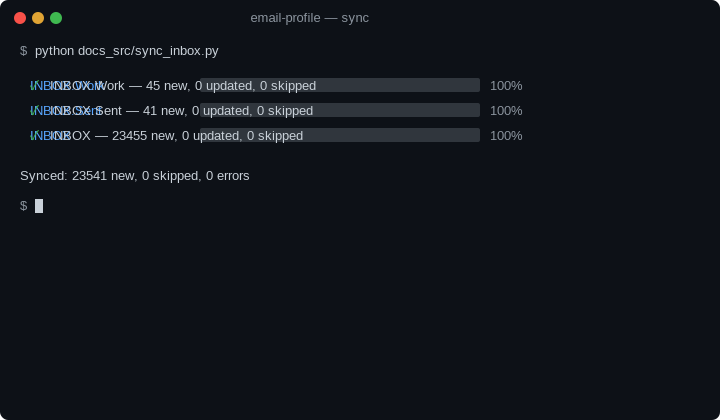
Sync your entire mailbox to a local SQLite database. Incremental — only downloads new emails. Parallel — multiple mailboxes at once. With progress bars.
with Email.from_env() as app:
    # Backup everything (compares by Message-ID, skips duplicates)
    result = app.sync()
    print(f"{result.inserted} new, {result.skipped} skipped")

    # Backup one mailbox
    result = app.sync(mailbox="INBOX")

    # Force re-download (skip duplicate check)
    result = app.sync(skip_duplicates=False)

    # Restore to server (e.g. after migrating)
    count = app.restore()
Mailbox Operations
with Email.from_env() as app:
    # Built-in folder shortcuts (auto-detected across languages)
    app.inbox      # INBOX
    app.sent       # Sent / Enviados / Enviadas
    app.trash      # Trash / Lixeira / Papelera
    app.drafts     # Drafts / Rascunhos
    app.spam       # Spam / Junk / Lixo Eletrônico

    # Any folder by name
    work = app.mailbox("INBOX.Work")

    # Message operations
    work.mark_seen(uid)
    work.move(uid, "INBOX.Archive")
    work.delete(uid)
Custom Storage
Storage is lazily initialized — email.db is only created when sync() or restore() is first called.
from email_profile import Email, StorageSQLite

# Default: saves to ./email.db on first sync
with Email.from_env() as app:
    app.sync()

# Custom path
with Email.from_env() as app:
    app.storage = StorageSQLite("./backup.db")
    app.sync()
Features
| Feature | Description |
|---|---|
| Auto-discovery | Detects IMAP/SMTP servers from email domain (50+ providers) |
| Unified API | IMAP + SMTP in a single Email class |
| Query Builder | Composable search with Q (AND, OR, NOT) and validated Query kwargs |
| Sync & Restore | Incremental backup to SQLite, restore to any server |
| Parallel | Multi-threaded sync and restore with configurable workers |
| Progress | Rich progress bars with per-mailbox status |
| Retry | Exponential backoff on transient failures |
| Send | Send, reply, forward with HTML, attachments, CC/BCC |
| Storage | Pluggable storage backend (SQLite default) |
| Flags | Read/unread, flag, delete, move, copy operations |
| Context Manager | with Email(...) as app: for automatic cleanup |
Supported Providers
Auto-discovery works out of the box. Just use your email and password — no server configuration needed.
| Provider | IMAP Server | |
|---|---|---|
 |
Gmail | imap.gmail.com |
 |
Outlook / Hotmail / Live | outlook.office365.com |
 |
Yahoo | imap.mail.yahoo.com |
 |
iCloud | imap.mail.me.com |
 |
Zoho | imap.zoho.com |
 |
ProtonMail (Bridge) | 127.0.0.1:1143 |
 |
AOL | imap.aol.com |
 |
Yandex | imap.yandex.com |
 |
Mail.ru | imap.mail.ru |
 |
GMX | imap.gmx.com |
 |
Hostinger | imap.hostinger.com |
 |
GoDaddy | imap.secureserver.net |
 |
Namecheap | mail.privateemail.com |
 |
Gandi | mail.gandi.net |
 |
OVH | ssl0.ovh.net |
 |
Ionos (1&1) | imap.ionos.com |
 |
Fastmail | imap.fastmail.com |
|
Rackspace | secure.emailsrvr.com |
|
Titan | imap.titan.email |
|
Locaweb | imap.locaweb.com.br |
|
KingHost | imap.kinghost.net |
|
UOL | imap.uol.com.br |
|
Terra | imap.terra.com.br |
Any server with DNS SRV or MX records is also detected automatically.
Environment Variables
EMAIL_USERNAME=user@example.com
EMAIL_PASSWORD=app_password
EMAIL_SERVER=imap.example.com  # optional, auto-discovered
License
MIT
1 maintainer

Metadata
1 maintainer
Release files for email-profile 1.0.0
For a detailed explanation of source distributions (sdists) and built distributions (wheels), please see the package formats documentation.
Source distribution (sdist)
| File | Size | Uploaded | Provenance | Actions |
|---|---|---|---|---|
| email_profile-1.0.0.tar.gz | 34.1 kB | With provenance | Details for email_profile-1.0.0.tar.gz |
Built distribution (wheel)
| File | Interpreter | ABI | Platform | Actions Reset |
|---|---|---|---|---|
| email_profile-1.0.0-py3-none-any.whl | Python 3 | none | any | Details for email_profile-1.0.0-py3-none-any.whl |
Total release size: 79.0 kB
Release files / email_profile-1.0.0.tar.gz
| Download URL | email_profile-1.0.0.tar.gz |
|---|---|
| Size | 34.1 kB |
| Tags | Source |
|
SHA-256 checksum How to use checksums |
74ab0e52837b24149d9dee6bdb602901d17a376d7d992b7ffce3ae40d43d8ba2
|
|
BLAKE2b-256 checksum How to use checksums |
f659f18583d25c1a0439dbdc6eb7b3a50b8fa7eaaf7d11bc16da2019b1a7e677
|
| Upload date | |
|
Uploaded using Trusted Publishing? What is trusted publishing? |
Yes |
| Uploaded via |
twine/6.1.0 CPython/3.13.12
|
Provenance
Provenance describes where a file came from. On PyPI, provenance is shared via attestations, which provide a verifiable record of the build or publishing details. View details, limitations and caveats.


PyPI Publish Attestation
PyPI verified that this artifact, at this checksum, originated from the publisher listed below.
Signed by GitHub Actions, verified by PyPI on Apr 17, 2026.
Transparency logRelease files / email_profile-1.0.0-py3-none-any.whl
| Download URL | email_profile-1.0.0-py3-none-any.whl |
|---|---|
| Size | 44.9 kB |
| Tags | Python 3 |
|
SHA-256 checksum How to use checksums |
c53ab080608fab587c283b2dd033c82cfe3899711c5c586bceb6ce7d8c0cf8f2
|
|
BLAKE2b-256 checksum How to use checksums |
db1bc4956cbc07f8186a4da2b6e4036fcac5cf12470f1380c273ab3a6e3e9410
|
| Upload date | |
|
Uploaded using Trusted Publishing? What is trusted publishing? |
Yes |
| Uploaded via |
twine/6.1.0 CPython/3.13.12
|
Provenance
Provenance describes where a file came from. On PyPI, provenance is shared via attestations, which provide a verifiable record of the build or publishing details. View details, limitations and caveats.
PyPI Publish Attestation
PyPI verified that this artifact, at this checksum, originated from the publisher listed below.
Signed by GitHub Actions, verified by PyPI on Apr 17, 2026.
Transparency logSecurity for email-profile 1.0.0
Provenance
Provenance describes where a file came from. On PyPI, provenance is shared via attestations, which provide a verifiable record of the build or publishing details. View details, limitations and caveats.
Full provenance
Both files in this release have been uploaded with provenance metadata.
Attestation for email_profile-1.0.0.tar.gz
PyPI Publish Attestation
PyPI verified that this artifact, at this checksum, originated from the publisher listed below.
Signed by GitHub Actions, verified by PyPI on Apr 17, 2026.
Transparency logA note on package security
PyPI is a repository for distributing packages, not a service for auditing them. While third-party security researchers and our staff do their best to detect and remove malicious packages, PyPI cannot guarantee the quality, security or suitability of any given package.
To learn more about protecting yourself from malicious actors, visit our package security documentation.














