
enchase
Calibration and flare analysis for CHASE/HIS solar spectroscopy. Install one package, point it at data, get aligned cubes, animations, contrast profiles, and temperature maps.



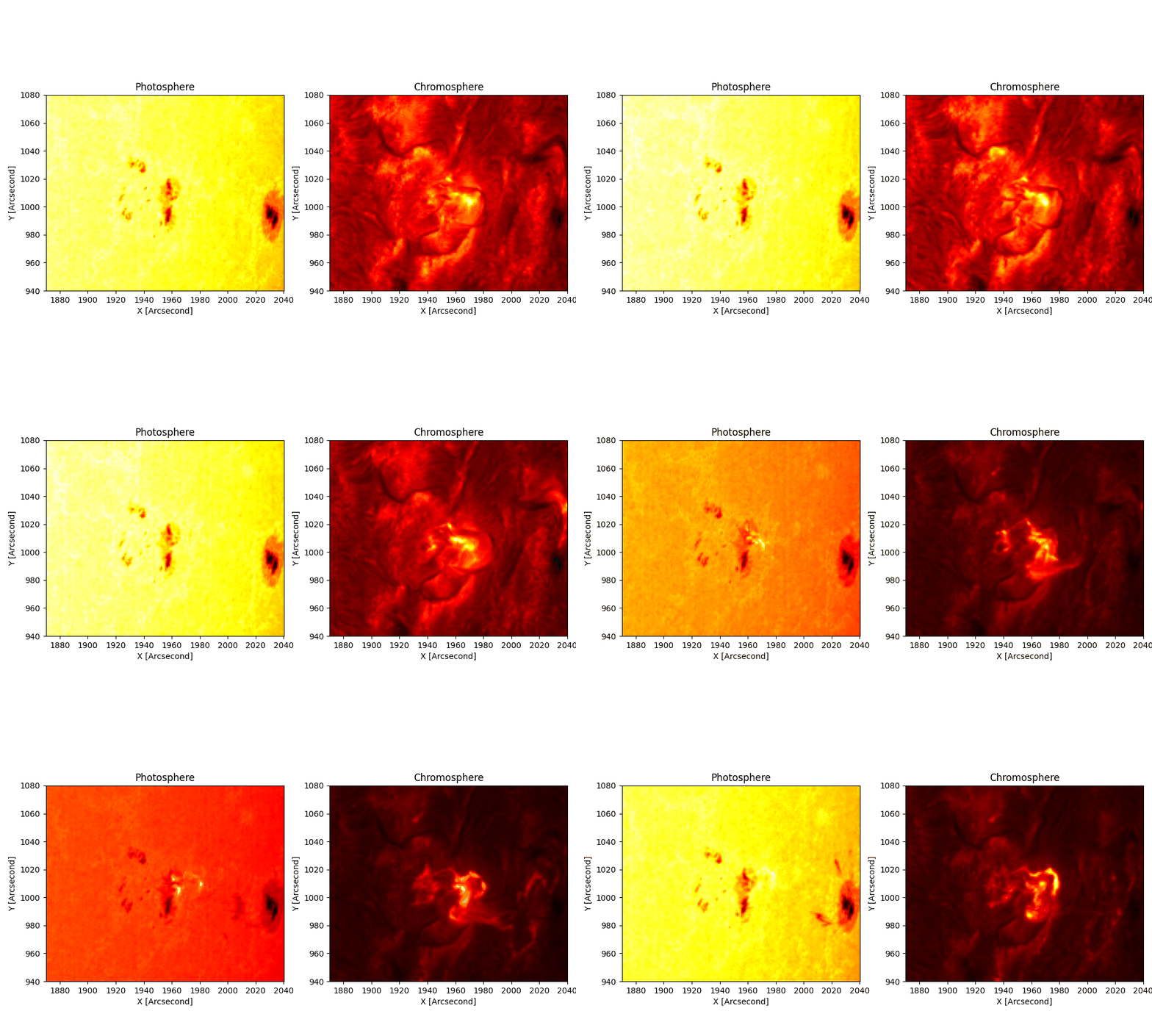
The 2023-03-29 X1.2 flare, stabilised by this pipeline. Photosphere left, chromosphere right.
Install
pip install enchase
That gives you the chase module, the chase command, and the chase-tui interactive app. Extras: pip install 'enchase[tui]' (TUI), 'enchase[atlas]' (absolute Fe I calibration), 'enchase[all]' (everything).
Get data
Two ways.
Option 1: our hosted dataset. We host ready-to-use CHASE observations on an S3 server, including the 2026-07-04 M3.2 flare (48 files, 8.65 GiB). No portal account, no expiring links:
import boto3
s3 = boto3.client("s3", endpoint_url="https://s3.preservemy.world",
                  aws_access_key_id=ACCESS_KEY, aws_secret_access_key=SECRET_KEY,
                  region_name="garage")
s3.download_file("chase-data",
                 "events/2026/07/04/M3.2/raw/HA/RSM20260704T132940_0000_HA.fits",
                 "data/RSM20260704T132940_0000_HA.fits")
Read credentials are free for research use: see docs/S3_DATA.md for the full guide (bucket layout, Colab setup, s3fs) and how to get keys.
Option 2: the CHASE portal. The portal (ssdc.nju.edu.cn) has a captcha, so you log in once in a real browser; after that everything is command line:
pip install enchase[portal] && playwright install chromium

chase-portal login          # opens the portal once; log in, close the window
chase-portal search --start "2023-03-29 02:00" --end "2023-03-29 03:00"
chase-portal urls   --start "2023-03-29 02:00" --end "2023-03-29 03:00" -o links.txt
chase links.txt             # downloads the files and runs the pipeline
urls writes one signed link per line (they expire in ~24h, so mint right before downloading). chase also accepts a single URL or a folder of already-downloaded *.fits. Walkthrough: docs/DATA_ACQUISITION.md.
Run it
Run this:
chase ./data --patch 940 1080 1870 2040 --contrast --temperature halpha
What happens: loads every scan, tracks the patch across frames, resamples wavelengths onto one grid, stabilises with optical flow, then writes results to ./chase_out/:
| You get | What it is |
|---|---|
quicklook.gif |
photosphere / chromosphere animation |
contrast_profile.gif + .npy |
wavelength-vs-time flare contrast |
ha_temp_maps.npy + temperature.gif |
chromospheric temperature maps |
aligned_data.npz |
the aligned cubes (also the resume checkpoint) |
diag_*.png |
patch overlay, quiet-Sun spectrum |
No patch coordinates yet? Run with --full-fov --no-optical-flow --no-track first, look at diag_qs_spectrum.png and the GIF, then pick a [y0 y1 x0 x1] box.
Rerun just one thing
The first run saved a checkpoint, so reruns skip the slow loading and alignment:
chase ./data --out ./chase_out --only gif           # re-render the animation. Takes seconds
chase ./data --out ./chase_out --only contrast      # recompute contrast only
chase ./data --out ./chase_out --only temperature --temperature fe_voigt
Turn things off
Every stage has a switch. Mix freely:
| Flag | What it disables |
|---|---|
--no-track |
cross-correlation patch tracking |
--no-resample |
per-frame wavelength resampling |
--no-drift |
spectral drift correction in the contrast stage |
--no-optical-flow |
optical-flow stabilisation |
--no-gif, --no-npz, --no-diagnostics |
those outputs |
--no-resample --no-drift together = completely untouched wavelength axis.
Alignment options (new in 2.2)
The defaults are the same as in 2.1: the patch is tracked by cross-correlation against scan 0, and the optical flow runs on the last Fe I wavelength (or the last Hα wavelength when there are no Fe I files). The options below are off unless you ask for them.
| Option (Config / TOML) | CLI flag | Values | What it does |
|---|---|---|---|
align_mode |
--align-mode |
xcorr (default), header, header+xcorr |
header takes each scan's crop shift from the disc-centre drift in the headers (CRPIX1/CRPIX2) plus the differential rotation of the patch (Snodgrass & Ulrich 1990), with no image correlation. header+xcorr adds a correlation residual on top (rejected above max_residual, 3 px). |
disc_center |
--disc-center |
crpix (default), limb, auto |
Disc-centre source for the header modes. limb uses sub-pixel limb fits. auto checks the header against limb fits of three scans and warns when the header is unreliable. |
rotation |
--no-rotation |
True (default) |
Differential rotation in the header modes. |
subpixel |
--subpixel |
False (default) |
Apply the fractional part of the crop shift with a cubic spline instead of rounding. |
reference |
--reference |
first (default), previous, running |
Correlation reference: scan 0, the previous scan, or the mean of the last reference_window (default 3) aligned scans. |
drift_control |
--drift-control |
none (default), header |
Ties chained correlation steps back to the header pointing by least squares, so they do not random-walk. |
shift_method |
--shift-method |
phase (default), windowed |
Correlation estimator. windowed is the Hann-windowed correlation used by chase.analysis.residual_pointing. |
flow_reference |
--flow-reference |
default, stable, masked, stable+masked |
Image the optical flow is computed on. stable picks the far-wing channel(s) (flow_channels, default 1) that change least; masked ignores pixels that change by more than flare_threshold (default 0.1). |
load_flare_sequence also takes max_residual, header_sigma and step_sigma (SDK only).
# Hα-only quiet Sun, filaments, near-limb or off-limb fields
chase ./data --patch 1520 1720 1600 1800 --align-mode header --subpixel --no-optical-flow

# long series (> 15 min) where image structure changes
chase ./data --patch ... --reference running --drift-control header

# flare ROI
chase ./data --patch ... --align-mode header+xcorr --flow-reference stable
What we measured (Solar Physics referee revision, real CHASE data; tracking error against per-scan limb-fit pointing):
- Hα-only fields (quiet Sun, filaments, near-limb and off-limb boxes in three data sets):
headergives 0.2-0.5″ rms, against 1.6-13″ for the 2.1 continuum fallback (up to 19″ over a 115-min series). The scan-to-scan Hα core rms drops from 2.8-10.8 % to 2.6-3.5 %. - After 15 min the 2.1 tracking reaches 3.3-22″ rms, also with Fe I.
header, andreference="running"withdrift_control="header", stay at 0.3-0.6″. Without the header tie a chained reference drifts by 0.7-5.2″. - X9.0 flare:
flow_reference="stable"lowers the peak residual after flow from 1.10 px (1.15″) to 0.92 px (0.96″). About 1 px remains at the flare peak with every option.maskedis worse at the peak (2.2 px), so do not use it there. On the flare ROI plainheader(1.64″) is worse than correlation (1.24″) before flow;header+xcorris best (0.95″).
When not to use them:
- Turn optical flow off for on-disc Hα-only fields after header recentring. The flow is computed against scan 0 and raises the core rms from 2.6-3.5 % to 4.1-5.7 %.
- Do not use the header modes on the 2023-03-29 Level-1 data (X1.2). Its
CRPIXis 30-42 px off the limb, and odd and even scans have field-dependent offsets of 8-11 px that no disc centre follows. Use the default Fe I correlation there (0.42″ tracked, 0.06″ after flow).disc_center="auto"warns in this case. - Sit-and-stare data are not supported: the public archive has none to test on.
Limb fit and centre-to-limb calibration (new in 2.2)
from chase.calib import fit_limb, limb_disk_center, limb_shifts, mu_map
from chase.calib import atlas_calibrate, download_clv_table, load_clv_table

cx, cy, r = limb_disk_center(full_disc_image)                 # sub-pixel, about 1 s per frame
shifts = limb_shifts(full_disc_images, model="ellipse")       # per-scan recentring
table = load_clv_table(download_clv_table(dest_dir="."))      # Pietrow et al. 2023 Hα CLV (CDS)
mu = mu_map(full_disc_image.shape, (cx, cy), r)
ifact, woff = atlas_calibrate(wav, box_cube, mu=mu[y0:y1, x0:x1], clv_table=table)  # near-limb box -> disc-centre factor
fit_limb(circle or rotated ellipse) takes 0.6-2 s per frame against 70-120 s forhough_disk_center. Residual full-disc pointing: 2.7″ (X1.2) and 0.6″ (M3.2), against 5.0″ and 1.0″ with Hough. What is left on X1.2 is a distortion of every second raster in the 2023 Level-1 data, which recentring the whole disc cannot remove.atlas_calibrate(..., mu=, clv_table=)corrects the quiet-Sun centre-to-limb variation (Neckel & Labs 1994 continuum plus the Pietrow et al. 2023 Hα table). On a near-limb box the calibration error drops from 12-73 % to 3-10 %. The table covers ±2 Å only; further out the correction is 4-19 % off. Stray light is not corrected. The defaultmu=1.0keeps the 2.1 behaviour.
The same thing in Python
from chase import Config, run_pipeline

results = run_pipeline(Config(fits_dir="./data", patch=[940, 1080, 1870, 2040],
                              contrast=True, temperature="halpha"))

results["aligned"]["ha"].shape    # (nframes, 118, H, W) stabilised float32
results["contrast"].shape         # (nframes, 118)
results["gif"]                    # './chase_out/quicklook.gif'
Rerun one step from the checkpoint: add resume=True and only the toggles you want.
Or skip the pipeline and call single functions:
import chase

cube, hdr, wav = chase.load_cube("RSM..._HA.fits")          # one cube: (118, H, W) + wavelengths
seq = chase.load_flare_sequence("./data", patch=[...])      # tracked + resampled sequence
ha_al = chase.optical_flow_align(seq["ha_cubes"], reference=seq["align_ref"])
contrast, _ = chase.contrast_profile(ha_al, background=seq["ha_bg"])
T, width = chase.halpha_width_temperature(ha_al[12], seq["wavelength_ha"])
Each line works on its own. Full list with snippets: docs/SDK.md.
Check how well each step worked (plain numbers, ready for a table):
from chase.analysis import residual_pointing, residual_wavelength, frame_rms
from chase.analysis import fit_limb_ellipse, offlimb_profile, psf_stray_light, throughput_trend
from chase.calib import atlas_calibrate, atlas_sensitivity, activity_mask

residual_pointing(fe_continuum_stack)["global_rms_arcsec"]    # leftover jitter after tracking/flow
residual_wavelength(qs_profiles, per_scan_grids)["std_mA"]   # line-core scatter between scans
atlas_calibrate(wav, dc_cube, mask=activity_mask(cont, ha_core), return_quality=True)
atlas_sensitivity(wav, dc_cube)                                # ifact vs wing threshold and mask
p = offlimb_profile(full_disc_image)                           # off-limb level, % of disc centre
psf_stray_light(full_disc_image, p)["s_dc_range"]              # scattered fraction at disc centre
throughput_trend(dates, ifact_per_date)["throughput_pct_per_yr"]
The pipeline does not correct stray light. For CHASE it is about 6–10 % of the disc-centre intensity, which makes small dark features (umbrae, filaments) look brighter than they are. The atlas factor changes by about 12 % per year, so fit it for each observation (the pipeline does this by default) rather than reusing one from another date. For Hα-only data use wing_continuum_frac=0.75: no Hα channel passes the 0.85 default, and atlas_calibrate warns about this.
Prefer clicking to typing?
chase-tui
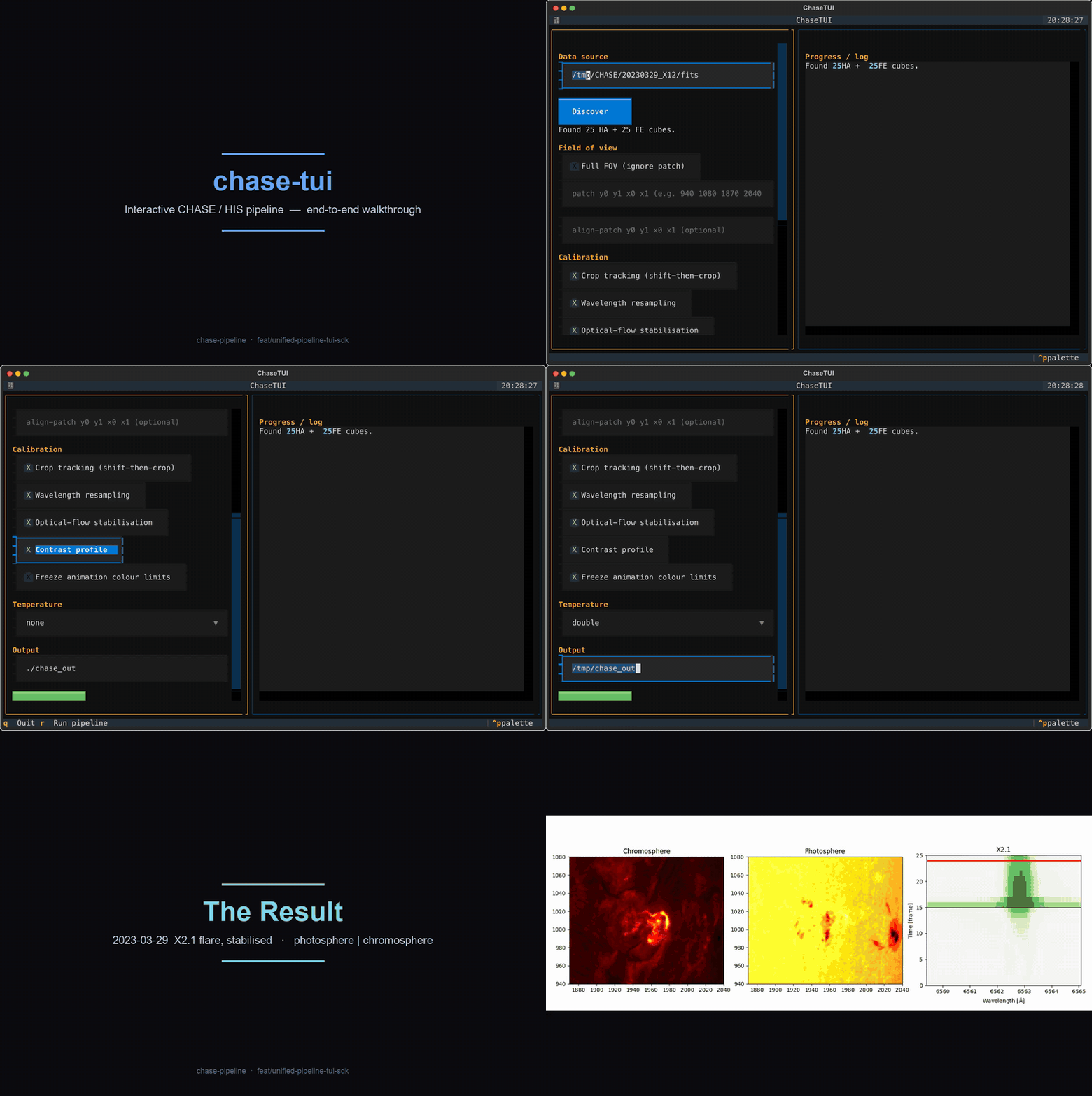
Every checkbox is one of the switches above. There is also a one-file config workflow: chase --config my.toml, keys mirror the flags (examples/config.toml).
Why this exists (statement of need)
CHASE (the Chinese Hα Solar Explorer) scans the full solar disk in Hα (118 wavelengths, 6559.4 to 6565.1 Å) and Fe I (46 wavelengths near 6569 Å). The portal ships full-disk cubes with no co-alignment and a wavelength zero-point that drifts by ~0.8 channels per frame. Getting a science-ready region out of that takes real calibration work, which is why the data is under-used. Earlier scripts (the original chase-pipeline, Finlay Davis's satprocess) each solved part of the problem. This package merges them into one installable tool that preserves the physics: shift-then-crop tracking, per-frame wavelength resampling, alignment on a flare-free channel, absolute atlas calibration, and the correct temperature inversion per line. The reasoning behind each rule is in docs/CALIBRATION.md.
What lives where
| Subpackage | Does | |
|---|---|---|
chase.io |
resumable download, FITS discovery, cube + sequence loading |  |
chase.calib.spatial / .align |
shift-then-crop tracking, optical-flow stabilisation |  |
chase.calib.wavelength |
per-frame resampling onto a common grid, spectral-drift xcorr |  |
chase.calib.intensity |
quiet-Sun norm, integral scaling, FTS-atlas absolute calibration |  |
chase.analysis.contrast |
wavelength-vs-time flare contrast |  |
chase.analysis.temperature |
Hα width to T (Molnar), Fe I to T (Planck / EB / Voigt) |  |
chase.analysis.validation |
residual pointing (arcsec), wavelength scatter (mÅ, km/s), frame-to-frame RMS (%, cgs) | |
chase.analysis.systematics |
stray light from the off-limb profile, throughput trend of the atlas factor |
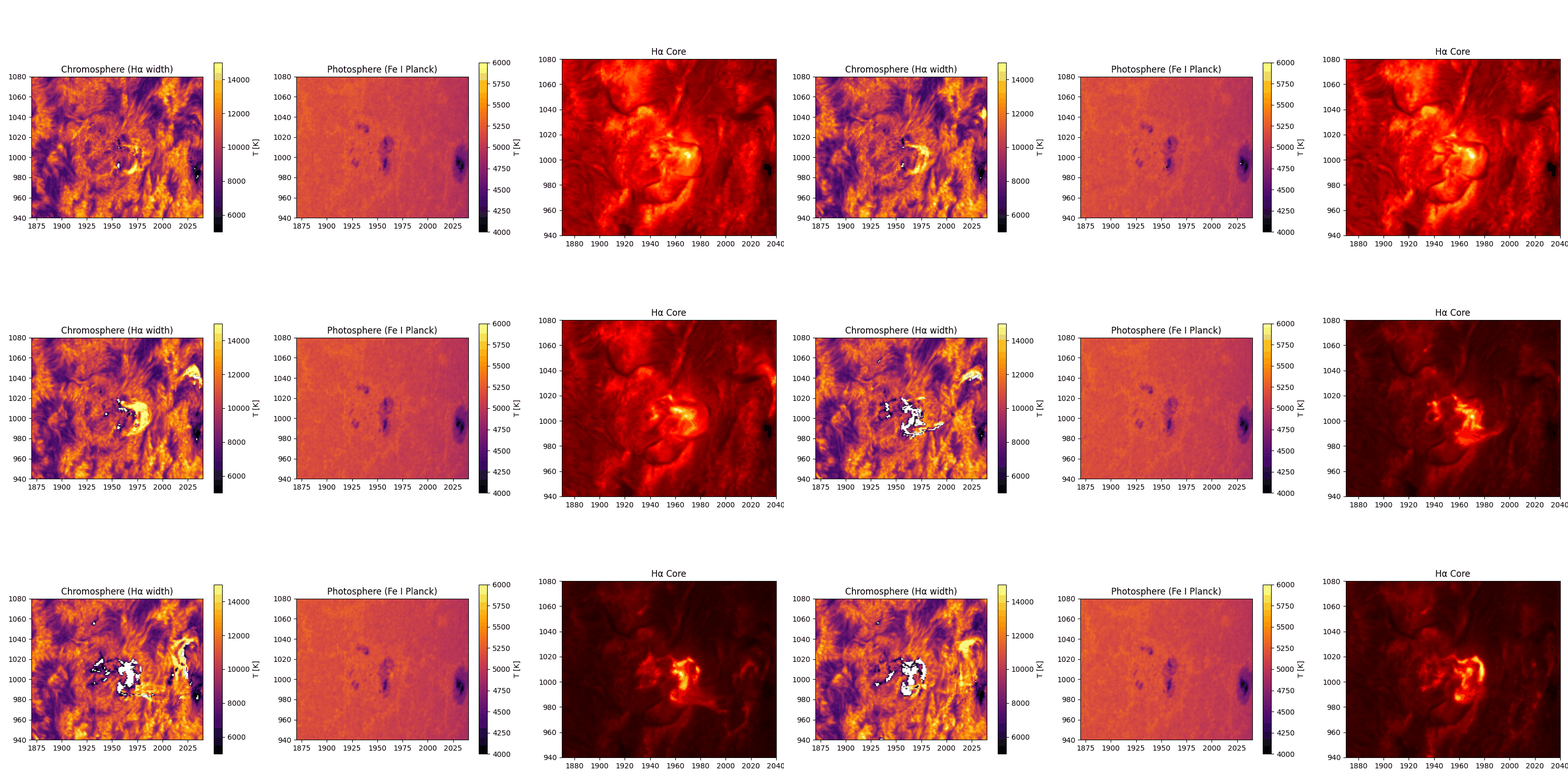
Double temperature map: chromosphere from Hα width (~10⁴ K), photosphere from Fe I Planck inversion (~5100 K).
Documentation
- docs/S3_DATA.md: use our hosted CHASE datasets from anywhere (incl. Google Colab)
- docs/DATA_ACQUISITION.md: CHASE portal to processed cube, end to end
- docs/SDK.md: every function, with snippets
- docs/TUI.md: TUI walkthrough
- docs/CALIBRATION.md: the science behind each calibration step
- docs/CONTRIBUTING.md: dev setup, tests, style
Development
git clone https://github.com/Majboor/enchase.git
cd enchase
pip install -e '.[all]'
pytest -q            # 27 tests, synthetic FITS fixtures, no big data needed
Acknowledgements
Built with the guidance and corrections of Dr. Alexander Pietrow (AIP) and Dr. Malcolm Druett. The Hough-circle limb centring, spectral cross-correlation, integral intensity scaling, and CSV shift-cache are adapted from Finlay Davis's satprocess (BSD-3-Clause; see NOTICE). Affiliation support from Prof. Dr. Sayed Amer Mahmood (University of the Punjab). Data courtesy of the CHASE/HIS mission and the Solar Science Data Center, Nanjing University.
Citing
Author: Waleed Ajmal, ORCID 0009-0006-8222-1983. Software citation metadata is in CITATION.cff.
If you use this pipeline, cite the methods it builds on:
- Molnar et al. 2019, ApJ 881, 99. Hα width to temperature (10.3847/1538-4357/ab2ba3)
- The Eddington-Barbier photospheric inversion (A&A 2013, aa21259-13)
- The ISPy FTS solar-atlas calibration (ISP-SST/ISPy)
License
MIT. Ported satprocess code stays BSD-3-Clause, listed in NOTICE.
1 maintainer

Metadata
1 maintainer
Release files for enchase 2.2.0
For a detailed explanation of source distributions (sdists) and built distributions (wheels), please see the package formats documentation.
Source distribution (sdist)
| File | Size | Uploaded | Provenance | |
|---|---|---|---|---|
| enchase-2.2.0.tar.gz | 113.8 kB | Without provenance | Details |
Built distribution (wheel)
| File | Interpreter | ABI | Platform | Reset |
|---|---|---|---|---|
| enchase-2.2.0-py3-none-any.whl | Python 3 | none | any | Details |
Total release size: 219.5 kB
Release files / enchase-2.2.0.tar.gz
| Download URL | enchase-2.2.0.tar.gz |
|---|---|
| Size | 113.8 kB |
| Tags | Source |
|
SHA-256 checksum How to use checksums |
e5296cffe09c984d7047b25f225e2e6ae93742eb603de43e6b29e8e77c69893c
|
|
BLAKE2b-256 checksum How to use checksums |
a9fac6a063429607e02e0bf11f6405b5c49e512491520b325705e63613b24ff6
|
| Upload date | |
|
Uploaded using Trusted Publishing? What is trusted publishing? |
No |
| Uploaded via |
twine/7.0.0 CPython/3.11.2
|
Release files / enchase-2.2.0-py3-none-any.whl
| Download URL | enchase-2.2.0-py3-none-any.whl |
|---|---|
| Size | 105.8 kB |
| Tags | Python 3 |
|
SHA-256 checksum How to use checksums |
f8dc7a3b570ca469153f0038a631362e360a95564e791b46b3e30ab09e2c37cd
|
|
BLAKE2b-256 checksum How to use checksums |
64cb4005954bbf0ac7922ea0a44d3b4fb9953403202918b351dda343d05e0400
|
| Upload date | |
|
Uploaded using Trusted Publishing? What is trusted publishing? |
No |
| Uploaded via |
twine/7.0.0 CPython/3.11.2
|
Security for enchase 2.2.0
Provenance
Provenance describes where a file came from. On PyPI, provenance is shared via attestations, which provide a verifiable record of the build or publishing details. View details, limitations and caveats.
No provenance found
None of the files in this release were uploaded with provenance metadata.
A note on package security
PyPI is a repository for distributing packages, not a service for auditing them. While third-party security researchers and our staff do their best to detect and remove malicious packages, PyPI cannot guarantee the quality, security or suitability of any given package.














