
⚡ Eneru
UPS monitoring and shutdown orchestration for NUT






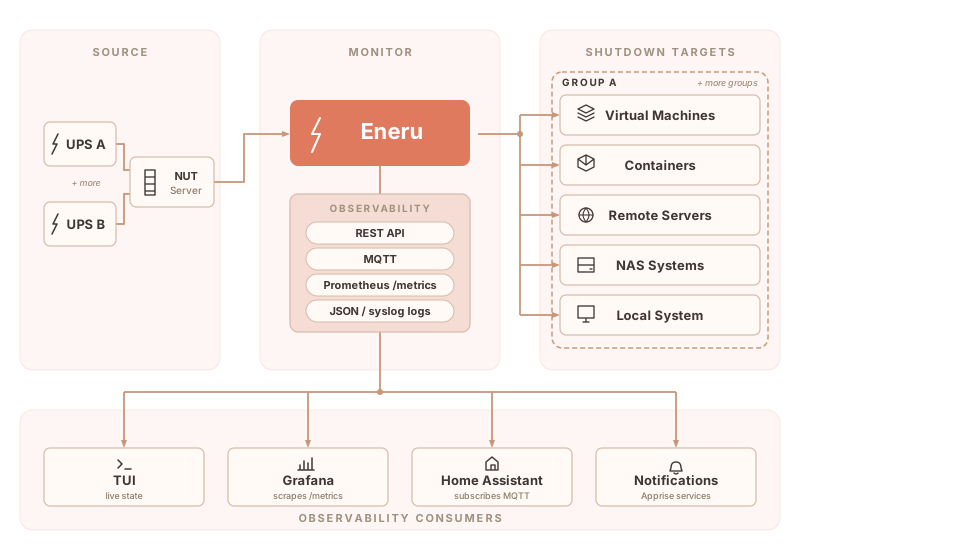
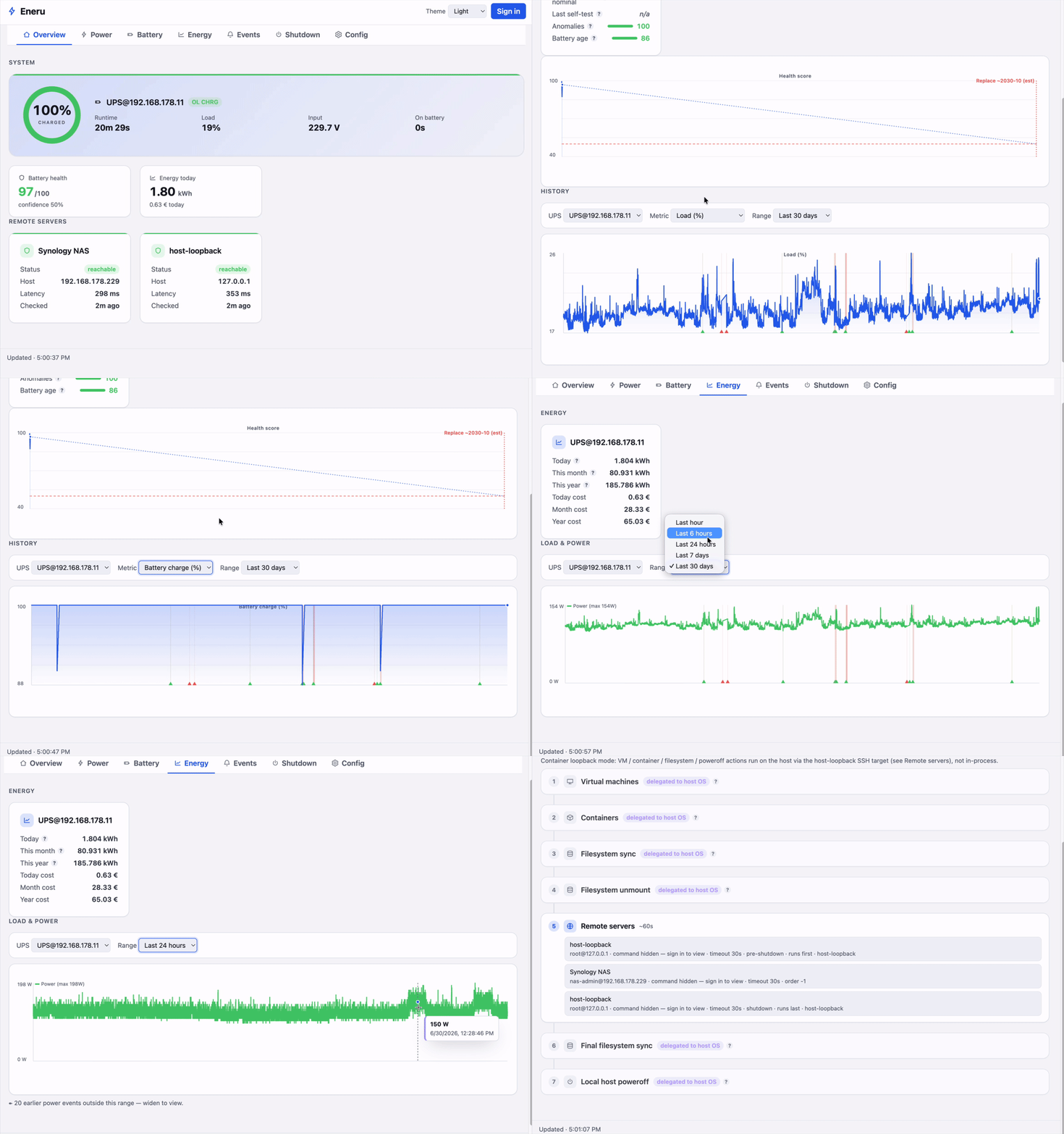
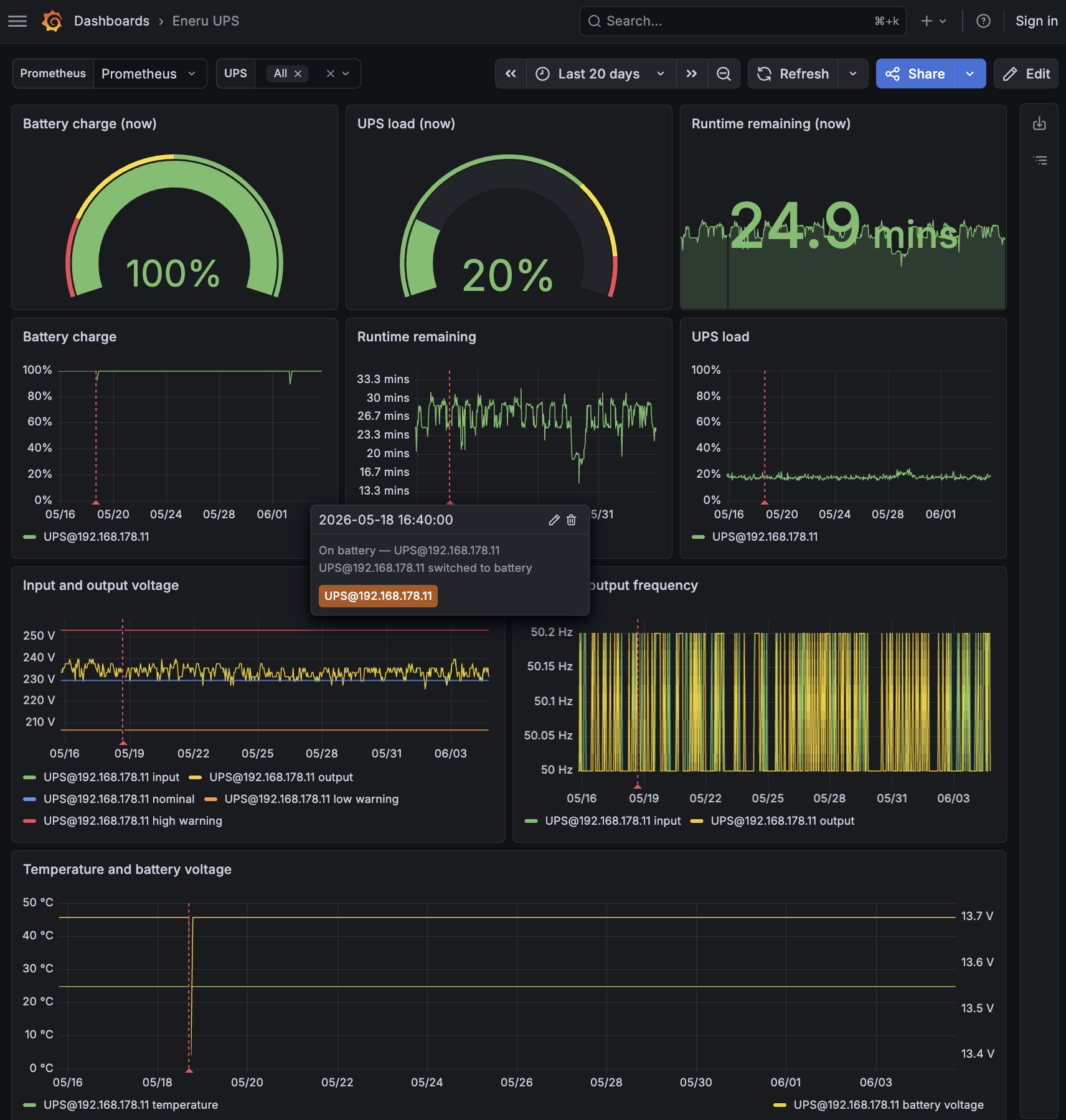
A Python-based UPS monitoring daemon for Network UPS Tools (NUT). Monitors one or more UPSes, orchestrates shutdown of VMs, containers, and remote servers during power events, and exposes a browser dashboard, authenticated API write paths, UPS control, Prometheus, MQTT, and Grafana observability.
Documentation • Getting Started • Configuration • Config editor • Dashboard • Changelog • Roadmap

Why Eneru?
Most UPS shutdown tools handle one machine. If you have more than one, things get complicated fast:
| Challenge | Eneru Solution |
|---|---|
| Multiple UPSes powering different servers | ✅ Multi-UPS monitoring from a single instance |
| Multiple servers need coordinated shutdown | ✅ Orchestrated multi-server shutdown via SSH |
| VMs and containers need graceful stop | ✅ Libvirt VM and Docker/Podman container handling |
| Network mounts hang during power loss | ✅ Timeout-protected unmounting |
| No visibility during power events | ✅ Browser dashboard, TUI dashboard, and notifications via 100+ services |
| Different systems need different commands | ✅ Per-server custom shutdown commands |
| Hypervisors need VM shutdown before host | ✅ Pre-shutdown actions (Proxmox, ESXi, XCP-ng, libvirt) |
| Battery estimates are unreliable | ✅ Multi-vector shutdown triggers |
| Network down during outage | ✅ Non-blocking notifications with persistent retry |
| Firmware recalibrates battery silently | ✅ Battery anomaly detection and alerts |
| Need power-quality telemetry | ✅ Browser dashboard, API, Prometheus, MQTT, Grafana, JSON logs, and SQLite events |
| Config mistakes only show up during a real outage | ✅ Guided config editor (eneru config) and a read-only pre-flight check of NUT, SSH and sudo (eneru config check) |
How Eneru is different
NUT's upsmon shuts down one machine with two triggers (low battery, forced shutdown). apcupsd does the same for APC hardware. PeaNUT and NUTCase provide dashboards but no shutdown logic. Enterprise tools (Eaton IPM, PowerChute) add virtualization support but are vendor-locked and proprietary.
Eneru sits on top of NUT and adds what these tools lack:
- Orchestrated multi-resource shutdown, VMs, compose stacks, containers, remote servers, filesystems, and local system in a coordinated sequence
- 6 independent shutdown triggers, including depletion rate (computed from observed battery data, not UPS estimates) and extended time on battery. NUT's 2 triggers miss these failure modes
- Multi-UPS coordination, monitor multiple UPSes with per-group triggers and shutdown policies, each with independent failure handling
- Browser dashboard and authenticated control, live status, event history, event deletion, config reload, and allowlisted NUT
upscmd/upsrwactions from the embedded API - Battery anomaly detection, catches firmware recalibrations and battery degradation with vendor-specific jitter filtering (APC, CyberPower, Ubiquiti)
- Guided setup and a pre-flight check,
eneru configwalks you through the config in a terminal UI and explains every option;eneru config checklogs in to NUT, SSHes to every remote server, proves sudo rules without running anything, and shows what would happen on power loss
See the full comparison in the documentation.
Use cases
Homelabs, virtualization hosts (Proxmox, ESXi, libvirt), Docker/Podman container hosts, NAS systems (Synology, QNAP, TrueNAS), multi-UPS environments with multiple server groups, and mixed physical/virtual setups.
Quick start
Installation
Docker / Podman:
docker pull ghcr.io/m4r1k/eneru:latest

# No config yet? Create one with the guided editor shipped in the image.
# SELinux hosts: keep :Z here AND add :Z to the daemon's /srv/eneru mounts
# below (see docs/install-docker.md); non-SELinux hosts can drop both.
sudo install -d -o 10001 -g 10001 /srv/eneru
docker run --rm -it --network host -v /srv/eneru:/srv/eneru:Z \
  ghcr.io/m4r1k/eneru:latest config --config /srv/eneru/config.yaml

docker run -d --name eneru \
  --restart unless-stopped \
  -p 9191:9191 \
  -v /srv/eneru/config.yaml:/etc/ups-monitor/config.yaml \
  -v /srv/eneru/state:/var/lib/eneru \
  -v /srv/eneru/run:/var/run/eneru \
  -v /srv/eneru/ssh:/var/lib/eneru/ssh \
  ghcr.io/m4r1k/eneru:latest \
  run --config /etc/ups-monitor/config.yaml \
  --api --api-bind 0.0.0.0 --api-port 9191
Keep private key files in /srv/eneru/ssh mode 0400. The directory itself
stays writable so Eneru can persist learned SSH host keys in known_hosts.
Use ghcr.io/m4r1k/eneru:testing for pre-release builds. v5.5+ supports the OCI image for both remote-only and local-host deployments. For full local-host ownership from a container (host poweroff, VM teardown, container stop, filesystem unmount), add --network host, -v /etc/machine-id:/etc/machine-id:ro, and a loopback SSH key. Hosts without systemd (Alpine, musl) have no /etc/machine-id — use a marker file instead. See Choose your install for the three deployment profiles and Migrate to container for the step-by-step.
PyPI:
pip install eneru[notifications]
Debian/Ubuntu:
curl -fsSL https://m4r1k.github.io/Eneru/KEY.gpg | sudo gpg --dearmor -o /usr/share/keyrings/eneru.gpg
echo "deb [arch=all signed-by=/usr/share/keyrings/eneru.gpg] https://m4r1k.github.io/Eneru/deb stable main" | sudo tee /etc/apt/sources.list.d/eneru.list
sudo apt update && sudo apt install eneru
RHEL/Fedora:
sudo dnf install -y epel-release
# Optional, RHEL 9 family only (skip on RHEL 10 / Fedora): CodeReady Builder
# provides python3-ruamel-yaml for the `eneru config` editor. The daemon
# installs and runs without it.
#   Rocky/Alma: sudo dnf install -y dnf-plugins-core && sudo dnf config-manager --set-enabled crb
#   RHEL:       sudo subscription-manager repos --enable codeready-builder-for-rhel-9-$(arch)-rpms
sudo curl -o /etc/yum.repos.d/eneru.repo https://m4r1k.github.io/Eneru/rpm/eneru.repo
sudo dnf install eneru
RPM packages support RHEL 9 and 10 (and compatible rebuilds). RHEL 8 packages ended with 6.1.x; on RHEL 8, run the container image (Docker/Podman) instead.
Configuration
The guided editor is the quickest way in. It asks for the UPS and its NUT login, your remote servers and notifications, explains every option as you go, tests each connection, and shows the full power-loss sequence before it saves. Existing files are edited in place with your comments kept.
# Create or edit the config (basic mode for the essentials, advanced for everything)
sudo eneru config

# Pre-flight: validation + live, read-only NUT/SSH/sudo checks + power-loss preview
sudo eneru config check

# Start, then watch it in real time
sudo systemctl enable --now eneru.service
eneru monitor --config /etc/ups-monitor/config.yaml
Prefer a text editor? /etc/ups-monitor/config.yaml is plain YAML;
examples/config-reference.yaml documents
every option, and eneru config check works on hand-written files too.
Single UPS
ups:
  name: "UPS@192.168.1.100"
  display_name: "Main UPS"

triggers:
  low_battery_threshold: 20
  critical_runtime_threshold: 600

local_shutdown:
  enabled: true
Multiple UPSes
ups:
  - name: "UPS1@192.168.1.10"
    display_name: "Rack A UPS"
    is_local: true
    remote_servers:
      - name: "Proxmox Node"
        enabled: true
        host: "192.168.1.20"
        user: "root"

  - name: "UPS2@192.168.1.11"
    display_name: "Rack B UPS"
    remote_servers:
      - name: "NAS"
        enabled: true
        host: "192.168.1.30"
        user: "admin"
See the full documentation for complete configuration options.
Features
- Guided config editor (
eneru config, basic and advanced modes) that explains every option, validates as you go and keeps your comments - Pre-flight inspector (
eneru config check): live, read-only NUT, SSH and sudo checks for every shutdown step, plus a power-loss preview - Monitor one or more UPSes from a single instance, each with its own shutdown group
- Browser dashboard served by the embedded API, with authentication, history graphs, event management, and UPS control
- Real-time TUI dashboard (
eneru monitor) with color-coded status - Shutdown triggers: battery %, runtime, depletion rate, time on battery, FSD flag, and the connection-loss failsafe (six in total)
- Battery anomaly alerts for unexpected charge drops while on line power, with jitter filtering for APC, CyberPower, and Ubiquiti UniFi UPS units
- Battery-health score (0-100) with replacement prediction and tiered low-score alerts
- Scheduled NUT self-tests with recorded, normalized results
- Energy and cost tracking (kWh from real power or load, calendar today/month/year windows)
- Daily, weekly, and monthly reports (events, battery health, energy, uptime) via the notification channel
- Read-only shutdown-plan view: exactly what runs, in order, with per-phase timeouts and an estimate
- Shuts down VMs, containers, remote servers, filesystems, and the local system in order
- Notifications to 100+ services (Discord, Slack, Telegram, ntfy, email) via Apprise
- Power quality monitoring: voltage, AVR, bypass, overload
- API, Prometheus metrics, outbound MQTT, JSON/syslog logs, and Grafana dashboard
- Config hot-reload by
systemctl reload,SIGHUP, or authenticated API request - Official OCI image for both remote-only deployments and full local-host ownership via SSH loopback delegate (v5.5+)
- Dry-run mode for safe testing
- Comprehensive test suite across multiple Linux distros, with E2E tests against real NUT, SSH, Docker, and libvirt on every commit
Three deployment profiles
| Install path | Local-host ownership | Remote systems | Recommended for |
|---|---|---|---|
| pip / deb / rpm (native) | First-class via systemd | Yes | Homelab, single-host professional, end-user-managed enterprise |
| OCI image (Docker / Podman) | Supported via SSH loopback delegate (v5.5+) | Yes | Homelab, professional, enterprise; the v5.5 default for containerized local-host |
| Kubernetes | Not recommended | Yes | Enterprise multi-site fleet monitoring of remote systems |
v5.5 made the OCI image first-class for the local-host case: the container SSHes to the host it runs on so the namespace barrier doesn't block the host-poweroff contract. Pick by deployment preference, not capability.
See Choose your install for the full feature × install matrix and Containers and Kubernetes for Docker, Podman, SELinux/AppArmor, Kubernetes, and the SSH walkthrough.
The name

Named after Eneru (エネル) from One Piece, the self-proclaimed God of Skypiea who ate the Goro Goro no Mi (Rumble-Rumble Fruit) and can control electricity. When the power from the grid fails, this tool takes over and shuts everything down safely. Unlimited power... management!
Documentation
Full documentation at eneru.readthedocs.io:
- Getting Started - installation and basic setup
- Config editor and checker -
eneru configandeneru config check - Configuration - full config reference
- Dashboard - browser dashboard and event management
- Authentication - users, API keys, and read gating
- NUT Control - authenticated UPS commands and writable variables
- Shutdown Triggers - how shutdown decisions work
- Notifications - Discord, Slack, Telegram, etc.
- Remote Servers - SSH setup for NAS and other servers
- Testing - testing strategy and coverage
- Troubleshooting - common issues and solutions
Support the project
Eneru is free and MIT-licensed and will stay that way. If it has saved your homelab or rack from a dirty shutdown and you'd like to chip in toward UPS hardware, NUT testing, and the maintainer's coffee budget, Buy Me a Coffee. Always optional, much appreciated.
License
MIT License - See LICENSE file for details.
1 maintainer

Metadata
1 maintainer
Release files for eneru 6.2.1
For a detailed explanation of source distributions (sdists) and built distributions (wheels), please see the package formats documentation.
Source distribution (sdist)
| File | Size | Uploaded | |
|---|---|---|---|
| eneru-6.2.1.tar.gz | 1.2 MB | Details |
Built distribution (wheel)
| File | Interpreter | ABI | Platform | Reset |
|---|---|---|---|---|
| eneru-6.2.1-py3-none-any.whl | Python 3 | none | any | Details |
Total release size: 1.8 MB
Release files / eneru-6.2.1.tar.gz
| Download URL | eneru-6.2.1.tar.gz |
|---|---|
| Size | 1.2 MB |
| Tags | Source |
|
SHA-256 checksum How to use checksums |
f78c5e7413e062005d9eef736770fa69d9289e645ca9d4d8366f82a94cfcffa8
|
|
BLAKE2b-256 checksum How to use checksums |
e71b80459735e76697ef11092f4ee64ae833d1abbf1b7561f559a396c0ce741b
|
| Upload date | |
|
Uploaded using Trusted Publishing? What is trusted publishing? |
Yes |
| Uploaded via |
twine/7.0.0 CPython/3.13.14
|
Provenance
Provenance describes where a file came from. On PyPI, provenance is shared via attestations, which provide a verifiable record of the build or publishing details. View details, limitations and caveats.


PyPI Publish Attestation
PyPI verified that this artifact, at this checksum, originated from the publisher listed below.
Signed by GitHub Actions, verified by PyPI on Oct 3, 2026.
Transparency logRelease files / eneru-6.2.1-py3-none-any.whl
| Download URL | eneru-6.2.1-py3-none-any.whl |
|---|---|
| Size | 619.8 kB |
| Tags | Python 3 |
|
SHA-256 checksum How to use checksums |
1d3bdd3ba5b6269230fa6169eb3b080ef4b5ce8f2d9c31a5badef3acd5038b80
|
|
BLAKE2b-256 checksum How to use checksums |
26ae494e64eb2fd45c6daf961f2a52ad494cc245ca6dcf33ca354991adc103f7
|
| Upload date | |
|
Uploaded using Trusted Publishing? What is trusted publishing? |
Yes |
| Uploaded via |
twine/7.0.0 CPython/3.13.14
|
Provenance
Provenance describes where a file came from. On PyPI, provenance is shared via attestations, which provide a verifiable record of the build or publishing details. View details, limitations and caveats.
PyPI Publish Attestation
PyPI verified that this artifact, at this checksum, originated from the publisher listed below.
Signed by GitHub Actions, verified by PyPI on Oct 3, 2026.
Transparency log













