
Enodia
Know where you are in a city from its Wi-Fi alone. No GPS, no location service: a map you walked yourself.





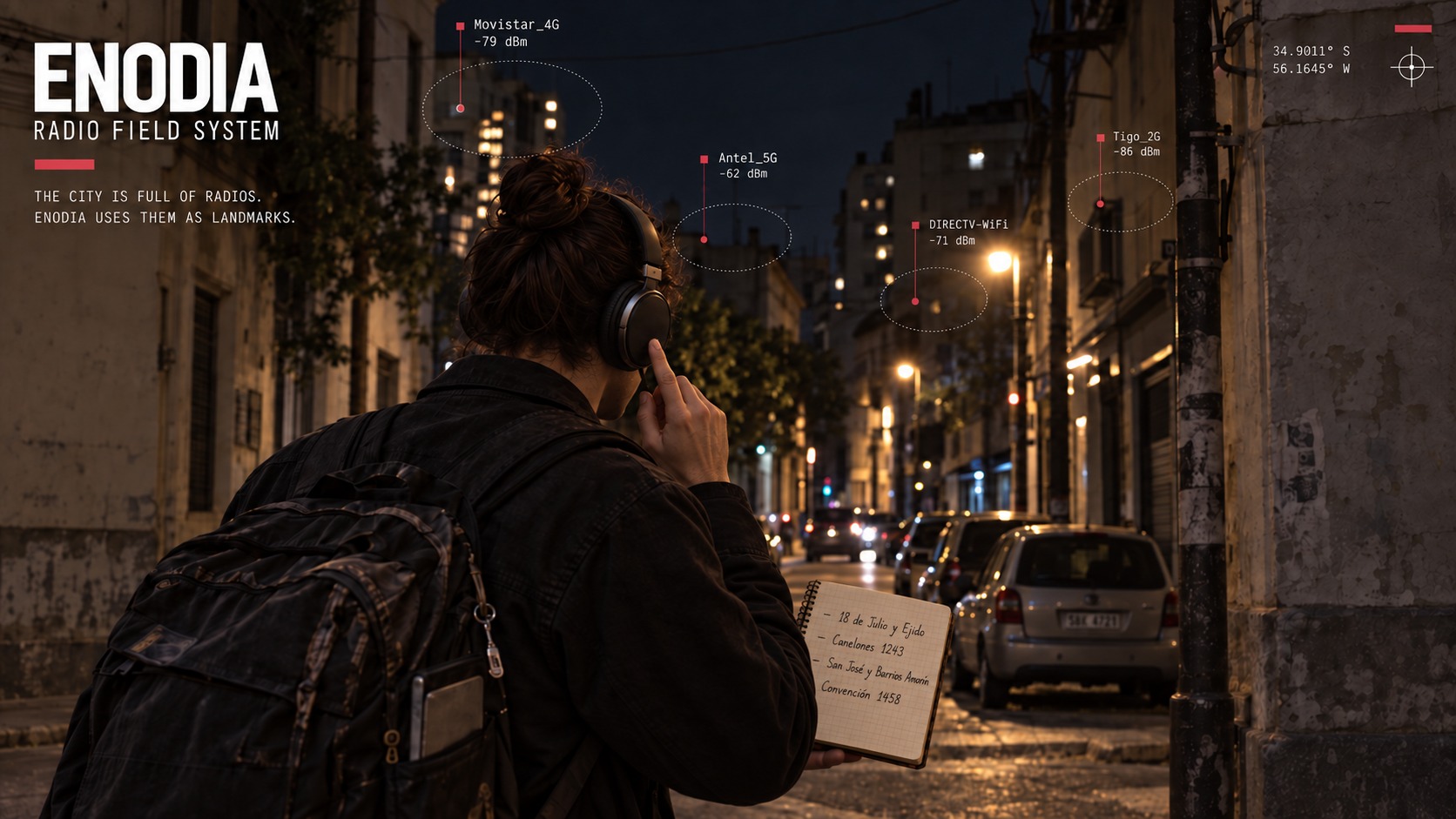
Enodia turns a Linux laptop in a backpack into a Wi-Fi scanner that talks. You walk, and it logs every network in reach and tells you through your headphones what changes. At each corner you press the headset button and write the corner down. Back home, Enodia lines the two up: every scan gets its place along your route, every router an estimated position, and the walk becomes a map. Walk those streets again and it tells you where you are, as you go.
It all runs on your machine. The one command that goes online looks your corners up on OpenStreetMap, and only when you ask it to.
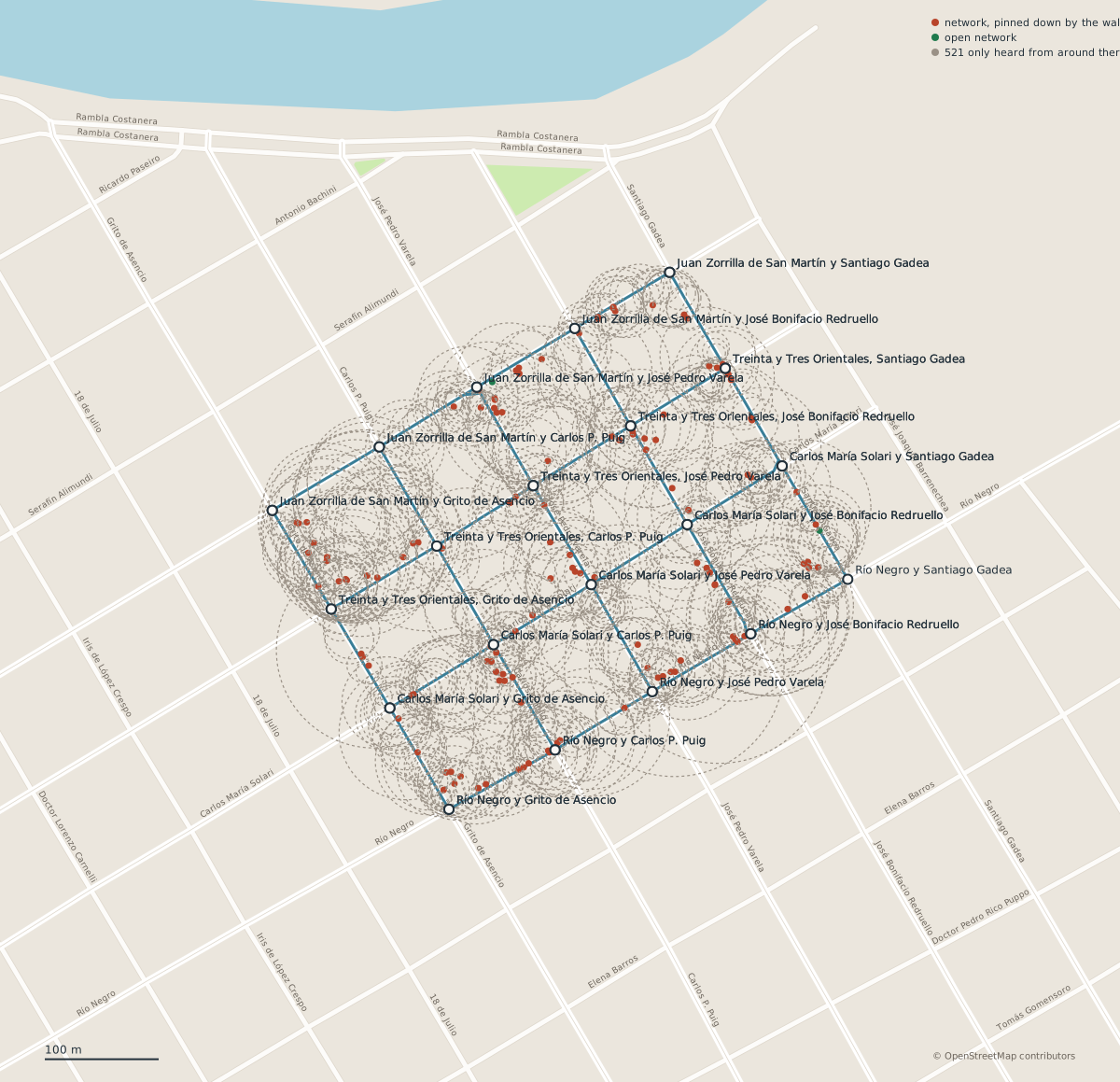
A real walk, published in samples/dolores/ with every network pseudonymised: the route, the corners marked along it, and where each access point probably stands. A dot is a router the walk pinned down, a ring one it only heard from around there.
What it does
- Records a walk by ear. A scan every five seconds, every network logged with its signal, and the news in your headphones: "New network found", "Mark 3". Nothing to look at while you walk.
- Places everything along your route. It joins the log with the corners you noted, places each scan between two of them, and estimates where each router stands. Out come a plan in SVG, a table in CSV and the walk in GeoJSON.
- Builds a map from your walks and tells you where a scan was taken:
between "Rivera y Brito del Pino" and "Rivera y Simón Bolívar", 53% of the way, orat the corner of "Rivera y Brito del Pino". - Follows you live.
--locate --watchscans as you walk, says where you are when it changes, and draws you on a page that reloads itself, over the streets, the water and the parks, with no connection. - Checks itself. Each estimate has a command that measures it against the walk: a corner held out and placed again, a block walked twice set against itself, a pass held out and found again from the rest of the map.
Install
You need Linux, Python 3.10 or newer, and a Wi-Fi interface run by iwd, NetworkManager or wpa_supplicant that you may scan with over D-Bus. For the voice, espeak-ng or SVOX Pico. Without either, Enodia prints what it would have said.
uv tool install enodia
uv tool upgrade enodia follows new releases. The proxy support of --geocode needs the socks extra: uv tool install "enodia[socks]". Before the first walk, set up the machine so that it keeps scanning with the lid closed and hears the headset button.
To work on Enodia itself, run uv sync in a clone and uv run enodia instead.
Try it now
The samples live in the repository rather than in the package, so clone it for them. No Wi-Fi card is involved:
git clone https://github.com/carlosplanchon/enodia.git
cd enodia
enodia --locate samples/synthetic_montevideo/rivera-query.jsonl \
  --map samples/synthetic_montevideo/rivera-map.jsonl --voice none
You are between "Rivera y Brito del Pino" and "Rivera y Simón Bolívar", 53% of the way
  around [-34.90311, -56.15836]
  2 walks agree, best similarity 89%, spread 0% of the stretch (1 m)
  from evidence last gathered 2026-09-17 17:02
That one is synthetic: real streets of Montevideo, invented radios, made to show the workflow (how it was made). The walk in Dolores is real. To see how well its map finds its own passes, which takes about two minutes:
enodia --check-map --map samples/dolores/dolores-map.jsonl
To see the real walk over a map, open samples/dolores/dolores-walk.geojson in a map viewer that reads GeoJSON, such as GPXSee (on Arch Linux, sudo pacman -S gpxsee), or look at samples/dolores/dolores-plan.svg, the same walk drawn with no map service at all.
Your first walk
1. Check the machine, then walk.
enodia --preflight --log walk.jsonl
enodia --log walk.jsonl
Press the headset button at every corner, the first and the last included. Enodia answers "Mark 1", "Mark 2" and so on. Two or three blocks are enough for a first try. Ctrl+C ends the walk.
2. Write the corners down in notebook.txt, one line per mark:
#1 Rivera y Avenida Doctor Francisco Soca
#2 Rivera y Brito del Pino
Without a button, write the time instead of the mark: 17:45:00 Rivera y Brito del Pino.
3. Put the walk on the map.
enodia --geocode notebook.txt --area Montevideo --streets streets.jsonl --surroundings
enodia --reconcile walk.jsonl notebook.geo.txt --streets streets.jsonl --svg plan.svg
enodia --map-add walk.jsonl notebook.geo.txt --streets streets.jsonl
--geocode looks the corners up on OpenStreetMap and writes notebook.geo.txt beside the notebook, with the streets and the neighbourhood into streets.jsonl. It is optional: without coordinates, every place is a fraction of the way between two corners.
The lookup is the one command that goes online. To keep it apart from your own address, send it through Tor: install the socks extra (uv tool install "enodia[socks]"), start the Tor daemon (on Arch Linux, sudo pacman -S tor and sudo systemctl start tor), and add --proxy socks5://127.0.0.1:9050. Through Tor says what that hides and what it does not.
4. Come back, and find yourself.
enodia --locate --watch --streets streets.jsonl --live-map live.html
Open live.html in a browser once and leave it open. enodia --assistant is a menu for the same steps, the lookup aside: the walk, the reconciliation, the map and finding yourself.
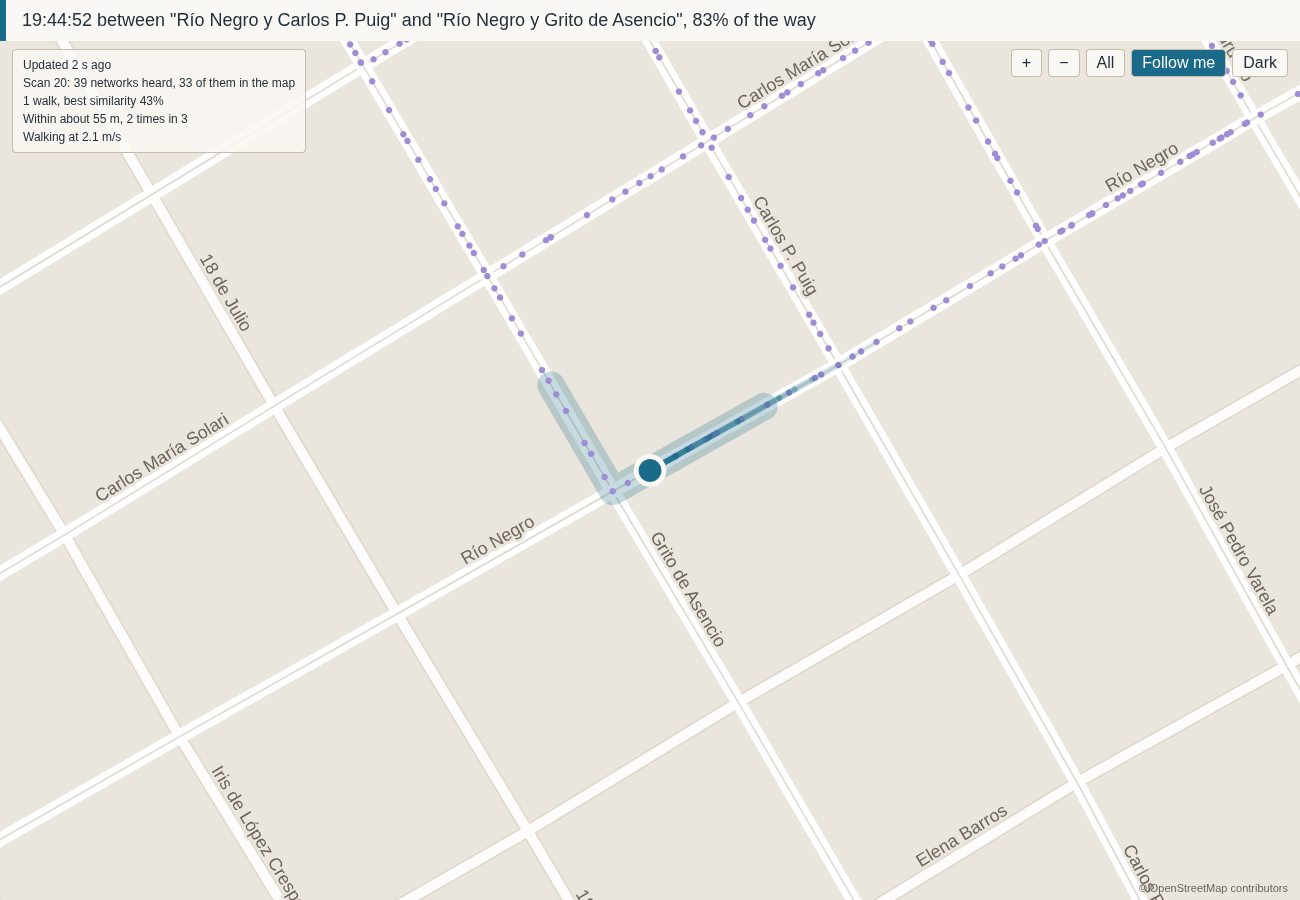
The live map, zoomed in with Follow me.
How it works
Every spot sounds different. From any point on a street you hear a particular set of Wi-Fi networks, some loud and some faint. That set is the spot's fingerprint (Wi-Fi fingerprinting), and a walk records one every five seconds.
Placing the walk. You press the button at each corner, and Enodia spreads the scans between two corners by how fast the networks around you changed (the Jaccard distance between one scan and the next, added up along the block). If they stayed the same for a while, you had stopped. If they turned over quickly, you were moving. Where they say nothing either way, it assumes a steady pace (linear interpolation on the clock).
Placing the routers. Each router goes in the middle of where it was heard, leaning towards where it was loudest (a weighted centroid, with weights from the log-distance path loss model). One heard all along the walk gets a ring instead of a dot, because the walk never pinned it down.
Finding yourself. Later, Enodia listens and asks which recorded spot sounds most like now. It counts the networks the two have in common, out of all the ones either of them heard, and a rare network counts for more, the way a distinctive voice in a crowd tells you more than a common one (weighted Jaccard similarity, with rarity weights like IDF). Each earlier walk gets one vote, the block with the best match wins, and you are placed along it between its best matches (k nearest neighbours, one per walk, grouped by block).
Saying what it does not know. If nothing sounds alike enough, the answer is "not on the map" (a similarity floor). If two blocks sound about as alike, it says so, and the scans just before it decide, since nobody jumps a block in five seconds (a softmax share of the evidence, and a vote of the last three scans). While you walk, the dot moves at a walking pace (a one-dimensional Kalman filter), and the streets you may be on are shaded around it: the worse the match, the wider the shade (an error band fitted on held-out walks).
Checking itself. The numbers below come from hiding part of a walk and finding it again from the rest, like covering the answers of a quiz (hold-out validation, one walk or one corner left out at a time).
How good is it?
One real walk so far. It is in the repository, so the first three numbers can be run again. The fourth comes from walking the same streets with Enodia the next day.
- The corners. Held out one at a time and placed again from the walk alone, they land 9 m from where they were on average, and 4 m with
--pace clock(--check-pace). - The routers. Seven blocks walked twice place the same networks within 16% of a block of each other on average (
--check-passes). - Finding yourself. A pass held out and located from the rest of the map lands 38 m from where it was on average (
--check-map). Most of those answers are on the block next door, because most blocks were walked once and holding that pass out left nothing on them. The experimental--along levelsbrings it to 33 m. - In the street. Walking with
--locate --watch, matching on which networks are in view lost no scan on streets the map knows. Matching on their signal strength too lost a third of them, and it is not the default.
A second walk over the same streets, on another day, is the measurement that settles these. The methodology says what each check can and cannot tell you.
Limits
- The map knows the streets you walked, and it ages as routers move or disappear.
- Positions are estimates, and the report says how far to trust each one. A router the walk only heard from around there is drawn as a ring, never as a dot.
- Enodia has no GPS on purpose: the question is whether a map of radios can place you by itself, and a receiver in the loop would answer it for the radio. GPS belongs as ground truth, written beside a corner in the notebook (
@ -34.9066, -56.2001). - Fresh scans send probe requests.
--preflightchecks that the scanning address is randomised, and changes nothing. - Logs and maps hold your neighbours' network names and addresses, and where they are.
--export-publicmakes a copy you can publish, and says what it cannot hide.
Documentation
- Machine setup: the lid, the Wi-Fi daemon, the voice, the headset button.
- CLI reference: every flag, by the command you reach for it with.
- File formats: the notebook you write, and the log and streets files Enodia writes.
- Methodology: how scans, routers and fingerprints are placed, and what each check measures.
- Design notes: each decision, and the failure behind it.
- Publishing a walk: what
--export-publicpromises, and what it cannot. - From Python: the same operations as function calls.
License
MIT.
1 maintainer

Release files for enodia 0.4.0
For a detailed explanation of source distributions (sdists) and built distributions (wheels), please see the package formats documentation.
Source distribution (sdist)
| File | Size | Uploaded | |
|---|---|---|---|
| enodia-0.4.0.tar.gz | 658.3 kB | Details |
Built distribution (wheel)
| File | Interpreter | ABI | Platform | Reset |
|---|---|---|---|---|
| enodia-0.4.0-py3-none-any.whl | Python 3 | none | any | Details |
Total release size: 837.3 kB
Release files / enodia-0.4.0.tar.gz
| Download URL | enodia-0.4.0.tar.gz |
|---|---|
| Size | 658.3 kB |
| Tags | Source |
|
SHA-256 checksum How to use checksums |
0e05a491aec0c95a5d4735ff1b75db283e09f661ed2f1596581e226e2f9bbeab
|
|
BLAKE2b-256 checksum How to use checksums |
7e7247c5e47f7e07ecb9eed98092948fe4284c557334fb758ab78e6b43c650a8
|
| Upload date | |
|
Uploaded using Trusted Publishing? What is trusted publishing? |
Yes |
| Uploaded via |
twine/7.0.0 CPython/3.13.14
|
Provenance
Provenance describes where a file came from. On PyPI, provenance is shared via attestations, which provide a verifiable record of the build or publishing details. View details, limitations and caveats.


PyPI Publish Attestation
PyPI verified that this artifact, at this checksum, originated from the publisher listed below.
Signed by GitHub Actions, verified by PyPI on Sep 24, 2026.
Transparency logRelease files / enodia-0.4.0-py3-none-any.whl
| Download URL | enodia-0.4.0-py3-none-any.whl |
|---|---|
| Size | 179.0 kB |
| Tags | Python 3 |
|
SHA-256 checksum How to use checksums |
182fd1b4179e8b08096a32a90f63443a389ad5e608f99a60a4d4a31d3c0f40ad
|
|
BLAKE2b-256 checksum How to use checksums |
34d0227878681eb33c34025b48beb79d8b9dbc42732c658cab3fe61bf2de4ae1
|
| Upload date | |
|
Uploaded using Trusted Publishing? What is trusted publishing? |
Yes |
| Uploaded via |
twine/7.0.0 CPython/3.13.14
|
Provenance
Provenance describes where a file came from. On PyPI, provenance is shared via attestations, which provide a verifiable record of the build or publishing details. View details, limitations and caveats.
PyPI Publish Attestation
PyPI verified that this artifact, at this checksum, originated from the publisher listed below.
Signed by GitHub Actions, verified by PyPI on Sep 24, 2026.
Transparency log













