
A provider-agnostic, entity-centric LLM-powered document entity extraction tool
Verified details
These details have been verified by PyPIProject links
GitHub Statistics
Maintainers

Project description
entityxtract


Entity-first, schema-driven extraction of structured data from unstructured documents (PDF, DOCX, TXT, images). Define custom entities with schemas, few-shot examples, and instructions, then extract reliably using any local or SOTA LLM.
Built as an open-source alternative to Google Cloud Document AI, Azure AI Document Intelligence, and Adobe PDF Extract — but provider-agnostic and designed to work with any LLM.
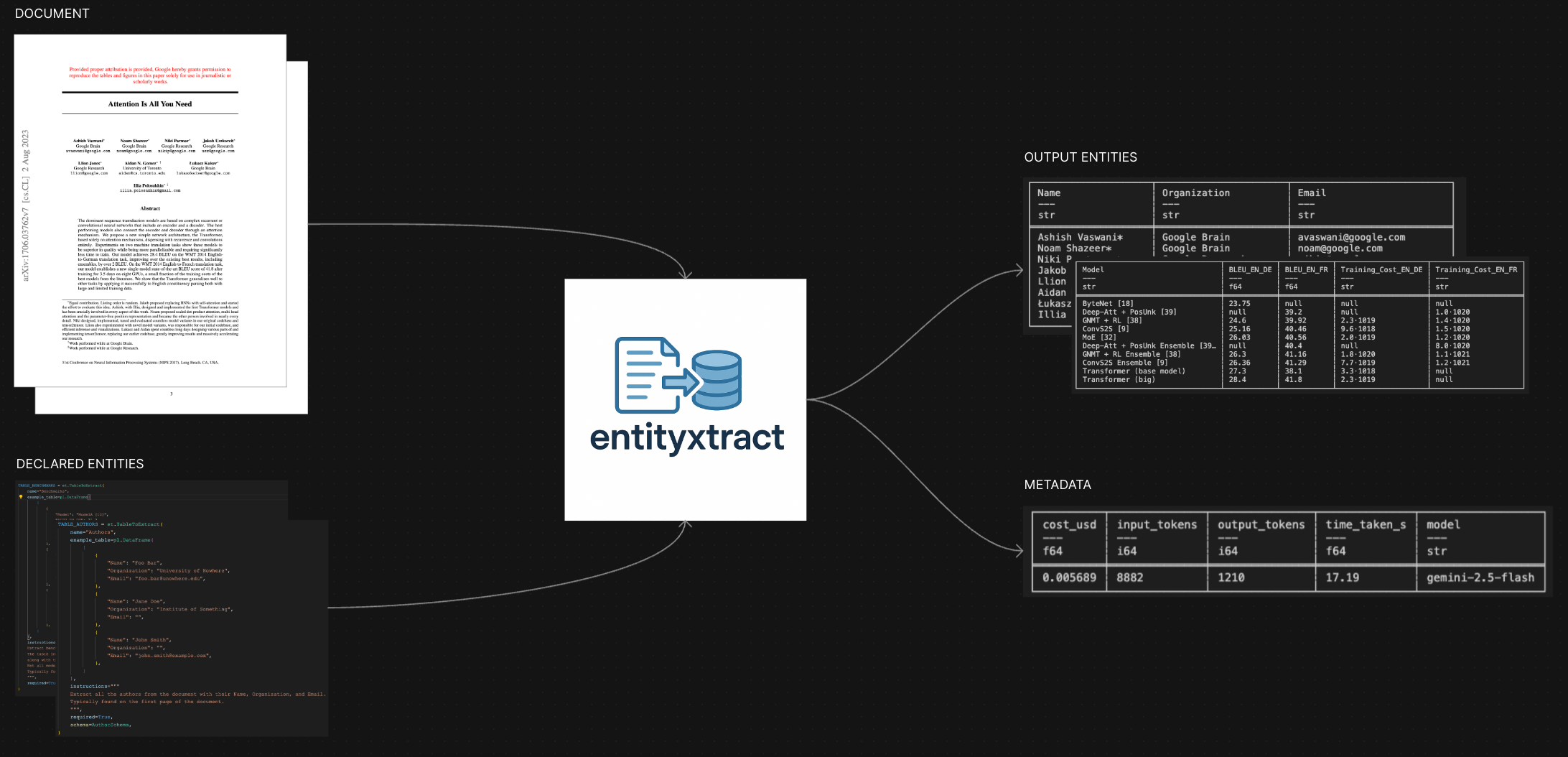
Features
- 🎯 Entity-first extraction — Smart structured data extraction with pre-defined / auto-identified entities.
- 📄 Multiple document formats — Support for PDF, TXT, MD, and images.
- 🔀 Smart input modes — Extract information using text, OCR, or hybrid approaches.
- 🌐 Provider-agnostic design — Works with any LLM via OpenAI-compatible APIs.
- 🔄 Robust execution — Built-in retries, parallel extraction, strictly structured and typed output.
- 📊 Observability — Structured logs, token usage tracking, and optional cost tracking.
- 📦 PyPI Package — Easily install and use entityxtract in your projects.
Coming Soon
- 🌐 FastAPI REST API for remote extraction services.
- 🖥️ Web UI for visual entity/schema management and job monitoring.
- 🔍 Auto-detect mode to automatically identify extractable entities in documents.
- 💰 Cost Optimization using PDF annotation caching, and smart input data pruning.
- 👁️ Deepseek OCR integration for enhanced document processing.
- 🔌 MCP server for agentic applications.
Installation
To use entityxtract, you'll need Python 3.12+ and uv (recommended):
# Install uv if you haven't already
curl -LsSf https://astral.sh/uv/install.sh | sh

# Clone the repository
git clone https://github.com/Prathamesh-Ghatole/entityxtract.git
cd entityxtract

# Install dependencies
uv sync
Getting Started
Extract pre-defined entities:
from pathlib import Path
import polars as pl
from entityxtract.extractor_types import (
    Document, TableToExtract, ObjectsToExtract,
    ExtractionConfig, FileInputMode
)
from entityxtract.extractor import extract_objects

# 1. Load your document
doc = Document(Path("document.pdf"))

# 2. Define what to extract
table = TableToExtract(
    name="Events",
    example_table=pl.DataFrame([
        {"Time": "02:05", "Type": "Operation", "Description": "Example event"},
        {"Time": "03:25", "Type": "Transit", "Description": "Another event"}
    ]),
    instructions="Extract the events table with Time, Type, and Description columns.",
    required=True
)

# 3. Configure extraction
config = ExtractionConfig(
    model_name="google/gemini-2.5-flash",  # Recommended
    temperature=0.0,
    file_input_modes=[FileInputMode.FILE]
)

# 4. Extract!
results = extract_objects(doc, ObjectsToExtract(objects=[table], config=config))

# Use your results
for name, result in results.results.items():
    if result.success:
        df = pl.DataFrame(result.extracted_data)
        print(df)
    else:
        print(f"Failed: {result.message}")
Configuration
Copy the sample environment file .env.sample to .env, or set the following environment variables directly:
# For all OpenAI-compatible endpoints [OpenAI, OpenRouter, Ollama, lm-studio, etc.]
export OPENAI_API_KEY="your-api-key"
export OPENAI_API_BASE="https://openrouter.ai/api/v1"

# Default model
export OPENAI_DEFAULT_MODEL="google/gemini-2.5-flash"
Usage Examples
Complete Example with Multiple Entities
from pathlib import Path
import polars as pl

from entityxtract.extractor_types import (
    Document, ExtractionConfig, FileInputMode,
    TableToExtract, StringToExtract, ObjectsToExtract
)
from entityxtract.extractor import extract_objects

# Load document
doc = Document(Path("reports/quarterly_summary.pdf"))

# Define entities to extract
table = TableToExtract(
    name="Financial Summary",
    example_table=pl.DataFrame([
        {"Quarter": "Q1 2024", "Revenue": "$1.2M", "Expenses": "$800K", "Profit": "$400K"},
        {"Quarter": "Q2 2024", "Revenue": "$1.5M", "Expenses": "$900K", "Profit": "$600K"}
    ]),
    instructions="Extract the quarterly financial summary table with Quarter, Revenue, Expenses, and Profit columns.",
    required=True
)

report_id = StringToExtract(
    name="Report ID",
    example_string="RPT-2024-Q2-001",
    instructions="Extract the report identifier from the document header.",
    required=False
)

# Configure extraction with cost tracking
config = ExtractionConfig(
    model_name="google/gemini-2.5-flash",
    temperature=0.0,
    file_input_modes=[FileInputMode.FILE],
    parallel_requests=4,
    calculate_costs=True
)

# Run extraction
objects = ObjectsToExtract(objects=[table, report_id], config=config)
results = extract_objects(doc, objects)

# Process results
for name, res in results.results.items():
    if res.success:
        print(f"✓ [{name}] extracted successfully")
        print(f"  Tokens: {res.input_tokens} in / {res.output_tokens} out")
        print(f"  Cost: ${res.cost:.4f}")

        # Export table to CSV
        if isinstance(res.extracted_data, list):
            df = pl.DataFrame(res.extracted_data)
            df.write_csv(f"{name}.csv")
            print(f"  Saved to {name}.csv")
    else:
        print(f"✗ [{name}] failed: {res.message}")

print(f"\nTotals: {results.total_input_tokens} tokens in, {results.total_output_tokens} tokens out")
print(f"Total cost: ${results.total_cost:.4f}")
Different Input Modes
# Pass document as file attachment
config = ExtractionConfig(
    model_name="google/gemini-2.5-flash",
    file_input_modes=[FileInputMode.FILE]
)

# Pass document as text content
config = ExtractionConfig(
    model_name="google/gemini-2.5-flash",
    file_input_modes=[FileInputMode.TEXT]
)

# Pass document as images (useful for scanned documents)
config = ExtractionConfig(
    model_name="google/gemini-2.5-flash",
    file_input_modes=[FileInputMode.IMAGE]
)

# Combine multiple input modes
config = ExtractionConfig(
    model_name="google/gemini-2.5-flash",
    file_input_modes=[FileInputMode.FILE, FileInputMode.TEXT]
)
See tests/test.py for more complete examples.
Roadmap
Interfaces
- 🌐 FastAPI REST API for remote extraction services
- 🖥️ Web UI for entity management, job runs, and results review
- 🤖 Auto-detect mode: automatically identify entities in documents
Developer Experience
- 📦 Publish to PyPI for easy
pip install entityxtract - ⚡ ENV-first configuration (deprecate YAML)
- 💾 Document annotation caching to reduce token usage
- 🔧 JSON import/export for entity schemas and results
- 📝 Enhanced CLI with
entityxtractcommand
Providers & Models
- 🏠 Local inference via Ollama
- 🔌 Native adapters for OpenAI, Gemini, Claude, and more
- 🌍 Support for additional LLM providers
Quality & Testing
- ✅ Expanded test coverage
- 📊 Benchmark suite for accuracy and performance
- 📚 Comprehensive documentation site
Comparisons
entityxtract positions itself as a flexible, open-source alternative to both commercial services and closed-source solutions:
Key Differentiators:
- Provider Agnostic: Works with any LLM, not locked to a single provider
- Open Source: Full transparency, customizable, and community-driven
- Schema + Examples: Strong emphasis on structured entity definitions with few-shot learning
- Complete Stack: Python SDK today, REST API and Web UI coming soon
Contributing
We welcome contributions! entityxtract uses modern Python tooling:
# Use uv for environment management
uv sync

# Run tests
uv run pytest tests/

# Code formatting with Ruff
uv run ruff check .
uv run ruff format .
Guidelines:
- Follow strict JSON output conventions
- Include tests for new features
- Update documentation as needed
- Use structured logging patterns
Open an issue or PR with a clear description and we'll be happy to review!
Get Help and Support
- 💬 GitHub Discussions - Ask questions and share ideas
- 🐛 Issues - Report bugs or request features
- 📧 Contact: prathamesh.s.ghatole@gmail.com
License
entityxtract is released under the MIT License. Free for commercial and personal use.
Built with ❤️ by Prathamesh Ghatole
entityxtract was built out of the need for intelligent entity extraction from documents using AI with minimal effort. Define what you need, and let AI handle the rest.
Project details
Verified details
These details have been verified by PyPIProject links
GitHub Statistics
Maintainers
Release history Release notifications | RSS feed


Download files
Download the file for your platform. If you're not sure which to choose, learn more about installing packages.
Source Distribution
Built Distribution
Filter files by name, interpreter, ABI, and platform.
If you're not sure about the file name format, learn more about wheel file names.
Copy a direct link to the current filters
File details
Details for the file entityxtract-0.5.2.tar.gz.
File metadata
- Download URL: entityxtract-0.5.2.tar.gz
- Upload date:
- Size: 2.7 MB
- Tags: Source
- Uploaded using Trusted Publishing? Yes
- Uploaded via: twine/6.1.0 CPython/3.13.7
File hashes
| Algorithm | Hash digest | |
|---|---|---|
| SHA256 |
62894890aa4beed816db136003384e2fb57526c24593f14c696a06ddadd87beb
|
|
| MD5 |
82d3ac6e70ff45a2dce0dab1791fc056
|
|
| BLAKE2b-256 |
cc418379311bf4e14cbf61c6621b6bce644f35f751190f489afb8d1dfb10941f
|
Provenance
The following attestation bundles were made for entityxtract-0.5.2.tar.gz:
Publisher:
publish.yml on Prathamesh-Ghatole/entityxtract
-
Statement:
-
Statement type:
https://in-toto.io/Statement/v1 -
Predicate type:
https://docs.pypi.org/attestations/publish/v1 -
Subject name:
entityxtract-0.5.2.tar.gz -
Subject digest:
62894890aa4beed816db136003384e2fb57526c24593f14c696a06ddadd87beb - Sigstore transparency entry: 1194647423
- Sigstore integration time:
-
Permalink:
Prathamesh-Ghatole/entityxtract@3a9b6de922929fdbb1983a3231a648ce82ab0a55 -
Branch / Tag:
refs/tags/v0.5.2 - Owner: https://github.com/Prathamesh-Ghatole
-
Access:
public
-
Token Issuer:
https://token.actions.githubusercontent.com -
Runner Environment:
github-hosted -
Publication workflow:
publish.yml@3a9b6de922929fdbb1983a3231a648ce82ab0a55 -
Trigger Event:
release
-
Statement type:
File details
Details for the file entityxtract-0.5.2-py3-none-any.whl.
File metadata
- Download URL: entityxtract-0.5.2-py3-none-any.whl
- Upload date:
- Size: 20.7 kB
- Tags: Python 3
- Uploaded using Trusted Publishing? Yes
- Uploaded via: twine/6.1.0 CPython/3.13.7
File hashes
| Algorithm | Hash digest | |
|---|---|---|
| SHA256 |
69ca4b1a7d0eb23e76eec22c66be0da50ad9e62b14cdc96b7c6387d328234380
|
|
| MD5 |
a3543789bab6099e810af8a4fce9aa65
|
|
| BLAKE2b-256 |
53505fd72d393961627439d56f7b1a34c12375b750915d44f5f3942ba600a076
|
Provenance
The following attestation bundles were made for entityxtract-0.5.2-py3-none-any.whl:
Publisher:
publish.yml on Prathamesh-Ghatole/entityxtract
-
Statement:
-
Statement type:
https://in-toto.io/Statement/v1 -
Predicate type:
https://docs.pypi.org/attestations/publish/v1 -
Subject name:
entityxtract-0.5.2-py3-none-any.whl -
Subject digest:
69ca4b1a7d0eb23e76eec22c66be0da50ad9e62b14cdc96b7c6387d328234380 - Sigstore transparency entry: 1194647436
- Sigstore integration time:
-
Permalink:
Prathamesh-Ghatole/entityxtract@3a9b6de922929fdbb1983a3231a648ce82ab0a55 -
Branch / Tag:
refs/tags/v0.5.2 - Owner: https://github.com/Prathamesh-Ghatole
-
Access:
public
-
Token Issuer:
https://token.actions.githubusercontent.com -
Runner Environment:
github-hosted -
Publication workflow:
publish.yml@3a9b6de922929fdbb1983a3231a648ce82ab0a55 -
Trigger Event:
release
-
Statement type:






