
A CLI tool to verify and fix AI/ML environment compatibility (Driver <-> CUDA <-> Wheels).
Verified details
These details have been verified by PyPIProject links
GitHub Statistics
Maintainers


Project description

Env-Doctor
The missing link between your GPU and Python AI libraries





"Why does my PyTorch crash with CUDA errors when I just installed it?"
Because your driver supports CUDA 11.8, but
pip install torchgave you CUDA 12.4 wheels.
Env-Doctor diagnoses and fixes the #1 frustration in GPU computing: mismatched CUDA versions between your NVIDIA driver, system toolkit, cuDNN, and Python libraries.
It takes 5 seconds to find out if your environment is broken - and exactly how to fix it.
Doctor "Check" (Diagnosis)
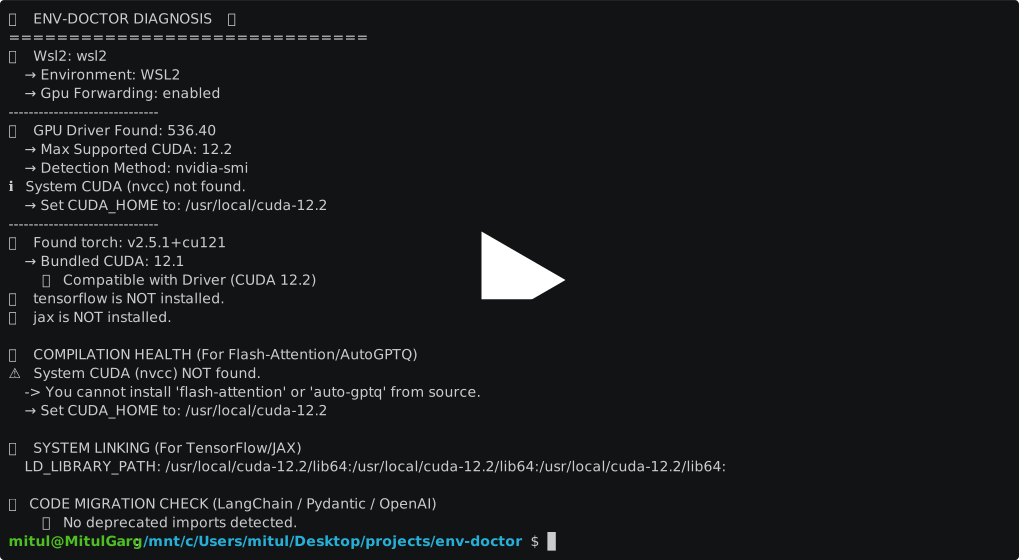
Features
| Feature | What It Does |
|---|---|
| One-Command Diagnosis | Check compatibility: GPU Driver → CUDA Toolkit → cuDNN → PyTorch/TensorFlow/JAX |
| Safe Install Commands | Get the exact pip install command that works with YOUR driver |
| AI Model Compatibility | Check if LLMs, Diffusion, or Audio models fit on your GPU before downloading |
| WSL2 GPU Support | Validate GPU forwarding, detect driver conflicts within WSL2 env for Windows users |
| Deep CUDA Analysis | Find multiple installations, PATH issues, environment misconfigurations |
| Container Validation | Catch GPU config errors in Dockerfiles before you build |
| CI/CD Ready | JSON output and proper exit codes for automation |
Installation
pip install env-doctor
Or from source:
git clone https://github.com/mitulgarg/env-doctor.git
cd env-doctor
pip install -e .
Usage
Diagnose Your Environment
env-doctor check
Example output:
🩺 ENV-DOCTOR DIAGNOSIS
============================================================

🖥️  Environment: Native Linux

🎮 GPU Driver
   ✅ NVIDIA Driver: 535.146.02
   └─ Max CUDA: 12.2

🔧 CUDA Toolkit
   ✅ System CUDA: 12.1.1

📦 Python Libraries
   ✅ torch 2.1.0+cu121

✅ All checks passed!
Get Safe Install Command
env-doctor install torch
⬇️ Run this command to install the SAFE version:
---------------------------------------------------
pip install torch torchvision --index-url https://download.pytorch.org/whl/cu118
---------------------------------------------------
Check Model Compatibility
env-doctor model llama-3-8b
🤖  Checking: LLAMA-3-8B (8.0B params)

🖥️   Your Hardware: RTX 3090 (24GB)

💾  VRAM Requirements:
  ✅  FP16: 19.2GB - fits with 4.8GB free
  ✅  INT4:  4.8GB - fits with 19.2GB free

✅  This model WILL FIT on your GPU!
List all models: env-doctor model --list
Validate Dockerfiles
env-doctor dockerfile
🐳  DOCKERFILE VALIDATION

❌  Line 1: CPU-only base image: python:3.10
    Fix: FROM nvidia/cuda:12.1.0-runtime-ubuntu22.04

❌  Line 8: PyTorch missing --index-url
    Fix: pip install torch --index-url https://download.pytorch.org/whl/cu121
More Commands
| Command | Purpose |
|---|---|
env-doctor check |
Full environment diagnosis |
env-doctor install <lib> |
Safe install command for PyTorch/TensorFlow/JAX |
env-doctor model <name> |
Check model VRAM requirements |
env-doctor cuda-info |
Detailed CUDA toolkit analysis |
env-doctor cudnn-info |
cuDNN library analysis |
env-doctor dockerfile |
Validate Dockerfile |
env-doctor docker-compose |
Validate docker-compose.yml |
env-doctor scan |
Scan for deprecated imports |
env-doctor debug |
Verbose detector output |
CI/CD Integration
# JSON output for scripting
env-doctor check --json

# CI mode with exit codes (0=pass, 1=warn, 2=error)
env-doctor check --ci
GitHub Actions example:
- run: pip install env-doctor
- run: env-doctor check --ci
Documentation
Full documentation: https://mitulgarg.github.io/env-doctor/
Contributing
Contributions welcome! See CONTRIBUTING.md for details.
License
MIT License - see LICENSE
Project details
Verified details
These details have been verified by PyPIProject links
GitHub Statistics
Maintainers
Release history Release notifications | RSS feed


Download files
Download the file for your platform. If you're not sure which to choose, learn more about installing packages.
Source Distribution
Built Distribution
Filter files by name, interpreter, ABI, and platform.
If you're not sure about the file name format, learn more about wheel file names.
Copy a direct link to the current filters
File details
Details for the file env_doctor-0.1.1.tar.gz.
File metadata
- Download URL: env_doctor-0.1.1.tar.gz
- Upload date:
- Size: 56.2 kB
- Tags: Source
- Uploaded using Trusted Publishing? Yes
- Uploaded via: twine/6.1.0 CPython/3.13.7
File hashes
| Algorithm | Hash digest | |
|---|---|---|
| SHA256 |
8df62545d69193f2e5d7549fdb492f900792582c96387ef92dbd320df7b530ea
|
|
| MD5 |
7ca6193577b1c0ac267c143dc1d3fa39
|
|
| BLAKE2b-256 |
f12d089f643e171b2a054a94503b549204b3b8d46f13b2292e7d4318051bde8e
|
Provenance
The following attestation bundles were made for env_doctor-0.1.1.tar.gz:
Publisher:
publish-pypi.yml on mitulgarg/env-doctor
-
Statement:
-
Statement type:
https://in-toto.io/Statement/v1 -
Predicate type:
https://docs.pypi.org/attestations/publish/v1 -
Subject name:
env_doctor-0.1.1.tar.gz -
Subject digest:
8df62545d69193f2e5d7549fdb492f900792582c96387ef92dbd320df7b530ea - Sigstore transparency entry: 838802902
- Sigstore integration time:
-
Permalink:
mitulgarg/env-doctor@4abe664eb90392856f653ec78519cfbdd8b3ff12 -
Branch / Tag:
refs/tags/v0.1.1 - Owner: https://github.com/mitulgarg
-
Access:
public
-
Token Issuer:
https://token.actions.githubusercontent.com -
Runner Environment:
github-hosted -
Publication workflow:
publish-pypi.yml@4abe664eb90392856f653ec78519cfbdd8b3ff12 -
Trigger Event:
push
-
Statement type:
File details
Details for the file env_doctor-0.1.1-py3-none-any.whl.
File metadata
- Download URL: env_doctor-0.1.1-py3-none-any.whl
- Upload date:
- Size: 62.6 kB
- Tags: Python 3
- Uploaded using Trusted Publishing? Yes
- Uploaded via: twine/6.1.0 CPython/3.13.7
File hashes
| Algorithm | Hash digest | |
|---|---|---|
| SHA256 |
9a5cc2c2acebb454f1789db7a0de614185cb09cf957a967198a656aee606d31c
|
|
| MD5 |
d827c2330c907e26f56d7ff6b5f86a67
|
|
| BLAKE2b-256 |
00bd9df7b0d7087c942f8df86768928baf345f2f264625a1ecb2a5c950ba72d0
|
Provenance
The following attestation bundles were made for env_doctor-0.1.1-py3-none-any.whl:
Publisher:
publish-pypi.yml on mitulgarg/env-doctor
-
Statement:
-
Statement type:
https://in-toto.io/Statement/v1 -
Predicate type:
https://docs.pypi.org/attestations/publish/v1 -
Subject name:
env_doctor-0.1.1-py3-none-any.whl -
Subject digest:
9a5cc2c2acebb454f1789db7a0de614185cb09cf957a967198a656aee606d31c - Sigstore transparency entry: 838802925
- Sigstore integration time:
-
Permalink:
mitulgarg/env-doctor@4abe664eb90392856f653ec78519cfbdd8b3ff12 -
Branch / Tag:
refs/tags/v0.1.1 - Owner: https://github.com/mitulgarg
-
Access:
public
-
Token Issuer:
https://token.actions.githubusercontent.com -
Runner Environment:
github-hosted -
Publication workflow:
publish-pypi.yml@4abe664eb90392856f653ec78519cfbdd8b3ff12 -
Trigger Event:
push
-
Statement type:






