
EnvCause
Git bisect finds the bad commit. EnvCause finds the bad configuration.




EnvCause is a local-first configuration debugging tool for development,
CI, and isolated staging environments. It compares a known-good configuration
with a known-bad one, repeatedly runs your reproduction command, and uses delta
debugging to reduce the changes to a 1-minimal failure-inducing set. It
supports .env, JSON, YAML, and TOML.
EnvCause itself has no telemetry and does not upload your configuration values. Your reproduction command remains under your control and runs with the access you give it.
Install
pipx install envcause
Alternatively, install it inside a virtual environment with python -m pip install envcause.
Quick start
Environment files
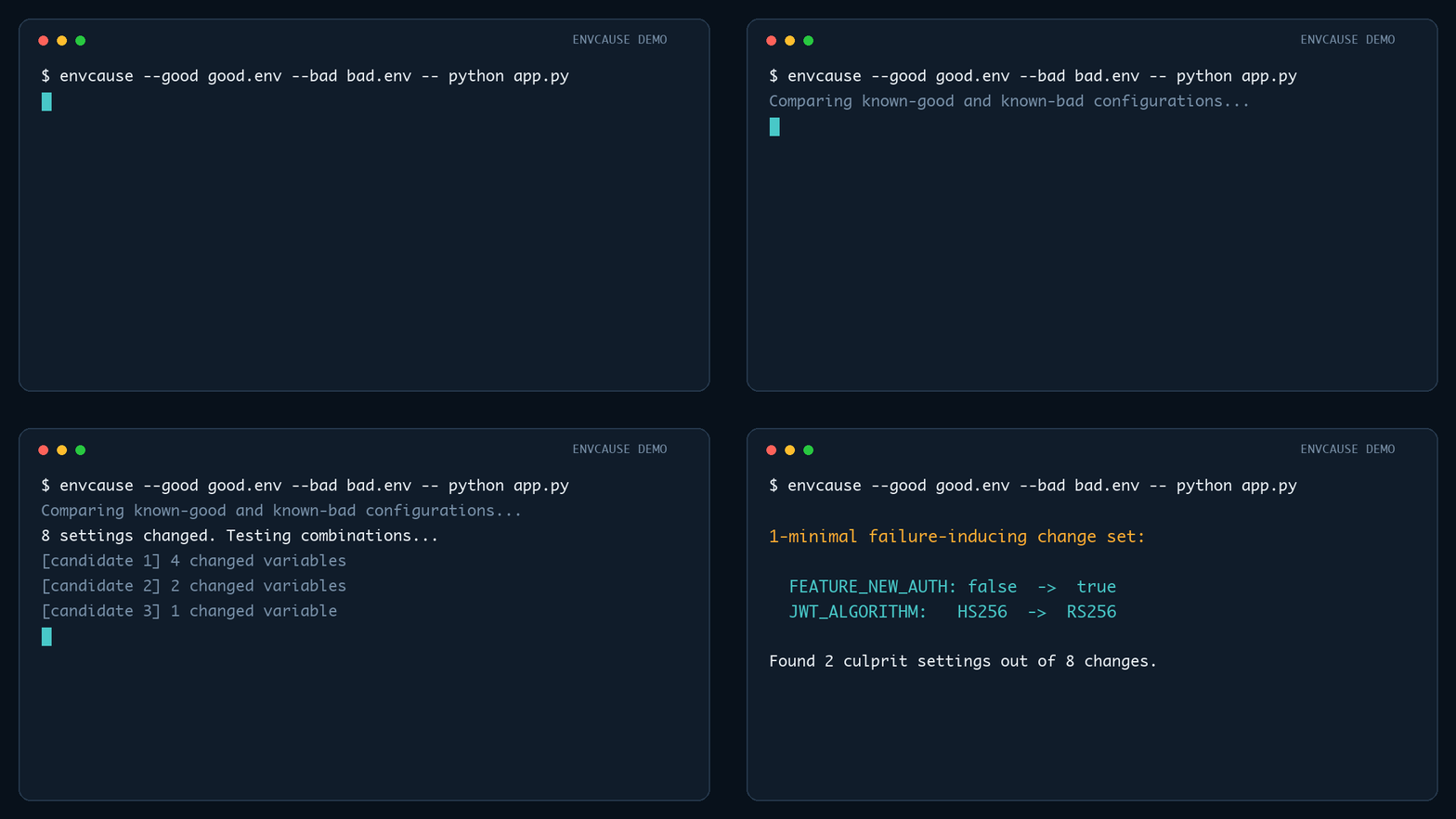
envcause \
  --good examples/good.env \
  --bad examples/bad.env \
  -- python examples/demo_app.py
Example output:
Original differing variables : 8
Failure-inducing variables    : 2

1-minimal failure-inducing change set:
  FEATURE_NEW_AUTH: false -> true
  JWT_ALGORITHM: HS256 -> RS256
JSON, YAML, and TOML
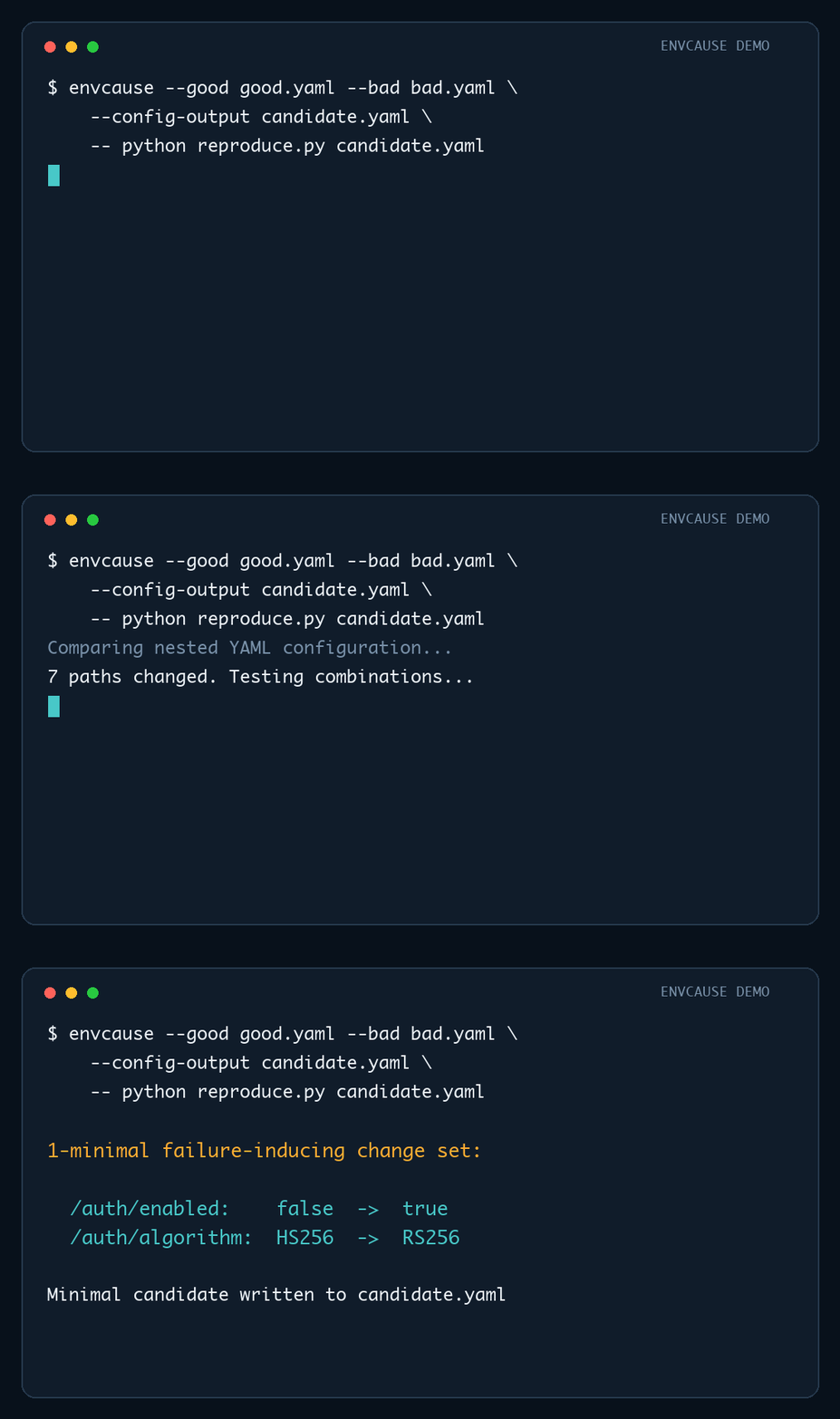
For a structured config, provide a separate candidate path and make the reproduction command read it:
envcause \
  --good config/good.yaml \
  --bad config/bad.yaml \
  --config-output /tmp/envcause-candidate.yaml \
  -- python reproduce.py /tmp/envcause-candidate.yaml
The final reduced candidate remains at --config-output after EnvCause exits.
Why this is useful
Configuration failures often come from many changes landing together: feature flags, URLs, credentials, timeouts, pool sizes, provider choices, or deployment-specific switches. Testing them manually is slow, and checking one variable at a time misses failures caused by combinations.
EnvCause searches combinations automatically.
Why not just check each change individually?
Changing one setting at a time only finds failures caused by a single setting. EnvCause also finds interactions: for example, a new authentication mode may be safe by itself and a new signing algorithm may be safe by itself, while enabling both together breaks the application.
| Approach | Finds interacting changes | Produces a minimal repro | Handles nested config |
|---|---|---|---|
| Manual one-at-a-time testing | No | Sometimes | Manually |
| Text diff | No | No | Shows lines only |
| Schema validation | No | No | Yes, for invalid structure |
| EnvCause | Yes | Yes, 1-minimal | Yes |
EnvCause complements schema validators and ordinary diffs: those tools explain what changed or what is invalid, while EnvCause identifies which combination of valid changes actually reproduces the observed failure.
Usage
envcause --good GOOD --bad BAD [options] -- COMMAND [ARGS...]
By default, a non-zero process exit code means the failure reproduced.
The format is inferred from the --good filename:
| Extension | Format | Candidate delivery |
|---|---|---|
.env or no extension |
dotenv | Applied to the command environment |
.json |
JSON | Written to --config-output |
.yaml, .yml |
YAML | Written to --config-output |
.toml |
TOML | Written to --config-output |
Use --format dotenv|json|yaml|toml when the extension is ambiguous.
Structured paths use JSON Pointer notation. Objects and tables are reduced
recursively; arrays are atomic changes. --config-output must differ from both
inputs. Generated candidates preserve data, but not comments or formatting.
Match a specific error instead
envcause \
  --good .env.local \
  --bad .env.staging \
  --contains "Connection refused" \
  -- npm test
This is useful when the command can fail for unrelated reasons.
For patterns that vary between runs, use a Python regular expression:
envcause --good good.env --bad bad.env --matches 'HTTP (500|503)' -- pytest -q
--contains and --matches search the combined stdout and stderr.
Match failures from JUnit XML
envcause \
  --good good.env \
  --bad bad.env \
  --junit test-results.xml \
  -- pytest --junitxml=test-results.xml
A candidate fails when a newly generated report contains a <failure> or <error> element. EnvCause removes the prior report before every run, so a command that does not create a fresh report cannot accidentally reuse a stale result. Relative report paths are resolved from --cwd when supplied.
Reduce flaky failures
envcause --good good.env --bad bad.env --repeat 3 -- pytest -q
A candidate counts as failing only if it reproduces on every repeat.
For nondeterministic systems, verify the known-good and known-bad baselines with a different number of runs than the reduction itself uses:
envcause --good good.env --bad bad.env --repeat 1 --verify-repeat 5 -- pytest -q
--verify-repeat defaults to --repeat. Raising it strengthens confidence
that the good baseline never fails and the bad baseline always fails before
spending many candidate runs on the reduction; keeping --repeat low keeps
the search itself fast. A single flaky sample on either baseline no longer
misclassifies it: the good baseline must fail on every verification run to
be rejected as already broken, and the bad baseline must fail on every
verification run to be trusted as reproducing.
Write a small reproduction file
envcause \
  --good good.env \
  --bad bad.env \
  --write-repro minimal.env \
  -- pytest -q
The generated file contains the good baseline plus the minimal bad-state
changes. For structured configs, its extension determines the output format;
an extensionless path uses the input format. Terminal output redacts values
whose names or paths look secret-sensitive unless --show-values is supplied.
Save a machine-readable report
envcause --good good.env --bad bad.env --report-json result.json -- pytest -q
The JSON report includes the command, matching mode, run and cache counts, and the reduced changes. Secret-looking values remain redacted unless --show-values is supplied.
Explain and share a result
Turn a saved report into a concise terminal diagnosis without rerunning the reproduction command:
envcause explain result.json
Generate a Markdown artifact for an issue, pull request, or incident report:
envcause explain result.json --format markdown --output diagnosis.md
The explanation includes the reduced changes, failure matcher, execution mode, reproduction command, run counts, and minimal config location when available. It cannot reveal values that were redacted when the JSON report was created.
Candidate caching
EnvCause caches candidate results in memory during each reduction, avoiding duplicate command executions when the delta-debugging search revisits a change set. Use --no-cache when the reproduction command is stateful and every candidate must be rerun.
To reuse results across invocations, provide a cache file:
envcause --good good.env --bad bad.env --cache-file .envcause-cache.json -- pytest -q
The cache stores SHA-256 fingerprints and pass/fail outcomes, not raw configuration values. Fingerprints account for the inputs, execution environment, command, matcher, working directory, timeout, and repeat count. Known-good and known-bad configurations are always verified with fresh runs before cached candidates are used.
Follow long reductions
envcause --good good.env --bad bad.env --progress -- pytest -q
Progress is written to stderr and shows the candidate number, number of changed variables or paths, command-run count, and whether the result came from cache.
Test candidates in parallel
envcause --good good.env --bad bad.env --parallel 4 -- pytest -q
Each delta-debugging round tests every chunk it needs to check against the same baseline, so those checks run concurrently instead of one at a time. The result is identical to a sequential run; only the wall-clock time changes.
--parallel requires candidates that do not share state with each other:
it is rejected for JSON, YAML, and TOML reduction (every candidate would
overwrite the same --config-output file), for --junit (concurrent runs
would share the same report path), and for --kube-pod (candidates share
the pod). It works with plain .env reduction and with --docker-image,
where every candidate already gets an independent container.
Docker and Kubernetes
Run candidates in Docker
Use --docker-image to start a fresh container for every candidate:
envcause \
  --good good.env \
  --bad bad.env \
  --docker-image my-app:debug \
  -- python /app/reproduce.py
Only variables named by the good or bad files are forwarded into the container. Variables absent from a candidate are explicitly unset, even when the image defines them. Values are forwarded through the Docker client's environment rather than included in its local command-line arguments.
Pass Docker options by repeating --docker-run-arg. Use the = form for values beginning with --:
envcause \
  --good good.env \
  --bad bad.env \
  --docker-image my-app:debug \
  --docker-run-arg=--network=host \
  --docker-run-arg=--volume \
  --docker-run-arg="$PWD:/workspace:ro" \
  --docker-run-arg=--workdir=/workspace \
  -- pytest -q
The image must contain the env utility. --cwd controls where the local Docker client runs; use Docker's --workdir argument to change the container working directory. JUnit matching requires the report path to be bind-mounted to the host.
Run candidates in Kubernetes
Use --kube-pod to execute candidates in an existing pod:
envcause \
  --good good.env \
  --bad bad.env \
  --kube-pod api-7c9d8f6d4-x2k9m \
  --kube-namespace staging \
  --kube-container api \
  --matches 'connection refused' \
  -- python /app/reproduce.py
--kube-context can select a non-current kubectl context. The target container must contain the env utility. Commands run in the pod's existing working directory. Use a disposable staging or debugging pod: the same pod is reused across candidates, and EnvCause may execute the command many times.
Kubernetes environment assignments are part of the kubectl exec request and may be visible in local process inspection or cluster audit records. Use sanitized configuration files when that visibility is not acceptable. JUnit matching is not supported for pods because the report is remote; use exit-code, --contains, or --matches mode.
GitHub Actions
EnvCause can run directly in a workflow as a composite action:
jobs:
  diagnose-config:
    runs-on: ubuntu-latest
    steps:
      - uses: actions/checkout@v7

      - name: Restore EnvCause candidate cache
        uses: actions/cache@v5
        with:
          path: .envcause-cache.json
          key: envcause-${{ runner.os }}-${{ github.ref_name }}

      - name: Reduce the failing configuration
        id: envcause
        uses: deeneshchowdhary/EnvCause@v1
        with:
          good: config/good.env
          bad: config/bad.env
          command: pytest -q
          matches: 'Connection refused|HTTP 503'

      - name: Upload the redacted report
        uses: actions/upload-artifact@v7
        with:
          name: envcause-report
          path: ${{ steps.envcause.outputs.report-path }}
The action installs EnvCause and its format dependencies, then executes the
command without a shell. The command input supports shell-style quoting for
arguments, but shell operators such as pipes and redirects are not interpreted.
For structured files, also set format and config-output; the command must
read that candidate path:
with:
  good: config/good.toml
  bad: config/bad.toml
  format: toml
  config-output: /tmp/envcause-candidate.toml
  command: python reproduce.py /tmp/envcause-candidate.toml
By default it:
- writes
envcause-report.jsonwith secret-looking values redacted - uses
.envcause-cache.jsonfor candidate caching - shows reduction progress in the action log
- adds a result table to the GitHub job summary
Available outputs are report-path, repro-path, failure-inducing-count,
command-executions, and cache-hits. Set write-repro to create a minimal
configuration file; unlike the default JSON report, that file contains real
bad-state values and should be handled as a secret-bearing artifact.
The repository's own CI workflow exercises the action locally on every push and pull request.
How the configuration model works
EnvCause starts from the good file as the baseline. Each differing variable or structured path can then be switched independently into its state from the bad file.
This also handles variables that exist in only one file:
- present only in
bad.env→ candidate change sets the variable - present only in
good.env→ candidate change unsets the variable
Variables inherited from the parent shell remain available unless overridden by the supplied files.
For JSON, YAML, and TOML, added or removed objects are treated as one change when the entire subtree exists on only one side. Lists are also treated atomically.
Important limitation: 1-minimal is not globally smallest
EnvCause uses the classic ddmin delta-debugging strategy. The result is 1-minimal: removing any one remaining change stops reproducing the failure. There may theoretically be another unrelated failure-inducing set with fewer variables.
That tradeoff keeps the number of command executions practical.
Safety
EnvCause is designed for local development and automated test workflows. Configuration files can contain secrets, so EnvCause:
- operates locally by default, with explicit Docker and Kubernetes adapters
- has no telemetry or built-in configuration upload
- redacts values for names or paths containing terms such as
SECRET,TOKEN,PASSWORD, orKEY - shows variable names and paths by default; those can still be sensitive
- writes real values to
--config-outputand--write-repro - creates new candidate and reproduction files with owner-only permissions (
0600on POSIX systems) - restores a pre-existing structured
--config-outputfile when reduction fails or is interrupted
Use --show-values only when appropriate.
Running reproduction commands safely
EnvCause runs the command you provide for each baseline and candidate, often many times. The same rule that applies to any test command applies here: use a test environment when the command has side effects.
For ordinary use, run EnvCause locally, in CI, in a fresh Docker container, or
against a disposable staging pod. If a production incident supplies the source
configuration, copy and sanitize it before reproducing the problem in one of
those environments. Use read-only or narrowly scoped credentials where
possible, and set --timeout plus --max-tests when you want to bound a run.
Use --repeat or --verify-repeat for nondeterministic failures, and
--no-cache when results depend on mutable external state. EnvCause executes
the command directly without adding a shell, but the target program still has
its normal operating-system and network permissions.
Roadmap
Completed:
-
.envreduction - JSON, YAML, and TOML reduction
- Docker, Kubernetes, and GitHub Actions integration
-
envcause explainterminal and Markdown reports - Multiple known-good and known-bad verification runs for nondeterministic
systems (
--verify-repeat) - Parallel candidate execution (
--parallel), for.envand Docker reduction
No further steps are currently planned; open an issue with a proposal if you have one.
Development
python -m unittest discover -s tests -v
YAML and TOML serialization use PyYAML and tomli-w; they are installed with the package.
Contributions are welcome. See CONTRIBUTING.md for setup and pull-request guidance.
1 maintainer

Metadata
1 maintainer
Release files for envcause 0.4.1
For a detailed explanation of source distributions (sdists) and built distributions (wheels), please see the package formats documentation.
Source distribution (sdist)
| File | Size | Uploaded | Provenance | |
|---|---|---|---|---|
| envcause-0.4.1.tar.gz | 36.5 kB | With provenance | Details |
Built distribution (wheel)
| File | Interpreter | ABI | Platform | Reset |
|---|---|---|---|---|
| envcause-0.4.1-py3-none-any.whl | Python 3 | none | any | Details |
Total release size: 64.5 kB
Release files / envcause-0.4.1.tar.gz
| Download URL | envcause-0.4.1.tar.gz |
|---|---|
| Size | 36.5 kB |
| Tags | Source |
|
SHA-256 checksum How to use checksums |
7d0c031e3d03631bed40f70b5b666afbdc1472dafd7c5e0937eede8e1a3849a8
|
|
BLAKE2b-256 checksum How to use checksums |
968b34ffd870541d14439e3f36472bf191618453d1fc6e4e42400999d5fce511
|
| Upload date | |
|
Uploaded using Trusted Publishing? What is trusted publishing? |
Yes |
| Uploaded via |
twine/7.0.0 CPython/3.13.14
|
Provenance
Provenance describes where a file came from. On PyPI, provenance is shared via attestations, which provide a verifiable record of the build or publishing details. View details, limitations and caveats.


PyPI Publish Attestation
PyPI verified that this artifact, at this checksum, originated from the publisher listed below.
Signed by GitHub Actions, verified by PyPI on Sep 4, 2026.
Transparency logRelease files / envcause-0.4.1-py3-none-any.whl
| Download URL | envcause-0.4.1-py3-none-any.whl |
|---|---|
| Size | 28.0 kB |
| Tags | Python 3 |
|
SHA-256 checksum How to use checksums |
e0f0b286b4327b6c3103289219854c2b3311ede2eb73d8c46bfd8e74d5c8fc59
|
|
BLAKE2b-256 checksum How to use checksums |
18aa24f6c572f17f4fa982ef5bd06f7764455cf39f5b442dde0bcdf768e6d3c2
|
| Upload date | |
|
Uploaded using Trusted Publishing? What is trusted publishing? |
Yes |
| Uploaded via |
twine/7.0.0 CPython/3.13.14
|
Provenance
Provenance describes where a file came from. On PyPI, provenance is shared via attestations, which provide a verifiable record of the build or publishing details. View details, limitations and caveats.
PyPI Publish Attestation
PyPI verified that this artifact, at this checksum, originated from the publisher listed below.
Signed by GitHub Actions, verified by PyPI on Sep 4, 2026.
Transparency logSecurity for envcause 0.4.1
Provenance
Provenance describes where a file came from. On PyPI, provenance is shared via attestations, which provide a verifiable record of the build or publishing details. View details, limitations and caveats.
Full provenance
All 2 files in this release have been uploaded with provenance metadata.
Attestation for envcause-0.4.1.tar.gz
PyPI Publish Attestation
PyPI verified that this artifact, at this checksum, originated from the publisher listed below.
Signed by GitHub Actions, verified by PyPI on Sep 4, 2026.
Transparency logA note on package security
PyPI is a repository for distributing packages, not a service for auditing them. While third-party security researchers and our staff do their best to detect and remove malicious packages, PyPI cannot guarantee the quality, security or suitability of any given package.
To learn more about protecting yourself from malicious actors, visit our package security documentation.














