
EnvCause
Git bisect finds the bad commit. EnvCause finds the bad configuration.




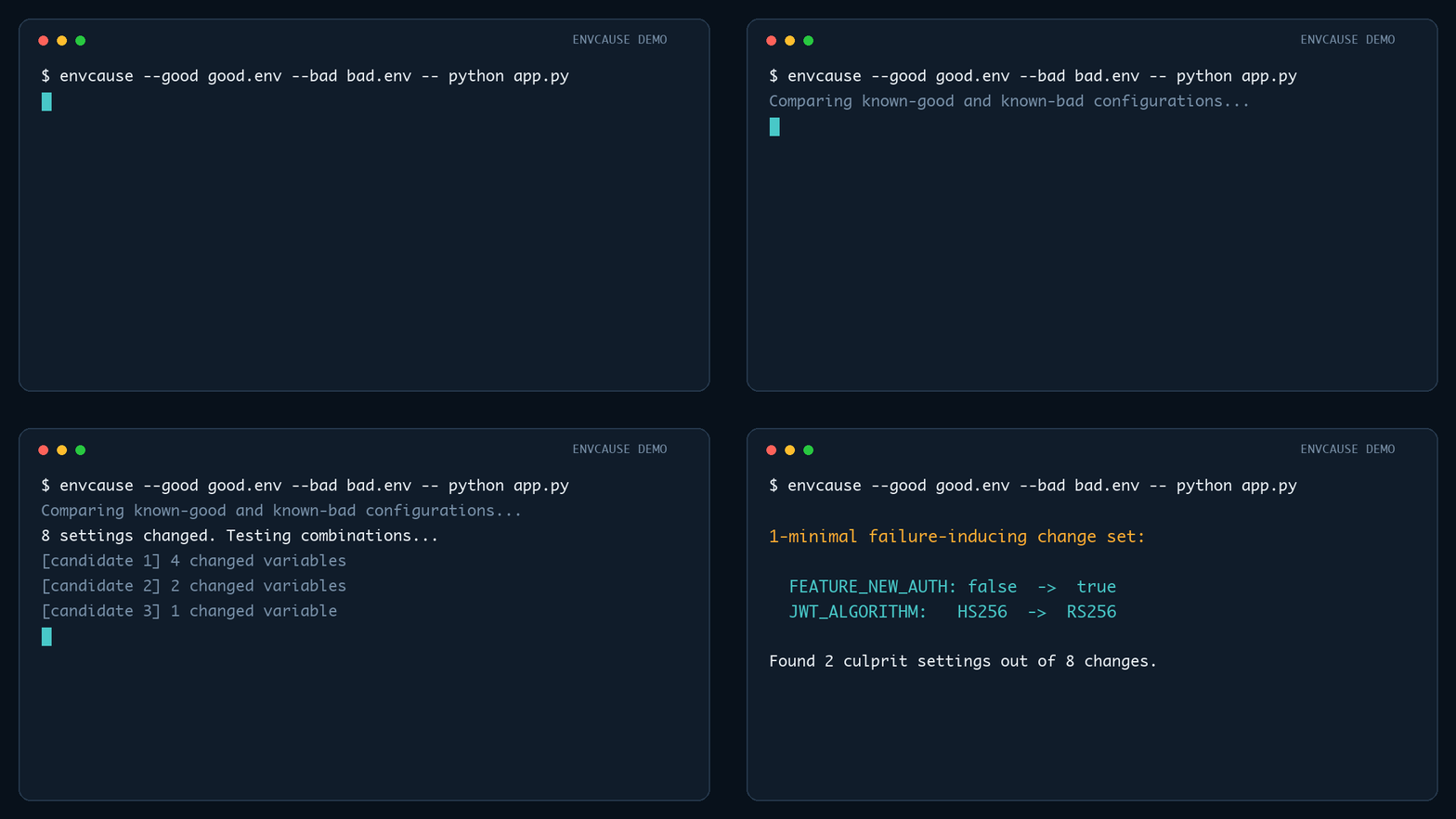
EnvCause compares a known-good configuration with a known-bad one, repeatedly
runs your reproduction command, and uses delta debugging to reduce the changes
to a 1-minimal failure-inducing set. It supports .env, JSON, YAML, and TOML.
It runs deliberately and entirely locally: your configuration values are not sent anywhere.
Install
pipx install envcause
Alternatively, install it inside a virtual environment with python -m pip install envcause.
Quick start
Environment files
envcause \
  --good examples/good.env \
  --bad examples/bad.env \
  -- python examples/demo_app.py
Example output:
Original differing variables : 8
Failure-inducing variables    : 2

1-minimal failure-inducing change set:
  FEATURE_NEW_AUTH: false -> true
  JWT_ALGORITHM: HS256 -> RS256
JSON, YAML, and TOML
For a structured config, provide a separate candidate path and make the reproduction command read it:
envcause \
  --good config/good.yaml \
  --bad config/bad.yaml \
  --config-output /tmp/envcause-candidate.yaml \
  -- python reproduce.py /tmp/envcause-candidate.yaml
The final reduced candidate remains at --config-output after EnvCause exits.
Why this is useful
Configuration failures often come from many changes landing together: feature flags, URLs, credentials, timeouts, pool sizes, provider choices, or deployment-specific switches. Testing them manually is slow, and checking one variable at a time misses failures caused by combinations.
EnvCause searches combinations automatically.
Usage
envcause --good GOOD --bad BAD [options] -- COMMAND [ARGS...]
By default, a non-zero process exit code means the failure reproduced.
The format is inferred from the --good filename:
| Extension | Format | Candidate delivery |
|---|---|---|
.env or no extension |
dotenv | Applied to the command environment |
.json |
JSON | Written to --config-output |
.yaml, .yml |
YAML | Written to --config-output |
.toml |
TOML | Written to --config-output |
Use --format dotenv|json|yaml|toml when the extension is ambiguous.
Structured paths use JSON Pointer notation. Objects and tables are reduced
recursively; arrays are atomic changes. --config-output must differ from both
inputs. Generated candidates preserve data, but not comments or formatting.
Match a specific error instead
envcause \
  --good .env.local \
  --bad .env.staging \
  --contains "Connection refused" \
  -- npm test
This is useful when the command can fail for unrelated reasons.
For patterns that vary between runs, use a Python regular expression:
envcause --good good.env --bad bad.env --matches 'HTTP (500|503)' -- pytest -q
--contains and --matches search the combined stdout and stderr.
Match failures from JUnit XML
envcause \
  --good good.env \
  --bad bad.env \
  --junit test-results.xml \
  -- pytest --junitxml=test-results.xml
A candidate fails when the report contains a <failure> or <error> element. The command should overwrite the report on every run. Relative report paths are resolved from --cwd when supplied.
Reduce flaky failures
envcause --good good.env --bad bad.env --repeat 3 -- pytest -q
A candidate counts as failing only if it reproduces on every repeat.
Write a small reproduction file
envcause \
  --good good.env \
  --bad bad.env \
  --write-repro minimal.env \
  -- pytest -q
The generated file contains the good baseline plus the minimal bad-state
changes. For structured configs, its extension determines the output format;
an extensionless path uses the input format. Terminal output redacts values
whose names or paths look secret-sensitive unless --show-values is supplied.
Save a machine-readable report
envcause --good good.env --bad bad.env --report-json result.json -- pytest -q
The JSON report includes the command, matching mode, run and cache counts, and the reduced changes. Secret-looking values remain redacted unless --show-values is supplied.
Explain and share a result
Turn a saved report into a concise terminal diagnosis without rerunning the reproduction command:
envcause explain result.json
Generate a Markdown artifact for an issue, pull request, or incident report:
envcause explain result.json --format markdown --output diagnosis.md
The explanation includes the reduced changes, failure matcher, execution mode, reproduction command, run counts, and minimal config location when available. It cannot reveal values that were redacted when the JSON report was created.
Candidate caching
EnvCause caches candidate results in memory during each reduction, avoiding duplicate command executions when the delta-debugging search revisits a change set. Use --no-cache when the reproduction command is stateful and every candidate must be rerun.
To reuse results across invocations, provide a cache file:
envcause --good good.env --bad bad.env --cache-file .envcause-cache.json -- pytest -q
The cache stores SHA-256 fingerprints and pass/fail outcomes, not raw configuration values. Fingerprints account for the inputs, execution environment, command, matcher, working directory, timeout, and repeat count. Known-good and known-bad configurations are always verified with fresh runs before cached candidates are used.
Follow long reductions
envcause --good good.env --bad bad.env --progress -- pytest -q
Progress is written to stderr and shows the candidate number, number of changed variables or paths, command-run count, and whether the result came from cache.
Docker and Kubernetes
Run candidates in Docker
Use --docker-image to start a fresh container for every candidate:
envcause \
  --good good.env \
  --bad bad.env \
  --docker-image my-app:debug \
  -- python /app/reproduce.py
Only variables named by the good or bad files are forwarded into the container. Variables absent from a candidate are explicitly unset, even when the image defines them. Values are forwarded through the Docker client's environment rather than included in its local command-line arguments.
Pass Docker options by repeating --docker-run-arg. Use the = form for values beginning with --:
envcause \
  --good good.env \
  --bad bad.env \
  --docker-image my-app:debug \
  --docker-run-arg=--network=host \
  --docker-run-arg=--volume \
  --docker-run-arg="$PWD:/workspace:ro" \
  --docker-run-arg=--workdir=/workspace \
  -- pytest -q
The image must contain the env utility. --cwd controls where the local Docker client runs; use Docker's --workdir argument to change the container working directory. JUnit matching requires the report path to be bind-mounted to the host.
Run candidates in Kubernetes
Use --kube-pod to execute candidates in an existing pod:
envcause \
  --good good.env \
  --bad bad.env \
  --kube-pod api-7c9d8f6d4-x2k9m \
  --kube-namespace staging \
  --kube-container api \
  --matches 'connection refused' \
  -- python /app/reproduce.py
--kube-context can select a non-current kubectl context. The target container must contain the env utility. Commands run in the pod's existing working directory and should avoid changing shared state because the same pod is reused across candidates.
Kubernetes environment assignments are part of the kubectl exec request and may be visible in local process inspection or cluster audit records. Use sanitized configuration files when that visibility is not acceptable. JUnit matching is not supported for pods because the report is remote; use exit-code, --contains, or --matches mode.
GitHub Actions
EnvCause can run directly in a workflow as a composite action:
jobs:
  diagnose-config:
    runs-on: ubuntu-latest
    steps:
      - uses: actions/checkout@v7

      - name: Restore EnvCause candidate cache
        uses: actions/cache@v5
        with:
          path: .envcause-cache.json
          key: envcause-${{ runner.os }}-${{ github.ref_name }}

      - name: Reduce the failing configuration
        id: envcause
        uses: deeneshchowdhary/EnvCause@v1
        with:
          good: config/good.env
          bad: config/bad.env
          command: pytest -q
          matches: 'Connection refused|HTTP 503'

      - name: Upload the redacted report
        uses: actions/upload-artifact@v7
        with:
          name: envcause-report
          path: ${{ steps.envcause.outputs.report-path }}
The action installs EnvCause and its format dependencies, then executes the
command without a shell. The command input supports shell-style quoting for
arguments, but shell operators such as pipes and redirects are not interpreted.
For structured files, also set format and config-output; the command must
read that candidate path:
with:
  good: config/good.toml
  bad: config/bad.toml
  format: toml
  config-output: /tmp/envcause-candidate.toml
  command: python reproduce.py /tmp/envcause-candidate.toml
By default it:
- writes
envcause-report.jsonwith secret-looking values redacted - uses
.envcause-cache.jsonfor candidate caching - shows reduction progress in the action log
- adds a result table to the GitHub job summary
Available outputs are report-path, repro-path, failure-inducing-count,
command-executions, and cache-hits. Set write-repro to create a minimal
configuration file; unlike the default JSON report, that file contains real
bad-state values and should be handled as a secret-bearing artifact.
The repository's own CI workflow exercises the action locally on every push and pull request.
How the configuration model works
EnvCause starts from the good file as the baseline. Each differing variable or structured path can then be switched independently into its state from the bad file.
This also handles variables that exist in only one file:
- present only in
bad.env→ candidate change sets the variable - present only in
good.env→ candidate change unsets the variable
Variables inherited from the parent shell remain available unless overridden by the supplied files.
For JSON, YAML, and TOML, added or removed objects are treated as one change when the entire subtree exists on only one side. Lists are also treated atomically.
Important limitation: 1-minimal is not globally smallest
EnvCause uses the classic ddmin delta-debugging strategy. The result is 1-minimal: removing any one remaining change stops reproducing the failure. There may theoretically be another unrelated failure-inducing set with fewer variables.
That tradeoff keeps the number of command executions practical.
Safety
Configuration files commonly contain secrets. EnvCause:
- runs locally
- has no telemetry or network code
- redacts values for names or paths containing terms such as
SECRET,TOKEN,PASSWORD, orKEY - shows variable names and paths by default; those can still be sensitive
- writes real values to
--config-outputand--write-repro
Use --show-values only when appropriate.
Roadmap
Completed:
-
.envreduction - JSON, YAML, and TOML reduction
- Docker, Kubernetes, and GitHub Actions integration
-
envcause explainterminal and Markdown reports
Potential next steps, in suggested order:
- Multiple known-good and known-bad verification runs for nondeterministic systems.
- Parallel candidate execution. Structured candidates need isolated per-run files, so this requires more execution-model work than baseline verification.
Development
python -m unittest discover -s tests -v
YAML and TOML serialization use PyYAML and tomli-w; they are installed with the package.
Contributions are welcome. See CONTRIBUTING.md for setup and pull-request guidance.
1 maintainer

Download files
Download the file for your platform. If you're not sure which to choose, learn more about installing packages.
Source Distribution
Built Distribution
Filter files by name, interpreter, ABI, and platform.
If you're not sure about the file name format, learn more about wheel file names.
Copy a direct link to the current filters
File details
Details for the file envcause-0.3.0.tar.gz.
File metadata
- Download URL: envcause-0.3.0.tar.gz
- Upload date:
- Size: 30.5 kB
- Tags: Source
- Uploaded using Trusted Publishing? Yes
- Uploaded via:
twine/7.0.0 CPython/3.13.14
File hashes
| Algorithm | Hash digest | |
|---|---|---|
| SHA256 |
f511ea818cbd7a4c53a0fcf859f35efd57693df5dbb2a44e2a7de90e2ee1d607
|
|
| MD5 |
36ef5c495ffec09f756556998cd86d79
|
|
| BLAKE2b-256 |
263b82dbec47aee8e87718d23ad6bfb196b93d1e1a07cad7124d071a6eff3352
|
Provenance
The following attestation bundles were made for envcause-0.3.0.tar.gz:
Publisher:
publish.yml on deeneshchowdhary/EnvCause
-
Statement:
-
Statement type:
https://in-toto.io/Statement/v1 -
Predicate type:
https://docs.pypi.org/attestations/publish/v1 -
Subject name:
envcause-0.3.0.tar.gz -
Subject digest:
f511ea818cbd7a4c53a0fcf859f35efd57693df5dbb2a44e2a7de90e2ee1d607 - Sigstore transparency entry: 2457728613
- Sigstore integration time:
-
Permalink:
deeneshchowdhary/EnvCause@963b154a999207e654a12b63f6bc79ff6d944c0c -
Branch / Tag:
refs/tags/v0.3.0 - Owner: https://github.com/deeneshchowdhary
-
Access:
public
-
Token Issuer:
https://token.actions.githubusercontent.com -
Runner Environment:
github-hosted -
Publication workflow:
publish.yml@963b154a999207e654a12b63f6bc79ff6d944c0c -
Trigger Event:
release
-
Statement type:
File details
Details for the file envcause-0.3.0-py3-none-any.whl.
File metadata
- Download URL: envcause-0.3.0-py3-none-any.whl
- Upload date:
- Size: 24.6 kB
- Tags: Python 3
- Uploaded using Trusted Publishing? Yes
- Uploaded via:
twine/7.0.0 CPython/3.13.14
File hashes
| Algorithm | Hash digest | |
|---|---|---|
| SHA256 |
ff931a10695307a0705bcfe36677300d9065c147795f757aae177a80c70abf1e
|
|
| MD5 |
bf2e4032743ebe5afa20750af24558e0
|
|
| BLAKE2b-256 |
ca5703716cdfcd74fcb6221451439ff8182fc7bd825326da9f3f901d3df59ac6
|
Provenance
The following attestation bundles were made for envcause-0.3.0-py3-none-any.whl:
Publisher:
publish.yml on deeneshchowdhary/EnvCause
-
Statement:
-
Statement type:
https://in-toto.io/Statement/v1 -
Predicate type:
https://docs.pypi.org/attestations/publish/v1 -
Subject name:
envcause-0.3.0-py3-none-any.whl -
Subject digest:
ff931a10695307a0705bcfe36677300d9065c147795f757aae177a80c70abf1e - Sigstore transparency entry: 2457728630
- Sigstore integration time:
-
Permalink:
deeneshchowdhary/EnvCause@963b154a999207e654a12b63f6bc79ff6d944c0c -
Branch / Tag:
refs/tags/v0.3.0 - Owner: https://github.com/deeneshchowdhary
-
Access:
public
-
Token Issuer:
https://token.actions.githubusercontent.com -
Runner Environment:
github-hosted -
Publication workflow:
publish.yml@963b154a999207e654a12b63f6bc79ff6d944c0c -
Trigger Event:
release
-
Statement type:














