
Epokio
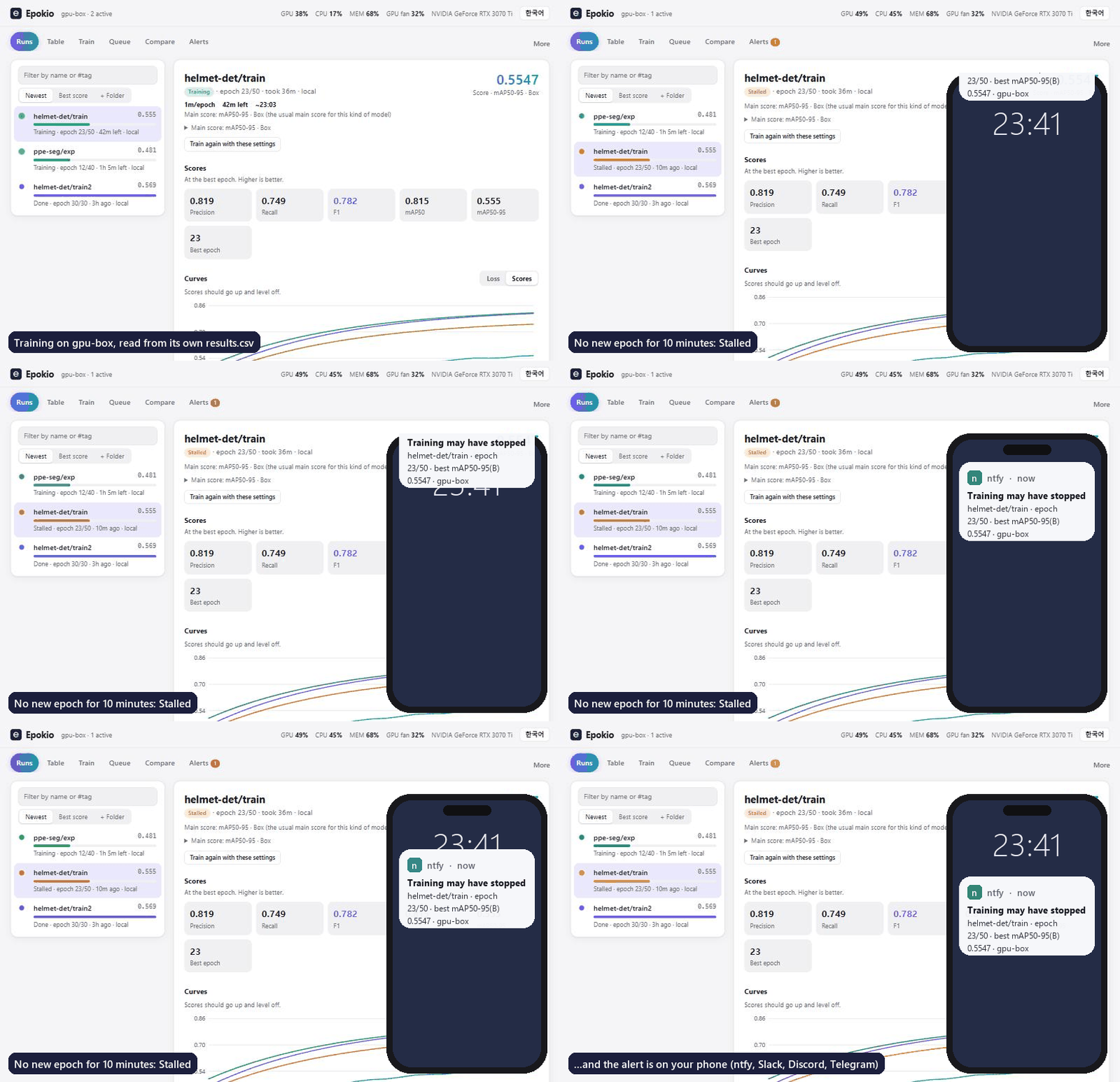
Get a phone alert when the training run on your GPU box or server stalls, NaNs or finishes. No code changes: it reads the logs you already write. Works over SSH.
| What it does better than Epokio | What Epokio adds | |
|---|---|---|
| TensorBoard | Rich charts per step, images, histograms, embeddings and the profiler. | Alerts when a run stalls, hits NaN or finishes, with no browser tab open; one list for many frameworks' logs; remote boxes over SSH with nothing installed. |
| W&B | Team dashboards, history across machines, sweeps, artifacts and a model registry. | No account, no logging calls, no upload; works without internet; reads W&B's local files, so you can keep both. |
| nvitop | A live view of each GPU, its processes and memory. | Knows about the run: epoch, time left, best score, stall and NaN detection, phone alerts. |
There is no account and no cloud, and no logging code to add when your framework writes a supported file (Keras needs a
CSVLogger or TensorBoard callback; a hand-written loop uses epokio.start, below). It also has a web page, a tray icon,
a terminal view and a macOS menu bar app.
What it does
- See every run on this machine or a remote GPU box: state, epoch, time left, best score, curves, plain-language notes ("recall is much higher than precision…") and the result images your framework saved.
- Get told when a run finishes, fails (NaN loss), stalls or reaches a target score: on the Mac, in the tray, or as a phone push (ntfy, Slack, Discord, Telegram) sent by the helper while it runs.
- Compare runs: only the settings that differ, a settings table for a whole sweep next to each run's main score, CSV export and Markdown reports.
- Start and queue runs (Ultralytics YOLO) from the web page, one at a time on each GPU, with a data check before
starting, a one-button Python setup (CUDA PyTorch on NVIDIA machines), resume from
weights/last.pt, and failure causes in plain words. - AI assistants can read and queue runs through the MCP server (
pip install "epokio[mcp]").
Reads Ultralytics (results.csv), Hugging Face Trainer (trainer_state.json), PyTorch Lightning
(metrics.csv), Keras (CSVLogger) and TensorBoard event files (read without TensorFlow). The best score
appears when a run logs a validation metric (or Hugging Face's best_metric); loss-only runs show none (Hugging Face runs that evaluate only eval_loss use the lowest eval_loss). A hand-written
loop shows up with two lines:
import epokio
with epokio.start("runs/my-model", epochs=50, lr=1e-4) as run:
    for epoch in range(50):
        ...
        run.log(val_loss=vl, accuracy=acc)
Start
pip install epokio
epokio setup            # finds your runs, starts the helper, opens the page
epokio setup --lan      # also let your phone or another computer watch this machine
Other commands: epokio watch (terminal view, good over SSH), epokio tray (pip install "epokio[tray]"),
epokio doctor (what Epokio sees, for a bug report), epokio agent --stop.
Viewing is open on this machine; anything that starts, stops or changes something needs the machine's token
(epokio agent --show-token). The helper uses only the Python standard library.
MIT licence.
1 maintainer

Metadata
1 maintainer
Release files for epokio 0.7.0
For a detailed explanation of source distributions (sdists) and built distributions (wheels), please see the package formats documentation.
Source distribution (sdist)
| File | Size | Uploaded | |
|---|---|---|---|
| epokio-0.7.0.tar.gz | 598.0 kB | Details |
Built distribution (wheel)
| File | Interpreter | ABI | Platform | Reset |
|---|---|---|---|---|
| epokio-0.7.0-py3-none-any.whl | Python 3 | none | any | Details |
Total release size: 1.1 MB
Release files / epokio-0.7.0.tar.gz
| Download URL | epokio-0.7.0.tar.gz |
|---|---|
| Size | 598.0 kB |
| Tags | Source |
|
SHA-256 checksum How to use checksums |
ace90a1a96b060f9ece19a257bac77b6207562291b4a87c12da650fcaca8bf60
|
|
BLAKE2b-256 checksum How to use checksums |
ac7b30cbf9b3bea9ebbf17128f3e9330ef4c7ac35b4700433947a1aa7998c2fc
|
| Upload date | |
|
Uploaded using Trusted Publishing? What is trusted publishing? |
Yes |
| Uploaded via |
twine/7.0.0 CPython/3.13.14
|
Provenance
Provenance describes where a file came from. On PyPI, provenance is shared via attestations, which provide a verifiable record of the build or publishing details. View details, limitations and caveats.


PyPI Publish Attestation
PyPI verified that this artifact, at this checksum, originated from the publisher listed below.
Signed by GitHub Actions, verified by PyPI on Oct 8, 2026.
Transparency logRelease files / epokio-0.7.0-py3-none-any.whl
| Download URL | epokio-0.7.0-py3-none-any.whl |
|---|---|
| Size | 527.1 kB |
| Tags | Python 3 |
|
SHA-256 checksum How to use checksums |
0cc3d2d87fa4498df9797840562196dd74f7b66709eccdd53a673ddc63622690
|
|
BLAKE2b-256 checksum How to use checksums |
0d191d5773f9469302f602fdc3933151a6500e2c827f1688dae92501af01066a
|
| Upload date | |
|
Uploaded using Trusted Publishing? What is trusted publishing? |
Yes |
| Uploaded via |
twine/7.0.0 CPython/3.13.14
|
Provenance
Provenance describes where a file came from. On PyPI, provenance is shared via attestations, which provide a verifiable record of the build or publishing details. View details, limitations and caveats.
PyPI Publish Attestation
PyPI verified that this artifact, at this checksum, originated from the publisher listed below.
Signed by GitHub Actions, verified by PyPI on Oct 8, 2026.
Transparency log













