
Epokio
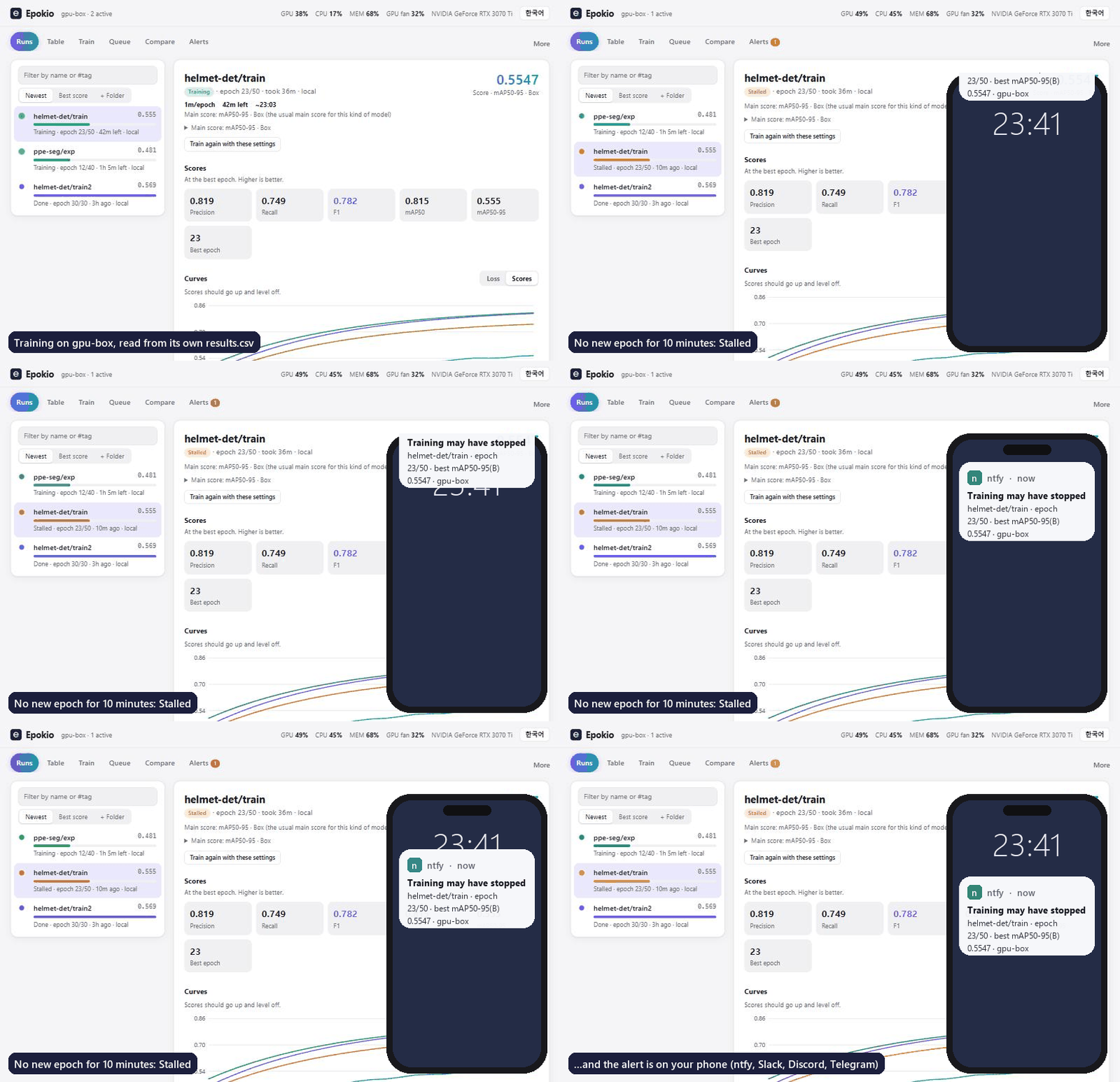
Epokio reads the training logs you already have and alerts your phone when a run stalls, hits NaN, or finishes. No code changes, no account: it reads what YOLO, Hugging Face, Lightning, Keras and TensorBoard already write. Works over SSH.
Quick start
Python 3.10 or later, on Windows, macOS or Linux. In a terminal in your project folder, on the machine that trains:
pip install epokio
epokio setup
epokio watch --once
epokio setup finds your runs, starts the helper (a small background program that reads the logs and sends the alerts) and opens its page. epokio watch --once prints the same list in the terminal.
Setup looks in this folder and in Desktop, Documents, Downloads, Projects and ~/runs, inside your user folder. Runs somewhere else, like D:\ or /data? Name the folder: epokio setup --root D:\myproject\runs.
On Windows, if pip or epokio is not recognized, put py -m in front: py -m epokio setup.
If pip stops with externally-managed-environment (Ubuntu 24.04, Homebrew Python), use a virtual environment or a conda env (how).
On a shared GPU server over SSH
No sudo needed. In your own account on the server (a conda env works too):
python3 -m venv ~/.epokio-venv && ~/.epokio-venv/bin/pip install epokio
~/.epokio-venv/bin/epokio setup --root /data/you/runs --autostart
--autostart writes a systemd user service, so the helper survives SSH logout and reboots. To keep it running after you log out,
setup turns on linger (loginctl enable-linger $USER); if the server refuses, an admin runs sudo loginctl enable-linger <you> once.
epokio doctor says in one line whether the helper runs now and comes back. Setup prints an SSH tunnel such as
ssh -N -L 18787:127.0.0.1:8787 <server> for your own computer, then http://127.0.0.1:18787/ shows the server's runs; epokio watch works in plain SSH.
Other accounts on the server can read a helper on 127.0.0.1, so on a shared machine see limits.
Phone alerts in 3 steps
- Install the ntfy app on your phone and subscribe to a topic only you know (letters, digits,
-and_). - Save it on the training machine, with your topic in place of
your-secret-topic:epokio alerts --add https://ntfy.sh/your-secret-topic - Check it:
epokio alerts --test
From then on, the helper sends an alert when a run finishes, fails (NaN loss or a crash) or stalls (no new epoch for well past its usual pace, 3 minutes at least). Slack, Discord and Telegram webhooks work the same way (https only).
Alerts go out only while the helper runs. epokio setup --autostart keeps it running after logout and reboot without sudo (a systemd user service on Linux, a LaunchAgent on macOS, the Startup folder on Windows).
epokio doctor shows whether it runs now and starts again; epokio doctor --test-alert sends a real test alert.
What you get
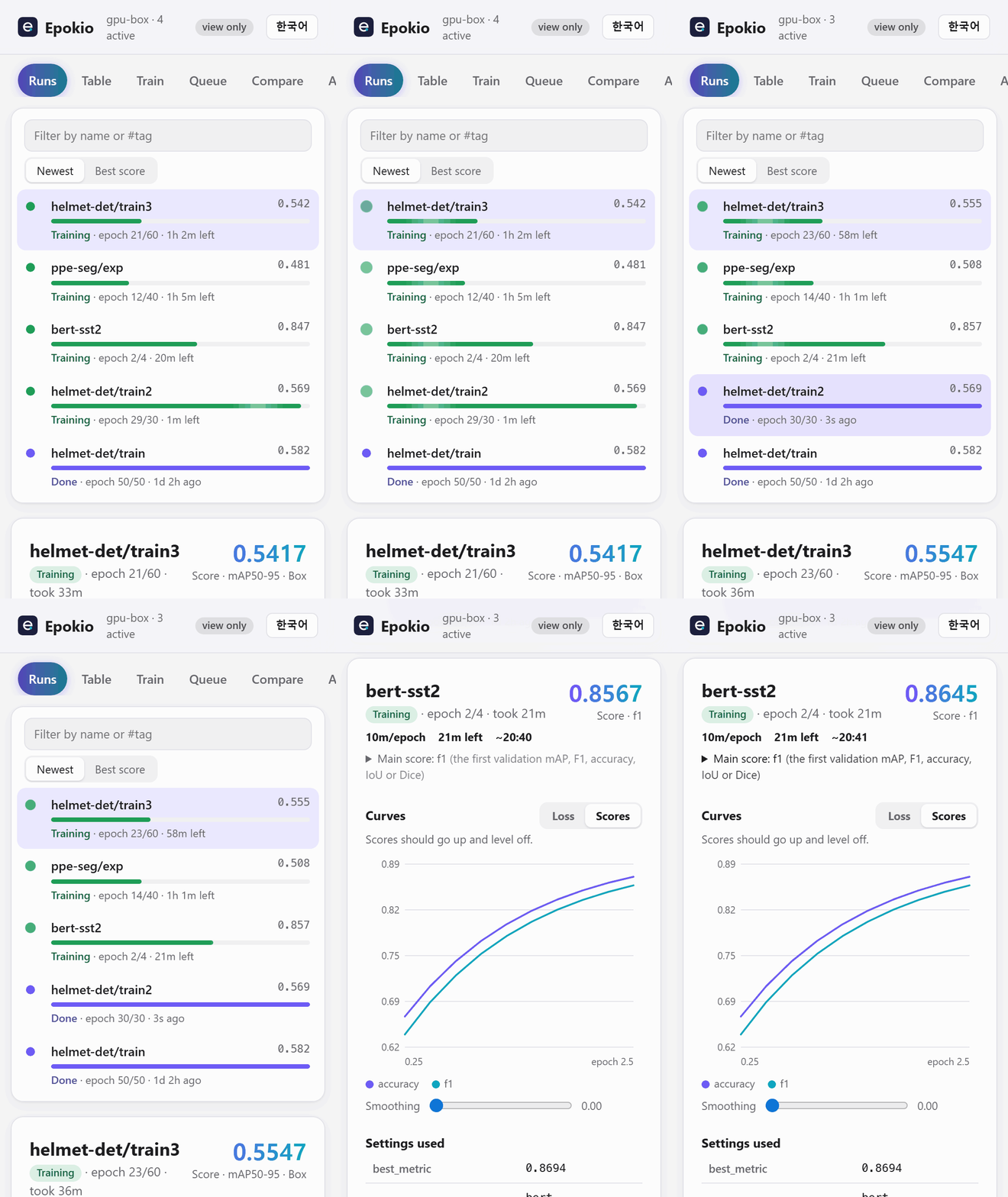
- One live list of every run: progress, time left and best score, whatever framework wrote the log.
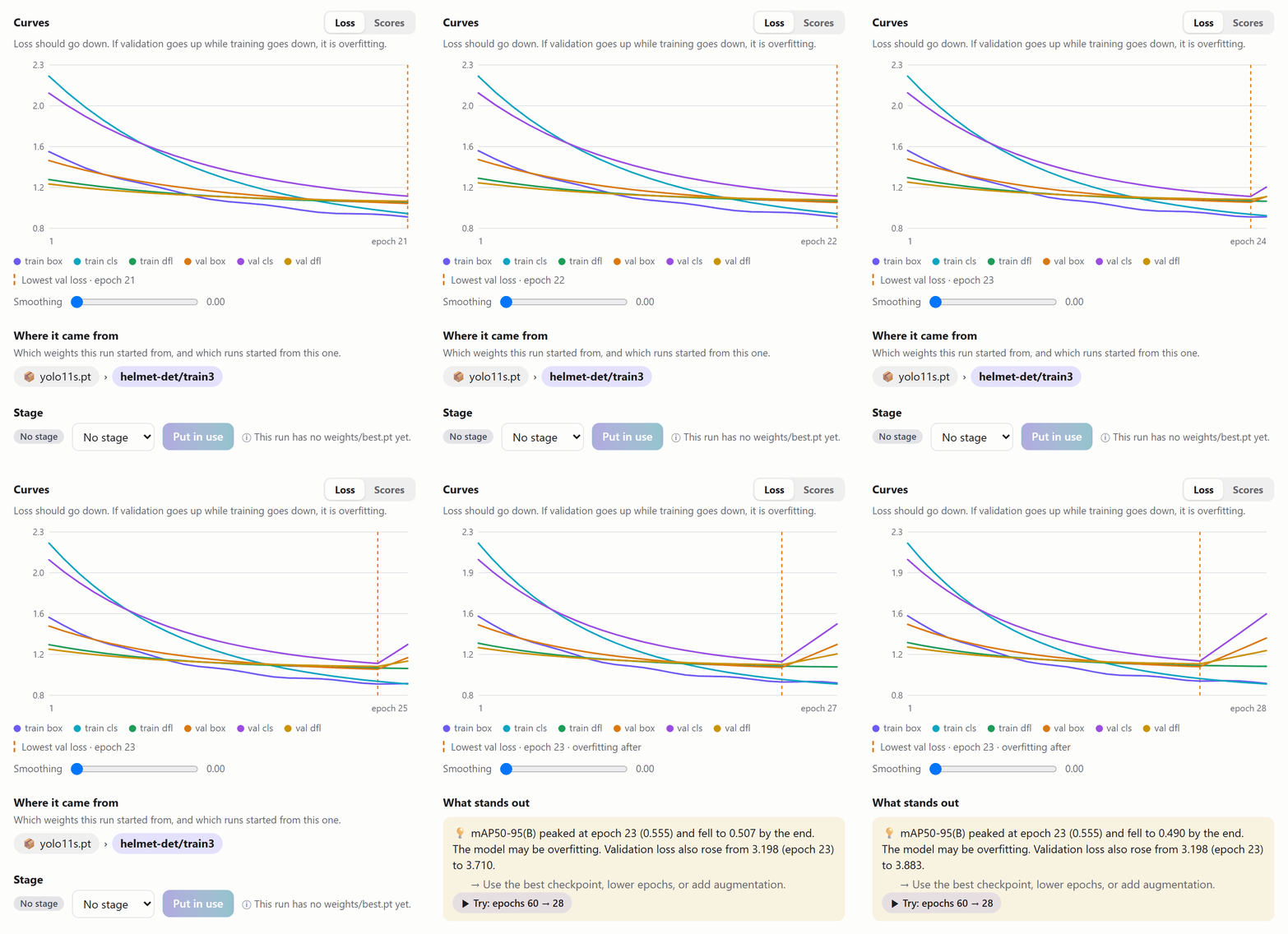
- Curves with a plain-language note. It marks the epoch with the lowest validation loss and says when the score starts to fall.
- On your phone too.
epokio setup --lanprints the address and a view-only token, which shows everything and hides every button that changes something. - Also in a terminal (
epokio watch, good over SSH), a tray icon on Windows and Linux, and a macOS menu bar app. - No account, no upload. Only the alerts you add leave the machine.
Notebooks and Colab
Where no helper can run, the training process sends the alert itself:
!pip install epokio
!epokio alerts --add https://ntfy.sh/your-secret-topic

import epokio
with epokio.start("runs/colab-exp", epochs=20, notify=True) as run:
    for epoch in range(20):
        ...
        run.log(train_loss=tl, val_loss=vl, acc=acc)
You get an alert when the block ends, or when it raises (with the error). A network failure never stops training.
Security defaults
- The helper listens on
127.0.0.1only.setup --lanopens it to your network and then asks for a token. - Starting training, queue jobs and sweeps from the page (and from MCP) is off.
epokio config launch_runs onturns it on and shows the Train, Queue and Sweeps tabs. - New tokens are view-only;
epokio agent --add-token NAME --scope runmakes one that can change things. - A
--lanhelper runs nothing sent over the network unless it was started with--allow-run. - On a shared server, other accounts can read a helper on
127.0.0.1. Over SSH on Linux,epokio setupasks to make viewing need a token too (reads_token always, on by default without a terminal,--no-lock-readsskips it; the page then asks forepokio agent --show-tokenonce). Elsewhere runepokio config reads_token always. Then give each person a token limited to their folders (how). - The helper speaks plain HTTP. Prefer an SSH tunnel or Tailscale over
--lan. Details: docs/remote.md.
Compared with other tools
Checked against each project's README and docs in October 2026. Epokio can read TensorBoard event files and W&B's local files, so it can sit next to them.
| Code changes | Account | Alerts | Pick it instead when | |
|---|---|---|---|---|
| Epokio | None if your framework writes a supported file (Keras: a CSVLogger or TensorBoard callback) |
No | Stall, NaN or crash, finish | |
| TensorBoard | Your code or framework writes event files | No | None | You want per-step charts, images, histograms or the profiler |
| W&B | wandb.init/log or a framework integration |
Yes | Run finished or crashed (Slack, email); run.alert() from your code |
A team shares dashboards, sweeps, artifacts and a model registry |
| Trackio (Hugging Face) | trackio.init/log (W&B-style API) or HF Trainer report_to="trackio" |
No (optional HF Space) | trackio.alert() from your code, to webhooks |
You want a free local W&B-style dashboard you can share on a Space |
| knockknock | A decorator around your training function | No (needs the chat service's credentials) | Start, finish, crash on 12 services (last release 2020) | You only need a finish or crash ping on email, Teams, SMS and the like |
| runmon | None: wraps the command or attaches to tmux | No (pairs its phone app; relay can be self-hosted) | Done, failed, error output, GPU idle, log silence, disk full | You want GPU-per-process views, or alerts for any command, not just training logs |
More columns (MLflow, Aim, Ultralytics Platform, price): docs/guide.md.
Supported formats
Ultralytics YOLO, Hugging Face Trainer, PyTorch Lightning (CSVLogger), Keras (CSVLogger or the TensorBoard callback),
TensorBoard event files and W&B local files (neither needs to be installed), timm, OpenMMLab, MAE/DeiT-style log.txt,
and your own loop: epokio.start, or a CSV whose first column is epoch, step, iter or iteration.
Which file each one reads, planned epochs and best-score rules: docs/guide.md.
More
Guide (alerts, limits, full comparison, privacy, troubleshooting) · Mac app · Remote helpers, Windows app, tray, phone · AI assistants (MCP) · Uninstall · Changelog · Contributing
Something wrong? Run epokio doctor and paste the output into an issue (it never prints your token). License: MIT.
1 maintainer

Metadata
1 maintainer
Release files for epokio 0.9.3
For a detailed explanation of source distributions (sdists) and built distributions (wheels), please see the package formats documentation.
Source distribution (sdist)
| File | Size | Uploaded | |
|---|---|---|---|
| epokio-0.9.3.tar.gz | 689.8 kB | Details |
Built distribution (wheel)
| File | Interpreter | ABI | Platform | Reset |
|---|---|---|---|---|
| epokio-0.9.3-py3-none-any.whl | Python 3 | none | any | Details |
Total release size: 1.3 MB
Release files / epokio-0.9.3.tar.gz
| Download URL | epokio-0.9.3.tar.gz |
|---|---|
| Size | 689.8 kB |
| Tags | Source |
|
SHA-256 checksum How to use checksums |
15805d03fa618d2fb889b038073760f06971d5a186051b423780ba4125c31e93
|
|
BLAKE2b-256 checksum How to use checksums |
487c40e0e511fedf565782302791f3da453183307955d4297620a3f197a50443
|
| Upload date | |
|
Uploaded using Trusted Publishing? What is trusted publishing? |
Yes |
| Uploaded via |
twine/7.0.0 CPython/3.13.14
|
Provenance
Provenance describes where a file came from. On PyPI, provenance is shared via attestations, which provide a verifiable record of the build or publishing details. View details, limitations and caveats.


PyPI Publish Attestation
PyPI verified that this artifact, at this checksum, originated from the publisher listed below.
Signed by GitHub Actions, verified by PyPI on Oct 10, 2026.
Transparency logRelease files / epokio-0.9.3-py3-none-any.whl
| Download URL | epokio-0.9.3-py3-none-any.whl |
|---|---|
| Size | 584.8 kB |
| Tags | Python 3 |
|
SHA-256 checksum How to use checksums |
4af625f544f3d1e72725f4e647937f2c44bf20e826da8097a9769c889df45cd9
|
|
BLAKE2b-256 checksum How to use checksums |
f73560a690fff02c44b9b09fb703c4df6e5bd8a0453c2a81705e7a8d53184c45
|
| Upload date | |
|
Uploaded using Trusted Publishing? What is trusted publishing? |
Yes |
| Uploaded via |
twine/7.0.0 CPython/3.13.14
|
Provenance
Provenance describes where a file came from. On PyPI, provenance is shared via attestations, which provide a verifiable record of the build or publishing details. View details, limitations and caveats.
PyPI Publish Attestation
PyPI verified that this artifact, at this checksum, originated from the publisher listed below.
Signed by GitHub Actions, verified by PyPI on Oct 10, 2026.
Transparency log













