
A lightweight, cross-platform desktop GUI for Elasticsearch
Verified details
These details have been verified by PyPIProject links
GitHub Statistics
Maintainers

Project description
PyQt Elasticsearch Viewer
Elasticsearch ES可视化客户端工具
A simple, lightweight, cross-platform desktop GUI for browsing and managing Elasticsearch clusters.
This tool is a self-contained desktop application built with Python and PyQt6. It provides a user-friendly interface for performing common Elasticsearch operations like searching, creating, reading, updating, and deleting documents. It is designed to be minimal and portable, relying only on the requests library for communication with Elasticsearch, with no dependency on the official elasticsearch-py client.
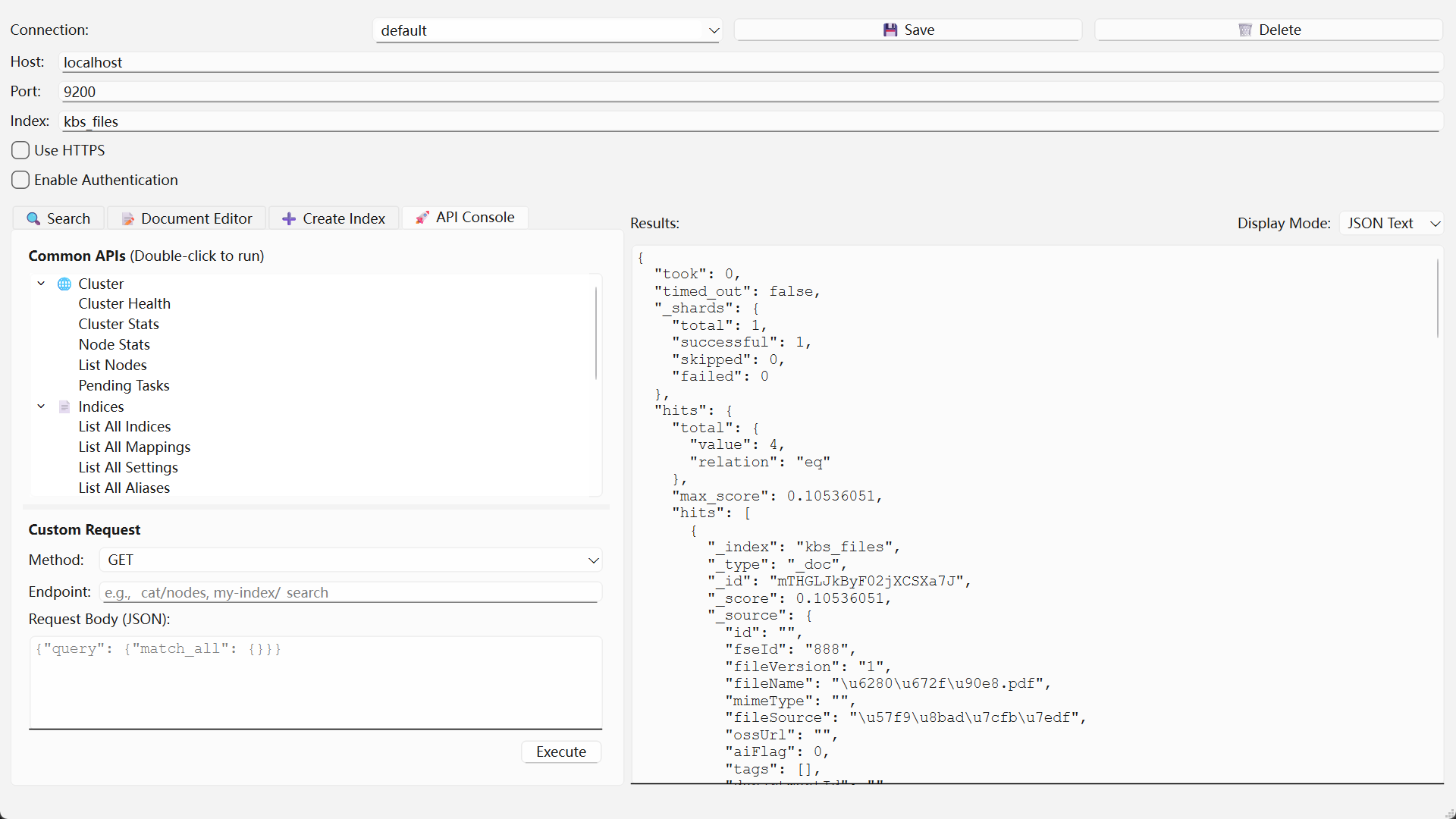
(Note: Screenshot shows an earlier version; the final version includes more features like CRUD tabs and HTTPS options.)
✨ Features
- Flexible Connectivity: Connect to any Elasticsearch cluster via HTTP or HTTPS.
- Security Options:
- Support for username/password (Basic) authentication.
- Option to disable SSL certificate verification for connecting to clusters with self-signed certificates.
- Powerful Search: A dedicated tab for writing and executing complex JSON-based Query DSL searches.
- Full CRUD Functionality: A "Document CRUD" tab for easy single-document operations:
- Get: Retrieve a document by its ID.
- Index/Create: Create or update a document. Supports both user-defined and auto-generated IDs.
- Update: Partially update a document using the
_updateAPI. - Delete: Remove a document by its ID.
- Interactive Results Display: View results in a clear, expandable tree view that handles nested JSON structures gracefully.
- User-Friendly:
- Copy-Paste: Easily copy keys, values, or full key-value pairs from the results tree with
Ctrl+Cor a right-click menu. - Session Persistence: Automatically saves your last successful connection and query configuration, loading it on the next launch.
- Copy-Paste: Easily copy keys, values, or full key-value pairs from the results tree with
- Lightweight & Cross-Platform:
- Minimal dependencies:
PyQt6andrequests. - Runs on Windows, macOS, and Linux.
- Minimal dependencies:
🛠️ Installation
You can install es-viewer directly from PyPI.
-
Install with pip: Make sure you have Python 3 and pip installed, then run:
pip install es-viewer
-
Run the application: After installation, you can run the application from your terminal:
es-viewer
Alternative: Running from Source
If you prefer to run the application directly from the source code:
-
Clone the repository:
git clone https://github.com/isee15/es-viewer
cd es-viewer
-
Install dependencies:
pip install PyQt6 requests
-
Run the application:
python es_gui.py
🚀 Usage
-
Run the application: If you installed via pip, run
es-viewerin your terminal. If running from source, usepython es_gui.py. -
Connection Panel:
- Fill in the
Host,Port, and targetIndex. - Check Use HTTPS if your cluster uses SSL/TLS.
- If using HTTPS with a self-signed certificate, you may need to uncheck Verify SSL Certificate.
- Check Enable Authentication and fill in your credentials if your cluster requires them.
- Fill in the
-
Search Tab:
- Write your full Elasticsearch Query DSL in the JSON editor.
- Click Execute Search to run the query.
- Results will be displayed in the tree view at the bottom.
-
Document CRUD Tab:
- Document ID: This field is required for
Get,Update, andDeleteoperations. It is optional forIndex/Create(if left blank, Elasticsearch will generate an ID). - Document Body:
- For
Index/Create, enter the full JSON content of the document. - For
Update, enter an update payload (e.g.,{"doc": {"field_to_update": "new_value"}}).
- For
- Click the corresponding button (
Get,Index/Create,Update,Delete) to perform the action. - The result of the operation will be displayed in the tree view below.
- Document ID: This field is required for
⚙️ Configuration
The application automatically saves your settings to a configuration file upon a successful search operation.
- File Location: The file is named
.es_viewer_config.jsonand is stored in your user home directory (e.g.,C:\Users\YourUseron Windows or/home/youruseron Linux). - Function: It stores the last used connection details, authentication state, and search query so you don't have to re-enter them every time you open the app.
- Security Note: The password is saved in plain text in this file. This is a security risk for production environments. Please use with caution.
📜 License
This project is licensed under the MIT License. See the LICENSE file for details.
Project details
Verified details
These details have been verified by PyPIProject links
GitHub Statistics
Maintainers
Release history Release notifications | RSS feed


Download files
Download the file for your platform. If you're not sure which to choose, learn more about installing packages.
Source Distribution
Built Distribution
Filter files by name, interpreter, ABI, and platform.
If you're not sure about the file name format, learn more about wheel file names.
Copy a direct link to the current filters
File details
Details for the file es-viewer-1.2.6.tar.gz.
File metadata
- Download URL: es-viewer-1.2.6.tar.gz
- Upload date:
- Size: 17.9 kB
- Tags: Source
- Uploaded using Trusted Publishing? Yes
- Uploaded via: twine/6.1.0 CPython/3.13.7
File hashes
| Algorithm | Hash digest | |
|---|---|---|
| SHA256 |
97ff84385aa17bd1320d5edb5c5aa95a7501dbf5ef45880ee4f0b76b5ea3f4f6
|
|
| MD5 |
40216693628e2e551628af0ab8cc865e
|
|
| BLAKE2b-256 |
7d902ed7f28e6465355473baf7f4e7e01bdb2cdd743a3114986ec064570cce74
|
Provenance
The following attestation bundles were made for es-viewer-1.2.6.tar.gz:
Publisher:
publish-to-pypi.yml on isee15/es-viewer
-
Statement:
-
Statement type:
https://in-toto.io/Statement/v1 -
Predicate type:
https://docs.pypi.org/attestations/publish/v1 -
Subject name:
es-viewer-1.2.6.tar.gz -
Subject digest:
97ff84385aa17bd1320d5edb5c5aa95a7501dbf5ef45880ee4f0b76b5ea3f4f6 - Sigstore transparency entry: 528280973
- Sigstore integration time:
-
Permalink:
isee15/es-viewer@669cb35a3e3b19acd1fe0475b6ec448eef3eaa2d -
Branch / Tag:
refs/tags/1.2.6 - Owner: https://github.com/isee15
-
Access:
public
-
Token Issuer:
https://token.actions.githubusercontent.com -
Runner Environment:
github-hosted -
Publication workflow:
publish-to-pypi.yml@669cb35a3e3b19acd1fe0475b6ec448eef3eaa2d -
Trigger Event:
release
-
Statement type:
File details
Details for the file es_viewer-1.2.6-py3-none-any.whl.
File metadata
- Download URL: es_viewer-1.2.6-py3-none-any.whl
- Upload date:
- Size: 15.8 kB
- Tags: Python 3
- Uploaded using Trusted Publishing? Yes
- Uploaded via: twine/6.1.0 CPython/3.13.7
File hashes
| Algorithm | Hash digest | |
|---|---|---|
| SHA256 |
91a73a65db2d8675d91e239195069ffb27d55df311748f6cce7a0e6386a630f7
|
|
| MD5 |
4d6cb67db9268519d7abcd5e171a937b
|
|
| BLAKE2b-256 |
698fc149528c4c0ef7b814b5110b757816f6a9164cd8bba346bcb0c2f98c8653
|
Provenance
The following attestation bundles were made for es_viewer-1.2.6-py3-none-any.whl:
Publisher:
publish-to-pypi.yml on isee15/es-viewer
-
Statement:
-
Statement type:
https://in-toto.io/Statement/v1 -
Predicate type:
https://docs.pypi.org/attestations/publish/v1 -
Subject name:
es_viewer-1.2.6-py3-none-any.whl -
Subject digest:
91a73a65db2d8675d91e239195069ffb27d55df311748f6cce7a0e6386a630f7 - Sigstore transparency entry: 528280983
- Sigstore integration time:
-
Permalink:
isee15/es-viewer@669cb35a3e3b19acd1fe0475b6ec448eef3eaa2d -
Branch / Tag:
refs/tags/1.2.6 - Owner: https://github.com/isee15
-
Access:
public
-
Token Issuer:
https://token.actions.githubusercontent.com -
Runner Environment:
github-hosted -
Publication workflow:
publish-to-pypi.yml@669cb35a3e3b19acd1fe0475b6ec448eef3eaa2d -
Trigger Event:
release
-
Statement type:






