
ES-MoE Toolkit


Drop it into a torch model or add it to YOLO in one call, the router loss reaches the optimiser, and every number here has a run record behind it. Try It.
Docs: English · 中文 · Quick start in Colab: notebooks/quickstart.ipynb · Ask questions about the code: DeepWiki.
Install
uv add esmoe            # the block, for any torch model
uv add esmoe[yolo]      # ... and the Ultralytics integration
esmoe[ultralytics] is that extra under its other name, and esmoe[tensorflow], esmoe[jax],
esmoe[flax] and esmoe[keras] each bring one backend. The distribution,
the import and the command line are all esmoe; the project is written ES-MoE in prose.
In a torch model
import esmoe
from torch import nn

net = nn.Sequential(
    nn.Conv2d(3, 64, 3, 2, 1),
    esmoe.ESMoE(kernels=[3, 5, 7], top_k=1),          # three experts, one per sample
    esmoe.ESMoE(kernels=[(1, 9), (9, 1)], top_k=2),   # two strip experts, both per sample
)

with esmoe.routing(net) as route:
    loss = task_loss(net(x), y) + 0.01 * route.loss()
loss.backward()
kernels gives each expert its receptive field, an int or an (h, w) pair, and with it how many
experts there are. expert gives a branch its structure, one factory for all of them or one each.
top_k says how many run per sample. The block takes its width from the first forward pass, so
nothing has to declare it. To put blocks into a model that already exists:
esmoe.graft(resnet, at="layer3", mode="after", kernels=[3, 5, 7], top_k=1)
at takes a submodule name, several names, or a (name, module) -> bool test; mode is after,
before or replace.
In Ultralytics YOLO
One call registers the block, grafts it into the config, builds the model, and makes the router loss part of the optimised training loss:
model = esmoe.equip("yolo11n.yaml", weight=0.01)
model.train(data="coco8.yaml", epochs=10)
Or take the steps apart when you need control over each one:
from ultralytics import YOLO
import esmoe

esmoe.register()                                             # resolve `ESMoE` in a model.yaml
esmoe.graft("yolov8n.yaml", out="v8-esmoe.yaml", at=[4, 6])  # insert blocks, renumber the head
model = YOLO("v8-esmoe.yaml")
esmoe.attach_aux_loss(model, weight=0.01)                    # the router loss joins the total
From the shell:
esmoe graft yolo11n.yaml -o yolo11n-esmoe.yaml --kernels 3,5,7 -k 1
attach_aux_loss adds an esmoe_aux entry to the trainer's loss table, so a non-zero,
back-propagated auxiliary term shows up in results.csv rather than merely in a config.
Written by hand, a config layer is just:
[-1, 1, ESMoE, [4, 2]]                              # num_experts, top_k
[-1, 1, ESMoE, [{kernels: [3, 5, 7], top_k: 1}]]    # or say what you mean
[-1, 1, ESMoE, [4, 2, null, {out_norm: true}]]      # ... and settings the trainer must keep
[-1, 1, ESMoE, [4, 2, null, {out_channels: 320}]]   # widened ...
[-1, 1, Index, [320, 0]]                            # ... and the official layer that declares it
ESMoE, ES_MoE and ES_MOE all resolve to the block, and a config that already names one is
taken as written: equip grafts nothing into it. The block is channel preserving and infers its
width on the first forward, which is what lets stock parse_model size it without a patch. A
widened block instead hands a one-element list to the official Index layer after it, whose
declared width parse_model does read; graft(out_channels=...) writes both. Settings belong in
the config because the trainer rebuilds the model from it, dropping anything set on the blocks
beforehand.
On tensorflow, jax and keras
Each framework gets its own implementation, written the way that framework is written: a
tf.Module on TensorFlow, pure functions on Jax, an nnx.Module on Flax, a
keras.layers.Layer on Keras 3. They read their arguments through the same code, so they take
the same ones.
from esmoe.tensorflow import ESMoE, Sequential  # tf.Module, no Keras
from esmoe.jax import ESMoE                     # init/apply, no Flax
from esmoe.flax import ESMoE                    # nnx.Module, the current Flax API
from esmoe.keras import ESMoE                   # keras.layers.Layer, any Keras backend
One difference holds for all three: they evaluate every expert and weight them by the gate.
Skipping an unrouted expert depends on the data, which a traced graph cannot express, so the
inference-time saving is torch's alone. The routing and the balancing term are the same
everywhere. esmoe.backend(name) returns the package for torch, tensorflow, jax, flax or keras.
Extend
Experts and the balancing objective are plain callables, so a variant is a few lines:
esmoe.ESMoE(kernels=[3, 5], expert=[MyExpert, esmoe.DWExpert], balance=my_balance_fn)
MyExpert(c1, c2, k) -> Module, my_balance_fn(probs, gate) -> scalar. To train with them under
YOLO, pass them to graft or equip: a function or class defined at module level goes into the
config as module:qualname, and every rebuild of the model -- the trainer's, each DDP worker's --
imports it back from that name. A lambda or anything defined in __main__ is refused when grafting.
esmoe.blocks(model) walks every block in a model, esmoe.collect_aux_loss(model) returns the
current step's router loss for custom training loops, and block.spec() reports the settings a
block is holding.
Compatibility
| backend | written against | router loss | graft | tested on |
|---|---|---|---|---|
| torch | nn.Module |
a weak registry | any nn.Module |
every CI leg, and one with ultralytics absent |
| tensorflow | tf.Module |
a weak registry | attribute or position | a leg with keras and ultralytics absent |
| jax | pure functions | returned by apply |
not applicable | a leg with keras and ultralytics absent |
| flax | nnx.Module |
an nnx.Intermediate |
nnx.Sequential |
a leg with keras and ultralytics absent |
| Keras 3 | keras.layers.Layer |
add_loss |
Sequential |
one leg per Keras backend: tensorflow, jax, torch |
The Ultralytics integration runs on the torch block:
| backbone | build + forward | grafted config | aux loss in training | protocol runs |
|---|---|---|---|---|
| YOLOv5 | yes | yes | yes | yes |
| YOLOv8 | yes | yes | yes | yes |
| YOLOv9 | yes | yes | yes | yes |
| YOLOv10 | yes | yes | yes | yes |
| YOLO11 | yes | yes | yes | yes |
| YOLO12 | yes | yes | yes | yes |
| YOLO26 | yes | yes | yes | yes |
| YOLO-Master (fork) | yes | yes | yes | no |
Every row is built, grafted and trained in CI, against both the latest ultralytics and 8.4.101, which report loss items in different shapes. The last column separates "builds and trains" from "was run under the full accuracy protocol".
DDP works: attach_aux_loss routes model.train() through a trainer class that lives in esmoe.yolo.trainer, so the
worker processes ultralytics spawns register the block and the auxiliary loss before they build. Verified by
scripts/verify.py (the real worker file in a fresh interpreter; two gloo ranks with agreeing router gradients).
Inside a process group an expert that no image routed to joins the graph at zero weight, so the settings
ultralytics uses under compile=True (find_unused_parameters=False, static_graph=True) train as well;
tests/test_distributed.py checks that with two gloo ranks, and that the block compiles and agrees with eager.
attach_aux_loss(model, weight=1.0, recipe="upstream") trains the way YOLO-Master's own trainer
trains a routed model, for a like-for-like comparison with it.
Defaults, and what they cost
ESMoE(num_experts=4, top_k=2) with attach_aux_loss(weight=0.01). The block adds 4.5% to 12.5%
parameters depending on the backbone and 4% to 10% wall-clock per run.
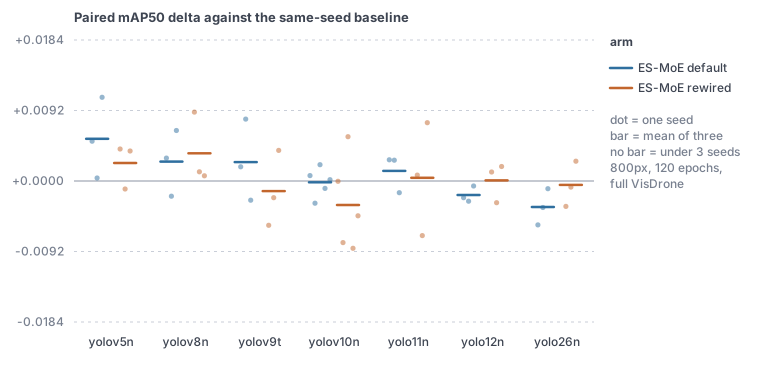
Accuracy depends on what the backbone ends in, not on how new it is: positive on the SPPF family
(+0.0055 v5n, +0.0025 v8n, +0.0025 v9t), flat once the end is an attention block (-0.0002 v10n,
+0.0013 11n), negative on area attention and the E2E head (-0.0018 12n, -0.0034 26n). Three seeds
read direction, not magnitude; the same-configuration repeats sit at the same scale as the effect.
Default grafting leaves a head branch that names the old backbone end by index reading the
pre-block tensor, and graft(..., rewire=True) retargets it, which is the only 3/3 arm on v8n.
What the balancing term reliably buys is that no expert dies: without it all six checkpoints lose two of four experts, and the Switch term at 0.01 leaves none dead in 66.
The dataset, the protocol, every run record and the per-seed figures are on the experiments page, with the criteria written before each round in docs/JUDGMENT.md.
Develop
uv sync --group dev
uv run ruff format . && uv run ruff check .
uv run pytest -q
CI runs thirteen legs on ubuntu-26.04: the full suite on Python 3.12 and 3.13 against two
ultralytics releases, one leg per backend with the other frameworks absent, the Keras layer on each
of its three backends, ten correctness checks on real training, and the quick-start notebook.
Contributing guidelines are in .github/CONTRIBUTING.md.
Reproducing the accuracy study is a separate path: every run writes one machine-readable record to
results/, and the checkpoints live on the checkpoints
branch. The experiments page has the commands.
Linked projects
- ultralytics - the official YOLO framework this plugs into.
- flax - the Jax library one of the implementations is written against.
- keras3 - the multi-backend framework one of the implementations runs on.
- Tencent/YOLO-Master - where ES-MoE comes from (paper).
License
AGPL-3.0-only, matching the Ultralytics ecosystem it builds on.
1 maintainer

Metadata
1 maintainer
Release files for esmoe 2.2.1
For a detailed explanation of source distributions (sdists) and built distributions (wheels), please see the package formats documentation.
Source distribution (sdist)
| File | Size | Uploaded | Provenance | Actions |
|---|---|---|---|---|
| esmoe-2.2.1.tar.gz | 91.7 kB | With provenance | Details for esmoe-2.2.1.tar.gz |
Built distribution (wheel)
| File | Interpreter | ABI | Platform | Actions Reset |
|---|---|---|---|---|
| esmoe-2.2.1-py3-none-any.whl | Python 3 | none | any | Details for esmoe-2.2.1-py3-none-any.whl |
Total release size: 162.1 kB
Release files / esmoe-2.2.1.tar.gz
| Download URL | esmoe-2.2.1.tar.gz |
|---|---|
| Size | 91.7 kB |
| Tags | Source |
|
SHA-256 checksum How to use checksums |
f504d691ae7d29d109d25b0f46536c910127074a607a961a9a26f9bc14df43e1
|
|
BLAKE2b-256 checksum How to use checksums |
9a51ecc0381c6be7a670fb2c69066651109cf92e572b146988ccb88ca5c03a31
|
| Upload date | |
|
Uploaded using Trusted Publishing? What is trusted publishing? |
Yes |
| Uploaded via |
twine/7.0.0 CPython/3.13.14
|
Provenance
Provenance describes where a file came from. On PyPI, provenance is shared via attestations, which provide a verifiable record of the build or publishing details. View details, limitations and caveats.


PyPI Publish Attestation
PyPI verified that this artifact, at this checksum, originated from the publisher listed below.
Signed by GitHub Actions, verified by PyPI on Oct 20, 2026.
Transparency logRelease files / esmoe-2.2.1-py3-none-any.whl
| Download URL | esmoe-2.2.1-py3-none-any.whl |
|---|---|
| Size | 70.5 kB |
| Tags | Python 3 |
|
SHA-256 checksum How to use checksums |
fa227912f70fcf81028f16a654ceba85fed2f9e1c2891855bda232a7f3fd4c65
|
|
BLAKE2b-256 checksum How to use checksums |
0273f3c6f56e0c1a2f0598f5de4c9ee187bc40eafcacd0a6f674587f85e16751
|
| Upload date | |
|
Uploaded using Trusted Publishing? What is trusted publishing? |
Yes |
| Uploaded via |
twine/7.0.0 CPython/3.13.14
|
Provenance
Provenance describes where a file came from. On PyPI, provenance is shared via attestations, which provide a verifiable record of the build or publishing details. View details, limitations and caveats.
PyPI Publish Attestation
PyPI verified that this artifact, at this checksum, originated from the publisher listed below.
Signed by GitHub Actions, verified by PyPI on Oct 20, 2026.
Transparency logSecurity for esmoe 2.2.1
Provenance
Provenance describes where a file came from. On PyPI, provenance is shared via attestations, which provide a verifiable record of the build or publishing details. View details, limitations and caveats.
Full provenance
All 2 files in this release have been uploaded with provenance metadata.
Attestation for esmoe-2.2.1.tar.gz
PyPI Publish Attestation
PyPI verified that this artifact, at this checksum, originated from the publisher listed below.
Signed by GitHub Actions, verified by PyPI on Oct 20, 2026.
Transparency logA note on package security
PyPI is a repository for distributing packages, not a service for auditing them. While third-party security researchers and our staff do their best to detect and remove malicious packages, PyPI cannot guarantee the quality, security or suitability of any given package.
To learn more about protecting yourself from malicious actors, visit our package security documentation.














