
EtherCAT Master
Generic EtherCAT master library built on PySOEM. Provides bus management, slave discovery, configurable PDO mapping, automatic reconnection, and a built-in web interface for configuration.
Developed by Henschel Robotics GmbH.
Features
- Bus management -- connect, configure, and run an EtherCAT bus with one or more slaves
- Generic slave handle -- read/write raw PDO bytes for any device (Beckhoff terminals, servos, I/O modules, ...)
- PDO mapping -- configure SyncManager assignments per slave via a JSON file or SDO writes
- Bus discovery -- scan the bus and detect any EtherCAT device (Beckhoff, Henschel, or any other vendor)
- Auto-reconnect -- background health monitoring with automatic recovery on cable disconnect
- Web interface -- built-in browser GUI for adapter selection, bus scanning, PDO configuration, and going OP
- Extensible -- subclass
GenericSlaveor implement the slave handle interface to build device-specific drivers (see python-hdrive-etc)
Prerequisites
Windows
| Dependency | Purpose | License |
|---|---|---|
| Npcap | Raw Ethernet packet capture | Free for personal use (up to 5 systems). Commercial / redistribution requires an Npcap OEM license. |
Install Npcap with WinPcap API-compatible mode enabled (checkbox during setup).
Linux
| Dependency | Purpose | License |
|---|---|---|
libpcap |
Raw Ethernet packet capture | BSD (free for any use) |
Install via your package manager:
# Debian / Ubuntu
sudo apt install libpcap-dev

# Fedora / RHEL
sudo dnf install libpcap-devel
On Linux, raw Ethernet access requires root. Either run with sudo or grant the capability once:
# Option A – run with sudo
sudo pip install ethercat-master --break-system-packages
sudo ecmaster-web

# Option B – grant raw socket capability (no sudo needed afterwards)
sudo setcap cap_net_raw=ep $(readlink -f $(which python3))
Npcap is not needed on Linux --
libpcapprovides the same functionality and is BSD-licensed.
Raspberry Pi Quick-Start
# 1. Install libpcap
sudo apt update
sudo apt install libpcap-dev

# 2. Install ethercat-master system-wide (so sudo can find it)
sudo pip install ethercat-master --break-system-packages

# 3. Add ~/.local/bin to PATH (if not already)
echo 'export PATH="$HOME/.local/bin:$PATH"' >> ~/.bashrc
source ~/.bashrc

# 4. Launch the web interface (requires root for raw Ethernet)
sudo ecmaster-web --adapter eth0
Open http://<pi-ip>:8080 from any device on your network.
Connect the EtherCAT slave(s) directly to the Pi's Ethernet port (
eth0). Use Wi-Fi or a second USB-Ethernet adapter for SSH / network access.
Python
- Python 3.8+
- PySOEM >= 1.1.0 -- Cython wrapper around SOEM (installed automatically by pip)
Installation
pip install ethercat-master
Or install from source:
git clone https://github.com/henschel-robotics/python-ethercat-master.git
cd python-ethercat-master
pip install -e .
Quickstart
1. Find your network adapter
from ethercat_master import EtherCATBus

for a in EtherCATBus.list_adapters():
    print(f"{a.desc}  ->  {a.name}")
Copy the adapter name (e.g. \Device\NPF_{GUID} on Windows, eth0 on Linux).
2. Connect and read PDO data
from ethercat_master import EtherCATBus, GenericSlave
import time

bus = EtherCATBus(adapter=r"\Device\NPF_{...}", cycle_time_ms=1)

slave = GenericSlave(0)
bus.register_slave(slave)
bus.open()

# Read inputs
print(slave.input.hex())

# Write outputs
slave.output = bytes([0xFF])

time.sleep(2)
bus.close()
3. Discover slaves on the bus
slaves = EtherCATBus.discover(adapter=r"\Device\NPF_{...}")
for s in slaves:
    print(f"[{s['index']}] {s['device_name']}  "
          f"In={s['input_bytes']}B  Out={s['output_bytes']}B")
PDO Configuration
Create a ethercat_config.json to control which PDOs are assigned per slave:
{
  "network": {
    "adapter": "\\Device\\NPF_{...}",
    "cycle_ms": 1.0
  },
  "default": {},
  "slaves": {
    "0": {
      "rx_pdo": ["0x1600", "0x1605"],
      "tx_pdo": ["0x1A00", "0x1A05"]
    }
  }
}
Pass it when creating the bus:
bus = EtherCATBus(adapter=..., cycle_time_ms=1, pdo_config_path="ethercat_config.json")
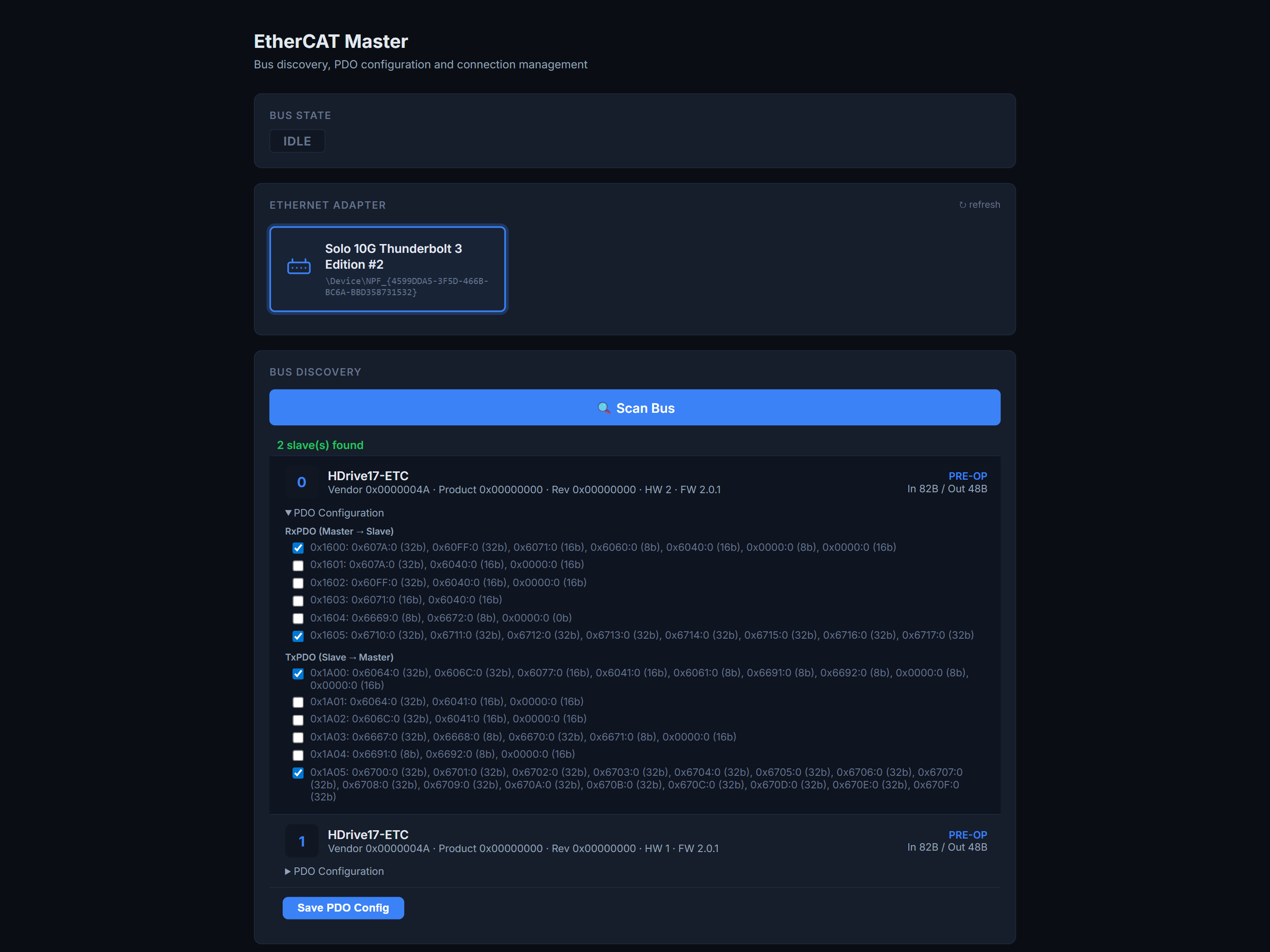
Or use the web interface to scan the bus, select PDOs with checkboxes, and save.
Raspberry Pi / Linux: When installed via pip, the default
ethercat_config.jsonis inside the package directory (e.g./usr/local/lib/python3.13/dist-packages/ethercat_master/ethercat_config.json). Copy it to your working directory for easy editing:cp $(python3 -c "import ethercat_master, os; print(os.path.join(os.path.dirname(ethercat_master.__file__), 'ethercat_config.json'))") .
Web Interface
Start the built-in web server using the console script (after pip install ethercat-master):
sudo ecmaster-web
sudo ecmaster-web --port 8080
sudo ecmaster-web --pdo-config /path/to/ethercat_config.json
Or run the same entry point as a module (useful in venvs, CI, or when ecmaster-web is not on PATH):
sudo python -m ethercat_master.webserver
sudo python -m ethercat_master.webserver --port 8080
sudo python -m ethercat_master.webserver --pdo-config /path/to/ethercat_config.json
On Windows, omit sudo (Npcap provides raw Ethernet access for the current user).
Then open http://localhost:8080 in your browser.
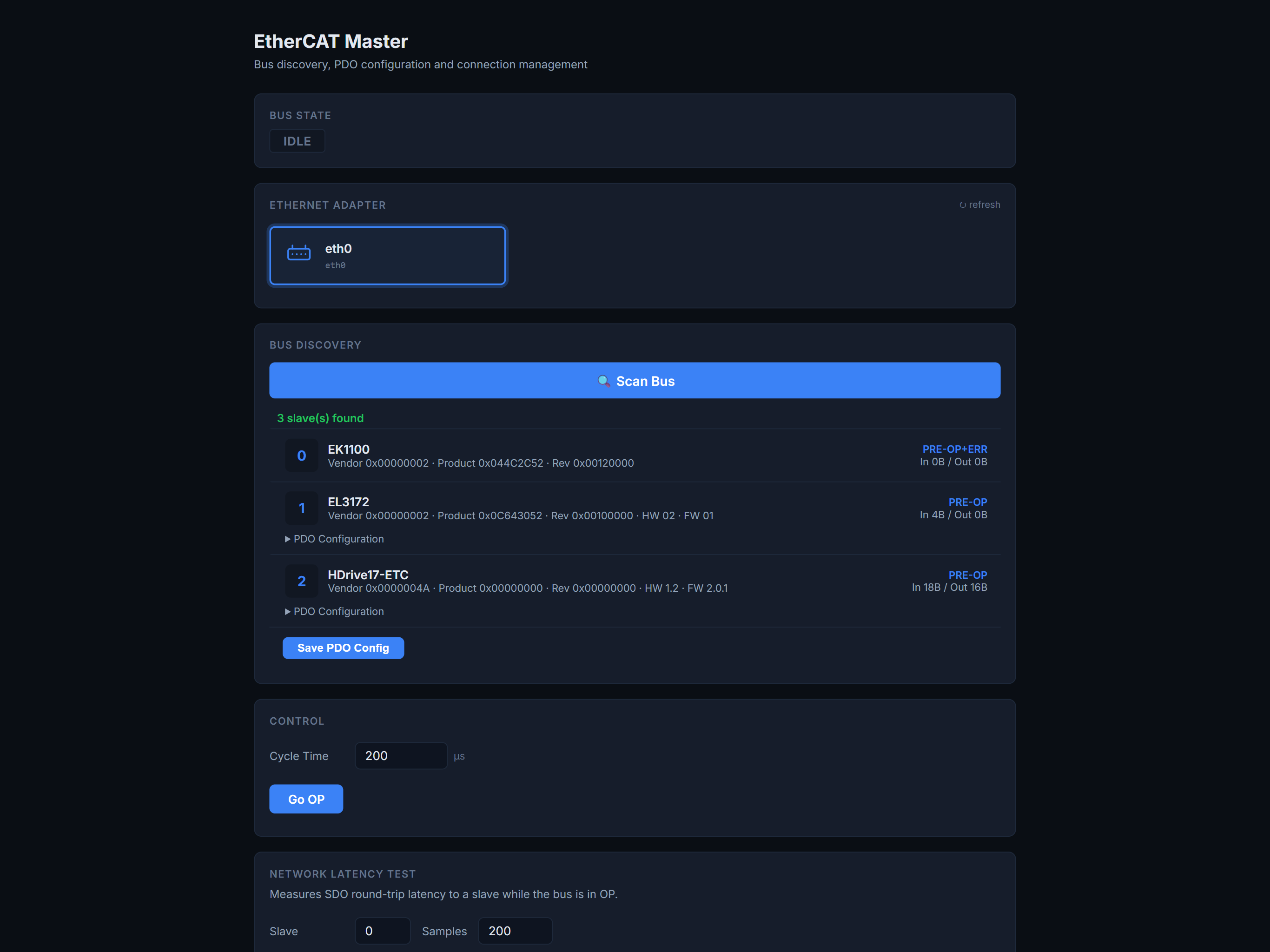
The web GUI lets you:
- Select a network adapter
- Scan the bus and discover any EtherCAT device — Beckhoff terminals, IO modules, servo drives, and more
- Configure PDO assignments per slave
- Set the cycle time and go to OP state
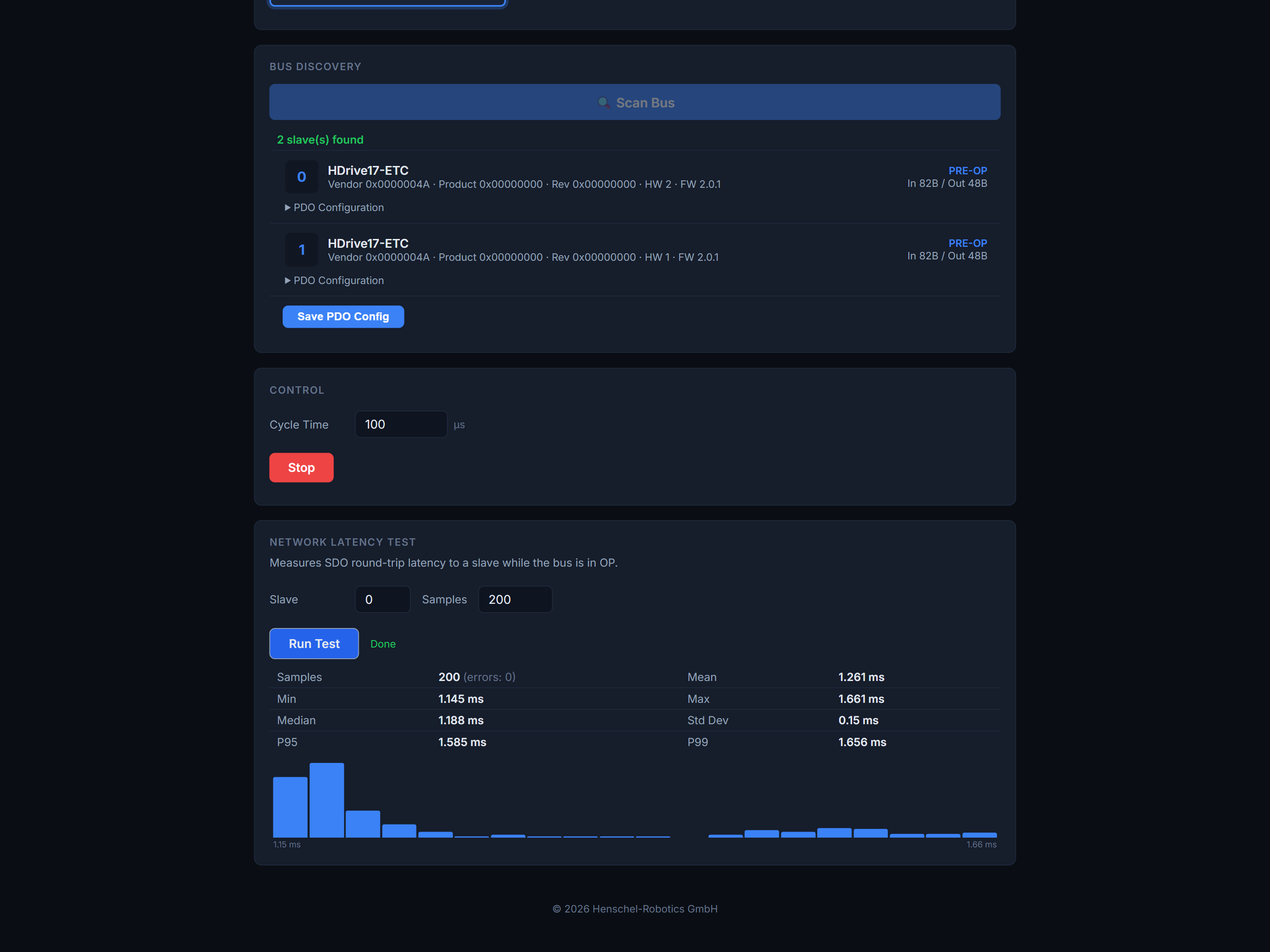
- Run network latency tests (SDO round-trip measurement with histogram)
| Mixed bus (Beckhoff + HDrive) | Network Latency Test |
|---|---|
 |
 |
Full guide:
docs/web-interface.md
Project Structure
python-ethercat-master/
├── ethercat_master/
│   ├── __init__.py          # Public API
│   ├── bus.py               # EtherCATBus — core bus management
│   ├── slave.py             # GenericSlave — universal slave handle
│   ├── pdo.py               # PDO mapping configuration
│   ├── exceptions.py        # Custom exceptions
│   ├── webserver.py         # Built-in web server
│   └── webgui/
│       ├── index.html       # Web GUI frontend
│       └── style.css        # Stylesheet
├── examples/
│   ├── connect.py           # Minimal single-slave example
│   ├── beckhoff.py          # Beckhoff EK1100 + terminals
│   └── mixed_bus.py         # HDrive motor + Beckhoff terminals
├── ethercat_config.json         # Example PDO config
└── pyproject.toml
Examples
The examples/ folder contains ready-to-run scripts. The recommended workflow is:
-
Configure the bus using the web interface (
ecmaster-web):- Select your network adapter
- Click Scan Bus to discover all slaves
- Expand each slave and configure the PDO assignments
- Click Save PDO Config — this writes
ethercat_config.jsonwith the adapter, cycle time, and per-slave PDO mapping
-
Copy
ethercat_config.jsonnext to your script (or point to it withpdo_config_path) -
Run the example — the bus uses the preconfigured adapter and PDO mapping from the file:
sudo python3 examples/connect.py          # Linux
python examples\connect.py                 # Windows
connect.py — Minimal single-slave example
Connects to one slave and continuously prints the raw input PDO bytes. Good for verifying that the bus works and PDOs are mapped correctly.
beckhoff.py — Beckhoff coupler + terminals
Scans the bus, discovers all terminals behind an EK1100 coupler, and reads their inputs in a loop. Standard Beckhoff terminals use factory-default PDO mappings from the SII EEPROM, so no ethercat_config.json is needed.
mixed_bus.py — HDrive motor + Beckhoff terminals
Demonstrates running an HDrive servo motor alongside Beckhoff I/O terminals on the same bus. Requires pip install hdrive-etc. The HDriveETC class is a slave handle that plugs into EtherCATBus just like GenericSlave, so you can combine any devices.
API Overview
EtherCATBus
| Method | Description |
|---|---|
EtherCATBus(adapter, cycle_time_ms, pdo_config_path) |
Create a bus instance |
list_adapters() |
List available network adapters |
discover(adapter, pdo_config_path) |
Scan the bus without going to OP |
register_slave(handle) |
Register a slave handle |
open() |
Configure slaves, map PDOs, start threads, go to OP |
close() |
Stop all slaves and close the connection |
GenericSlave
| Property / Method | Description |
|---|---|
GenericSlave(slave_index, use_default_pdo) |
Create a handle for slave at the given index |
slave.input |
Read-only bytes of the last received input PDO |
slave.output |
Read/write bytes for the output PDO |
Exceptions
| Exception | When |
|---|---|
ConnectionError |
Adapter not found, no slaves, state transition failed |
CommunicationError |
Bus communication lost or timed out |
ConfigurationError |
PDO mapping or config_map() failed |
Background Threads
When bus.open() is called, three background threads are started:
| Thread | Interval | Purpose |
|---|---|---|
| ProcessData | 1 ms | Raw EtherCAT frame send/receive |
| PDO Update | configurable | Decode RX / encode TX per slave |
| State Check | 300 ms | Health monitoring, auto-reconnect |
License
This project is MIT-licensed -- see pyproject.toml.
Copyright (c) Henschel Robotics GmbH
Third-party license notice
| Component | License | Notes |
|---|---|---|
| PySOEM | MIT | Cython wrapper (installed via pip) |
| SOEM | GPLv3 / Commercial | Bundled inside PySOEM. As of SOEM 2.0 the license is GPLv3 or a commercial license from rt-labs. If GPLv3 is incompatible with your product, contact rt-labs for a commercial SOEM license. |
| Npcap (Windows only) | Proprietary | Free for personal use (≤ 5 installs). Commercial use or redistribution requires an Npcap OEM license. |
| libpcap (Linux only) | BSD | Free for any use, no restrictions. |
Important for commercial products: If you ship a product that includes this library, you need to consider the SOEM (GPLv3) and Npcap (proprietary) license obligations. On Linux, only the SOEM license applies since libpcap is BSD.
1 maintainer

Metadata
1 maintainer
Release files for ethercat-master 0.1.8
For a detailed explanation of source distributions (sdists) and built distributions (wheels), please see the package formats documentation.
Source distribution (sdist)
| File | Size | Uploaded | |
|---|---|---|---|
| ethercat_master-0.1.8.tar.gz | 38.7 kB | Details |
Built distribution (wheel)
| File | Interpreter | ABI | Platform | Reset |
|---|---|---|---|---|
| ethercat_master-0.1.8-py3-none-any.whl | Python 3 | none | any | Details |
Total release size: 76.1 kB
Release files / ethercat_master-0.1.8.tar.gz
| Download URL | ethercat_master-0.1.8.tar.gz |
|---|---|
| Size | 38.7 kB |
| Tags | Source |
|
SHA-256 checksum How to use checksums |
a68ae55e3dd26dd8f609689b8cad8d5741a57d81a6e028f4bbeb0f7a200b5fef
|
|
BLAKE2b-256 checksum How to use checksums |
9cb946e878ebbdb94b430bdf82fa7bf9c0309cf1f0383f441be56a7796fbfe90
|
| Upload date | |
|
Uploaded using Trusted Publishing? What is trusted publishing? |
No |
| Uploaded via |
twine/7.0.0 CPython/3.12.10
|
Release files / ethercat_master-0.1.8-py3-none-any.whl
| Download URL | ethercat_master-0.1.8-py3-none-any.whl |
|---|---|
| Size | 37.4 kB |
| Tags | Python 3 |
|
SHA-256 checksum How to use checksums |
ae05f806a759f67e3c24a4e75b437e6c7abcb6824f5e92acdb1af4738a9c52eb
|
|
BLAKE2b-256 checksum How to use checksums |
6056fd0431d1941378a9086016ac3c29fc12d4f6f61ae0c5c9be8ddeb0d12c7d
|
| Upload date | |
|
Uploaded using Trusted Publishing? What is trusted publishing? |
No |
| Uploaded via |
twine/7.0.0 CPython/3.12.10
|














