
State control system for automated, high-throughput behavioral training.

Project description
Ethopy
State control system for automated, high-throughput behavioral training based on Python. It is tightly integrated with Database storage & control using the Datajoint framework. It can run on Linux, MacOS, Windows and it is optimized for use with Raspberry pi boards.
It is comprised of several overridable modules that define the structure of experiment, stimulus and behavioral control.

A diagram that illustrates the relationship between the core modules:
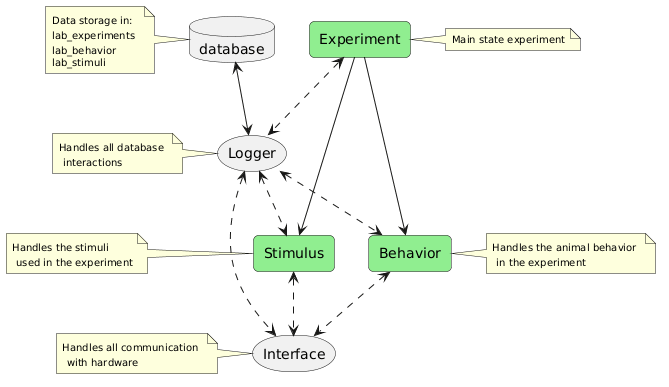
Core modules:
Experiment
Main state experiment Empty class that is overriden by other classes depending on the type of experiment.
This class can have various State classes. An Entry and Exit State are necessary, all the rest can be customized.
A typical experiment state diagram:
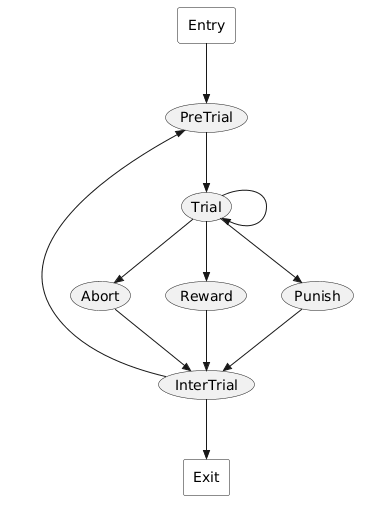
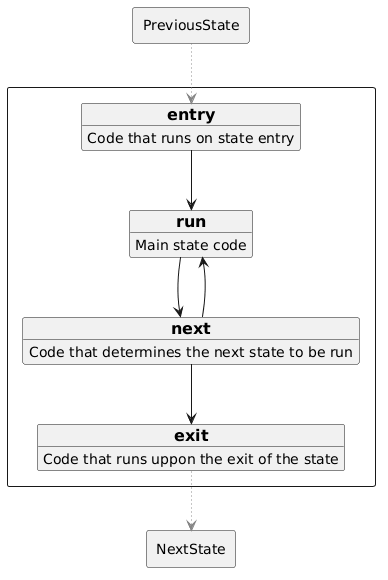
Each of the states is discribed by 4 overridable funcions:
Tables that are needed for the experiment that discribe the setup:
SetupConfiguration
SetupConfiguration.Port
SetupConfiguration.Screen
The experiment parameters are specified in *.py script configuration files that are entered in the Task table within the lab_experriment schema. Some examples are in the conf folder but any folder that is accessible to the system can be used. Each protocol has a unique task_idx identifier that is used uppon running.
Implemented experiment types:
- MatchToSample: Experiment with Cue/Delay/Response periods
- MatchPort: Stimulus matched to ports
- Navigate: Navigation experiment
- Passive: Passive stimulus presentation experiment
- FreeWater: Free water delivery experiment
- Calibrate: Port Calibration of water amount
- PortTest: Testing port for water delivery
Behavior
Empty class that handles the animal behavior in the experiment.
IMPORTANT: Liquid calibration protocol needs to be run frequently for accurate liquid delivery
Implemented Behavior types:
- MultiPort: Default RP setup with lick, liquid delivery and proximity port
- VRBall (beta): Ball for 2D environments with single lick/liquid delivery port
- Touch (beta): Touchscreen interface
Stimulus
Empty class that handles the stimuli used in the experiment.
Implemented stimulus types:
- Grating: Orientation gratings
- Bar: Moving bar for retinotopic mapping
- Movies: Movie presentation
- Olfactory: Odor persentation
- Panda: Object presentation
- VROdors: Virtual environment with odors
- SmellyObjects: Odor-Visual objects
Non-overridable classes:
Logger (non-overridable)
Handles all database interactions and it is shared across Experiment/Behavior/Stimulus classes non-overridable
Data are storred in tables within 3 different schemata that are automatically created:
lab_experiments:
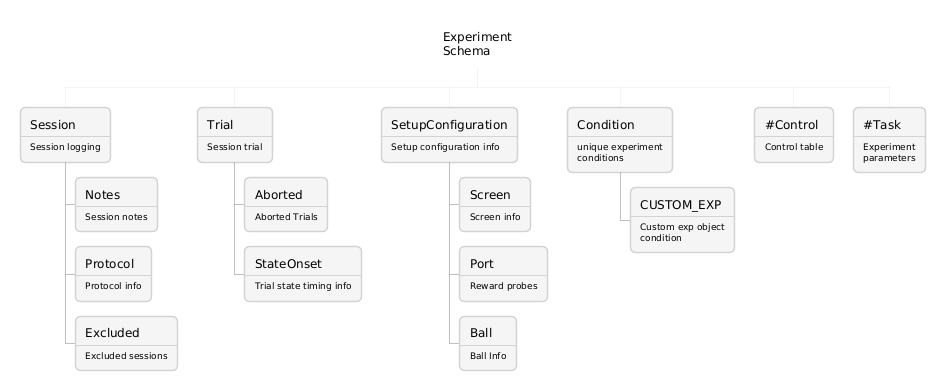
lab_behavior:
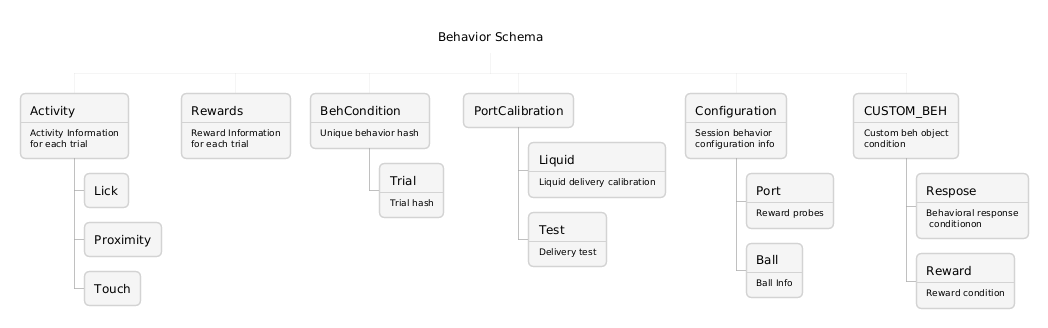
lab_stimuli:
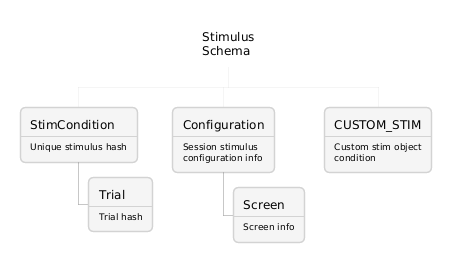
Interface (non-overridable)
Handles all communication with hardware
HOW TO RUN
Can be run either as a service that is controled by the Control table
sudo python3 run.py
or can specify a task_idx to run directly. After it completes, the process ends.
sudo python3 run.py 1
This process can be automated by either a bash script that runs on startup or through control from a salt server.
INSTALLATION INSTRUCTIONS (for Raspberry pi)
Get latest raspbian OS in raspi-config:
- enable ssh
- disable screen blanking
- enable Desktop auto-login
Change hostname - Optional, but it will make it easier to identify later
sed -r -i s/raspberrypi/<<HOSTNAME>>/g /etc/hostname /etc/hostname
sed -r -i s/raspberrypi/<<HOSTNAME>>/g /etc/hosts /etc/hosts
Change username - Optional
sudo useradd -s /bin/bash -d /home/<<USERNAME>>/ -m -G sudo <<USERNAME>>
sudo passwd <<USERNAME>>
mkhomedir_helper <<USERNAME>>
sudo userdel -r -f pi
Install salt for remote control, you need to have a salt-master server! - Optional
sudo apt install salt-minion -y
echo 'master: <<YOUR_SALT-MASTER_IP>>' | sudo tee -a /etc/salt/minion
echo 'id: <<HOSTNAME>>' | sudo tee -a /etc/salt/minion
echo 'master_finger: <<MASTER-FINGER>>' | sudo tee -a /etc/salt/minion
sudo service salt-minion restart
X display settings for ssh run, important for Panda stimulus
sed -i -e '$aexport DISPLAY=:0' ~/.profile
sed -i -e '$axhost +  > /dev/null' ~/.profile
Install dependent libraries
sudo apt update
sudo apt install python-dev libatlas-base-dev build-essential libavformat-dev libavcodec-dev libswscale-dev libsquish-dev libeigen3-dev libopenal-dev libfreetype6-dev zlib1g-dev libx11-dev libjpeg-dev libvorbis-dev libogg-dev libassimp-dev libode-dev libssl-dev libgles2 libgles1 libegl1 -y
Install python packages
sudo pip3 install 'numpy>=1.19.1' pygame==1.9.6 cython pybind11 scipy datajoint omxplayer-wrapper imageio imageio-ffmpeg
Install correct multitouch driver for 7" inch raspberry pi screen
git clone http://github.com/ef-lab/python-multitouch ~/github/python-multitouch
cd ~/github/python-multitouch/library
sudo python3 setup.py install
Install panda3d version for raspberry pi
wget ftp://eflab.org/shared/panda3d1.11_1.11.0_armhf.deb
sudo dpkg -i panda3d1.11_1.11.0_armhf.deb
Enable pigpio service
wget https://raw.githubusercontent.com/joan2937/pigpio/master/util/pigpiod.servicesudo cp pigpiod.service /etc/systemd/system
sudo systemctl enable pigpiod.service
sudo systemctl start pigpiod.service
Get EthoPy
git clone http://github.com/ef-lab/EthoPy ~/github/EthoPy
Create dj_local_conf.json with the correct parameters in the EthoPy folder:
{
   "database.host": "YOUR DATABASE",
    "database.user": "USERNAME",
    "database.password": "PASSWORD",
    "database.port": "PORT",
    "database.reconnect": true,
    "database.enable_python_native_blobs": true,
    "source_path" : "LOCAL_RECORDINGS_DIRECTORY",
    "target_path" : "TARGET_RECORDINGS_DIRECTORY"
}
Create tables
cd ~/github/EthoPy
python3 -c 'from core.Experiment import *'
python3 -c 'from core.Stimulus import *'
python3 -c 'from core.Behavior import *'
python3 -c 'from Stimuli import *'
python3 -c 'from Behaviors import *'
python3 -c 'from Experiments import *'
Release history Release notifications | RSS feed


Download files
Download the file for your platform. If you're not sure which to choose, learn more about installing packages.
Source Distribution
Built Distribution
Filter files by name, interpreter, ABI, and platform.
If you're not sure about the file name format, learn more about wheel file names.
Copy a direct link to the current filters
File details
Details for the file ethopy-0.0.5.tar.gz.
File metadata
- Download URL: ethopy-0.0.5.tar.gz
- Upload date:
- Size: 3.2 MB
- Tags: Source
- Uploaded using Trusted Publishing? No
- Uploaded via: uv/0.5.5
File hashes
| Algorithm | Hash digest | |
|---|---|---|
| SHA256 |
91cf64abb503a61dd26f397ebaba506c40ce16b379101cedce1eac489c4c9844
|
|
| MD5 |
37a72079a1c48ed12de1504625858747
|
|
| BLAKE2b-256 |
1e7e4b39afc64b00612648f6d89e4fc17979cae2fc13d32f866a3d1e455e9138
|
File details
Details for the file ethopy-0.0.5-py3-none-any.whl.
File metadata
- Download URL: ethopy-0.0.5-py3-none-any.whl
- Upload date:
- Size: 102.1 kB
- Tags: Python 3
- Uploaded using Trusted Publishing? No
- Uploaded via: uv/0.5.5
File hashes
| Algorithm | Hash digest | |
|---|---|---|
| SHA256 |
68b2d00600c8002487ff43098f3077d2198fc2524a5f430667e9670331d4873c
|
|
| MD5 |
35169c0e7858801bb63ba72dbaae0a70
|
|
| BLAKE2b-256 |
05595b7130b3c59f02b94e0ee0b5d9fbaf96b436ef61360022b4136c291d71ee
|






