
State control system for automated, high-throughput behavioral training.

Project description
Ethopy




Ethopy is a state control system for automated, high-throughput behavioral training based on Python. It provides a flexible framework for designing and running behavioral experiments with:
- Tight integration with database storage & control using Datajoint
- Cross-platform support (Linux, macOS, Windows)
- Optimized for Raspberry Pi boards
- Modular architecture with overridable components
- Built-in support for various experiment types, stimuli, and behavioral interfaces
The full documentation is available at:
Features
- Modular Design: Comprised of several overridable modules that define the structure of experiments, stimuli, and behavioral control
- Database Integration: Automatic storage and management of experimental data using Datajoint
- Multiple Experiment Types: Support for various experiment paradigms (MatchToSample, Navigation, Passive Viewing, etc.)
- Hardware Integration: Interfaces with multiple hardware setups
- Stimulus Control: Various stimulus types supported (Gratings, Movies, Olfactory, 3D Objects)
- Real-time Control: State-based experiment control with precise timing
- Extensible: Easy to add new experiment types, stimuli, or behavioral interfaces
System Architecture
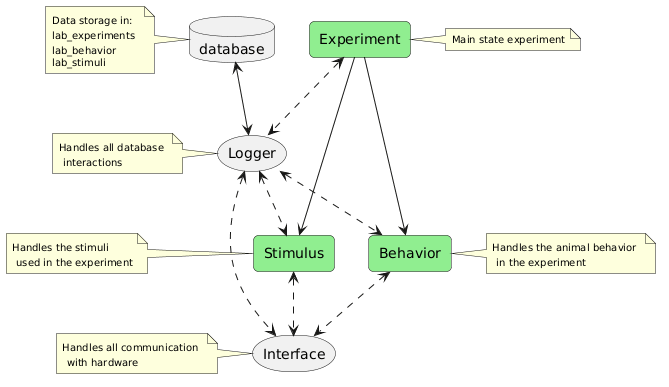
The following diagram illustrates the relationship between the core modules:
Installation & Setup
Requirements
- Python 3.8 or higher
- Docker (for database setup)
- Dependencies: numpy, pandas, datajoint, pygame, pillow, and more (automatically installed)
Basic Installation
pip install ethopy
For optional features:
# For 3D object support
pip install "ethopy[obj]"

# For development
pip install "ethopy[dev]"

# For documentation
pip install "ethopy[docs]"
Database Setup
- Start the database container:
ethopy-setup-djdocker # This will start a MySQL container for data storage
- Configure the database connection (this tells Ethopy how to connect to the database):
Create a configuration file at:
- Linux/macOS:
~/.ethopy/local_conf.json - Windows:
%USERPROFILE%\.ethopy\local_conf.json
{
    "dj_local_conf": {
        "database.host": "127.0.0.1",
        "database.user": "root",
        "database.password": "your_password",
        "database.port": 3306
    },
    "source_path": "/path/to/data",
    "target_path": "/path/to/backup",
    "logging": {
        "level": "INFO",
        "filename": "ethopy.log"
    }
}
- Verify database connection:
ethopy-db-connection # Ensures Ethopy can connect to the database
- Create required schemas:
ethopy-setup-schema # Sets up all necessary database tables for experiments
After completing these steps, your database will be ready to store experiment data, configurations, and results.
Running Experiments
- Service Mode: Controlled by the Control table in the database
- Direct Mode: Run a specific task directly
Example of running a task:
# Run a grating test experiment
ethopy -p grating_test.py

# Run a specific task by ID
ethopy --task-idx 1
Core Architecture
Understanding Ethopy's core architecture is essential for both using the system effectively and extending it for your needs. Ethopy is built around four core modules that work together to provide a flexible and extensible experimental framework. Each module handles a specific aspect of the experiment, from controlling the overall flow to managing stimuli and recording behavior.
1. Experiment Module
The base experiment module defines the state control system. Each experiment is composed of multiple states, with Entry and Exit states being mandatory.
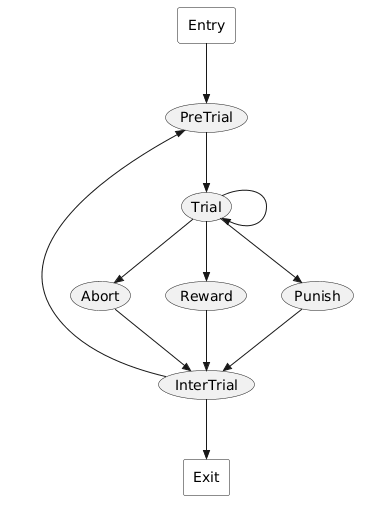
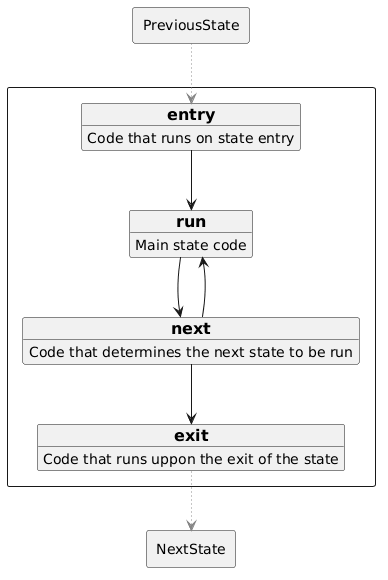
Each state has four overridable functions that control its behavior:
Available Experiment Types
- MatchPort: Stimulus-port matching experiments
- Passive: Passive stimulus presentation
- FreeWater: Water delivery experiments
- Calibrate: Port calibration for water delivery
Configuration
Experiments require setup configuration through:
SetupConfigurationSetupConfiguration.PortSetupConfiguration.Screen
Experiment parameters are defined in Python configuration files and stored in the Task table within the lab_experiment schema.
2. Behavior Module
Handles animal behavior tracking and response processing.
Available Behavior Types
- MultiPort: Standard setup with lick detection, liquid delivery, and proximity sensing
- HeadFixed: Passive head fixed setup
Important: Regular liquid calibration is essential for accurate reward delivery. We recommend calibrating at least once per week to ensure consistent reward volumes and reliable experimental results.
3. Stimulus Module
Controls stimulus presentation and management.
Available Stimulus Types
- Visual
- Grating: Orientation gratings
- Bar: Moving bars for retinotopic mapping
- Dot: Moving dots
4. Core System Modules
Logger Module (Non-overridable)
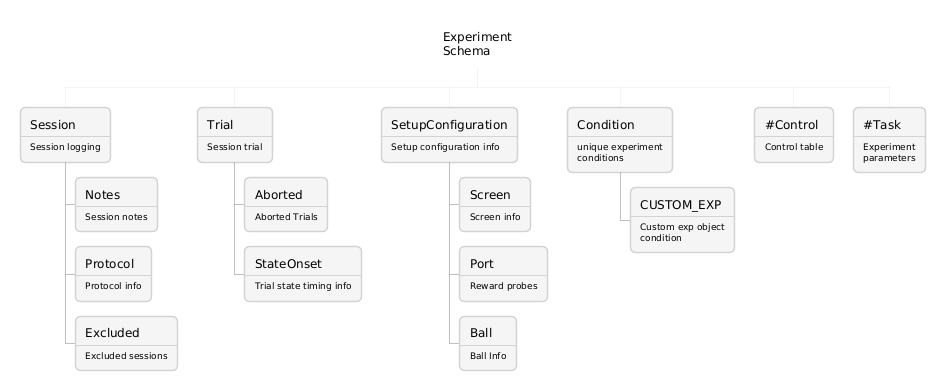
Manages all database interactions across modules. Data is stored in three schemas:
lab_experiments:
lab_behavior:
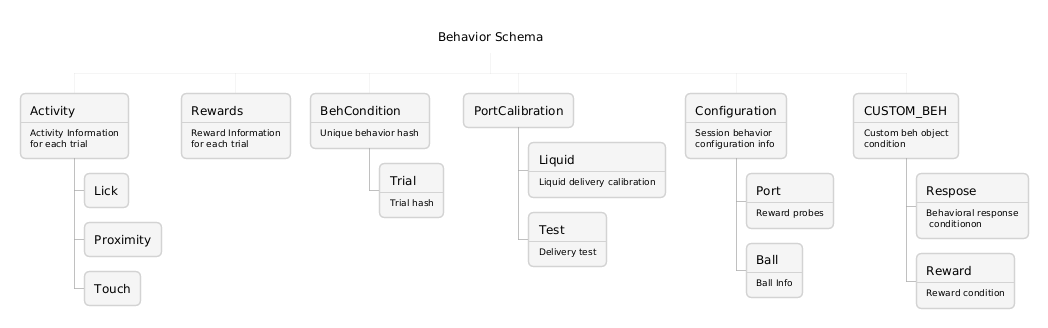
lab_stimuli:
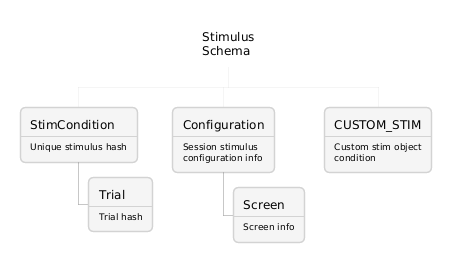
Interface Module (Non-overridable)
Manages hardware communication and control.
Development & Contributing
Development Setup
- Clone the repository:
git clone https://github.com/ef-lab/ethopy_package/  # Main repository
cd ethopy
- Install development dependencies:
pip install -e ".[dev,docs]"
Code Quality
The project uses several tools to maintain code quality:
- ruff: Code formatting and linting
- isort: Import sorting
- mypy: Static type checking
- pytest: Testing and test coverage
Run tests:
pytest tests/
Documentation
Documentation is built using MkDocs. Install documentation dependencies and serve locally:
pip install ".[docs]"
mkdocs serve
License
This project is licensed under the MIT License - see the LICENSE file for details.
Support
For questions and support:
- Open an issue on GitHub
- Check the full documentation
Release history Release notifications | RSS feed


Download files
Download the file for your platform. If you're not sure which to choose, learn more about installing packages.
Source Distribution
Built Distribution
Filter files by name, interpreter, ABI, and platform.
If you're not sure about the file name format, learn more about wheel file names.
Copy a direct link to the current filters
File details
Details for the file ethopy-0.0.7.tar.gz.
File metadata
- Download URL: ethopy-0.0.7.tar.gz
- Upload date:
- Size: 3.2 MB
- Tags: Source
- Uploaded using Trusted Publishing? No
- Uploaded via: uv/0.5.5
File hashes
| Algorithm | Hash digest | |
|---|---|---|
| SHA256 |
68b5c3b95b13c6ccbef67243b64eb206c5e3c8a5ecbdbc0f0363a479851f2fa0
|
|
| MD5 |
3da8392fd335edf5977148a44d998022
|
|
| BLAKE2b-256 |
ec1ae99554181e0c47484cc1a74119f6e0d5b1bc1b6a60e46c6a00fbd13edac4
|
File details
Details for the file ethopy-0.0.7-py3-none-any.whl.
File metadata
- Download URL: ethopy-0.0.7-py3-none-any.whl
- Upload date:
- Size: 104.3 kB
- Tags: Python 3
- Uploaded using Trusted Publishing? No
- Uploaded via: uv/0.5.5
File hashes
| Algorithm | Hash digest | |
|---|---|---|
| SHA256 |
be3a34f1882122237f4fc5a1f80b826d24fe23b938c0e3d72eb539c5e1c0db68
|
|
| MD5 |
91811e7493e3f0dfe99b175994340664
|
|
| BLAKE2b-256 |
002f25c37ab25fbb3384dd43cbd56d894ff3c771b552c4184ffd1c225477d4bf
|






