
eulumdat-plot




Photometric polar diagram generator for EULUMDAT (.ldt) files —
designed for product datasheets and publication-ready documents.
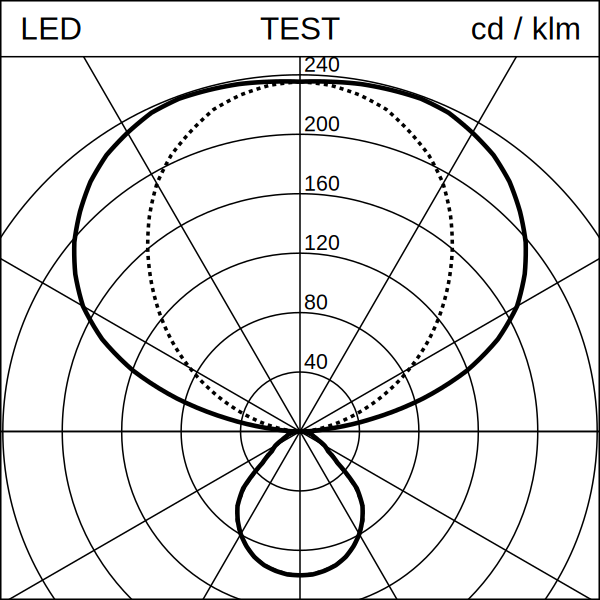
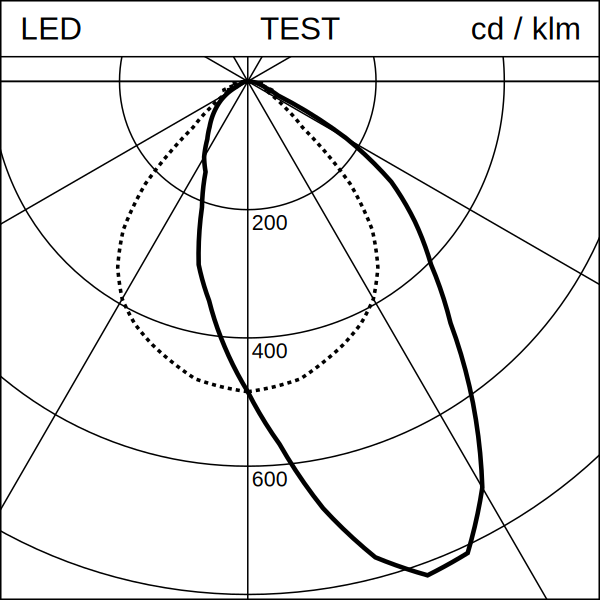
Reads a .ldt file and produces a Lumtopic-style SVG: a square image
with a top banner and a polar candela distribution diagram showing the
C0/C180 (solid) and C90/C270 (dotted) curves, scaled to fill the plot area.
For scientific / interactive plots (matplotlib, axis labels, legends), see the eulumdat-py examples.
Part of the eulumdat-* ecosystem, built
on top of eulumdat-py.
Features
- Reads any EULUMDAT file — all symmetry types (ISYM 0–4) handled by
eulumdat-py - Generates a publication-ready SVG polar diagram (Lumtopic style)
- Dynamic radial scale (3–6 concentric circles, round values)
- Dominant-hemisphere detection for automatic scale label placement
- Proportional scaling via
Layout.for_size(n)— one parameter controls everything - Optional I(γ) interpolation (linear or cubic spline) for smooth curves
- Optional raster export to PNG and JPEG (cross-platform, no native DLL)
- Debug mode for visual validation of C-plane assignment
Installation
Core package (SVG generation only):
pip install eulumdat-plot
With raster export (PNG / JPEG):
pip install "eulumdat-plot[export]"
With cubic spline interpolation:
pip install "eulumdat-plot[cubic]"
Everything:
pip install "eulumdat-plot[full]"
Quick start
from eulumdat_plot import plot_ldt, plot_ldt_svg

# Generate an SVG file next to the source file
path = plot_ldt("luminaire.ldt")

# With a distribution code in the banner centre
path = plot_ldt("luminaire.ldt", code="D53")

# Get the SVG as a string (for inline HTML embedding, no file written)
svg_str = plot_ldt_svg("luminaire.ldt")
Scaling
All visual parameters (stroke widths, font sizes, margins) scale proportionally from the 1181 px reference with a single call:
from eulumdat_plot import plot_ldt, Layout

svg = plot_ldt("luminaire.ldt", layout=Layout.for_size(600))
Raster export
from eulumdat_plot import plot_ldt, Layout
from eulumdat_plot.export import svg_to_png, svg_to_jpg

svg = plot_ldt("luminaire.ldt", layout=Layout.for_size(1181))
png = svg_to_png(svg, size_px=600)
jpg = svg_to_jpg(svg, size_px=600, quality=95)
The export size is independent of the SVG canvas size.
API reference
plot_ldt()
def plot_ldt(
    ldt_path: str | Path,
    svg_path: str | Path | None = None,
    *,
    code: str = "",
    layout: Layout | None = None,
    interpolate: bool = True,
    interp_step_deg: float = 1.0,
    interp_method: str = "linear",
    debug: bool = False,
) -> Path
| Parameter | Default | Description |
|---|---|---|
ldt_path |
— | Source .ldt file |
svg_path |
same name, .svg |
Output SVG path |
code |
"" |
Distribution code shown in the banner centre |
layout |
Layout() |
Visual parameters |
interpolate |
True |
Resample I(γ) before plotting |
interp_step_deg |
1.0 |
Angular step for resampling (degrees) |
interp_method |
"linear" |
"linear" or "cubic" (requires scipy) |
debug |
False |
Colour-code C-planes for visual validation |
plot_ldt_svg()
Same as plot_ldt() but returns the SVG as a string instead of writing to
disk. Useful for inline HTML embedding (no temporary file created).
def plot_ldt_svg(
    ldt_path: str | Path,
    *,
    code: str = "",
    layout: Layout | None = None,
    interpolate: bool = True,
    interp_step_deg: float = 1.0,
    interp_method: str = "linear",
) -> str
Layout.for_size()
Layout.for_size(size_px: int) -> Layout
Creates a Layout with all dimensions scaled proportionally from the
1181 px reference. Layout.for_size(1181) is identical to Layout().
svg_to_png() / svg_to_jpg()
svg_to_png(svg_path, png_path=None, *, size_px=1181, background="#FFFFFF") -> Path
svg_to_jpg(svg_path, jpg_path=None, *, size_px=1181, background="#FFFFFF", quality=95) -> Path
Requires pip install "eulumdat-plot[export]".
Examples
| File | Description |
|---|---|
examples/01_basic_usage.md |
Generate an SVG from a .ldt file |
examples/02_resize_and_export.md |
Scaling, raster export, batch processing |
Project structure
eulumdat-plot/
├── data/
│   ├── input/          # sample .ldt files (ISYM 0–4)
│   └── output/         # generated SVG / PNG / JPEG
├── docs/
│   └── img/
│       └── sample_01.svg
├── examples/
│   ├── 01_basic_usage.md
│   └── 02_resize_and_export.md
├── src/
│   └── eulumdat_plot/
│       ├── __init__.py
│       ├── plot.py     # public API — LDT → SVG pipeline
│       ├── renderer.py # SVG renderer + Layout dataclass
│       └── export.py   # raster export (PNG / JPEG)
├── tests/
│   ├── test_smoke.py   # 46 real LDT files, all ISYM types
│   └── test_scaling.py # Layout.for_size() proportionality
├── pyproject.toml
├── CHANGELOG.md
└── README.md
eulumdat-* ecosystem
New to the ecosystem? eulumdat-quickstart — a step-by-step guide covering all 8 packages with working examples.
| Package | Description |
|---|---|
| eulumdat-py | Read / write EULUMDAT files |
| eulumdat-symmetry | Symmetrise and detect ISYM |
eulumdat-plot |
Polar intensity diagram (SVG/PNG) — this package |
| eulumdat-luminance | Luminance table and polar diagram |
| eulumdat-ugr | UGR catalogue (CIE 117/190) |
| eulumdat-analysis | Beam half-angle, FWHM |
| eulumdat-report | Full photometric datasheet (HTML/PDF) |
| eulumdat-ies | LDT ↔ IES LM-63-2002 conversion |
Requirements
- Python ≥ 3.9
eulumdat-py≥ 1.0.0numpy≥ 1.21svgwrite≥ 1.4- (optional)
vl-convert-python≥ 1.6 +Pillow≥ 9.0 — raster export - (optional)
scipy≥ 1.7 — cubic spline interpolation
License
MIT — © 2024 123VincentB
1 maintainer

Metadata
1 maintainer
Release files for eulumdat-plot 1.0.4
For a detailed explanation of source distributions (sdists) and built distributions (wheels), please see the package formats documentation.
Source distribution (sdist)
| File | Size | Uploaded | |
|---|---|---|---|
| eulumdat_plot-1.0.4.tar.gz | 23.0 kB | Details |
Built distribution (wheel)
| File | Interpreter | ABI | Platform | Reset |
|---|---|---|---|---|
| eulumdat_plot-1.0.4-py3-none-any.whl | Python 3 | none | any | Details |
Total release size: 41.5 kB
Release files / eulumdat_plot-1.0.4.tar.gz
| Download URL | eulumdat_plot-1.0.4.tar.gz |
|---|---|
| Size | 23.0 kB |
| Tags | Source |
|
SHA-256 checksum How to use checksums |
c3535ef72f6f2942bc0cb521fa56d9716a5af6afd579361900e67fa87ac35019
|
|
BLAKE2b-256 checksum How to use checksums |
670da52885ff5a6590a70a6610f3d5fb020dddec722296701657b5da6400f27c
|
| Upload date | |
|
Uploaded using Trusted Publishing? What is trusted publishing? |
No |
| Uploaded via |
twine/6.2.0 CPython/3.10.11
|
Release files / eulumdat_plot-1.0.4-py3-none-any.whl
| Download URL | eulumdat_plot-1.0.4-py3-none-any.whl |
|---|---|
| Size | 18.6 kB |
| Tags | Python 3 |
|
SHA-256 checksum How to use checksums |
8296778b7d57cc114af5c2416fafd0c9d0f211185f3e8d3d585502e21bcd3a4b
|
|
BLAKE2b-256 checksum How to use checksums |
4288996054865749be7615814d7fd949721def6c636fb069e67a4ec43fbcc806
|
| Upload date | |
|
Uploaded using Trusted Publishing? What is trusted publishing? |
No |
| Uploaded via |
twine/6.2.0 CPython/3.10.11
|














