
EVA AI-Relational Database System

Project description
EVA AI-SQL Database System







EVA DB is a database system for building simpler and faster AI-powered applications.
EVA DB is an AI-SQL database system for developing applications powered by AI models. We aim to simplify the development and deployment of AI-powered applications that operate on structured (tables, feature stores) and unstructured data (videos, text, podcasts, PDFs, etc.).
EVA DB accelerates AI pipelines by 10-100x using a collection of performance optimizations inspired by time-tested SQL database systems, including data-parallel query execution, function caching, sampling, and cost-based predicate reordering. EVA supports an AI-oriented SQL-like query language tailored for analyzing both structured and unstructured data. It has first-class support for PyTorch, Hugging Face, YOLO, and Open AI models.
The high-level SQL API allows even beginners to use EVA in a few lines of code. Advanced users can define custom user-defined functions that wrap around any AI model or Python library. EVA DB is fully implemented in Python and licensed under the Apache license.
Quick Links
- Features
- Quick Start
- Documentation
- Roadmap
- Architecture Diagram
- Illustrative Applications
- Screenshots
- Community and Support
- Contributing
- License
Features
- 🔮 Build simpler AI-powered applications using short SQL-like queries
- ⚡️ 10-100x faster AI pipelines using AI-centric query optimization
- 💰 Save money spent on GPUs
- 🚀 First-class support for your custom deep learning models through user-defined functions
- 📦 Built-in caching to eliminate redundant model invocations across queries
- ⌨️ First-class support for PyTorch, Hugging Face, YOLO, and Open AI models
- 🐍 Installable via pip and fully implemented in Python
Illustrative Applications
Here are some illustrative EVA-powered applications (each Jupyter notebook can be opened on Google Colab):
- 🔮 Using ChatGPT to ask questions based on videos
- 🔮 Analysing traffic flow at an intersection
- 🔮 Examining the emotion palette of actors in a movie
- 🔮 Image Similarity Search on Reddit [FAISS + Qdrant]
- 🔮 Classifying images based on their content
- 🔮 Image Segmentation using Hugging Face
- 🔮 Recognizing license plates
- 🔮 Analysing toxicity of social media memes
Documentation
- Detailed Documentation
- The Getting Started page shows how you can use EVA for different AI tasks and how you can easily extend EVA to support your custom deep learning model through user-defined functions.
- The User Guides section contains Jupyter Notebooks that demonstrate how to use various features of EVA. Each notebook includes a link to Google Colab, where you can run the code yourself.
- Tutorials
- Join us on Slack
- Follow us on Twitter
- Medium-Term Roadmap
- Demo
Quick Start
- Install EVA using the pip package manager. EVA supports Python versions >= 3.8:
pip install evadb
- To launch and connect to an EVA server in a Jupyter notebook, check out this illustrative emotion analysis notebook:
cursor = connect_to_server()
- Load a video onto the EVA server (we use ua_detrac.mp4 for illustration):
LOAD VIDEO "data/ua_detrac/ua_detrac.mp4" INTO TrafficVideo;
- That's it! You can now run queries over the loaded video:
SELECT id, data FROM TrafficVideo WHERE id < 5;
- Search for frames in the video that contain a car:
SELECT id, data FROM TrafficVideo WHERE ['car'] <@ Yolo(data).labels;
| Source Video | Query Result |
|---|---|
 |
 |
- Search for frames in the video that contain a pedestrian and a car:
SELECT id, data FROM TrafficVideo WHERE ['pedestrian', 'car'] <@ Yolo(data).labels;
- Search for frames with more than three cars:
SELECT id, data FROM TrafficVideo WHERE ArrayCount(Yolo(data).labels, 'car') > 3;
- Use your custom deep learning model in queries with a user-defined function (UDF):
CREATE UDF IF NOT EXISTS Yolo
TYPE  ultralytics
'model' 'yolov8m.pt';
- Chain multiple models in a single query to set up useful AI pipelines.
   -- Analyse emotions of faces in a video
   SELECT id, bbox, EmotionDetector(Crop(data, bbox))
   FROM MovieVideo JOIN LATERAL UNNEST(FaceDetector(data)) AS Face(bbox, conf)
   WHERE id < 15;
-
EVA runs queries faster using its AI-centric query optimizer. Two key optimizations are:
💾 Caching: EVA automatically caches and reuses previous query results (especially model inference results), eliminating redundant computation and reducing query processing time.
🎯 Predicate Reordering: EVA optimizes the order in which the query predicates are evaluated (e.g., runs the faster, more selective model first), leading to faster queries and lower inference costs.
Consider these two exploratory queries on a dataset of dog images:

  -- Query 1: Find all images of black-colored dogs
  SELECT id, bbox FROM dogs
  JOIN LATERAL UNNEST(Yolo(data)) AS Obj(label, bbox, score)
  WHERE Obj.label = 'dog'
    AND Color(Crop(data, bbox)) = 'black';

  -- Query 2: Find all Great Danes that are black-colored
  SELECT id, bbox FROM dogs
  JOIN LATERAL UNNEST(Yolo(data)) AS Obj(label, bbox, score)
  WHERE Obj.label = 'dog'
    AND DogBreedClassifier(Crop(data, bbox)) = 'great dane'
    AND Color(Crop(data, bbox)) = 'black';
By reusing the results of the first query and reordering the predicates based on the available cached inference results, EVA runs the second query 10x faster!
Architecture Diagram
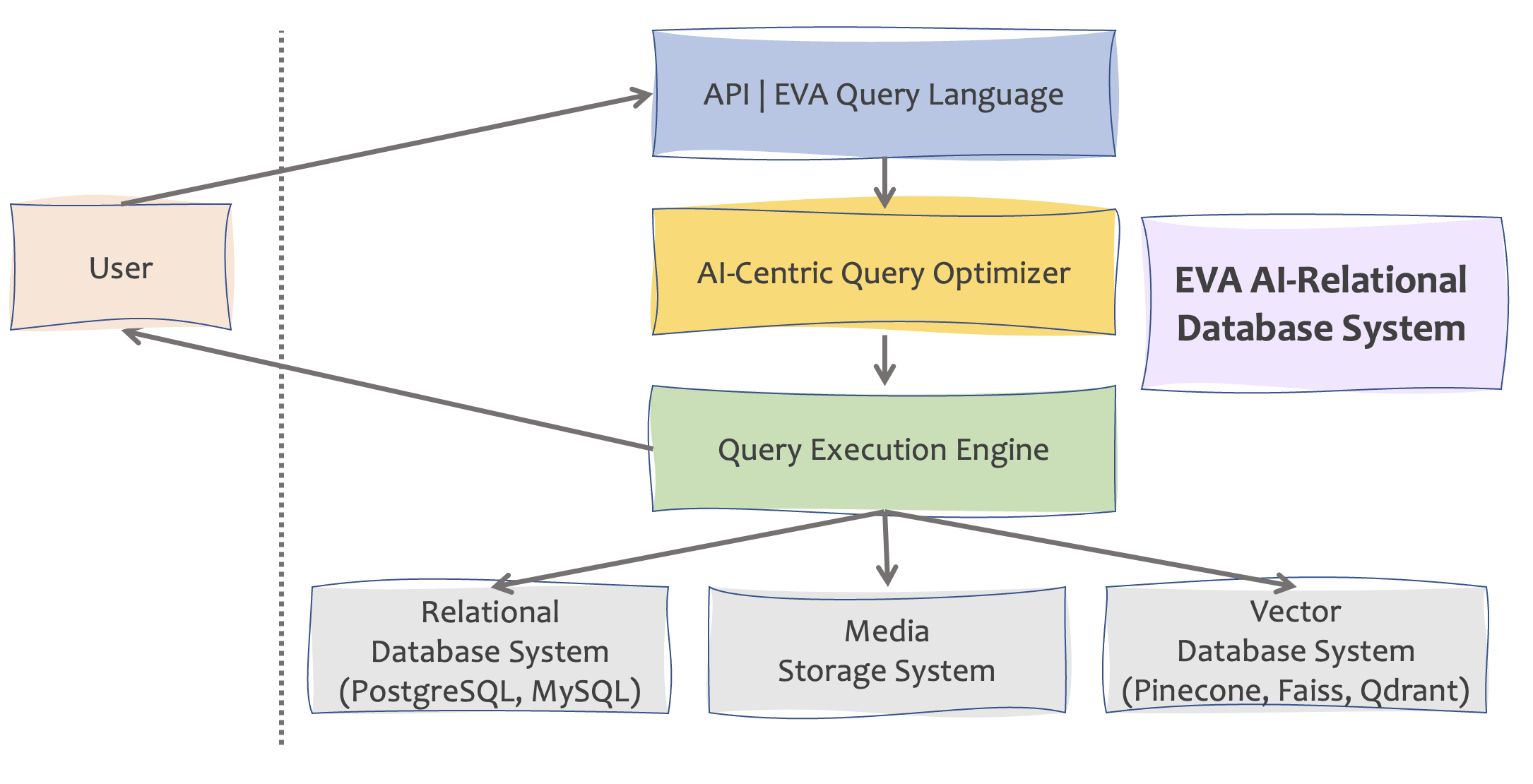
This diagram presents the key components of EVA DB. EVA's AI-centric Query Optimizer takes a parsed query as input and generates a query plan that is then executed by the Query Engine. The Query Engine hits multiple storage engines to retrieve the data required for efficiently running the query:
- Structured data (SQL database system connected via
sqlalchemy). - Unstructured media data (on cloud buckets or local filesystem).
- Vector data (vector database system).
Screenshots
🔮 Traffic Analysis (Object Detection Model)
| Source Video | Query Result |
|---|---|
|
|
🔮 MNIST Digit Recognition (Image Classification Model)
| Source Video | Query Result |
|---|---|
 |
 |
🔮 Movie Emotion Analysis (Face Detection + Emotion Classification Models)
| Source Video | Query Result |
|---|---|
 |
 |
🔮 License Plate Recognition (Plate Detection + OCR Extraction Models)
| Query Result |
|---|
 |
Community and Support
👋 If you have general questions about EVA, want to say hello or just follow along, we'd like to invite you to join our Slack Communityand to follow us on Twitter.

If you run into any problems or issues, please create a Github issue and we'll try our best to help.
Don't see a feature in the list? Search our issue tracker if someone has already requested it and add a comment to it explaining your use-case, or open a new issue if not. We prioritize our roadmap based on user feedback, so we'd love to hear from you.
Contributing


EVA is the beneficiary of many contributors. All kinds of contributions to EVA are appreciated. To file a bug or to request a feature, please use GitHub issues. Pull requests are welcome.
For more information, see our contribution guide.
License
Copyright (c) 2018-present Georgia Tech Database Group. Licensed under Apache License.
Release history Release notifications | RSS feed


Download files
Download the file for your platform. If you're not sure which to choose, learn more about installing packages.
Source Distribution
Built Distribution
Filter files by name, interpreter, ABI, and platform.
If you're not sure about the file name format, learn more about wheel file names.
Copy a direct link to the current filters
File details
Details for the file evadb-0.2.6.tar.gz.
File metadata
- Download URL: evadb-0.2.6.tar.gz
- Upload date:
- Size: 269.0 kB
- Tags: Source
- Uploaded using Trusted Publishing? No
- Uploaded via: twine/4.0.2 CPython/3.10.11
File hashes
| Algorithm | Hash digest | |
|---|---|---|
| SHA256 |
3ebd596139db44959e2cb2798937115d11708fb294618051c7e44761a540328f
|
|
| MD5 |
80fedd7b7c158bdae3c58331650aeb25
|
|
| BLAKE2b-256 |
56a34174ebbe8e2643621161a9aca2b9cb3c65c5eaf048ad6bb6210a261493c5
|
File details
Details for the file evadb-0.2.6-py3-none-any.whl.
File metadata
- Download URL: evadb-0.2.6-py3-none-any.whl
- Upload date:
- Size: 541.0 kB
- Tags: Python 3
- Uploaded using Trusted Publishing? No
- Uploaded via: twine/4.0.2 CPython/3.10.11
File hashes
| Algorithm | Hash digest | |
|---|---|---|
| SHA256 |
2d634b581378ae66f8c4e42984ec236a6e5649d2626a0f5e75e5214cab5e0040
|
|
| MD5 |
0916e9e2253c21f209915c1efa483dd0
|
|
| BLAKE2b-256 |
3e03711166b8038988d179c67d9db36d1023464b09a1b9415f0f7223125efbd6
|






