
evidential



Evidence.dev-style interactive tables for Marimo, packaged as an anywidget and powered by DuckDB when you need it.
evidential is a display widget. SQL or pandas shapes the data, Python says
how to present it, and the browser renders it: sort, search, paginate, freeze
columns, group with subtotals, download CSV and open a fullscreen view.
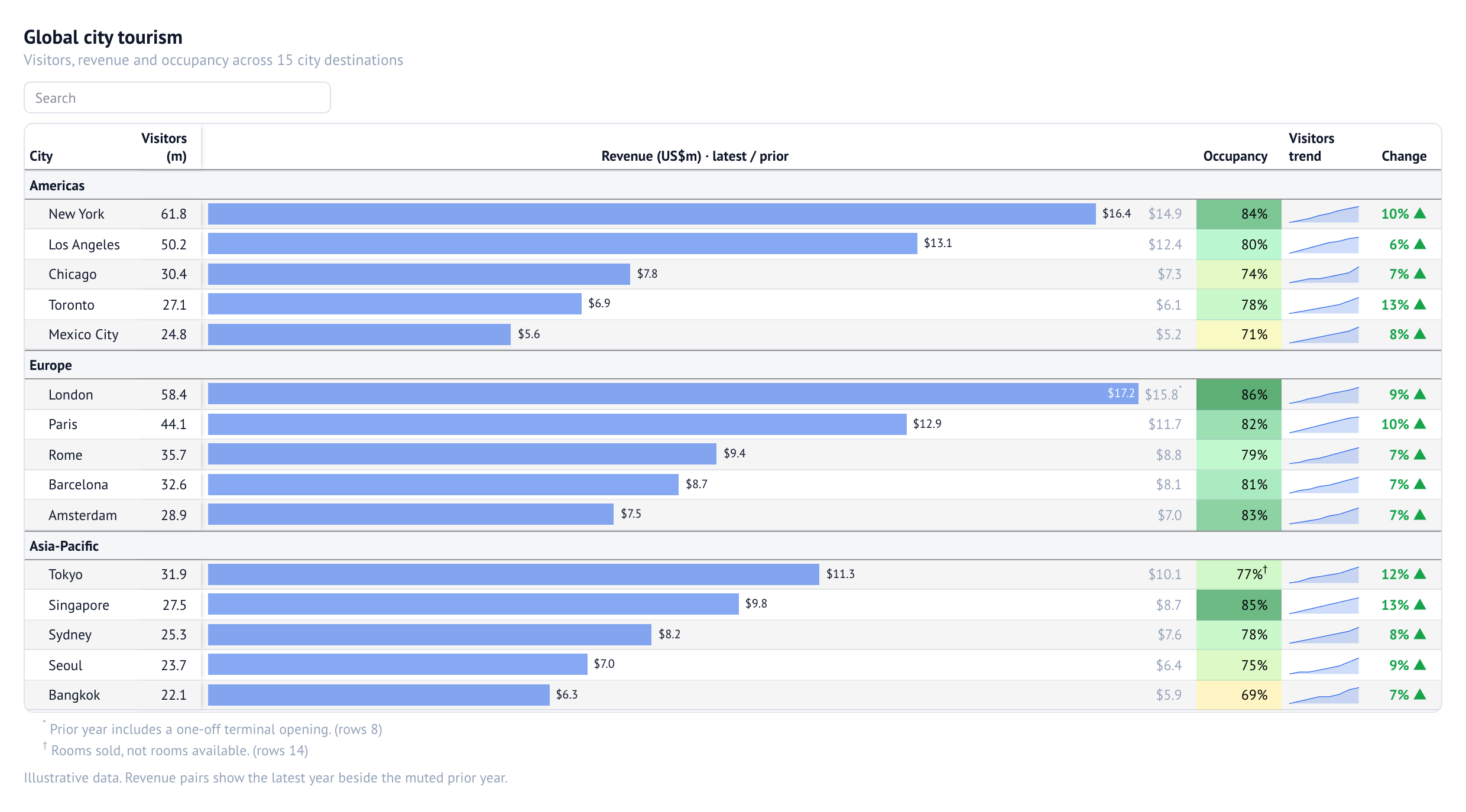
Sections, sub-columns, footnotes, bars, colour scales and sparklines in one table.
Status: alpha. The API may change.
Install
uv add "evidential[marimo,duckdb]"
To explore the demo notebooks from a checkout:
git clone https://github.com/edouardp/evidential
cd evidential
uv sync
uv run marimo edit notebooks
The renderer bundle is committed, so users need no JavaScript toolchain.
Extras are evidential[duckdb], evidential[marimo] and evidential[studio]
(see pyproject.toml).
1. Your first table
from evidential import EvidentialTable

tips = [
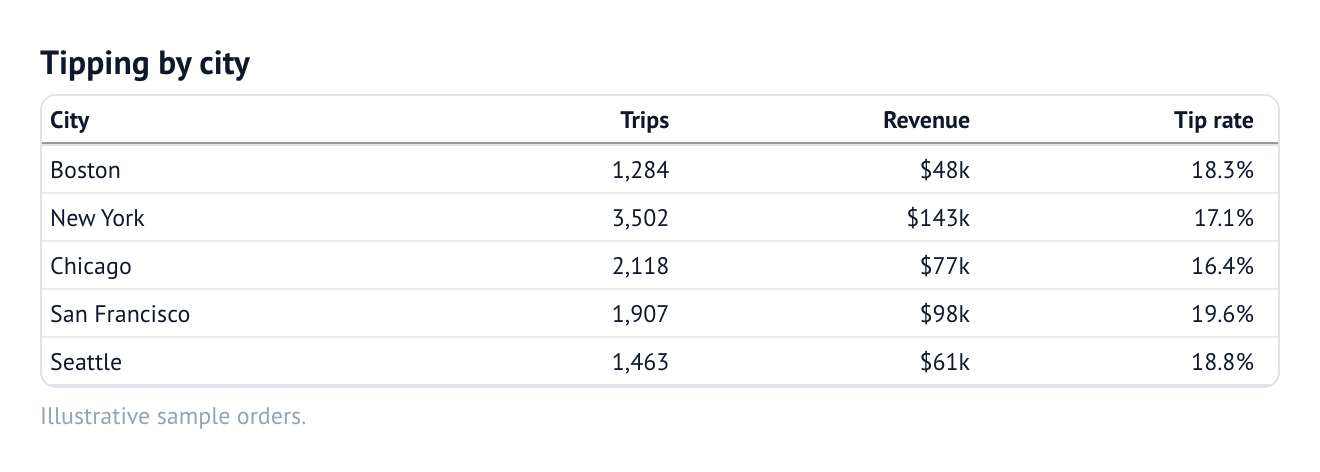
    {"city": "Boston", "trips": 1284, "revenue": 48120.50, "tip_rate": 0.183},
    {"city": "New York", "trips": 3502, "revenue": 142880.25, "tip_rate": 0.171},
    {"city": "Chicago", "trips": 2118, "revenue": 76540.00, "tip_rate": 0.164},
    {"city": "San Francisco", "trips": 1907, "revenue": 98320.75, "tip_rate": 0.196},
    {"city": "Seattle", "trips": 1463, "revenue": 61140.10, "tip_rate": 0.188},
]

EvidentialTable(tips, title="Tipping by city")
Types are inferred from the data. Integers default to whole numbers (num0),
floats choose an auto-scaling format, dates render as dates, and lists become
sparkline input.
In Marimo, output the table directly. Wrap it with mo.ui.anywidget(...) only
when another cell needs to read widget state:
import marimo as mo

table = mo.ui.anywidget(EvidentialTable(tips, title="Tipping by city"))
table
2. Point it at your data
EvidentialTable accepts a list of dicts, a pandas DataFrame, a PyArrow
table, or a DuckDB relation:
EvidentialTable(frame)
EvidentialTable(arrow_table)
EvidentialTable(con.table("orders"))
EvidentialTable(con.sql("SELECT * FROM orders LIMIT 500"))
DuckDB is optional, but it makes the examples below concise:
from evidential import duck

con = duck.connect()  # DuckDB with httpfs loaded
A DuckDB table or view relation carries COMMENT ON COLUMN text into the
header tooltip. A raw con.sql(...) result does not know its source; pass the
comments explicitly:
from evidential import EvidentialTable, duck

comments = {name: {"info": text} for name, text in duck.column_comments(con, "orders").items()}
EvidentialTable(con.sql("SELECT * FROM orders LIMIT 500"), column_config=comments)
Arrow field metadata (comment, description or info) works the same way,
including through Parquet and Feather. You can also set a description directly:
col.currency("revenue").info("Net revenue in USD")
For Amazon S3 Tables, use duck.connect_s3_tables
or see notebooks/02_s3_tables.py.
3. Describe columns
Column descriptions are built one column at a time with col.*. Every factory
returns an immutable Column; every chain method returns a new one.
columns=[
    col.text("city"),
    col.integer("trips"),
    col.currency("revenue"),
    col.percent("tip_rate", decimals=1, title="Tip rate"),
]
Kinds
The factory chooses the kind; the chain refines it.
| Kind | Factories |
|---|---|
| Text | col.text, col.chip, col.icons, col.flag, col.boolean |
| Numbers | col.number, col.integer, col.currency, col.percent |
| Time | col.date, col.time, col.datetime |
| Marks | col.bar, col.point, col.points, col.range, col.stacked_bar, col.strip, col.boxplot, col.distribution |
| Values as marks | col.color, col.delta, col.sparkline, col.symbols, col.rating, col.repeat |
| Cells | col.link / col.url, col.image, col.logo, col.markdown, col.html |
| Composition | col.group, col.subcolumns, col.merge, col.array, col.auto |
col.number auto-scales. col.currency takes code= (usd, eur, gbp, …)
and decimals=. col.percent treats values as proportions unless
whole=True. Dates and times accept relative=.
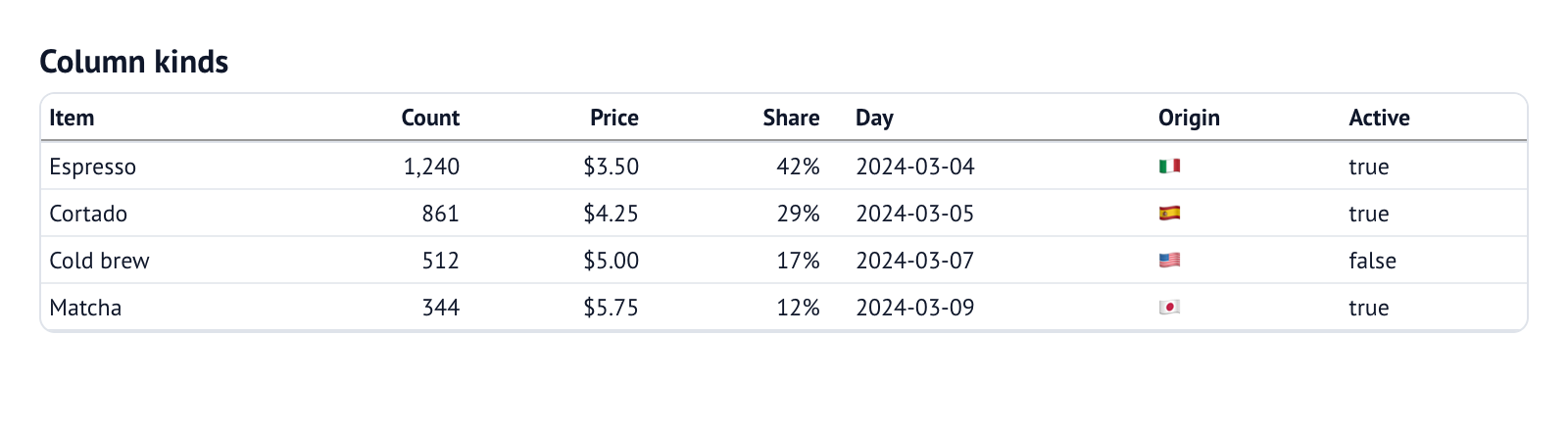
columns=[
    col.text("item"),
    col.integer("count"),
    col.currency("price"),
    col.percent("share", decimals=0),
    col.date("day"),
    col.flag("origin"),
    col.boolean("active"),
]
Refine a column
col.currency("revenue", decimals=0).neg(bracket=True).bold()
col.percent("growth", decimals=1).delta(down_is_good=False).italic()
col.number("score").color(scale="Blues", min=0, max=100)
| Need | Chain methods |
|---|---|
| Formatting | .fmt(code) / .format(code), .total_fmt(), .subtotal_fmt(), .align(), .align_decimals(), .figure_style() |
| Text | .title(), .info(), .footnote(), .bold(), .italic(), .font(), .font_color(), .wrap(), .rotate_title() |
| Values | .neg(), .red_negatives(), .null_text(), .blank(), .blank_below(), .blank_above(), .highlight(), .cell_style() |
| Placement | .group(), .subcolumn(), .hide(), .repeat_values(), .sort_by(), .relative(), .fmt_column() |
| Rich cells | .markdown(), .html(), .link(), .image(), .logo(), .template() |
| Visualisations | .color(), .chip(), .delta(), .sparkline(), .symbols(), .bar(), .point(), .range(), .scale(), .label(), .domain() |
.fmt() is the escape hatch for an exact SSF
code. Common presets:
col.number("share").fmt("pct1")
col.number("distance").fmt("num1k")
col.currency("revenue").fmt("usd0")
col.date("month").fmt("mmm-yy")
col.number("bytes").fmt("bytes")
col.number("elapsed").fmt("duration")
col.number("rank").fmt("roman")
col.number("value").fmt("sci")       # 1.23 × 10⁵
col.auto("revenue") keeps the inferred type, format and metadata, then applies
your refinements. A Column is a Mapping, so to_config() returns the plain
dict and the dict form remains valid anywhere a column is accepted:
columns=[col.text("city"), col.auto("revenue").font_color("#334155")]
column_config={"revenue": col.currency("revenue", decimals=0)}
4. Set the table's presentation
Use settings(...) for a reusable bundle. Explicit keyword arguments win over
the bundle.
REPORT = settings(
    title="Monthly revenue",
    subtitle="By city and channel",
    caption="Source: orders.parquet",
    page_size=15,
    search=True,
    download=True,
    row_shading=True,
    row_lines=True,
    freeze_columns=1,
    width="900px",
    max_height="70vh",
)

EvidentialTable(tips, columns=[...], settings=REPORT, title="This month")
| Goal | Options |
|---|---|
| Frame and type | title, subtitle, caption, info, info_link, width, max_height, border, compact, font_size, theme, header_color, header_font_color, background_color |
| Columns | freeze_columns, wrap, wrap_titles, format_titles, stretch, order_columns_by_group, column_stats, align_decimals, figure_style, rotate_titles |
| Interaction | search, sortable, page_size, download, row_numbers, default_sort, select |
| Rows | row_shading, row_lines, group_gap, stub, stub_head, null_text |
| Groups and totals | show_total_row, total_label, total_position, subtotal_position, collapsible, collapsed, groups_open, group_type |
The API reference lists every option and value.
Table layout gallery
The frame, rules, notes and summaries are independent of cell graphics. These
examples query an illustrative DuckDB orders table with six product records.
Each query lists the fields it needs, including fields used only for grouping
or footnotes. The notebook creates con and the table before the examples.
They share basic columns and a settings bundle for width and disabled search,
sorting and pagination. Excerpts use
... for those shared column/settings references; follow a source link for
the complete runnable setup. Inline definitions and layout options stay visible.
Simple table
Start with the standard frame, header and row rules.
EvidentialTable(con.sql("SELECT product, units, sales FROM orders"), columns=..., settings=...)
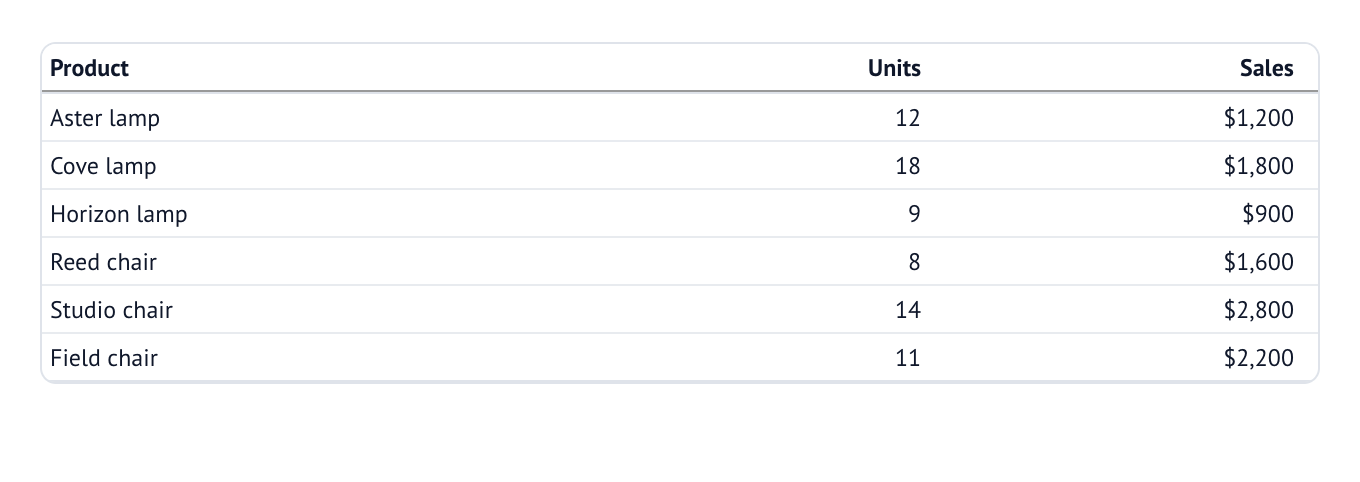
Notebook source: layout_simple
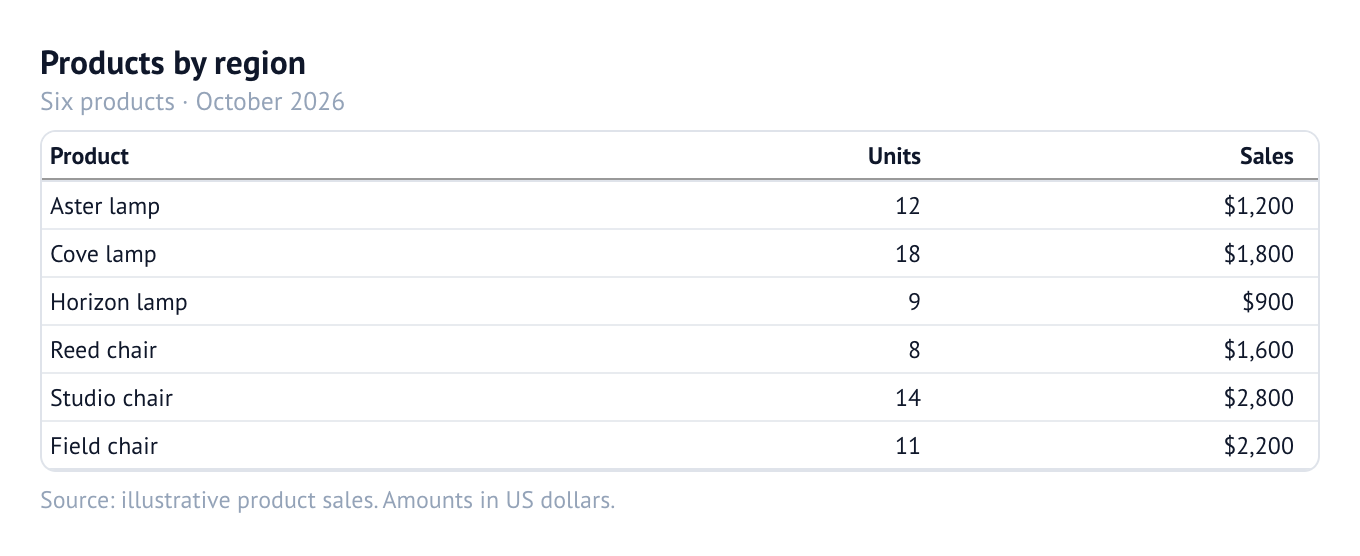
Title, subtitle and caption
Use the title for the subject, the subtitle for context, and the caption for a source or explanatory note.
EvidentialTable(
    con.sql("SELECT product, units, sales FROM orders"),
    columns=...,
    settings=...,
    title="Products by region",
    subtitle="Six products · October 2026",
    caption="Source: illustrative product sales. Amounts in US dollars.",
)
Notebook source: layout_titles
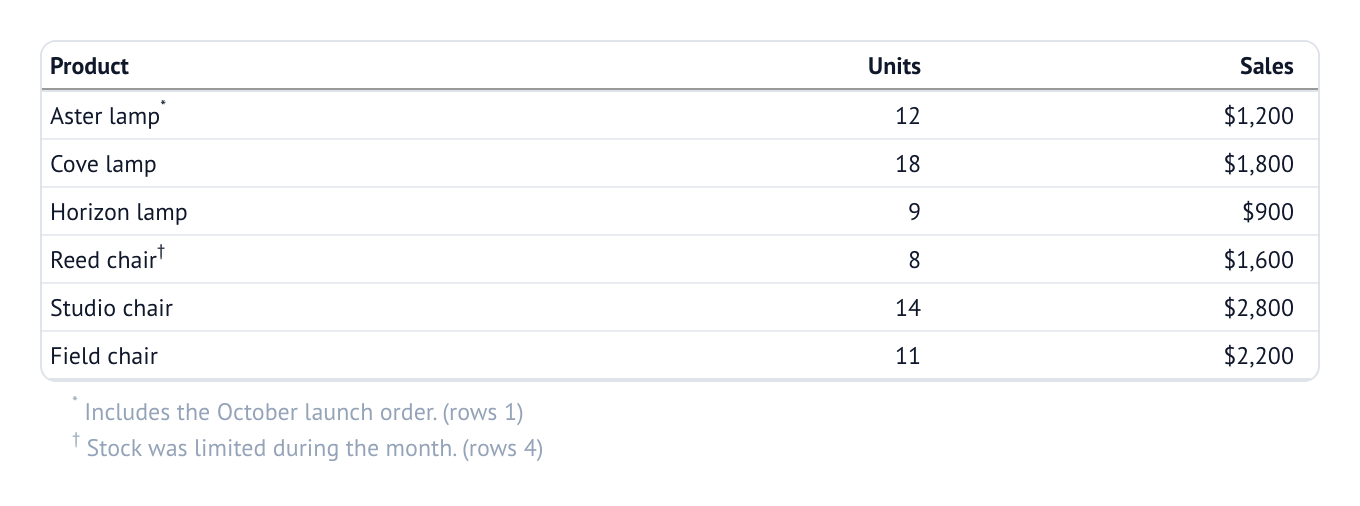
Footnotes
Attach notes to source fields with .footnote(...). Matching cells receive
superscript symbols and their notes appear below the table.
EvidentialTable(
    con.sql("SELECT product, units, sales, note FROM orders"),
    columns=[
        col.text("product").footnote("note"),
        col.integer("units"),
        col.currency("sales", decimals=0),
    ],
    settings=...,
)
Notebook source: layout_footnotes
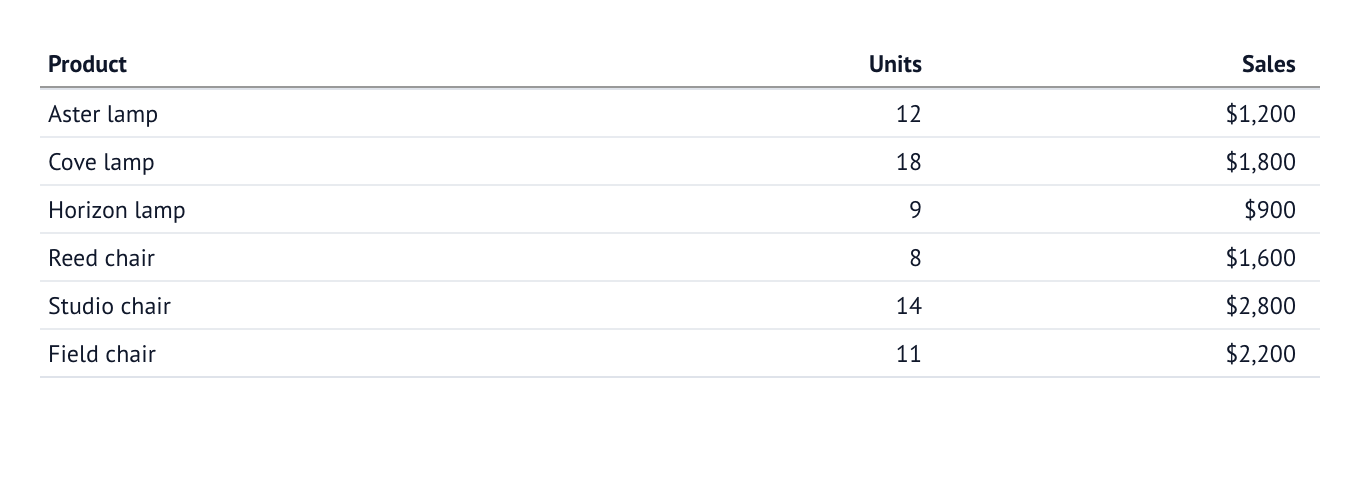
Row lines on
Horizontal rules separate each detail row. The outer frame is controlled
separately with border.
EvidentialTable(
    con.sql("SELECT product, units, sales FROM orders"),
    columns=...,
    settings=...,
    border=False,
    row_lines=True,
)
Notebook source: layout_lines_on
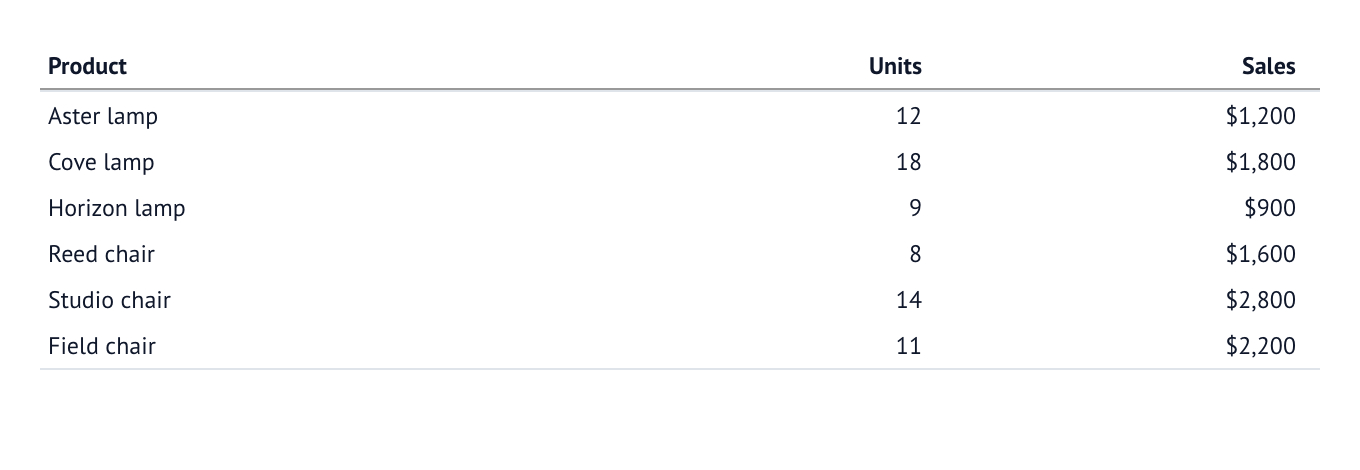
Row lines off
Keep the header and final table rules while removing the lines between rows.
EvidentialTable(
    con.sql("SELECT product, units, sales FROM orders"),
    columns=...,
    settings=...,
    border=False,
    row_lines=False,
)
Notebook source: layout_lines_off
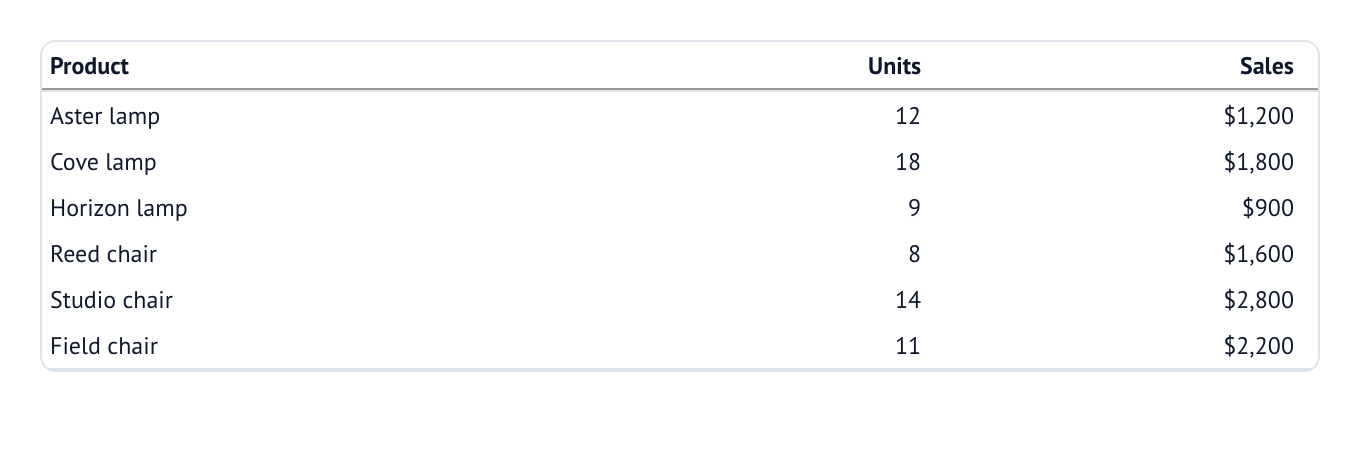
Outer frame
An outer border can enclose the table even when internal row lines are off.
EvidentialTable(
    con.sql("SELECT product, units, sales FROM orders"),
    columns=...,
    settings=...,
    border=True,
    row_lines=False,
)
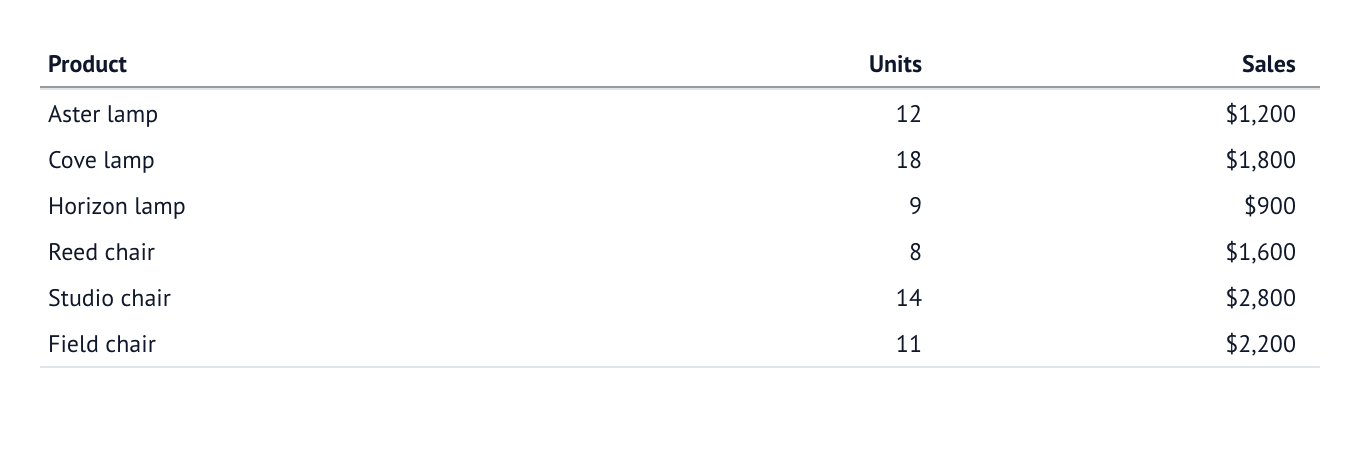
Row shading off
Use a plain background without row lines or an outer frame.
EvidentialTable(
    con.sql("SELECT product, units, sales FROM orders"),
    columns=...,
    settings=...,
    border=False,
    row_lines=False,
    row_shading=False,
)
Notebook source: layout_shading_off
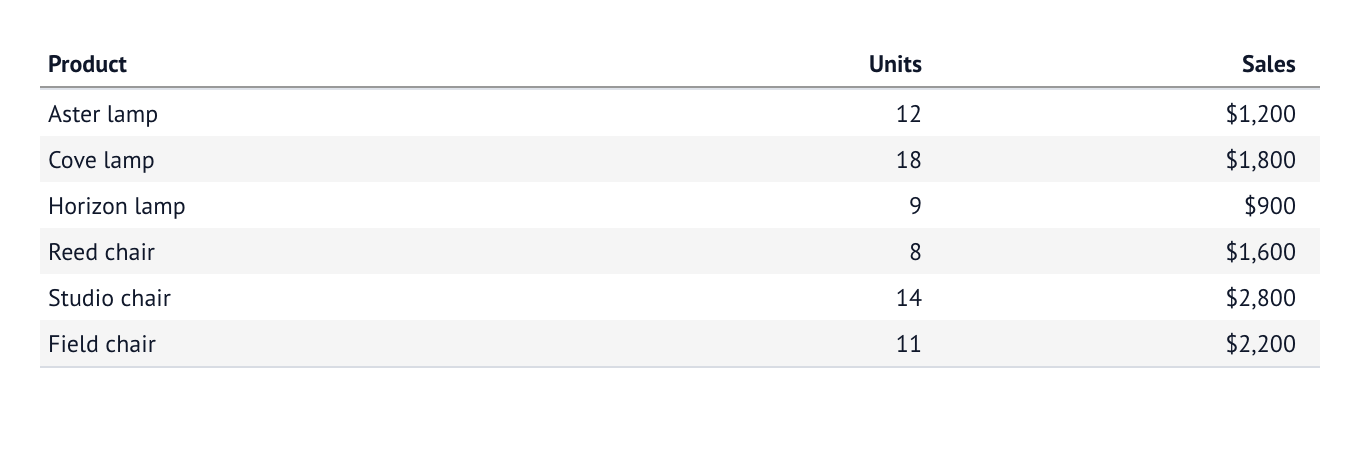
Shade alternate rows
row_shading=1 alternates one shaded row with one unshaded row.
EvidentialTable(
    con.sql("SELECT product, units, sales FROM orders"),
    columns=...,
    settings=...,
    border=False,
    row_lines=False,
    row_shading=1,
)
Notebook source: layout_shading_one
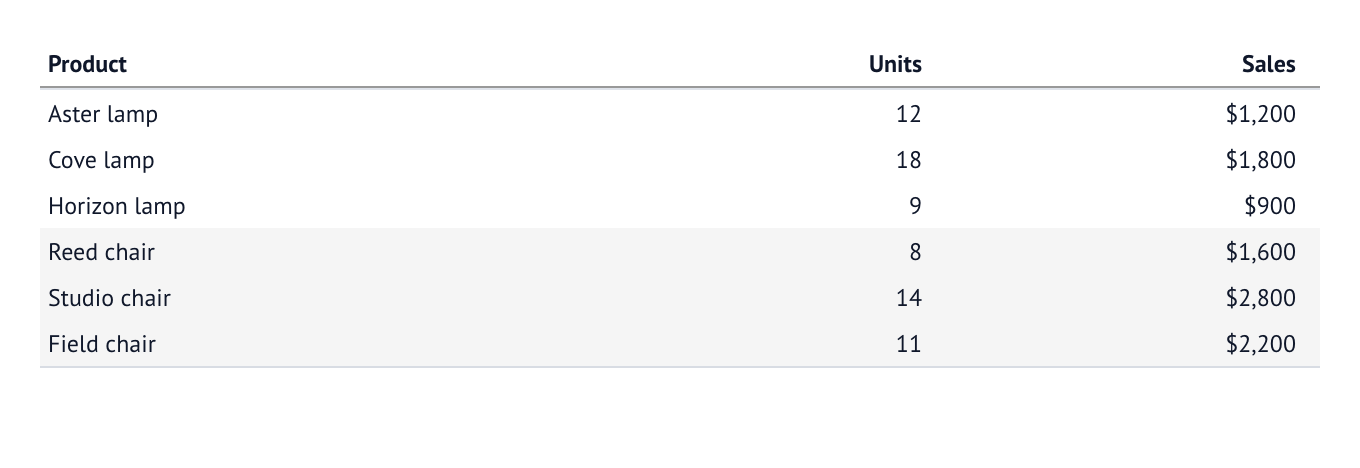
Shade blocks of three
row_shading=3 alternates three shaded rows with three unshaded rows.
EvidentialTable(
    con.sql("SELECT product, units, sales FROM orders"),
    columns=...,
    settings=...,
    border=False,
    row_lines=False,
    row_shading=3,
)
Notebook source: layout_shading_three
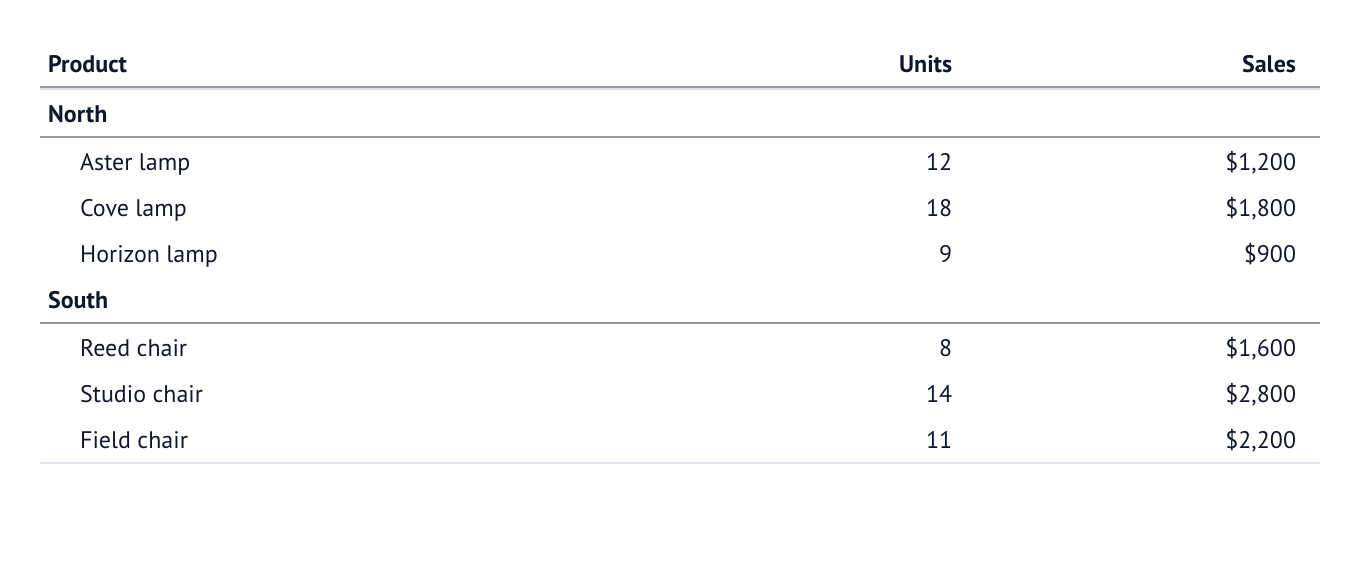
Group headings
Introduce each region with a display-only heading. section_indent=1 insets
the product names by one rem beneath it. The six source records remain the
detail data.
EvidentialTable(
    con.sql("SELECT region, product, units, sales FROM orders"),
    columns=...,
    settings=...,
    border=False,
    row_lines=False,
    section_indent=1,
    row_layout=rows.group_by("region").section(rule="below"),
)
Notebook source: layout_headings
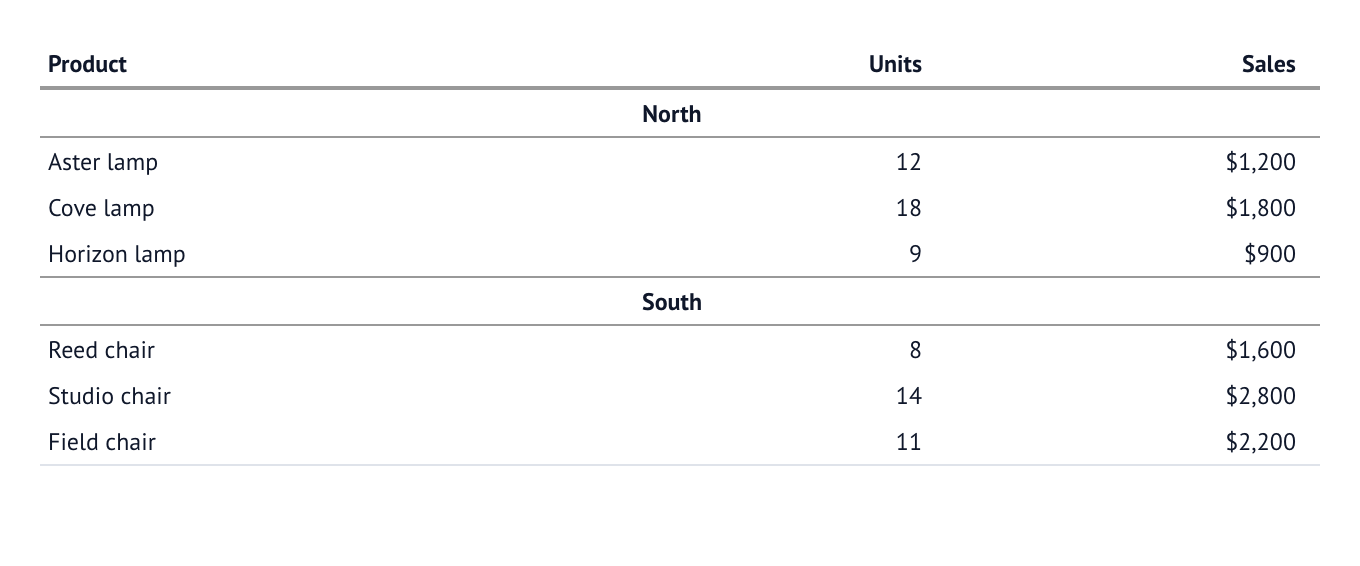
Centered group headings
Center a heading across the full table width, with a rule above and below. This style keeps the detail labels flush left and has no heading value cells.
EvidentialTable(
    con.sql("SELECT region, product, units, sales FROM orders"),
    columns=...,
    settings=...,
    border=False,
    row_lines=False,
    row_layout=rows.group_by("region").section(align="center", rule="both"),
)
Notebook source: layout_headings_centered
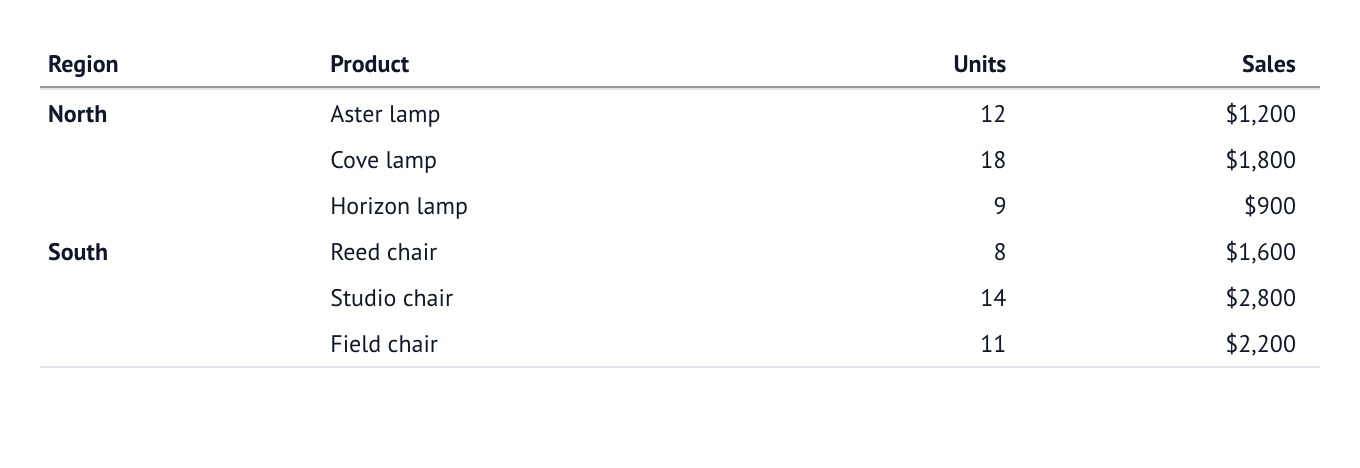
Group labels in their own column
Keep the region in bold beside its products, showing it only on the first
detail row of each run. .repeat_values(False) blanks repeated display
values without changing the data. Labels reappear at the start of each page and after a
heading or summary; filtering and sorting use the full values.
EvidentialTable(
    con.sql("SELECT region, product, units, sales FROM orders"),
    columns=[
        col.text("region").bold().repeat_values(False),
        col.text("product"),
        col.integer("units"),
        col.currency("sales", decimals=0),
    ],
    settings=...,
    border=False,
    row_lines=False,
    row_layout=rows.group_by("region"),
)
Notebook source: layout_headings_column
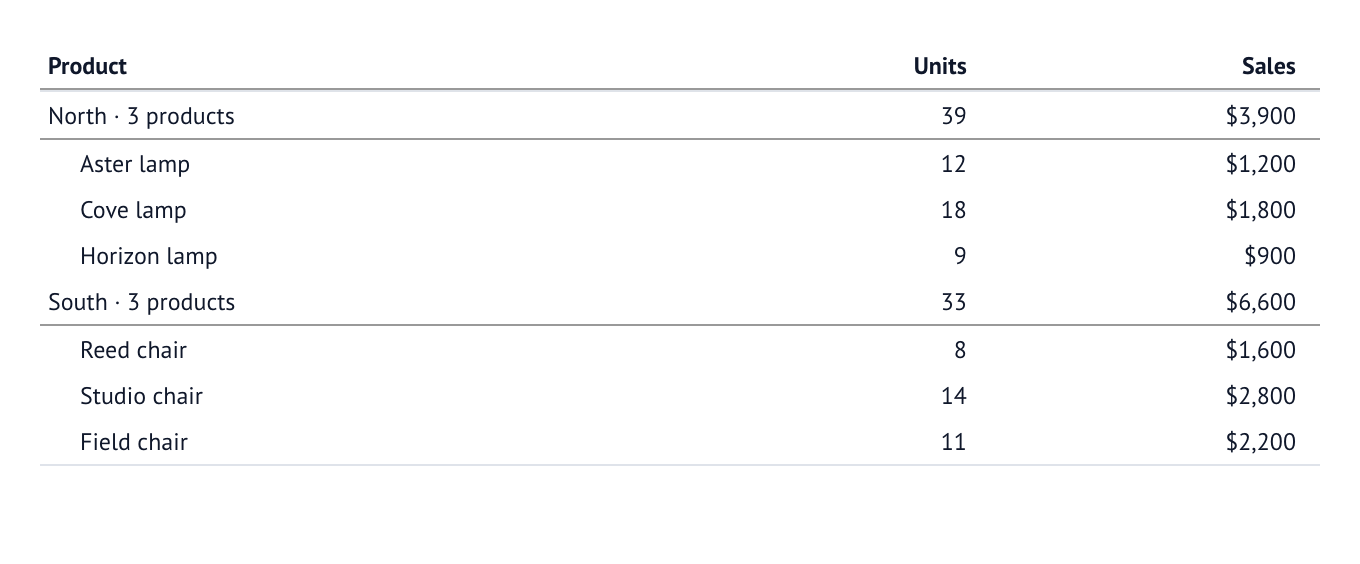
Headings with counts and totals
A heading can combine a formatted label with aggregate values in the other columns. Here it shows the product count, total units and total sales, with indented product names underneath.
EvidentialTable(
    con.sql("SELECT region, product, units, sales FROM orders"),
    columns=...,
    settings=...,
    border=False,
    row_lines=False,
    section_indent=1,
    row_layout=rows.group_by("region").section(
        label=lambda group: f"{group[0]['region']} · {len(group)} products",
        values={"units": "sum", "sales": "sum"},
        rule="below",
    ),
)
Notebook source: layout_heading_values
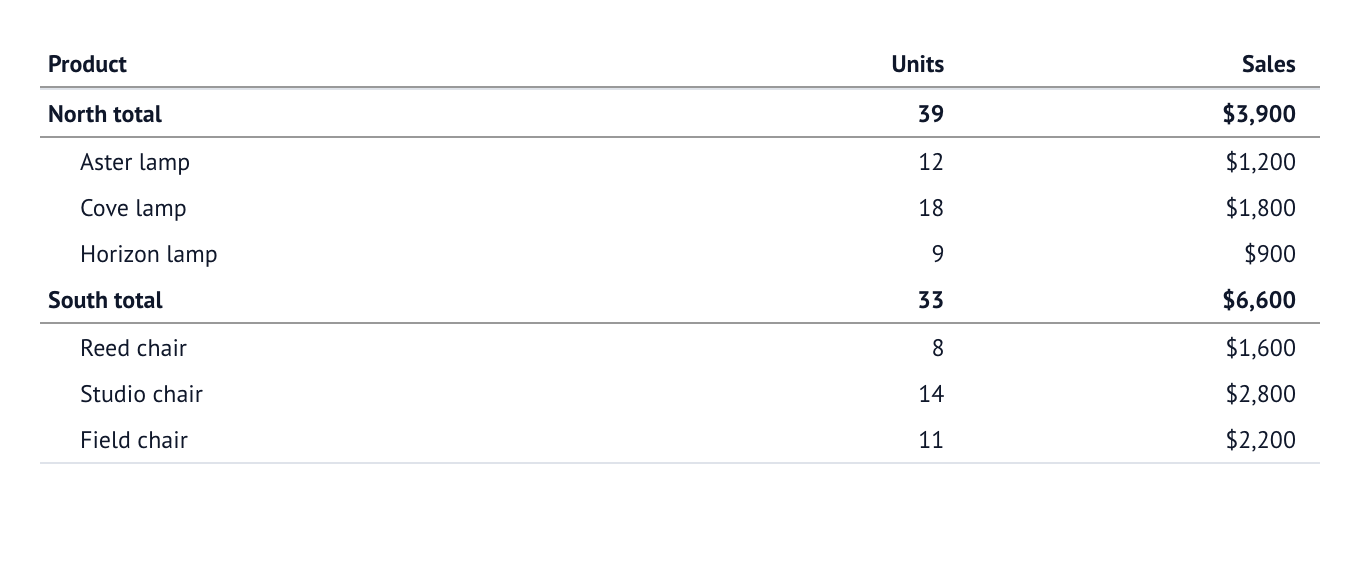
Summaries before each group
Place the region total above its detail rows. A summary can act as the group
heading without an additional section row. Indent the product names beneath
that summary with section_indent=1.
EvidentialTable(
    con.sql("SELECT region, product, units, sales FROM orders"),
    columns=...,
    settings=...,
    border=False,
    row_lines=False,
    section_indent=1,
    row_layout=rows.group_by("region").summary(
        label=lambda group: f"{group[0]['region']} total",
        values={"units": "sum", "sales": "sum"},
        position="top",
        rule="below",
    ),
)
Notebook source: layout_summary_top
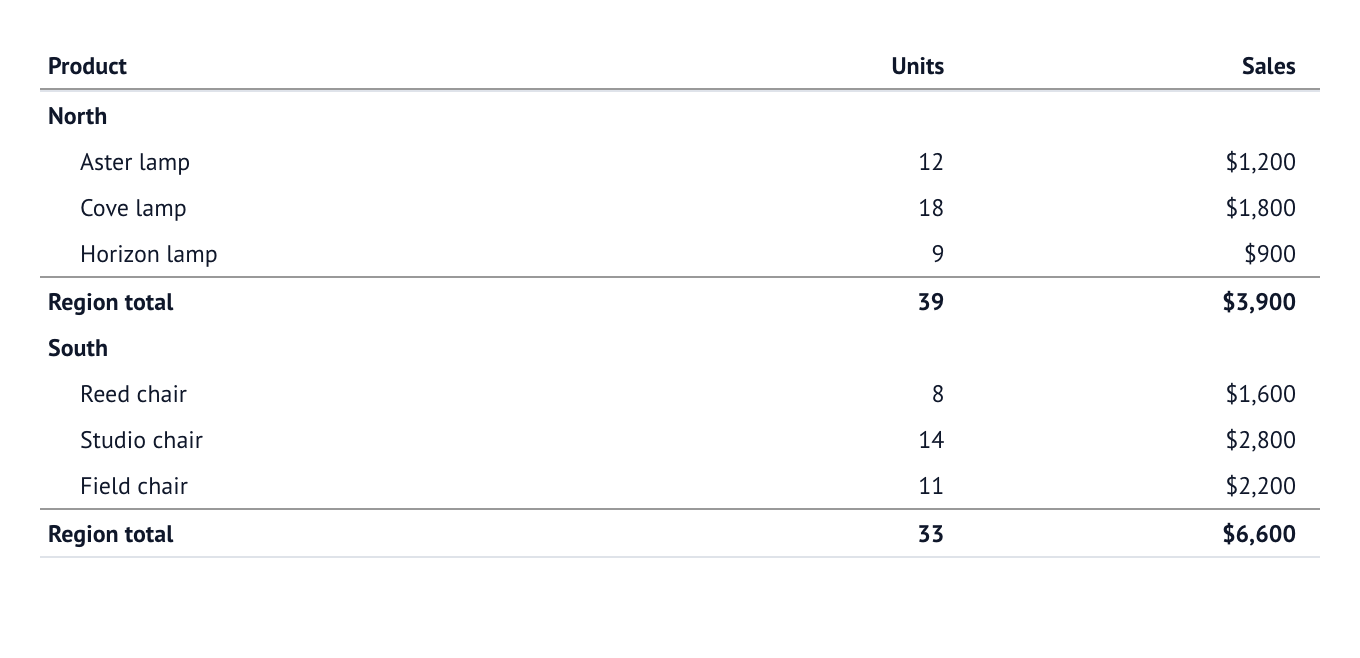
Summary footers and subtotals
Put a subtotal after each region, with a heading before the indented details. Headings and subtotal labels stay aligned at the left edge.
EvidentialTable(
    con.sql("SELECT region, product, units, sales FROM orders"),
    columns=...,
    settings=...,
    border=False,
    row_lines=False,
    section_indent=1,
    row_layout=rows.group_by("region")
    .section()
    .summary("Region total", values={"units": "sum", "sales": "sum"}),
)
Notebook source: layout_summary_bottom
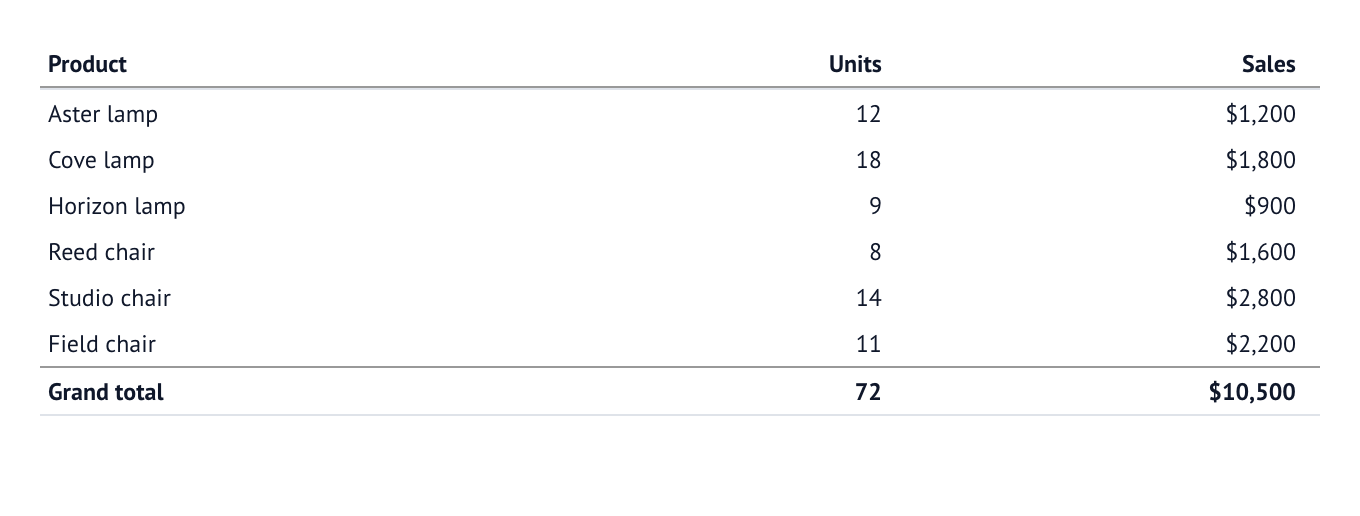
Grand total
Add one final summary across all source records, without group headings or subtotals.
EvidentialTable(
    con.sql("SELECT product, units, sales FROM orders"),
    columns=...,
    settings=...,
    border=False,
    row_lines=False,
    row_layout=Rows().grand_summary("Grand total", values={"units": "sum", "sales": "sum"}),
)
Notebook source: layout_grand_total
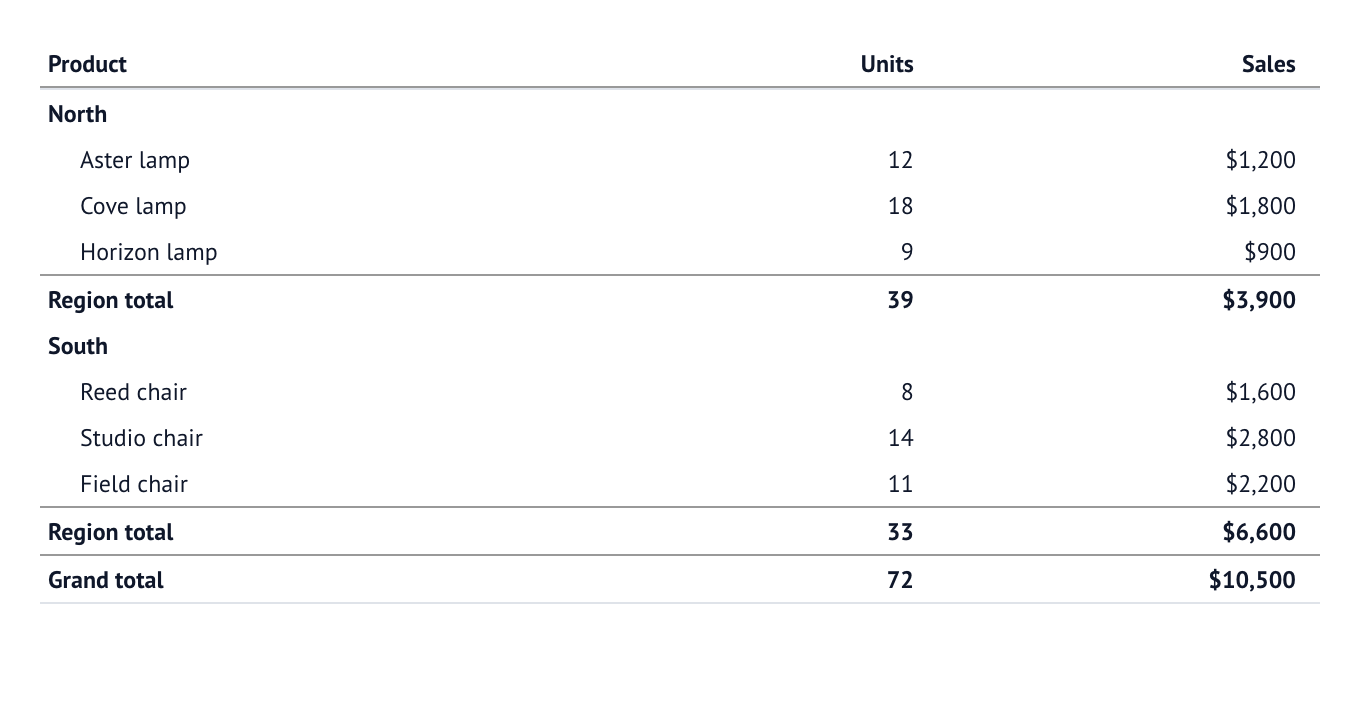
Group summaries and a grand total
Combine headings, indented details, region subtotals and a final grand total. Summaries read the detail records, so the grand total never counts subtotals twice.
EvidentialTable(
    con.sql("SELECT region, product, units, sales FROM orders"),
    columns=...,
    settings=...,
    border=False,
    row_lines=False,
    section_indent=1,
    row_layout=rows.group_by("region")
    .section()
    .summary("Region total", values={"units": "sum", "sales": "sum"})
    .grand_summary("Grand total", values={"units": "sum", "sales": "sum"}),
)
Notebook source: layout_combined_totals
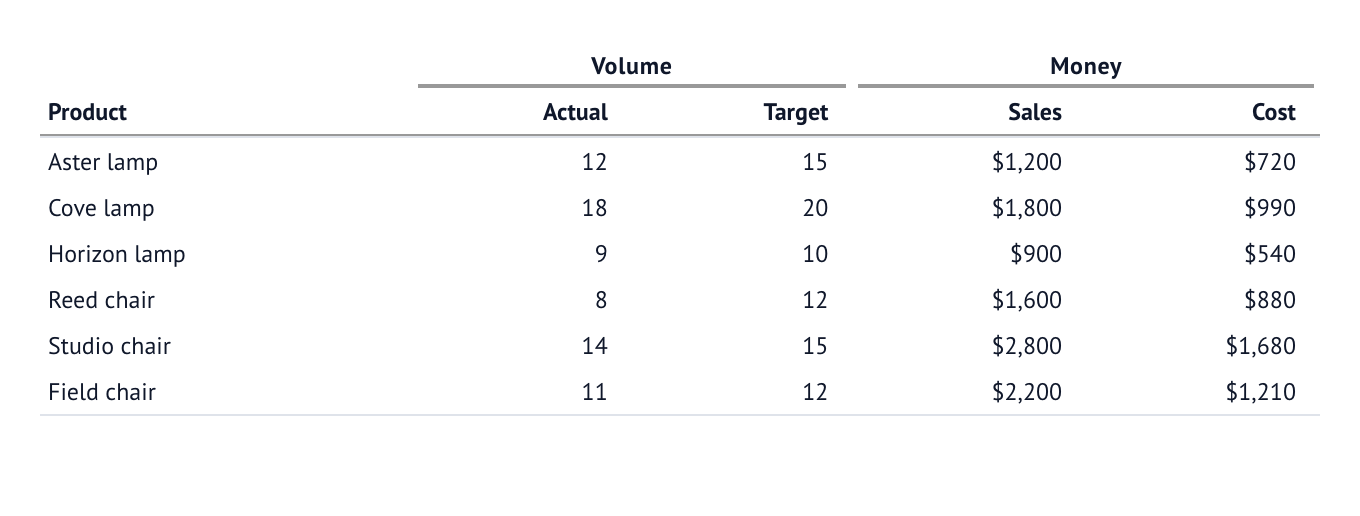
Column groups: one level
Place related columns under shared spanners. The product column remains an independent row label.
EvidentialTable(
    con.sql("SELECT product, units, target_units, sales, cost FROM orders"),
    settings=...,
    columns=[
        col.text("product"),
        col.group("Volume", [
            col.integer("units", title="Actual"),
            col.integer("target_units", title="Target"),
        ]),
        col.group("Money", [
            col.currency("sales", decimals=0),
            col.currency("cost", decimals=0),
        ]),
    ],
    border=False,
    row_lines=False,
)
Notebook source: layout_groups_one
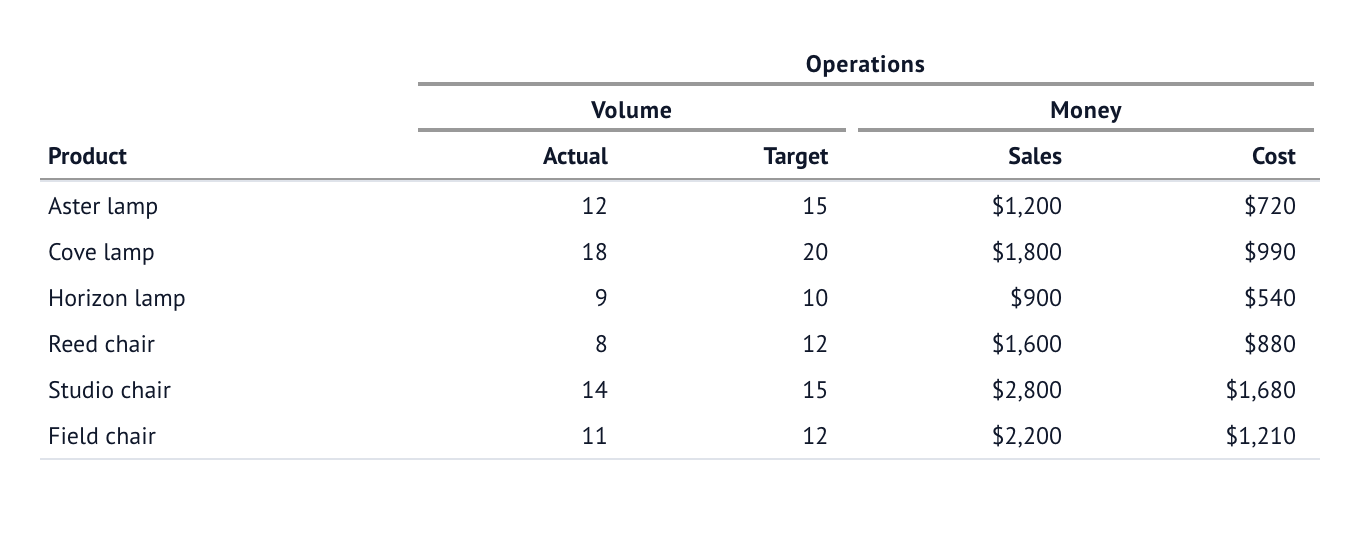
Column groups: two levels
Nest spanners to describe a hierarchy. Here Operations contains Volume and Money, each with two leaf columns.
EvidentialTable(
    con.sql("SELECT product, units, target_units, sales, cost FROM orders"),
    settings=...,
    columns=[
        col.text("product"),
        col.group("Operations", [
            col.group("Volume", [
                col.integer("units", title="Actual"),
                col.integer("target_units", title="Target"),
            ]),
            col.group("Money", [
                col.currency("sales", decimals=0),
                col.currency("cost", decimals=0),
            ]),
        ]),
    ],
    border=False,
    row_lines=False,
)
Notebook source: layout_groups_two
5. Add visualisations
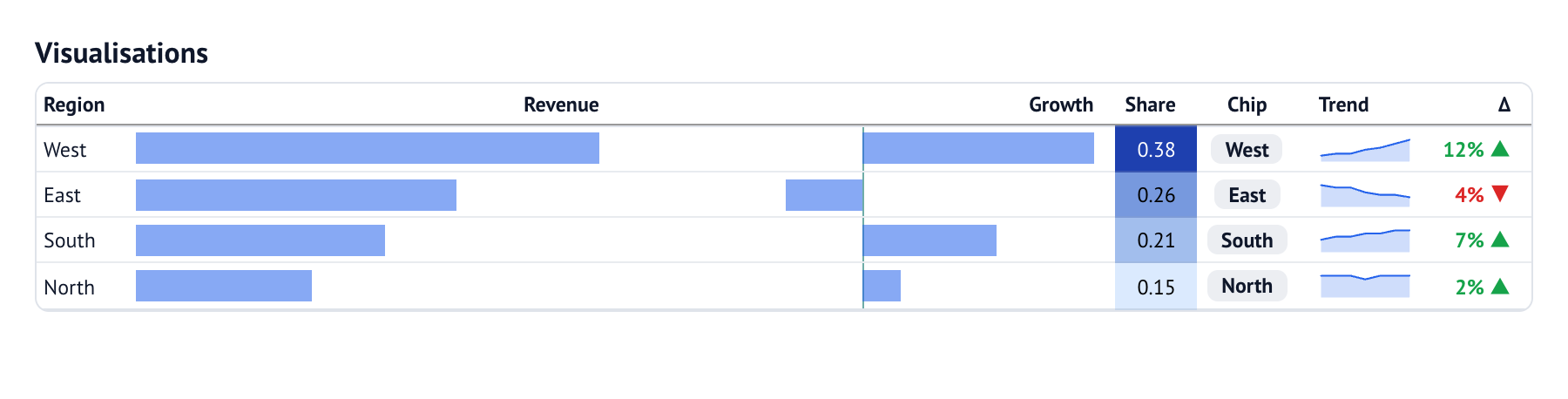
A visualisation presents the underlying value; sorting, search, statistics and CSV export still use the raw value.
columns=[
    col.text("region"),
    col.bar("revenue"),
    col.bar("growth", center=True),
    col.color("share"),
    col.chip("region", title="Chip"),
    col.sparkline("trend", type="area"),
    col.percent("growth", decimals=0, title="Δ").delta(),
]
Notebook source: visualizations
Graphic gallery
Every graphic type, with the Python that builds it. The images come from
notebooks/50_graphics_gallery.py, captured
together with these descriptions and code excerpts by make readme.
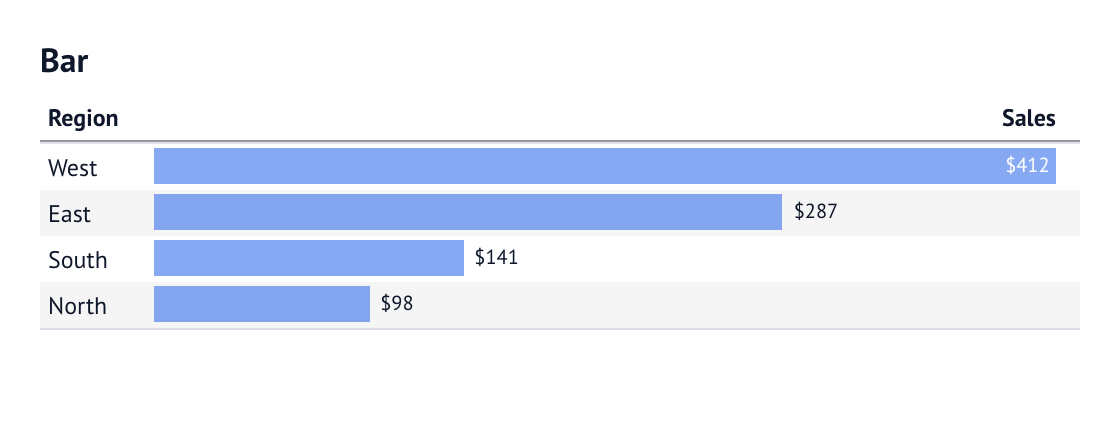
Bar
Labels prefer the outside end, moving inside when space is tight.
columns=[
    col.text("region"),
    col.bar("sales", format="usd0", label=label.auto_position("outside end")),
]
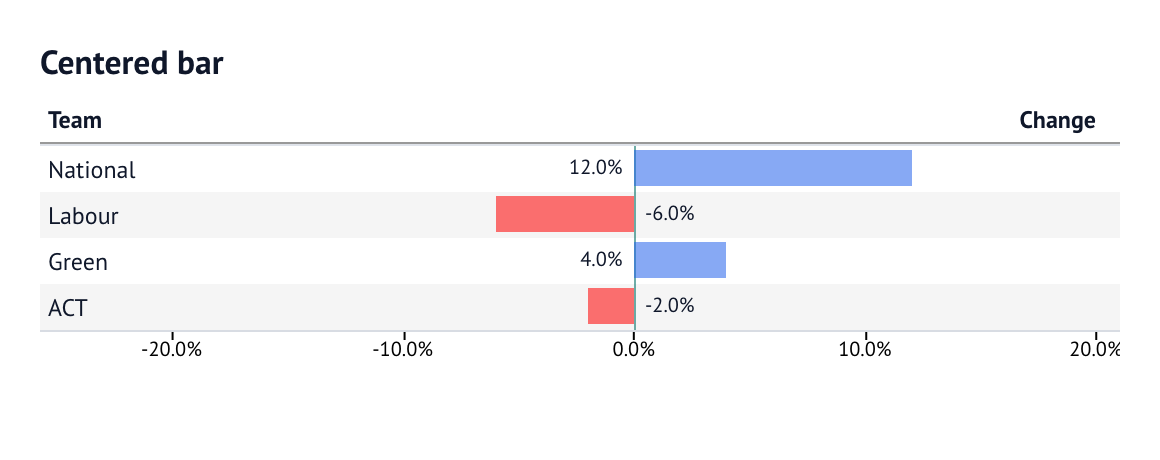
Centered bar
Positive and negative values extend from zero on a shared scale. Negative bars are red.
columns=[
    col.text("team"),
    col.bar("change", center=True, color_negative="red", format="pct1", label=True).scale(
        domain=(-0.2, 0.2), axis=True, axis_position="bottom"
    ),
]
Notebook source: graphic_bar_centered
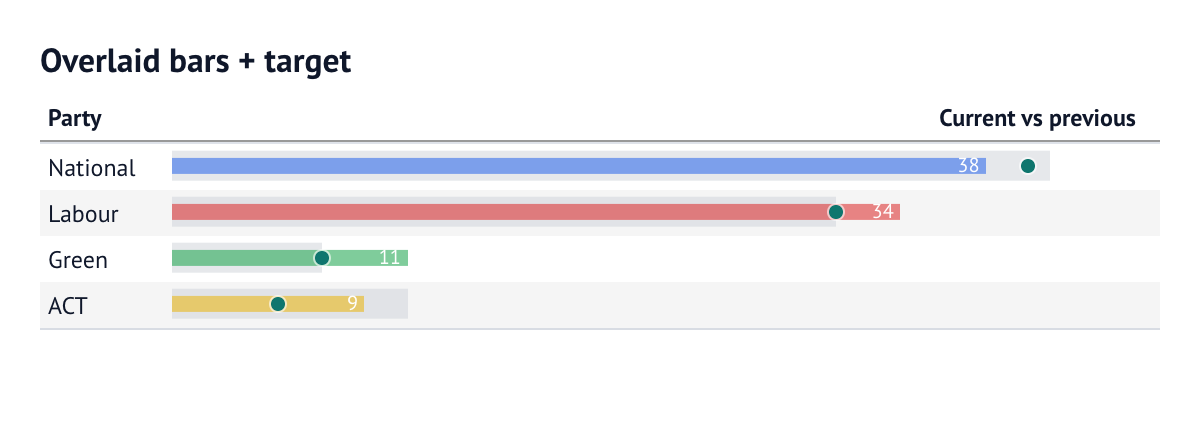
Overlaid bars with a target
Layer the current value over the previous value, then mark the target.
columns=[
    col.text("party"),
    col.bar("previous", format="num0", color="#d1d5db", size=0.85)
    .bar("current", format="num0", color="@colour", size=0.45, label=label.position("inside end"), title="Current vs previous")
    .point("target", color="#0f766e", size=7)
    .scale(domain=(0, 45)),
]
Notebook source: graphic_bar_overlay
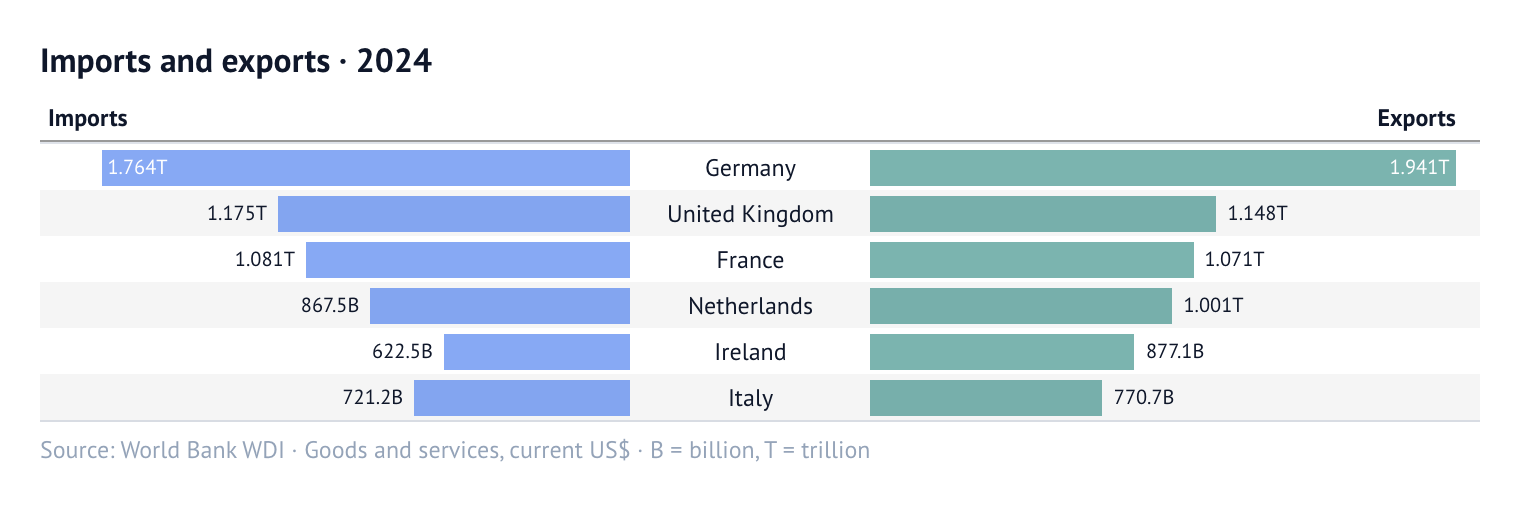
Back-to-back bars
Compare imports and exports of goods and services in current US dollars for the six largest European traders in 2024, including the UK. Countries are ranked by imports plus exports. Both sides use the same scale; labels use compact units (B = billion, T = trillion).
Source: World Bank WDI (NE.IMP.GNFS.CD and NE.EXP.GNFS.CD).
columns=[
    col.bar(
        "imports",
        format="compact",
        direction="left",
        color="#2563eb",
        label=label.auto_position("outside end"),
        pad=3,
    ).domain("trade").align("left"),
    col.text("country", title="").align("center"),
    col.bar(
        "exports",
        format="compact",
        color="#0f766e",
        label=label.auto_position("outside end"),
        pad=3,
    ).domain("trade"),
]
Notebook source: graphic_bar_back_to_back
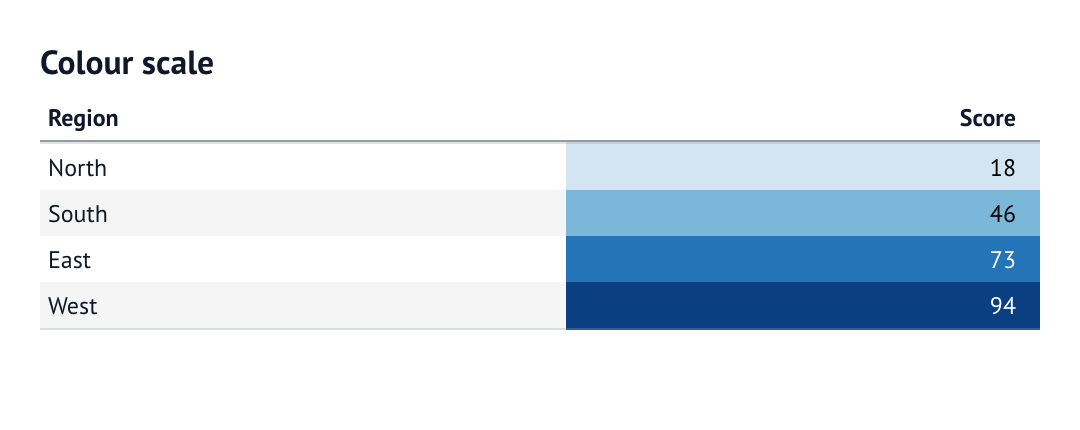
Color scale
Encode the score as a background colour while keeping its numeric value.
columns=[
    col.text("region"),
    col.number("score", fmt="num0").color(scale="Blues", min=0, max=100),
]
Notebook source: graphic_color
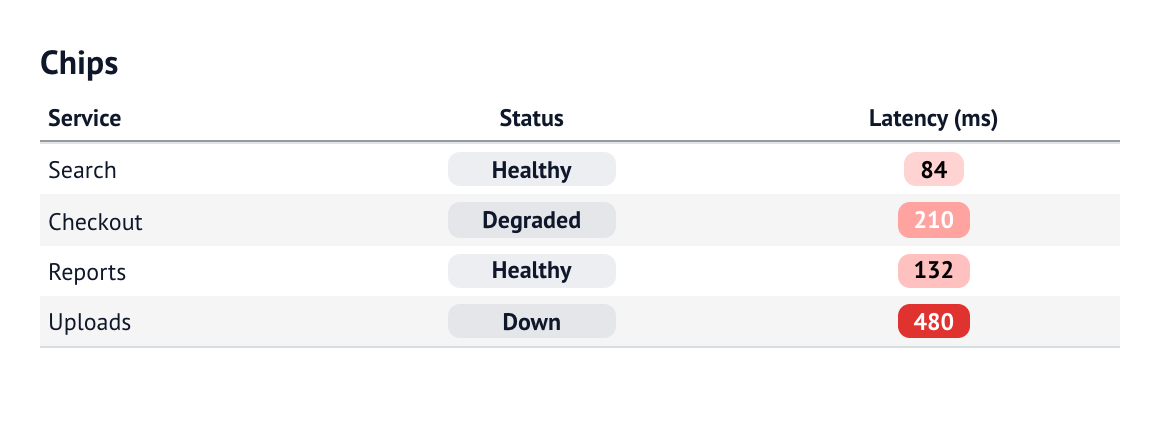
Chip
Use chips for categories or a numeric colour scale.
columns=[
    col.text("service"),
    col.chip("status", min_width=84),
    col.number("latency", fmt="num0").chip(scale="red", min=0, max=500).title("Latency (ms)"),
]
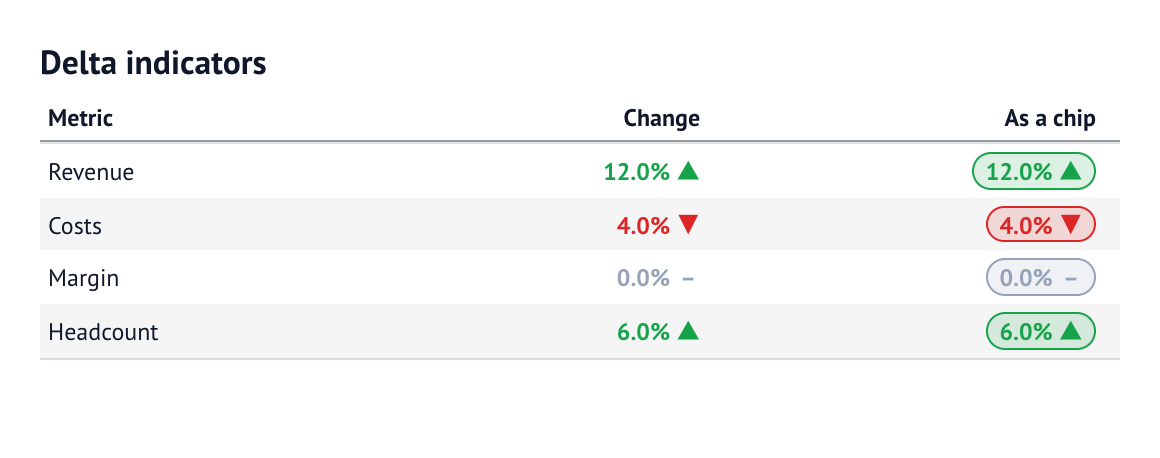
Delta
Treat changes within the neutral range as steady, with optional chip backgrounds.
columns=[
    col.text("metric"),
    col.percent("change", decimals=1).delta(down_is_good=False, neutral_range="-0.02:0.02"),
    col.percent("change", decimals=1, title="As a chip").delta(
        down_is_good=False, neutral_range="-0.02:0.02", chip=True
    ),
]
Notebook source: graphic_delta
Sparklines
Show a series as a line, area, bars, points or increase/steady/decrease marks.
columns=[
    col.text("series"),
    col.sparkline("line", type="line", width=110, height=30),
    col.sparkline("area", type="area", fit_to_data=True, width=110, height=30),
    col.sparkline("bar", type="bar", width=110, height=30),
    col.sparkline("points", type="points", width=110, height=30, markers=True),
    col.sparkline("change", type="change", width=110, height=30),
]

Notebook source: graphic_sparklines
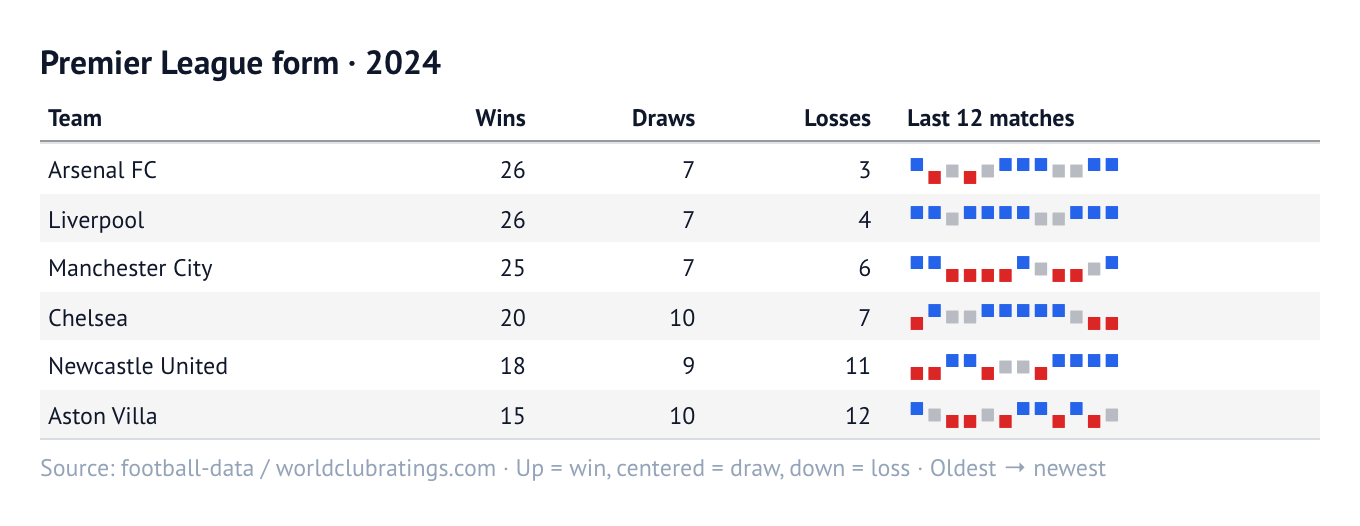
Change sparkline: Premier League form
A change sparkline can show match results: blue/up is a win, gray/centered is a draw, and red/down is a loss. Each rectangle has the same size; a larger winning margin does not make it taller. The sequence runs from oldest to newest across each team's last 12 league matches.
These are the top six teams by league points earned in calendar year 2024, with wins, draws and losses for that year—not season standings. The data comes from the football explorer in notebook 46, filtered to Premier League matches; international matches are excluded.
columns=[
    col.text("team"),
    col.integer("wins"),
    col.integer("draws"),
    col.integer("losses"),
    col.sparkline("form", type="change", width=156, height=22, y_fmt="num0")
        .title("Last 12 matches"),
]
Notebook source: graphic_football_form
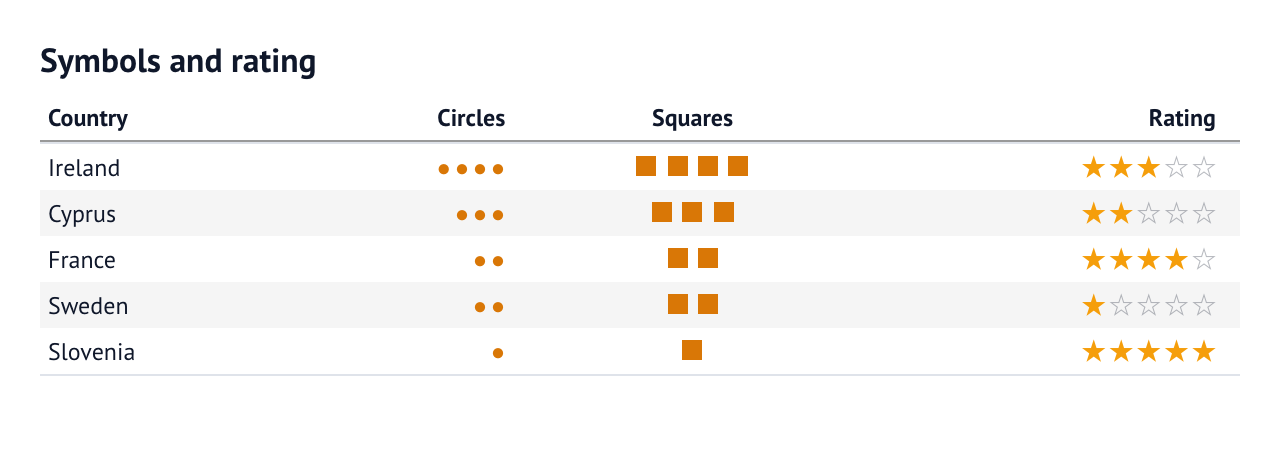
Symbols and rating
Repeat glyphs or shapes for counts, or show a five-point rating.
columns=[
    col.text("country"),
    col.symbols("gold", symbol="●", color="#d97706", title="Circles"),
    col.symbols("gold", shape="square", color="#d97706", title="Squares").align("center"),
    col.rating("score", title="Rating"),
]
Notebook source: graphic_symbols
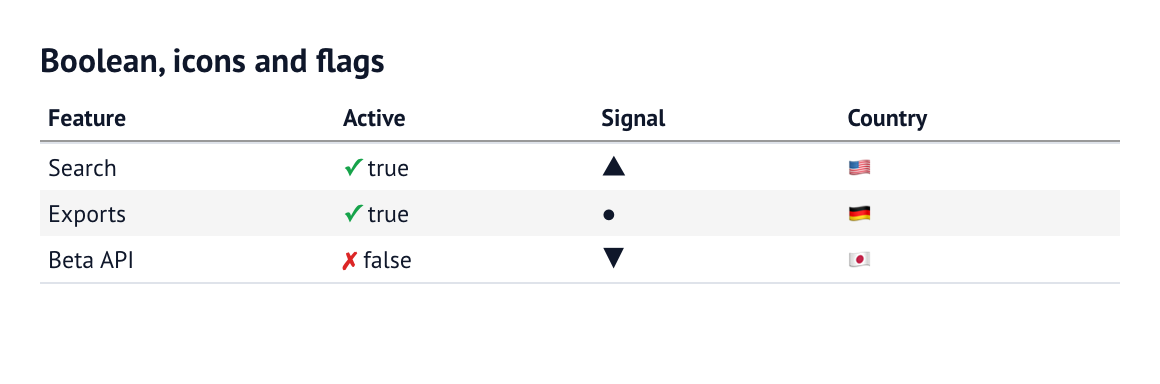
Boolean, icons and flags
Render booleans, mapped icons and country flags.
columns=[
    col.text("feature"),
    col.boolean("active", true_symbol="✓", false_symbol="✗"),
    col.icons("signal", map={"up": "▲", "flat": "●", "down": "▼"}),
    col.flag("country"),
]
Notebook source: graphic_boolean_icons
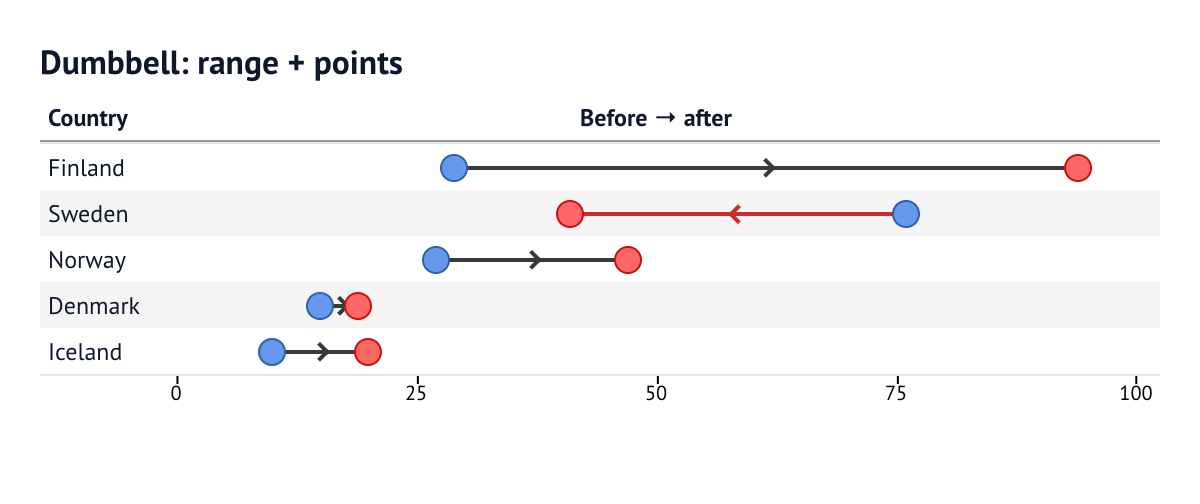
Dumbbell: range plus points
Connect two values, colour decreases red and add a direction chevron.
columns=[
    col.text("country"),
    col.range("before", "after", color="#222222", color_negative="#cc1111", size=2, direction_marker=True)
       .point("before", color="#6699ee", outline="#2f5fa8", size=12)
       .point("after", color="#ff6666", outline="#cc1111", size=12)
       .title("Before → after")
       .align("center")
       .scale(domain=(0, 100), axis=True, axis_position="bottom"),
]
Notebook source: graphic_dumbbell
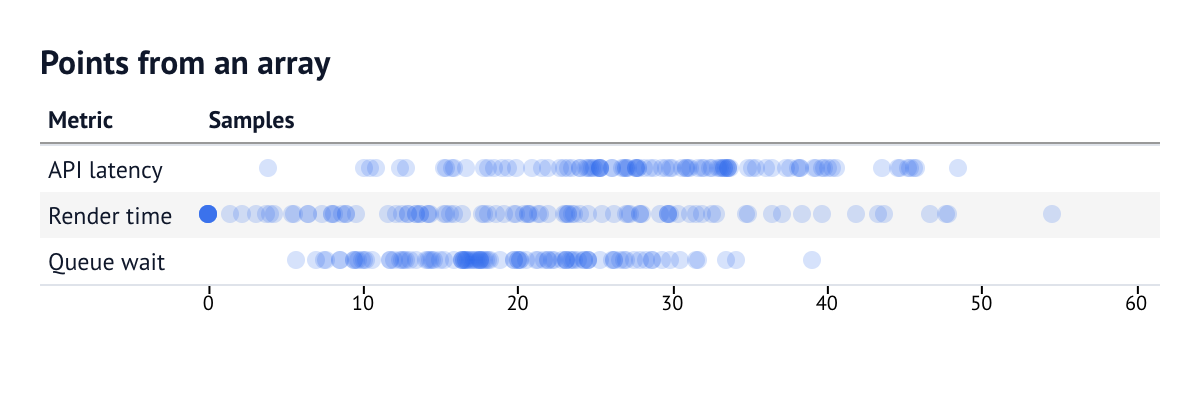
Points from an array
Plot every sample on one horizontal scale, with transparent marks for overlap.
columns=[
    col.text("metric"),
    col.points("samples", color="#2563eb30", size=9, outline=False).scale(
        domain=(0, 60), axis=True, axis_position="bottom"
    ),
]
Notebook source: graphic_points
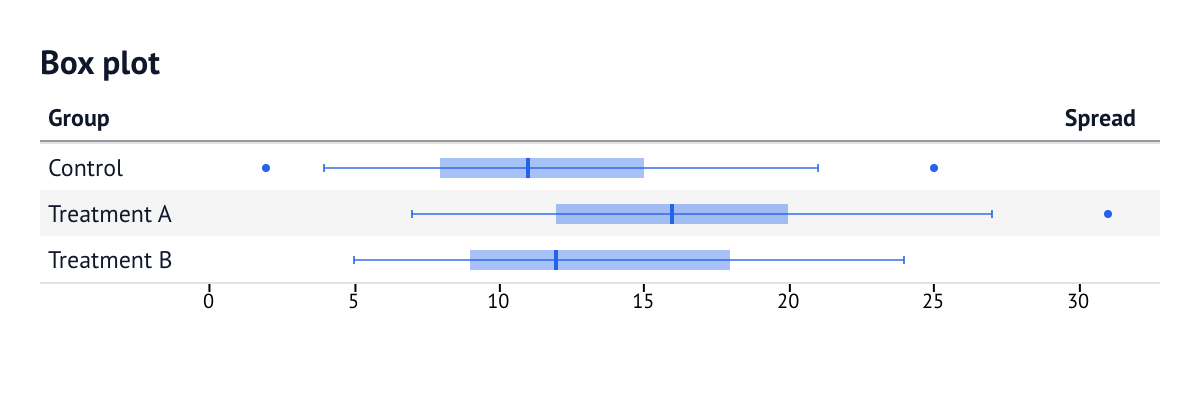
Box plot
Show quartiles, a median, whiskers and outliers.
columns=[
    col.text("group"),
    col.boxplot("lo", "q1", "med", "q3", "hi", outliers="outs", whisker="iqr", title="Spread").scale(
        domain=(0, 32), axis=True, axis_position="bottom"
    ),
]
Notebook source: graphic_boxplot
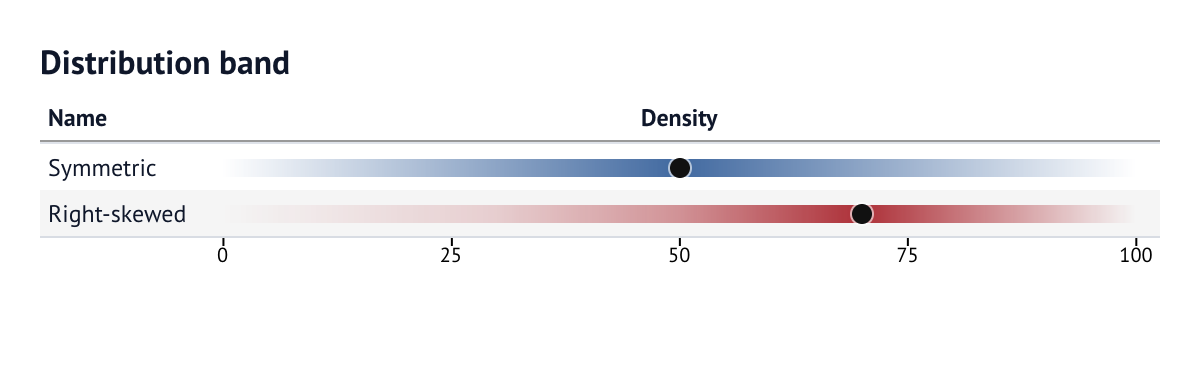
Distribution band
Draw a density band with a median point.
columns=[
    col.text("name"),
    col.distribution("curve", x="x", y="pdf", color="@ink")
    .point("median", color="#111111", outline=False)
    .title("Density")
    .align("center")
    .scale(domain=(0, 100), axis=True, axis_position="bottom"),
]
Notebook source: graphic_distribution
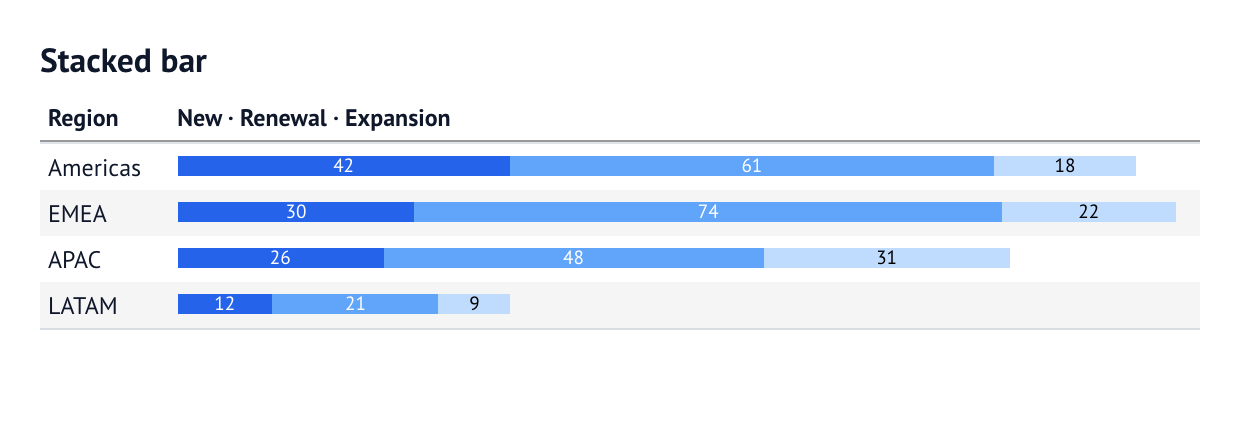
Stacked bar
Stack components and label them within the bar.
columns=[
    col.text("region"),
    col.stacked_bar(
        "new",
        "renewal",
        "expansion",
        colors=["#2563eb", "#60a5fa", "#bfdbfe"],
        labels=True,
        format="num0",
        size=0.6,
        title="New · Renewal · Expansion",
    ),
]
Notebook source: graphic_stacked_bar
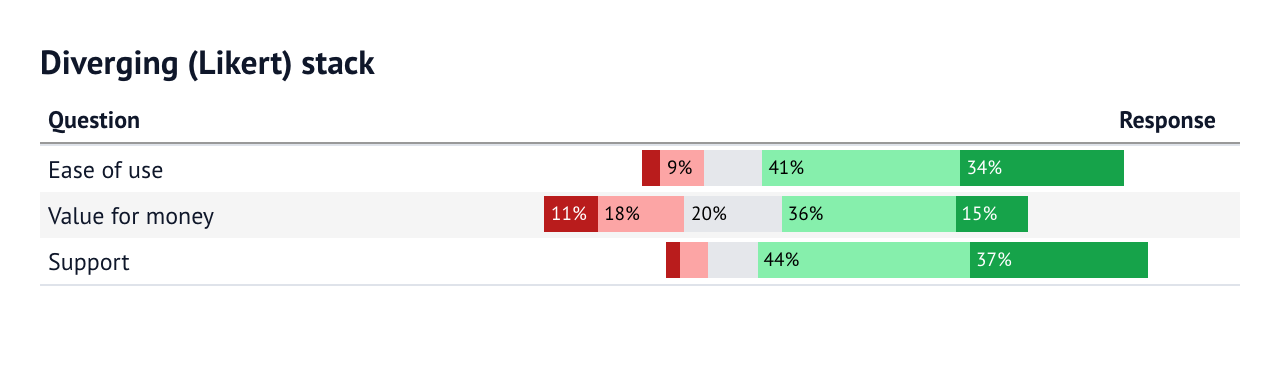
Diverging Likert stack
Split neutral responses around zero and label the normalised shares.
columns=[
    col.text("question"),
    col.stacked_bar(
        "sd",
        "d",
        "n",
        "a",
        "sa",
        colors=["#b91c1c", "#fca5a5", "#e5e7eb", "#86efac", "#16a34a"],
        labels="percent",
        label_align="begin",
        diverge_at="n",
        neutral="split",
        normalize="percent",
        size=1,
        title="Response",
    ),
]
Notebook source: graphic_stack_likert
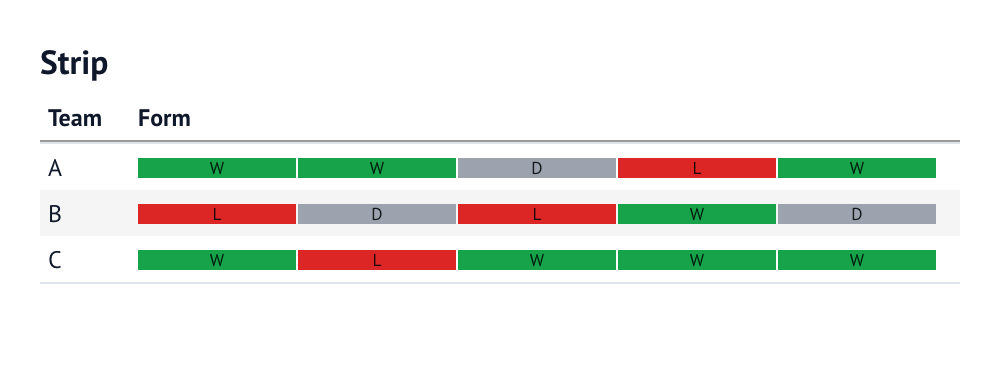
Strip
Display an ordered sequence of categorical outcomes.
columns=[
    col.text("team"),
    col.strip("form", colors={"W": "#16a34a", "D": "#9ca3af", "L": "#dc2626"}, labels=True),
]
Notebook source: graphic_strip
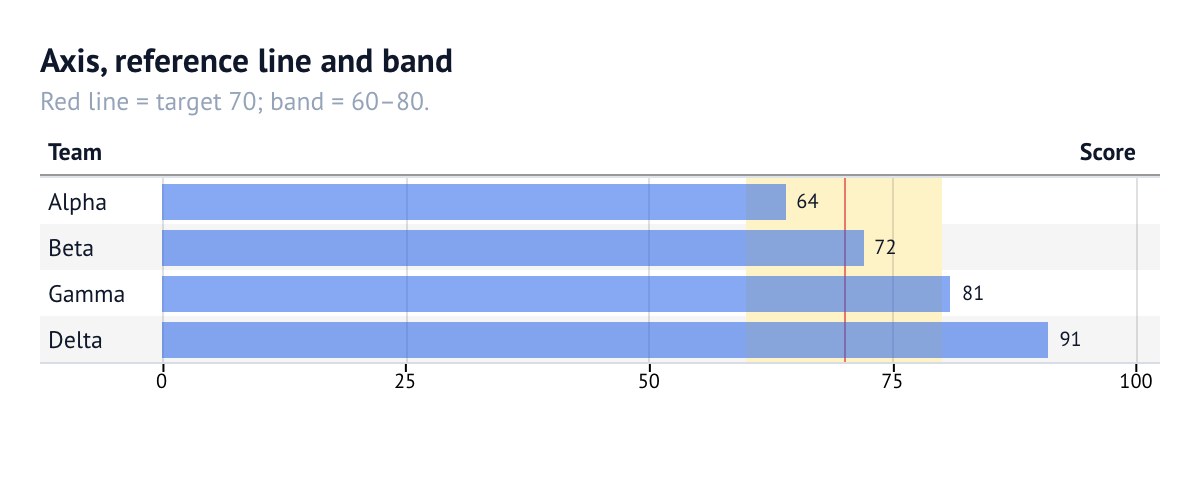
Axis, reference line and band
Add an external axis, gridlines, a target line and a reference band.
columns=[
    col.text("team"),
    col.bar("score", format="num0", label=label.auto_position("outside end"))
    .scale(domain=(0, 100), axis=True, axis_position="bottom", gridlines=True)
    .reference_band(60, 80, color="#fef3c7")
    .reference_line(70, color="#dc2626"),
]
Notebook source: graphic_reference
Labels and shared domains
from evidential import col, domain, label

annotation = label.fmt("usd0").bold().auto_position("inside end")

payments = domain.numeric("payments").include_zero().palette("Blues")

columns=[
    col.bar("card", label=annotation).domain(payments),
    col.number("cash").color().domain("payments"),
]
A label can show the mark's value, another field (label="@candidate"), or fixed
text. A named domain pools values across columns so bars, heatmaps and
sparklines share one scale and palette. See
notebooks/47_shared_domains.py.
6. Build header structures
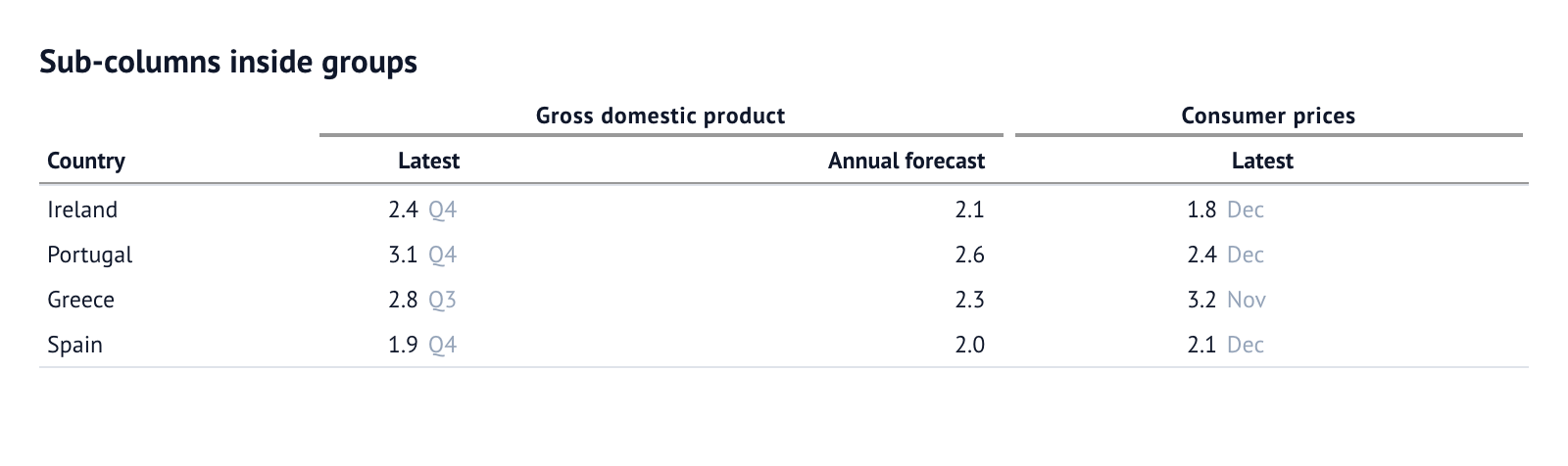
col.subcolumns(label, [...]) gives its members one shared leaf header.
col.group(label, [...]) adds a spanner over a run of columns. Both nest.
A column named "GDP Measure.GDP nominal" groups under GDP Measure
automatically; column_groups={...} is the equivalent mapping form.
columns=[
    col.text("country"),
    col.group(
        "Gross domestic product",
        [
            col.subcolumns(
                "Latest",
                [
                    col.number("gdp", fmt="num1", align="right").neg(),
                    col.auto("quarter").align("left").font_color("#94a3b8"),
                ],
            ),
            col.number("forecast", fmt="num1", align="right", title="Annual forecast"),
        ],
    ),
    col.group(
        "Consumer prices",
        [
            col.subcolumns(
                "Latest",
                [
                    col.number("cpi", fmt="num1", align="right").neg(),
                    col.auto("month").align("left").font_color("#94a3b8"),
                ],
            )
        ],
    ),
]
The stub setting marks row-label columns, and stub_head labels the stub:
settings(stub="country", stub_head="Country")
7. Derive values and add display rules
Merged columns build one cell from several source columns:
from evidential import col, cols_merge_n_pct, cols_merge_range, cols_merge_uncert

columns=[
    col.text("site"),
    col.merge("range", cols_merge_range("low", "high", fmt="num0", title="Range")),
    col.merge("measurement", cols_merge_uncert("value", "uncert", fmt="num1")),
    col.merge("share", cols_merge_n_pct("n", "pct", title="Share")),
]
Display rules transform values at render time. Rules run in order; the last match wins.
from evidential import cells_body, tab_format, tab_style, text_transform

EvidentialTable(
    tips,
    columns=[col.text("city"), col.currency("revenue"), col.percent("tip_rate")],
    rules=[
        text_transform(cells_body("city"), str.upper),
        tab_style(cells_body("revenue"), color="#b45309"),
        tab_format(cells_body("revenue"), "usd0"),
    ],
)
Substitutions are also rules: sub_missing, sub_zero, sub_small_vals,
sub_large_vals and sub_values. Location selectors accept column names and
either 0-based row indices or a Python predicate.
Presentation parts
A table also has a frame, notes and optional dividers:
section_row("Label")/spacer_row()create display-only rows inrows.col.text("product").footnote("note")marks cells;footnotes=[...]adds static notes, andfootnote_marks="numbers"|"letters"|"symbols"chooses the mark scheme.caption=...adds source notes;stub/stub_headdefine row labels.column_stats=Trueadds min/max/avg/null under each header.null_text,.blank_below,.blank_aboveand.blank(...)control missing values.
8. Group, pivot and compare
The aggregate helpers accept the same col.* builders, run their aggregation
in DuckDB, and return a normal EvidentialTable.
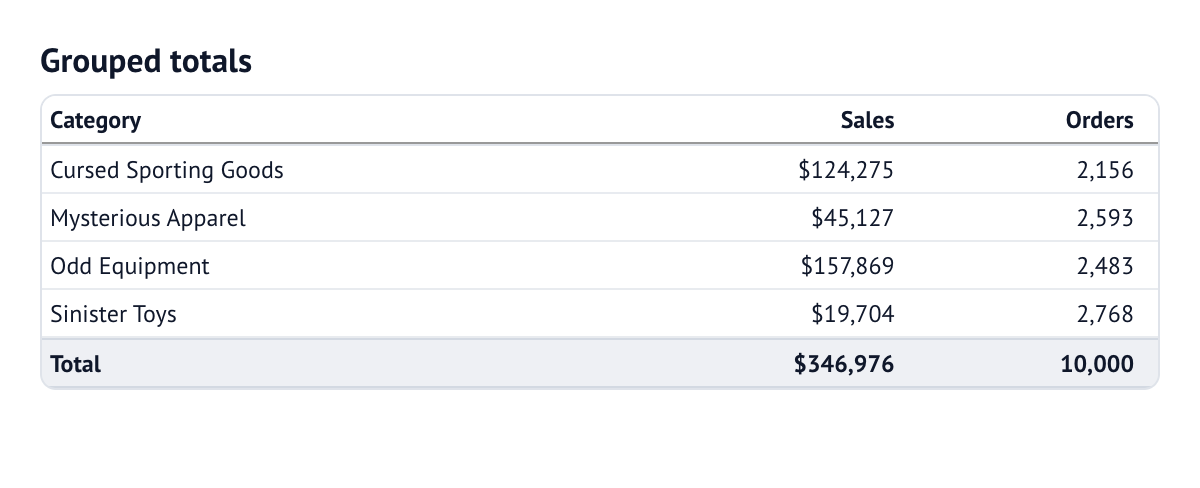
Grouped totals
Group the sample orders by category, with sales and order counts. The helper
adds subtotals and a grand total. sample_orders() opens the bundled fixture
in DuckDB; its definition lives in the notebook.
grouped_table(
    sample_orders(),
    "SELECT category AS category, sales FROM needful_things.orders",
    dimensions=["category"],
    measures=["round(sum(sales), 0) AS sales", "count(*) AS orders"],
    dimension_config={"category": col.text("category")},
    measure_config={
        "sales": col.currency("sales", decimals=0),
        "orders": col.integer("orders"),
    },
    settings=settings(title="Grouped totals", page_size=10, width="560px"),
)
Notebook source: grouped_totals
Aggregations for subtotals/totals
aggregations={"sales": "mean"} recomputes subtotals from detail values with a
built-in name or a Python callable. Use weight_columns={"sales": "weight"}
for weighted means.
Pivot, compare and query
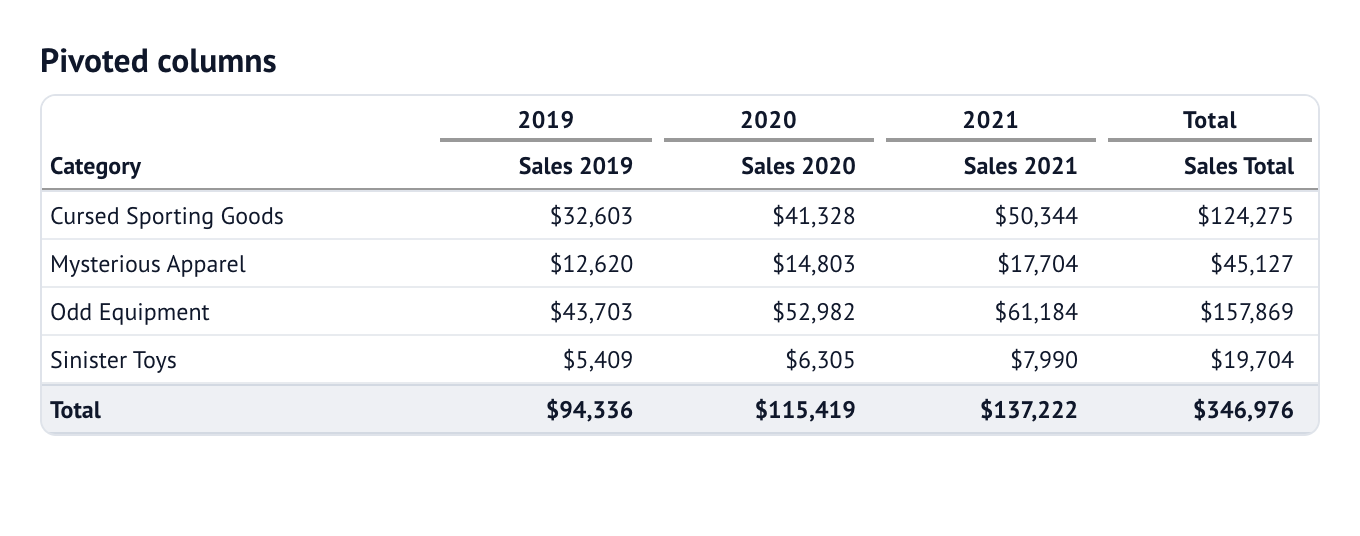
Turn each year into a column group, with one row per category. This example
uses the same sample_orders() fixture connection as the grouped table.
pivot_table(
    sample_orders(),
    "SELECT category, year(order_datetime) AS year, sales FROM needful_things.orders",
    dimensions=["category"],
    pivots=["year"],
    measures=["round(sum(sales), 0) AS sales"],
    dimension_config={"category": col.text("category")},
    measure_config={"sales": col.currency("sales", decimals=0)},
    settings=settings(title="Pivoted columns", page_size=10, width="640px"),
)
Notebook source: pivoted_columns
from evidential import comparison_table, query_table

# Adds <measure>_prior, <measure>_delta and <measure>_pct columns.
comparison_table(
    con,
    "SELECT region, order_date, sales FROM orders",
    dimensions=["region"],
    measures=["sum(sales) AS sales"],
    date_column="order_date",
    compare_vs="prior year",
)

# Ad-hoc SQL with Evidence-style where / order / limit / date_range.
query_table(
    con,
    "SELECT * FROM orders",
    where="sales > 0",
    order="sales DESC",
    limit=100,
    date_range="last 30 days",
    date_column="order_date",
)
For rows already in Python, grouped_records(rows, group_by=..., measures=...)
does the same grouping without a database.
Display-only headings and summaries
rows adds headings and summaries without making them source records.
from evidential import EvidentialTable, col, rows

layout = (
    rows.group_by("region")
    .section(values={"category": rows.count(suffix=" products"), "sales": "sum"})
    .summary("Region total", values={"sales": "sum"})
    .grand_summary("All regions", values={"sales": "sum"})
)

EvidentialTable(
    products,
    row_layout=layout,
    columns=[col.text("product"), col.text("category"), col.bar("sales", format="usd2")],
    page_size=3,
    section_indent=1,
)
Search recalculates named aggregations; a callable keeps its source scope until
the next set_data. table.rows contains details only, while
table.display_rows is an inspection snapshot that includes synthetic rows.
rows.of(products).group_by("region").summary(...).build() returns a view that
can be passed directly to EvidentialTable.
9. Live tables and row selection
LiveEvidentialTable re-runs a parameterised query without recreating the
widget, so sort, search and page state survive.
from evidential import LiveEvidentialTable, col

# 1. controls
min_fare = mo.ui.slider(0, 80, value=10, label="Minimum fare")
min_fare

# 2. persistent widget: no control references in this cell
live = LiveEvidentialTable(
    con,
    "SELECT * FROM trips WHERE fare_amount >= {min_fare}",
    auto_run=False,
    columns=[col.number("fare_amount", fmt="usd2"), col.number("trip_distance", fmt="num1")],
)
live

# 3. reactive cell: re-runs whenever the slider changes
_ = live.set_controls(min_fare=min_fare)
Values are bound as SQL parameters, never spliced into the SQL text. Outside a
reactive host, bind_controls=True makes the widget re-run itself.
query_values(con, sql) returns one column as a list for populating selectors.
The cell that creates the widget must not reference a control. Referencing one registers a Marimo dependency and recreates the widget on every change.
Set select="country_code" to make rows clickable. The clicked value crosses to
Python through the widget's selected trait:
countries = mo.ui.anywidget(
    EvidentialTable(
        rows,
        columns=[col.text("country"), col.integer("population")],
        select="country_code",
        empty_message="Click a country",
    )
)
countries
# another cell
selected = countries.widget.selected
detail.widget.set_data(con.sql(detail_sql, params={"code": selected or ""}))
set_data keeps the widget and its layout in place; update_options and
set_column change presentation without rebuilding it.
10. Marimo Studio views
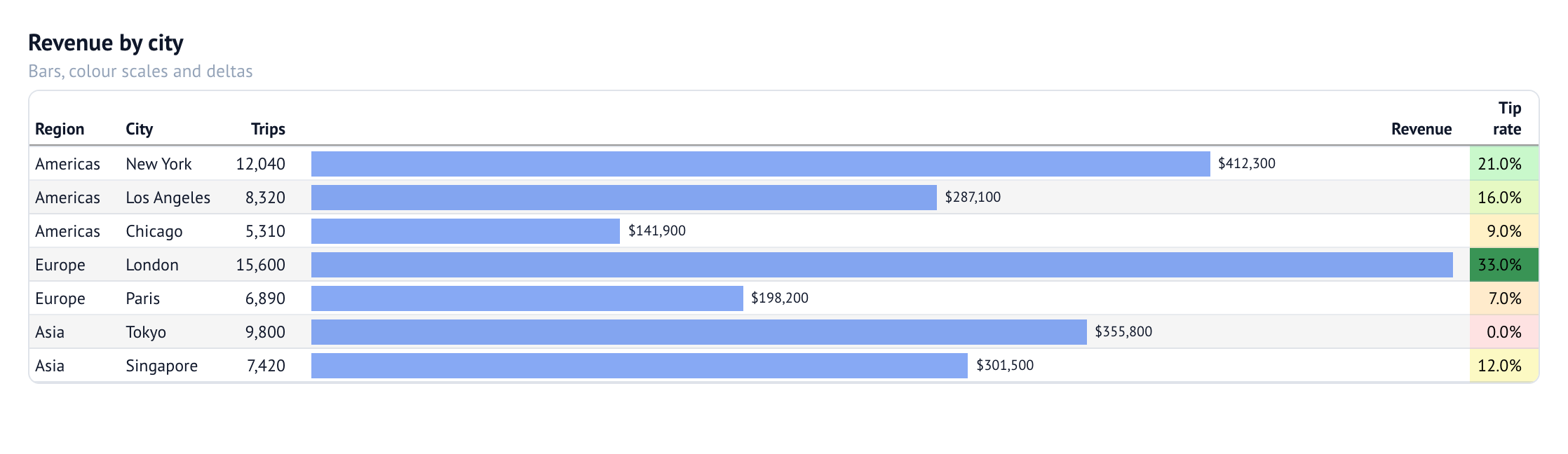
A marimo Studio view
projects named cells from a notebook, so one table can back a dashboard, report
or slide deck. This is the table from the Studio demo; its view projects the
same revenue_table cell alongside KPIs and a region filter.
<marimo-cell name="revenue_table"></marimo-cell>
<strong mo-value="kpis.revenue"></strong>
make studio-serve
make studio-validate
The interactive table uses Studio's Server runtime. See the Studio guide for the full dashboard view. The table's column configuration is:
columns=[
    col.text("region"),
    col.text("city"),
    col.integer("trips"),
    col.bar("revenue", format='usd0', label=True),
    col.percent("tip_rate", decimals=1, title="Tip rate").color(
        scale=["#fee2e2", "#fef9c3", "#bbf7d0", "#15803d"], min=0, max=0.35
    ),
]
Notebook source: revenue_table
11. Amazon S3 Tables
from evidential import duck

con = duck.connect_s3_tables(table_bucket_arn="arn:aws:s3tables:...:bucket/...")
con.sql("SELECT * FROM s3tables.taxi.yellow_trips LIMIT 100")
This attaches an Iceberg REST catalog using ambient AWS credentials. See
notebooks/02_s3_tables.py.
Compatibility
The fluent API is the preferred surface, but the older spellings still work:
column_config={"revenue": {"fmt": "usd0"}}is merged onto inferred columns.- Raw
viz="bar"dictionaries are accepted. column_groups={...}remains the mapping form ofcol.group(...).fmt=andformat=are equivalent; the same applies to the other alias pairs listed in the API reference.
The scalar col.number(...).bar() shortcut was removed. Use the mark factory:
col.bar("sales", format="usd0", label=True)
Reference
- API reference — the full factory, chain, mark, settings and module reference, with screenshots.
- Design & DX — why the table works the way it does.
- Technical architecture — wire format, render pipeline and diagrams.
- marimo Studio views — projections and troubleshooting.
- ADRs — the decisions behind the API.
notebooks/— runnable examples of every feature.
The public surface is re-exported from evidential:
| Import | Purpose |
|---|---|
EvidentialTable, LiveEvidentialTable |
tables and live queries |
col, label, domain, rows |
column, annotation, scale and row-layout builders |
settings, TableOptions, ColumnOptions |
typed table and column configuration |
grouped_table, grouped_records, pivot_table, comparison_table, query_table |
aggregate and query helpers |
cells_body, tab_style, tab_format, text_transform, sub_*, cols_merge_* |
display rules and merged values |
duck, query_values, date_range_sql |
DuckDB and query utilities |
Development
make install            # Python and JavaScript dependencies
make install-hooks      # pre-commit hooks
make lint               # ruff · bandit · pip-audit · pyrefly · shellcheck · checkmake · rumdl
make format             # auto-fix formatting and lint issues
make test               # Python tests (with coverage) and JavaScript tests
make test-browser       # Playwright functional tests
make check-notebooks    # marimo check on every notebook
make check-artifact     # build a wheel/sdist and verify their contents
make validate           # lint + notebook checks + tests + bundle check + build
make readme             # generate README examples and capture notebook tables
make readme-check       # detect stale text/images without launching a browser
make frontend-build     # rebuild static/table.js and static/table.css
The gates are mirrored in .pre-commit-config.yaml
(on commit) and scripts/lint.sh (local validation).
tests/release/ checks the repository workflow itself, including that the wheel
contains the committed renderer assets.
Descriptions, column snippets and images in the illustrated table examples come from the same named notebook cells. Edit those notebooks rather than the generated README regions. See the authoring guide.
For a release, run make release to choose patch, minor or major, or use
make release-minor (and the corresponding patch/major targets).
make release VERSION=0.2.0rc1 selects an exact version. The release checks
README/image freshness before changing the version, opens CHANGELOG.md in
$EDITOR, validates locally, publishes through the keyring, and creates the
GitHub release. See the release process.
Relationship to Evidence
This is a focused reimplementation for the Python/Marimo ecosystem. Formatting
presets, colour-scale maths and table presentation are ported from Evidence's
formatValue, table-viz, table-styles and color-scale-utils modules.
Evidence is MIT licensed; the same license applies here.
License
MIT.
1 maintainer

Metadata
1 maintainer
Release files for evidential 0.1.2
For a detailed explanation of source distributions (sdists) and built distributions (wheels), please see the package formats documentation.
Source distribution (sdist)
| File | Size | Uploaded | Provenance | Actions |
|---|---|---|---|---|
| evidential-0.1.2.tar.gz | 173.7 kB | Without provenance | Details for evidential-0.1.2.tar.gz |
Built distribution (wheel)
| File | Interpreter | ABI | Platform | Actions Reset |
|---|---|---|---|---|
| evidential-0.1.2-py3-none-any.whl | Python 3 | none | any | Details for evidential-0.1.2-py3-none-any.whl |
Total release size: 344.6 kB
Release files / evidential-0.1.2.tar.gz
| Download URL | evidential-0.1.2.tar.gz |
|---|---|
| Size | 173.7 kB |
| Tags | Source |
|
SHA-256 checksum How to use checksums |
9e7e48d83b88e9213fcad7079c61bc3d075f93f3fd169a611ac4c247498ea087
|
|
BLAKE2b-256 checksum How to use checksums |
c8be6aefd68aac11bbbb4fa950c5e6861e0c4dbb73121aed34e0869f30a5ce70
|
| Upload date | |
|
Uploaded using Trusted Publishing? What is trusted publishing? |
No |
| Uploaded via |
uv/0.13.4 {"installer":{"name":"uv","version":"0.13.4","subcommand":["publish"]},"python":null,"implementation":{"name":null,"version":null},"distro":{"name":"macOS","version":null,"id":null,"libc":null},"system":{"name":null,"release":null},"cpu":null,"openssl_version":null,"setuptools_version":null,"rustc_version":null,"ci":null}
|
Release files / evidential-0.1.2-py3-none-any.whl
| Download URL | evidential-0.1.2-py3-none-any.whl |
|---|---|
| Size | 170.9 kB |
| Tags | Python 3 |
|
SHA-256 checksum How to use checksums |
6f753f493baf35f20cd3d14401f3bcec17d403fcbeac08be6b77d25a7b7ad32c
|
|
BLAKE2b-256 checksum How to use checksums |
c0d7105666e25975ff7c4894ff9b649d6f7264b7d2c37a436c93a000bd07c750
|
| Upload date | |
|
Uploaded using Trusted Publishing? What is trusted publishing? |
No |
| Uploaded via |
uv/0.13.4 {"installer":{"name":"uv","version":"0.13.4","subcommand":["publish"]},"python":null,"implementation":{"name":null,"version":null},"distro":{"name":"macOS","version":null,"id":null,"libc":null},"system":{"name":null,"release":null},"cpu":null,"openssl_version":null,"setuptools_version":null,"rustc_version":null,"ci":null}
|
Security for evidential 0.1.2
Provenance
Provenance describes where a file came from. On PyPI, provenance is shared via attestations, which provide a verifiable record of the build or publishing details. View details, limitations and caveats.
No provenance found
None of the files in this release were uploaded with provenance metadata.
A note on package security
PyPI is a repository for distributing packages, not a service for auditing them. While third-party security researchers and our staff do their best to detect and remove malicious packages, PyPI cannot guarantee the quality, security or suitability of any given package.
To learn more about protecting yourself from malicious actors, visit our package security documentation.














