
excelize-py






Package excelize-py is a Python port of Go Excelize library, providing a set of functions that allow you to write and read from XLAM / XLSM / XLSX / XLTM / XLTX files. Supports reading and writing spreadsheet documents generated by Microsoft Excel™ 2007 and later. Supports complex components by high compatibility, and provided streaming API for generating or reading data from a worksheet with huge amounts of data. This library needs Python version 3.9 or later. The full API docs can be found at docs reference.
Platform Compatibility
| Operating system | CPU Architecture |
|---|---|
| Windows | amd64, arm64, i686 |
| Darwin | amd64, arm64 |
| Linux | amd64, arm64, i686 |
Basic Usage
Installation
pip install excelize
Create spreadsheet
Here is a minimal example usage that will create spreadsheet file.
import excelize

f = excelize.new_file()
try:
    # Create a new sheet.
    index = f.new_sheet("Sheet2")
    # Set value of a cell.
    f.set_cell_value("Sheet2", "A2", "Hello world.")
    f.set_cell_value("Sheet1", "B2", 100)
    # Set active sheet of the workbook.
    f.set_active_sheet(index)
    # Save spreadsheet by the given path.
    f.save_as("Book1.xlsx")
except (RuntimeError, TypeError) as err:
    print(err)
finally:
    err = f.close()
    if err:
        print(err)
Reading spreadsheet
The following constitutes the bare to read a spreadsheet document.
import excelize

try:
    f = excelize.open_file("Book1.xlsx")
except (RuntimeError, TypeError) as err:
    print(err)
    exit()
try:
    # Get value from cell by given worksheet name and cell reference.
    cell = f.get_cell_value("Sheet1", "B2")
    print(cell)
    # Get all the rows in the Sheet1.
    rows = f.get_rows("Sheet1")
    for row in rows:
        for cell in row:
            print(f"{cell}\t", end="")
        print()
except (RuntimeError, TypeError) as err:
    print(err)
finally:
    # Close the spreadsheet.
    err = f.close()
    if err:
        print(err)
Add chart to spreadsheet file
With Excelize chart generation and management is as easy as a few lines of code. You can build charts based on data in your worksheet or generate charts without any data in your worksheet at all.
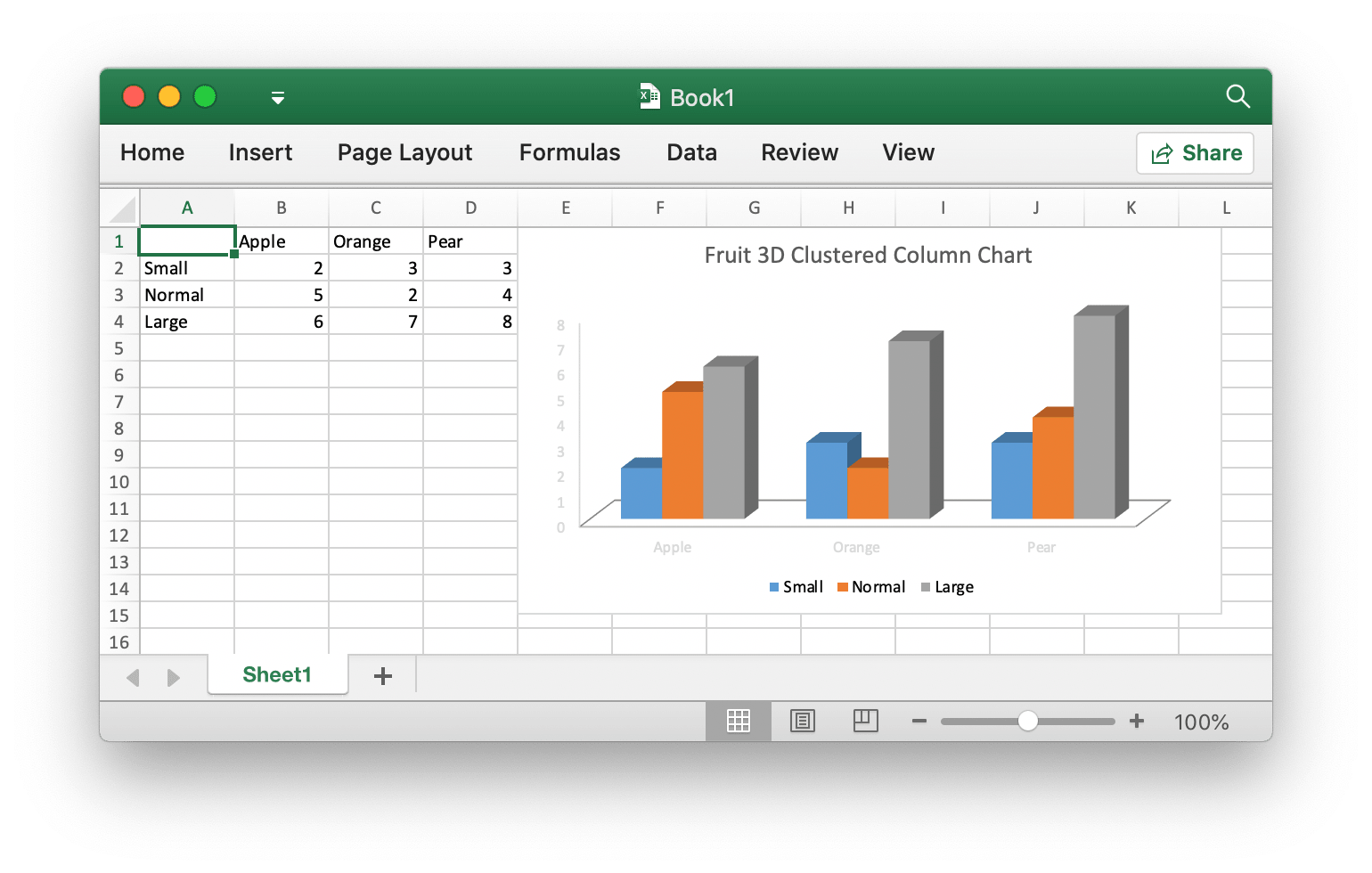
import excelize

f = excelize.new_file()
data = [
    [None, "Apple", "Orange", "Pear"],
    ["Small", 2, 3, 3],
    ["Normal", 5, 2, 4],
    ["Large", 6, 7, 8],
]
try:
    for idx, row in enumerate(data):
        cell = excelize.coordinates_to_cell_name(1, idx + 1, False)
        f.set_sheet_row("Sheet1", cell, row)
    chart = excelize.Chart(
        type=excelize.ChartType.Col3DClustered,
        series=[
            excelize.ChartSeries(
                name="Sheet1!$A$2",
                categories="Sheet1!$B$1:$D$1",
                values="Sheet1!$B$2:$D$2",
            ),
            excelize.ChartSeries(
                name="Sheet1!$A$3",
                categories="Sheet1!$B$1:$D$1",
                values="Sheet1!$B$3:$D$3",
            ),
            excelize.ChartSeries(
                name="Sheet1!$A$4",
                categories="Sheet1!$B$1:$D$1",
                values="Sheet1!$B$4:$D$4",
            ),
        ],
        title=excelize.ChartTitle(
            paragraph=[
                excelize.RichTextRun(
                    text="Fruit 3D Clustered Column Chart",
                )
            ],
        ),
    )
    f.add_chart("Sheet1", "E1", chart)
    # Save spreadsheet by the given path.
    f.save_as("Book1.xlsx")
except (RuntimeError, TypeError) as err:
    print(err)
finally:
    err = f.close()
    if err:
        print(err)
Add picture to spreadsheet file
import excelize

try:
    f = excelize.open_file("Book1.xlsx")
except (RuntimeError, TypeError) as err:
    print(err)
    exit()
try:
    # Insert a picture.
    f.add_picture("Sheet1", "A2", "image.png", None)
    # Insert a picture to worksheet with scaling.
    f.add_picture("Sheet1", "D2", "image.jpg", excelize.GraphicOptions(
        scale_x=0.5,
        scale_y=0.5,
    ))
    # Insert a picture offset in the cell with printing support.
    f.add_picture("Sheet1", "H2", "image.gif", excelize.GraphicOptions(
        print_object=True,
        lock_aspect_ratio=False,
        offset_x=15,
        offset_y=10,
        locked=False,
    ))
    # Save the spreadsheet with the origin path.
    f.save()
except (RuntimeError, TypeError) as err:
    print(err)
finally:
    # Close the spreadsheet.
    err = f.close()
    if err:
        print(err)
Contributing
Contributions are welcome! Open a pull request to fix a bug, or open an issue to discuss a new feature or change.
Licenses
This program is under the terms of the BSD 3-Clause License. See https://opensource.org/licenses/BSD-3-Clause.
The Excel logo is a trademark of Microsoft Corporation. This artwork is an adaptation.
The Go gopher was created by Renee French. Licensed under the Creative Commons 4.0 Attributions license.
1 maintainer

Metadata
1 maintainer
Release files for excelize 0.1.0
For a detailed explanation of source distributions (sdists) and built distributions (wheels), please see the package formats documentation.
Built distribution (wheel)
| File | Interpreter | ABI | Platform | Reset |
|---|---|---|---|---|
| excelize-0.1.0-py3-none-any.whl | Python 3 | none | any | Details |
Release files / excelize-0.1.0-py3-none-any.whl
| Download URL | excelize-0.1.0-py3-none-any.whl |
|---|---|
| Size | 30.7 MB |
| Tags | Python 3 |
|
SHA-256 checksum How to use checksums |
3aa2d1950ab095c5bbf5002d7f64069daecb8350ca696baa9bbdf9e7c191fc50
|
|
BLAKE2b-256 checksum How to use checksums |
f6d443db26728fdc1b45a278f3f442c75a4664215133890f38bce16cab77c086
|
| Upload date | |
|
Uploaded using Trusted Publishing? What is trusted publishing? |
Yes |
| Uploaded via |
twine/6.1.0 CPython/3.13.12
|
Provenance
Provenance describes where a file came from. On PyPI, provenance is shared via attestations, which provide a verifiable record of the build or publishing details. View details, limitations and caveats.


PyPI Publish Attestation
PyPI verified that this artifact, at this checksum, originated from the publisher listed below.
Signed by GitHub Actions, verified by PyPI on Jul 12, 2026.
Transparency log













