
A Python build of the Go Excelize library for reading and writing Microsoft Excel™ (XLAM / XLSM / XLSX / XLTM / XLTX) spreadsheets
Verified details
These details have been verified by PyPIProject links
GitHub Statistics
Maintainers

Project description
excelize-py






Package excelize-py is a Python port of Go Excelize library, providing a set of functions that allow you to write and read from XLAM / XLSM / XLSX / XLTM / XLTX files. Supports reading and writing spreadsheet documents generated by Microsoft Excel™ 2007 and later. Supports complex components by high compatibility, and provided streaming API for generating or reading data from a worksheet with huge amounts of data. This library needs Python version 3.9 or later. The full API docs can be found at docs reference.
Platform Compatibility
| Operating system | CPU Architecture |
|---|---|
| Windows | amd64, arm64, i686 |
| Darwin | amd64, arm64 |
| Linux | amd64, arm64, i686 |
Basic Usage
Installation
pip install excelize
Create spreadsheet
Here is a minimal example usage that will create spreadsheet file.
import excelize

f = excelize.new_file()
try:
    # Create a new sheet.
    index = f.new_sheet("Sheet2")
    # Set value of a cell.
    f.set_cell_value("Sheet2", "A2", "Hello world.")
    f.set_cell_value("Sheet1", "B2", 100)
    # Set active sheet of the workbook.
    f.set_active_sheet(index)
    # Save spreadsheet by the given path.
    f.save_as("Book1.xlsx")
except (RuntimeError, TypeError) as err:
    print(err)
finally:
    err = f.close()
    if err:
        print(err)
Reading spreadsheet
The following constitutes the bare to read a spreadsheet document.
import excelize

try:
    f = excelize.open_file("Book1.xlsx")
except (RuntimeError, TypeError) as err:
    print(err)
    exit()
try:
    # Get value from cell by given worksheet name and cell reference.
    cell = f.get_cell_value("Sheet1", "B2")
    print(cell)
    # Get all the rows in the Sheet1.
    rows = f.get_rows("Sheet1")
    for row in rows:
        for cell in row:
            print(f"{cell}\t", end="")
        print()
except (RuntimeError, TypeError) as err:
    print(err)
finally:
    # Close the spreadsheet.
    err = f.close()
    if err:
        print(err)
Add chart to spreadsheet file
With Excelize chart generation and management is as easy as a few lines of code. You can build charts based on data in your worksheet or generate charts without any data in your worksheet at all.
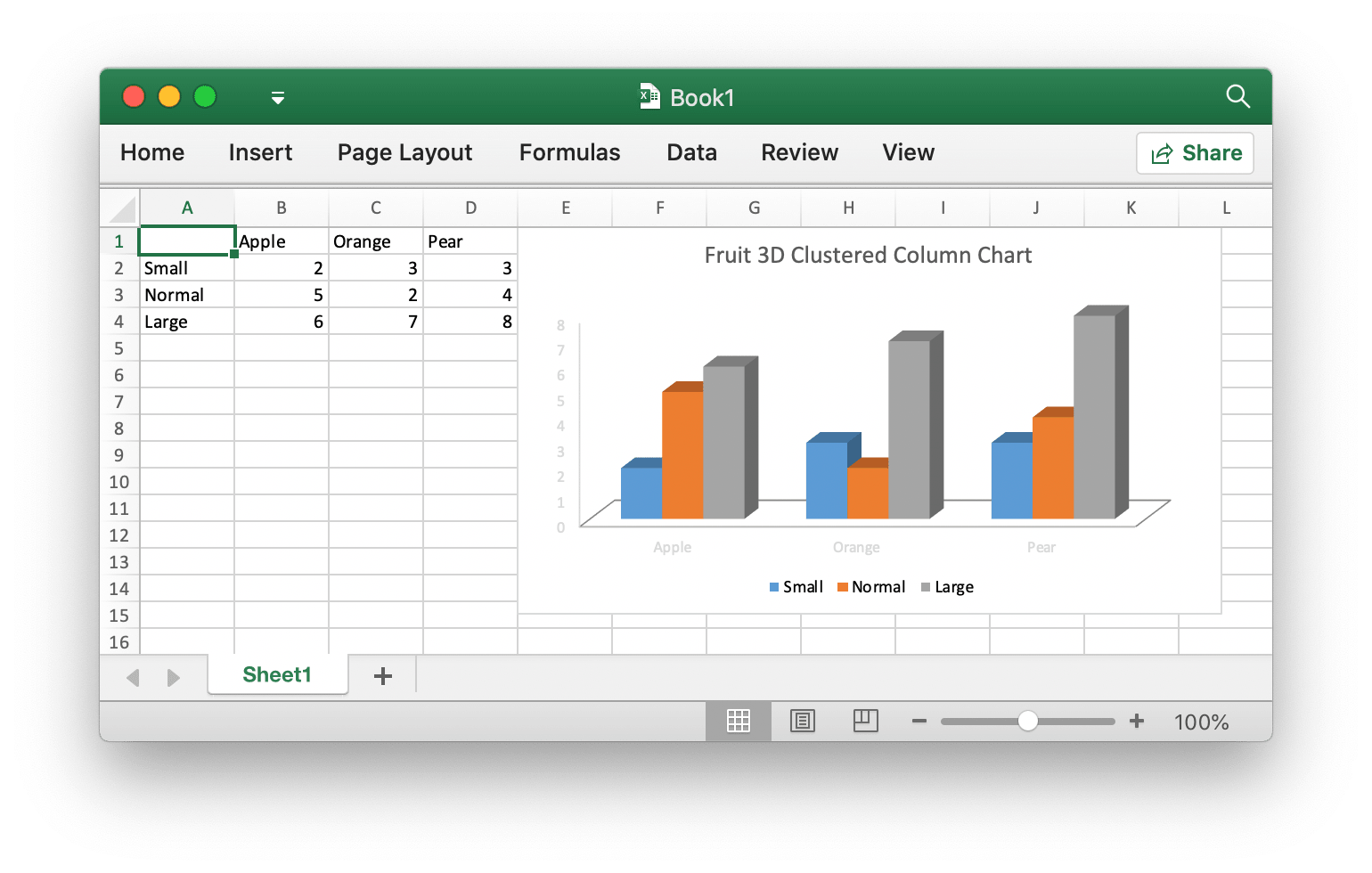
import excelize

f = excelize.new_file()
data = [
    [None, "Apple", "Orange", "Pear"],
    ["Small", 2, 3, 3],
    ["Normal", 5, 2, 4],
    ["Large", 6, 7, 8],
]
try:
    for idx, row in enumerate(data):
        cell = excelize.coordinates_to_cell_name(1, idx + 1, False)
        f.set_sheet_row("Sheet1", cell, row)
    chart = excelize.Chart(
        type=excelize.ChartType.Col3DClustered,
        series=[
            excelize.ChartSeries(
                name="Sheet1!$A$2",
                categories="Sheet1!$B$1:$D$1",
                values="Sheet1!$B$2:$D$2",
            ),
            excelize.ChartSeries(
                name="Sheet1!$A$3",
                categories="Sheet1!$B$1:$D$1",
                values="Sheet1!$B$3:$D$3",
            ),
            excelize.ChartSeries(
                name="Sheet1!$A$4",
                categories="Sheet1!$B$1:$D$1",
                values="Sheet1!$B$4:$D$4",
            ),
        ],
        title=[excelize.RichTextRun(text="Fruit 3D Clustered Column Chart")],
    )
    f.add_chart("Sheet1", "E1", chart)
    # Save spreadsheet by the given path.
    f.save_as("Book1.xlsx")
except (RuntimeError, TypeError) as err:
    print(err)
finally:
    err = f.close()
    if err:
        print(err)
Add picture to spreadsheet file
import excelize

try:
    f = excelize.open_file("Book1.xlsx")
except (RuntimeError, TypeError) as err:
    print(err)
    exit()
try:
    # Insert a picture.
    f.add_picture("Sheet1", "A2", "image.png", None)
    # Insert a picture to worksheet with scaling.
    f.add_picture("Sheet1", "D2", "image.jpg", excelize.GraphicOptions(
        scale_x=0.5,
        scale_y=0.5,
    ))
    # Insert a picture offset in the cell with printing support.
    f.add_picture("Sheet1", "H2", "image.gif", excelize.GraphicOptions(
        print_object=True,
        lock_aspect_ratio=False,
        offset_x=15,
        offset_y=10,
        locked=False,
    ))
    # Save the spreadsheet with the origin path.
    f.save()
except (RuntimeError, TypeError) as err:
    print(err)
finally:
    # Close the spreadsheet.
    err = f.close()
    if err:
        print(err)
Contributing
Contributions are welcome! Open a pull request to fix a bug, or open an issue to discuss a new feature or change.
Licenses
This program is under the terms of the BSD 3-Clause License. See https://opensource.org/licenses/BSD-3-Clause.
The Excel logo is a trademark of Microsoft Corporation. This artwork is an adaptation.
The Go gopher was created by Renee French. Licensed under the Creative Commons 4.0 Attributions license.
Project details
Verified details
These details have been verified by PyPIProject links
GitHub Statistics
Maintainers


Download files
Download the file for your platform. If you're not sure which to choose, learn more about installing packages.
Source Distribution
Built Distribution
Filter files by name, interpreter, ABI, and platform.
If you're not sure about the file name format, learn more about wheel file names.
Copy a direct link to the current filters
File details
Details for the file excelize-0.0.9.tar.gz.
File metadata
- Download URL: excelize-0.0.9.tar.gz
- Upload date:
- Size: 30.1 MB
- Tags: Source
- Uploaded using Trusted Publishing? Yes
- Uploaded via: twine/6.1.0 CPython/3.13.7
File hashes
| Algorithm | Hash digest | |
|---|---|---|
| SHA256 |
42d3da06306c8f07a977751b5c605744aee49eadcd202c6388fc4baf68bc9746
|
|
| MD5 |
b8611d937d0ef64baa872b0c3c9c66b6
|
|
| BLAKE2b-256 |
0c8cbd0e7fefd382d1f457ed64c54bc191f991c9b869d47706098371106f6912
|
Provenance
The following attestation bundles were made for excelize-0.0.9.tar.gz:
Publisher:
build.yml on xuri/excelize-py
-
Statement:
-
Statement type:
https://in-toto.io/Statement/v1 -
Predicate type:
https://docs.pypi.org/attestations/publish/v1 -
Subject name:
excelize-0.0.9.tar.gz -
Subject digest:
42d3da06306c8f07a977751b5c605744aee49eadcd202c6388fc4baf68bc9746 - Sigstore transparency entry: 1004630376
- Sigstore integration time:
-
Permalink:
xuri/excelize-py@645d2ef184026ec49519b896b612ed458c84f5e7 -
Branch / Tag:
refs/tags/v0.0.9 - Owner: https://github.com/xuri
-
Access:
public
-
Token Issuer:
https://token.actions.githubusercontent.com -
Runner Environment:
github-hosted -
Publication workflow:
build.yml@645d2ef184026ec49519b896b612ed458c84f5e7 -
Trigger Event:
release
-
Statement type:
File details
Details for the file excelize-0.0.9-py3-none-any.whl.
File metadata
- Download URL: excelize-0.0.9-py3-none-any.whl
- Upload date:
- Size: 30.3 MB
- Tags: Python 3
- Uploaded using Trusted Publishing? Yes
- Uploaded via: twine/6.1.0 CPython/3.13.7
File hashes
| Algorithm | Hash digest | |
|---|---|---|
| SHA256 |
a5261bbf81b15b24079172382e655d49a29cb1f2f3752f9c06e5d71b2d97bd34
|
|
| MD5 |
7b0e7188425229dc7cd3925de1908598
|
|
| BLAKE2b-256 |
fde02890fe9d49ae98497343f3e02ac6c7d3f15f3ed188e7e68053bc39b0c3c5
|
Provenance
The following attestation bundles were made for excelize-0.0.9-py3-none-any.whl:
Publisher:
build.yml on xuri/excelize-py
-
Statement:
-
Statement type:
https://in-toto.io/Statement/v1 -
Predicate type:
https://docs.pypi.org/attestations/publish/v1 -
Subject name:
excelize-0.0.9-py3-none-any.whl -
Subject digest:
a5261bbf81b15b24079172382e655d49a29cb1f2f3752f9c06e5d71b2d97bd34 - Sigstore transparency entry: 1004630383
- Sigstore integration time:
-
Permalink:
xuri/excelize-py@645d2ef184026ec49519b896b612ed458c84f5e7 -
Branch / Tag:
refs/tags/v0.0.9 - Owner: https://github.com/xuri
-
Access:
public
-
Token Issuer:
https://token.actions.githubusercontent.com -
Runner Environment:
github-hosted -
Publication workflow:
build.yml@645d2ef184026ec49519b896b612ed458c84f5e7 -
Trigger Event:
release
-
Statement type:






