
exe-dev-atlas
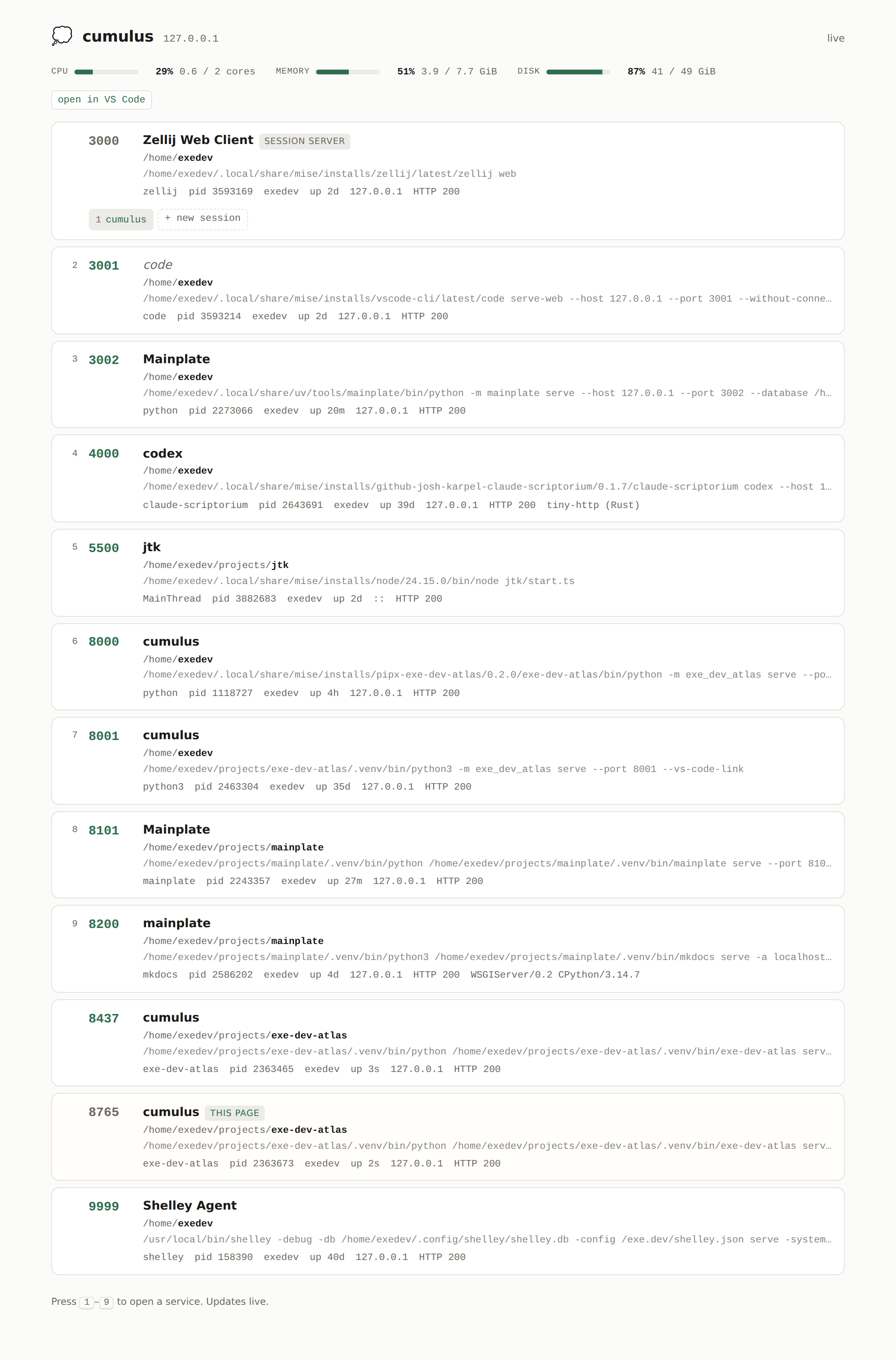
A port explorer for an exe.dev VM: which ports are bound, what process bound them, and links to access them, as a web page served from the VM itself.
exe.dev automatically forwards ports 3000-9999
to https://<vm>.exe.xyz:<port>/, so a server started on one already has a URL.
exe-dev-atlas serves a lightweight page
on the port the bare hostname points at (or whatever other port you choose)
with links to and information about programs that are listening on those ports,
so that https://<vm>.exe.xyz/ becomes a launcher for everything else on the box.
This can be useful when "multiplexing" multiple servers on the same VM. A typical use case might be development work where you want to simultaneously expose terminal sessions, editor sessions, a docs dev server, your service, and your agent all at the same time, and you want to have a convenient web UI to click into them instead of needing to remember and type the ports by hand.
Install
$ uv tool install exe-dev-atlas
$ exe-dev-atlas install
exeuntu, the default exe.dev image, ships with uv, so there is nothing to install before that first line.
install writes a user systemd unit and starts it. serve runs the same server in the
foreground. Both take --port (default 8000, also read from EXE_DEV_ATLAS_PORT).
Security
All the atlas provides is discoverability. It grants nothing, gates nothing, and changes no access control on the VM: exe.dev's proxy decides who reaches the box, every port in the proxied range was reachable by those people before this was installed, and the atlas authenticates nobody, so it serves the same page to everyone who gets that far.
What changes is how much work it takes to find things. A reader who would have had to guess a port number is handed the list, and the list is detailed: every row carries a process's full command line, its working directory, its user, and its pid.
So the VM's sharing settings are the whole boundary, exactly as they were before, and the atlas is a reason to read them carefully:
- Never make a VM running the atlas public.
share set-public <vm>drops the login requirement on the proxied port, so anybody who finds the hostname gets the page and everything on it. - Read a Web share as full access to every web server on the box.
share add <vm> <email>grants access to the VM's HTTPS proxy, with all that implies about what is listening on it: a dev server, a notebook, a Zellij web server that hands out a terminal. - The port itself is defended by nothing. exe.dev's proxy is the only thing authenticating anyone. A caller that reaches the port without making that hop, an SSH tunnel or another user on the box, is served the page like everybody else.
share show <vm> says who has access today.
Beyond Port Exploration
exe-dev-atlas does a few things beyond generic port exploration.
Resource usage
The header shows how much of the VM is in use right now:
CPU across every core, memory, and the root filesystem,
each as a percentage and as how much is in use of how much there is.
Memory counts reclaimable page cache as free, the way free's available column does,
and disk counts what an unprivileged user can fill, the way df does.
There is no history, only the current values, updated live with everything else.
VS Code
exe-dev-atlas shows a link under the header that opens your local VS Code in
remote SSH mode targeting the VM.
This can be convenient, but you might want to
run VS Code Server
on your VM instead (as a systemd service, of course!).
If you don't find this link helpful,
you can disable it by running exe-dev-atlas install --no-vs-code-link.
Both commands take --vs-code-link/--no-vs-code-link,
and install records whichever you asked for in the unit,
so you must pass it each time you call install.
Installing the page as an app
The page is a progressive web app, so a browser that installs those (Chrome, Edge, Safari on macOS and iOS) can give each VM's atlas a window and a launcher entry of its own, named for the VM and drawn with its emoji (or its initial, if it has none). Use the browser's own install control, such as the install icon in Chrome's address bar or Share → Add to Home Screen on iOS.
It does nothing offline. The atlas is a live view of the machine, so with the VM unreachable you get the browser's own error rather than a stale listing. iOS draws home screen icons from PNGs only, so there the icon is whatever iOS falls back to rather than the emoji.
Zellij
exe-dev-atlas has specialized support for Zellij's
web server.
When exe-dev-atlas detects that a process is running zellij web, it runs zellij list-sessions to discover which sessions
are already active and produces direct links to them as well, alongside a link that starts a
new one.
Installation
Requirements
exe-dev-atlas is, unsurprisingly, intended to run on an exe.dev VM,
and assumes the shape of their exeuntu image:
- Linux. Every fact about a socket or a process is read out of
/proc, throughpsutil. - A user
systemdmanager, which is whatexe-dev-atlas installwrites a unit into, enables, and starts. uv, which comes with the image.uv tool installfetches the Python 3.14 this needs along with it, so the system's own interpreter is not involved.- The reflection integration, which is
where the VM's name and emoji come from.
exe-dev-atlaswill not start without it: the page is an index of a named VM, and one that cannot say which box it is describing is worse than no page at all. - The port proxy, which forwards 3000-9999 and points the
bare
https://<vm>.exe.xyz/hostname at one of them. That port is where the atlas belongs. - exe.dev's authentication, which is the only thing deciding who reaches the page. See Security.
The systemd unit
exe-dev-atlas install writes a user systemd unit and starts it, so the atlas comes back
after a crash and after a reboot. It says what it did and points at the journal for what came
of it.
It does not fetch, build, or manage a Python environment: whoever installed the package chose
the version, and install only points systemd at it. To upgrade, upgrade the package and run
install again.
Run install again after changing any of its options, too. The unit records what it was asked
for rather than reading the command's defaults at each start, so --port and
--vs-code-link/--no-vs-code-link take effect at the install that named them.
More than one atlas on a box
When working on exe-dev-atlas itself, it might be convenient to run it twice on the same VM.
--systemd-unit-suffix <suffix> installs the unit under a suffixed name, so a second atlas
sits beside the first instead of overwriting it:
$ exe-dev-atlas install --systemd-unit-suffix dev --port 8001
installed /home/you/.config/systemd/user/exe-dev-atlas-dev.service
restarted exe-dev-atlas-dev to serve port 8001 from /home/you/src/exe-dev-atlas/.venv/bin/python
`journalctl --user -u exe-dev-atlas-dev -e` says whether it stayed up. A port another program already holds and an unanswered reflection lookup are the two usual reasons it would not.
Give each its own --port: nothing stops two units from being told to bind the same one, and
the loser restarts every five seconds. The suffix may hold letters, digits, hyphens, and
underscores.
This is what a checkout wants, and what just install in this repository does: working on the
atlas shouldn't take down the one serving the VM's front door.
Development
We use mise to manage tool installs and just to manage recipes.
$ mise install
$ just setup
$ just test
just --list shows the rest.
1 maintainer

Metadata
1 maintainer
Release files for exe-dev-atlas 0.4.0
For a detailed explanation of source distributions (sdists) and built distributions (wheels), please see the package formats documentation.
Source distribution (sdist)
| File | Size | Uploaded | Provenance | Actions |
|---|---|---|---|---|
| exe_dev_atlas-0.4.0.tar.gz | 45.4 kB | Without provenance | Details for exe_dev_atlas-0.4.0.tar.gz |
Built distribution (wheel)
| File | Interpreter | ABI | Platform | Actions Reset |
|---|---|---|---|---|
| exe_dev_atlas-0.4.0-py3-none-any.whl | Python 3 | none | any | Details for exe_dev_atlas-0.4.0-py3-none-any.whl |
Total release size: 96.1 kB
Release files / exe_dev_atlas-0.4.0.tar.gz
| Download URL | exe_dev_atlas-0.4.0.tar.gz |
|---|---|
| Size | 45.4 kB |
| Tags | Source |
|
SHA-256 checksum How to use checksums |
71f1fcc4df9d34c527d850a079c1acb55f9109d0a1bc289efce2c151268e9d80
|
|
BLAKE2b-256 checksum How to use checksums |
d0c4580b4b91869a1e8fd8c2fd74074786181056dedb28aba1c978e6cef0356f
|
| Upload date | |
|
Uploaded using Trusted Publishing? What is trusted publishing? |
Yes |
| Uploaded via |
uv/0.13.7 {"installer":{"name":"uv","version":"0.13.7","subcommand":["publish"]},"python":null,"implementation":{"name":null,"version":null},"distro":{"name":"Ubuntu","version":"24.04","id":"noble","libc":null},"system":{"name":null,"release":null},"cpu":null,"openssl_version":null,"setuptools_version":null,"rustc_version":null,"ci":true}
|
Release files / exe_dev_atlas-0.4.0-py3-none-any.whl
| Download URL | exe_dev_atlas-0.4.0-py3-none-any.whl |
|---|---|
| Size | 50.8 kB |
| Tags | Python 3 |
|
SHA-256 checksum How to use checksums |
c0cb78f6a3a943436e510b300e8aadf01dc8f785b2024e4a43ed8817846a84d9
|
|
BLAKE2b-256 checksum How to use checksums |
c31d797d7eb6c7e0fd49aa30120f7712259dab626925a8fe63ab848bb56edc1c
|
| Upload date | |
|
Uploaded using Trusted Publishing? What is trusted publishing? |
Yes |
| Uploaded via |
uv/0.13.7 {"installer":{"name":"uv","version":"0.13.7","subcommand":["publish"]},"python":null,"implementation":{"name":null,"version":null},"distro":{"name":"Ubuntu","version":"24.04","id":"noble","libc":null},"system":{"name":null,"release":null},"cpu":null,"openssl_version":null,"setuptools_version":null,"rustc_version":null,"ci":true}
|
Security for exe-dev-atlas 0.4.0
Provenance
Provenance describes where a file came from. On PyPI, provenance is shared via attestations, which provide a verifiable record of the build or publishing details. View details, limitations and caveats.
No provenance found
None of the files in this release were uploaded with provenance metadata.
A note on package security
PyPI is a repository for distributing packages, not a service for auditing them. While third-party security researchers and our staff do their best to detect and remove malicious packages, PyPI cannot guarantee the quality, security or suitability of any given package.
To learn more about protecting yourself from malicious actors, visit our package security documentation.














