



ExifMapper
A simple, user-friendly desktop application that lets you extract GPS coordinates from images and display them on an interactive map. Whether your photos are stored locally or hosted online, this tool makes it easy to visualize their locations.
Features
- Load GPS Data: Extract coordinates from local images (e.g., .jpg, .png) or web URLs with EXIF GPS metadata.
- Interactive Map: View locations on a map with customizable styles (OpenStreetMap, Stamen Terrain, CartoDB Positron).
- Add Custom Locations: Manually input latitude and longitude for places without GPS data.
- Edit & Manage: Rename or remove locations from your list.
- Save & Load: Save your locations to a JSON file and load them later.
- Beginner-Friendly: Clear tooltips, examples, and a help section guide new users.
- Supports linux & windows!
Preview
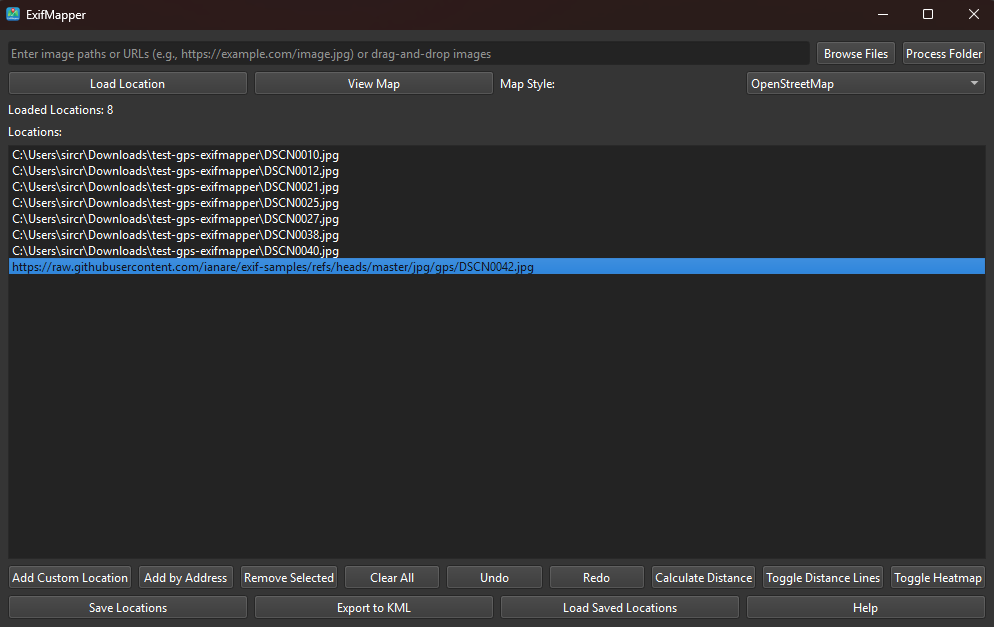
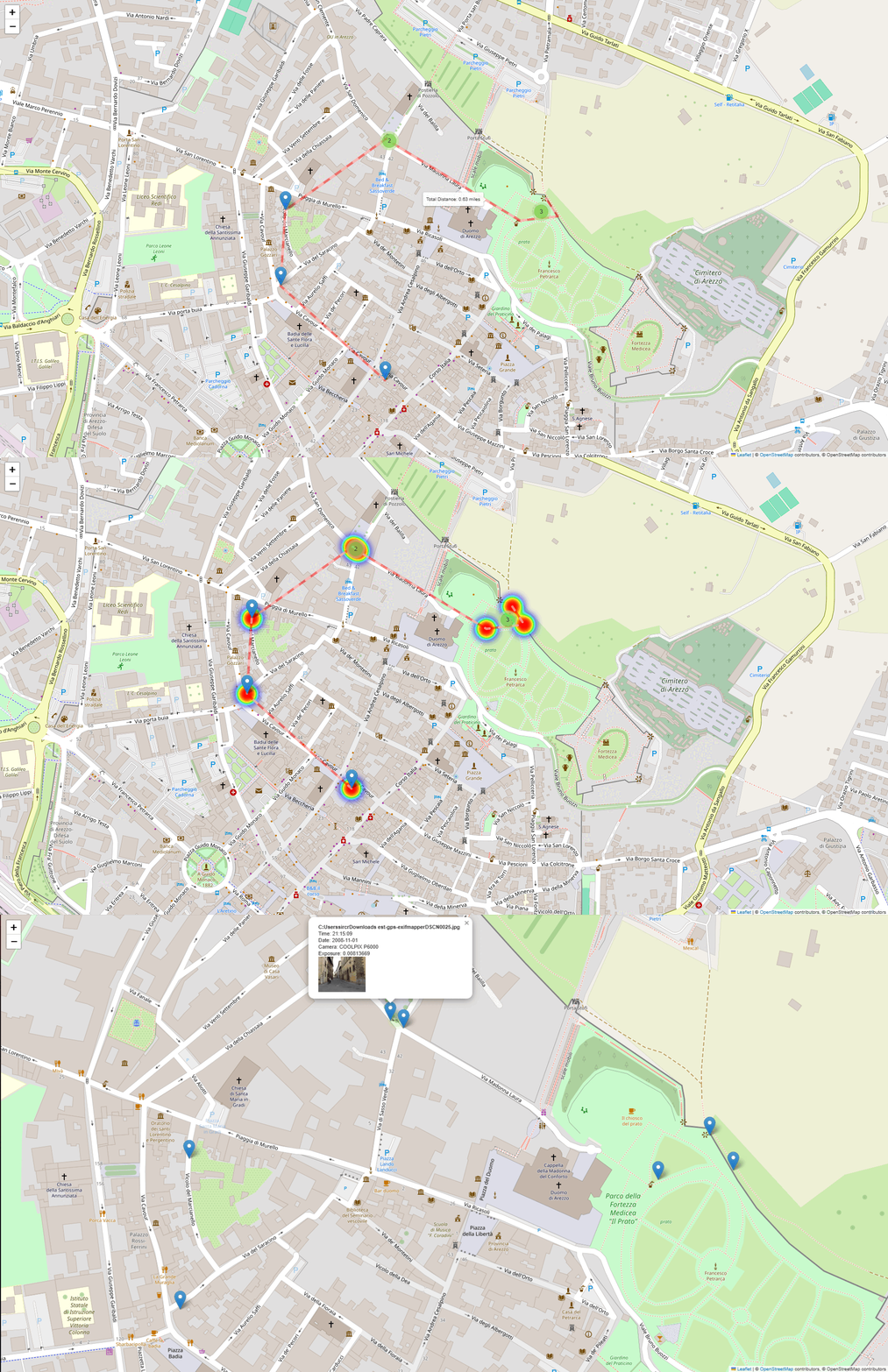
Installation
Prerequisites
- Python 3.11+
pip install exifmapper
Usage
exifmapper
- To launch the gui from any cli.
1 maintainer

Metadata
1 maintainer
Release files for exifmapper 1.0.1
For a detailed explanation of source distributions (sdists) and built distributions (wheels), please see the package formats documentation.
Source distribution (sdist)
| File | Size | Uploaded | Provenance | Actions |
|---|---|---|---|---|
| exifmapper-1.0.1.tar.gz | 475.1 kB | With provenance | Details for exifmapper-1.0.1.tar.gz |
Built distribution (wheel)
| File | Interpreter | ABI | Platform | Actions Reset |
|---|---|---|---|---|
| exifmapper-1.0.1-py3-none-any.whl | Python 3 | none | any | Details for exifmapper-1.0.1-py3-none-any.whl |
Total release size: 949.3 kB
Release files / exifmapper-1.0.1.tar.gz
| Download URL | exifmapper-1.0.1.tar.gz |
|---|---|
| Size | 475.1 kB |
| Tags | Source |
|
SHA-256 checksum How to use checksums |
695b71446a175f3338fa056ba54f7891520592584e43b20aba688eb49578af0d
|
|
BLAKE2b-256 checksum How to use checksums |
cb46cfb92f52d52af7c87740a3ecffde84192ce44266407c1507a0d8a4c1711c
|
| Upload date | |
|
Uploaded using Trusted Publishing? What is trusted publishing? |
Yes |
| Uploaded via |
twine/6.1.0 CPython/3.12.9
|
Provenance
Provenance describes where a file came from. On PyPI, provenance is shared via attestations, which provide a verifiable record of the build or publishing details. View details, limitations and caveats.


PyPI Publish Attestation
PyPI verified that this artifact, at this checksum, originated from the publisher listed below.
Signed by GitHub Actions, verified by PyPI on Apr 21, 2025.
Transparency logRelease files / exifmapper-1.0.1-py3-none-any.whl
| Download URL | exifmapper-1.0.1-py3-none-any.whl |
|---|---|
| Size | 474.2 kB |
| Tags | Python 3 |
|
SHA-256 checksum How to use checksums |
fb942bf9a4b6bfcd13d5db41151d12290dd1ab0bf92f6b0632e5ad139901ceb9
|
|
BLAKE2b-256 checksum How to use checksums |
3af8e830306ea6e1319b637e388239ee62be1fdeacb1a29b5c91346e9d887a9c
|
| Upload date | |
|
Uploaded using Trusted Publishing? What is trusted publishing? |
Yes |
| Uploaded via |
twine/6.1.0 CPython/3.12.9
|
Provenance
Provenance describes where a file came from. On PyPI, provenance is shared via attestations, which provide a verifiable record of the build or publishing details. View details, limitations and caveats.
PyPI Publish Attestation
PyPI verified that this artifact, at this checksum, originated from the publisher listed below.
Signed by GitHub Actions, verified by PyPI on Apr 21, 2025.
Transparency logSecurity for exifmapper 1.0.1
Provenance
Provenance describes where a file came from. On PyPI, provenance is shared via attestations, which provide a verifiable record of the build or publishing details. View details, limitations and caveats.
Full provenance
All 2 files in this release have been uploaded with provenance metadata.
Attestation for exifmapper-1.0.1.tar.gz
PyPI Publish Attestation
PyPI verified that this artifact, at this checksum, originated from the publisher listed below.
Signed by GitHub Actions, verified by PyPI on Apr 21, 2025.
Transparency logA note on package security
PyPI is a repository for distributing packages, not a service for auditing them. While third-party security researchers and our staff do their best to detect and remove malicious packages, PyPI cannot guarantee the quality, security or suitability of any given package.
To learn more about protecting yourself from malicious actors, visit our package security documentation.














