
🎒 Exo-Inventory


A powerful, high-performance Minecraft inventory rendering library for Python.
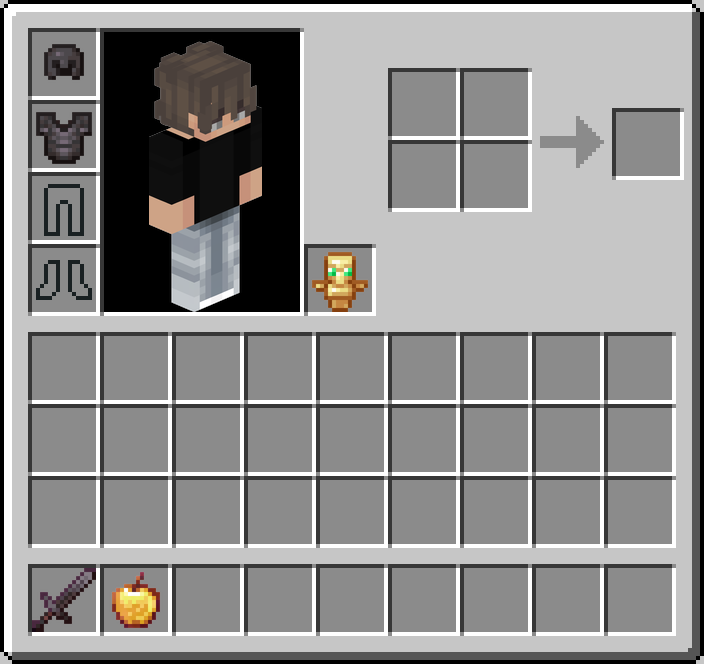
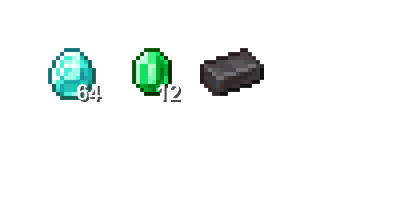
exo-inventory is a professional-grade library designed to fetch, mirror, and render Minecraft item icons and player inventories with 100% customizability. Whether you need a standard player inventory or a completely custom 9x6 chest layout, exo-inventory handles the assets and coordinates for you.
✨ Features
- 🔄 Smart Asset Mirroring: Local mirror of Jemsire's Minecraft icons with automatic version detection (1.13.2 to 1.21.10+).
- 🖼️ Flexible Rendering Engine: Support for arbitrary item placement (
render_custom) or standard Minecraft layouts (render_player). - 🤖 Automated Maintenance: Integrated GitHub Actions workflow to sync assets and rebuild metadata daily.
- 🎨 UI Assets Bundled: Core assets (backgrounds, empty slot icons) come pre-installed in the package.
- 👤 Player Models: Automatic integration with
mc-heads.netfor rendering 3D player skins. - ⚡ High Performance: Path caching, recursive item lookup, and asynchronous asset fetching.
🖼️ Visual Previews
| Standard Inventory | Custom Transparent Grid |
|---|---|
 |
 |
🚀 Installation
Install the library directly from PyPI (Recommended):
pip install exo-inventory
Or from the source:
pip install git+https://github.com/zKauaFerreira/Exo-Lib.git
Note: The library already comes with 1400+ Minecraft icons and UI assets bundled in the package. You can start rendering immediately after installation!
⚡ Quick Start (Plug & Play)
1. Minimalistic Rendering
Since assets are bundled, you can render an inventory in seconds!
import asyncio
from exo_inventory import InventoryRenderer

async def main():
    # Initializing with built-in assets
    renderer = InventoryRenderer()
    await renderer.initialize()

    player_data = {
        "uuid": "caf29aa7-b3f6-494f-b44f-66cdd3fb9a42",
        "armor": [{"id": "diamond_helmet", "slot": 39}],
        "hotbar": [{"id": "netherite_sword", "slot": 0}],
        "main_inventory": [],
        "off_hand": {"id": "shield"}
    }

    render = await renderer.render_player(player_data)
    # The 'render' object is a PIL Image
    render.save("inventory.png")

    await renderer.close()

asyncio.run(main())
📂 Examples Folder
We provided a dedicated examples/ directory in our repository to help you get started with common use cases.
standard_inventory.py: Demonstrates standard player inventory rendering.custom_grid.py: Shows how to create custom grids with transparent backgrounds.manage_assets.py: Advanced usage: how to sync assets to a custom external folder.
🛠️ Advanced Usage
🎨 Customizing Asset Locations
If you want to manage your icons in a specific shared folder across multiple projects:
# Pass a path to use an external cache
renderer = InventoryRenderer(assets_dir="./shared_assets")
🧩 Custom Layouts
# background=None generates a transparent PNG
image = await renderer.render_custom(
    items_map=[{"id": "apple", "x": 10, "y": 10}],
    width=100,
    height=100,
    background=None
)
📦 Asset Utilities & Exporting
Need the icons for something else? Export assets from the internal cache to any directory.
from exo_inventory import AssetsManager
assets = AssetsManager()
await assets.initialize()

await assets.export_assets(
    target_dir="./my_resource_pack",
    items_list=["diamond", "netherite_sword"],
    include_ui=True
)
👤 Advanced Player Rendering
Customizing the player model render (poses/angles).
# Get a 3D body render with a 45-degree rotation
body_img = await renderer.get_player_render(
    uuid="zKauaFerreira",
    render_type="body", # options: 'body', 'head', 'avatar', 'player'
    size=400,
    angle=45
)
🛰️ Remote Asset Synchronization
The library pulls UI themes and metadata from the official repository:
| Asset | Source |
|---|---|
inventory_bg.png |
zKauaFerreira/Exo-Lib/main/src/exo_inventory/data |
jemsire_index.json |
Remote metadata mirror (daily updated) |
empty_armor_slots |
Exo-Lib official UI assets |
🤖 Automation (CI/CD)
The library includes a pre-configured GitHub Action (.github/workflows/update_assets.yml) that:
- Runs every day at midnight.
- Checks Jemsire for new Minecraft versions.
- Downloads new ZIPs and extracts them recursively.
- Generates a new
jemsire_index.json. - Commits changes back to your repository automatically.
📂 Project Structure
exo-inventory/
├── src/
│   └── exo_inventory/
│       ├── __init__.py    # Main exports
│       ├── assets.py      # Jemsire & Remote Sync logic
│       └── renderer.py    # Pillow-based rendering engine
├── pyproject.toml         # Build & Dependency config
└── README.md              # You are here
🛠️ Requirements
- Python 3.10+
- Pillow: For image processing.
- aiohttp: For asynchronous asset downloads.
- discord.py: Compatible for bot integrations.
🖥️ CLI Commands
exo-inventory provides built-in CLI commands for easy maintenance and asset extraction.
# Sync all assets to the library's internal storage
python -m exo_inventory.assets sync

# Export all icons AND UI elements to your current project folder
python -m exo_inventory.assets export ./assets
📜 License & Acknowledgments
- Icons: Provided by Jemsire.
- Player Heads: Powered by mc-heads.net.
- Core Developers: zKauaFerreira.
Maintained with ❤️ for the Minecraft Discord community.
1 maintainer

Metadata
1 maintainer
Release files for exo-inventory 0.1.16
For a detailed explanation of source distributions (sdists) and built distributions (wheels), please see the package formats documentation.
Source distribution (sdist)
| File | Size | Uploaded | |
|---|---|---|---|
| exo_inventory-0.1.16.tar.gz | 8.0 MB | Details |
Built distribution (wheel)
| File | Interpreter | ABI | Platform | Reset |
|---|---|---|---|---|
| exo_inventory-0.1.16-py3-none-any.whl | Python 3 | none | any | Details |
Total release size: 16.6 MB
Release files / exo_inventory-0.1.16.tar.gz
| Download URL | exo_inventory-0.1.16.tar.gz |
|---|---|
| Size | 8.0 MB |
| Tags | Source |
|
SHA-256 checksum How to use checksums |
572ccf45c9a7ec2500551d058b784c82b34c55958d2566f4cb749a26705c6cb9
|
|
BLAKE2b-256 checksum How to use checksums |
ef042594d5cd4c807e02a3351ee8ae3a2f78845742e30600fb052d12e3da8ac4
|
| Upload date | |
|
Uploaded using Trusted Publishing? What is trusted publishing? |
Yes |
| Uploaded via |
twine/6.1.0 CPython/3.13.7
|
Provenance
Provenance describes where a file came from. On PyPI, provenance is shared via attestations, which provide a verifiable record of the build or publishing details. View details, limitations and caveats.


PyPI Publish Attestation
PyPI verified that this artifact, at this checksum, originated from the publisher listed below.
Signed by GitHub Actions, verified by PyPI on Feb 24, 2026.
Transparency logRelease files / exo_inventory-0.1.16-py3-none-any.whl
| Download URL | exo_inventory-0.1.16-py3-none-any.whl |
|---|---|
| Size | 8.7 MB |
| Tags | Python 3 |
|
SHA-256 checksum How to use checksums |
d6ccc65c9fa6e655cdd530f36cc74655eb164d40362e3e42355fb5631e3bd26a
|
|
BLAKE2b-256 checksum How to use checksums |
7cd72e10a20be6f3e734460e74ef35933e38e5b9ada09719bcbb87c57cb18006
|
| Upload date | |
|
Uploaded using Trusted Publishing? What is trusted publishing? |
Yes |
| Uploaded via |
twine/6.1.0 CPython/3.13.7
|
Provenance
Provenance describes where a file came from. On PyPI, provenance is shared via attestations, which provide a verifiable record of the build or publishing details. View details, limitations and caveats.
PyPI Publish Attestation
PyPI verified that this artifact, at this checksum, originated from the publisher listed below.
Signed by GitHub Actions, verified by PyPI on Feb 24, 2026.
Transparency log













